A dispenser minecraft is one of the most important redstone components for players who want to automate tasks, build traps, or simplify repetitive actions in survival mode. While it may look similar to a dropper at first glance, a dispenser behaves very differently and unlocks far more gameplay possibilities.
Many players search for how to craft a dispenser in Minecraft PC because this block is essential for early automation. Whether you want to shoot arrows, place water automatically, or activate items without player input, learning how a dispenser works is a foundational Minecraft skill.
In simple terms, a dispenser minecraft is a block that uses items when powered by redstone. Instead of just dropping items on the ground, it interacts directly with the world, making it one of the most versatile tools in the game.

What Is a Dispenser in Minecraft?
A dispenser minecraft is a redstone-activated block designed to use items stored inside it. When powered, the dispenser will either shoot, place, equip, or activate an item depending on what is inside its inventory.
This behavior makes dispensers ideal for automation, traps, farms, and even multiplayer mini-games. Unlike manual actions, dispensers allow Minecraft systems to function without constant player interaction.
What Does a Minecraft Dispenser Do?
Depending on the item inside, a dispenser can:
- Shoot arrows, snowballs, eggs, or fire charges
- Place water or lava using buckets
- Equip armor onto players or mobs
- Use flint and steel automatically
- Shear sheep or carve pumpkins
This flexibility is what separates a dispenser from most other redstone blocks.
Dispenser vs Dropper: What’s the Difference?
Although they look almost identical, dispensers and droppers serve very different purposes:
- A dispenser uses items
- A dropper only drops items as entities
For example, a dropper will simply eject an arrow onto the ground, while a dispenser will actually shoot the arrow. Understanding this difference prevents one of the most common beginner mistakes in redstone builds.
Dispenser Minecraft Recipe (Materials Required)
Before learning how to make a dispenser in Minecraft, you need to gather the correct materials. The recipe is slightly more expensive than a dropper, mainly because it requires a crafted bow.
Items Needed to Craft a Dispenser
To craft a dispenser minecraft, you need:
- 7 Cobblestone
- 1 Bow
- 1 Redstone Dust
These materials are accessible in early survival, but the bow often slows players down if they lack string.
Why Does the Dispenser Recipe Use a Bow?
The bow is what allows the dispenser to shoot items instead of simply dropping them. This design choice makes dispensers more powerful but also slightly harder to mass-produce compared to droppers.
Because bows require string, many players choose to farm spiders or explore abandoned mineshafts before crafting multiple dispensers.
How to Craft a Dispenser in Minecraft (PC / Java Edition)
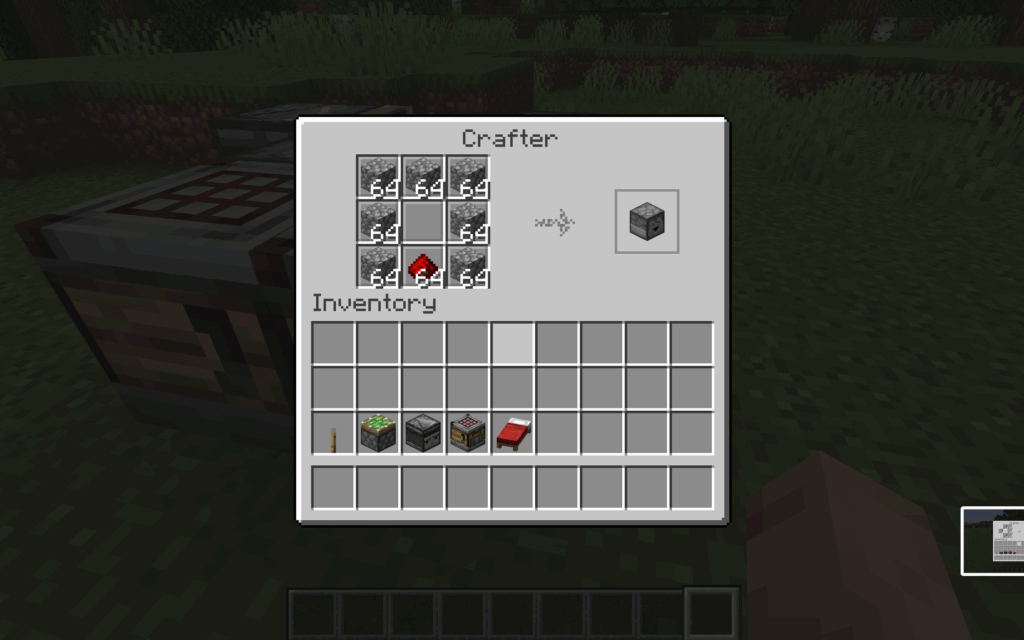
If you are wondering how to craft a dispenser in Minecraft PC, the process is straightforward once you have the materials.
Step-by-Step: How to Make a Dispenser in Minecraft
Follow these steps exactly:
- Open a crafting table
- Place 7 cobblestone around the outer slots
- Place the bow in the center slot
- Place redstone dust in the bottom-center slot
If placed correctly, the dispenser will appear in the result box.
Common Crafting Mistakes to Avoid
Many players fail to craft a dispenser because of small errors:
- Using string instead of a crafted bow
- Placing redstone in the wrong slot
- Confusing the recipe with a dropper
Double-checking the layout saves time and resources.
How to Use a Dispenser in Minecraft
After crafting your dispenser minecraft, the next step is learning how to activate it properly.
How to Activate a Dispenser
A dispenser requires a redstone signal to function. You can activate it using:
- Buttons
- Levers
- Pressure plates
- Redstone dust and repeaters
Once powered, the dispenser will immediately use one item from its inventory.
Items That Work with a Minecraft Dispenser
Not all items behave the same way, but common and useful options include:
- Arrows and fire charges for traps
- Water and lava buckets for farms
- Flint and steel for ignition systems
- Armor for equipping mobs or players
Choosing the right item determines how effective your dispenser setup will be.
Common Beginner Uses for a Minecraft Dispenser
A dispenser minecraft shines when used in simple but effective builds. Beginners often start with small projects before moving into advanced redstone systems.
Combat and Defense Uses
Popular combat-related uses include:
- Arrow traps for base defense
- Automatic fire traps
- TNT activation systems
These setups allow players to protect areas without constant supervision.
Farming and Utility Uses
Dispensers are also widely used in farming:
- Automatic crop harvesting
- Water deployment for crop growth
- Equipping armor stands or mobs
Even basic farms become more efficient with dispenser automation.
Why Dispensers Matter in Survival Mode
Learning how to make a dispenser in Minecraft unlocks a new level of efficiency. Dispensers reduce repetitive actions, improve safety, and enable scalable builds that grow with your world.
A dispenser minecraft is often one of the first steps toward mastering redstone. Once you understand its basic behavior, you can combine it with comparators, observers, and other components to build complex systems.
Advanced Dispenser Minecraft Mechanics You Should Know
Once you understand the basics, the dispenser minecraft becomes one of the most powerful redstone blocks in the game. Its true value appears when you start combining item behavior, block direction, and precise redstone timing.
How Dispensers Interact with Different Items
A dispenser does not treat every item the same way. Instead, it checks the item type and decides how to use it:
- Projectiles (arrows, snowballs, eggs) are fired forward
- Buckets place or collect water and lava
- Tools like flint and steel activate blocks
- Armor is equipped onto nearby entities
This adaptive behavior is what allows one block to serve so many automation roles.
Direction, Facing, and Redstone Timing
The facing direction of a dispenser determines exactly where items are used. Because of this, orientation is critical in farms and traps. Redstone timing also matters: rapid clocks can cause misfires or lag, while repeaters help control activation speed and reliability.
Dispenser Minecraft vs Dropper: Advanced Comparison
Although dispensers and droppers share a similar appearance, their use cases are very different once you move into advanced builds.
Functional Differences in Redstone Builds
A dispenser minecraft is designed for interaction. It activates the world by using items. A dropper, by contrast, is built for transportation, simply moving items between inventories.
When to Use Each Block
Use a dispenser when:
- You need to place or activate items
- You are building traps or farms
- Player interaction must be automated
Use a dropper when:
- Moving items between chests
- Building elevators or item sorters
- Avoiding unnecessary entity creation
Dispenser vs Dropper Comparison Table
| Feature | Dispenser | Dropper |
| Uses items | Yes | No |
| Shoots projectiles | Yes | No |
| Places liquids | Yes | No |
| Item transport | Limited | Excellent |
| Crafting cost | Higher | Lower |
Practical Dispenser Minecraft Builds for Survival
A dispenser minecraft is most effective when applied to real survival problems. Simple builds often outperform complex systems when reliability matters.
Trap and Defense Systems
Common defensive builds include:
- Arrow traps for base protection
- Fire charge launchers
- Lava-based area denial systems
These builds allow players to secure areas without constant supervision.
Farming and Automation Uses
Dispensers are also essential in farming automation:
- Crop harvesting using water buckets
- Automatic sheep shearing
- Pumpkin and melon farm activation
These systems save time and reduce manual labor.
Common Dispenser Minecraft Mistakes (And How to Fix Them)
Even experienced players misuse dispensers due to small oversights.
Redstone Setup Errors
Common redstone problems include:
- Incorrect signal strength
- Uncontrolled rapid clocks
- Forgetting block facing direction
Fixing these issues usually improves reliability immediately.
Item Compatibility Mistakes
Not all items behave intuitively. Expecting a dispenser to move items like a dropper is a frequent mistake. Always test item behavior before finalizing a build.
Using Dispensers in Multiplayer and Servers
In multiplayer environments, dispenser systems must be efficient and optimized.
Dispensers in PvP and Base Defense
Automated defenses powered by dispensers give players a strategic edge, especially when defending offline bases.
Server Performance and Redstone Load
Fast redstone clocks using dispensers can cause server lag. Optimizing tick rates and avoiding unnecessary activations helps maintain performance.

Optimizing Minecraft Gameplay Performance
Large dispenser-based systems can stress multiplayer servers, especially during chunk loading and entity creation.
Why Dispenser Builds Can Cause Lag
Lag is often caused by:
- Rapid redstone clocks
- Constant block updates
- Projectile spam
How ExitLag Improves Minecraft Online Performance
ExitLag stabilizes your connection by optimizing routing paths and reducing packet loss. For players running dispenser-heavy builds on multiplayer servers, this results in smoother gameplay and fewer synchronization issues.
Final Tips for Mastering the Dispenser Minecraft
A dispenser minecraft is most powerful when used intentionally. It excels at interaction-based automation and defensive systems, but it should be replaced by droppers or pistons when item transport or block movement is required.
Knowing when to use a dispenser—and when not to—is the key to mastering redstone efficiently.
All game images used in this blog belong to Mojang Studios. They are used for informational/educational purposes only and do not imply endorsement or affiliation with the rights holders.
Got questions or want to connect with other players? Join the conversation at the ExitLag Forum!