

Doom The Dark Ages System Requirements are one of the biggest concerns for players preparing for launch. With larger battles, cinematic action, and upgraded visuals, many fans want to know if their current gaming PC is ready.
Before release day, checking Doom The Dark Ages System Requirements helps you avoid crashes, low FPS, or long loading times. Whether you use a mid-range build or a high-end setup, knowing the hardware targets matters.
What are Doom The Dark Ages System Requirements and who needs them? Simply put, every PC player should verify CPU, GPU, RAM, and SSD space before installing. This is especially important for gamers searching Doom: The Dark Ages System Requirements or Doom The Dark Ages System Requirements PC online.
The new title from Bethesda and id Software appears ready to push modern hardware harder than previous entries. Therefore, players using older graphics cards may need reduced settings for stable performance.
In addition, fast storage matters more than ever. Massive environments and quick transitions often depend on SSD speed instead of traditional hard drives.

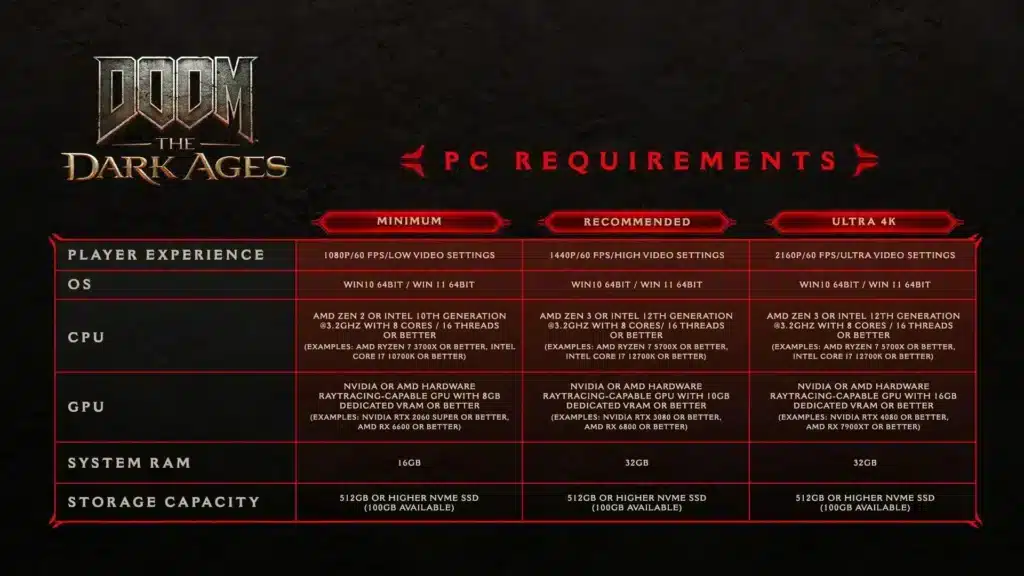
Doom The Dark Ages System Requirements Minimum Specs
Meeting the minimum setup should allow the game to run at lower settings with playable frame rates. However, competitive smoothness and visual quality may require stronger hardware.
Expected CPU Requirements
A modern 8-core processor is likely the entry target. CPUs in this range help handle enemy AI, physics, and combat effects.
Recommended examples include:
- Intel Core i7-10700K
- AMD Ryzen 7 3700X
- Newer equivalents or better
Expected GPU Requirements
Graphics power will be essential because of lighting effects and detailed environments. Entry-level ray tracing capable cards may be preferred.
Likely minimum GPU tier:
- NVIDIA RTX 2060 Super
- AMD RX 6600
- Similar newer cards
RAM And Storage Needs
Memory and storage can directly affect stability.
- 16GB RAM should be the baseline.
- SSD installation is highly recommended.
- Expect 100GB or more of free space.
Players with HDD-only systems may experience slower texture loading and longer startup times.
Doom The Dark Ages System Requirements PC Recommended Specs
If you want higher FPS and better image quality, recommended specs will provide a much smoother experience. This is the best route for players seeking Doom The Dark Ages System Requirements PC for Ultra settings.
Best CPU For High FPS
For faster frame pacing and heavy action scenes, stronger processors help significantly.
Good options include:
- Intel Core i7-12700K
- Intel Core i5-13600K
- AMD Ryzen 7 5800X
- AMD Ryzen 7 7700X
Best GPU For Ultra Settings
For high textures and advanced lighting, stronger graphics cards are ideal.
Suggested GPUs:
- RTX 3080
- RTX 4070
- RX 6800 XT
- RX 7800 XT
Ideal Memory And SSD Setup
For premium gameplay quality, aim for:
- 32GB RAM
- NVMe SSD
- Updated Windows 11 drivers
This combination reduces stutter during intense encounters.
Can Your PC Run Doom: The Dark Ages?
Many players ask if their current hardware is enough. The answer depends on your target resolution.
1080p Performance Estimates
These GPUs should perform well:
- RTX 3060
- RTX 4060
- RX 6700 XT
1440p Performance Estimates
For sharper visuals and stronger FPS:
- RTX 4070
- RTX 4070 Super
- RX 7800 XT
4K Performance Estimates
For maximum image quality:
- RTX 4080
- RTX 5080 class hardware
- RX 7900 XTX
If your system is below these targets, lowering shadows and reflections can help immediately.
Best Settings To Improve Doom: The Dark Ages Performance
Even powerful systems benefit from optimized settings. Smart tweaks often deliver better FPS without ruining visuals.
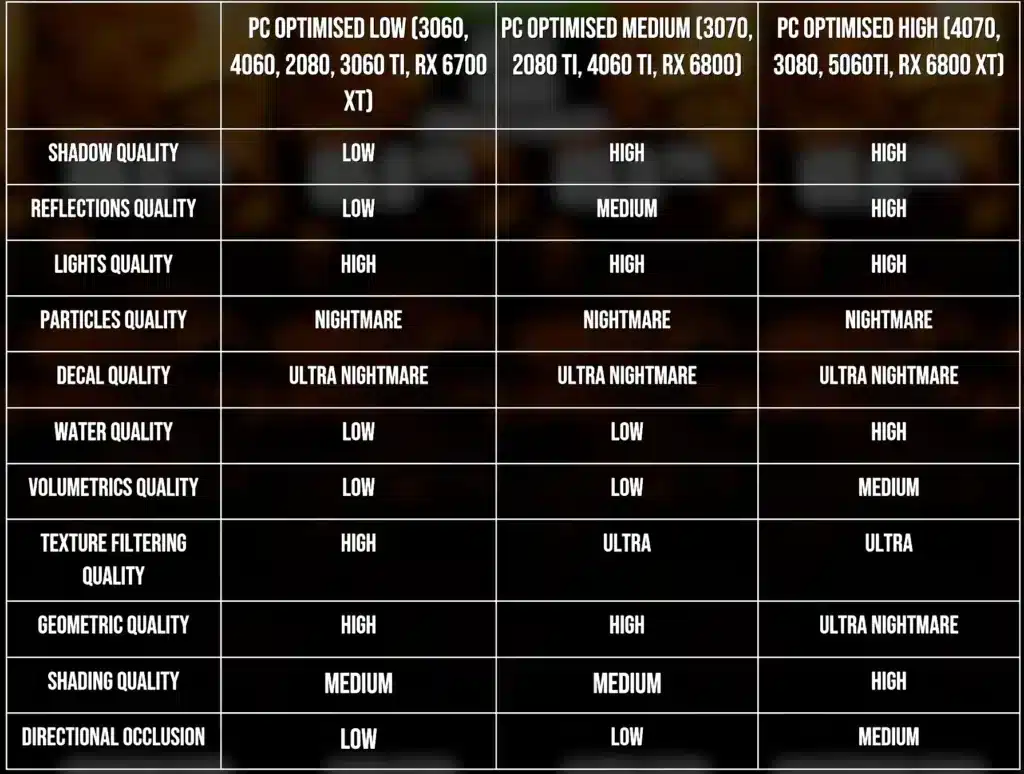
Graphics Settings For More FPS
Use these settings first:
- Texture Quality: High
- Shadows: Medium
- Reflections: Low
- Volumetrics: Medium
- Motion Blur: Off
Upscaling Features
Modern upscaling can dramatically improve performance.
Use when available:
- DLSS for NVIDIA GPUs
- FSR for AMD GPUs
- Frame Generation on supported cards
These tools can raise frame rates while preserving visual quality.
Why ExitLag Helps Doom Players On PC
Although this is mainly a single-player title, launchers, updates, cloud saves, and connected services can still create instability. ExitLag helps optimize routes, reduce packet spikes, and stabilize traffic while gaming.
It also improves responsiveness for other online shooters and competitive titles. If you play multiple games, ExitLag becomes a strong performance tool beyond Doom: The Dark Ages System Requirements concerns.
Should You Upgrade Before Launch?
If your PC has a GTX-era GPU, 8GB RAM, or no SSD, upgrading now may be worth it. Meanwhile, systems with RTX 30 or RX 6000 series cards should remain in a solid position.
In short, Doom The Dark Ages System Requirements suggest a demanding modern release. Check your hardware early, optimize your settings, and prepare for smooth demon-slaying action on launch day.
Doom: The Dark Ages Storage Size And SSD Requirements
Storage space is one of the most overlooked parts of Doom The Dark Ages System Requirements. Many modern AAA games require large installs, shader caches, and frequent updates.
Players should expect the game to need at least 100GB of free space. However, keeping 120GB or more available is the smarter option for future patches and smoother operation.
How Much Space Will Doom: The Dark Ages Need?
Large action games often include:
- High-resolution textures
- Cinematic audio files
- Patch data
- Temporary shader files
Because of this, low free storage can reduce performance and loading speed.
Why SSD Is Essential
Using an SSD instead of an HDD can dramatically improve your experience.
Benefits include:
- Faster boot times
- Reduced loading screens
- Better texture streaming
- Less combat stutter
NVMe SSD models deliver the best results for players chasing premium performance.
Best GPUs For Doom The Dark Ages System Requirements PC
Graphics hardware will likely be the main factor for smooth gameplay. If you are researching Doom The Dark Ages System Requirements PC, your GPU matters more than almost anything else.
Best GPU For 1080p Gaming
Strong choices include:
- RTX 3060
- RTX 4060
- RX 6700 XT
These cards should target High settings with solid frame rates.
Best GPU For 1440p And Ultra
For sharper visuals and stronger image quality:
- RTX 4070 Super
- RTX 4070 Ti
- RX 7800 XT
Best GPU For 4K Performance
For maximum detail:
- RTX 4080 Super
- RTX 4090
- RX 7900 XTX
CPU Benchmarks For Doom: The Dark Ages System Requirements
Although GPUs handle graphics, processors remain critical for enemy AI, physics, and frame pacing.
Mid-Range CPUs That Should Run Well
Reliable choices:
- Ryzen 5 5600X
- Ryzen 7 5700X
- Intel i5-12400F
- Intel i5-13400F
High-End CPUs For Max FPS
For stronger consistency:
- Ryzen 7 7800X3D
- Intel i7-14700K
- Ryzen 9 series chips
Is 6 Cores Enough?
Yes, six cores should run the game. Still, eight or more cores are better for multitasking, streaming, and future updates.
Doom The Dark Ages System Requirements Laptop Guide
Laptop gamers also want to know if portable systems can handle launch day demands.
Gaming Laptops That Can Run It
Good targets include:
- RTX 4060 Laptop GPU
- RTX 4070 Laptop GPU
- Ryzen 7 H-series CPUs
- Intel i7 HX models
Laptop Optimization Tips
Use these tips immediately:
- Plug into wall power
- Use performance mode
- Raise rear airflow
- Lower shadows first
- Keep drivers updated
Thermals are often the biggest limit on laptops.
Doom: The Dark Ages FPS Optimization Checklist
Even powerful PCs can gain free FPS with proper setup.
Settings To Change First
Use this order:
- Motion Blur Off
- Shadows Medium
- Reflections Low
- Volumetrics Medium
- DLSS or FSR On
Windows Optimization Steps
- Update GPU drivers
- Enable Game Mode
- Close browsers and overlays
- Use High Performance power plan
These changes often improve stability during launch week.
Performance Table For Quick Comparison
| Hardware Tier | Resolution | Expected Settings |
| RTX 3060 | 1080p | High |
| RTX 4070 | 1440p | Ultra |
| RTX 4080 | 4K | Ultra |
| RX 7800 XT | 1440p | Ultra |
| RTX 4060 Laptop | 1080p | Medium-High |
Why ExitLag Helps Modern PC Games
Many players think optimization only means graphics settings. However, network instability, launcher congestion, packet spikes, and background routing problems can also impact responsiveness.
ExitLag helps stabilize traffic, improve routing efficiency, and reduce packet loss. This is especially useful during launch periods when many users download updates simultaneously.
It is also ideal for online shooters, battle royale titles, MOBAs, and MMORPGs after you finish checking Doom: The Dark Ages System Requirements.
Final Upgrade Advice Before Launch
If your budget is limited, upgrade in this order:
- SSD
- GPU
- RAM
- CPU
An SSD gives the fastest quality-of-life improvement. After that, GPU upgrades create the largest FPS gains.
Modern mid-range PCs should run well. Older GTX systems with 8GB RAM may struggle at higher settings.
Ultimately, Doom The Dark Ages System Requirements show this is a demanding modern release. Prepare early, optimize smartly, and enjoy smoother demon-slaying combat on day one.
All game images used in this blog belong to Bethesda Softworks / id Software. They are used for informational/educational purposes only and do not imply endorsement or affiliation with the rights holders.
Got questions or want to connect with other players? Join the conversation at the ExitLag Forum!
