Nothing breaks your focus faster than entering a ranked match and suddenly facing Dota 2 high ping spikes that ruin last-hits, delay your spells, and disrupt teamfights, at very other game. At first sight, this problem seems random, but it has very real causes that directly affect your experience. In advance, players around the world search for ways to solve Dota 2 high ping, especially when unstable routing makes gameplay unpredictable.
About Dota 2 high ping, according to competitive players, ping spikes don’t just hurt performance—they cost MMR. That’s why learning how to solve this issue becomes essential. Additionally, Dota 2 is officially supported in the games list you can explore, which means there are proven methods to stabilize your connection from now on.
Throughout this guide, you’ll understand why Dota 2 high ping happens, how to fix it, and how to prevent it permanently.
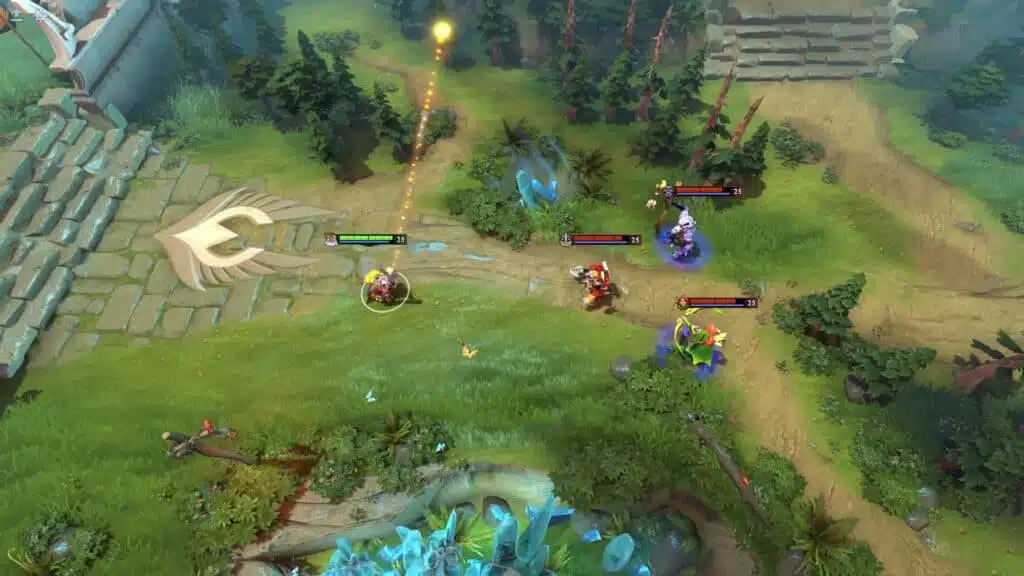
What is high ping in Dota 2?
When discussing Dota 2 high ping, it’s important to understand how latency, data packets, and game servers interact. Firstly, ping is the amount of time, in milliseconds (ms), that your device takes to send data to the server and receive a response. The higher this value, the longer your actions take to register in-game.
Above all, latency is a measurement of communication delay, while high ping represents that this communication is taking too long. In Dota 2, every movement, spell, or command relies entirely on timely delivery of data packets. When these packets take too long to reach the server, your actions appear delayed, inconsistent, or out of sync.
Even more, high ping directly affects the pace of Dota 2 because the game runs on real-time decision-making. A delay of even 80–150ms can make the difference between landing a perfect Echo Slam or missing a crucial Black Hole. That’s why consistent, low latency is essential for competitive matches.
How high ping affects gameplay in Dota 2
When Dota 2 high ping happens, gameplay becomes inconsistent and unpredictable. Below are the most common problems players face:
- Rubberbanding when moving across the map
- Delayed spell casts that ruin combos or timings
- Hit registration issues on attack commands
- Teleport scroll failures due to latency spikes
- Disconnections during teamfights
- Missed last-hits and denies because animations respond too late
- Competitive disadvantage against players with stable connections
Spell timing disruption
At first, these delays may seem minor, but in Dota 2, milliseconds define entire fights. When your ping spikes, abilities like Puck’s Phase Shift or Juggernaut’s Omnislash respond late, making you vulnerable. In summary, high ping turns reactive heroes into liabilities.
Map interaction delay
Secondly, map interactions also break. Warding, dewarding, smoke timing, creep pulling, and rune control all become harder when latency is inconsistent. Therefore, strategic gameplay becomes impossible.
Check also: Dota 2 Ranks: MMR, Medals, Calibration and Fast Climb Tips
Main causes of high ping in Dota 2
Server distance
Often, players are automatically connected to distant servers. The farther your region is from the server, the more routing steps your data packets must travel through, increasing delay. In the same way, geographic distance leads to natural latency increases.
ISP / routing issues
According to network specialists, your ISP chooses routes based on cost, not performance. That’s because traditional routing doesn’t prioritize gaming. As a result, your data may take long, congested paths instead of the shortest route.
Network congestion
Sometimes, your connection slows because multiple devices are consuming bandwidth. Streaming, downloads, and background applications cause unstable Dota 2 latency and sudden spikes.
Outdated hardware
While not the main cause, outdated network adapters, drivers, or modems cause instability. Previously, players ignored this, but outdated equipment can cause long-term delays.
Game-specific issues
Occasionally, Dota 2 connection issues come from the game itself: matchmaking server instability, region overload, or maintenance. These situations temporarily increase ping.
How to check and test your ping in Dota 2
Firstly, Dota 2 allows players to view ping directly in the settings. Enable the option “Display Network Information” to track your ping during matches. This is the simplest way to understand when spikes happen.
Now, for more advanced testing, you can use OS commands. On Windows, type “ping [server] -t” in the command prompt. This continuous test shows if your connection is stable or fluctuating. Similarly, macOS and Linux have terminal-based tests.
As a reference:
- 0–50ms: Excellent
- 50–80ms: Playable
- 80–120ms: Noticeable delay
- 120ms+: Unstable, high delay
In other words, anything above 100ms creates enough input delay to affect competitive performance.
Ping levels classification
| Ping Range | Quality | Gameplay Experience |
| 0–40 ms | Excellent | Smooth, responsive |
| 40–70 ms | Good | Slight delay, barely noticeable |
| 70–120 ms | Playable | Delays in skill checks, timing feels off |
| 120–200 ms | Poor | Rubberbanding and significant delay |
| 200+ ms | Critical | Unplayable interactions |
Basic fixes to reduce high ping in Dota 2
Optimize local connection
- Use an Ethernet cable instead of Wi-Fi
- Close background programs consuming bandwidth
- Update your network drivers
- Disable automatic updates (Steam, Windows, browsers)
- Restart your modem and router
- Limit connected devices
These fixes, while basic, often resolve immediate lag Dota 2 symptoms.

Contact your ISP
Beforehand, list potential problems:
- Routing instability
- Excessive packet loss
- Regional congestion
Then note what you can request:
- A new modem/router
- Route adjustments
- Line inspection
Additionally, here’s a simple checklist you can follow:
- Ask your ISP if your region is experiencing congestion
- Request a stability test on your connection
- Check if your line supports gaming routing upgrades
In contrast, ISPs do not automatically optimize gaming traffic—so contacting them may resolve overlooked issues.
ExitLag: the best solution to fix high ping in Dota 2
What is ExitLag?
ExitLag is a software built specifically for connection optimization in online games. Unlike generic tools, it focuses entirely on eliminating unstable routing and ensuring that your data packets travel through the shortest, most stable paths possible. Also, Dota 2 is officially supported, which guarantees smoother gameplay for players. By exploring the platform’s technology page, you can understand how its multi-layer routing system works.
ExitLag was built by gamers who know exactly how harmful latency spikes are. Therefore, it delivers consistent, real-time performance improvements.
How ExitLag works
ExitLag uses advanced technologies to keep your connection stable:
- Real-time route analysis
- Multiple routes simultaneously
- Automatic best route selection
- Hop optimization
- Connection stabilization
Together with continuous monitoring, these features eliminate Dota 2 latency problems that standard routing cannot solve.
Precision in spell timing
With ExitLag, Dota 2 players experience immediate improvements in spell execution. Because the software stabilizes your connection, abilities like Shadow Fiend’s razes, Lion’s disables, or Storm Spirit’s zip-ins become perfectly timed. In advance, this ensures your input reaches the server instantly, even during heavy fights.
Consistent mobility and map rotations
In the same way, heroes that depend on movement—like Ember Spirit, Earth Spirit, or Timbersaw—benefit from smoother, predictable command response. When Dota 2 latency is reduced, rotations, jukes, and escape paths become more reliable. That way, you avoid rubberbanding or sudden spikes that ruin high-level decision-making.
Lag-free teamfights
At first sight, teamfights seem chaotic, but they rely on precision. With ExitLag, your connection optimization ensures that you see events in real time instead of delayed. Therefore, supports can save allies with a perfect Force Staff or Glimmer Cape, while cores can land AoE spells with confidence.
More stable MMR climbing
Even more, Dota 2 ranked games demand consistency. With ExitLag, your performance becomes significantly more reliable, helping you climb MMR without unexpected delays or disconnects. According to experienced players, stable ping is one of the biggest competitive advantages.
Ideal for international servers
Possibly you often play on different regions—SEA, EU, NA, or SA—because of party stacks or schedule. ExitLag reduces Dota 2 connection issues on distant servers, ensuring that even cross-region matches remain playable.
Protection during peak hours
At the same time, ExitLag prevents lag spikes caused by regional congestion. During peak hours, ISPs often reroute traffic inefficiently, but ExitLag’s routing avoids these unstable paths, keeping your match smooth, even if your network is heavily used at home.
Is ExitLag worth it for Dota 2?
Definitely. For players dealing with unstable ping, unpredictable spikes, or routing problems, ExitLag offers a real, measurable upgrade to stability. In summary, it solves what local fixes and ISPs cannot: routing efficiency. Since Dota 2 relies entirely on reaction time and microprecision, stable ping translates directly into better gameplay.
Together with real-time route analysis, multi-path technology, and constant monitoring, ExitLag delivers consistency that standard connections simply can’t match. By checking the service’s pricing options, you can evaluate the best plan for your needs—but the performance benefits speak for themselves.
How to use ExitLag in Dota 2
The process is extremely simple:
Step 1 – Access the official ExitLag website and download the application. There’s a free trial period for new users.
Step 2 – Install and open the program. Log in with your account.
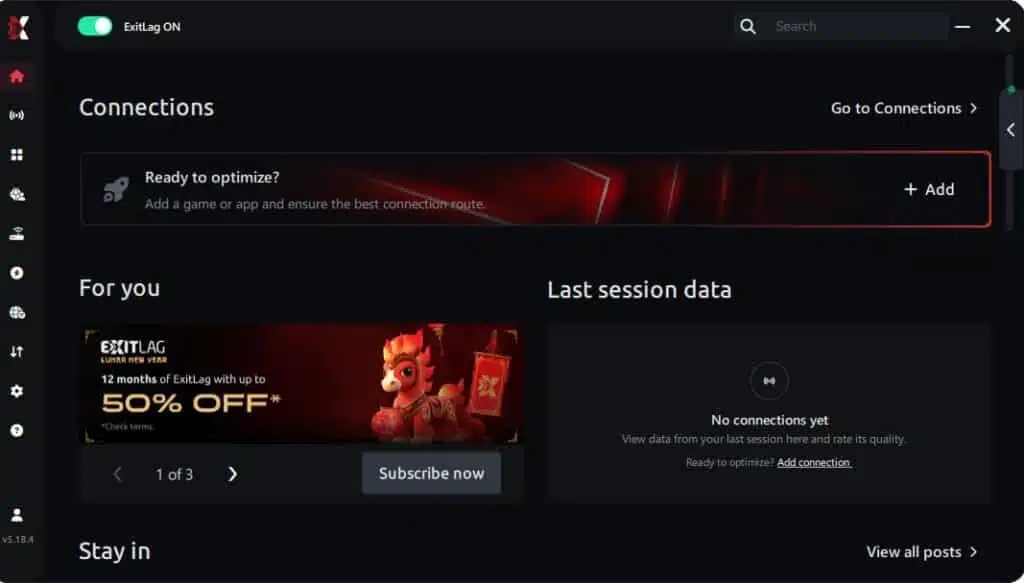
Step 3 – In the search bar, type “Dota 2” and select the game from the list.

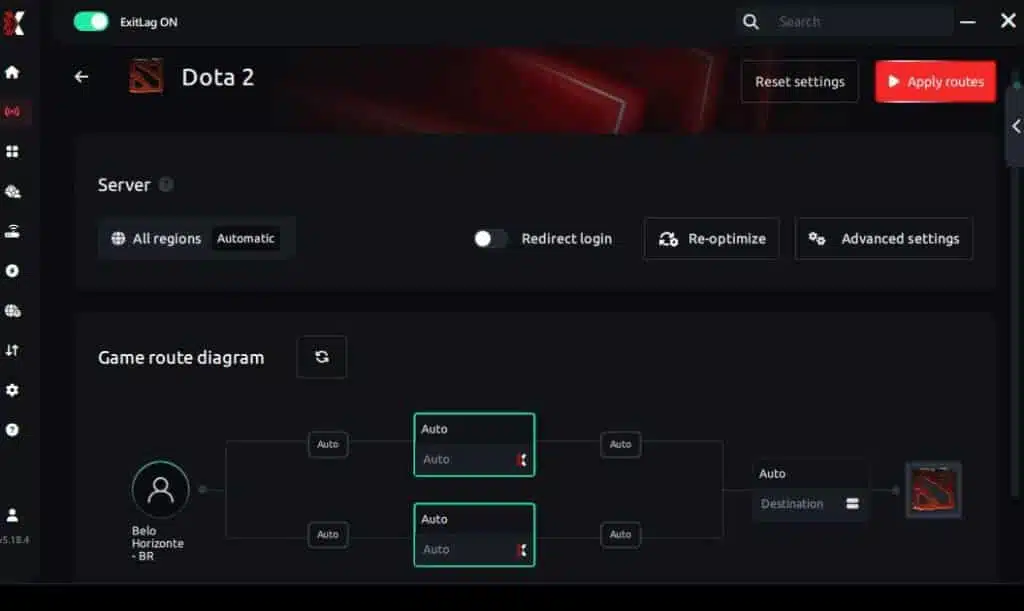
Step 4 – Choose between automated or manual route
Based on the results, you can let ExitLag automatically select the best route or manually choose the server that showed the lowest latency for your connection.
AI-optimized automated route
Based on the results, you can let ExitLag automatically select the best route through AI optimization. The system analyzes multiple connection paths in real time and automatically identifies the most efficient route for your connection, ensuring the lowest possible latency without requiring manual choices.
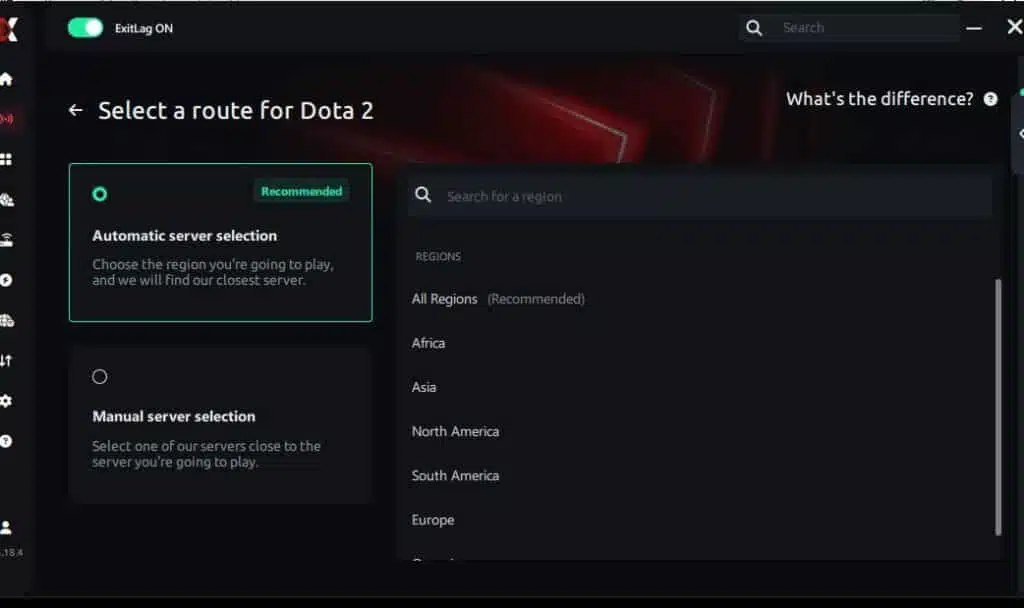
Manual route
If you prefer to have full control over your connection, you can manually choose the server based on the ping test results. Simply select the server that showed the lowest latency or the one that best meets your specific gaming needs, allowing complete customization of your experience.
Step 5 – Click “Dota 2” or the play button. ExitLag will begin optimizing your connection automatically.
Step 6 – Wait a few seconds until optimization is complete. You’ll see ping indicators in the interface.
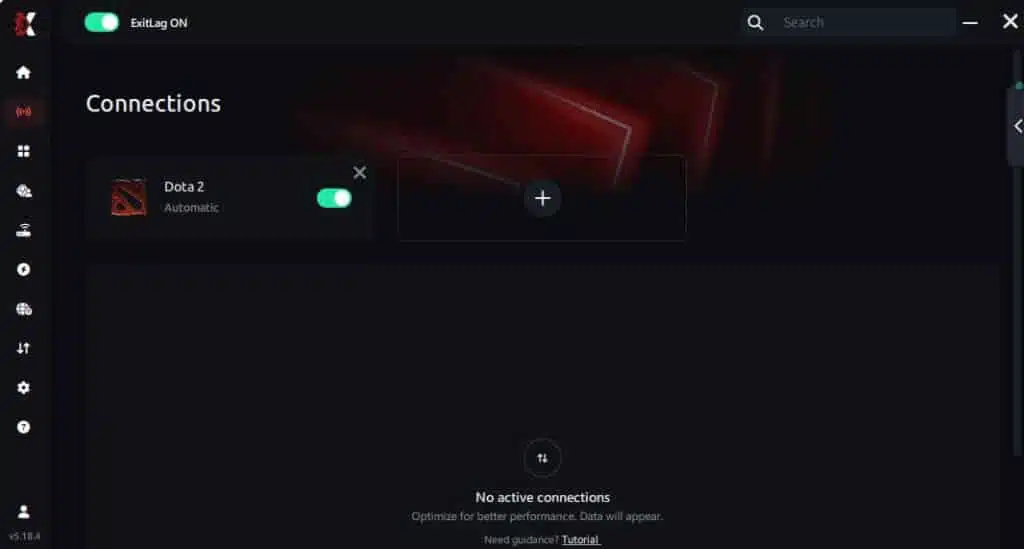
Step 7 – Launch Dota 2 normally. The optimization will already be active.
ExitLag runs in the background while you play, constantly adjusting routes to maintain the best possible performance.
FAQ: everything about high ping in Dota 2
What causes high ping in Dota 2?
High ping usually comes from server distance, routing instability, or congestion. According to network patterns, ISPs may direct your packets through slow routes, increasing latency. Additionally, lag Dota 2 can occur if multiple devices share your connection or if your modem/router is outdated. In other words, there isn’t just one cause—several factors can combine to create delays.
How do I check my ping in Dota 2?
To check your ping, go to Settings → Options → Display Network Information. This will show live ping and packet loss during matches. Afterwards, you can run command-line tests like “ping -t” to observe fluctuations over time. From the same point of view, this helps you determine whether spikes are caused by local issues or external routing problems.
What is good ping for Dota 2?
Anything below 60ms is excellent for competitive gameplay. Between 60–90ms is playable but noticeably slower. Above 100ms, actions begin to feel delayed, especially for fast-paced heroes. Lastly, if your ping exceeds 120ms, you will experience breakpoints in spell timing and map movement.
Can high ping get you banned in Dota 2?
No, high ping alone does not cause bans. However, if your ping leads to repeated AFKs or abandons, the system may place you in low-priority. In conclusion, poor connection indirectly affects account status, but it is not treated as cheating or misconduct.
Does ExitLag work for Dota 2?
Yes. ExitLag supports Dota 2 fully and uses specialized routing to reduce ping, eliminate spikes, and stabilize your gameplay. From now on, players experience more predictable movement, spellcasting accuracy, and fewer disconnects. Since it uses multi-route scanning, it finds the fastest path automatically at all times.
Why does my ping spike randomly in Dota 2 even with good internet?
Often, this happens because “good internet” does not mean “good routing.” ISPs route traffic based on cost, not speed. At the same time, background applications, Wi-Fi interference, and region overload can cause random spikes. Even so, tools like ExitLag solve these issues by bypassing unstable routes.
Conclusion
In summary, dealing with Dota 2 high ping is frustrating because it affects every match—last hits, spell timing, rotations, and teamfights all depend on stable latency. But now you know the real causes, how to diagnose the problem, and the most effective fixes. In the end, the best long-term solution is optimizing routing directly.
By using ExitLag, you stabilize your connection, reduce latency, and eliminate unpredictable spikes during critical moments. For more insights, tutorials, and tips, visit the official ExitLag blog.
Dota 2 high ping no longer needs to ruin your free time. Now that you understand the causes and how to stabilize your connection, you can finally enjoy your gaming smoothly. Start your free trial and see the difference for yourself.
Got questions or want to connect with other players? Join the conversation at the ExitLag Forum!