Mastering the intricate mechanics of explosive engineering in Minecraft transforms simple night skies into breathtaking displays of color and light. When you understand how gunpowder ratios, dyes, and custom star modifiers interact, your aerial shows will leave every server player amazed. Every single component serves a specific purpose in dictating flight height, explosion patterns, and brilliant particle effects.
Ignoring proper crafting formulas wastes valuable materials and leaves your custom rockets flying too low or fizzling out silently. When you learn how to combine paper, heavy explosive charges, and rare mob heads, you unlock limitless creative potential. Turning basic resources into dazzling pyrotechnic spectacles completely changes how you celebrate your multiplayer achievements.
Firework Minecraft crafting represents the pinnacle of festive expression and utility progression across survival worlds. From lighting up midnight celebrations to propelling yourself across dimensions using an Elytra glider, mastering these recipes is essential. Knowing how to plan your explosive payloads and manage your storage changes everything about your gameplay.
How To Craft A Firework Star And Custom Explosive Payloads
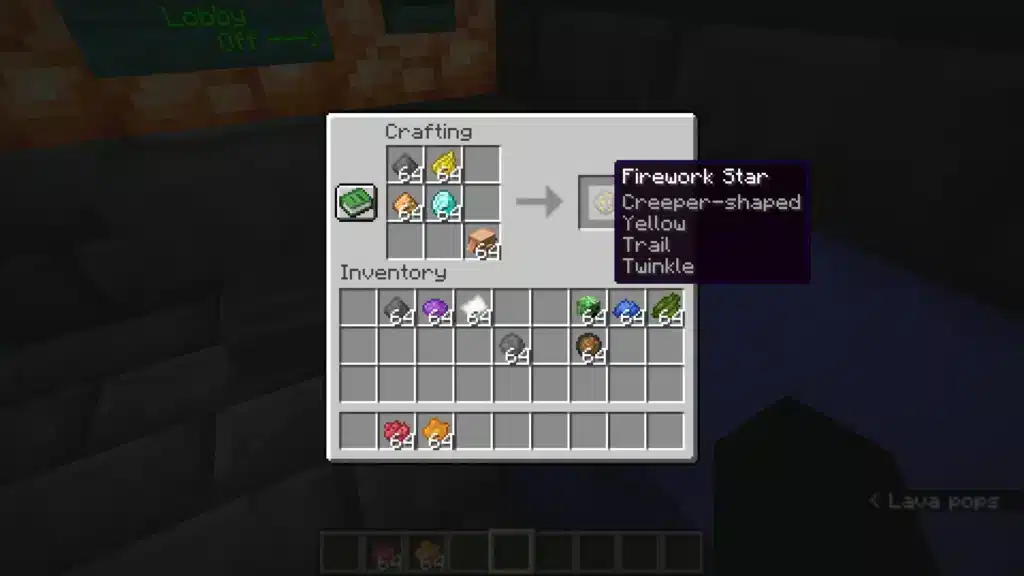
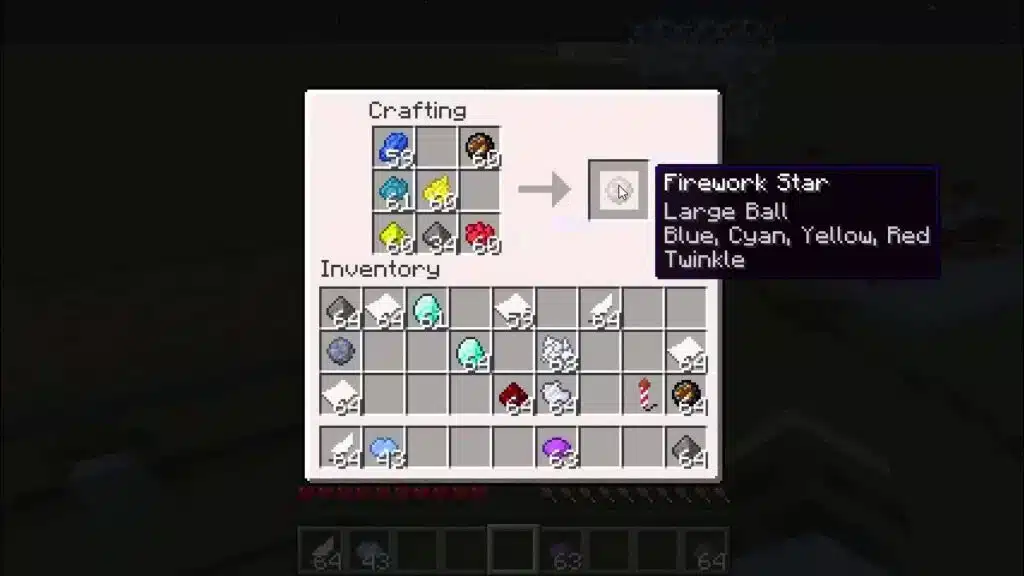
Creating the core payload for your aerial display requires combining standard gunpowder with color dyes inside a workbench grid. This basic combination yields a standard small ball explosion, but adding unique modifier items unlocks custom shapes and textures. Experienced builders know that mixing multiple dyes into a single batch creates vibrant multi-color bursts.
Furthermore, incorporating special ingredients like fire charges or gold nuggets changes the geometric footprint of the final explosion entirely. Adding diamond dust or glowstone powder introduces advanced particle trails and crackling twinkle effects that elevate your designs. Experimenting with these combinations lets you design signature signatures for your base architecture.
- Fire Charge: Produces a massive large ball explosion that dominates the night sky with wide radiance.
- Gold Nugget: Shapes the sparkling detonation into a distinct star pattern ideal for festive celebrations.
- Mob Head: Generates an intricate creeper face silhouette when the payload detonates overhead.
- Feather: Creates an asymmetrical burst pattern that scatters sparks in a jagged layout.
Assembling these components requires careful attention to ingredient placement and ingredient layering to avoid wasting rare supplies. Additionally, running a secondary crafting step with additional dyes adds a smooth fade color effect to your explosions. Mastering these payload variations separates basic builders from true pyrotechnic experts.
- Place one unit of gunpowder and at least one dye into the crafting grid to establish the base color.
- Add a single shape modifier item like a gold nugget or fire charge to alter the explosion geometry.
- Include diamond dust or glowstone powder to append visual trails or crackling twinkle effects.
- Retrieve your completed custom star and combine it with extra dyes in a separate step if you want a color fade.
Assembling Firework Rockets And Managing Flight Durations
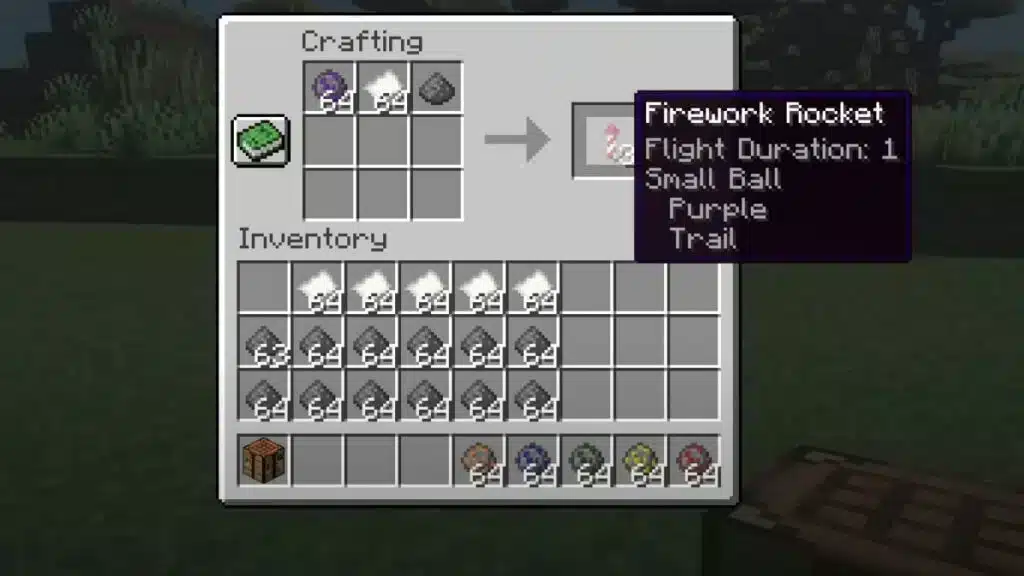
Once your custom payload is ready, you must combine it with paper and additional gunpowder to assemble the launchable rocket. The quantity of gunpowder included in this final assembly step dictates the flight duration and maximum altitude before detonation. For Elytra travel, players often omit the explosive star entirely to create pure propulsion boosters that preserve inventory space.
Understanding flight mechanics ensures you never detonate your booster too early while soaring through high altitude biomes. Crafting three gunpowder units into a single recipe yields a long-duration rocket that maximizes your travel distance per item. Organizing your automated crafting stations keeps your supply lines running smoothly during extended exploration sessions.
| Gunpowder Count | Flight Duration Tier | Primary Practical Use Case |
| 1 Gunpowder | Short Flight | Quick surface checks and tight aerial displays |
| 2 Gunpowder | Medium Flight | Balanced neighborhood navigation and moderate height |
| 3 Gunpowder | Long Flight | Long-distance Elytra travel and maximum altitude |
Optimizing your rocket manufacturing process prevents you from running out of essential materials during emergency transit. Additionally, setting up automated gunpowder farms utilizing creeper spawning platforms guarantees a steady resource flow. Balancing your travel boosters with display pyrotechnics keeps your chests organized and ready for action.
- Open your crafting table and place one sheet of paper in any open grid slot.
- Add between one and three units of gunpowder in separate slots to determine your desired flight duration.
- Insert your custom-crafted firework star into the grid if you are building a celebratory display rocket.
- Collect your batch of three finished rockets and test them in an open outdoor area.
How Do You Design Automated Display Launchers?
Creating stunning spectacles for server events or holiday celebrations is much easier when you wire up automated dispenser firing arrays. Placing multiple dispensers filled with diverse rocket types into hidden wall cavities allows you to coordinate massive multi-stage shows. Connecting these units to redstone repeater clocks generates continuous firing rhythms without manual button pressing.
Furthermore, separating your control switches into distinct zones lets you trigger specific color themes on command during multiplayer gatherings. Ensuring your redstone wiring is protected from weather and accidental mob interference keeps your automated infrastructure reliable. Designing these professional show setups showcases your mastery of game mechanics.
- Repeater Timers: Adjust tick delays on redstone repeaters to control the exact timing interval between consecutive rocket launches.
- Concealed Wiring: Run your power lines underground or behind structural pillars to maintain clean aesthetic lines around your base.
- Dispenser Banks: Stack multiple rows of dispensers vertically to launch massive walls of colored light simultaneously.
What Makes A Successful Pyrotechnic Storage System?
Managing hundreds of different color combinations, shape modifiers, and flight durations requires a disciplined storage layout near your crafting room. Because minor variations in dye mixtures create distinct item IDs, dumping everything into a single chest leads to frustrating inventory chaos. Establishing dedicated labeled bins for raw ingredients, finished stars, and completed rockets saves precious time.
Additionally, building item sorting filters connected to your gunpowder collection farms automates the intake of your most critical resource. Keeping your workplace tidy ensures you can quickly assemble custom batches whenever a celebration or journey calls for them. Efficiency in storage translates directly to smoother gameplay and grander creative projects.
- Group your raw materials such as paper, dyes, and gunpowder into clearly accessible front-row storage chests.
- Dedicate intermediate drawers specifically for finished firework stars categorized by shape and effect.
- Store completed rockets by flight duration tier to prevent accidental usage of long-range boosters during short trips.
- Keep rare mob heads and fire charges locked in secure vaults away from high-traffic workshop areas.
Pro Tips: Minecraft Firework Mastery
- Elytra safety check: Always use unexploded boosters containing zero firework stars when flying with an Elytra to prevent accidental self-damage.
- Rainbow layering: Combine multiple star variants with contrasting dye colors inside a single rocket recipe to produce layered multi-stage explosions.
- Farming efficiency: Build your creeper farming chambers in desert or swamp biomes with high spawn visibility to maximize gunpowder intake rates.
- Visual previewing: Hover your cursor over finished components in your inventory tooltip to verify exact flight and explosion parameters before launching.
Common Mistakes Minecraft Firework Players Make
- Forgetting shape modifiers during star creation: Trying to add items like gold nuggets or fire charges to a finished rocket instead of the star recipe results in standard small balls. Fix: always include special modifiers during the initial firework star crafting phase.
- Overloading travel boosters with heavy stars: Putting high-tier explosive stars into your daily transit rockets causes unwanted screen clutter and accidental damage. Fix: reserve explosive stars exclusively for celebratory display rockets and keep travel boosters clean.
- Wasting rare resources on short flights: Using maximum gunpowder tiers for simple local scouting trips drains your storage supplies rapidly. Fix: use single-gunpowder recipes for everyday movement and save three-gunpowder builds for long journeys.
Optimize Your Multiplayer Server Experience With ExitLag
Building massive redstone automated show installations and navigating high-population multiplayer servers requires an uninterrupted network connection to prevent frustrating rubber-banding and block placement rollbacks. High latency and packet loss can ruin your timing during synchronized fireworks displays or fast-paced Elytra navigation sessions across loaded chunks. ExitLag is a specialized game connection optimizer designed to analyze multiple network pathways in real time and secure the fastest route to game servers.
Utilizing advanced Multipath Technology, ExitLag sends your data packets through several simultaneous routes so that a single unstable node never drops your connection. It also features an integrated Traffic Shaper to prioritize your game data while managing background bandwidth consumption effortlessly. Whether you are hosting grand server events or exploring distant dimensions with your community, maintaining pristine network stability is essential. Boost your gameplay consistency today by checking outExitLag Download.
Image Disclaimer
All game images used in this blog post belong to Mojang Studios and Microsoft. They are used for informational and educational purposes only and do not imply endorsement or affiliation with the rights holders.
Got questions or want to connect with other players? Join the conversation at the ExitLag Forum!