

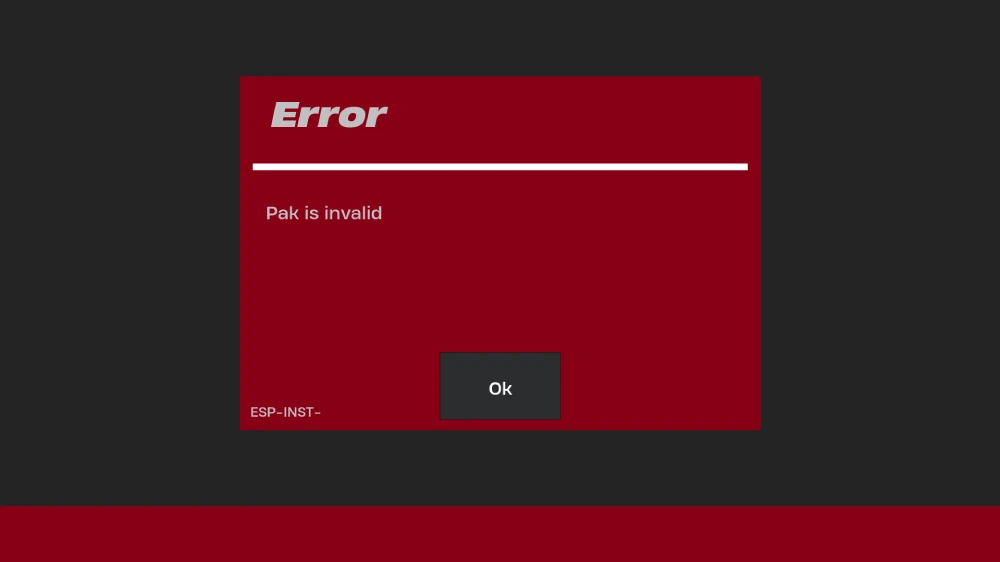
Few things are more frustrating than preparing to launch Fortnite only to be stopped by the Fortnite error pak is invalid message. This error often appears after game updates, file corruption, or incomplete installations. For many players, it prevents the game from starting entirely.
The Fortnite pak is invalid error occurs when the game cannot properly read or verify its data files, known as “.pak” files. These are essential archives that store Fortnite’s assets, including skins, maps, and textures. If even one of these files becomes damaged or unreadable, Fortnite will block access to avoid crashes or exploits.
Understanding the error pak is invalid Fortnite issue is the first step toward fixing it and getting back into the game.
What Causes Fortnite Pak Is Invalid Error?
Common causes for the ‘Pak is invalid’ error include:
- Incomplete or interrupted game updates / patch downloads
- Corrupted or partially downloaded .pak files
- Discrepancies between local game files and server versions
- Interference from antivirus / firewall software deleting or quarantining pak files
- Disk errors, bad sectors, or storage corruption
- System shutdowns during installation or patching
- Incorrect system clock / date, causing signature mismatch
- Insufficient free disk space during updates
Fortnite Error Pak Is Invalid: Common Scenarios
Players encounter the Fortnite error pak is invalid message in different situations. Some see it right after updating the game, others when verifying files, and some even after a clean install.
| Scenario | Description | Likelihood |
| After Patch Update | Files become corrupted or incompletely downloaded | Very Common |
| During First Install | Errors in initial file download / setup | Common |
| After System Crash / Power Loss | Shutdown during patching corrupts files | Common |
| Random Startup / Launch | Local file corruption or mismatch | Less Common |
| Verifying / Integrity Check | Detection of corrupted pak files | Moderate |
As the table shows, update-related corruption is by far the most frequent cause of the error pak is invalid Fortnite problem.
How to Recognize the Error
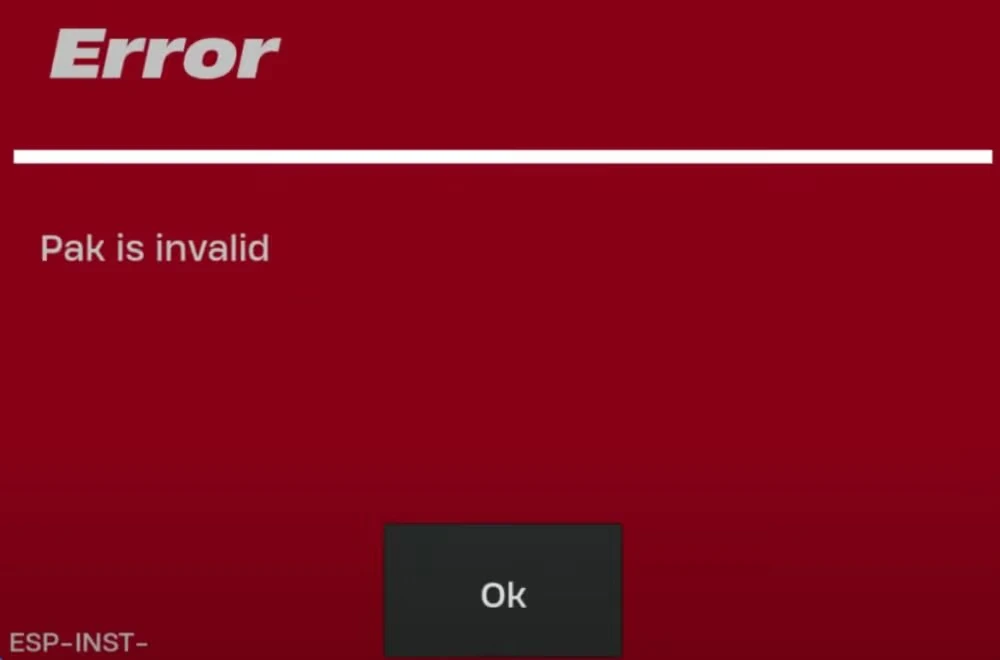
The error message typically reads:
“Pak file is invalid. Please verify your installation.”
In some cases, it may also include a numerical code or reference to a specific pak file. Regardless of the variation, it all points to the same root issue: Fortnite cannot verify the game’s data packages.
Why .Pak Files Are So Important
To understand the Fortnite error pak is invalid, it’s useful to know what .pak files actually do. These files are large archives used by Unreal Engine (the engine Fortnite runs on) to store:
- 3D models
- Character skins
- Textures and animations
- Audio files
- UI assets
- Map data
If a single .pak file is unreadable, the entire game can become unstable. That’s why Fortnite refuses to launch when it detects corruption—it’s a preventive measure.
Key Signs of Pak File Corruption
- Game crashes during startup
- Error message blocking launch
- Extremely slow loading times
- Missing textures or models in Creative mode
- Updates failing to complete
These symptoms almost always connect back to invalid or corrupted .pak files.
Quick Fixes for Fortnite Error Pak Is Invalid
- Verify Game Files – Use Epic Games Launcher to repair corrupted files.
- Clear Cache – Delete temporary files to remove conflicting data.
- Disable Antivirus Temporarily – Prevents false positives that quarantine .pak files.
- Reinstall Fortnite – A full reinstall replaces all .pak archives.
- Check Disk for Errors – Run CHKDSK to detect bad sectors.
- Repair Easy Anti-Cheat – Some errors overlap with EAC verification.
- Update Windows and Drivers – Ensures system compatibility with new patches.
These steps resolve the majority of Fortnite pak is invalid error cases.
Advanced Troubleshooting for Error Pak Is Invalid Fortnite
If the quick fixes don’t work, deeper system-level troubleshooting may be required. For example:
- Reinstall Visual C++ Redistributables – Essential for Unreal Engine stability.
- Check RAM with MemTest86 – Faulty memory can corrupt downloaded files.
- Switch Installation Drive – If your SSD has bad sectors, installing on another drive may fix the issue.
- Use Wired Connection for Updates – Prevents corrupted downloads from unstable Wi-Fi.
By addressing hardware and software simultaneously, you increase the chances of permanently fixing the error pak is invalid Fortnite issue.
ExitLag and Fortnite File Stability
Although ExitLag is primarily known for reducing ping and stabilizing connections, it can also indirectly help prevent the Fortnite error pak is invalid. Many corrupted .pak files happen during unstable updates, where packet loss or interruptions corrupt downloads.
With ExitLag, players get:
- More stable patch downloads
- Reduced risk of file corruption during updates
- Optimized server routing for faster installs
- Fewer disconnections that trigger pak errors
This makes ExitLag a valuable ally for preventing update-related causes of the Fortnite pak is invalid error.
Start your Exitlag 3 days Trial!
What Are .Pak Files in Unreal Engine?
To fully understand why the Fortnite pak is invalid error happens, it’s important to know what .pak files are. In Unreal Engine, .pak files act as compressed archives that bundle together massive amounts of game content.
These files contain:
- Textures for maps and skins
- Sound effects and music
- 3D models for weapons and buildings
- Animations and physics data
- Gameplay scripts and logic
The advantage of .pak files is that they streamline the loading process, but the downside is that corruption in even one of them can crash the entire game.
Why Fortnite Error Pak Is Invalid Keeps Coming Back
Many players report that the error pak is invalid Fortnite returns even after successful fixes. This usually happens due to:
- Recurrent patch instability – updates overwrite the same files repeatedly.
- Hardware instability – faulty RAM or SSDs slowly corrupt game files.
- External interference – antivirus or third-party optimizers wrongly block Fortnite’s updates.
- Incomplete downloads – unstable connections leave patches half-installed.
Understanding these root causes is key to applying long-term fixes.
Advanced Fixes for Persistent Errors
If the Fortnite error pak is invalid keeps reappearing, try these deeper solutions:
- Complete Clean Install
- Uninstall Fortnite and Epic Games Launcher.
- Delete all remaining files in AppData and installation folders.
- Reinstall from scratch to eliminate residual corruption.
- Uninstall Fortnite and Epic Games Launcher.
- Switch Installation Drive
- If installed on an HDD, move Fortnite to an SSD.
- If already on SSD, try a different drive to rule out bad sectors.
- If installed on an HDD, move Fortnite to an SSD.
- Use Command Prompt for Disk Health
- Run chkdsk /f to repair file system issues.
- Run chkdsk /f to repair file system issues.
- Run System File Checker
- Execute sfc /scannow to repair broken Windows components.
- Execute sfc /scannow to repair broken Windows components.
- Reinstall DirectX and Visual C++ Libraries
- These are required dependencies for Unreal Engine to properly read .pak files.
- These are required dependencies for Unreal Engine to properly read .pak files.
Basic vs. Advanced Solutions
| Error Level | Basic Fix | Advanced Fix |
| Corrupted pak after update | Verify game files | Clean install on another drive |
| Antivirus conflict | Disable or whitelist Fortnite | Uninstall conflicting security apps |
| Network instability | Restart router | Use wired connection + ExitLag |
| Disk issue | Restart PC | Run CHKDSK + replace faulty drive |
| Persistent pak corruption | Reinstall Fortnite | Full OS reinstall (last resort) |
This comparison shows how some cases need only simple solutions, while others require more drastic approaches.
Preventing Error Pak Is Invalid Fortnite
The best strategy is prevention. Here are proven methods to avoid encountering the Fortnite pak is invalid error in the first place:
- Always keep Windows and drivers updated.
- Avoid interrupting Fortnite updates.
- Use a wired connection for large patches.
- Exclude Fortnite folders from antivirus scans.
- Regularly clean cache files and temporary folders.
- Verify files after every major Fortnite update.
When to Suspect Hardware Problems
If you face repeated error pak is invalid Fortnite messages despite reinstallations, hardware may be to blame. Signs include:
- Frequent crashes in other games.
- Blue screen errors during heavy tasks.
- SSD showing reduced read/write speed.
- RAM errors detected by MemTest86.
In these cases, replacing or repairing hardware may be the only solution.
Step-by-Step to Prevent Future Errors
- Keep your system drivers updated monthly.
- Always download Fortnite updates on stable internet.
- Add Fortnite and Epic Games Launcher to antivirus exceptions.
- Regularly clean your PC’s temporary files.
- Monitor your SSD/HDD health using CrystalDiskInfo.
- Restart your PC after every patch before launching Fortnite.
- Use ExitLag to stabilize downloads and reduce the chance of corrupted files.
ExitLag and Fortnite Performance
While ExitLag doesn’t directly repair corrupted .pak files, it plays a big role in preventing future Fortnite error pak is invalid issues caused by unstable downloads. Many corrupted .pak files result from packet loss or interrupted updates, which ExitLag helps prevent by optimizing routing and ensuring a more stable internet connection.
Additionally, ExitLag improves in-game performance by:
- Reducing ping during matches.
- Stabilizing FPS in online lobbies.
- Preventing disconnections that could corrupt temporary files.
- Making downloads smoother and less likely to break.
This makes ExitLag an excellent complement to Epic’s verification system, ensuring both smooth downloads and lag-free gameplay.
Final Thoughts on Fortnite Error Pak Is Invalid
The Fortnite pak is invalid error is a frustrating but solvable issue. By understanding the role of .pak files, applying both basic and advanced fixes, and preventing file corruption through good practices, players can greatly reduce the risk of this error returning.
For those who want extra protection, ExitLag provides the network stability needed to ensure updates download correctly, helping avoid corrupted patches that often trigger the error.
In the end, mastering these solutions means more time enjoying Fortnite and less time stuck troubleshooting.
FAQ – Fortnite Pak Is Invalid
It usually happens due to corrupted game files, incomplete updates, antivirus interference, or disk problems.
Start by verifying game files, reinstalling Fortnite, and checking your disk health. For persistent cases, a clean reinstall or switching drives may be necessary.
Yes. While it doesn’t repair files directly, ExitLag prevents unstable downloads and packet loss that often cause corrupted .pak files, reducing the chance of the error happening again.
All game images used in this blog belong to Epic Games. They are used for informational/educational purposes only and do not imply endorsement or affiliation with the rights holders.
Got questions or want to connect with other players? Join the conversation at the ExitLag Forum!

