

The Fortnite Unstable Story Moment was one of the biggest narrative beats Chapter 7 has delivered so far. It closed out an entire season in under four minutes.
If you are still catching up on what happened, you are not alone. Plenty of players logged in late or ran into queue issues right as the event fired.
This guide breaks down the Fortnite Unstable Story Moment, including the exact Date and Time it aired, what to expect from the aftermath, and how the fallout connects to the current season. Whether you watched it live or you are piecing it together from clips, this covers everything you need.
Fortnite Unstable Story Moment: What Actually Happened
The Unstable Story Moment played out inside a standard Battle Royale match, centered directly on the Zero Point Stabilizer near Frosted Flat. It was not a separate lobby or a special playlist.
Instead, Epic Games folded the cinematic sequence into ordinary matches happening across the island at the same moment. Consequently, every player online at that time witnessed the same story beat regardless of their squad, mode, or match state.
Who Was Involved
Doctor Slone attempted to stabilize the fractured Zero Point using the newly built Stabilizer. However, Geno had other plans.
- Geno hacked into the Stabilizer through a backdoor he had secretly built into the system earlier in the season.
- Slone briefly regained control of the beam, and the stabilization energy flickered back to its normal color for a moment.
- Geno and the Dark Voyager then hacked the core systems directly, overpowering Slone’s final defense.
- The corrupted, pixelated beam ultimately fell fully under Geno’s control.
The Aftermath on the Island
Once the sequence ended, the Zero Point itself was replaced by a mysterious game cartridge sitting on the island. This single visual cue set up everything that followed.
In short, Geno went from a background threat to the most dangerous figure in the story in less than four minutes. As a result, the entire island shifted toward a new chapter of the narrative.
Fortnite Unstable Story Moment: Date, Time, and What to Expect
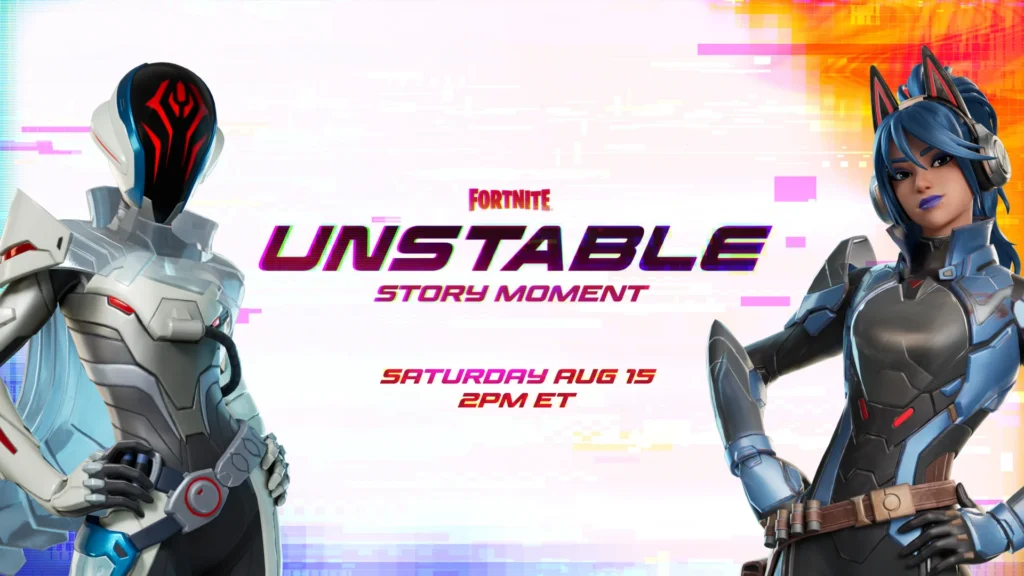
Here is the direct answer players keep searching for. The Fortnite Unstable Story Moment fired on August 15 at 2:00 PM ET, and it served as the concluding live event of the previous season before the current one began.
Because it was a one-time story beat, Epic Games did not schedule any reruns inside the game. Anyone who missed the original window can only catch the moment through video replays shared by the community afterward.
Exact Start Times by Region
Time zones caused a lot of confusion in the days leading up to the event. Below is a clean breakdown so there is no guesswork.
| Region | Local Start Time |
|---|---|
| Eastern Time (ET) | 2:00 PM |
| Pacific Time (PT) | 11:00 AM |
| British Summer Time (BST) | 7:00 PM |
| Central European Time (CET) | 8:00 PM |
Notably, Epic Games disabled damage starting at 1:55 PM ET so nobody could be eliminated while the sequence played out. That five minute buffer gave everyone time to reach the Stabilizer safely.
What Happens After the Event
The Fortnite Unstable Story Moment was designed as a bridge, not a standalone finale. Consequently, the story it set up carried straight into the current season, which launched shortly after with a full Gaming Legends theme.
If you are wondering what changed once the dust settled, here is the short version:
- The Zero Point disappeared and was replaced by a cartridge teasing the next chapter of the story.
- Geno established a foothold on the map, setting up his role as the new central antagonist.
- The map itself began transforming, introducing crossover locations tied to classic gaming franchises.
- New mythic items and points of interest arrived alongside the map shift.
- A fresh Battle Pass and progression system launched to match the new theme.
How Do You Watch the Fortnite Unstable Story Moment If You Missed It?
This is one of the most common questions players ask once a live event has already passed. Unfortunately, Epic Games rarely builds in-game replay tools for these moments.
That said, you still have a few reliable options:
- Search official Fortnite video channels, which typically post full recap footage within a day or two.
- Check community clip archives on major gaming forums, where players upload full, unedited event footage.
- Watch condensed recap videos that walk through each phase of the story beat with commentary.
- Read written recaps from gaming outlets that break the sequence down frame by frame.
Why Epic Games Does Not Rerun These Events
Story moments are treated differently from full-scale live events like concerts or boss fights. Since they exist to move the narrative forward in real time, replaying them would break the sense of a shared, one-time moment.
Therefore, Epic leans on the surprise factor. Missing the exact window means you experience the story secondhand, which is part of why so many players rush to log in early.

Preparing for the Next Fortnite Unstable Story Moment
Story moments tend to arrive with little warning beyond a short in-game countdown. As a result, preparation matters more than most players realize.
Steps to Take Before the Event Fires
Follow this simple checklist the next time a countdown timer appears on the island:
- Log into a Battle Royale match at least 15 to 20 minutes before the scheduled time to avoid queue bottlenecks.
- Travel toward the confirmed event location as soon as you spawn in.
- Stay in the general area rather than looting far away, since damage is typically disabled just before the sequence starts.
- Keep your game client updated so you do not miss the moment waiting on a patch download.
- Close background applications that might interfere with your connection during peak server load.
Common Server Problems During Live Events
Large story moments push enormous numbers of players into the same servers at once. This often leads to noticeable slowdowns right when it matters most.
- Queue spikes: Server queues jump sharply in the final minutes before a scheduled event.
- Increased ping: More concurrent players on shared routes can raise latency for everyone.
- Packet loss: Unstable connections during peak load can cause rubber-banding or dropped inputs.
- Login errors: High traffic sometimes triggers temporary authentication failures.
Pro Tips: Fortnite Unstable Story Moment Prep
- Log in early, not exactly on time: Servers fill up fast in the final ten minutes, so arriving early avoids getting stuck in a queue right as the moment fires.
- Pick a squad-fill lobby if solo queue feels slow: Full lobbies sometimes load faster during high-traffic windows than empty ones.
- Avoid downloading unrelated updates right before the event: Bandwidth competition from background downloads can spike your latency at the worst possible time.
- Use a wired connection when possible: Wireless connections are more prone to packet loss, which becomes far more noticeable during high-population events.
Common Mistakes Fortnite Unstable Story Moment Players Make
- Logging in right at the start time: Many players wait until the exact minute the event fires, then get stuck in a queue and miss the whole sequence. Fix: log in 15 to 20 minutes early instead.
- Assuming the event will repeat later that day: Story moments are one-time showings, unlike some larger live events. Fix: treat every countdown as a single opportunity and prioritize being online for it.
- Ignoring connection quality before a major event: A laggy connection can cause the cinematic to stutter or desync during the most important seconds. Fix: check your network stability well before the countdown hits zero.
- Standing too far from the confirmed event location: Some players keep looting instead of heading toward the Stabilizer, then get caught outside the action. Fix: travel to the location as soon as the countdown appears on screen.
Boosting Your Connection for Fortnite Live Events
Live story moments and season launches both push massive numbers of players onto the same servers at once. That kind of traffic spike is exactly when connection quality tends to fall apart.
This is where ExitLag becomes genuinely useful. It is not a VPN: it does not encrypt your traffic or mask your IP address.
Instead, ExitLag continuously analyzes multiple network routes in real time and automatically selects the fastest, most stable path to Fortnite’s servers. During high-traffic windows like a story moment or a season launch, that routing difference can be the gap between a smooth cinematic and a stuttering one.
Here is what makes it particularly useful for events like the Fortnite Unstable Story Moment:
- Real-time Optimization: Cuts down delay and packet loss so your inputs stay responsive even when servers are under heavy load.
- Multipath Technology: Sends your connection through multiple routes at once, so if one path gets congested, the others keep you online.
- Multi-Internet: Supports up to four simultaneous connections, automatically switching if one drops during a critical moment.
- AI-powered routing: Selects the best available route with a single click, though manual customization is also available for advanced users.
ExitLag supports more than 4,000 games across PC and Mobile, with over 1,500 servers spread across 190+ countries. It is trusted by more than 30 million users and handles over 18 million optimizations every week.
It is also completely safe to use with Fortnite, since it does not modify game files, inject code, or interact with anti-cheat systems in any way. Just remember not to run it alongside a VPN, since the two can conflict and reduce effectiveness.
If server queues and mid-event lag have cost you a story moment before, grabbing the ExitLag Download ahead of the next big Fortnite event is a simple way to stack the odds in your favor.
Wrapping Up the Fortnite Unstable Story Moment
The Fortnite Unstable Story Moment proved that a short, focused cinematic can carry as much weight as a full-scale live event. In under four minutes, the entire direction of the story shifted.
Ultimately, understanding the Date, Time, and What to Expect around events like this helps you avoid missing the next one. Staying prepared, both narratively and technically, makes all the difference when Epic Games drops the next surprise.
All game images used in this blog post belong to Epic Games. They are used for informational and educational purposes only and do not imply endorsement or affiliation with the rights holders.
Got questions or want to connect with other players? Join the conversation at the ExitLag Forum!


