

You’re in the middle of a match. A decisive gunfight. Fast building. Everything seems normal – until it doesn’t. Inputs feel slightly delayed, and the ping shown on screen looks different from what you were used to, even though you’re playing in the same region with the same connection as always.
If you’ve noticed this during Fortnite Season 7, you’re not alone.
After the Fortnite update v39.11, many players started reporting Fortnite lag after update, noticing changes in ping behavior and overall responsiveness. This led to questions about whether the issue was real lag, a performance problem, or simply a change in how Fortnite displays latency.
In this article, we’ll explain what changed in Fortnite update v39.11, why ping feels different, and how to better understand your connection during Season 7.

What Is Ping and Why It Matters in Fortnite
Ping is the time it takes for a data packet to travel from your device to the Fortnite server and back. It’s measured in milliseconds (ms), and the lower the value, the faster the communication.
In competitive games like Fortnite, especially after a major update, even small latency variations can impact gameplay. Building speed, gunfight timing, edits, and movement all rely on fast responses. That’s why Fortnite lag, stuttering, or delayed actions become noticeable very quickly.
What Players Started Reporting After the Season 7 Update
Following the Fortnite Season 7 update, players from different regions began reporting similar issues, such as:
- Higher ping values than before
- Differences between ping shown in the menu and during matches
- A feeling of Fortnite update lag, even with stable internet
- Reports of Fortnite performance issues, sometimes confused with network problems
Some players also noticed FPS drops in Fortnite, which can further amplify the perception of lag when combined with latency changes. It’s important to separate graphical performance issues from network-related ones, as they have different causes and solutions.
For players consistently seeing elevated numbers, this often overlaps with known cases of high ping in Fortnite, even when the connection itself hasn’t changed.
What Changed in Fortnite Update v39.11
In Fortnite update v39.11, Epic Games officially announced adjustments to how latency is calculated and displayed in-game.
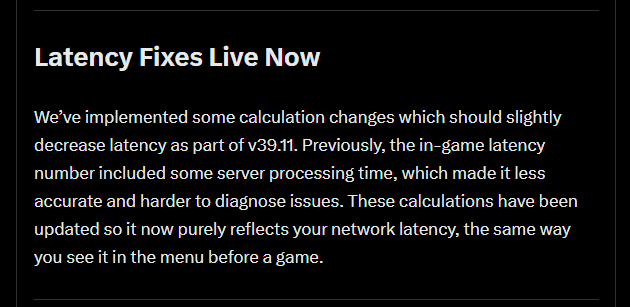
Official source: Fortnite Status
This update introduced a new ping measurement format, changing how latency values are processed and presented during matches. While the servers themselves did not necessarily change, the way Fortnite reports latency to players did.
This directly affected how players perceive Fortnite v39 lag and Fortnite v39.11 lag, even when their actual connection quality remained stable.
Why Fortnite Ping Feels Different After the Update
When the method used to calculate latency changes, the numbers shown on screen naturally behave differently.
Before v39.11, Fortnite used a specific reference for ping calculation. With the new format, latency readings now reflect different parameters, which can result in higher or more variable values.
This doesn’t automatically mean your internet connection got worse. It means the reference point used to measure ping was adjusted, changing how players interpret the data.
In some cases, this shift also increases sensitivity to instability, commonly referred to as Fortnite jitter, which can make gameplay feel inconsistent even when ping values seem acceptable.
Different Latency Measurements Can Produce Different Numbers
Latency can be measured from multiple points along the network path. Depending on where and how that measurement occurs, values can vary significantly.
That’s why, after a Fortnite new update lag, relying on a single in-game number can be misleading. External tools that provide context about route stability and packet behavior become essential to understand what’s actually happening.
Viewing Your Fortnite Latency More Accurately With ExitLag
After Fortnite changed how ping is displayed, understanding real network behavior became even more important. ExitLag offers two complementary tools to help players analyze latency and route performance during Fortnite Season 7.
1. Connection Diagram
With Fortnite selected in ExitLag and routes applied, the Connection Diagram visually displays how your connection is routed to the game server.

How to access:
- Open ExitLag
- Search for Fortnite in the game list
- Select the desired server
- Click Apply Routes
- Open the Connection Diagram
- Enter a match
This allows you to monitor ping stability and latency variations using optimized routes, helping you identify issues such as instability or packet loss in Fortnite that may not be obvious through in-game numbers alone.
2. Ping for Games
Ping for Games, available through the Network Analyzer, lets you measure latency directly to Fortnite servers before entering a match.

How to access:
- Open ExitLag
- Go to Network Analyzer
- Select Ping for Games
- Search for Fortnite
- Choose the server
- Start the test
This provides a clearer reference point and helps players understand whether perceived Fortnite lag after update is related to routing, stability, or simply the new latency display format.
ExitLag: Stability and Route Predictability
When latency measurement changes, network route quality becomes even more important.
ExitLag focuses on delivering a more stable and predictable connection through:
- Intelligent route optimization
- Multiple simultaneous connections with redundancy
- Reduced packet loss
- Lower latency fluctuations
By improving route consistency, ExitLag helps reduce the impact of perceived Fortnite performance issues, even when in-game ping values fluctuate.
Extra Tips to Reduce Fortnite Lag and Stuttering
- Prefer a wired connection whenever possible
- Avoid downloads and streaming while playing
- Keep network drivers updated
- Reduce the number of devices connected to Wi-Fi
- Play during off-peak network hours
For a deeper technical breakdown, see our complete guide on how to fix Fortnite lag.
Frequently Asked Questions
Not necessarily. The way ping is calculated and displayed changed in Fortnite update v39.11, which can affect how latency values appear.
No. It works as an additional reference to help you better understand real network latency.
No. ExitLag operates exclusively at the network routing level.
Yes. Optimization happens after traffic leaves your home network.
In update v39.11, Epic Games announced that adjustments were made to how latency is calculated and displayed in-game.
Overall, there was a change in the ping measurement format, altering how this value is calculated and presented during matches.
Conclusion
Changes in how ping is measured can raise questions, especially after a major update like Fortnite Lag Season 7. Understanding what changed in Fortnite update v39.11, how latency is now calculated, and how to interpret these new values helps players gain clarity about their connection.
With tools like Connection Diagram and Ping for Games, players can better contextualize latency behavior, while ExitLag works to deliver stability and predictable routing – even when Fortnite’s ping display changes.
All game images used in this blog belong to Epic Games. They are used for informational/educational purposes only and do not imply endorsement or affiliation with the rights holders.
Got questions or want to connect with other players? Join the conversation at the ExitLag Forum!

