Forza Horizon 5 mods have redefined how fans enjoy this open-world racing masterpiece. With a thriving modding community on PC, the game now stretches far beyond its base version. From lawless running from cops mods in Forza Horizon 5 to infinite cash tricks and dazzling map overhauls, modding offers new excitement with every download.
If you’re playing FH5 on PC, you’re in the driver’s seat for endless customization. This guide dives into the best Forza Horizon 5 PC mods, where to find them, how to install them, and why they’re revolutionizing the Horizon Festival.
Why Mod Forza Horizon 5?

Mods supercharge your Forza experience, giving you control over features the official game doesn’t allow. Here’s what makes them irresistible:
- Unlock features unavailable in the base game
- Create chaos with cops vs racers gameplay
- Farm unlimited in-game money
- Explore custom tracks, terrains, and visuals
- Add new cars, liveries, and UI enhancements
For many, the ability to play Forza Horizon 5 like a sandbox—not just a race simulator—is the main draw. With the right setup, you can turn Mexico into your personal racetrack, crime scene, or creative showcase.
How to Install Forza Horizon 5 Mods on PC
Modding FH5 requires care. Here’s how to get started:
1. Back Up Your Game
Before anything, create a copy of your game directory. Mods can conflict with updates.
2. Install Vortex Mod Manager or Mod Engine
These tools simplify mod installation and help manage conflicts.
3. Download Mods from Trusted Sources
Stick to reputable sites like:
- Nexus Mods
- RaceDepartment
- FH5Mods.net
4. Follow Mod Instructions
Each mod comes with a unique setup. Some replace existing files; others are drag-and-drop.
5. Test Mods in Offline Mode First
Before going online, make sure everything runs smoothly. Some mods can result in bans if used in multiplayer.
Running from Cops Mods in Forza Horizon 5
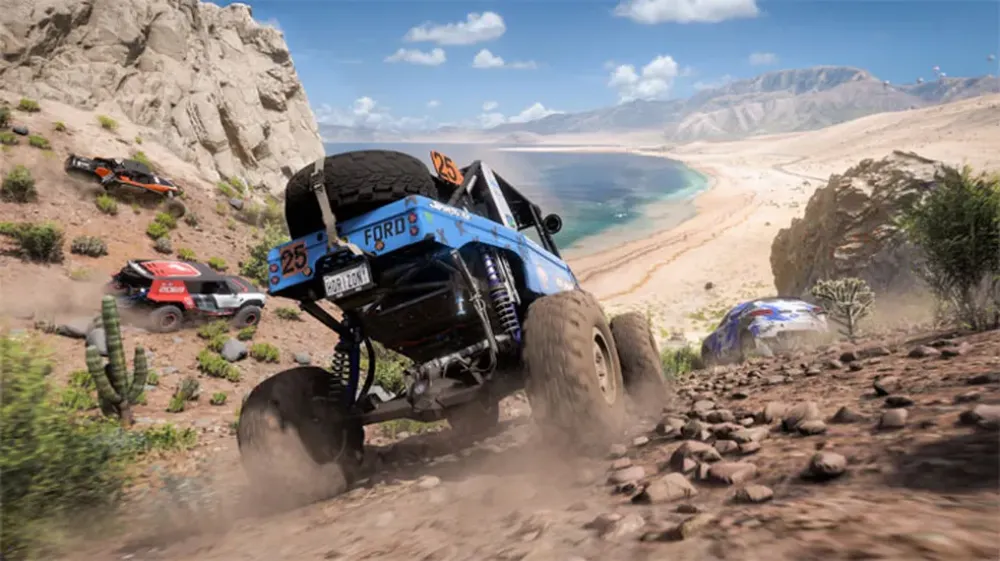
Want to feel like you’re in a Fast & Furious movie? Running from cops mods for Forza Horizon 5 add adrenaline-pumping pursuits to your game. These mods spawn AI police units that:
- Chase you based on speed and infractions
- Use spike strips and roadblocks
- Escalate difficulty as heat levels increase
What to Expect
- Fully scripted police chase sequences
- Sirens, lights, and police chatter
- Compatible with Forza Horizon 5 open-world free roam
Fan Favorites
- “FH5 Police Pursuit Overhaul”
- “Heat Level Mod with Cop AI Upgrade”
- “Chase Me Modpack”
These mods are particularly loved by streamers and YouTubers for creating cinematic chase content.
Forza Horizon 5 Mods for Money: Unlock Infinite Wealth
No more grinding for credits. With Forza Horizon 5 mods for money, players unlock infinite cash to:
- Buy all cars instantly
- Max out every house and festival upgrade
- Customize liveries without financial constraints
Top Money Mods
- “Unlimited Money Save Files”
- “FH5 Economy Bypass Script”
- “Mega Credits Trainer for PC”
Important: Only use these mods offline. Using them online may trigger bans from Playground Games or Microsoft.
Advantages
- Speed up collection completion
- Freely test supercars without farming
- Focus on racing, not grinding
Forza Horizon 5 PC Mods: The Power of Exclusive Access

PC players enjoy exclusive modding capabilities that console gamers can only dream of. Why?
- File access: Mod files can be edited directly
- Higher hardware potential: More complex mods run smoother
- Community tools: Mod managers and injection tools are PC-only
PC-Only Mods You Need
- “First-Person Driving View”
- “Enhanced Graphics with Ray Tracing Tweaks”
- “Realistic Tire Grip & Physics Pack”
These mods not only improve visuals and realism but also introduce entirely new perspectives. Some users even simulate drifting competitions using real-world physics settings.
Forza Horizon 5 Map Mods: Change the World
Imagine racing through entirely new environments, handcrafted by the community. That’s what Forza Horizon 5 map mods offer.
Popular Map Mods
- “Volcano Drift Arena”
- “Downtown Mexico City Expansion”
- “Abandoned Airfield Playground”
Features
- Massive stunt zones
- Off-road trails with realistic elevation
- Custom race routes with dynamic weather
Modded maps allow players to build their dream racetracks, explore hidden ruins, or recreate real-world locations. The freedom to reshape Mexico is limitless.
The ExitLag Edge: Race Without Limits

Lag is the enemy of speed. Whether you’re flying down a modded mountain track or escaping the cops, stable connection is everything. That’s why so many modded Forza players trust ExitLag.
Why ExitLag?
- Reduces ping and jitter
- Stabilizes your connection during multiplayer
- Optimized routes for FH5 servers
- Prevents packet loss in high-speed moments
Using ExitLag while running custom mods ensures smooth, responsive performance—especially in cinematic multiplayer chase events or big modded maps.
Start your Exitlag 3 days Trial!
What Mods Can’t Do
Mods are powerful, but they have boundaries:
- No Multiplayer Support: Most mods only work offline
- Game Updates Break Mods: Always check mod compatibility
- Mods Can Trigger Anti-Cheat: Stay safe by modding offline only
Still, within these limits, you can revolutionize your Forza experience.
Drift Mods in Forza Horizon 5: Master the Art of Slide
Whether you’re tandem drifting or solo sliding down winding hills, Forza Horizon 5 drift mods create a simulation-worthy experience that rivals pro setups. These mods adjust:
- Torque distribution
- E-brake sensitivity
- Tire grip physics
- Drift angle tolerances
Recommended Drift Packs
- “FH5 Pro Drift Handling Pack”
- “Formula Drift Tuning Overhaul”
- “RealDrive Drift Physics for FH5”
Why Drifters Love These Mods
- Custom tuning per car type
- Compatible with popular steering wheels
- Feels closer to Assetto Corsa-style physics
Even without full sim-rig setups, these drift mods can give you buttery-smooth corner slides with precision control.
UI and HUD Mods: Redesign Your Driving Dashboard

Want to ditch the default interface? Forza Horizon 5 UI mods revamp your experience visually and functionally. Common improvements include:
- Minimalist HUD for cinematic gameplay
- Analog gauges
- Custom tachometers and speedometers
- Drift angle meters and telemetry overlays
Popular UI Mods
- “Clean Horizon UI Pack”
- “Race Pro Tachometer HUD”
- “FH5 Streamer HUD Overlay Mod”
These enhancements are perfect for streamers and creators looking to personalize their visual identity.
Audio Mods and Soundpacks: Revamp the Engine Roar
Stock engine sounds not cutting it? Sound mods in FH5 swap out factory audio with:
- Real-life car engine samples
- Enhanced exhaust bursts and revs
- Doppler effects for speed perception
- Custom radio soundtracks
Top Sound Mods
- “JDM Legends Sound Pack”
- “V8 Supercharger Engine FX”
- “Cinematic Car Audio Overhaul”
These packs give your gameplay an aural intensity that brings every car to life.
Mod Comparison Table
Here’s a quick breakdown of the most popular Forza Horizon 5 mods and what they bring to the road:
| Mod Type | Mod Name | Key Features | Best For |
| Police Chase | FH5 Police Pursuit Overhaul | Heat levels, AI cops, roadblocks | High-speed chaos |
| Drift Physics | Pro Drift Handling Pack | Realistic tire physics, angle control | Tandem drifters |
| Unlimited Money | Mega Credits Trainer | Infinite in-game currency | Fast car collectors |
| UI/HUD | Race Pro Tachometer HUD | Analog meters, drift HUD | Streamers, immersion seekers |
| Map Mods | Downtown Mexico City Expansion | New districts, traffic mods | Open-world explorers |
| Sound Packs | JDM Legends Sound Pack | Real engine sounds from iconic cars | JDM fans, audio purists |
| Graphics Enhancer | FH5 Ray Tracing Visual Tweak | Enhanced shadows, reflections | Visual fidelity lovers |
Use this table as your go-to guide when selecting mods to prioritize based on your goals.
Community Challenges and Custom Events
Mods aren’t just about solo fun. Many creators now organize custom community events based on modded content:
- Drift competitions on custom tracks
- Time attack leaderboards using map mods
- Photo contests for best cinematic modded shots
- Freeroam roleplay with AI cops and weather control
Platforms like Discord, Reddit, and YouTube host vibrant FH5 modding events. Some even offer V-Buck or Steam credit prizes for winners.
Troubleshooting Tips for Modded FH5
Sometimes mods won’t play nice. Here’s how to fix common issues:
Game Won’t Launch After Installing Mods
- Revert to a clean backup
- Check for broken script dependencies
- Update Vortex or Mod Engine tools
Crashes on Specific Maps
- Lower graphics settings
- Reinstall the map mod manually
- Verify game file integrity
Mod Conflicts or Missing HUDs
- Deactivate all mods
- Reactivate them one by one to isolate the issue
- Use only one UI mod at a time
Final Thoughts: Master the Modded Road
The possibilities in Forza Horizon 5 mods are only limited by your imagination. Whether you’re sliding through Mexico in a smoke-filled tandem drift or escaping heat-level five police chases on a neon-lit custom map, mods transform gameplay from great to legendary.
Pair your mod setup with ExitLag to ensure zero lag spikes and max network efficiency—crucial for high-performance PC builds and large-scale map mods.
FAQ – Frequently Asked Questions
Can I combine drift mods with map mods?
Yes! Many players build custom drift events using both simultaneously.
Are UI mods performance heavy?
Most are optimized. Avoid layering too many graphical overlays.
Will soundpacks affect multiplayer?
No—but you must remain offline while using them to avoid detection.
Can I use mods on Steam and Microsoft Store versions?
Yes, though file paths and permissions may differ slightly.
All game images used in this blog belong to Playground Games and Xbox Game Studios. They are used for informational/educational purposes only and do not imply endorsement or affiliation with the rights holders.
Got questions or want to connect with other players? Join the conversation at the ExitLag Forum!