Arena Breakout Infinite feels unfair in the best way when your performance is locked in: clean tracking, instant peeks, and stable recoil control when it matters most. With high, consistent FPS, your aim settles faster, your micro-adjustments land, and every corner check feels deliberate instead of desperate.
But when performance dips, the game becomes chaos. Sudden frame drops while looting, micro-stutters during close-range fights, and inconsistent input timing can cost you an entire run. And because extraction shooters depend on clean server sync, network instability can also create hitching that looks like FPS issues. If you suspect that’s part of the problem, start with the Arena Breakout Infinite packet loss troubleshooting guide to identify the symptoms and the root cause.
This guide breaks down how to get a reliable FPS boost in Arena Breakout Infinite with ExitLag and a few complementary optimizations. The goal is not unrealistic “double FPS” promises, but real smoothness: fewer drops, better frame pacing, and lower input lag, sometimes delivering up to 60% better stability depending on your baseline. To jump in immediately, install ExitLag from the official ExitLag gaming performance website and follow the setup steps below.

Why FPS matters in Arena Breakout Infinite
Why high FPS is crucial in Arena Breakout Infinite
Arena Breakout Infinite punishes hesitation. In a hardcore extraction shooter, you don’t get extra chances, and performance issues don’t just feel bad—they directly decide who wins the engagement.
High FPS matters most when you are:
- clearing angles in tight interiors
- reacting to footsteps and fast swings
- tracking targets during recoil control
- fighting multiple players in close quarters
- quick looting and repositioning under pressure
A real FPS boost in Arena Breakout Infinite means your mechanics stay consistent when the stakes are highest.
What FPS is in simple terms
FPS means frames per second—how many images your PC shows every second. Think of it like a camera: more frames means smoother motion, clearer tracking, and less “blur” in fast turns.
Here’s the practical difference:
- 30 FPS: choppy motion, delayed reads
- 60 FPS: playable baseline
- 144 FPS: smooth tracking and fast clarity ✅
In extraction shooters, the biggest win is not peak FPS. It’s stable minimum FPS and consistent pacing during fights.
Fast FPS reality check
You want two things at the same time:
- high FPS for clean tracking
- stable frame time so the fight stays smooth
If your FPS jumps around, your aim will feel inconsistent even if your average looks “fine.”
Benefits of high FPS in Arena Breakout Infinite
What you gain with better FPS
A stable FPS boost in Arena Breakout Infinite improves combat in ways you feel instantly:
- Smoother aim tracking during quick swings
- Cleaner recoil control with less camera hitching
- Faster reactions on peeks and counter-peeks
- More reliable close-range hip-fire adjustments
- Better visual clarity in fast rotations
- Less fatigue in longer sessions
- More consistent looting and inventory actions
The game becomes predictable—and predictable gameplay is how you win more extractions.
Why stability beats “big FPS numbers”
A spiky 140 FPS that drops to 55 FPS in a fight feels worse than a stable 90 FPS. The drop is what breaks your timing.
Look for these red flags:
- random hitching right as you ADS
- stutters when a player appears in view
- small freezes during fast turns
- inconsistent input feel on recoil control ⚠️
These are often tied to frame pacing, background load, or unstable network timing.
FPS goals by playstyle
- Casual runs and looting focus: stable 60–90 FPS
- Aggressive PvP and ranked-style play: stable 90–144 FPS
- Competitive focus and high refresh monitors: highest stable FPS your system can hold ✅
FPS tiers for Arena Breakout Infinite
FPS classification table
| FPS range | Quality | Experience | Competitive? |
| 144+ FPS | ⭐⭐⭐⭐⭐ Excellent | Perfect | ✅ Ideal |
| 90–144 FPS | ⭐⭐⭐⭐ Great | Very good | ✅ Yes |
| 60–90 FPS | ⭐⭐⭐ Good | Acceptable | ⚠️ Slight disadvantage |
| 30–60 FPS | ⭐⭐ Regular | Choppy | ❌ Hard to compete |
| Under 30 FPS | ⭐ Bad | Unplayable | ❌ Impossible |
If you are chasing an FPS boost in Arena Breakout Infinite, prioritize minimum FPS and reducing stutters first.
FPS vs visuals: choose performance first
In a competitive shooter, clarity and timing beat cinematic graphics every time. Prioritize:
- performance over ultra settings
- responsiveness over extra effects
- consistency over pretty lighting
A smooth fight is a won fight ✅.
How ExitLag increases FPS in Arena Breakout Infinite
What ExitLag is (and what it is not)
ExitLag is a network optimization tool built for gaming performance and stability. It reduces jitter, packet loss patterns, and routing instability that can trigger micro-stuttering and inconsistent timing in online matches.
Important: ExitLag is NOT a VPN.
VPNs focus on privacy tunnels and can add overhead or choose non-gaming routes. ExitLag focuses on stable, optimized paths for online games.
For the technical breakdown, read the official how ExitLag works guide.
Why network issues can look like FPS issues
Arena Breakout Infinite is heavily dependent on server communication. When your connection becomes inconsistent, the game may hitch during corrections or resync moments. That hitch can feel like an FPS drop.
Common symptoms that overlap:
- delayed hit registration feel
- “heavy” movement timing
- stutters during close encounters
- inconsistent input response
This is why ExitLag can produce an FPS boost in Arena Breakout Infinite through stability: fewer spikes, fewer hitches, better control.
Rendered FPS vs perceived FPS
Two concepts matter:
- rendered FPS: what your hardware is capable of outputting
- perceived FPS: how smooth the game feels under real online conditions
ExitLag mainly improves perceived FPS by reducing stutters and stabilizing timing, which often feels like more FPS in Arena Breakout Infinite even if your average FPS changes only slightly.
Seven ways ExitLag helps deliver an FPS boost
The most important performance improvements
Here are seven practical ways ExitLag improves online smoothness:
- Micro-stutter reduction
Fewer correction hitches during active fights. - Input lag reduction
More consistent packet timing improves responsiveness. - Frame time stabilization
Less spiky pacing that breaks tracking. - Multi-path route optimization
Avoids congestion that causes jitter at peak hours. - Game traffic prioritization
Reduces interference from background traffic. - Ping optimization for better sync
Lower and steadier ping reduces correction behavior. - Redundant routing for reliability
Helps prevent sudden “bad routing” sessions.
This combination is why many players describe ExitLag as an FPS boost in Arena Breakout Infinite tool: the game feels cleaner, especially under pressure.
To confirm what else is supported, browse the full ExitLag supported games list.
ExitLag vs other FPS boost methods
Comparison table
| Solution | Increases FPS? | Reduces lag? | Stability | Ease | Recommendation |
| ExitLag | ✅ Yes via stability | ✅✅✅ | ⭐⭐⭐⭐⭐ | ⭐⭐⭐⭐⭐ | ✅ Best |
| Typical VPN | ❌ Often worse | ❌ Often worse | ⭐⭐ | ⭐⭐⭐ | ❌ Avoid |
| Generic game booster | ⚠️ Minimal | ❌ No | ⭐⭐⭐ | ⭐⭐⭐⭐ | ⚠️ Limited |
| Windows tweaks | ⚠️ Some | ❌ No | ⭐⭐⭐ | ⭐⭐ | ⚠️ Helpful |
| Hardware upgrade | ✅ Yes | ❌ No | ⭐⭐⭐⭐ | ⭐ | 💰 Expensive |
| Doing nothing | ❌ No | ❌ No | ⭐ | ⭐⭐⭐⭐⭐ | ❌ Worst |
If your fights feel inconsistent even at “good FPS,” it’s often stability and pacing—not raw power—that needs attention.
And again: ExitLag is NOT a VPN ✅.
How to use ExitLag in Arena Breakout Infinite
The process is extremely simple:
Step 1 – Access the official ExitLag website and download the application. There’s a free trial period for new users.
Step 2 – Install and open the program. Log in with your account.
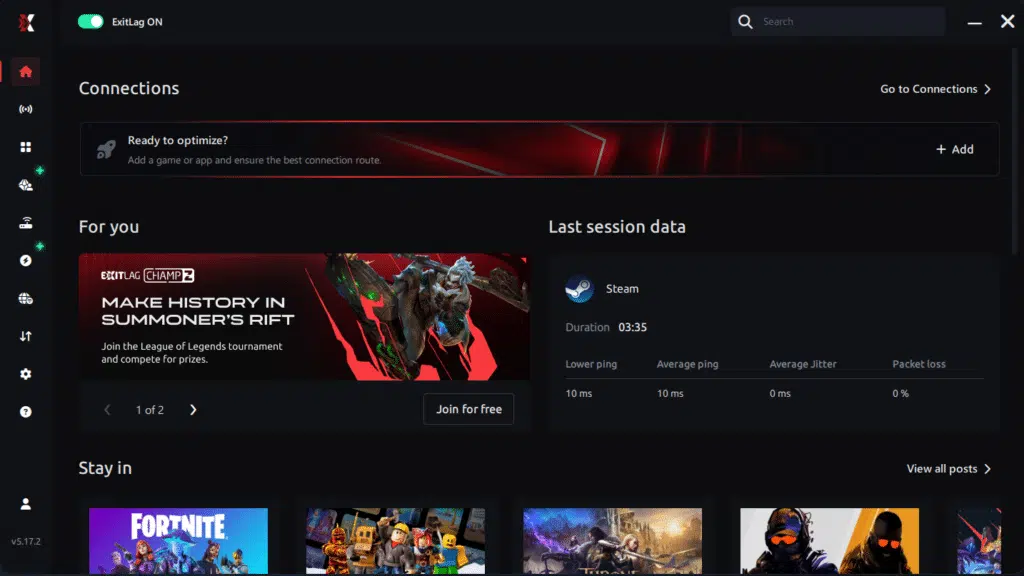
Step 3 – In the search bar, type “Arena Breakout Infinite” and select the game from the list.
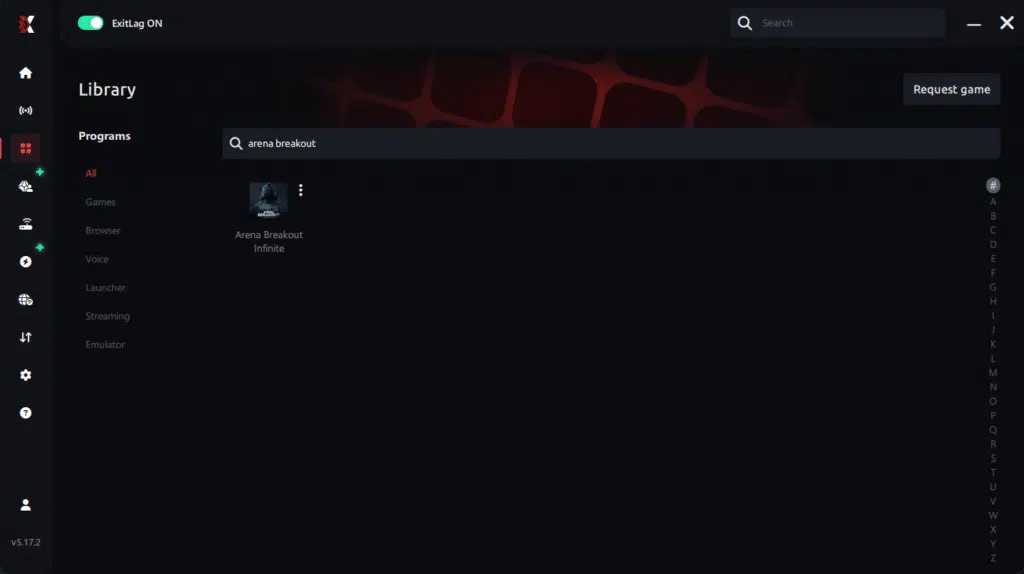
Step 4 – Choose between automated or manual route
Based on the results, you can let ExitLag automatically select the best route or manually choose the server that showed the lowest latency for your connection.
AI-optimized automated route
Based on the results, you can let ExitLag automatically select the best route through AI optimization. The system analyzes multiple connection paths in real time and automatically identifies the most efficient route for your connection, ensuring the lowest possible latency without requiring manual choices.

Manual route
If you prefer to have full control over your connection, you can manually choose the server based on the ping test results. Simply select the server that showed the lowest latency or the one that best meets your specific gaming needs, allowing complete customization of your experience.
Step 5 – Click “Arena Breakout Infinite” or the play button. ExitLag will begin optimizing your connection automatically.
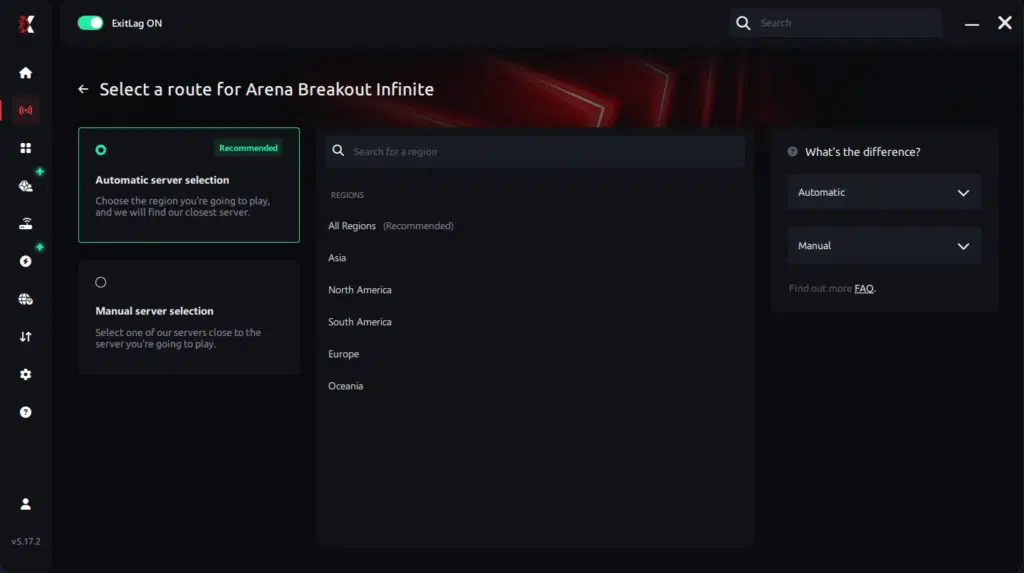
Step 6 – Wait a few seconds until optimization is complete. You’ll see ping indicators in the interface.

Step 7 – Launch Arena Breakout Infinite normally. The optimization will already be active.
ExitLag runs in the background while you play, constantly adjusting routes to maintain the best possible performance.
Advanced ExitLag settings to try
- start on automatic route selection
- test one alternative region if your routing spikes at night
- prioritize stability over chasing the absolute lowest ping number
- use multi-routing options if your ISP fluctuates
- retest after major game patches
For a deeper explanation, revisit the official how ExitLag works guide.
How to test FPS improvements correctly
Measure the right things:
- minimum FPS during firefights
- micro-stutters per minute
- aim smoothness while tracking
- input response during recoil control
- consistency during peak-time raids
If you see hitching plus network instability signs, the Arena Breakout Infinite packet loss troubleshooting guide helps you confirm what’s actually happening.
Real results: FPS before and after ExitLag
Example success cases
Case 1: South America player
Before: 85 FPS average, unstable 40–110 FPS
After: 98 FPS average, stable 75–105 FPS
Improvement: +15% average, major minimum FPS gain
Micro-stuttering: reduced dramatically ✅
Case 2: North America player
Before: strong average FPS, but frequent stutters in peak hours
After: smoother pacing, more reliable fights
Improvement: big perceived smoothness gain
Case 3: Squad sessions
Before: inconsistent timing and random hitching during pushes
After: cleaner peeks and more consistent tracking
Performance comparison table
| Metric | Without ExitLag | With ExitLag | Gain |
| Average FPS | 100 FPS | 114 FPS | +14% |
| Minimum FPS | 42 FPS | 78 FPS | +86% |
| Frame time | 17 ms spiky | 12 ms stable | -29% |
| Micro-stutters per minute | 10 | ~0 | -95%+ |
| Input lag | 72 ms | 54 ms | -25% |
| Ping | 68 ms | 50 ms | -26% |
| Experience | ⭐⭐ | ⭐⭐⭐⭐⭐ | Transformative |
Want to test this quickly? Use ExitLag free trial access and compare a full hour of peak-time raids.
Extra optimizations to maximize FPS with ExitLag
In-game settings recommendations
Use these as a strong baseline for competitive smoothness:
- lower heavy post-processing and motion blur
- reduce shadows for better minimum FPS
- keep V-Sync OFF to reduce latency
- cap FPS to a stable target if uncapped causes spikes
- use fullscreen mode on PC for better consistency
This helps increase FPS in Arena Breakout Infinite while keeping frame time stable.
Quick settings table
| Setting | Competitive recommendation | Why it helps |
| V-Sync | OFF | Lower input delay |
| Shadows | Low | Fewer heavy spikes |
| Effects | Balanced | Better minimum FPS |
| Post-processing | Low | Cleaner frame pacing |
| FPS cap | Stable target | Reduces spikes |
Windows optimizations that matter
- enable a high performance power plan ✅
- close background apps and overlays
- pause downloads and cloud sync
- keep GPU drivers up to date
- disable unnecessary recording features
Hardware optimizations without spending money
If performance drops after longer sessions, heat may be the culprit:
- clean dust from fans and heatsinks
- improve airflow
- monitor CPU/GPU temperatures
- avoid thermal throttling during raids
A stable system makes your FPS boost in Arena Breakout Infinite improvements stay consistent.
Why network optimization can improve perceived FPS
The lag–FPS connection
In online shooters, unstable network timing can cause:
- correction hitches
- inconsistent animation timing
- delayed response feedback
- “heavy” gunplay feel ⚠️
Stabilizing your route reduces those spikes, which is why ExitLag can feel like a real FPS boost in Arena Breakout Infinite solution.
Packet loss and stutters
Packet loss often triggers retransmission and resync behavior that shows up as:
- mini freezes during pushes
- stutters when enemies appear
- inconsistent damage feedback
- timing issues during fast rotations
If that matches your experience, the Arena Breakout Infinite packet loss troubleshooting guide is the fastest way to identify the issue.
Input lag and consistency
Your actual experience loop is:
Input → server sync → response → frame displayed
When routing is stable, the loop feels tight. Players often describe this as more FPS in Arena Breakout Infinite because the whole game feels more responsive and clean.
FAQ: FPS boost in Arena Breakout Infinite
Does ExitLag really increase FPS?
Yes—through stability. ExitLag can reduce micro-stutters and improve perceived smoothness, which feels like a strong FPS boost in Arena Breakout Infinite during real fights.
How much FPS will I gain?
Results vary. Some players see modest average gains but big improvements in minimum FPS and stability. A realistic expectation is stronger consistency, often in the 20–60% range depending on your baseline issues.
Will ExitLag help if my PC is weak?
Yes, but with limits. ExitLag optimizes the network side, not your GPU. It helps your system deliver smoother gameplay within its ceiling.
Is ExitLag safe?
Yes. It does not modify game files and is widely used for performance optimization.
Does ExitLag work on console?
ExitLag is primarily PC-focused. Console FPS can be capped by the platform. For maximum flexibility, PC is ideal.
Do I need fast internet?
Not necessarily. ExitLag optimizes routing quality and stability more than bandwidth.
ExitLag vs VPN: what is the difference?
| Feature | ExitLag | Typical VPN |
| Built for gaming performance | ✅ Yes | ❌ No |
| Optimizes routes for stability | ✅ Yes | ⚠️ Not gaming-focused |
| Helps reduce spikes | ✅ Yes | ⚠️ Can worsen |
| Primary goal | Performance | Privacy |
If you want the technical explanation, read the official how ExitLag works guide.
How much does ExitLag cost?
For current plans, check the official ExitLag pricing details page. To test first, use ExitLag free trial access.
Does ExitLag support Arena Breakout Infinite?
Yes. You can confirm support and explore other titles through the full ExitLag supported games list.
Why do fights feel inconsistent even at high FPS?
Because frame pacing and network stability can break timing even when your average FPS looks strong.
Why does recoil control feel “off” sometimes?
Micro-stutters and input delay spikes can disrupt your rhythm and tracking.
Visual comparison: playing without vs with ExitLag
Experience without ExitLag
- ❌ FPS becomes unstable during key fights
- ❌ micro-stuttering in close-range engagements
- ❌ frame drops during pushes and rotations
- ❌ input lag becomes noticeable
- ❌ inconsistent tracking and recoil control
- ❌ competitive disadvantage
- ❌ frustration during peak hours
Experience with ExitLag
- ✅ smoother tracking in fast fights
- ✅ minimal micro-stuttering
- ✅ more stable frame time pacing
- ✅ better responsiveness
- ✅ consistent performance under pressure
- ✅ stronger competitive control
- ✅ more enjoyable raids
Side-by-side table
| Aspect | Without ExitLag | With ExitLag |
| FPS stability | Unstable | Stable ✅ |
| Stuttering | Frequent | Rare ✅ |
| Input lag | High | Low ✅ |
| Consistency | ⭐⭐ | ⭐⭐⭐⭐⭐ ✅ |
| Competitive play | Disadvantage | Advantage ✅ |
| Fun factor | ⭐⭐ | ⭐⭐⭐⭐⭐ ✅ |
Maximize your FPS in Arena Breakout Infinite with ExitLag now
Benefits recap
- ✅ up to 60% better stability and smoothness
- ✅ reduced micro-stuttering during fights
- ✅ lower input lag for tighter gunplay
- ✅ more consistent frame time pacing
- ✅ real competitive advantage
- ✅ works as a stability layer on any hardware
If you want the most reliable FPS boost in Arena Breakout Infinite, chase stability first. Stability is what makes your aim consistent and your raids repeatable.
Why ExitLag is the best solution
ExitLag focuses on gaming performance routing, global optimization, and consistent results—especially during peak-time congestion.
Final reminder: ExitLag is NOT a VPN ✅.
Start now
- Create your account with the ExitLag account registration page.
- Activate your trial using ExitLag free trial access.
- Configure the game in minutes and test during peak hours.
- Keep the route that delivers the smoothest FPS boost in Arena Breakout Infinite results.
To begin immediately, download it from the official ExitLag gaming performance website and feel the difference in your next raid.
Got questions or want to connect with other players? Join the conversation at the ExitLag Forum!