You jump into Arena Breakout Infinite ready for a tense raid, slow-peek a corner, line up the perfect headshot… and then jitter, fluctuating ping, and connection instability ruin everything. Your shots register late, enemies stutter or teleport, and your character feels like it’s moving through mud instead of reacting to your inputs. In a hardcore extraction shooter where every bullet and every step matters in PvP and ranked-style lobbies, unpredictable delays are often worse than simply having high ping.
If you want to see how many competitive games face the same issue, take a look at the supported titles list on ExitLag supported games list.

What is jitter in Arena Breakout Infinite?
In simple terms, jitter is the irregular variation in your network latency — not just how high your ping is, but how much it jumps over time. Latency measures how long it takes a packet to go from your PC or mobile device to the game servers and back. Jitter shows how inconsistent that time is from one packet to the next.
If your response time goes 50 ms, then 120 ms, then 80 ms, then 150 ms, the game sees unstable timing and starts to feel desynced. Even if your “average” ping doesn’t look terrible, this instability is what causes delayed shots, weird peeks, and messy movement.
Ideally, your ping stays almost flat, with at most 5–10 ms variation between packets. In a fast, tactical shooter like Arena Breakout Infinite, anything beyond that starts to break your rhythm and your ability to predict how long actions will take to reach the server.
How jitter affects your gameplay in Arena Breakout Infinite
Jitter in Arena Breakout Infinite creates very specific, very painful problems, especially in high-stakes raids and competitive firefights:
- Inconsistent command response: Sometimes your shot, lean, or crouch happens instantly; other times there’s a noticeable delay that throws off your timing.
- Unreliable peeks and dodges: Dodges, strafes, and shoulder peeks become unpredictable, making it risky to challenge angles because your character doesn’t react the same way every time.
- Broken shooting rhythm: Your firing tempo, recoil control, and burst patterns are harder to maintain when each click is registered at a slightly different moment.
- Sudden deaths and teleporting enemies: Opponents can appear to “snap” into new positions or rubberband, turning clean trades into confusing deaths.
- Frustration in PvP encounters: In extraction raids where every gear set matters, losing a fight to random delays feels dramatically worse than losing to better aim.
- Wasted consumables and abilities: Heals, stims, and tactical items may land too late or out of sync with what you see on your screen.
- Inconsistent hit registration: Some bullets connect perfectly, while others feel like they disappear, even when crosshair placement is identical.
- Unreliable aim and tracking: When your timing changes every second, muscle memory and crosshair placement become way less effective.
Main causes of jitter in Arena Breakout Infinite
Network congestion
When multiple devices in your home are streaming, downloading, watching videos, or updating games, your packets have to compete for bandwidth. This traffic jam means some packets arrive quickly while others are delayed, creating jitter even if your raw speed is technically “fast enough.”
Unstable routing
Your ISP chooses the route your data takes to reach Arena Breakout Infinite’s servers. If that route changes often or passes through overloaded nodes, the travel time varies constantly. These small but frequent shifts show up as unstable latency and unpredictable firefights.
Unstable Wi-Fi
Wi-Fi is convenient but naturally more fragile than a cable. Walls, distance, neighboring routers, and household electronics all interfere with the signal. Every micro-drop or spike in signal strength becomes latency variation, which you feel as jitter during raids and PvP.
ISP-level issues
Some providers have congested networks, poor peering with certain regions, or misconfigured equipment. Even if a speed test looks fine, the real route between you and the game servers can be shaky. That hidden instability is what makes Arena Breakout Infinite feel fine one second and awful the next.
Distance from the servers
The farther you are from the region you’re playing on, the more routers (hops) your packets must cross. Each hop is a potential slowdown or failure point. Long paths plus heavy traffic almost always result in higher ping and more pronounced jitter.
Game-specific traffic patterns
Arena Breakout Infinite is a tactical extraction shooter with detailed ballistics, audio, and many simultaneous calculations during fights. Big firefights, crowded servers, and high tick data exchange amplify any weaknesses in your network path, making jitter especially noticeable when you push into contested areas.
How to identify and measure jitter in Arena Breakout Infinite
Extended ping test
One of the best ways to spot jitter is to run a long ping test outside the game. Open your terminal or command prompt and send continuous pings to a stable host (such as your router IP or a reliable DNS). If results jump from, say, 30 ms to 110 ms, then down to 60 ms and back up again, you clearly have jitter.
In a healthy connection, the numbers sit close together with only small deviations. Big swings indicate the exact type of variation that later translates into delayed shots and stuttering movement in Arena Breakout Infinite.
In-game signs
Inside Arena Breakout Infinite, you’ll feel jitter even if you don’t stare at the ping display:
- The displayed ping keeps changing instead of staying within a narrow range.
- The game feels inconsistent — sometimes amazingly smooth, sometimes suddenly unplayable, even mid-raid.
- You experience intermittent rubberbanding while moving, especially when turning corners or changing stance.
- Skills or commands (like aiming, leaning, or interacting) have a variable delay; sometimes they feel snappy, other times sluggish.
- The experience feels unstable despite the UI occasionally showing “low” ping, which is the classic sign of hidden jitter.
If you recognize these patterns, your problem isn’t just high latency — it’s unstable latency.
Jitter levels table for Arena Breakout Infinite
Use this reference table to understand how different jitter levels impact your gameplay:
| Jitter level | Ping variation pattern | Effect on Arena Breakout Infinite |
| 0–5 ms | Almost flat line | Ideal stability; peeks, shots, and movement feel perfectly synced. |
| 5–15 ms | Small regular bumps | Playable; minor inconsistencies that most players barely notice. |
| 15–30 ms | Noticeable spikes | You start feeling delayed shots, weird trades, and awkward peeks. |
| 30–50 ms | Frequent, big jumps | Rubberbanding, late lean animations, and unreliable gunfights. |
| 50+ ms | Constant heavy swings | Raids feel random; PvP becomes frustrating and often unplayable. |
Basic solutions to reduce jitter in Arena Breakout Infinite
Prioritize your connection
- Use an Ethernet cable
Avoid Wi-Fi whenever you can. A wired connection drastically reduces interference and instability. - Close background applications
Shut down downloads, streaming services, launchers updating in the background, and heavy browser tabs that consume bandwidth. - Limit other devices on the network
Fewer active devices means more stable bandwidth for Arena Breakout Infinite, especially during intense raids. - Disable automatic updates while playing
System, launcher, and store updates often start suddenly, creating abrupt variation in latency and causing mid-fight spikes. - Update network drivers and router firmware
Keeping drivers and firmware current helps fix known bugs and improves overall response time consistency. - Use game-specific options wisely
Choose the closest region, disable unnecessary background overlays, and avoid cross-region matchmaking if it constantly introduces unstable servers.
Configure QoS on router
Quality of Service (QoS) lets your router prioritize specific types of traffic — like Arena Breakout Infinite packets — over less sensitive data such as downloads or streaming. By tagging your game traffic as high priority, QoS makes sure your packets are processed first, reducing jitter caused by local congestion. It doesn’t magically increase bandwidth, but it massively improves how consistently that bandwidth is used for your firefights.
Check with your ISP
If you’ve optimized your home setup and still suffer random spikes, contact your ISP and describe the instability you’re experiencing during online games. Ask them to:
- Test your line quality and check for noise
- Verify modem and infrastructure status
- Review routing to the regions you play on
Sometimes jitter originates well outside your house, and only your provider can fix those deeper network problems.
ExitLag: the definitive solution to eliminate jitter in Arena Breakout Infinite
What is ExitLag?
ExitLag is a specialized software focused entirely on connection optimization for online games, acting as a smart stabilizer between you and the game servers. Built by gamers who understand how brutal jitter is in tactical shooters, it targets the real problem: the quality and consistency of your route, not just raw speed tests. To understand its core technology in detail, you can explore the official overview at ExitLag technology overview.
ExitLag is designed for PC and mobile gaming, not consoles, where it can directly control and optimize routing. The goal is simple: deliver a more stable connection so your shots, peeks, and movements in Arena Breakout Infinite happen when you expect them to, every time.
How ExitLag eliminates jitter in Arena Breakout Infinite
ExitLag uses its Multi-Internet technology to give you more than just a single fragile route. Instead, it builds intelligent redundancy and real-time optimization into your connection path. If you want a deeper breakdown of this process, check the “how it works” explanation at how ExitLag works.
Here’s what happens under the hood:
- Multiple simultaneous routes
Your data is sent through several optimized paths at once. If one path suffers delay or congestion, others still deliver packets quickly. - Intelligent packet selection
ExitLag automatically selects packets that arrive fastest and discards late ones, smoothing the response time that Arena Breakout Infinite actually sees. - Real-time route optimization
The software continuously monitors all available routes and instantly switches away from any path that starts showing instability. - Reduction of network hops
By shortening the number of routers your packets pass through, ExitLag reduces the number of potential failure points that cause jitter and spikes. - Smart buffering and traffic flow
ExitLag manages packet flow so the game servers receive a steady, controlled stream of data, even if your ISP has minor fluctuations.
The end result is a connection where latency variation is heavily minimized, turning chaotic firefights into predictable experiences where your inputs match what happens on screen.
Advantages of ExitLag for Arena Breakout Infinite players
- Complete ping stabilization
ExitLag focuses on keeping your ping consistent, so your peeks, corners, and gunfights feel fair and predictable from start to finish. - Jitter elimination
With multi-route delivery and smart path selection, ExitLag drastically reduces the spikes that cause delayed shots and teleporting enemies. - Improved timing and reaction
Stable ping means you can actually trust your muscle memory — when you lean, shoot, or retreat, the game reacts in sync with your inputs. - Competitive edge in PvP
In high-risk raids and competitive lobbies, the player with a more stable connection has a tangible advantage in trades and reaction-based duels. - Works on any server region
Whether you’re playing on your local region or joining friends overseas, ExitLag optimizes routes across the globe so you can choose performance over guesswork. - Simple and intuitive interface
You don’t need networking knowledge. Just select Arena Breakout Infinite, apply the optimization, and play with routing handled for you in the background.
Is ExitLag worth using in Arena Breakout Infinite?
ExitLag is especially valuable if you:
- Frequently deal with jitter, ping swings, or weird desync in raids
- Play on distant or international server regions
- Care about performance in competitive or ranked-style environments
- Game during peak hours when your ISP is more congested
- Use Wi-Fi or have a provider known for unstable routing
- Have already tried basic tweaks but still lose fights to unpredictable delays
If any of these scenarios sound like your daily reality, investing in a stabilized route can change how Arena Breakout Infinite feels completely. You can review available plans and options on the official pricing page at ExitLag pricing plans.
How to use ExitLag in Arena Breakout Infinite
The process is extremely simple:
Step 1 – Access the official ExitLag website and download the application. There’s a free trial period for new users.
Step 2 – Install and open the program. Log in with your account.
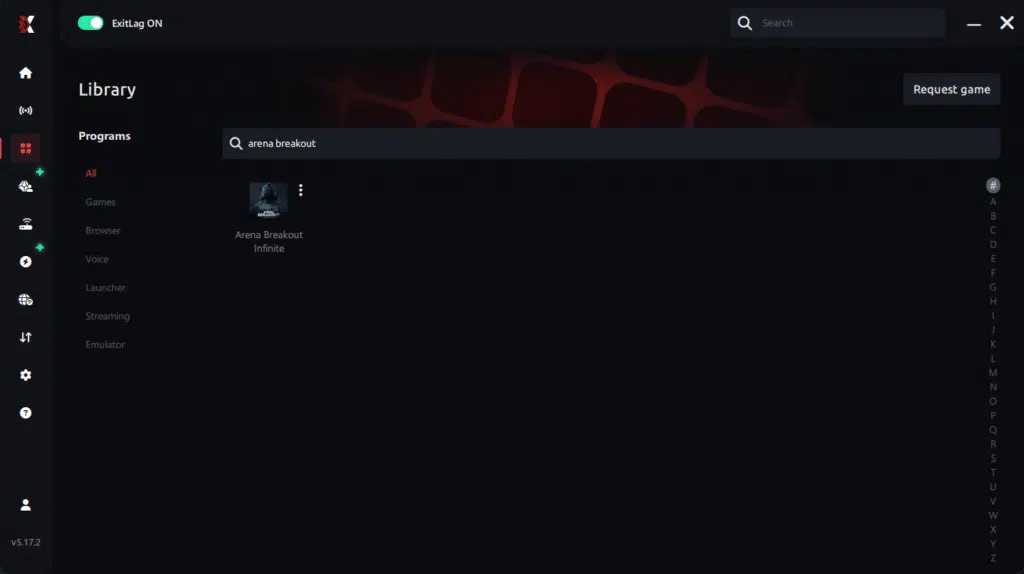
Step 3 – In the search bar, type “Arena Breakout Infinite” and select the game from the list.
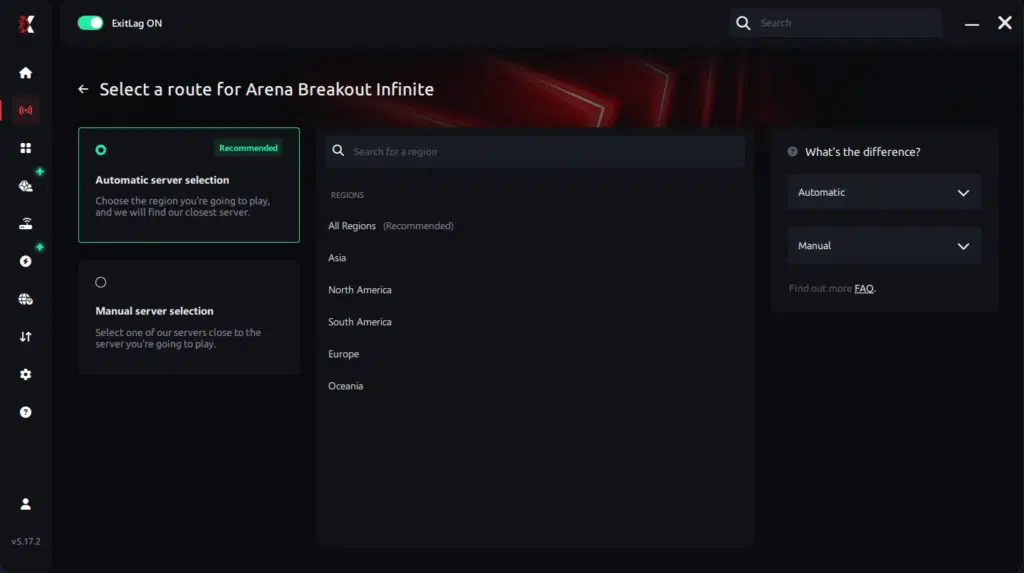
Step 4 – Choose between automated or manual route
Based on the results, you can let ExitLag automatically select the best route or manually choose the server that showed the lowest latency for your connection.
AI-optimized automated route
Based on the results, you can let ExitLag automatically select the best route through AI optimization. The system analyzes multiple connection paths in real time and automatically identifies the most efficient route for your connection, ensuring the lowest possible latency without requiring manual choices.

Manual route
If you prefer to have full control over your connection, you can manually choose the server based on the ping test results. Simply select the server that showed the lowest latency or the one that best meets your specific gaming needs, allowing complete customization of your experience.
Step 5 – Click “Arena Breakout Infinite” or the play button. ExitLag will begin optimizing your connection automatically.
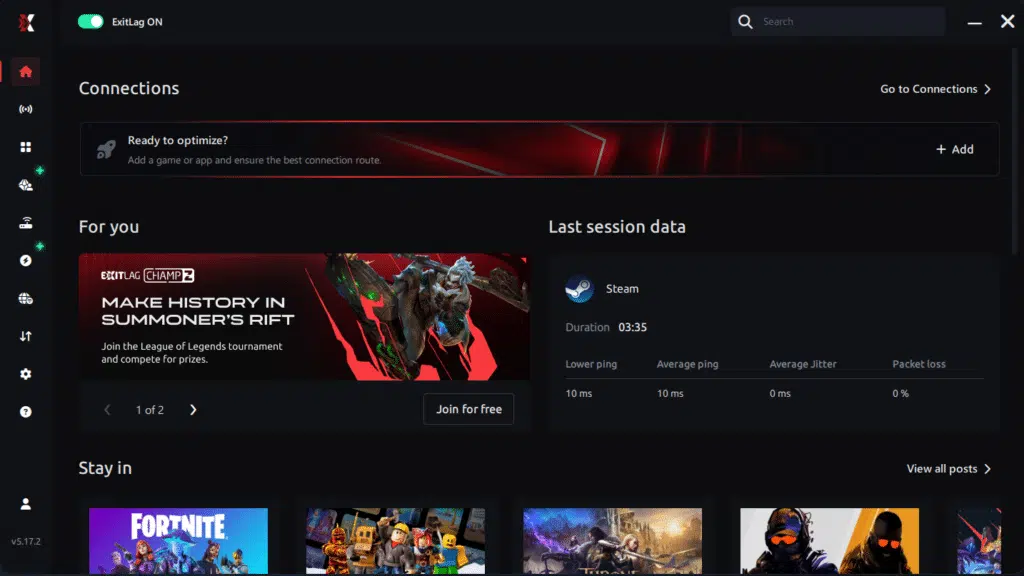
Step 6 – Wait a few seconds until optimization is complete. You’ll see ping indicators in the interface.

Step 7 – Launch Arena Breakout Infinite normally. The optimization will already be active.
ExitLag runs in the background while you play, constantly adjusting routes to maintain the best possible performance.
FAQ: frequently asked questions about jitter in Arena Breakout Infinite
What is the difference between jitter, lag, and packet loss in Arena Breakout Infinite?
Jitter is the variation in ping over time — how unstable your latency is from one moment to the next. Lag is the overall delay between your action (like firing a shot) and the game’s reaction. Packet loss happens when some data never reaches the server at all. You can have low ping but high jitter or packet loss, and that combination still produces a terrible gameplay experience.
Why does my ping keep fluctuating in Arena Breakout Infinite?
Fluctuating ping often comes from network congestion in your home, unstable routing by your ISP, Wi-Fi interference, or multiple devices using heavy bandwidth at once. Distance to the server region also plays a big role. All these factors create the instability you feel as random delays and inconsistent trades.
Is jitter worse than simply having high ping in Arena Breakout Infinite?
In many cases, yes. A stable 100 ms ping is something you can adapt to, because it behaves the same every time you shoot or peek. But if your ping jumps between 30 ms and 150 ms constantly, your brain can’t predict how long actions will take, making raids and PvP fights feel random and unfair.
How can I tell if I specifically have jitter while playing Arena Breakout Infinite?
Watch for signs like inputs sometimes feeling instant and sometimes sluggish, even with similar ping values. Run a long ping test and see how much the results vary. Frequent rubberbanding, delayed lean animations, and inconsistent hit registration are strong indicators that jitter is your main problem.
Does Wi-Fi really cause more jitter in Arena Breakout Infinite?
Yes. Wi-Fi is more vulnerable to interference, physical obstacles, and shared spectrum with neighboring routers. These fluctuations directly create variation in your latency, which shows up as jitter. Using a wired Ethernet cable is one of the simplest and most effective ways to stabilize your connection.
Does ExitLag help with issues other than jitter in Arena Breakout Infinite?
ExitLag is built to stabilize routes, reduce ping, and mitigate packet loss across hundreds of supported games. By optimizing the path your data takes, it improves overall connection reliability, which means fewer spikes, fewer desync moments, and smoother raids and firefights in Arena Breakout Infinite.
Do I need to keep ExitLag running while playing Arena Breakout Infinite?
Yes. ExitLag must stay open so it can continuously monitor and optimize your routes. You can minimize it to the system tray, but if you close it, your traffic will fall back to your default, potentially unstable path.
Why does jitter feel so bad specifically in a tactical extraction shooter like Arena Breakout Infinite?
Because every peek, headshot, and retreat is timing-critical. Even tiny inconsistencies can cause you to lose trades you should have won. Jitter breaks the tight sync between what you see and what the server processes, which is especially punishing in high-risk, full-loot PvP where every mistake has real consequences.

Conclusion
Jitter can turn Arena Breakout Infinite from a tense, tactical masterpiece into a frustrating mess of delayed shots, broken peeks, and confusing deaths. The worst part isn’t just the delay itself — it’s the unpredictability. When your connection is constantly changing, you never know if your next gunfight will feel fair or doomed from the start.
But you don’t have to accept that as normal. By understanding what jitter is, cleaning up your home network, and using intelligent routing tools to stabilize your latency, you can reclaim control over your raids and PvP encounters. For more connection-focused guides, performance tips, and optimization tutorials, make sure to explore the articles available at ExitLag blog connection optimization insights.
A stable, optimized connection lets Arena Breakout Infinite shine the way it was designed: responsive controls, reliable trades, and tense firefights decided by your decisions and aim — not by random spikes and unpredictable lag.
If you’re ready to eliminate jitter, stabilize your ping, and feel the difference in your very next raid, start your ExitLag free trial now and optimize your routes for Arena Breakout Infinite at Start your ExitLag free trial now.
Got questions or want to connect with other players? Join the conversation at the ExitLag Forum!