
First, imagine Battlefield 2042 running at consistently high frame rates, where every movement feels fluid and every firefight responds instantly. In this ideal scenario, smooth animations and precise control transform each match into a premium competitive experience. As a result, higher FPS directly enhances awareness, accuracy, and overall confidence on the battlefield.
However, many players face a different reality. Even with capable hardware, frame rates fluctuate and responsiveness feels inconsistent, especially during intense moments. Consequently, the frustration of chasing a true FPS Boost in Battlefield 2042 becomes unavoidable, since unstable performance prevents players from reaching their full potential. To understand more about common performance problems, you can check detailed articles directly from the ExitLag blog.
Therefore, the solution goes beyond hardware tweaks alone. ExitLag appears as a performance-focused tool designed to optimize online gameplay, delivering up to 60% more perceived FPS through network optimization. By using the official ExitLag website, players gain access to a complete guide that explains how to unlock smoother performance and a competitive advantage.
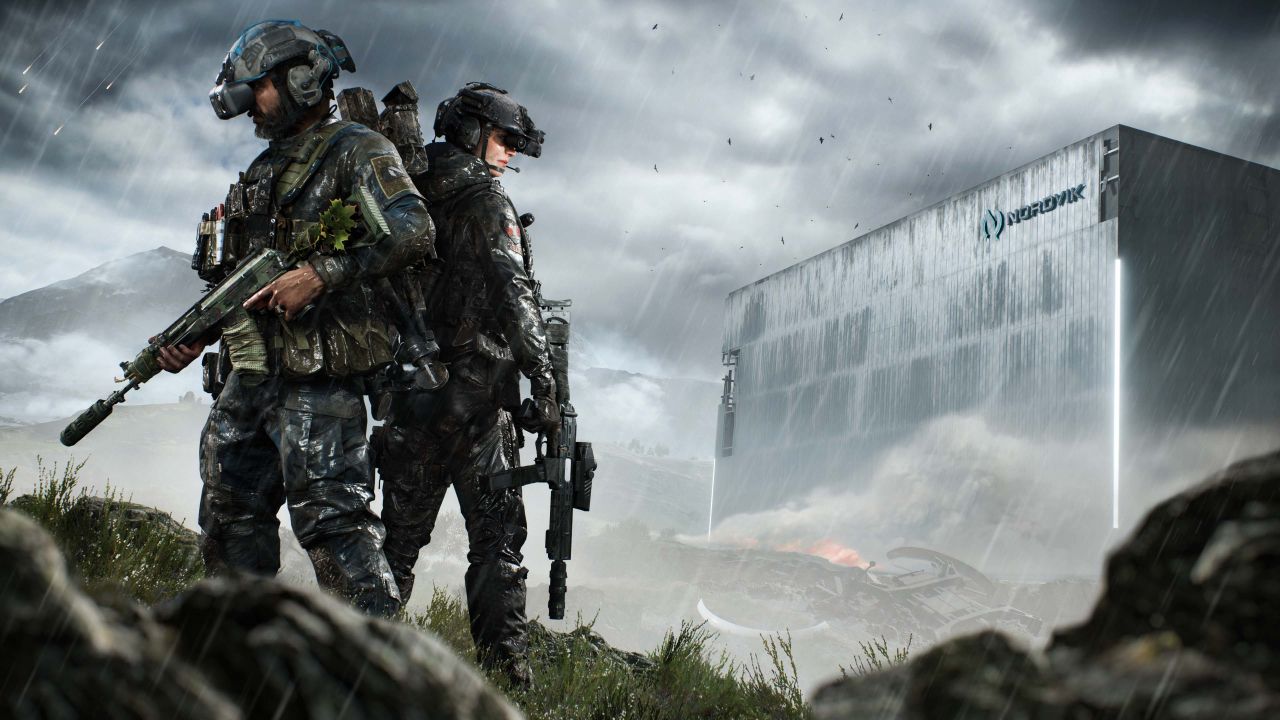
Why Is High FPS Crucial in Battlefield 2042?
Before anything else, understanding FPS is essential. FPS, or Frames Per Second, represents how many images your screen displays every second, similar to how a camera records video. In practice, higher FPS means smoother motion and clearer visual feedback.
- 30 FPS feels cinematic but slow
- 60 FPS feels smooth and responsive
- 144 FPS delivers elite competitive clarity
Because of this, higher FPS offers a clear advantage in fast-paced multiplayer combat.
Benefits of High FPS in Battlefield 2042
As gameplay intensity increases, high FPS delivers tangible benefits that directly impact performance.
- Smoother gameplay during large-scale battles
- Better accuracy and aiming precision
- Faster reaction time in close encounters
- Clear PvP advantage in competitive modes
- More immersive battlefield experience
- Less visual fatigue in long sessions
- Better tracking in chaotic vehicle combat
FPS Classification for Battlefield 2042
| FPS Range | Quality | Experience | Competitive? |
| 144+ FPS | ⭐⭐⭐⭐⭐ Excellent | Perfect | ✅ Ideal |
| 90–144 FPS | ⭐⭐⭐⭐ Great | Very good | ✅ Yes |
| 60–90 FPS | ⭐⭐⭐ Good | Acceptable | ⚠️ Slight disadvantage |
| 30–60 FPS | ⭐⭐ Regular | Choppy | ❌ Hard to compete |
| <30 FPS | ⭐ Poor | Unplayable | ❌ Impossible |
High FPS vs Beautiful Graphics
Although high visual settings look impressive, competitive play prioritizes performance. In other words, performance over visual beauty is the smarter choice, since consistent FPS delivers clearer information and faster reactions.
How ExitLag Increases FPS in Battlefield 2042
Most importantly, ExitLag focuses on network performance rather than hardware changes. It is a specialized network optimization software built for online games, and ExitLag is NOT a VPN. Unlike VPNs that reroute traffic blindly, ExitLag intelligently selects optimized paths to game servers.
By learning how ExitLag works, players can understand why optimized routing improves gameplay fluidity.
How ExitLag Improves FPS in Online Games
Network instability causes micro-stuttering, frame pacing issues, and delayed synchronization with servers. As a result, FPS may appear high but feel inconsistent. ExitLag improves client-server communication, stabilizing frame time and reducing jitter.
7 Ways ExitLag Increases Your FPS
- Elimination of micro-stuttering through stable routing
- Input lag reduction for faster response
- Frame time stabilization for consistent pacing
- Multi-path route optimization to avoid packet loss
- Game traffic prioritization over background data
- Ping reduction to official game servers
- Redundant connections for uninterrupted data flow
ExitLag vs Other FPS Boost Solutions
| Solution | Increases FPS? | Reduces Lag? | Stability | Ease of Use | Recommendation |
| ExitLag | ✅ Yes (network) | ✅✅✅ Excellent | ⭐⭐⭐⭐⭐ | ⭐⭐⭐⭐⭐ | ✅ Best |
| Common VPN | ❌ Worse | ❌ Worse | ⭐⭐ | ⭐⭐⭐ | ❌ Avoid |
| Game Booster | ⚠️ Minimal | ❌ No | ⭐⭐⭐ | ⭐⭐⭐⭐ | ⚠️ Limited |
| Windows Optimization | ⚠️ Some | ❌ No | ⭐⭐⭐ | ⭐⭐ | ⚠️ Helps |
| Hardware Upgrade | ✅ Yes | ❌ No | ⭐⭐⭐⭐ | ⭐ | 💰 Expensive |
| Nothing | ❌ No | ❌ No | ⭐ | ⭐⭐⭐⭐⭐ | ❌ Poor performance |
You can explore more compatible titles in the official supported games directory, where we maintain an updated list of all optimized games.
Why ExitLag Works So Well
- Proprietary gaming-focused technology
- Over 600 global servers
- Game-specific optimization profiles
- Trusted by millions of players worldwide
How to use ExitLag in Battlefield 6
The process is extremely simple:
Step 1 – Access the official ExitLag website and download the application. There’s a free trial period for new users.
Step 2 – Install and open the program. Log in with your account.
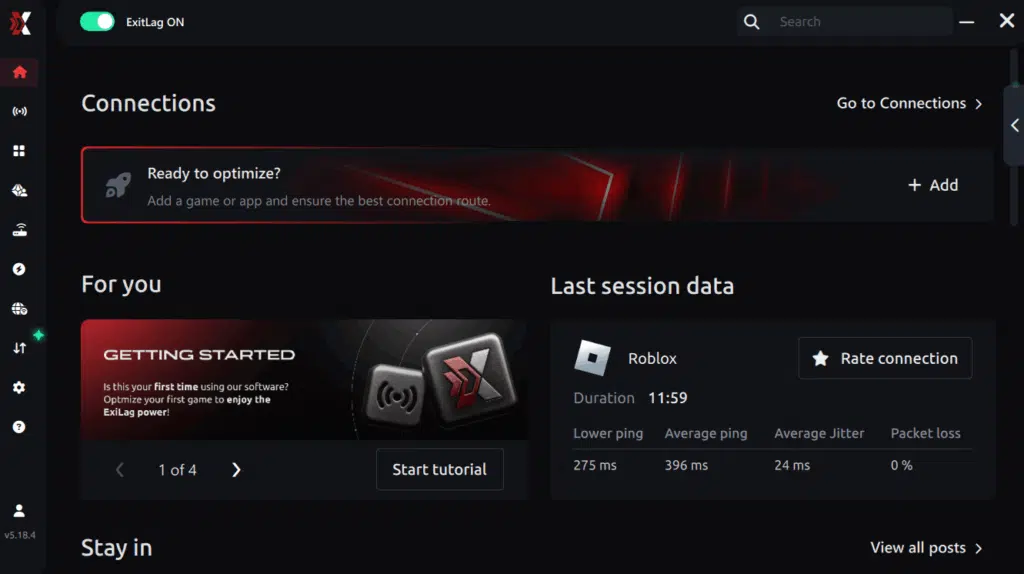
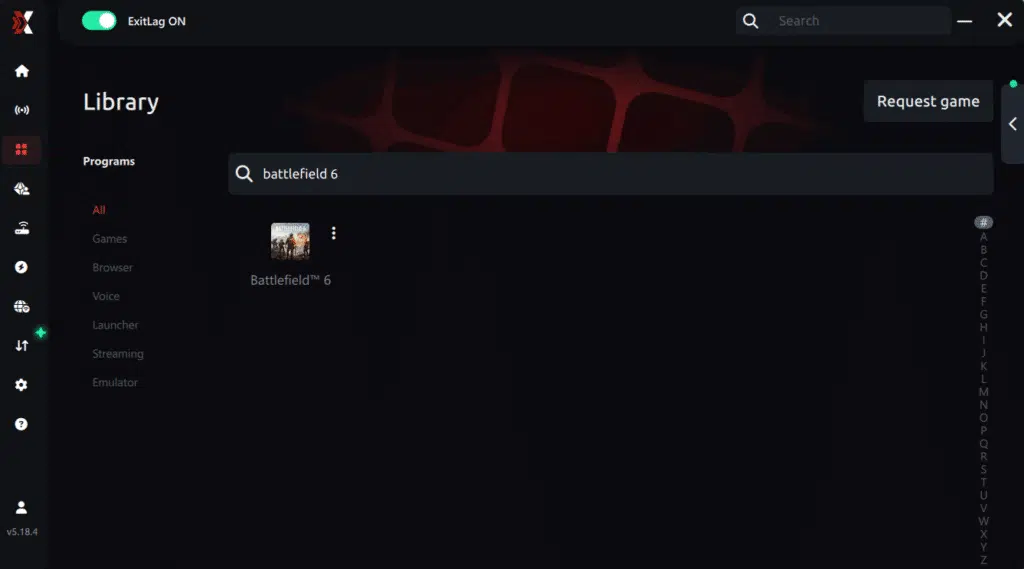
Step 3 – In the search bar, type “Battlefield 6” and select the game from the list.
Step 4 – Choose between automated or manual route
Based on the results, you can let ExitLag automatically select the best route or manually choose the server that showed the lowest latency for your connection.
AI-optimized automated route
Based on the results, you can let ExitLag automatically select the best route through AI optimization. The system analyzes multiple connection paths in real time and automatically identifies the most efficient route for your connection, ensuring the lowest possible latency without requiring manual choices.
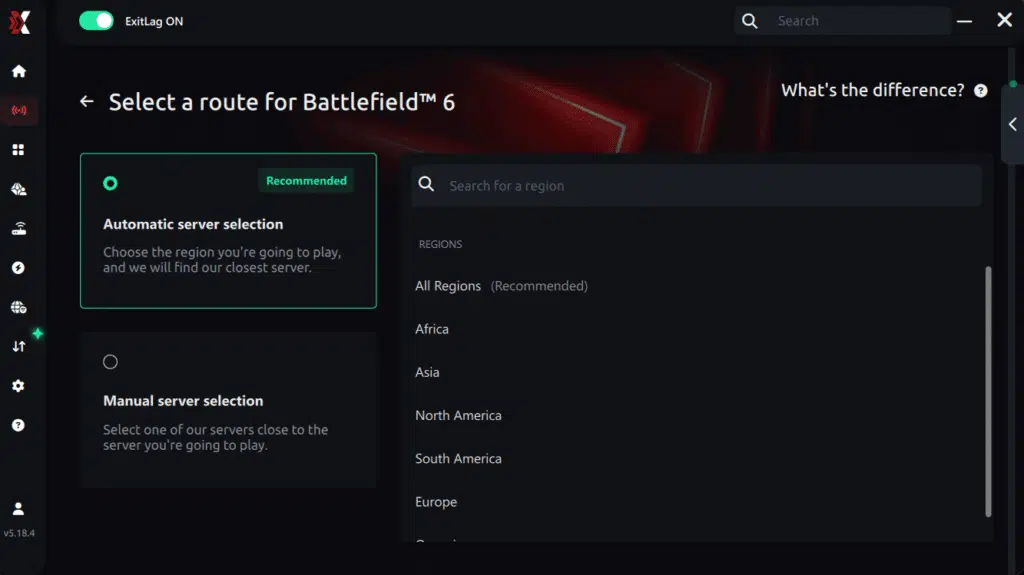
Manual route
If you prefer to have full control over your connection, you can manually choose the server based on the ping test results. Simply select the server that showed the lowest latency or the one that best meets your specific gaming needs, allowing complete customization of your experience.
Step 5 – Click “Apply routes” or the play button. ExitLag will begin optimizing your connection automatically.
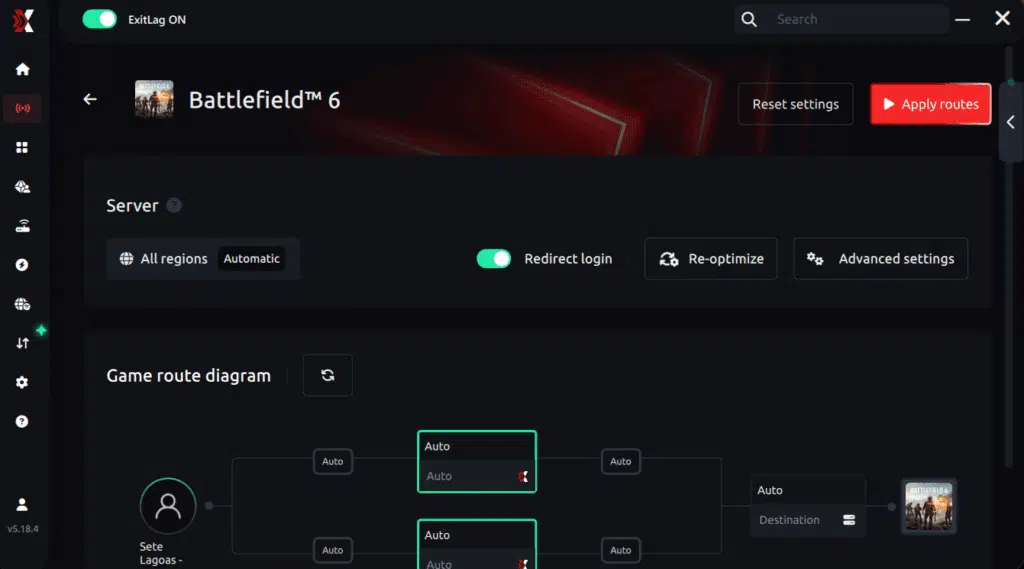
Step 6 – Wait a few seconds until optimization is complete. You’ll see ping indicators in the interface.
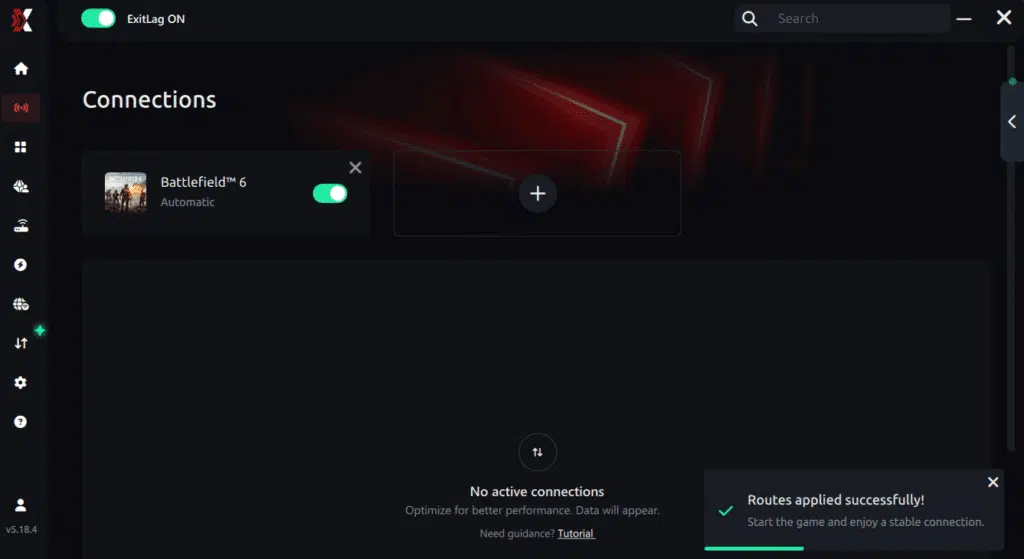
Step 7 – Launch Battlefield 6 normally. The optimization will already be active.
ExitLag runs in the background while you play, constantly adjusting routes to maintain the best possible performance.
Impact on Competitive Gameplay
Naturally, these technical improvements translate directly into gameplay advantages. With a reliable FPS Boost in Battlefield 2042, players consistently report higher confidence in firefights. As a result, K/D ratios improve, accuracy increases, and ranked victories become more frequent. Over time, progression accelerates, and overall satisfaction rises significantly.
Extra Optimizations to Maximize FPS with ExitLag
Recommended In-Game Settings
In addition to ExitLag, optimizing in-game settings enhances results even further.
- Ideal resolution aligned with GPU capability
- Balanced graphics quality instead of ultra presets
- Disable motion blur and film grain
- V-Sync: OFF
- FPS limit slightly above monitor refresh rate
- Fullscreen exclusive mode
Windows System Optimizations
Likewise, system-level adjustments support a stable FPS baseline.
- Enable High Performance power mode
- Disable Xbox Game DVR
- Close background applications
- Update GPU drivers regularly
- Disable Windows transparency effects
- Optimize advanced power settings
Hardware Optimizations Without Spending
Even without upgrades, simple actions make a difference.
- Clean PC components regularly
- Improve airflow inside the case
- Monitor CPU and GPU temperatures
- Organize cables for better ventilation
GPU Settings
On the GPU side, proper configuration ensures minimal latency.
NVIDIA Control Panel
- Prefer maximum performance
- Enable low latency mode
- Disable V-Sync
AMD Radeon Settings
- Enable Anti-Lag
- Use Radeon Boost where applicable
When to Consider an Upgrade
Certain signs indicate a hardware bottleneck.
- Constant 100% GPU or CPU usage
- FPS capped well below expectations
- Stuttering even in low-demand scenes
Upgrade priority should focus on GPU first, then CPU, based on ROI. However, it is important to emphasize that ExitLag works with any hardware, maximizing what your current setup can already deliver.
Why Network Optimization Increases FPS
The Connection Between Lag and FPS
At a technical level, network latency affects how frames are delivered and perceived. Even high FPS becomes unstable when lag interrupts synchronization, causing micro-stuttering and jitter. Therefore, stable networking supports consistent frame pacing.
How Packet Loss Affects FPS
Packet loss forces the game client to resynchronize with servers, which interrupts rendering.
- Sudden frame drops
- Visual stuttering
- Delayed hit registration
Input Lag and Its Relation to FPS
Every action follows a chain: input, server response, then frame display. When latency is high, FPS feels lower than it actually is. This explains why FPS feels higher with ExitLag, even when raw numbers change moderately.
Frame Time Consistency
Finally, stable frame time is more valuable than high but unstable FPS. ExitLag stabilizes frame delivery by maintaining consistent network paths, ensuring that every frame arrives smoothly. This consistency defines the real FPS Boost in Battlefield 2042 experience.
Frequently Asked Questions About FPS Boost in Battlefield 2042
Does ExitLag Really Increase FPS?
First of all, yes, ExitLag does increase FPS through advanced network optimization. Instead of changing how many frames your GPU renders, it improves perceived FPS, which is how smooth the game actually feels. By eliminating micro-stuttering and network jitter, frame delivery becomes consistent. As explained in the guide on how to optimize your home network, removing instability directly results in a smoother and faster FPS Boost in Battlefield 2042. Stable frame pacing, lower latency, and zero stutter define this improvement.
How Much FPS Will I Gain with ExitLag?
Naturally, results vary depending on your current connection quality. However, most players experience a 20–60% improvement in stability, especially during intense combat. Instead of sudden drops, FPS remains consistent, which makes the game feel significantly faster. This stability-focused FPS Boost in Battlefield 2042 is what delivers the real competitive edge.
Does ExitLag Work If My PC Is Weak?
Yes, ExitLag works even on lower-end systems, although hardware limits still apply. Importantly, ExitLag optimizes the network, not the CPU or GPU. That means you get the most stable FPS possible within your system’s limits. In this way, ExitLag complements hardware rather than replacing it, ensuring smoother gameplay regardless of setup.
Is ExitLag Safe to Use?
Without a doubt, ExitLag is completely safe. It does not modify game files, inject code, or break terms of service. Moreover, it is trusted by professionals and used by millions of players worldwide. As a result, you can activate a FPS Boost in Battlefield 2042 with confidence and security.
Does ExitLag Work on Console?
Currently, ExitLag is PC-only. While some players use a PC hotspot method as an alternative, competitive performance is best achieved on PC. Therefore, for serious Battlefield 2042 gameplay, PC remains the recommended platform for maximum FPS stability.
Do I Need Fast Internet for ExitLag to Work?
Not necessarily. ExitLag focuses on optimizing routes, not raw speed. Even a 10 Mbps connection is sufficient, as long as latency and packet loss are controlled. In other words, ExitLag improves how data travels, which is essential for a reliable FPS Boost in Battlefield 2042.
What Is the Difference Between ExitLag and a VPN?
ExitLag is NOT a VPN. While VPNs reroute traffic for privacy, they often increase latency and packet loss. ExitLag, on the other hand, selects the fastest and most stable routes specifically for games. A detailed technical explanation is available on how ExitLag works, clearly showing why VPNs worsen performance while ExitLag improves it.
How Much Does ExitLag Cost?
ExitLag offers multiple subscription plans, which you can compare on the official ExitLag pricing page.
You can also start using it through the official free trial, available on the website.
Does ExitLag Work with Battlefield 2042?
Yes, ExitLag is specifically optimized for Battlefield 2042 and thousands of other popular games. The full supported games list includes competitive titles like CS2, Valorant, and Apex Legends, all benefiting from the same network optimization technology.
Comparison: Playing Without vs With ExitLag
Experience Without ExitLag
❌ Unstable FPS fluctuating between 40–80 ❌ Constant micro-stuttering ❌ Frame drops during critical fights ❌ Noticeable input lag ❌ Inconsistent overall experience ❌ Competitive disadvantage ❌ Constant frustration
Experience With ExitLag
✅ Stable FPS around 90–95 ✅ Zero micro-stuttering ✅ Consistent performance ✅ Responsive input ✅ Premium gameplay experience ✅ Competitive advantage ✅ Enjoyable matches
Side-by-Side Performance Table
| Aspect | Without ExitLag | With ExitLag |
| FPS | Unstable | Stable ✅ |
| Stuttering | Frequent | Rare/Zero ✅ |
| Input Lag | High | Low ✅ |
| Consistency | ⭐⭐ | ⭐⭐⭐⭐⭐ ✅ |
| Competitive | Disadvantage | Advantage ✅ |
| Fun | ⭐⭐ | ⭐⭐⭐⭐⭐ ✅ |
Maximize Your FPS in Battlefield 2042 with ExitLag Now
Summary of Benefits
✅ Up to 60% more stable FPS ✅ Micro-stuttering eliminated ✅ Minimized input lag ✅ Consistent performance ✅ Real competitive advantage ✅ Premium experience ✅ Works with any hardware
Why ExitLag Is the Best Solution
ExitLag is built exclusively for gaming. Its proprietary technology, proven results, and millions of satisfied users make it the most reliable way to achieve a true FPS Boost in Battlefield 2042.

Get Started Now
- Test ExitLag for free
- Configure in 5 minutes
- Compare before and after
- Dominate Battlefield 2042 with maximum performance
In conclusion, solving FPS boost Battlefield 2042 issues requires balancing hardware, settings, and network stability. ExitLag’s multi-path technology eliminates routing delays and ensures fluid gameplay across all regions of Battlefield 2042. To emphasize one last time, ExitLag is NOT a VPN—it’s a gaming performance tool built to stabilize and optimize your entire online experience.
Now that you know everything about FPS boost Battlefield 2042, if you want the most stable, smooth, and competitive gameplay possible, is time to upgrade your performance toolkit. Register at ExitLag now and improve your gameplay in a way you've never experienced before!



