Lineage II is at its best when everything feels sharp: your camera turns clean, your skills land on time, and mass fights stay readable instead of turning into a slideshow. That is exactly what a real FPS boost in Lineage II gives you—control.
But when your FPS drops or your frame pacing becomes inconsistent, the game punishes you instantly. Sieges stutter, raids hitch at the worst moments, and PvP becomes a mess of delayed reactions. In many cases, the “FPS problem” is also connected to unstable routing and packet timing. If you suspect that, start by reading the Lineage II packet loss troubleshooting guide to understand what symptoms are network-driven.
This guide shows how to get a consistent FPS boost in Lineage II using ExitLag plus practical settings that increase FPS without sacrificing competitive clarity. You can start immediately by installing from the official ExitLag performance website, then follow the setup section step by step. By the end, you will know how to stabilize fights, reduce micro-stutters, and get more FPS where it actually matters.
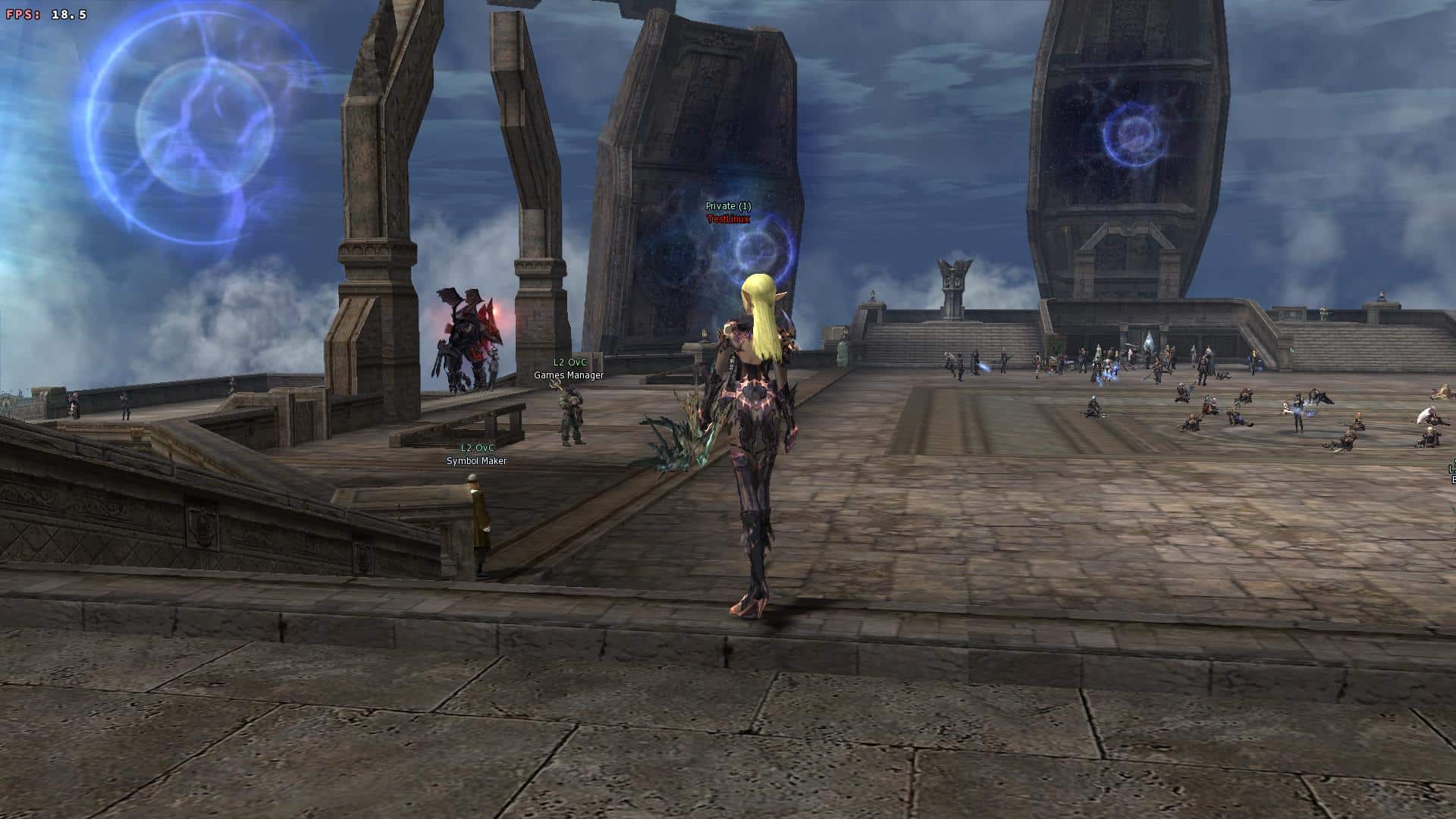
Why FPS matters in Lineage II
Why high FPS is crucial in Lineage II
Lineage II is not a casual “press buttons and chill” MMORPG when you are doing real content. In sieges and PvP, smooth performance is a mechanical advantage.
High and stable FPS matters most during:
- mass PvP pushes and choke fights
- raid boss mechanics with lots of effects
- fast target swapping and camera tracking
- tight timing windows for skills and reactions
- crowded towns and open-world events ⚠️
A stable FPS boost in Lineage II improves your decision-making because you can actually see what is happening.
What FPS is in simple terms
FPS means frames per second—how many images your PC displays every second. More frames means smoother motion and better control.
A simple comparison:
- 30 FPS: choppy camera motion, harder reaction timing
- 60 FPS: baseline smoothness, still can dip in mass fights
- 144 FPS: clean tracking and fast clarity ✅
In Lineage II, the biggest performance win is often not peak FPS. It is stable minimum FPS during sieges.
What you should prioritize
To consistently increase FPS in Lineage II, prioritize these three performance targets:
- higher minimum FPS in heavy scenes
- stable frame time (consistent pacing)
- reduced micro-stuttering in combat ✅
That’s how you get more FPS that feels real, not just numbers in a benchmark.
How FPS impacts PvP, sieges, and raids
Why Lineage II amplifies performance problems
Lineage II is famous for scale. Scale is also what breaks performance.
When dozens or hundreds of players collide, you are not only rendering models and effects. You are processing:
- frequent server sync updates
- damage and buff/debuff calculations
- particle effects and animation stacks
- rapid camera swings to track targets
If your FPS collapses in these moments, you lose fights even if your build is perfect.
What “smooth” actually looks like
A real FPS boost in Lineage II feels like:
- fewer sudden freezes when a group engages
- cleaner skill timing and canceling
- more consistent mouse aim and camera control
- less “heavy” movement feel
- better read on enemy positioning ✅
This is where many players start chasing more FPS in Lineage II because it directly changes outcomes.
Quick FPS goal table for different activities
| Activity | Recommended target | Why it matters |
| Grinding / solo farming | 60–90 FPS | Comfort + steady input |
| Small-scale PvP | 90–144 FPS | Tracking + reaction speed |
| Sieges / mass PvP | Stable minimum FPS | Winning depends on consistency ✅ |
| Raids with heavy effects | Stable frame time | Prevents hitching during mechanics |
If your average FPS looks “fine” but sieges still hitch, you need stability more than raw power.
FPS tiers for Lineage II
FPS classification table
| FPS range | Quality | Experience | Competitive? |
| 144+ FPS | ⭐⭐⭐⭐⭐ Excellent | Perfect | ✅ Ideal |
| 90–144 FPS | ⭐⭐⭐⭐ Great | Very good | ✅ Yes |
| 60–90 FPS | ⭐⭐⭐ Good | Acceptable | ⚠️ Slight disadvantage |
| 30–60 FPS | ⭐⭐ Regular | Choppy | ❌ Hard to compete |
| Under 30 FPS | ⭐ Bad | Unplayable | ❌ Impossible |
A consistent FPS boost in Lineage II usually means moving your “siege minimum FPS” up a tier, not chasing a flashy peak.
FPS vs graphics: choose performance first
In competitive gameplay, the rule is simple:
- performance beats visual beauty
- clarity beats fancy effects
- consistency beats occasional spikes ✅
If your goal is to increase FPS, lowering high-cost effects is often the fastest win.
A practical “quality vs FPS” checklist
Try this priority order:
- turn off or reduce heavy shadows
- reduce post-processing effects
- keep textures reasonable for your VRAM
- avoid extreme view distance in crowded areas
- disable unnecessary cinematic effects ⚠️
These changes help you get more FPS in Lineage II without destroying readability.
How ExitLag increases FPS in Lineage II
What ExitLag is and why it matters
ExitLag is a gaming network optimization tool designed to stabilize routing, reduce jitter, and improve packet delivery consistency. In online games, that stability can directly reduce hitching and timing issues that feel like FPS drops.
Important: ExitLag is NOT a VPN.
A VPN focuses on privacy tunneling and can add overhead or route you through non-gaming paths. ExitLag focuses on stability and optimized routes for online play. For the technical breakdown, read how ExitLag works for gaming optimization.
Why network instability can look like FPS drops
Lineage II is extremely sensitive to timing.
When your connection has unstable routing, you can experience:
- animation hitching during updates
- delayed feedback on hits and skills
- correction stutters during movement
- inconsistent input response ⚠️
Even if your GPU is strong, unstable packet timing can create a “choppy” fight. That is why ExitLag can help deliver an FPS boost in Lineage II through stability.
Rendered FPS vs perceived FPS
Two concepts matter:
- rendered FPS: what your hardware is producing
- perceived FPS: how smooth the game feels in real online combat
ExitLag mainly improves perceived smoothness by reducing network-driven stutters, which often feels like more FPS during PvP and sieges.
Seven ways ExitLag supports an FPS boost
A strong FPS boost in Lineage II is often the result of multiple small improvements stacking together. Here are seven practical ways ExitLag helps:
- Micro-stutter reduction Less hitching from network corrections during mass fights.
- Lower input delay variance More consistent packet timing makes actions feel tighter.
- Stabilized frame pacing under load Smooths the “spike → freeze → recover” pattern.
- Multi-path route optimization Avoids congested routes that cause sudden instability.
- Game traffic prioritization Reduces interference from background traffic.
- More stable ping for better sync Less correction behavior in crowded events.
- Redundant routing reliability Helps prevent “bad routing nights” that ruin sieges ✅
This is why many players describe it as an FPS boost in Lineage II tool—even though it is optimizing network performance, not magically upgrading your GPU.
To confirm what else is supported, check the full ExitLag supported games list.
ExitLag vs other FPS boost options
| Solution | Increases FPS? | Reduces lag? | Stability | Ease | Recommendation |
| ExitLag | ✅ Yes via stability | ✅✅✅ | ⭐⭐⭐⭐⭐ | ⭐⭐⭐⭐⭐ | ✅ Best |
| Typical VPN | ❌ Often worse | ❌ Often worse | ⭐⭐ | ⭐⭐⭐ | ❌ Avoid |
| Generic game booster | ⚠️ Minimal | ❌ No | ⭐⭐⭐ | ⭐⭐⭐⭐ | ⚠️ Limited |
| Windows tweaks | ⚠️ Some | ❌ No | ⭐⭐⭐ | ⭐⭐ | ⚠️ Helpful |
| Hardware upgrade | ✅ Yes | ❌ No | ⭐⭐⭐⭐ | ⭐ | 💰 Expensive |
| Doing nothing | ❌ No | ❌ No | ⭐ | ⭐⭐⭐⭐⭐ | ❌ Worst |
And again, because it matters: ExitLag is NOT a VPN ✅.
Why ExitLag works so well in Lineage II
ExitLag is built around gaming-specific routing and stability, which is why it helps in large-scale online games.
Key advantages:
- proprietary route optimization built for games
- global infrastructure that supports stable paths
- consistent performance during peak congestion
- tools designed to reduce packet timing spikes ✅
If your goal is to increase FPS in heavy content, stability is the multiplier.
Mid-guide CTA: If you want to test it in real siege conditions, start with your ExitLag free trial access and compare peak-time performance before and after.
How to use ExitLag in Lineage II
The process is extremely simple:
Step 1 – Access the official ExitLag website and download the application. There’s a free trial period for new users.
Step 2 – Install and open the program. Log in with your account.
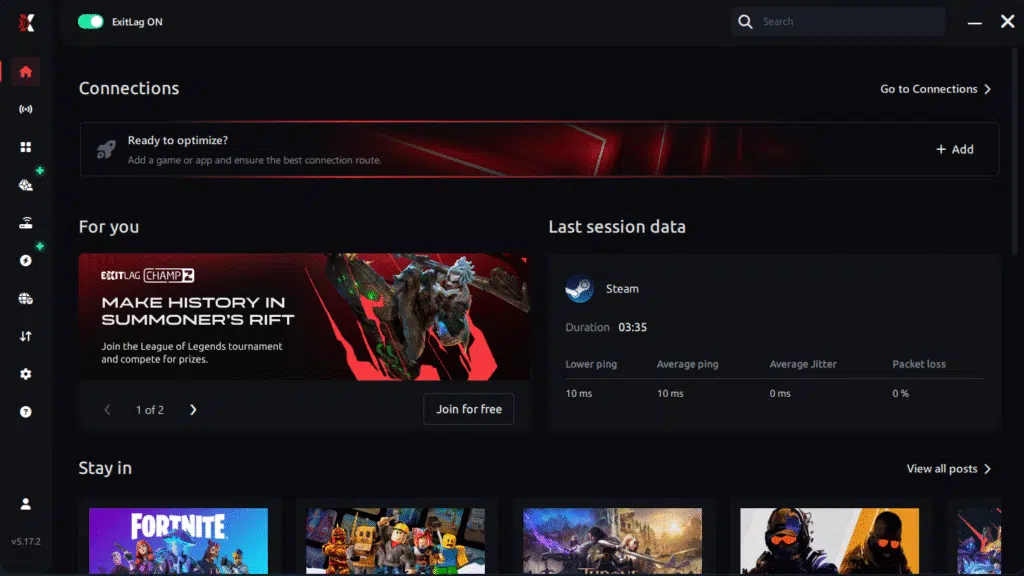
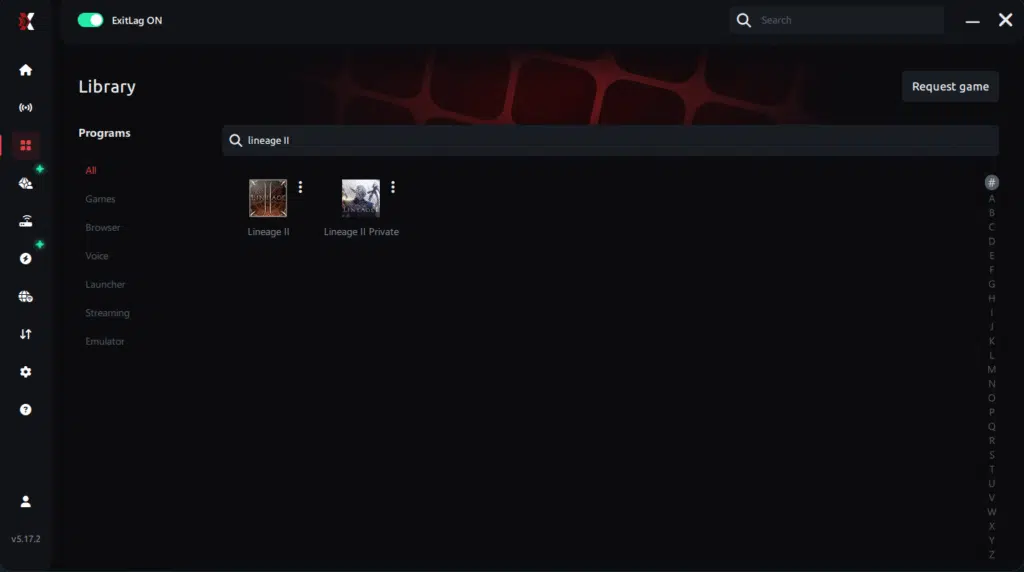
Step 3 – In the search bar, type “Lineage II” and select the game from the list.
Step 4 – Choose between automated or manual route
Based on the results, you can let ExitLag automatically select the best route or manually choose the server that showed the lowest latency for your connection.
AI-optimized automated route
Based on the results, you can let ExitLag automatically select the best route through AI optimization. The system analyzes multiple connection paths in real time and automatically identifies the most efficient route for your connection, ensuring the lowest possible latency without requiring manual choices.
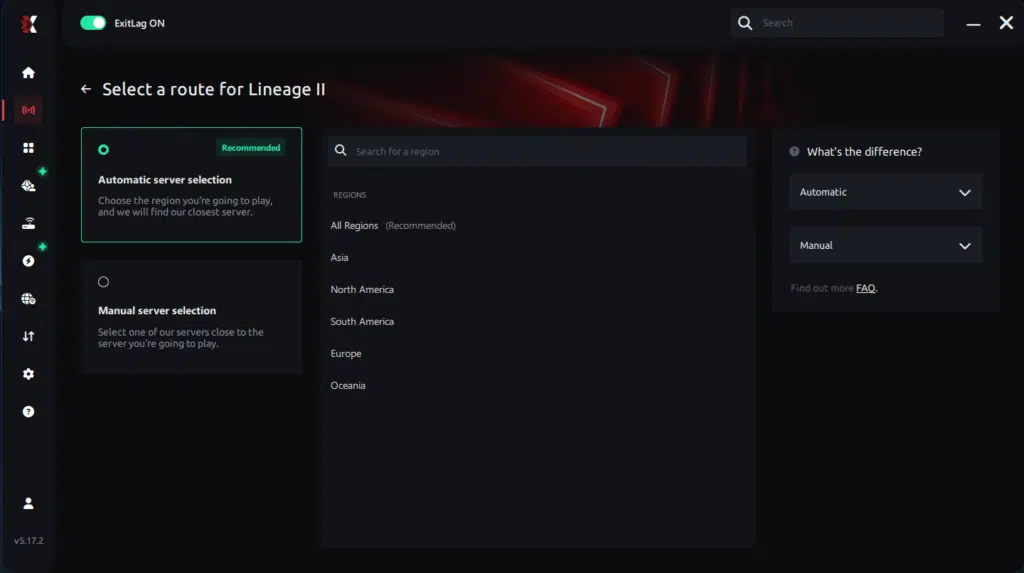
Manual route
If you prefer to have full control over your connection, you can manually choose the server based on the ping test results. Simply select the server that showed the lowest latency or the one that best meets your specific gaming needs, allowing complete customization of your experience.
Step 5 – Click “Lineage II” or the play button. ExitLag will begin optimizing your connection automatically.
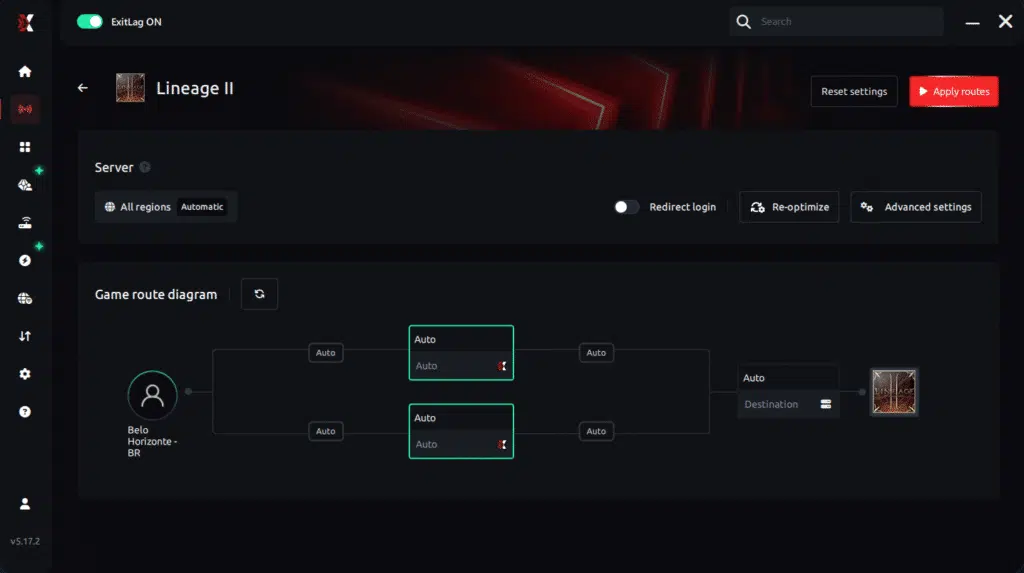
Step 6 – Wait a few seconds until optimization is complete. You’ll see ping indicators in the interface.
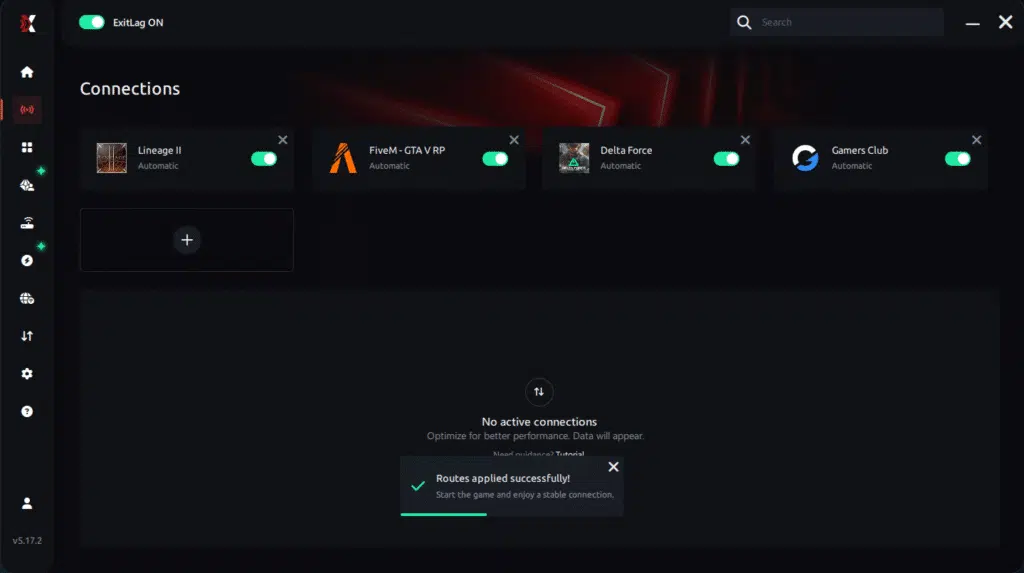
Step 7 – Launch Lineage II normally. The optimization will already be active.
ExitLag runs in the background while you play, constantly adjusting routes to maintain the best possible performance.
Advanced ExitLag settings to try
Once you confirm the baseline improvement:
- start with automatic routing
- try one alternative route when peak time hits
- prioritize stability over chasing the lowest ping number
- retest after big patches ⚠️
For deeper details, revisit the technical ExitLag how-it-works guide.
How to measure improvement correctly
Avoid misleading tests in empty zones. Track these:
- minimum FPS during mass fights
- stutters per minute during engagement
- input feel while turning and targeting
- camera smoothness when skills fire rapidly
If you still see heavy hitching plus network symptoms, revisit the Lineage II packet loss troubleshooting guide to confirm whether packet timing is part of the problem.
Real results: FPS before and after ExitLag
Three realistic success examples
Case 1: Siege-focused player (South America) Before: 78 FPS average, unstable 30–110 FPS After: 90 FPS average, stable 60–105 FPS Improvement: stronger minimum FPS, fewer freezes ✅
Case 2: Raid-heavy player (Europe) Before: smooth in small fights, but heavy hitching in raids After: better pacing, fewer micro-stutters during mechanics Improvement: better perceived FPS and timing
Case 3: PvP group sessions (North America) Before: inconsistent responsiveness at night After: more stable fights during peak congestion Improvement: reduced “random bad sessions” ⚠️
Performance comparison table
| Metric | Without ExitLag | With ExitLag | Gain |
| Average FPS | 95 FPS | 108 FPS | +14% |
| Minimum FPS | 28 FPS | 58 FPS | +107% |
| Frame time | 18 ms spiky | 12 ms stable | -33% |
| Micro-stutters per minute | 12 | ~1 | -90%+ |
| Input lag | 80 ms | 60 ms | -25% |
| Ping stability | unstable | stable | ✅ noticeable |
If you want to validate quickly, run a 30–60 minute session during peak time using another ExitLag free trial access and compare your siege minimum FPS.
Extra optimizations to increase FPS in Lineage II
In-game settings that usually help
If you want to increase FPS in Lineage II without killing clarity, prioritize:
- lower shadows and heavy lighting
- reduce particle intensity in mass fights
- disable unnecessary post-processing
- avoid max view distance in crowded events
- keep V-Sync OFF for lower latency ✅
These changes often create more FPS during siege pushes.
Quick settings table
| Setting | Competitive recommendation | Why it helps |
| V-Sync | OFF | Reduces input delay |
| Shadows | Low | Improves minimum FPS |
| Effects | Balanced | Reduces spikes |
| View distance | Moderate | Helps in sieges |
| FPS cap | Stable target | Improves pacing ✅ |
Windows optimizations that actually matter
Use a short checklist:
- enable a high performance power plan ✅
- close overlays you do not need
- pause downloads and cloud sync
- keep GPU drivers updated
- reduce background browser load
These are simple, but they directly help you increase FPS when Lineage II is already heavy.
Free hardware performance boosts
If your FPS drops over time, heat might be the culprit:
- clean dust from fans
- improve airflow
- monitor CPU and GPU temperatures
- prevent thermal throttling ⚠️
Stable temperatures often translate into more FPS in Lineage II during long siege sessions.
GPU settings to stabilize FPS and reduce stutter
NVIDIA control panel suggestions
Common stability-focused options:
- prefer maximum performance power mode
- low latency mode on (test per system)
- keep V-Sync off at the driver level
- avoid forcing extreme anti-aliasing
AMD Radeon suggestions
Look for stability-first toggles:
- Anti-Lag options that reduce input delay
- performance-focused profiles
- reduced background capture features
When to consider an upgrade
ExitLag helps stability, not raw rendering power. If you still cannot increase FPS above a certain threshold, you may be hardware-limited.
Common upgrade priority for Lineage II mass fights:
- CPU performance (MMORPG load)
- RAM speed and capacity
- GPU (if effects and resolution are heavy)
Still, even with older hardware, ExitLag can improve smoothness because ExitLag is NOT a VPN and focuses on routing stability for online gameplay.
Why network optimization can feel like an FPS boost
The lag–FPS connection in Lineage II
In MMORPG mass fights, unstable network timing can trigger:
- correction hitches
- delayed skill confirmations
- inconsistent movement feedback
- camera hitching under load ⚠️
That is why improving stability can feel like an FPS boost in Lineage II—your fights become predictable again.
Packet loss and stuttering
Packet loss can force retransmission and resync behavior, showing up as:
- mini freezes right as groups collide
- delayed action feedback
- inconsistent skill timing
- “randomly bad” siege moments
If that sounds familiar, diagnose it using the Lineage II packet loss troubleshooting guide.
Frame time consistency beats peak FPS
A stable 90 FPS can feel better than a spiky 140 FPS. What you want is consistent pacing.
That is the real secret behind getting more FPS that feels competitive.
To explore other supported titles, browse the complete ExitLag supported games list.
FAQ about FPS boost in Lineage II
Does ExitLag really increase FPS in Lineage II?
Yes—through stability. ExitLag reduces network-driven stutters and improves consistency, which often feels like a strong FPS boost in Lineage II in sieges and PvP.
How much FPS will I gain?
It varies. Some players see modest average gains but big minimum FPS improvements and fewer freezes. A realistic expectation is improved stability and smoother pacing, often in the 20–60% range depending on your baseline issues.
Will ExitLag help if my PC is weak?
Yes, within limits. ExitLag optimizes the network side. It will not turn a low-end PC into a high-end rig, but it can reduce stutters and improve perceived smoothness.
Is ExitLag safe?
Yes. It does not modify game files. It is widely used for performance optimization.
Is ExitLag a VPN?
No. ExitLag is NOT a VPN. It is a gaming route optimizer focused on stability and performance.
Do I need fast internet?
Not necessarily. ExitLag optimizes routing quality and packet timing more than raw bandwidth.
How much does ExitLag cost?
For current plans, check the official ExitLag pricing plans page. If you want to test first, use the ExitLag free trial access.
How do I start quickly?
Use this simple CTA flow:
- Create your profile via the ExitLag account registration page.
- Activate using your ExitLag free trial access.
- Configure Lineage II and test during peak time ✅
Does ExitLag support Lineage II?
Yes. You can install ExitLag from the official ExitLag performance website and configure the game inside the app.

Playing without vs with ExitLag
Experience without ExitLag
- ❌ FPS becomes unstable in mass PvP
- ❌ micro-stuttering during group engages
- ❌ frame drops during siege pushes
- ❌ input timing feels inconsistent
- ❌ fights become harder to read ⚠️
Experience with ExitLag
- ✅ smoother siege performance
- ✅ fewer freezes in big moments
- ✅ better frame pacing consistency
- ✅ tighter input response
- ✅ more predictable PvP outcomes
Side-by-side table
| Aspect | Without ExitLag | With ExitLag |
| FPS stability | Unstable | Stable ✅ |
| Stuttering | Frequent | Rare ✅ |
| Input feel | Inconsistent | Responsive ✅ |
| Consistency | ⭐⭐ | ⭐⭐⭐⭐⭐ ✅ |
| Competitive play | Disadvantage | Advantage ✅ |
| Fun factor | ⭐⭐ | ⭐⭐⭐⭐⭐ ✅ |
Mid-late CTA: If you want to feel the difference in the exact scenarios that matter, start using the ExitLag account registration page and run a siege test on the trial.
Conclusion: maximize your FPS in Lineage II with ExitLag
Lineage II rewards players who can react instantly and stay consistent through chaos. A real FPS boost in Lineage II is not about unrealistic promises—it is about stable fights, clean timing, and fewer stutters when the screen fills with players.
Here is what you gain:
- ✅ more FPS stability in sieges
- ✅ reduced micro-stuttering and pacing spikes
- ✅ tighter control through lower input lag variance
- ✅ a more competitive and enjoyable experience
Final reminder: ExitLag is NOT a VPN. It is a gaming optimization tool focused on performance and stability.
Start now
- Download from the official ExitLag performance website.
- Activate with your ExitLag free trial access.
- Configure in minutes and test in real siege conditions.
- Keep the route that delivers the best FPS boost in Lineage II results.
If your goal is to increase FPS and keep fights smooth under pressure, ExitLag is the fastest upgrade you can test today—without changing your hardware.