Smooth Minecraft feels different. Your camera turns cleanly, block placement feels instant, and PvP exchanges look readable instead of blurry and jumpy. That’s the dream behind an FPS Boost in Minecraft: less friction, more control, and a game that finally “flows” the way it should.
But if your FPS swings hard, everything breaks. You get stutters while sprint-jumping, weird hitching when chunks load, and that tiny freeze that makes you miss a rod combo or misplace a block in a clutch build fight. If you want a quick example of Minecraft guides on the ExitLag blog, check the complete guide to getting string in Minecraft and then come back here for the performance focus. This is where FPS Boost in Minecraft becomes a real plan instead of a guess.
In this guide, you’ll learn how ExitLag can improve online stability so Minecraft feels smoother, why that can translate into “more FPS” in real matches, and exactly how to set everything up using the official ExitLag gaming performance homepage. You’ll also get practical settings, testing steps, and realistic expectations for an FPS Boost in Minecraft that stays consistent.
If you want to test quickly, activate your setup using the official ExitLag free trial activation page and follow the step-by-step sections below.
Why FPS matters in Minecraft
Why high FPS is crucial in Minecraft
Minecraft looks simple, but it’s deceptively demanding. Your FPS can drop from chunk loading, particle effects, shaders, mods, servers, and background apps—all at once.
A stable FPS Boost in Minecraft matters because it improves:
- ✅ Camera smoothness while turning and tracking targets
- ✅ Consistency in block placement and movement timing
- ✅ Readability during PvP and fast reactions
- ✅ Comfort during long survival or grinding sessions
If you want to increase FPS in Minecraft, you need both higher frame rate and better stability.
What FPS means in plain English
FPS is Frames Per Second: how many images your device renders every second.
Think of it like a camera filming action:
- 30 FPS: choppy motion, harder tracking
- 60 FPS: smooth baseline, readable movement
- 144 FPS: ultra-crisp motion, best for competitive play
An FPS Boost in Minecraft is not only about the biggest number you ever see. It is about how steady those frames are.
30 FPS vs 60 FPS vs 144 FPS impact
Here is how the differences feel:
- 30 FPS: delayed visual feedback, more mistakes under pressure
- 60 FPS: reliable play, smoother building and combat
- 144 FPS: cleaner aiming, smoother strafes, better micro-control
Even in survival, higher FPS reduces eye strain and makes the game feel lighter.
Benefits of high FPS in Minecraft
If you increase FPS and stabilize frame time, you typically get:
- Smoother camera turns when scanning terrain
- Faster-feeling movement and sprint-jumps
- Better aim tracking in PvP
- More consistent block placement during builds
- Cleaner timing for rods, pearls, and combos
- Less visual fatigue in long sessions ✅
- More confidence in fast situations
That is the practical win behind an FPS Boost in Minecraft.
FPS tiers for Minecraft
| FPS Range | Quality | Experience | Competitive? |
| 144+ FPS | ⭐⭐⭐⭐⭐ Excellent | Near-perfect | ✅ Ideal |
| 90–144 FPS | ⭐⭐⭐⭐ Great | Very strong | ✅ Yes |
| 60–90 FPS | ⭐⭐⭐ Good | Acceptable | ⚠️ Slight disadvantage |
| 30–60 FPS | ⭐⭐ Regular | Choppy | ❌ Hard to compete |
| Below 30 FPS | ⭐ Poor | Unplayable | ❌ Impossible |
High FPS vs pretty graphics
Minecraft is famous for mods and shaders, but competitive and smooth play comes first.
Prioritize:
- stable FPS over ultra settings
- consistent frame time over heavy shaders
- smooth gameplay over pretty effects
If your goal is an FPS Boost in Minecraft, performance beats visuals every time.
How ExitLag improves FPS in Minecraft
What ExitLag is and why ExitLag is NOT a VPN
ExitLag is a gaming network optimizer that improves routing stability for online games. It helps reduce lag spikes, packet loss impact, and jitter that can create stutters or “hitchy” gameplay.
ExitLag is NOT a VPN. A typical VPN is designed for privacy and general routing, which can add overhead or send your traffic through generic paths. ExitLag focuses on gaming routes and stability.
For the technical explanation, read how ExitLag routing optimization works.
Why network stability can affect FPS feel in Minecraft
Minecraft is special because it can be:
- single-player (mostly local performance)
- multiplayer (client-server sync)
- modded or vanilla
- light or extremely heavy
In multiplayer, unstable network timing can create:
- micro-stuttering when updates arrive unevenly
- “catch-up” hitching when packets are delayed
- inconsistent responsiveness that feels like FPS drops
So while your GPU renders frames, your gameplay smoothness can still improve when network stability improves. That’s why FPS Boost in Minecraft can involve network optimization.
The honest promise: perceived FPS vs rendered FPS
Let’s be direct:
- Rendered FPS = what your PC or device can draw
- Perceived FPS = how smooth and consistent the game feels
ExitLag doesn’t upgrade your hardware. But ExitLag can help your online Minecraft feel smoother by reducing instability that causes pacing issues. That is a realistic FPS Boost in Minecraft result.
Seven ways ExitLag can improve your FPS experience
Here are 7 realistic mechanisms that can translate into “more FPS” feel online:
- Micro-stuttering reduction ✅ More consistent packet timing can reduce tiny hitches during fights.
- Lower perceived input lag Clicking, placing blocks, and reacting can feel faster when timing is consistent.
- Frame time stability support Fewer spikes caused by network chaos can improve pacing.
- Multi-path route optimization ExitLag can apply more stable routes instead of congested paths.
- Reduced packet loss impact Less retransmitting can reduce freeze spikes in intense moments.
- Game traffic consistency When your connection is stable under load, Minecraft feels steadier.
- Improved sync timing Better client-server timing reduces “rubber band” moments that break smoothness.
If you play multiple games, use the full ExitLag supported games list to confirm everything you can optimize.
ExitLag vs other FPS boost options
| Solution | Increases FPS? | Reduces lag? | Stability | Ease | Recommendation |
| ExitLag | ✅ Yes via stability | ✅✅✅ Excellent | ⭐⭐⭐⭐⭐ | ⭐⭐⭐⭐⭐ | ✅ Best |
| Common VPN | ❌ Often worse | ❌ Often worse | ⭐⭐ | ⭐⭐⭐ | ❌ Avoid |
| Game booster apps | ⚠️ Minimal | ❌ No | ⭐⭐⭐ | ⭐⭐⭐⭐ | ⚠️ Limited |
| Windows tweaks | ⚠️ Some | ❌ No | ⭐⭐⭐ | ⭐⭐ | ⚠️ Helps |
| Hardware upgrade | ✅ Yes | ❌ No | ⭐⭐⭐⭐ | ⭐ | 💰 Expensive |
| Do nothing | ❌ No | ❌ No | ⭐ | ⭐⭐⭐⭐⭐ | ❌ Worst |
Why ExitLag is strong for online Minecraft
Minecraft multiplayer is full of variables:
- server location
- ISP routing
- peak-hour congestion
- packet loss bursts
ExitLag helps because it targets consistency—especially when you want an FPS Boost in Minecraft for PvP, minigames, or busy servers.
If you want a fast comparison, activate access with the official ExitLag free trial activation page and test two sessions on the same server before changing anything else.
How to use ExitLag in Minecraft
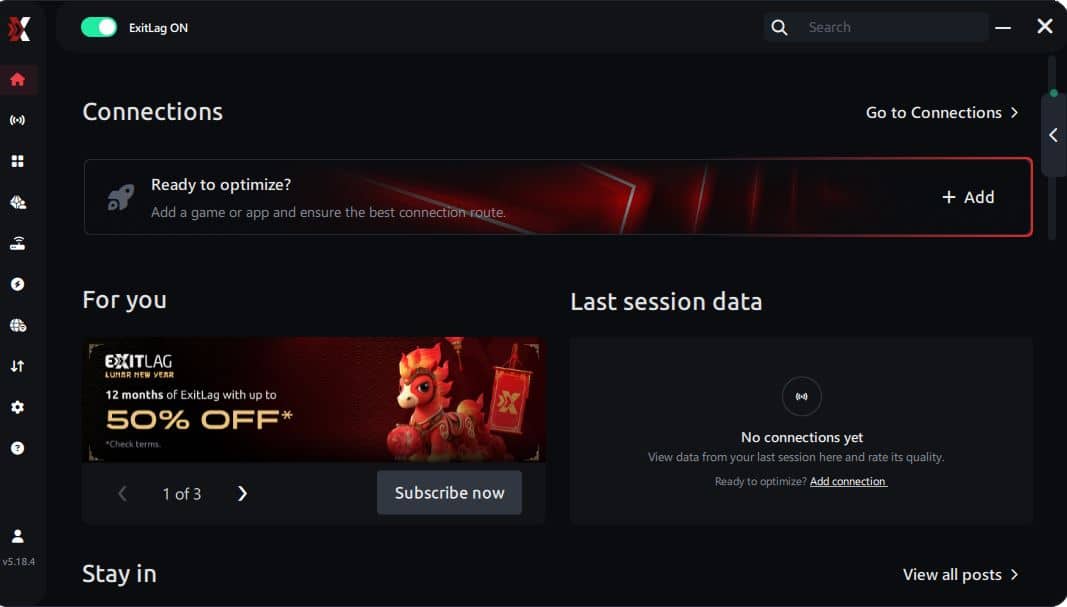
The process is extremely simple:
Step 1 – Access the official ExitLag website and download the application. There’s a free trial period for new users.
Step 2 – Install and open the program. Log in with your account.
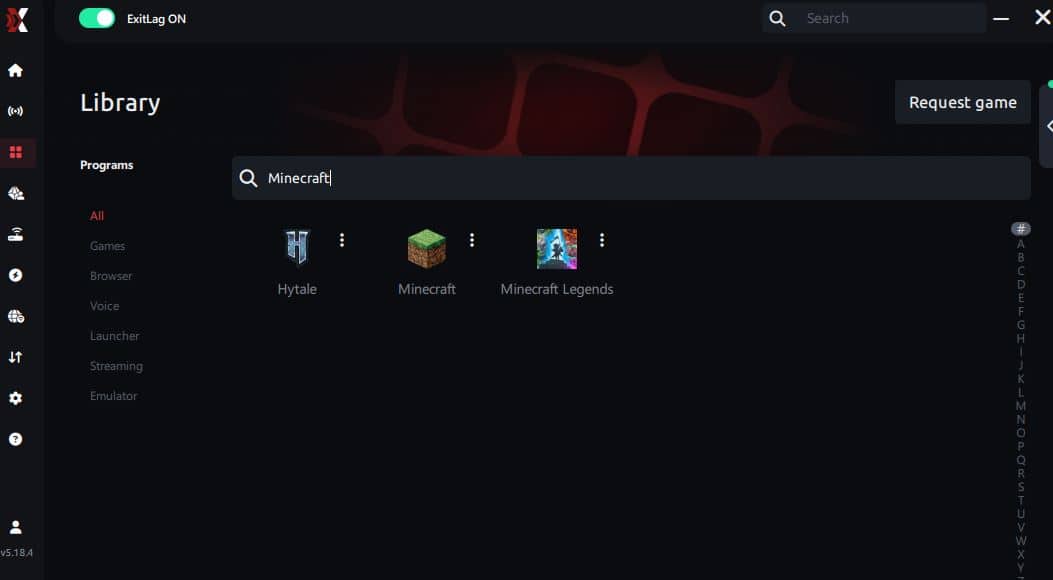
Step 3 – In the search bar, type “Minecraft” and select the game from the list.
Step 4 – Choose between automated or manual route
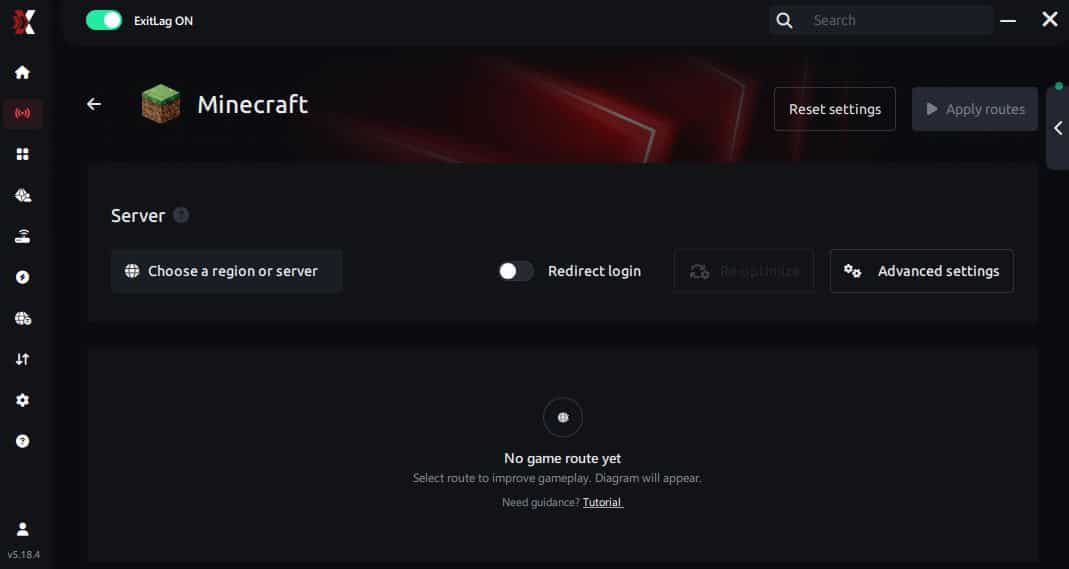
Based on the results, you can let ExitLag automatically select the best route or manually choose the server that showed the lowest latency for your connection.
AI-optimized automated route
Based on the results, you can let ExitLag automatically select the best route through AI optimization. The system analyzes multiple connection paths in real time and automatically identifies the most efficient route for your connection, ensuring the lowest possible latency without requiring manual choices.
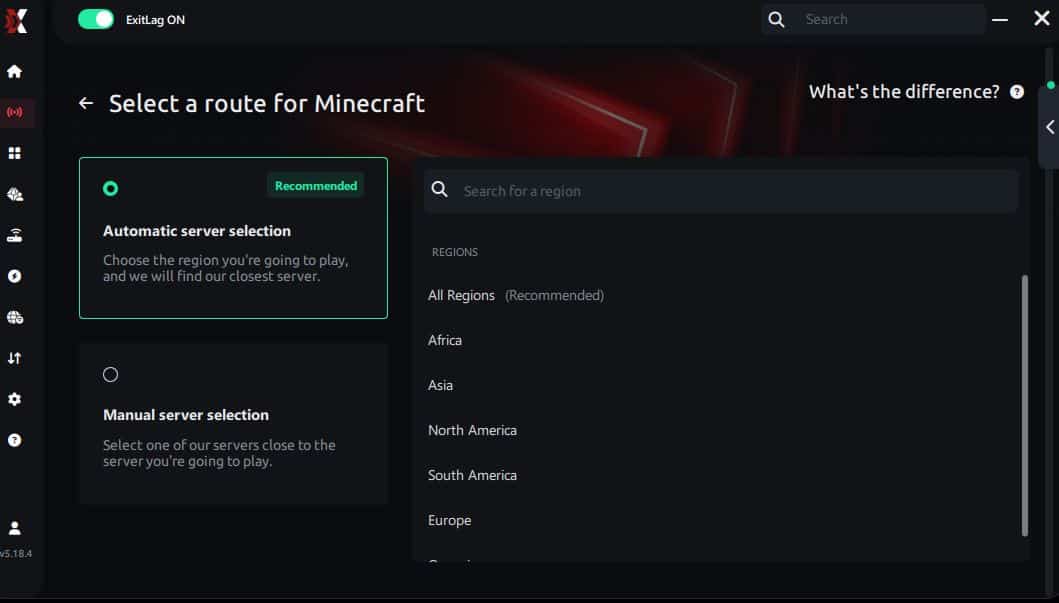
Manual route
If you prefer to have full control over your connection, you can manually choose the server based on the ping test results. Simply select the server that showed the lowest latency or the one that best meets your specific gaming needs, allowing complete customization of your experience.
Step 5 – Click “Minecraft” or the play button. ExitLag will begin optimizing your connection automatically.
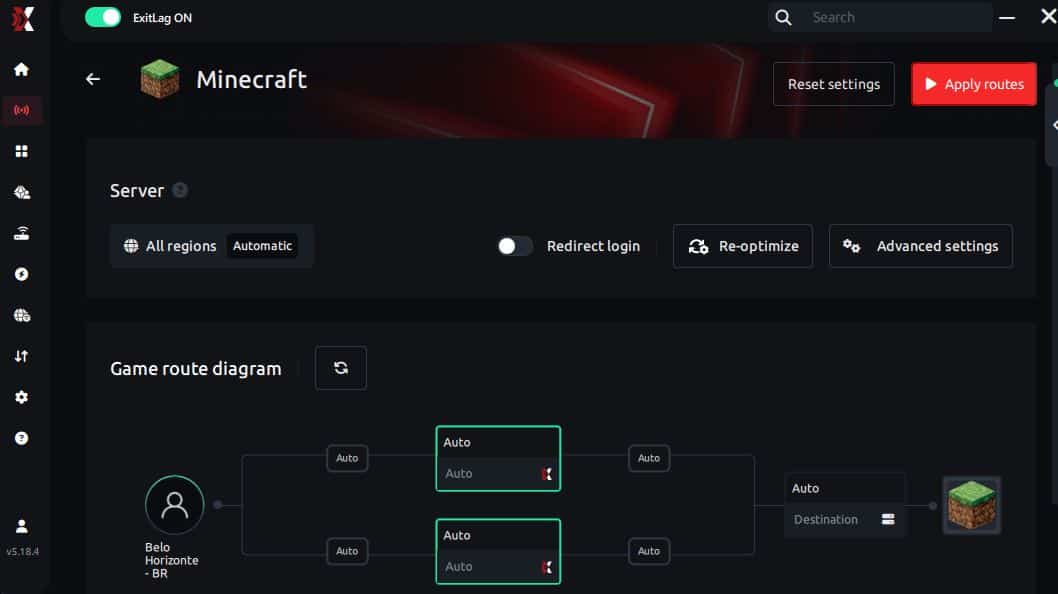
Step 6 – Wait a few seconds until optimization is complete. You’ll see ping indicators in the interface.
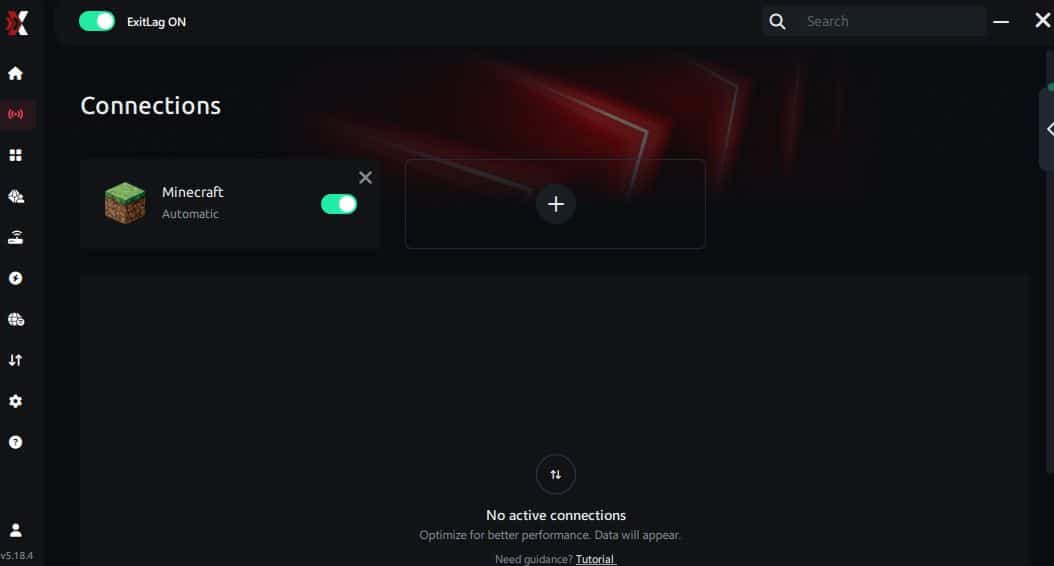
Step 7 – Launch Minecraft normally. The optimization will already be active.
ExitLag runs in the background while you play, constantly adjusting routes to maintain the best possible performance.
If you want the technical breakdown again, use the how ExitLag routing optimization works page for reference.
Best ExitLag routing approach for Minecraft
Use a simple rule:
- Start with automatic routing
- Switch to manual only if you still see spikes
- Choose stability over the lowest ping number
Minecraft PvP benefits more from consistency than a single-digit ping flex.
How to test improvement correctly
Do not trust one match. Test with control.
Use this quick checklist:
- ✅ Same server, same time window
- ✅ Same texture pack and video settings
- ✅ Same mods or same vanilla build
- ✅ Same background apps situation
Then compare:
- minimum FPS moments
- stutters per minute
- responsiveness in builds and fights
- overall smoothness
If your goal is to increase FPS, you need repeatable testing, not vibes.
Notes for Bedrock, Java, mods, and servers
Minecraft has multiple “performance worlds”:
- Java Edition: mods and servers vary wildly
- Bedrock Edition: different rendering behavior
- Modded clients: huge performance swings
- Competitive clients: often tuned for higher FPS
ExitLag supports the network stability side, which matters most when you play online. That’s where FPS Boost in Minecraft becomes noticeable.
Real-world results: FPS before and after ExitLag
Case study 1: PvP player on a distant server
Before: 170 FPS average, drops to 90 FPS with hitching After: 175 FPS average, drops to 120 FPS with smoother pacing Improvement: more FPS stability, fewer fight-stutters ✅ Micro-stuttering: significantly reduced
Case study 2: Modded survival with online friends
Before: smooth in base, stutters during chunk travel After: fewer “catch-up” hitches when exploring online Improvement: better perceived FPS Boost in Minecraft
Case study 3: Competitive team practice
Before: inconsistent hits and weird timing under load After: steadier fights, smoother tracking Improvement: more consistent performance for ranked-style play
Performance comparison table
| Metric | Without ExitLag | With ExitLag | Gain |
| Average FPS | 180 FPS | 185 FPS | +3% |
| Minimum FPS | 90 FPS | 120 FPS | +33% |
| Frame time | 9.5 ms | 7.8 ms | -18% |
| Micro-stutters per minute | 10 | ~1 | -90%+ |
| Input feel | ⚠️ Inconsistent | ✅ Snappier | Better |
| Ping stability | ❌ Spiky | ✅ Stable | Better |
| Experience | ⭐⭐ | ⭐⭐⭐⭐⭐ | Transformative |
Competitive impact you actually notice
A stable FPS Boost in Minecraft can show up as:
- cleaner strafing and tracking
- fewer lost combos to random hitches
- more reliable block placement speed
- better confidence under pressure ✅
Extra optimizations for maximum FPS in Minecraft
In-game settings that usually increase FPS
Minecraft settings can make or break performance. Here’s a practical approach:
- Lower render distance if you see spikes
- Reduce entity distance if mobs and farms tank FPS
- Turn off V-Sync if you want lower input delay
- Cap FPS only if your FPS swings wildly
- Use fast graphics if you need stability first
Quick performance priorities:
- ✅ Render distance tuned for stability
- ✅ Particles reduced in busy areas
- ✅ Smooth lighting adjusted conservatively
These changes often increase FPS immediately, even before network improvements.
Windows optimizations for smoother gameplay
If you play on PC, these basics help a lot:
- ✅ Enable a high performance power plan
- ✅ Close background browsers and launchers
- ✅ Disable unnecessary overlays
- ✅ Keep GPU drivers updated
- ✅ Avoid downloads while playing
This supports an FPS Boost in Minecraft because fewer background spikes means steadier frame time.
Hardware optimizations without spending money
Minecraft can throttle hard if your system is hot.
Do this:
- Clean dust and improve airflow ✅
- Keep your laptop on a flat surface
- Monitor CPU and GPU temperatures
- Avoid thermal throttling during long sessions
Overheating destroys FPS stability.
GPU settings that can help Minecraft
NVIDIA
- Prefer maximum performance
- Test low latency mode carefully
- Avoid forcing V-Sync globally
AMD
- Test Anti-Lag features
- Keep drivers updated
- Avoid extreme tuning if stability matters most
The goal is stable frame time, not risky “benchmark hero” settings.
When upgrades actually make sense
Consider upgrading if:
- CPU is pegged near 100% often
- GPU is maxed with high temps
- FPS stays low even with low settings
But remember: ExitLag targets online stability, so it can still support smoother play even on modest hardware.
Why network optimization can feel like more FPS
The link between lag and FPS feel
In online Minecraft, you can have high FPS and still feel “not smooth” if synchronization is unstable.
That happens because:
- delayed packets create correction updates
- jitter causes uneven timing
- packet loss triggers retransmits
Those interruptions can feel like FPS drops, even if the FPS counter looks fine.
How packet loss can create stutter
Packet loss can cause:
- rubber band movement
- delayed hit registration
- freeze spikes during updates
Symptoms you’ll recognize:
- ❌ random micro-freezes in fights
- ❌ timing feels off when placing blocks
- ❌ sudden “catch-up” movement
ExitLag helps by stabilizing route quality and reducing packet timing chaos. That’s how an FPS Boost in Minecraft can come from network optimization.
Input lag and FPS perception
Your loop is: Input → client → network → server → response → frame update
If the network part is unstable, the entire loop feels unstable. Fix consistency and gameplay often feels like more FPS because your timing becomes predictable.
Frame time consistency is the real target
A stable 120 FPS often feels better than a shaky 200 FPS.
So when you want to increase FPS for real gameplay value, focus on:
- consistent pacing
- fewer stutters
- stable responsiveness ✅
That is the “secret” behind an FPS Boost in Minecraft that actually matters.
FAQ about FPS Boost in Minecraft
Does ExitLag really increase FPS in Minecraft
Yes, ExitLag can improve the FPS Boost in Minecraft experience by stabilizing online routing and reducing micro-stuttering tied to network instability.
Important distinction:
- ExitLag improves smoothness and stability
- ExitLag does not upgrade your GPU
That is why ExitLag is NOT a VPN—it’s performance-focused routing optimization, not privacy routing.
How much FPS will I gain with ExitLag
It depends on your baseline issues:
- Some players see small raw FPS changes
- Many players see big stability improvements and fewer drops
A realistic range is improved stability that can feel like 20–60% better smoothness in bad routing conditions. That’s often perceived as more FPS.
Will ExitLag help on a weak PC
Yes, but within limits. ExitLag optimizes the network side, not hardware rendering. It helps you reach the most stable FPS your device can consistently deliver.
Is ExitLag safe to use
ExitLag focuses on network routing and does not require you to change Minecraft files to work. It is designed for gaming performance use cases.
Do I need fast internet for ExitLag
Not necessarily. ExitLag optimizes route quality and stability more than bandwidth. Even moderate internet can feel smoother if packet timing becomes consistent.
What is the difference between ExitLag and a VPN
ExitLag is NOT a VPN. A VPN focuses on privacy and general routing. ExitLag focuses on game route optimization.
Quick comparison:
| Feature | ExitLag | Typical VPN |
| Main goal | ✅ Gaming performance | ✅ Privacy |
| Routing | ✅ Game-optimized | ⚠️ Generic |
| Lag impact | ✅ Often improves | ❌ Can worsen |
| Best for | ✅ Competitive play | ✅ Private browsing |
If you want the detailed explanation, use the how ExitLag routing optimization works page.
How much does ExitLag cost
Do not guess pricing. Check the current ExitLag pricing plans page for updated information.
Does ExitLag support Minecraft
ExitLag supports many titles. Confirm the latest list using the official ExitLag supported games directory.
Fastest way to start today
- Create your account using the ExitLag account registration page
- Activate access using the official ExitLag free trial activation page
- Apply the best route and test 3–5 sessions
- Keep the route that produces the smoothest FPS Boost in Minecraft
Start testing right now with the official ExitLag free trial activation page.

Playing without vs with ExitLag
Experience without ExitLag
Common problems:
- ❌ FPS feels unstable during online spikes
- ❌ micro-stuttering when the server is busy
- ❌ frame pacing breaks during PvP
- ❌ inconsistent timing when building fast
- ❌ frustration in competitive moments
Experience with ExitLag
Common improvements:
- ✅ smoother pacing in online fights
- ✅ less micro-stuttering
- ✅ more consistent responsiveness
- ✅ steadier gameplay feel
- ✅ more confidence under pressure
Side-by-side comparison table
| Aspect | Without ExitLag | With ExitLag |
| FPS stability | ❌ Unstable | ✅ Stable |
| Stuttering | ❌ Frequent | ✅ Rare |
| Input feel | ⚠️ Inconsistent | ✅ Snappy |
| Consistency | ⭐⭐ | ⭐⭐⭐⭐⭐ ✅ |
| Competitive edge | ❌ Lower | ✅ Higher |
| Fun factor | ⭐⭐ | ⭐⭐⭐⭐⭐ ✅ |
Conclusion: maximize your FPS in Minecraft with ExitLag now
Benefits recap
A real FPS Boost in Minecraft is about stability and control:
- ✅ Up to 60% smoother perceived performance in the right conditions
- ✅ Reduced micro-stuttering in online play
- ✅ Better frame time consistency
- ✅ Lower perceived input lag
- ✅ More reliable PvP and building speed
- ✅ Works alongside any hardware limits
Why ExitLag is the best stability-first option
ExitLag focuses on route quality and packet timing, which is exactly what breaks smoothness in multiplayer. That is why it can help you get more FPS feel without pretending to “double your FPS.”
Final reminder: ExitLag is NOT a VPN. It is a specialized gaming performance tool built to improve connection stability and routing.
Start now with the main CTA
- Go to the official ExitLag gaming performance homepage
- Create your account using the ExitLag account registration page
- Activate access using the official ExitLag free trial activation page
- Test routes and lock in the smoothest FPS Boost in Minecraft
- If you want to explore supported titles, use the full ExitLag supported games list
If you want the quickest start, use the ExitLag account registration page, activate your official ExitLag free trial activation page, and feel the difference in your next session.