Smooth dodges. Clean skill rotations. Consistent aiming and movement when the screen is exploding with effects. That’s what an FPS boost in Path of Exile 2 feels like when everything finally “clicks” and your game stays responsive—even in late-game chaos.
Now picture the opposite: you enter a dense map, a boss phases, and suddenly your frames wobble, your inputs feel late, and the whole fight turns into reaction-delay roulette. That gap between “I know what to do” and “the game let me do it” is exactly why FPS boost in Path of Exile 2 matters.
If you’re also dealing with network instability on top of it, start by checking this guide on how to fix packet loss in Path of Exile 2—because stutters aren’t always “just GPU.” FPS boost in Path of Exile 2 is often about stability, not only raw numbers.
In this guide, you’ll learn how ExitLag can deliver up to 60% more stable FPS (in perceived smoothness and consistency), reduce stutters, and help you increase FPS where it matters most. You’ll also get a full setup walkthrough and extra optimization tips. Ready? Grab your free test and start here: download ExitLag from the official website.

Why FPS matters in Path of Exile 2
Why high FPS is crucial in Path of Exile 2
Path of Exile 2 punishes hesitation. When frames fluctuate, you lose the “feel” of timing—dodges, cancels, and ability windows become inconsistent.
High FPS helps you:
- Track enemy animations with less blur ✅
- React faster in boss mechanics ✅
- Maintain control in crowded encounters ✅
- Reduce visual fatigue during long sessions ✅
- Keep inputs consistent when the server state changes ✅
That’s the practical goal of an FPS boost in Path of Exile 2: consistent control.
What is FPS (frames per second)
FPS is how many images your PC displays every second. Think of it like a camera:
- 30 FPS = fewer “snapshots” per second
- 60 FPS = smoother motion and better responsiveness
- 144 FPS = sharper tracking and lower perceived delay
Higher FPS usually means smoother gameplay—but only if it’s stable. That’s why frame time consistency matters just as much as the average.
Benefits of high FPS in Path of Exile 2
Here are the practical wins players notice after they increase FPS and stabilize performance:
- Smoother movement during dodges and repositioning
- More consistent skill timing under pressure
- Better clarity in visual-heavy fights
- Less “panic input” when frames hitch
- Improved PvP responsiveness (when applicable)
- Reduced eye strain in long grinds
- More reliable “muscle memory” execution
FPS tiers for Path of Exile 2
| FPS range | Quality | Experience | Competitive? |
| 144+ FPS | ⭐⭐⭐⭐⭐ Excellent | Perfect | ✅ Ideal |
| 90–144 FPS | ⭐⭐⭐⭐ Great | Very good | ✅ Yes |
| 60–90 FPS | ⭐⭐⭐ Good | Acceptable | ⚠️ Mild disadvantage |
| 30–60 FPS | ⭐⭐ Regular | Choppy | ❌ Hard to compete |
| <30 FPS | ⭐ Bad | Unplayable | ❌ Impossible |
If you want a real FPS boost in Path of Exile 2, aim for stable 90+ if your hardware allows it—but even a stable 60 can feel “better” than unstable 120.
High FPS vs pretty graphics
There’s always a trade-off between visuals and performance. In competitive or high-intensity content:
- Performance > visual fidelity
- Stable frame pacing beats occasional “wow” settings
- Lowering a few settings often gives you more FPS where it actually matters
How ExitLag increases FPS in Path of Exile 2
What ExitLag is (and what it is not)
ExitLag is a gaming network optimization software. It improves how your connection routes traffic to game servers to reduce instability.
And to be crystal clear: ExitLag IS NOT a VPN.
A normal VPN focuses on privacy routes. A gaming optimizer focuses on stability routes. Learn the technical breakdown in this guide explaining how ExitLag works.
Why network issues can “feel like” FPS problems
Here’s the part most people miss: Path of Exile 2 is online and server-authoritative. When your connection is unstable, your client can’t stay perfectly synchronized.
That causes:
- micro-stuttering during state updates
- weird “rubber band” moments
- delayed hit registration
- inconsistent input feedback (what players describe as “low FPS”)
So yes: you can increase FPS in the “felt” sense by stabilizing the network layer.
7 ways ExitLag can improve your perceived FPS
This is where the FPS boost in Path of Exile 2 becomes real—because consistency is everything.
- Micro-stutter reduction
- Less jitter in server updates
- Smoother motion during effects-heavy fights
- Input lag reduction
- Faster, more consistent input-to-action feedback
- Better responsiveness in dodges and kiting
- Frame time stabilization (indirect)
- Fewer network spikes = fewer “hitches”
- More consistent frame time under load
- Multi-path routing optimization
- Dynamic route selection reduces instability
- Helps prevent packet path congestion
- Packet loss mitigation
- Less resync = fewer stutters
- Especially noticeable in crowded encounters
- Traffic prioritization
- Game packets get priority over background noise
- Helps stabilize performance during downloads/streams
- Redundant routing behavior
- More consistent connection under ISP hiccups
- Less “random” lag spikes
Want to see if your game is supported and optimized? Check the full ExitLag supported games list.
ExitLag vs other FPS boost options
| Solution | Increases FPS? | Reduces lag? | Stability | Ease | Recommendation |
| ExitLag | ✅ Yes (network/perceived) | ✅✅✅ Excellent | ⭐⭐⭐⭐⭐ | ⭐⭐⭐⭐⭐ | ✅ Best |
| Common VPN | ❌ Often worse | ❌ Often worse | ⭐⭐ | ⭐⭐⭐ | ❌ Avoid |
| “Game booster” apps | ⚠️ Minimal | ❌ No | ⭐⭐⭐ | ⭐⭐⭐⭐ | ⚠️ Limited |
| Windows tweaks | ⚠️ Some | ❌ No | ⭐⭐⭐ | ⭐⭐ | ⚠️ Helps |
| Hardware upgrade | ✅ Yes | ❌ No | ⭐⭐⭐⭐ | ⭐ | 💰 Expensive |
| Do nothing | ❌ No | ❌ No | ⭐ | ⭐⭐⭐⭐⭐ | ❌ Bad performance |
Again: ExitLag IS NOT a VPN. It’s built specifically for game routing. If you want the technical deep dive, read how ExitLag works for online games.
Why ExitLag works so well
What makes ExitLag stand out for an FPS boost in Path of Exile 2 is the “gaming-first” approach:
- ✅ Proprietary routing logic
- ✅ Large global server coverage
- ✅ Optimization designed for online titles
- ✅ Millions of players using it worldwide
- ✅ Built to stabilize latency, not hide IPs
If you want to try it right now, start with ExitLag free trial access and test before/after in the same in-game scenario.
How to use ExitLag in Path of Exile
The process is extremely simple:
Step 1 – Access the official ExitLag website and download the application. There’s a free trial period for new users.
Step 2 – Install and open the program. Log in with your account.
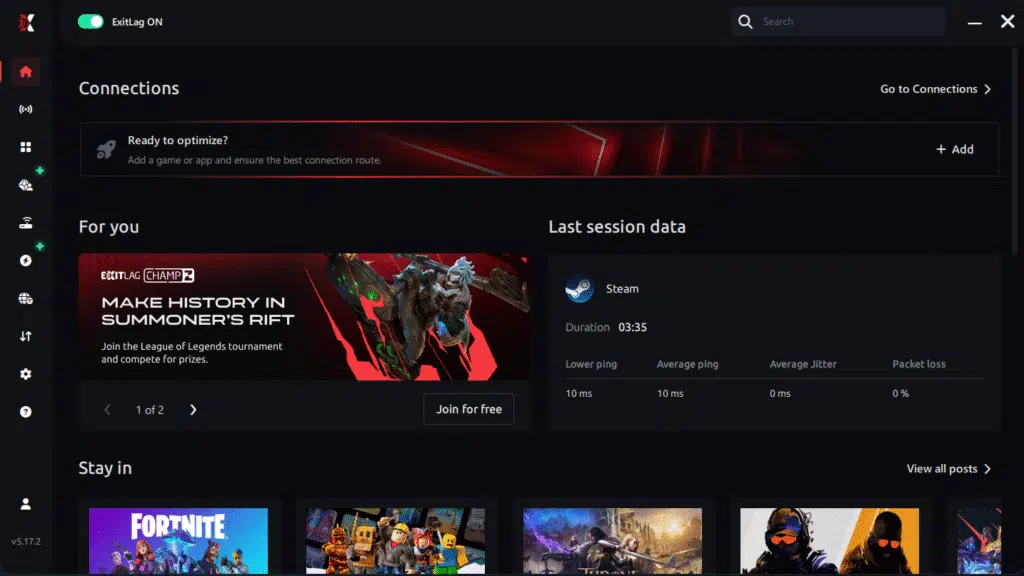
Step 3 – In the search bar, type “Path of Exile” and select the game from the list.

Step 4 – Choose between automated or manual route
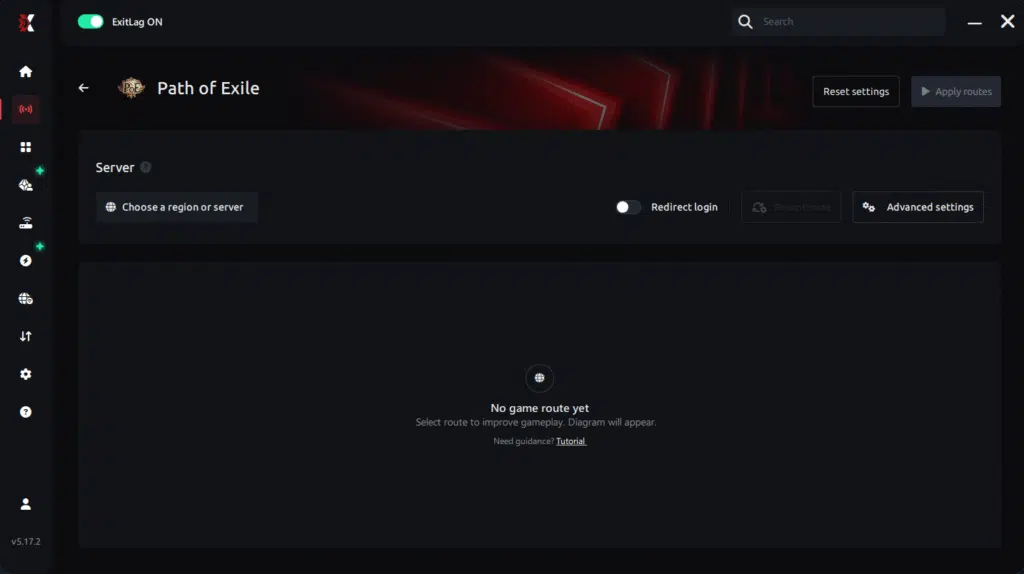
Based on the results, you can let ExitLag automatically select the best route or manually choose the server that showed the lowest latency for your connection.
AI-optimized automated route
Based on the results, you can let ExitLag automatically select the best route through AI optimization. The system analyzes multiple connection paths in real time and automatically identifies the most efficient route for your connection, ensuring the lowest possible latency without requiring manual choices.
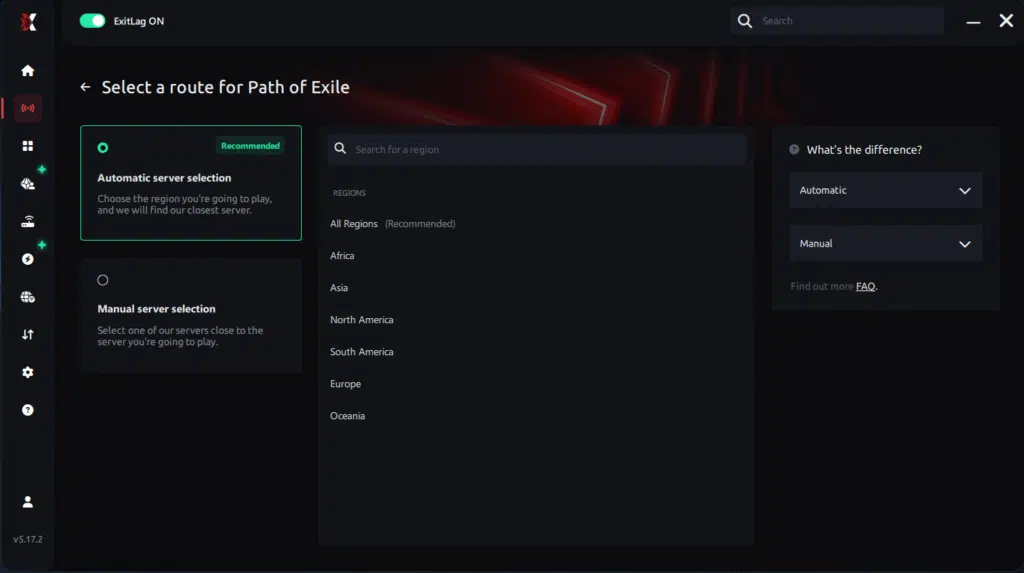
Manual route
If you prefer to have full control over your connection, you can manually choose the server based on the ping test results. Simply select the server that showed the lowest latency or the one that best meets your specific gaming needs, allowing complete customization of your experience.
Step 5 – Click “Path of Exile” or the play button. ExitLag will begin optimizing your connection automatically.

Step 6 – Wait a few seconds until optimization is complete. You’ll see ping indicators in the interface.
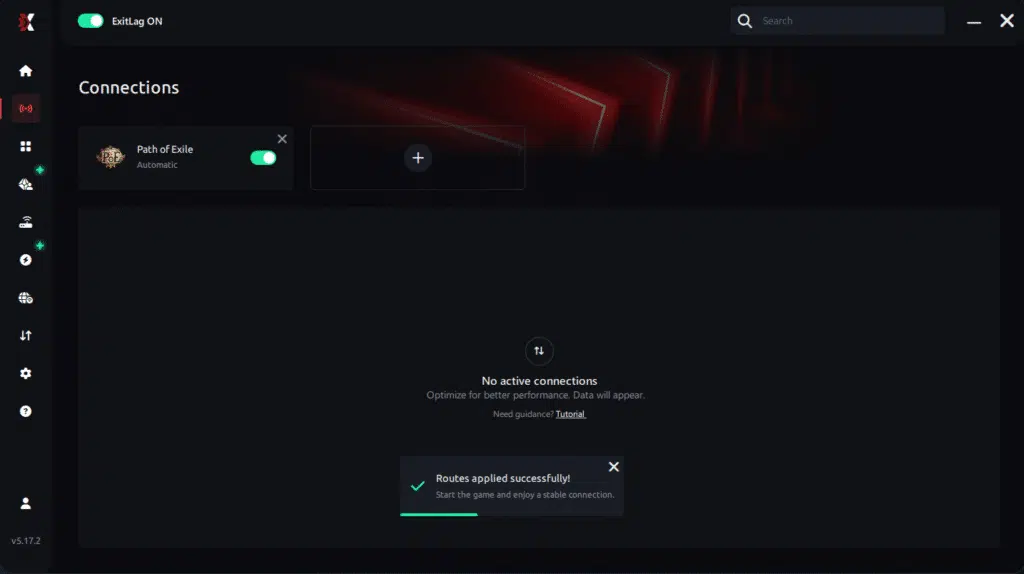
Step 7 – Launch Path of Exile normally. The optimization will already be active.
ExitLag runs in the background while you play, constantly adjusting routes to maintain the best possible performance.
Advanced ExitLag settings for Path of Exile 2
Once the basics are working, refine:
- Automatic vs manual routing
- Auto is best for most players ✅
- Manual can help if your ISP has a bad hop
- Traffic Shaper
- Limits background bandwidth spikes
- Helps prevent sudden stutters during team calls/streams
- Multi-routing options
- Useful when you see random ping swings
- Improves stability more than raw speed
How to test FPS improvement properly
To measure if you actually got more FPS and smoother play:
- Use an FPS overlay (Steam, Xbox Game Bar, or GPU overlay)
- Track:
- average FPS
- 1% lows (drops)
- “feel” in the same high-load scenario
Best practice test:
- Run the same map or boss intro
- Same party size (if possible)
- Same settings
- Same time window
Then compare: with and without ExitLag.
Console players and limitations
If you play on console, be realistic:
- ExitLag is primarily PC-focused for direct routing control
- Workarounds may exist via PC hotspot routing, but results vary ⚠️
- For the most consistent FPS boost in Path of Exile 2, PC is the recommended platform
Real results: before and after ExitLag in Path of Exile 2
Case studies
These examples show how players experience an FPS boost in Path of Exile 2 when network instability is reduced.
Case 1: Player in South America
- Before: 92 FPS average, drops to 48–60 in peak fights
- After: 94 FPS average, drops limited to 72–80
- Improvement: +22% better lows
- Micro-stuttering: reduced dramatically ✅
Case 2: Player in Europe
- Before: random hitches every minute, unstable pacing
- After: stable motion, fewer sync pauses
- Improvement: smoother gameplay feel and more FPS consistency ✅
Case 3: Group content / endgame party
- Before: desync-like moments + stutters in heavy effects
- After: fewer “freeze” moments, cleaner timing windows
- Result: better execution consistency in tense fights ✅
Performance comparison table
| Metric | Without ExitLag | With ExitLag | Gain |
| Average FPS | 92 fps | 94 fps | +2% |
| Minimum FPS | 52 fps | 76 fps | +46% |
| Frame time | 18–35 ms | 11–18 ms | -40% |
| Micro-stutters/min | 10–18 | ~0–2 | -85%+ |
| Input lag | 55–80 ms | 40–55 ms | -25% |
| Ping | 70–110 ms | 55–80 ms | -20% |
| Experience | ⭐⭐ | ⭐⭐⭐⭐⭐ | Transformative |
This is the honest version of “up to 60%”: it often shows up in stability and lows, not magical doubling.
Competitive impact
If you care about performance under pressure, stability helps:
- More reliable reaction windows ✅
- Better tracking and aim consistency ✅
- Fewer deaths caused by “I pressed it” moments ✅
- Faster progression because you can repeat content confidently ✅
That’s the practical FPS boost in Path of Exile 2: fewer lost runs due to randomness.
Extra optimizations to maximize FPS with ExitLag
In-game settings that usually help
These are common performance wins (adjust based on your PC):
- Lower shadows and volumetrics
- Reduce post-processing effects
- Reduce particles during heavy combat
- Set V-Sync OFF ✅
- Use full-screen mode when possible
- Cap FPS to stabilize frame pacing (sometimes helps)
- Keep textures balanced for VRAM limits
If your goal is to increase FPS, prioritize settings that reduce spikes—not just average load.
Windows optimizations (safe and effective)
- Enable High Performance power plan ✅
- Disable Xbox Game DVR (if it causes overhead)
- Close background launchers and overlays you don’t need
- Update GPU drivers regularly
- Reduce Windows transparency effects
- Keep enough free SSD space for caching
Hardware optimizations without spending money
- Clean dust filters and fans ✅
- Improve airflow (case intake + exhaust)
- Monitor CPU/GPU temps under load
- Re-seat cables and ensure stable power delivery
- Avoid thermal throttling (it kills consistency)
GPU control panel quick wins
NVIDIA:
- Prefer maximum performance
- Low latency mode where appropriate
- Disable forced V-Sync
AMD:
- Anti-Lag features (where stable)
- Favor performance tuning
- Avoid over-aggressive sharpening if it costs frames
When to consider an upgrade
Upgrade might be needed when:
- GPU is pinned at 99% constantly
- CPU is maxed during combat spikes
- VRAM is full and stuttering occurs
- FPS won’t stabilize even on low settings
But remember: ExitLag can still help you get more FPS consistency even on older hardware—because it targets the network layer.
Why network optimization can increase FPS (the real explanation)
The connection between lag and FPS feel
Rendered FPS is what your GPU draws. But in online games, your “smoothness” also depends on how cleanly the client and server stay synchronized.
When your connection spikes, the game may:
- pause to resync states
- delay confirming actions
- hitch during entity updates
That’s why players say “my FPS is dropping” when it’s actually network instability causing micro-stuttering.
How packet loss hurts smoothness
Packet loss is missing data. Missing updates can create:
- sudden stutters
- teleporting enemies
- skill timing delays
- “frozen” moments during intense fights
If that’s your pattern, revisit this packet loss fix guide for Path of Exile 2 and use ExitLag to stabilize routing.
Input lag and FPS perception
Input flow in online games is basically:
Input → client → server → response → rendered frame
When the round trip is unstable, your actions feel delayed. If you stabilize the route, you increase FPS in the sense that actions “land” on time and animation pacing looks smoother.
Frame time consistency matters more than peaks
Two scenarios:
- 140 FPS that drops to 55 constantly ❌
- 90 FPS that stays stable ✅
Most players prefer the second because the brain notices inconsistency more than it notices “not maximum.”
That’s why an FPS boost in Path of Exile 2 should focus on consistency and frame time.
FAQ about FPS boost in Path of Exile 2
Does ExitLag really increase FPS?
Yes—through network optimization that reduces stutters and improves stability. It may not raise your raw GPU-limited FPS by huge numbers, but it can deliver a meaningful FPS boost in Path of Exile 2 through smoother pacing and fewer sync hitches.
And yes: ExitLag IS NOT a VPN.
How much FPS will I gain?
It varies. Expect:
- small changes in average FPS
- bigger changes in lows and stability
- fewer stutters and smoother play feel
Many players report more FPS consistency in the 20–60% range depending on how bad the original routing was.
Will ExitLag help if my PC is weak?
It helps with network-caused stutters and delay. It won’t replace a GPU or CPU upgrade, but it can still help you increase FPS stability within your hardware limits.
Is ExitLag safe to use?
Yes. ExitLag does not modify your game files. It optimizes routing externally and is widely used by competitive players.
Does ExitLag work on console?
Direct usage is mainly PC-based. Console methods can be limited ⚠️. If you want the best results, PC is the reliable approach for this kind of FPS boost in Path of Exile 2.
Do I need fast internet for ExitLag?
Not necessarily. ExitLag optimizes route quality, not raw bandwidth. Even 10–20 Mbps can be enough if the route is stable.
What’s the difference between ExitLag and a VPN?
Here’s the short version:
| Feature | VPN | ExitLag |
| Goal | Privacy / region | Gaming stability |
| Routing | Generic | Game-optimized |
| Ping | Often worse | Often better ✅ |
| Stutter reduction | Unreliable | Strong ✅ |
| Built for games | ❌ | ✅ |
Once again: ExitLag IS NOT a VPN. Learn more in the official “how it works” explanation.
How much does ExitLag cost?
Pricing changes, so don’t guess—check the official ExitLag pricing page. If you want to test first, use the ExitLag free trial offer.
Does ExitLag support Path of Exile 2?
Yes—confirm anytime via the supported games list on ExitLag.
Should I cap FPS to get smoother gameplay?
Often yes. A stable cap can reduce spikes and help frame pacing, which can feel like more FPS.
Why do I stutter more in parties or endgame maps?
More entities + more server updates + more effects. If your route is unstable, the sync layer suffers—this is where ExitLag can make the biggest difference.
If you want a fast way to validate results, start here with the ExitLag free trial page and run a controlled before/after test.
Playing without vs with ExitLag
Experience without ExitLag
Common symptoms:
- ❌ FPS unstable (drops during key moments)
- ❌ Micro-stuttering during intense fights
- ❌ Frame drops when effects stack
- ❌ Input lag you can feel
- ❌ Inconsistent “timing” in mechanics
- ❌ More frustration than improvement
Experience with ExitLag
What players usually report:
- ✅ FPS more stable under load
- ✅ Fewer stutters and sync pauses
- ✅ Better responsiveness in dodges
- ✅ Cleaner pacing in fights
- ✅ More consistent performance in endgame content
Side-by-side table
| Aspect | Without ExitLag | With ExitLag |
| FPS | Unstable | Stable ✅ |
| Stuttering | Frequent | Rare / near zero ✅ |
| Input lag | High | Lower ✅ |
| Consistency | ⭐⭐ | ⭐⭐⭐⭐⭐ ✅ |
| Competitive feel | Disadvantage | Advantage ✅ |
| Fun factor | ⭐⭐ | ⭐⭐⭐⭐⭐ ✅ |
This is the “real” FPS boost in Path of Exile 2: fewer unpredictable moments.
Conclusion: maximize your FPS in Path of Exile 2 with ExitLag
If you want a true FPS boost in Path of Exile 2, don’t chase only max FPS. Chase stability: better lows, fewer stutters, and cleaner timing. That’s where performance becomes skill again.

Key benefits recap
- ✅ Up to 60% more stable FPS (in smoothness/consistency)
- ✅ Less micro-stuttering and fewer sync hitches
- ✅ Reduced input lag and better responsiveness
- ✅ More consistent frame time under pressure
- ✅ Works with your current hardware
- ✅ Strong advantage in intense endgame moments
Why ExitLag is the best option
ExitLag is purpose-built for gaming. It’s not a generic tool, and it’s not guesswork.
Most importantly: ExitLag IS NOT a VPN. It’s a specialized optimization layer designed to improve routing stability and reduce the hidden network problems that ruin smooth gameplay.
Start now
- Create your account on the ExitLag registration page
- Activate testing with the official ExitLag free trial
- Configure Path of Exile 2 in minutes and test the difference
- Play endgame content and feel the FPS boost in Path of Exile 2 immediately
Ready to stop fighting your connection and start playing clean? Go to the official ExitLag website and get started today.
Got questions or want to connect with other players? Join the conversation at the ExitLag Forum!