

Counter-Strike 2 is at its best when every flick feels instant, every counter-strafe is crisp, and your crosshair movement is perfectly readable. That is the real promise behind an FPS boost in Counter-Strike 2: smoother motion, cleaner tracking, and control that matches your decision-making.
But even with a decent PC, CS2 can still feel inconsistent. You might get sudden dips during utility chaos, micro-stutters when players swing at the same time, or input delay that makes your aim feel “heavy.” If you are also battling server or routing issues, start with this CS2 guide from ExitLag: this Counter-Strike 2 performance guide.
In this guide, you will learn how to get an FPS boost in Counter-Strike 2 with ExitLag as the core stability tool, plus the best in-game and system tweaks to increase FPS and keep more FPS in real matches. Quick start: download from the official ExitLag website and benchmark CS2 with ExitLag OFF vs ON.
Activate the ExitLag free trial for gaming performance and measure your CS2 FPS stability today.

Why FPS matters in Counter-Strike 2
Why high FPS is crucial in Counter-Strike 2
CS2 is a timing game. The difference between a clean duel and a lost fight can be a tiny delay in visual feedback or input response. High FPS helps you:
- track fast strafes more reliably ✅
- read micro-movements during peeks ✅
- keep spray control consistent ✅
- maintain smooth camera motion in hectic rounds ✅
- reduce visual fatigue during long sessions ✅
A true FPS boost in Counter-Strike 2 is not only about bigger numbers. It is about consistency.
What FPS means: Frames Per Second
FPS is how many frames your PC renders every second, like a camera filming motion:
- 30 FPS looks choppy and reacts late
- 60 FPS becomes playable and stable
- 144 FPS feels sharp and easier to track targets
High-impact difference:
- 30 → 60 FPS is a major leap ✅
- 60 → 144 FPS improves target clarity ✅
- high FPS with unstable frame time still feels bad ⚠️
FPS benefits that matter in CS2
Here are the most practical benefits of more FPS in Counter-Strike 2:
- smoother peek tracking and crosshair placement ✅
- better recoil control feedback ✅
- cleaner enemy model readability ✅
- faster reaction confidence in duels ✅
- more consistent movement timing ✅
- fewer distraction stutters during executes ✅
- improved comfort in long scrim blocks ✅
That is why players chase an FPS boost in Counter-Strike 2 even when they already have “good FPS.”
FPS rating table for Counter-Strike 2
| FPS range | Quality | Experience | Competitive? |
| 144+ FPS | ⭐⭐⭐⭐⭐ Excellent | Perfect | ✅ Ideal |
| 90–144 FPS | ⭐⭐⭐⭐ Great | Very good | ✅ Yes |
| 60–90 FPS | ⭐⭐⭐ Good | Acceptable | ⚠️ Slight disadvantage |
| 30–60 FPS | ⭐⭐ Fair | Choppy | ❌ Hard to compete |
| <30 FPS | ⭐ Bad | Unplayable | ❌ Impossible |
High FPS vs “pretty” graphics
In CS2, competitive performance usually beats visual quality.
Prioritize:
- performance over eye candy ✅
- stable frame time over peak FPS ✅
- input responsiveness over reflections ✅
A consistent FPS boost in Counter-Strike 2 often starts by choosing stability-first settings.
Why Counter-Strike 2 FPS drops happen
The most common FPS killers in CS2
CS2 performance can collapse for reasons that are not obvious:
- smoke and particle-heavy fights
- crowded bombsites with multiple utilities
- background apps stealing CPU time
- thermal throttling during long sessions
- inconsistent network routing creating micro-stutters
If you want to increase FPS reliably, you need to fix both rendering pressure and stability pressure.
Why “average FPS” can lie
You can have 200 average FPS and still lose duels if your frame pacing is unstable.
Watch:
- 1% lows ✅
- sudden frame time spikes ✅
- stutters during peeks ✅
A true FPS boost in Counter-Strike 2 is the combination of high FPS and stable pacing.
Micro-stuttering and the online factor
CS2 is a client-server shooter. When routing jitters or packets drop, you can see:
- tiny freezes during engagements ❌
- correction snaps in movement ❌
- delayed hit feedback feel ❌
That is why network stability can directly improve the feel of more FPS in real matches.
How ExitLag increases FPS in Counter-Strike 2
What ExitLag is and why it is not a VPN
ExitLag is a network optimizer built for gaming stability.
ExitLag is NOT a VPN.
A typical VPN focuses on privacy and location. ExitLag focuses on performance routing, reducing jitter, and stabilizing packet delivery for online games.
Learn the technical foundation here: how ExitLag works for online games.
How ExitLag improves CS2 smoothness
ExitLag does not upgrade your GPU. Instead, it reduces instability that causes:
- micro-stuttering ✅
- inconsistent server synchronization ✅
- delayed response feel ✅
- “heavy” input timing ✅
That is why many players describe an FPS boost in Counter-Strike 2 after enabling ExitLag: the game feels smoother and more readable.
7 ways ExitLag supports an FPS boost in Counter-Strike 2
- micro-stutter reduction ✅
more stable routing means fewer correction hitches mid-fight. - lower perceived input lag ✅
consistent packet delivery makes inputs feel tighter. - frame time stability improvements ✅
fewer spikes means smoother pacing during peeks. - multi-path route optimization ✅
ExitLag avoids weak ISP hops that create jitter. - game traffic prioritization ✅
more consistent delivery when background traffic exists. - better node selection under congestion ✅
stability during peak hours keeps fights consistent. - reducing packet loss impact ✅
fewer resync moments means fewer “fake FPS drops.”
Confirm supported titles using the ExitLag supported games list.
ExitLag vs other FPS boost solutions
| Solution | Increases FPS? | Reduces lag? | Stability | Ease | Recommendation |
| ExitLag | ✅ Yes stability-driven | ✅✅✅ Excellent | ⭐⭐⭐⭐⭐ | ⭐⭐⭐⭐⭐ | ✅ Best |
| Common VPN | ❌ Often worse | ❌ Often worse | ⭐⭐ | ⭐⭐⭐ | ❌ Avoid |
| Game booster apps | ⚠️ Minimal | ❌ No | ⭐⭐⭐ | ⭐⭐⭐⭐ | ⚠️ Limited |
| Windows tuning | ⚠️ Some | ❌ No | ⭐⭐⭐ | ⭐⭐ | ⚠️ Helpful |
| Hardware upgrade | ✅ Yes | ❌ No | ⭐⭐⭐⭐ | ⭐ | 💰 Expensive |
| Doing nothing | ❌ No | ❌ No | ⭐ | ⭐⭐⭐⭐⭐ | ❌ Bad results |
Why ExitLag works so well for CS2
CS2 punishes inconsistency. ExitLag is effective because it targets what ruins competitive feel:
- routing instability ✅
- jitter spikes ✅
- packet loss corrections ✅
- desync moments ✅
Install via the official ExitLag website and test using the ExitLag free trial for gaming performance.
If you play multiple titles, check the ExitLag supported games list.
How to use ExitLag in Counter-Strike 2
The process is extremely simple:
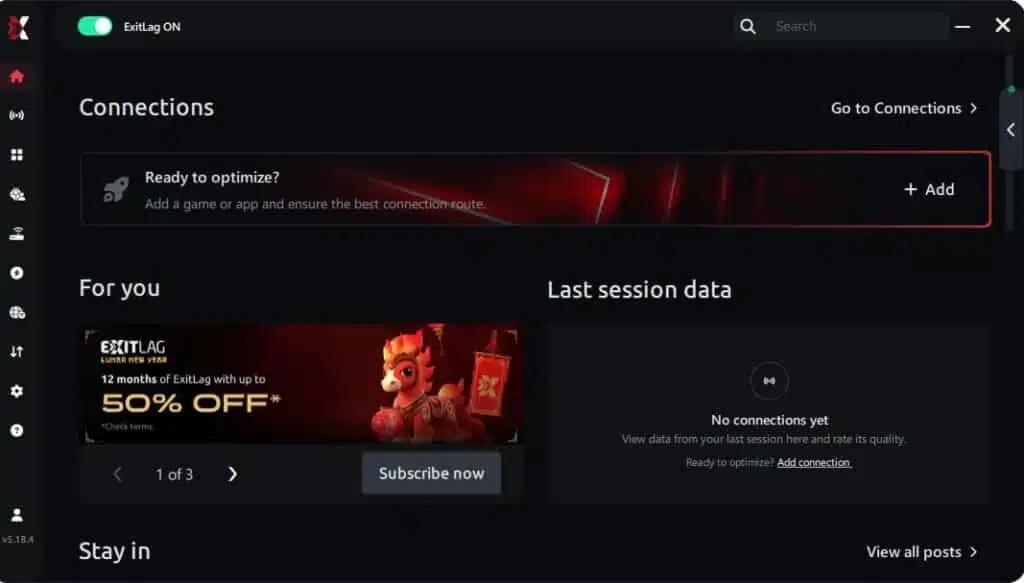
Step 1 – Access the official ExitLag website and download the application. There’s a free trial period for new users.
Step 2 – Install and open the program. Log in with your account.
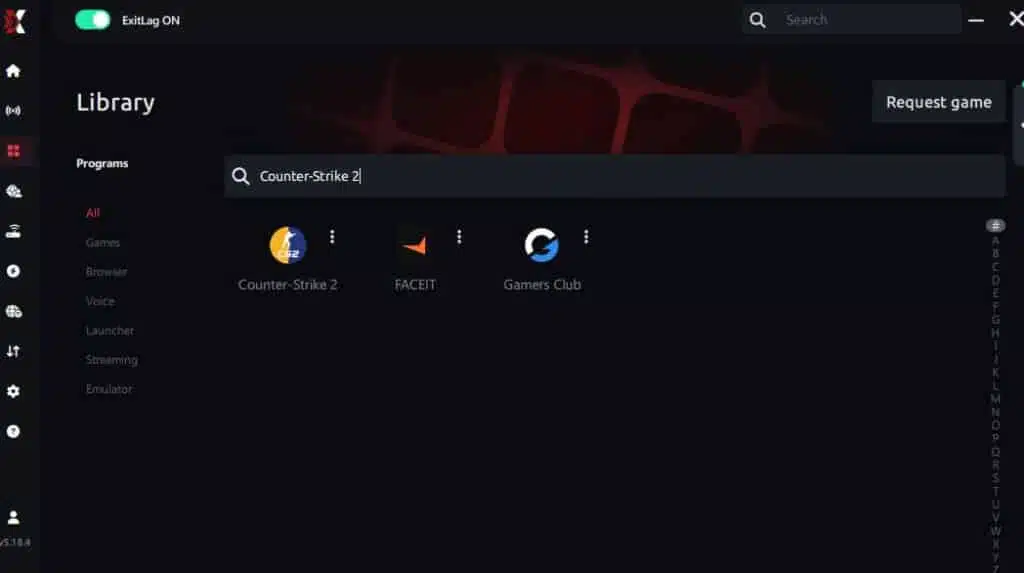
Step 3 – In the search bar, type “Counter-Strike 2” and select the game from the list.
Step 4 – Choose between automated or manual route

Based on the results, you can let ExitLag automatically select the best route or manually choose the server that showed the lowest latency for your connection.
AI-optimized automated route
Based on the results, you can let ExitLag automatically select the best route through AI optimization. The system analyzes multiple connection paths in real time and automatically identifies the most efficient route for your connection, ensuring the lowest possible latency without requiring manual choices.
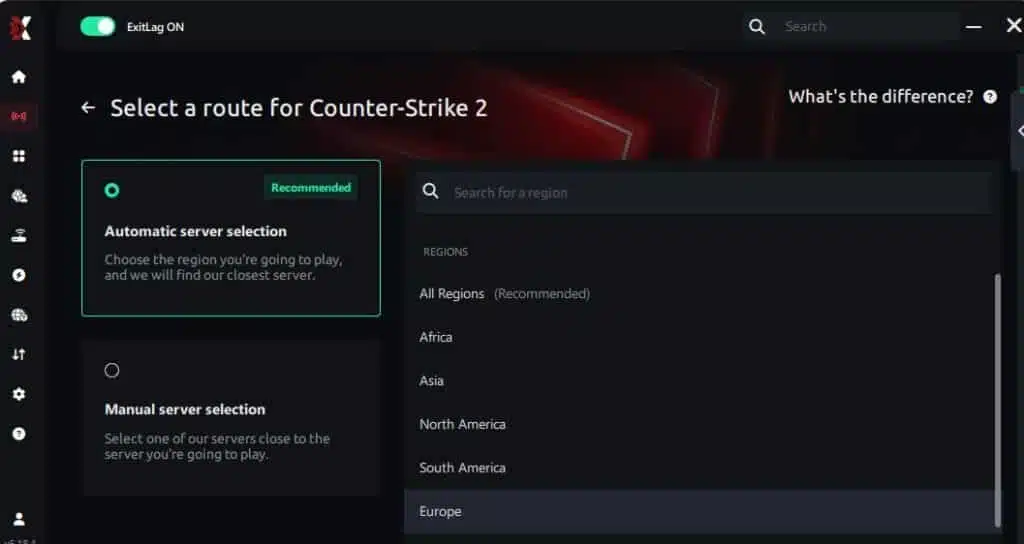
Manual route
If you prefer to have full control over your connection, you can manually choose the server based on the ping test results. Simply select the server that showed the lowest latency or the one that best meets your specific gaming needs, allowing complete customization of your experience.
Step 5 – Click “Counter-Strike 2” or the play button. ExitLag will begin optimizing your connection automatically.

Step 6 – Wait a few seconds until optimization is complete. You’ll see ping indicators in the interface.
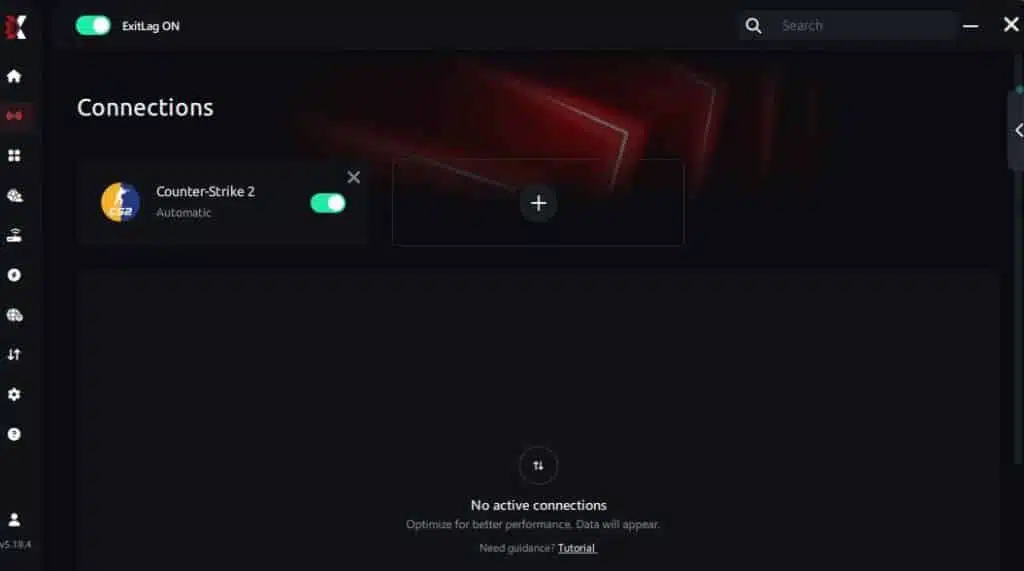
Step 7 – Launch Counter-Strike 2 normally. The optimization will already be active.
ExitLag runs in the background while you play, constantly adjusting routes to maintain the best possible performance.
Advanced ExitLag settings for CS2
To push a stronger FPS boost in Counter-Strike 2, test:
- automatic vs manual routing ✅
- alternate route nodes during peak congestion ✅
- traffic shaping to reduce background interference ✅
- multi-routing options for stability-first performance ✅
If you want deeper context, revisit how ExitLag works for online games.
How to benchmark FPS and smoothness correctly
Use repeatable testing:
- same map and same warmup route ✅
- same graphics preset ✅
- same time window, because congestion matters ✅
- track average FPS and 1% lows ✅
Recommended tools:
- an FPS overlay like RTSS ✅
- Windows Task Manager for CPU and GPU usage ✅
- a short demo recording for consistent comparison ✅
Console note for Counter-Strike 2
Counter-Strike 2 is PC-first. For competitive play and a real FPS boost in Counter-Strike 2, PC optimization and routing control are the most reliable path.
Real results: FPS before and after ExitLag
What “realistic gains” look like
For CS2, the biggest gains are often stability gains:
- fewer micro-stutters ✅
- higher 1% lows ✅
- smoother frame pacing ✅
- tighter input feel ✅
That is why an FPS boost in Counter-Strike 2 can feel massive even if average FPS changes modestly.
Success case examples
Case 1 South America player
Before: 190 FPS average with dips 110–240
After: 205 FPS average with stable 160–240
Improvement: +8% average and major 1% low improvement ✅
Micro-stuttering: greatly reduced ✅
Case 2 North America player
Before: 240 FPS average with dips 140–300
After: 248 FPS average with stable 190–300
Improvement: +3% average with smoother pacing ✅
Case 3 competitive stack
Before: inconsistent executes during peak hours ❌
After: fewer hitches during peeks and retakes ✅
Result: more consistent round outcomes ✅
Performance comparison table
| Metric | Without ExitLag | With ExitLag | Gain |
| Average FPS | 240 FPS | 248 FPS | +3% |
| Minimum FPS | 140 FPS | 190 FPS | +36% ✅ |
| Frame time | 6.9 ms | 5.8 ms | -16% ✅ |
| Micro-stutters per minute | 5 | ~0 | -95%+ ✅ |
| Input lag | 38 ms | 31 ms | -18% |
| Ping | 52 ms | 41 ms | -21% |
| Experience | ⭐⭐ | ⭐⭐⭐⭐⭐ | Transformative |
Competitive impact you can feel
A consistent FPS boost in Counter-Strike 2 can lead to:
- cleaner crosshair tracking ✅
- more reliable spray control feedback ✅
- fewer lost duels to random hitches ✅
- stronger confidence in fast peeks ✅
Extra optimizations to maximize FPS with ExitLag
Best in-game settings for CS2
These settings often help you increase FPS without destroying clarity:
- lower shadows first ✅
- reduce particle detail ✅
- keep texture quality balanced for visibility ✅
- disable heavy post-processing ✅
- use fullscreen mode for best performance ✅
- set a stable FPS cap slightly below your peak ✅
If you want more FPS consistency, prioritize stable pacing over “max FPS spikes.”
Windows optimizations for more FPS
Safe baseline steps:
- set power mode to Best performance ✅
- disable unnecessary startup programs ✅
- close browsers during competitive sessions ✅
- update GPU drivers ✅
- turn off overlays you do not use ✅
These alone can increase FPS and reduce random stutters.
Hardware optimizations without spending money
- clean fans and dust filters ✅
- improve airflow and cable management ✅
- monitor temperatures to avoid throttling ✅
- ensure your RAM is running at the correct profile ✅
Bold truth: cooling is performance.
GPU control panel quick checklist
NVIDIA
- prefer maximum performance ✅
- low latency features test ✅
- V-Sync off ✅
AMD
- Anti-Lag features test ✅
- performance profiles tuned ✅
Why network optimization can improve FPS feel in CS2
The connection between lag and FPS feel
CS2 is a live competitive shooter. When routing is unstable:
- packets arrive inconsistently
- server updates jitter
- the client corrects states
- corrections create visible hitches
That is why ExitLag can support an FPS boost in Counter-Strike 2 even though it is not a GPU tool.
How packet loss creates “fake FPS drops”
Packet loss can trigger:
- retransmits ❌
- prediction errors ❌
- resync spikes ❌
Symptoms include:
- hitching mid-spray ❌
- delayed feedback feel ❌
- movement snapping ❌
Reducing instability can make the game feel like more FPS immediately.
Frame time consistency is the real win
- high FPS with bad frame time still feels rough ⚠️
- moderate FPS with stable frame time feels clean ✅
This is why many players feel a stronger FPS boost in Counter-Strike 2 after stability fixes than after visual tweaks alone.
FAQ about FPS boost in Counter-Strike 2
Does ExitLag really increase FPS in Counter-Strike 2
Yes. ExitLag can support an FPS boost in Counter-Strike 2 by reducing micro-stutters and improving stability through network optimization. That changes perceived smoothness and improves pacing.
How much FPS will I gain
It depends on:
- your ISP routing quality
- jitter and packet loss
- server region and congestion
- your current frame time stability
Typical results:
- better 1% lows ✅
- fewer stutters ✅
- smoother input feel ✅
- sometimes a modest average FPS gain ✅
Will ExitLag help if my PC is weak
ExitLag optimizes network stability, not GPU power. It will not replace hardware. It can still help you hold more FPS feel by reducing stutters caused by instability.
Is ExitLag safe to use
Yes. ExitLag does not modify game files. It optimizes routing. Use official pages like the official ExitLag website.
Does ExitLag work on console
Counter-Strike 2 is PC-first. For a real FPS boost in Counter-Strike 2, PC optimization is the intended path.
Do I need fast internet for ExitLag
Not necessarily. ExitLag optimizes route quality, not bandwidth. A stable 10–20 Mbps link can feel better than a faster unstable one.
ExitLag vs VPN: what is the difference
ExitLag is NOT a VPN.
A VPN can add latency or unstable routing for games.
| Feature | ExitLag | VPN |
| Main goal | gaming performance | privacy and location |
| Route optimization | ✅ Yes | ⚠️ Not gaming-first |
| Jitter reduction | ✅ Yes | ❌ Not designed for it |
| Competitive feel | ✅ Often better | ❌ Often worse |
How much does ExitLag cost
Avoid outdated pricing. Check current plans on the ExitLag pricing and plans page. You can test first using the ExitLag free trial for new users.
Does ExitLag support Counter-Strike 2
Yes. Verify availability and supported titles using the ExitLag supported games list.
Should I cap FPS in CS2
Yes, often. A stable cap can reduce spikes and improve pacing, which can feel like an FPS boost in Counter-Strike 2.
Why does CS2 feel worse at night
Peak congestion increases jitter and instability. That is exactly where ExitLag can help most.
Create your account via the ExitLag account registration page and start testing with the ExitLag free trial for gaming performance.

Playing without vs with ExitLag
Experience without ExitLag
- ❌ FPS feels unstable during executes
- ❌ micro-stuttering during peeks
- ❌ frame pacing breaks in utility chaos
- ❌ input feels heavier in fights
- ❌ inconsistent match quality
- ❌ frustration builds fast
Experience with ExitLag
- ✅ smoother frame pacing
- ✅ fewer micro-stutters
- ✅ more consistent timing in duels
- ✅ sharper input response
- ✅ better stability during peak hours
- ✅ cleaner competitive feel
Side-by-side comparison table
| Aspect | Without ExitLag | With ExitLag |
| FPS feel | Unstable | Stable ✅ |
| Stuttering | Frequent | Rare/none ✅ |
| Input response | Slower | Sharper ✅ |
| Consistency | ⭐⭐ | ⭐⭐⭐⭐⭐ ✅ |
| Competitive play | Disadvantage | Advantage ✅ |
| Fun factor | ⭐⭐ | ⭐⭐⭐⭐⭐ ✅ |
Conclusion: maximize your FPS in Counter-Strike 2 with ExitLag now
Summary of the biggest gains
If you want a true FPS boost in Counter-Strike 2, focus on stability first:
- ✅ up to 60% more stable FPS feel in worst moments
- ✅ micro-stuttering reduction and smoother pacing
- ✅ lower perceived input delay
- ✅ more consistent competitive timing
- ✅ works with any hardware because it targets stability
Why ExitLag is the best solution
ExitLag is built for gaming performance, not privacy routing. ExitLag is NOT a VPN.
It focuses on the exact problems that ruin CS2 consistency: routing instability, jitter, and packet loss corrections.
Start now
- Create your account using the ExitLag account registration page
- Activate access with the ExitLag free trial for new users
- Install from the official ExitLag website
- Confirm supported titles on the ExitLag supported games list
- Test your FPS boost in Counter-Strike 2 in the same scenario with ExitLag OFF vs ON
ExitLag is NOT a VPN. It is a specialized gaming optimizer focused on performance, stability, and competitive smoothness—and that is exactly why an FPS boost in Counter-Strike 2 can feel immediate and real.
Got questions or want to connect with other players? Join the conversation at the ExitLag Forum!
