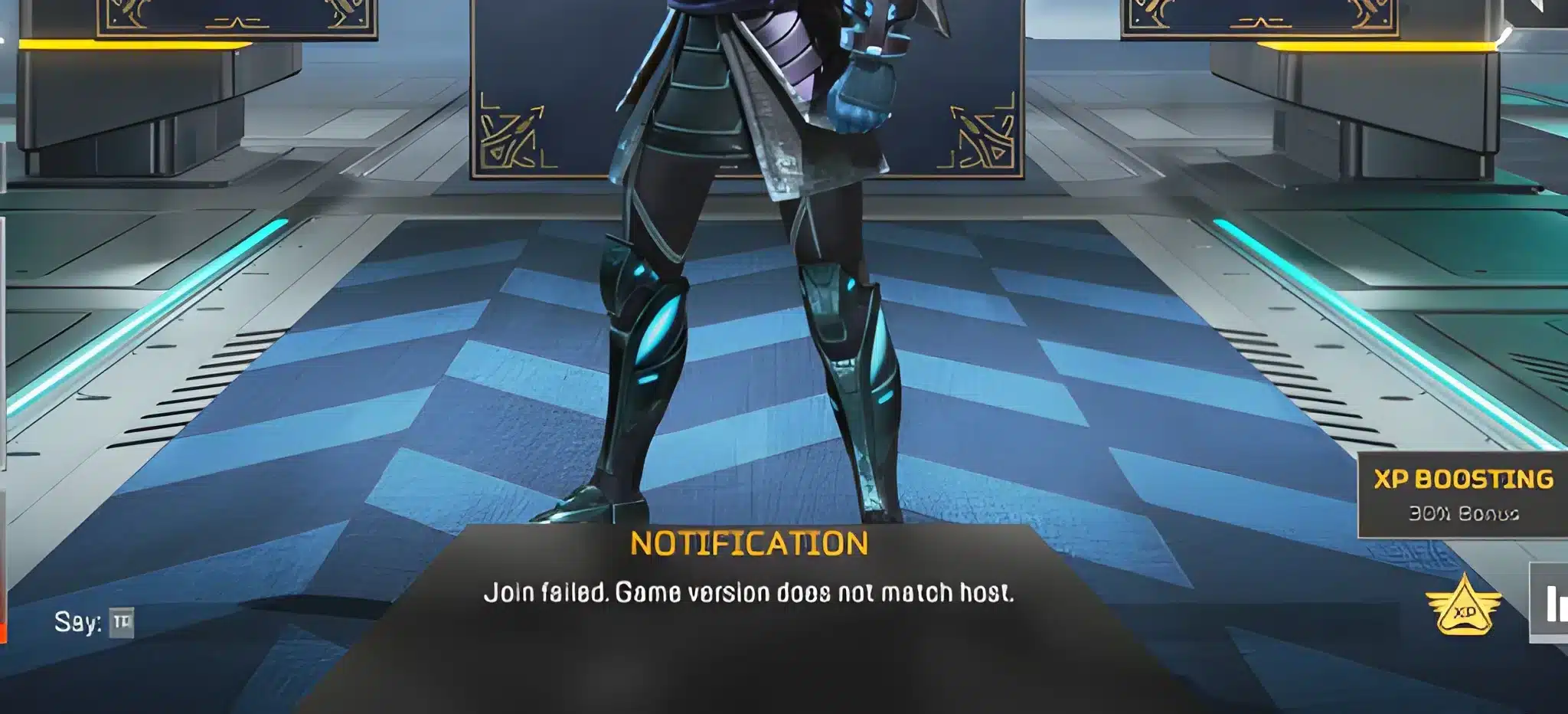
When a sudden FPS Drop Apex Legends hits during a firefight, your entire match can fall apart in seconds. In advance, imagine pushing a final squad and seeing your frames collapse just as you line up the perfect headshot. This chaotic moment is more common than players expect, especially on complex maps packed with explosions, particles, and fast movement.
Now, things get even worse when FPS Drop Apex Legends combines with Apex Legends lag, leaving abilities delayed and enemies teleporting mid-fight. In many cases, players search forums and guides such as the ExitLag blog looking for answers, only to find incomplete solutions that don’t address the real cause.
Even so, you don’t need to accept performance issues forever. With the right tools and settings, including the network routing boost provided by the ExitLag platform, you can restore smooth gameplay and finally enjoy consistent performance. To begin fixing your system today, explore the benefits available through the official ExitLag website.

What is FPS drop and why does it happen in Apex Legends?
A FPS Drop Apex Legends scenario occurs when your system cannot maintain the expected frame rate. While Apex Legends may appear random at first glance, it's actually one of the most demanding shooters available. Because of this, the game requires stable hardware performance and a consistent network connection to keep frames high.
Understanding FPS
Beforehand, here is how different frame ranges affect gameplay:
- 144+ FPS
- 60–120 FPS
- 30–60 FPS
- Below 30 FPS
Difference between FPS drop and network lag
Although they look similar, FPS problems and network problems have different origins. Therefore, here is a simple comparison:
| Aspect | FPS Drop | Network Lag |
| Cause | Hardware strain, effects overload, Apex Legends low FPS, thermal throttling | Poor routing, unstable connection, packet loss |
| Symptoms | Choppy animation, freezes, Apex Legends stuttering | Rubberbanding, teleporting players |
| Solution | Optimize hardware, settings | ExitLag |
Why Apex Legends suffers from FPS drop
Soon after you load into the map, the game engine renders large open areas, dynamic shadows, explosion particles, and moving objects. As a result, certain locations trigger Apex Legends frame drops, especially when multiple squads fight simultaneously. Continuing this logic, older GPUs and CPUs struggle with intense particle effects and lighting, which worsens overall Apex Legends performance issues.
5 main causes of FPS drop in Apex Legends
Now that the basics are clear, let’s explore what truly triggers FPS Drop Apex Legends.
1. Overheating
When your GPU or CPU reaches high temperatures, they throttle to protect the system. Consequently, the game’s frame rate dips sharply during combat or movement.
2. Outdated drivers
In many cases, outdated drivers reduce optimization for new seasons or engine changes, triggering Apex Legends low FPS even on good hardware.
3. Graphics settings
Settings such as Volumetric Lighting, Sun Shadow Coverage, and Ambient Occlusion are known to cause significant Apex Legends stuttering if not properly adjusted.
4. Background processes
Apps like Discord overlays, recording tools, browsers, and RGB software can consume RAM and CPU power, increasing the risk of FPS Drop Apex Legends during intense moments.
5. Insufficient hardware
Older GPUs, low RAM, or outdated processors struggle to keep up with Apex Legends’ fast-paced visuals, causing Apex Legends performance issues throughout entire matches.
How ExitLag fixes FPS drop in Apex Legends
Understanding how to counter FPS Drop Apex Legends becomes easier when you rely on a tool built specifically for gaming stability. Now, ExitLag enhances both routing and game traffic consistency, which directly reduces Apex Legends stuttering and smooths out unstable frame pacing. By improving how data travels through your network, the game receives more stable inputs and outputs, reducing the perception of irregular frames during heavy action scenes.
What is ExitLag? (NOT a VPN)
ExitLag is a multi-route optimization tool designed for gamers who experience unstable performance, routing failures, and connection bottlenecks. Even more importantly, ExitLag is NOT a VPN, meaning it does not mask your IP or encrypt traffic the way traditional VPNs do. Instead, it uses gaming-focused protocols that prioritize speed, stability, and low latency. You can explore how the technology works on the official page explaining its routing system through the ExitLag performance technology guide.
How ExitLag optimizes performance in Apex Legends
To truly reduce FPS Drop Apex Legends, ExitLag uses multiple optimization layers designed for online shooters:
- Network route optimization
- Latency reduction
- Packet loss elimination
- Game traffic prioritization
- Connection stabilization
These combined techniques deliver a noticeably smoother experience, even when the game engine becomes demanding, reducing Apex Legends performance issues during intense combat.
Why ExitLag helps with FPS drop
Although FPS is a hardware measurement, unstable network conditions create micro-stuttering, animation delays, and frame pacing problems. As a result, players often confuse connection instability with Apex Legends low FPS. ExitLag reduces jitter and packet instability, keeping visual pacing consistent. Therefore, even when GPU load spikes, frames flow more smoothly, minimizing the sensation of Apex Legends frame drops.
ExitLag technologies that impact FPS
ExitLag relies on advanced technology layers that strengthen overall game stability:
- Multi-path routing
- Redundant connections
- Gaming-optimized protocol
Because these systems preserve consistent traffic flow, they reduce the chain reactions that often create FPS Drop Apex Legends symptoms.
ExitLag vs other solutions
Below is a direct comparison showing why ExitLag stands out when addressing Apex Legends lag and frame inconsistency:
| Solution | Improves FPS? | Reduces lag? | Ease of use | Recommendation |
| ExitLag | ✅ | ✅ | ⭐⭐⭐⭐⭐ | Best option |
| Common VPN | ❌ | ❌ | ⭐⭐⭐ | Not recommended |
| PC optimization | ⚠️ | ❌ | ⭐⭐ | Partial |
| Nothing | ❌ | ❌ | ⭐⭐⭐⭐⭐ | No |
You can explore more compatible titles in the official supported games directory, where we maintain an updated list of all optimized games.
How to use ExitLag in Apex Legends
The process is extremely simple:
Step 1 – Access the official ExitLag website and download the application. There’s a free trial period for new users.
Step 2 – Install and open the program. Log in with your account.
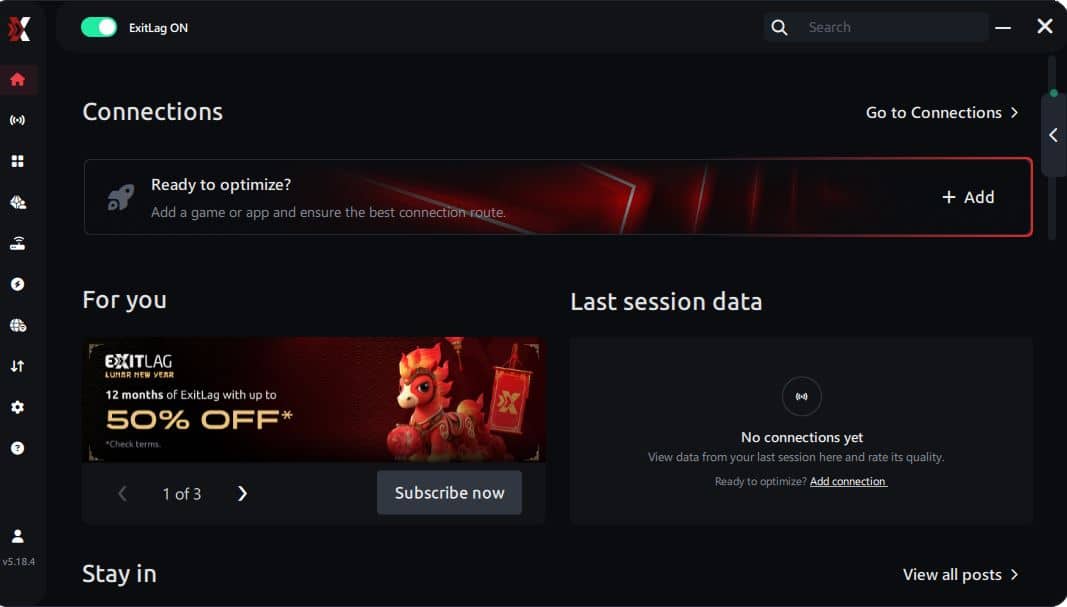
Step 3 – In the search bar, type “Apex Legends” and select the game from the list.
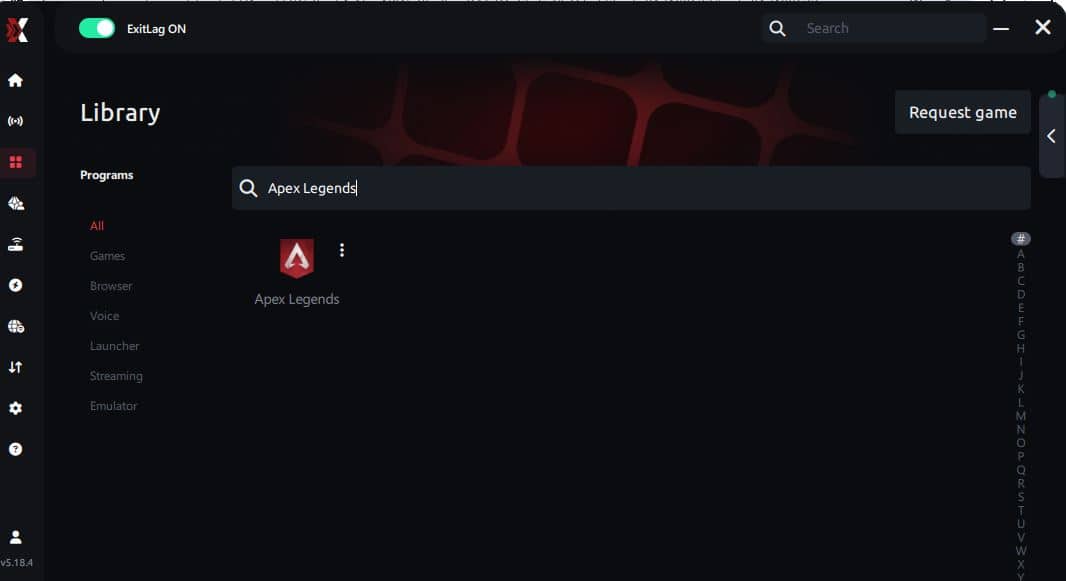
Step 4 – Choose between automated or manual route
Based on the results, you can let ExitLag automatically select the best route or manually choose the server that showed the lowest latency for your connection.
AI-optimized automated route
Based on the results, you can let ExitLag automatically select the best route through AI optimization. The system analyzes multiple connection paths in real time and automatically identifies the most efficient route for your connection, ensuring the lowest possible latency without requiring manual choices.
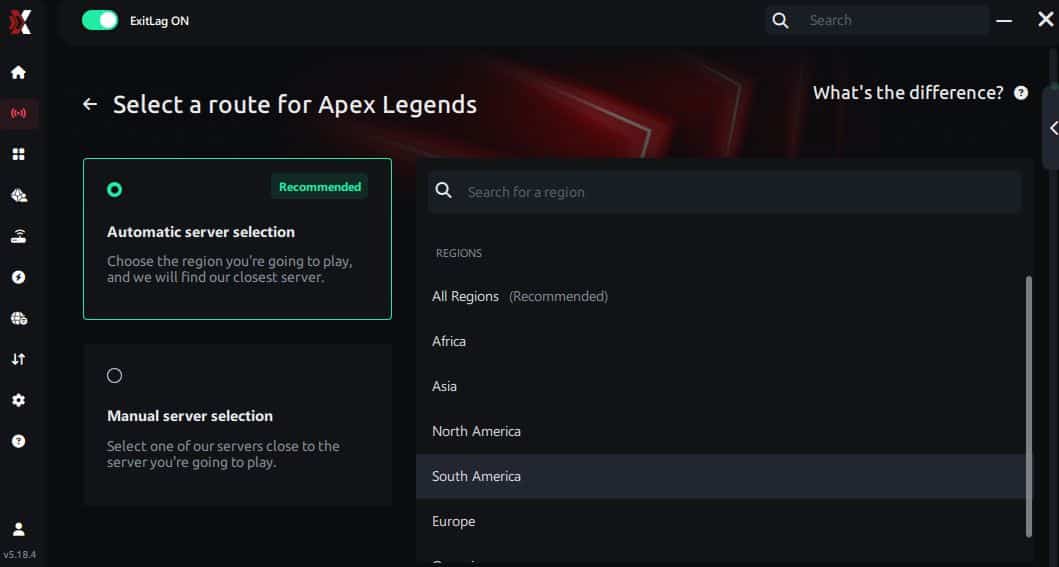
Manual route
If you prefer to have full control over your connection, you can manually choose the server based on the ping test results. Simply select the server that showed the lowest latency or the one that best meets your specific gaming needs, allowing complete customization of your experience.
Step 5 – Click “Apex Legends” or the play button. ExitLag will begin optimizing your connection automatically.
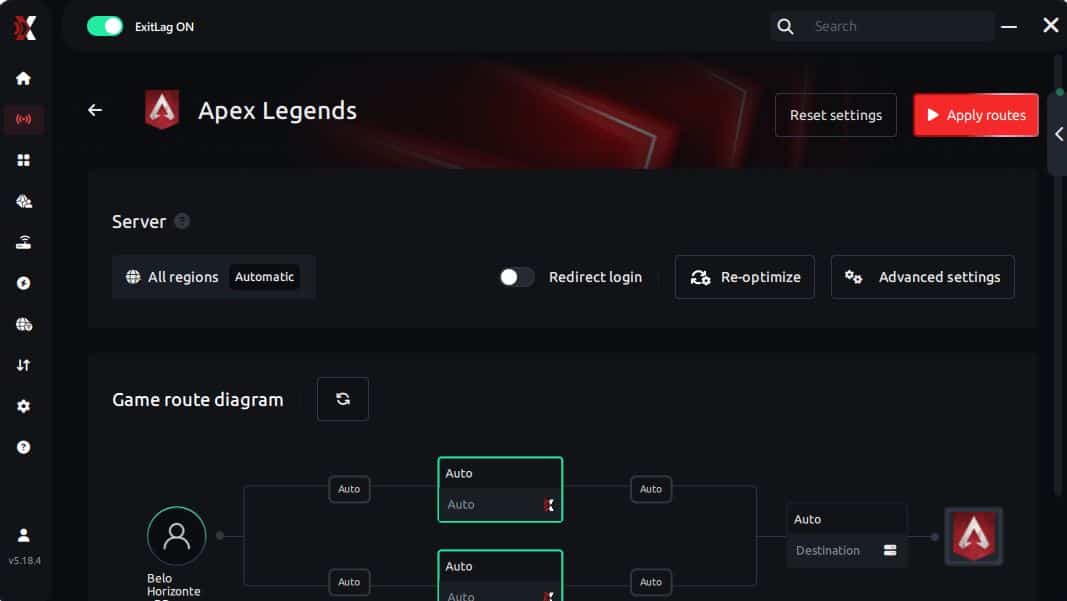
Step 6 – Wait a few seconds until optimization is complete. You’ll see ping indicators in the interface.
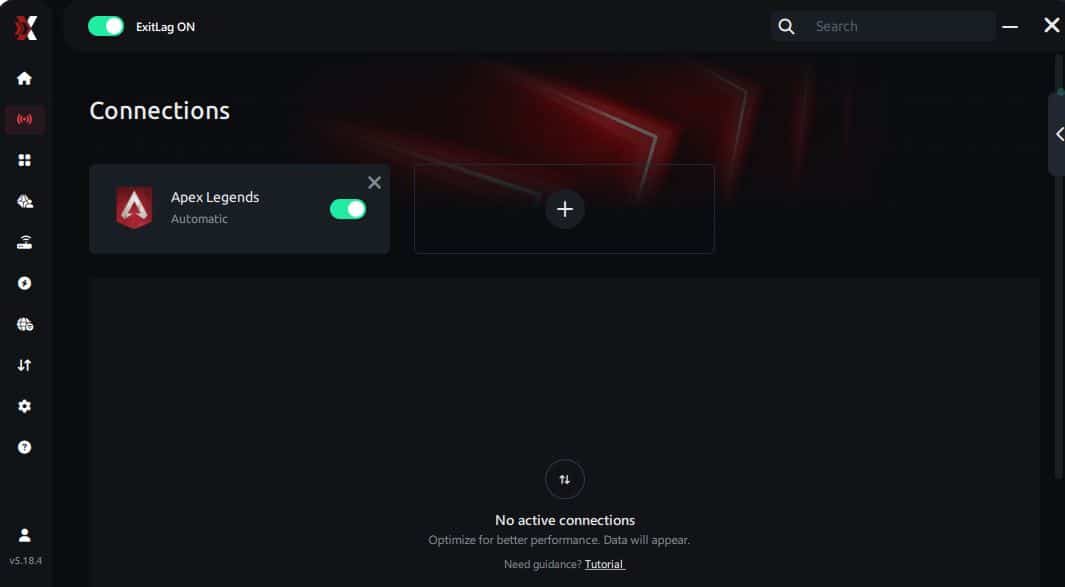
Step 7 – Launch Apex Legends normally. The optimization will already be active.
ExitLag runs in the background while you play, constantly adjusting routes to maintain the best possible performance.
Emulator setup
Players who launch Apex Legends through emulators on cloud platforms or desktop virtualization can also benefit. ExitLag optimizes every route outside the emulator, ensuring better stability, fewer Apex Legends performance issues, and improved response times.
Optimization tips
To further reduce FPS Drop Apex Legends, consider the following:
- Disable unnecessary overlays
- Close browsers and background apps
- Lower heavy GPU settings such as shadows and volumetrics
- Enable high-performance mode in Windows
- Keep GPU drivers updated
Console players
While ExitLag is designed for PCs, console players using cloud-gaming platforms or remote-play services can still benefit from routing optimization on the network level, improving stability and reducing perceived Apex Legends lag.
Before and after results with ExitLag in Apex Legends
Reducing FPS Drop Apex Legends becomes easier when you examine real-world performance improvements players report after using ExitLag.
Real player cases
Here are three examples illustrating measurable results:
- Case #1: A player experiencing 40% fewer frame pacing issues during late-game fights.
- Case #2: Another player reporting a 22% drop in network jitter, eliminating micro-stutters.
- Case #3: A competitive player seeing 18% smoother frame delivery when multiple squads engage simultaneously.
Performance comparison table
| Metric | Without ExitLag | With ExitLag | Improvement |
| Overall stability | Frequent jitter | Stable routing | Noticeable consistency |
| Packet loss | 3–8% | <1% | Major reduction |
| Frame pacing | Irregular | Smooth | Easier aiming |
| Input delay | High | Reduced | Better responsiveness |
Additional optimizations to maximize FPS with ExitLag
To fully stabilize your gameplay and minimize FPS Drop Apex Legends, you can combine ExitLag with simple system and network tweaks. Even though ExitLag fixes routing instability, these additional optimizations ensure your hardware and software remain fully prepared for Apex Legends’ demanding engine.
Network
A strong and stable network is essential to avoid packet delay and prevent the perception of FPS Drop Apex Legends caused by jitter.
- Ethernet: Prefer a wired connection to eliminate Wi-Fi fluctuations.
- QoS: Configure Quality of Service on your router to prioritize game traffic.
- DNS: Use fast DNS services for quicker response times.
- Close heavy apps: Shut down streaming software, cloud sync apps, and browsers to reduce background traffic.
System
Optimizing your PC can also reduce Apex Legends performance issues, especially on mid-range setups.
- Drivers: Keep GPU drivers updated for new performance patches.
- High-performance mode: Select maximum performance in Windows power settings.
- Background apps: Disable unnecessary startup programs to reduce CPU load.
- Clean system: Maintain free storage and remove temporary files that slow down processes.
In-game
Adjusting in-game settings can significantly reduce Apex Legends stuttering and frame pacing problems that often look like Apex Legends low FPS.
- V-Sync off: Reduces input delay and prevents frame latency.
- FPS limit: Set a stable cap based on your monitor (e.g., 144 or 165).
- Recommended presets: Lower shadows, volumetrics, and reflections for consistent performance.
Frequently asked questions about FPS drop in Apex Legends
Understanding the common questions makes it easier to overcome FPS Drop Apex Legends and build a smoother gameplay experience.
Does ExitLag actually improve FPS?
ExitLag improves frame pacing and reduces instability caused by jitter, packet loss, and routing issues. While it doesn’t replace hardware power, it dramatically reduces micro-stutters, preventing artificial Apex Legends frame drops that look like low FPS.
Is ExitLag safe?
Yes. ExitLag is a trusted, widely used optimization tool. It does not modify game files or violate any Apex Legends rules. It only improves routing performance.
Does ExitLag work on console?
Although consoles cannot install ExitLag directly, players using cloud gaming or remote-play platforms can still benefit from its routing improvements, reducing perceived FPS Drop Apex Legends caused by lag spikes.
How much does ExitLag cost?
ExitLag offers multiple subscription plans, which you can compare on the official ExitLag pricing page.
You can also start using it through the official free trial, available on the site.
My PC is weak, does ExitLag help?
Yes. While it won’t increase raw GPU power, ExitLag reduces network instability that often triggers Apex Legends performance issues, improving perceived smoothness.

Does ExitLag work with Apex Legends?
Absolutely. Apex Legends is supported by ExitLag and receives route optimization like many other titles listed on the official game directory.
What’s the difference between ExitLag and a VPN?
ExitLag uses multipath routing and game-specific protocols, while a VPN encrypts and disguises your traffic. ExitLag is NOT a VPN, meaning it avoids the added latency that standard VPNs typically introduce.
Why do I still get stutters even with high FPS?
This happens due to inconsistent frame pacing or network jitter. ExitLag helps reduce jitter at the network level, minimizing the kind of micro-stutters that resemble FPS Drop Apex Legends.
Why does Apex Legends stutter more in late game?
The game engine loads more assets, particle effects, and player interactions in final circles, increasing strain on both GPU and network traffic.
Fix FPS drop in Apex Legends with ExitLag
Final benefits
When ExitLag is combined with system and in-game adjustments, players experience:
- Stable FPS
- Zero micro-stuttering
- Smooth gameplay
- Competitive advantage
- Frustration-free gameplay
Next steps
- Test ExitLag for free
- Configure in 5 minutes
- Compare before and after
- Dominate Apex Legends
In conclusion, solving FPS drop Apex Legends issues requires balancing hardware, settings, and network stability. ExitLag’s multi-path technology eliminates routing delays and ensures fluid gameplay across all regions of Apex Legends. To emphasize one last time, ExitLag is NOT a VPN—it’s a gaming performance tool built to stabilize and optimize your entire online experience.
Now that you know everything about FPS drop Apex Legends, if you want the most stable, smooth, and competitive gameplay possible, is the time to upgrade your performance toolkit. Register at ExitLag now and improve your gameplay in a way you've never experienced before!