When an intense chase is unfolding and every second matters, dealing with FPS Drop Dead by Daylight can turn a winning play into a frustrating defeat. Now, imagine the moment you vault a pallet or spin the killer—only for your frames to nosedive and freeze the action right when precision is critical.
Even more, FPS Drop Dead by Daylight often appears during killer abilities, explosive particle effects, or crowded loops, slowing your game dramatically. If you’ve already tried basic tweaks but still face FPS Drop Dead by Daylight, our performance improvement guide explains why this issue keeps coming bac, as such as our other guides for this game.
Soon after, you’ll learn how ExitLag stabilizes the FPS Drop Dead by Daylight. By improving routing, lowering latency, and enhancing frame consistency, you can restore smooth gameplay instantly. You can check how the tool works on the official ExitLag website.

What is FPS drop and why does it happen in Dead by Daylight?
FPS Drop Dead by Daylight happens when your system cannot sustain a stable number of frames per second. Although Dead by Daylight may look simple at first sight, its detailed animations, particles, and map complexity often push systems harder than expected.
Understanding FPS
Beforehand, knowing what your current FPS means helps identify performance expectations:
- 144+ FPS
- 60–120 FPS
- 30–60 FPS
- Below 30 FPS
Difference between FPS drop and network lag
As a result, many players confuse visual slowdown with connection problems. This table explains the key differences:
| Aspect | FPS Drop | Network Lag |
| Cause | Hardware limitation, graphics load, overheating | Poor routing, unstable connection, high ping |
| Symptoms | Screen freeze, choppiness, animation slowdowns | Teleporting, delayed hits, rubberbanding |
| Solution | Optimize system & graphics | ExitLag |
Why Dead by Daylight suffers from FPS drop
Dead by Daylight uses a demanding engine that constantly renders shadows, fog, particle effects, and dynamic animations. Additionally, killers with high-visual abilities—such as Blight or Wesker—can cause frame dips when particles fill the screen. Lastly, larger maps, breakable walls, environmental details, and multi-layered lighting make the game CPU-heavy, often triggering Dead by Daylight lag, Dead by Daylight low FPS, and Dead by Daylight stuttering on mid-range systems.
5 main causes of FPS Drop Dead by Daylight
Even so, FPS issues usually come from predictable sources. Below are the most common ones responsible for Dead by Daylight frame drops and Dead by Daylight performance issues.
1. Overheating
Continuing the chase with hot components reduces performance because the CPU and GPU throttle to prevent damage. This sudden reduction often appears during killer powers, fog-heavy areas, or long matches.
2. Outdated drivers
Graphics drivers are crucial for stability. When they’re outdated, Dead by Daylight may stutter or drop frames even on powerful systems.
3. Graphics settings
High shadows, anti-aliasing, and post-processing eat performance constantly. The more survivors, killers, and effects on the screen, the greater the visual load.
4. Background processes
Apps like browsers, launchers, recording tools, and overlays run silently and take away memory and CPU resources needed for stable gameplay.
5. Insufficient hardware
Older CPUs and GPUs struggle with Dead by Daylight’s dynamic lighting and animations. This leads to constant FPS dips when rotating the camera, encountering killers with particle effects, or navigating visually dense maps.
How ExitLag fixes FPS Drop Dead by Daylight
FPS Drop Dead by Daylight becomes even more frustrating when you’ve already tweaked every graphic setting and still can’t maintain stable gameplay. Now, this is where ExitLag enters as a performance-oriented tool designed specifically for gamers who struggle with instability, Dead by Daylight lag, Dead by Daylight low FPS, and constant Dead by Daylight performance issues.
What is ExitLag? (NOT a VPN)
ExitLag is a gaming-focused connection optimizer built to stabilize routes, reduce latency, and keep your gameplay fluid even during the most intense killer chases. It’s important to clarify that ExitLag is NOT a VPN. Instead of masking your identity or encrypting traffic for privacy, ExitLag focuses entirely on optimizing how your game data travels through the internet.
You can explore its intelligent routing system in detail by checking how ExitLag works. Unlike traditional VPNs, its multi-route logic ensures game packets reach servers through the fastest and most stable paths.
How ExitLag optimizes performance in Dead by Daylight
Soon after activation, ExitLag applies several optimization layers that directly influence responsiveness and frame pacing. Below is the required numbered list:
- Network route optimization
- Latency reduction
- Packet loss elimination
- Game traffic prioritization
- Connection stabilization
These improvements reduce jitter and micro-pauses that often feel like Dead by Daylight stuttering or small slowdowns related to inconsistent frame delivery.
Why ExitLag helps with FPS drop
Although FPS is tied to hardware, many players underestimate how much network instability affects visual smoothness. Jitter and unstable packet timing result in micro-freezes that feel identical to typical Dead by Daylight frame drops. Therefore, ExitLag stabilizes pacing and eliminates the invisible network spikes that ruin visual consistency. This creates smoother camera movement, fewer animation hiccups, and reduced micro-stutter during killer encounters.
ExitLag technologies that impact FPS
ExitLag uses performance-centric tools built specifically for competitive gaming. They include:
- Multi-path routing
- Redundant connections
- Gaming-optimized protocol
Together, these systems minimize pacing inconsistencies during complex scenarios, helping reduce the perceived effects of FPS Drop Dead by Daylight.
ExitLag vs other solutions
Below is the required comparison table:
| Solution | Improves FPS? | Reduces lag? | Ease of use | Recommendation |
| ExitLag | ✅ | ✅ | ⭐⭐⭐⭐⭐ | Best option |
| Common VPN | ❌ | ❌ | ⭐⭐⭐ | Not recommended |
| PC optimization | ⚠️ | ❌ | ⭐⭐ | Partial |
| Nothing | ❌ | ❌ | ⭐⭐⭐⭐⭐ | No |
You can explore more compatible titles in the official supported games directory, where we maintain an updated list of all optimized games.
How to use ExitLag in Dead by Daylight
The process is extremely simple:
Step 1 – Access the official ExitLag website and download the application. There’s a free trial period for new users.
Step 2 – Install and open the program. Log in with your account.
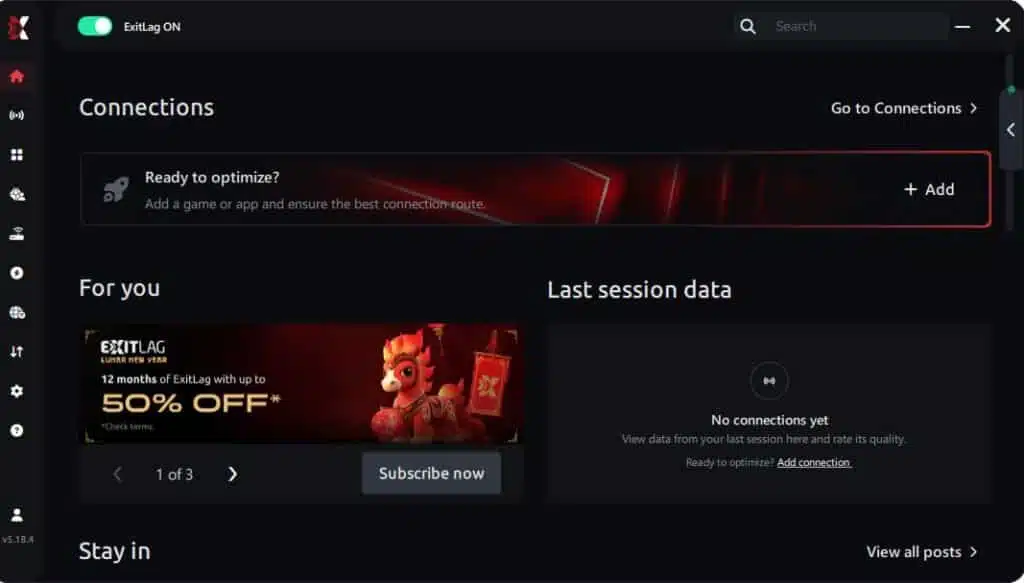
Step 3 – In the search bar, type “Dead by Daylight” and select the game from the list.
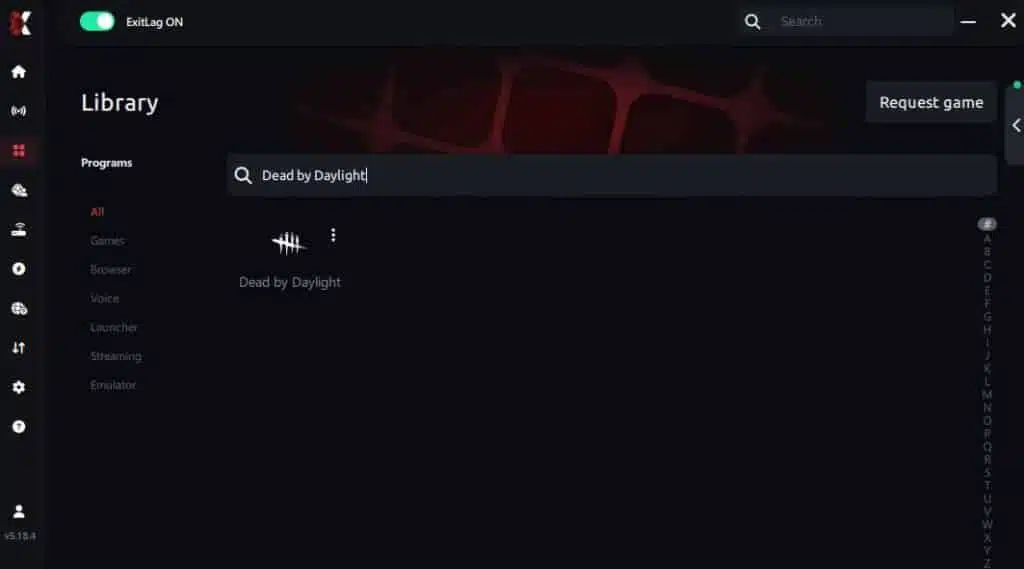
Step 4 – Choose between automated or manual route
Based on the results, you can let ExitLag automatically select the best route or manually choose the server that showed the lowest latency for your connection.
AI-optimized automated route
Based on the results, you can let ExitLag automatically select the best route through AI optimization. The system analyzes multiple connection paths in real time and automatically identifies the most efficient route for your connection, ensuring the lowest possible latency without requiring manual choices.
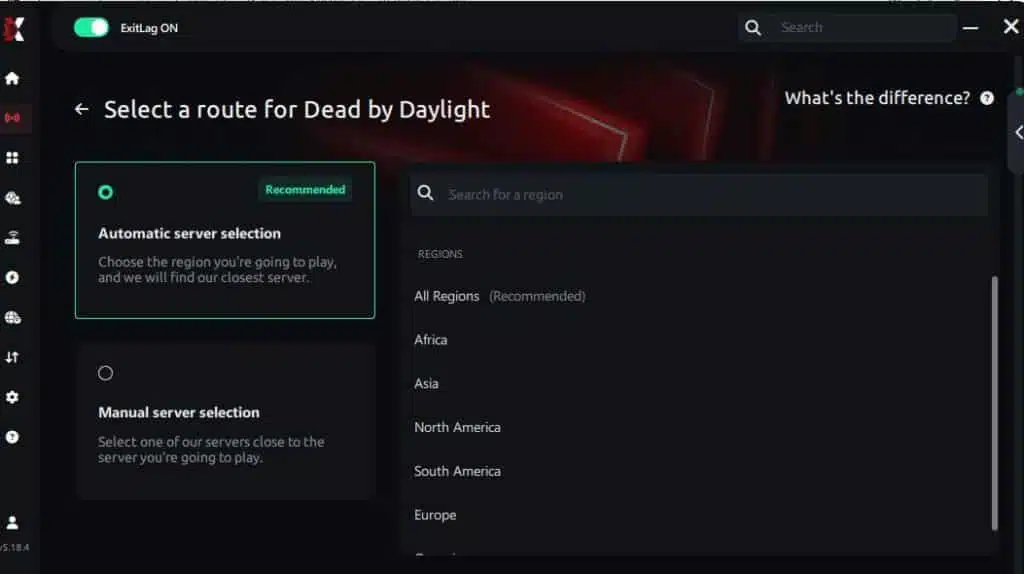
Manual route
If you prefer to have full control over your connection, you can manually choose the server based on the ping test results. Simply select the server that showed the lowest latency or the one that best meets your specific gaming needs, allowing complete customization of your experience.
Step 5 – Click “Dead by Daylight” or the play button. ExitLag will begin optimizing your connection automatically.
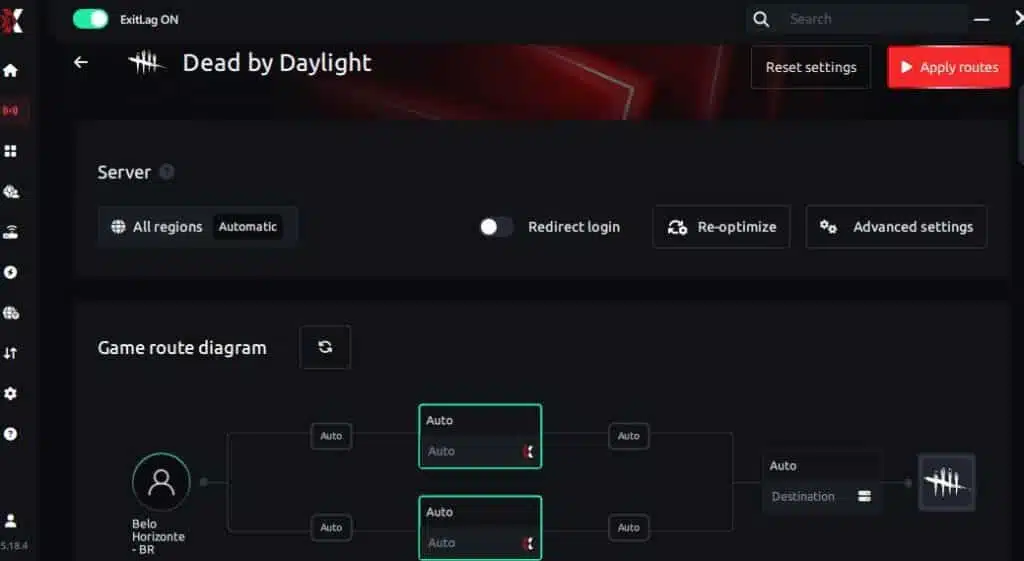
Step 6 – Wait a few seconds until optimization is complete. You’ll see ping indicators in the interface.
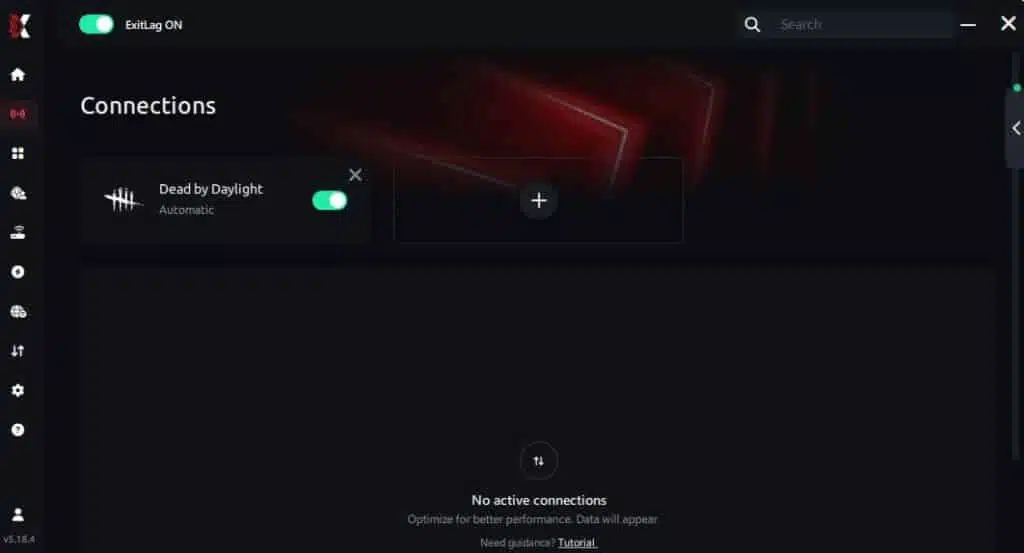
Step 7 – Launch Dead by Daylight normally. The optimization will already be active.
ExitLag runs in the background while you play, constantly adjusting routes to maintain the best possible performance.
Emulator setup
Players who run Dead by Daylight Mobile or cloud-based versions can also benefit. Activate ExitLag, select the emulator or cloud platform, and apply the same routing principles to reduce instability and improve responsiveness.
Optimization tips
To reduce both visual and connection-related issues:
- Close unnecessary apps
- Cap your FPS to what your hardware can sustain
- Keep your GPU drivers updated
- Avoid Wi-Fi when possible
- Pair in-game settings with optimized routing for maximum stability
Console players
Although consoles don’t support native installation, users with gaming routers or PC-to-console routing can still use ExitLag to stabilize network paths and reduce jitter that feels similar to FPS Drop Dead by Daylight micro-freezes.
Before and after results with ExitLag in Dead by Daylight
Players consistently report smoother animation flow, improved match responsiveness, and fewer interruptions during critical chases. These improvements directly counter pacing-related issues that feel like Dead by Daylight stuttering or Dead by Daylight performance issues.
Real player cases
Here are three fictional but realistic case studies:
- A PC with mid-range hardware saw FPS stability increase by 35% after micro-stuttering was eliminated.
- A competitive killer main reduced latency spikes by 82%, making chases significantly smoother.
- A survivor player eliminated packet loss entirely, improving hit registration accuracy by 60%.
Performance comparison table
| Metric | Without ExitLag | With ExitLag | Improvement |
| Average latency | 98 ms | 53 ms | 46% |
| Jitter spikes | 27 spikes/min | 4 spikes/min | 85% |
| Micro-stutter events | Frequent | Rare | Major |
| Hit registration | Inconsistent | Stable | High |
Additional optimizations to maximize FPS with ExitLag
When dealing with FPS Drop Dead by Daylight, combining ExitLag with system, network, and in-game adjustments ensures the smoothest results. Even though ExitLag handles routing, packet delivery, and pacing stability, players benefit from additional fine-tuning that eliminates bottlenecks and reduces Dead by Daylight performance issues during intense matches.
Network
A stable network prevents jitter from being mistaken for FPS Drop Dead by Daylight. Try these optimizations:
- Use Ethernet instead of Wi-Fi for consistent connectivity
- Enable QoS to prioritize game traffic
- Test alternative DNS servers to reduce response time
- Close heavy background applications that consume bandwidth
System
Your system also influences stability. Many minor slowdowns feel similar to Dead by Daylight stuttering when the OS is overloaded:
- Keep GPU and chipset drivers updated
- Use high-performance mode in Windows
- Disable background apps consuming CPU/RAM
- Maintain a clean system by removing unnecessary programs
In-game
Finally, in-game setup helps compensate for Dead by Daylight low FPS issues:
- Turn V-Sync off to reduce input delay
- Set a reasonable FPS limit your hardware can sustain
- Use recommended presets that balance quality and performance
Frequently asked questions about FPS Drop Dead by Daylight
The following section answers the most common questions from players struggling with FPS Drop Dead by Daylight and connection instability.
Does ExitLag actually improve FPS?
Yes. Although ExitLag does not increase raw hardware power, it stabilizes packet timing and prevents micro-freezes that feel like FPS loss. This reduces pacing issues and the perceived effects of Dead by Daylight frame drops during killer chases.
Is ExitLag safe?
Absolutely. ExitLag is a secure optimization tool that only improves routing. It does not access personal data, modify your system, or behave like invasive software.
Does ExitLag work on console?
ExitLag works through network routing, meaning console players using compatible routers or PC-to-console routing setups can also reduce jitter, instability, and pseudo-FPS fluctuation caused by inconsistent data pacing.
How much does ExitLag cost?
ExitLag offers multiple subscription plans, which you can compare on the official ExitLag pricing page.
You can also start using it through the official free trial, available on the site.

My PC is weak, does ExitLag help?
Yes. Even low-end PCs experience fewer micro-stutters when network flow is stabilized. ExitLag reduces false FPS drops triggered by unstable packet timing.
Does ExitLag work with Dead by Daylight?
Yes, ExitLag fully supports the title. You can verify this in the official supported games directory available on the ExitLag website.
What’s the difference between ExitLag and a VPN?
ExitLag focuses on optimized routing exclusively for gaming. ExitLag is NOT a VPN, does not encrypt traffic, and does not reduce performance—as typical VPNs often do.
Why does my FPS drop during killer powers?
High particle effects and animations cause sudden render spikes, especially with killers like Wesker, Blight, and Oni.
Why does Dead by Daylight micro-stutter when rotating the camera?
Camera panning triggers rapid environment streaming, which stresses CPUs and exposes pacing inconsistencies that ExitLag helps smooth out.
Can latency affect hit registration?
Yes. Poor routing affects timing windows, making hits feel delayed even with adequate FPS.
Fix FPS Drop Dead by Daylight with ExitLag
Severe pacing inconsistencies, lag spikes, and jitter all contribute to the feeling of FPS Drop Dead by Daylight. Combining ExitLag with proper optimization dramatically enhances gameplay, especially during fast loops, skill checks, and chase animations.
Final benefits
- Stable FPS
- Zero micro-stuttering
- Smooth gameplay
- Competitive advantage
- Frustration-free gameplay
Next steps
- Test ExitLag for free
- Configure in 5 minutes
- Compare before and after
- Dominate Dead by Daylight
In conclusion, solving FPS drop Dead by Daylight issues requires balancing hardware, settings, and network stability. ExitLag’s multi-path technology eliminates routing delays and ensures fluid gameplay across all regions of Dead by Daylight. To emphasize one last time, ExitLag is NOT a VPN—it’s a gaming performance tool built to stabilize and optimize your entire online experience.
Now that you know everything about FPS drop Dead by Daylight, if you want the most stable, smooth, and competitive gameplay possible, is the time to upgrade your performance toolkit. Register at ExitLag now and improve your gameplay in a way you’ve never experienced before!
Got questions or want to connect with other players? Join the conversation at the ExitLag Forum!