

Few things break immersion faster than an intense duel suddenly turning into a slideshow because of FPS Drop Gamers Club. At the worst moment—right when you peek, strafe, or execute the perfect spray—the frame rate collapses and ruins the play. This issue affects new and veteran players alike, especially during ranked matches.
Even more frustrating is when FPS Drop Gamers Club appears alongside Gamers Club lag, heavy textures, or unstable rendering. It’s the kind of performance crash that forces players to tab out, tweak settings, or restart the match entirely. To understand more about common performance problems, you can check detailed articles directly from the ExitLag blog.
Now, the good news: tools like ExitLag can stabilize your connection, improve routing, and reduce the impact of background network spikes that often amplify FPS Drop Gamers Club. With optimized paths and multi-routing intelligence, ExitLag helps keep gameplay consistent. You can explore further refinements by visiting the official ExitLag website.

What is FPS drop and why does it happen in Gamers Club?
When discussing FPS Drop Gamers Club, it’s essential to understand what FPS represents and why sudden dips happen. Frames per second determine how smooth your gameplay feels, and when they fall, the game becomes choppy. These drops frequently occur when your system can’t keep up with rendering demands or when Gamers Club performance issues interfere with stability.
Understanding FPS
Different FPS ranges influence visual fluidity:
- 144+ FPS
- 60–120 FPS
- 30–60 FPS
- Below 30 FPS
Difference between FPS drop and network lag
Although players often confuse FPS dips with Gamers Club lag, each problem has different origins.
| Aspect | FPS Drop | Network Lag |
| Cause | Hardware strain, graphics overload, temperature spikes | Routing issues, unstable connection, packet loss |
| Symptoms | Visual stutter, frozen frames, low FPS counter | Rubberbanding, delayed shots, teleporting players |
| Solution | Optimize hardware, drivers, settings | ExitLag |
Why Gamers Club suffers from FPS drop
Gamers Club uses competitive servers designed for precision, but players still encounter FPS Drop Gamers Club due to various rendering challenges. High-detail maps, smoke particles, shadows, and rapid player movement require consistent GPU and CPU performance. When your system struggles, you’ll feel Gamers Club low FPS, especially during firefights with intense particle effects or fast peeks.
Additionally, Gamers Club’s anti-cheat, match recording features, and overlays can load the system. These small processes accumulate, making Gamers Club frame drops far more noticeable during busy rounds. If your hardware isn’t properly cooled or updated, the situation worsens quickly.
5 main causes of FPS drop in Gamers Club
Understanding the roots of the problem helps reduce Gamers Club stuttering and maintain stable performance. Below are the most common causes of FPS Drop Gamers Club.
1. Overheating
Overheating forces your GPU or CPU to throttle, dramatically lowering frame rates. When temperatures spike, performance drops instantly. Dust buildup, poor airflow, and old thermal paste contribute to heavy Gamers Club performance issues.
2. Outdated drivers
Using outdated GPU drivers almost always results in FPS Drop Gamers Club. Modern competitive environments require current optimizations. NVIDIA and AMD frequently update their drivers to fix stutter, shader issues, and rendering anomalies.
3. Graphics settings
Unbalanced graphical configurations—like ultra shadows or high anti-aliasing—drain resources and create Gamers Club low FPS. Competitive players typically prefer low or minimal settings to ensure consistency.
4. Background processes
Apps running simultaneously in the background can consume RAM, CPU, and disk resources. Discord overlays, browsers, and recording software often cause Gamers Club stuttering when the system reaches its limit.
5. Insufficient hardware
If your PC doesn’t meet modern competitive standards, FPS Drop Gamers Club becomes unavoidable. Older GPUs can’t handle high-refresh-rate rendering, and lower-end CPUs struggle with high-tick-rate servers.
How ExitLag fixes FPS drop in Gamers Club
When players struggle with FPS Drop Gamers Club, they often assume the issue is only hardware-related. However, network instability can trigger micro-stuttering, input delays, and inconsistent pacing that worsen visual drops. That's why optimizing both system and network paths becomes essential for competitive performance.
What is ExitLag? (NOT a VPN)
ExitLag is a multi-routing gaming optimizer created to stabilize your connection during gameplay. It improves responsiveness and reduces the chance of desync during intense fights. Importantly, ExitLag is NOT a VPN, meaning it doesn’t encrypt traffic or slow down routing like traditional VPNs.
You can learn the technical details directly from the official explanation of how ExitLag works.
ExitLag focuses on game-specific traffic rather than generic browsing paths. Because of that, it solves underlying issues that amplify Gamers Club lag and indirectly reduce stability—often misinterpreted as FPS Drop Gamers Club.
How ExitLag optimizes performance in Gamers Club
Below is the required step-by-step list showing how network optimization impacts gameplay consistency:
- Network route optimization
- Latency reduction
- Packet loss elimination
- Game traffic prioritization
- Connection stabilization
These improvements help minimize jitter and reduce visual inconsistencies that resemble Gamers Club stuttering during intense crossfires.
Why ExitLag helps with FPS drop
Even though FPS is tied to hardware, unstable network pacing can create irregular frame delivery. Micro-stuttering happens when frames arrive inconsistently; jitter disrupts movement interpolation; pacing issues cause delayed frame rendering. When combined, these problems create an experience similar to that of FPS Drop Gamers Club.
ExitLag reduces these symptoms by stabilizing real-time data flow. When data packets travel smoothly, the game engine maintains consistent updates, reducing apparent frame interruptions often mistaken for Gamers Club frame drops.
ExitLag technologies that impact FPS
ExitLag uses several technologies that help mitigate Gamers Club performance issues:
- Multi-path routing
- Redundant connections
- Gaming-optimized protocol
These optimize input and rendering communication, lowering engine stalls and improving competitive consistency.
ExitLag vs other solutions
| Solution | Improves FPS? | Reduces lag? | Ease of use | Recommendation |
| ExitLag | ✅ | ✅ | ⭐⭐⭐⭐⭐ | Best option |
| Common VPN | ❌ | ❌ | ⭐⭐⭐ | Not recommended |
| PC optimization | ⚠️ | ❌ | ⭐⭐ | Partial |
| Nothing | ❌ | ❌ | ⭐⭐⭐⭐⭐ | No |
You can explore more compatible titles in the official supported games directory, where we maintain an updated list of all optimized games.
How to use ExitLag in gamers club
The process is extremely simple:
Step 1 – Access the official ExitLag website and download the application. There’s a free trial period for new users.
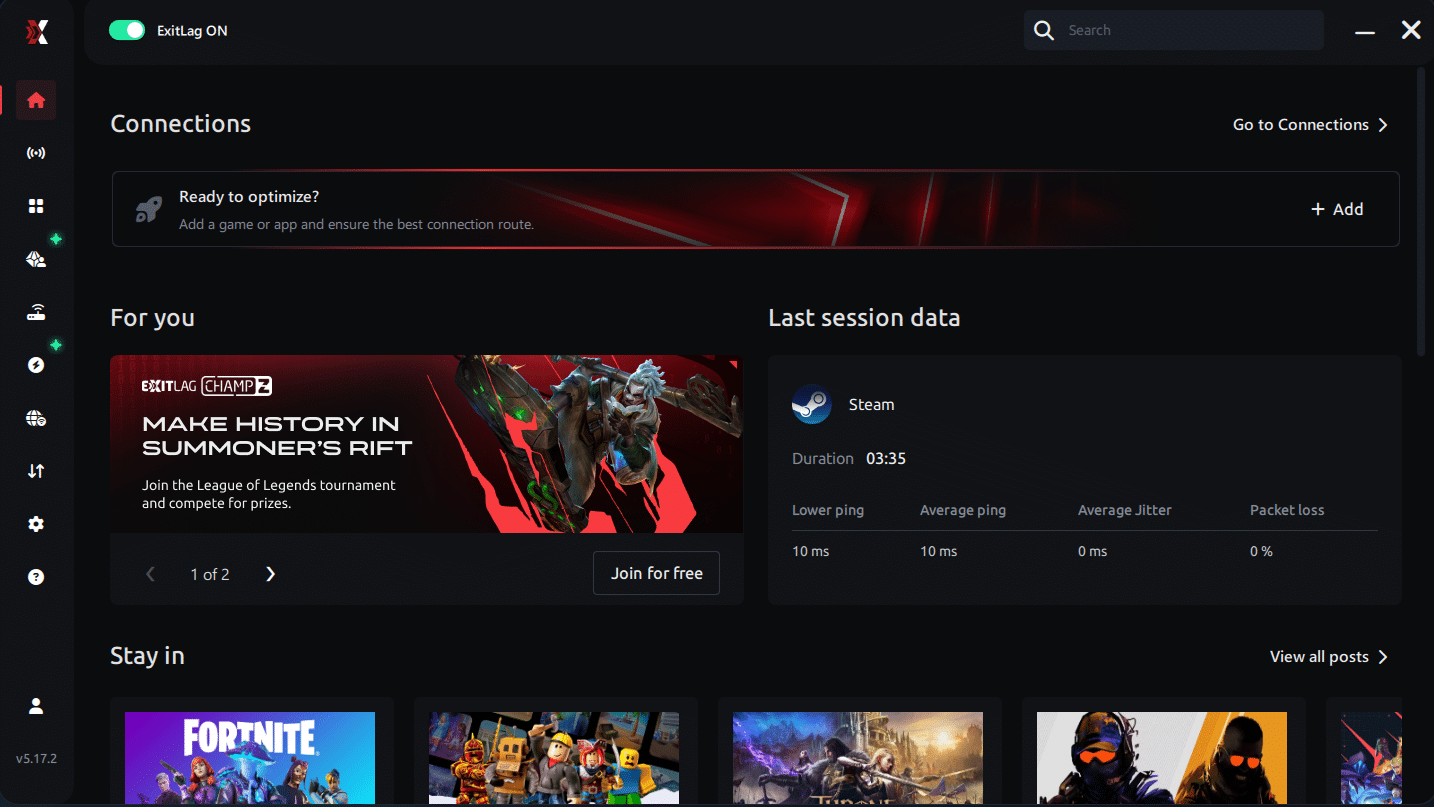
Step 2 – Install and open the program. Log in with your account.
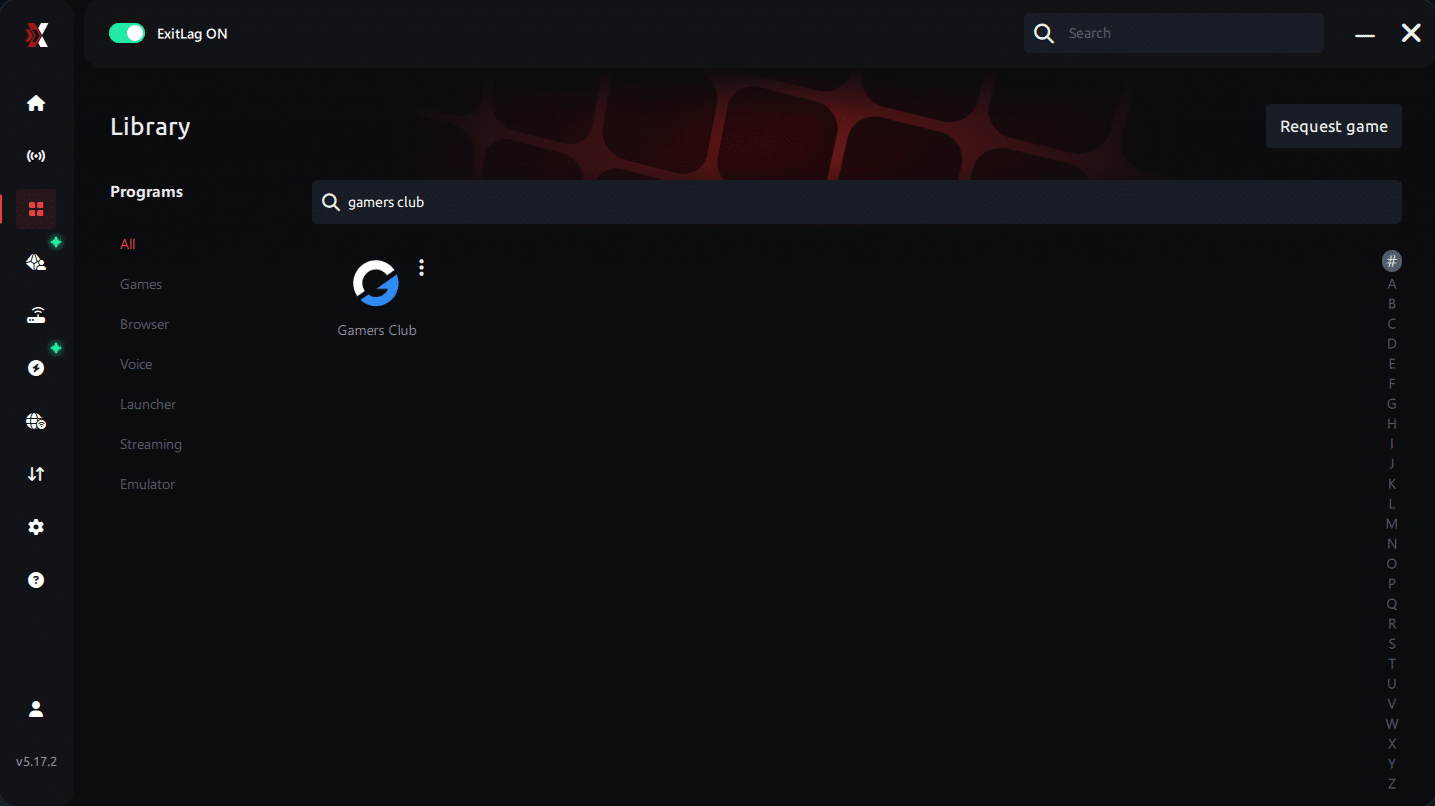
Step 3 – In the search bar, type “gamers club” and select the game from the list.
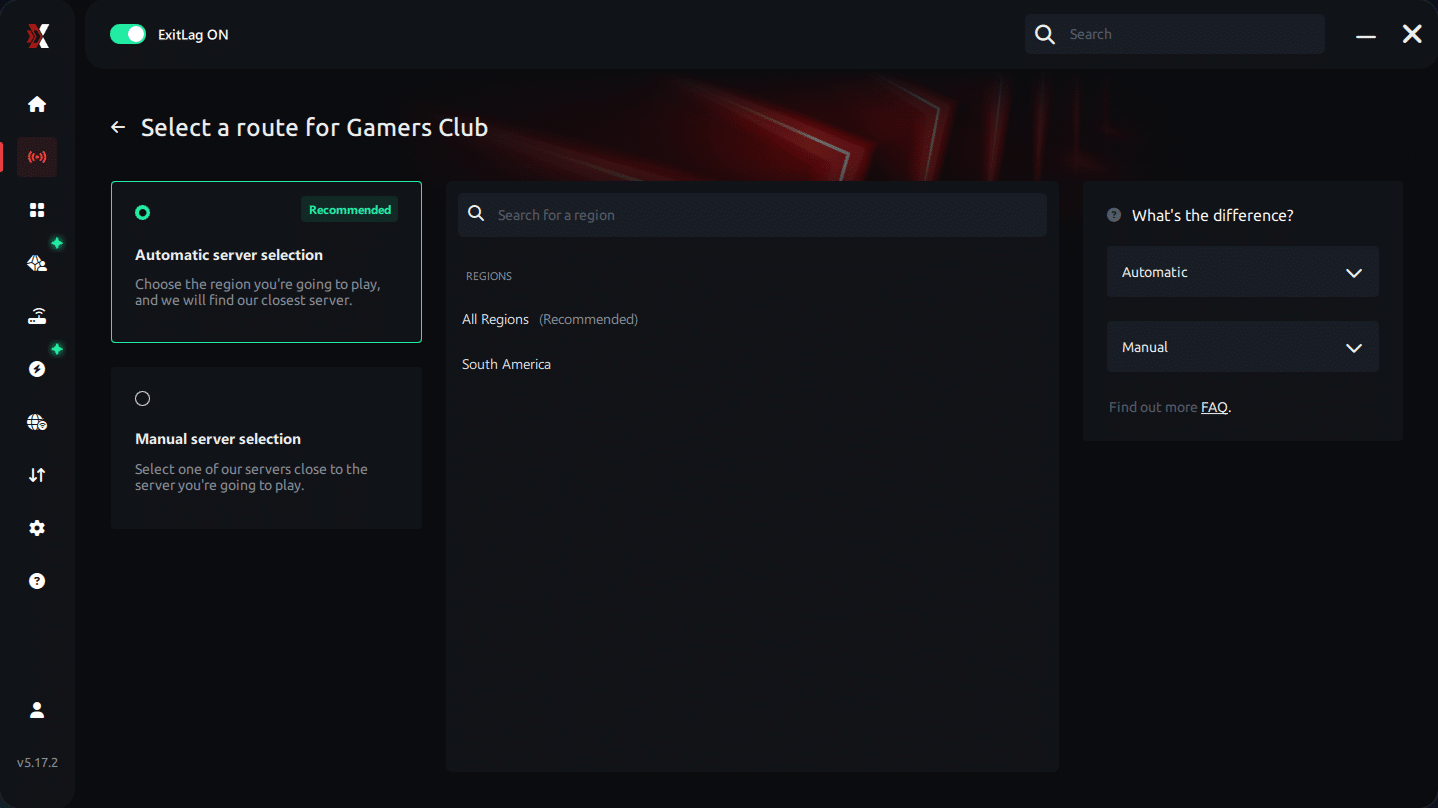
Step 4 – Choose between automated or manual route
Based on the results, you can let ExitLag automatically select the best route or manually choose the server that showed the lowest latency for your connection.
AI-optimized automated route
Based on the results, you can let ExitLag automatically select the best route through AI optimization. The system analyzes multiple connection paths in real time and automatically identifies the most efficient route for your connection, ensuring the lowest possible latency without requiring manual choices.
Manual route
If you prefer to have full control over your connection, you can manually choose the server based on the ping test results. Simply select the server that showed the lowest latency or the one that best meets your specific gaming needs, allowing complete customization of your experience.
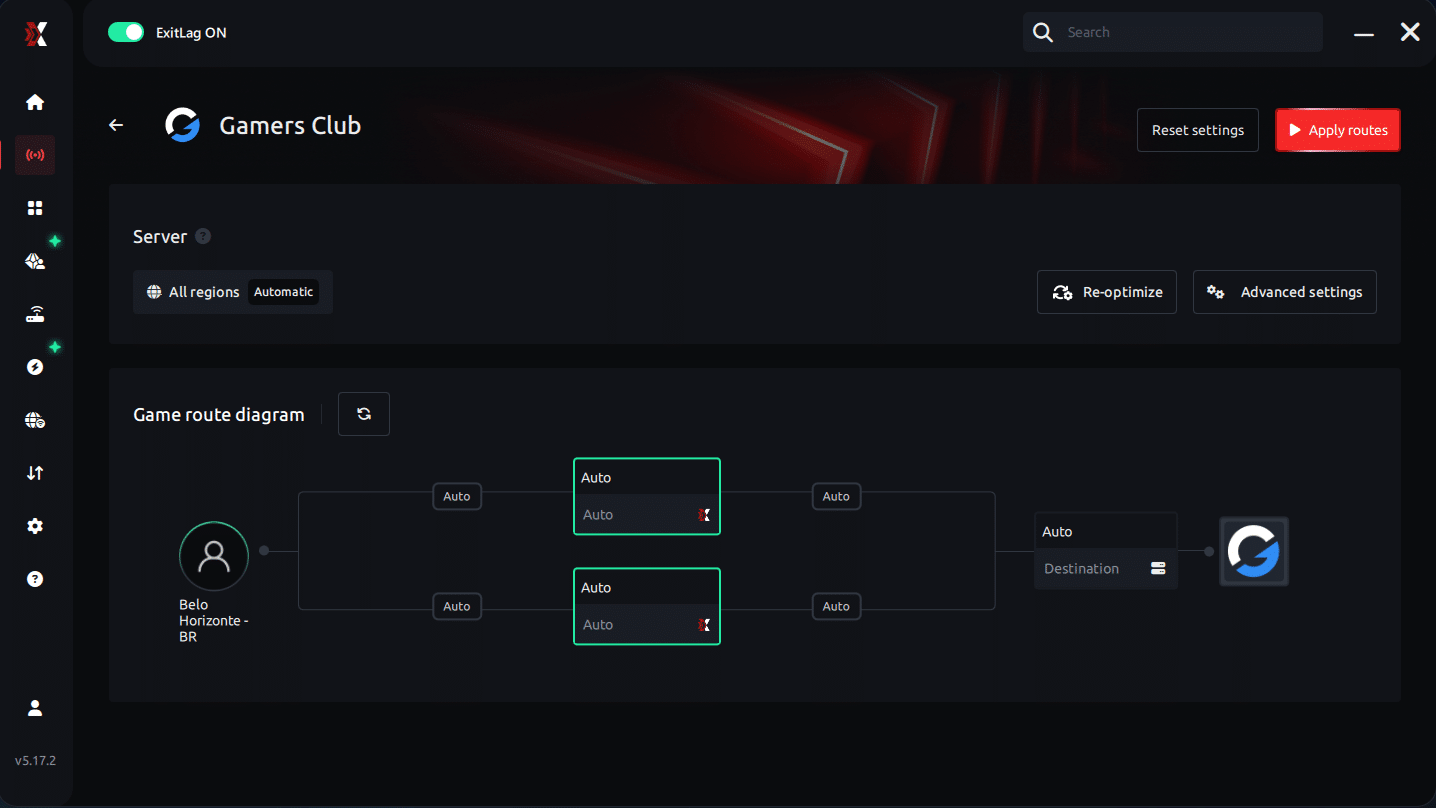
Step 5 – Click “gamers club” or the play button. ExitLag will begin optimizing your connection automatically.
Step 6 – Wait a few seconds until optimization is complete. You’ll see ping indicators in the interface.
Step 7 – Launch gamers club normally. The optimization will already be active.
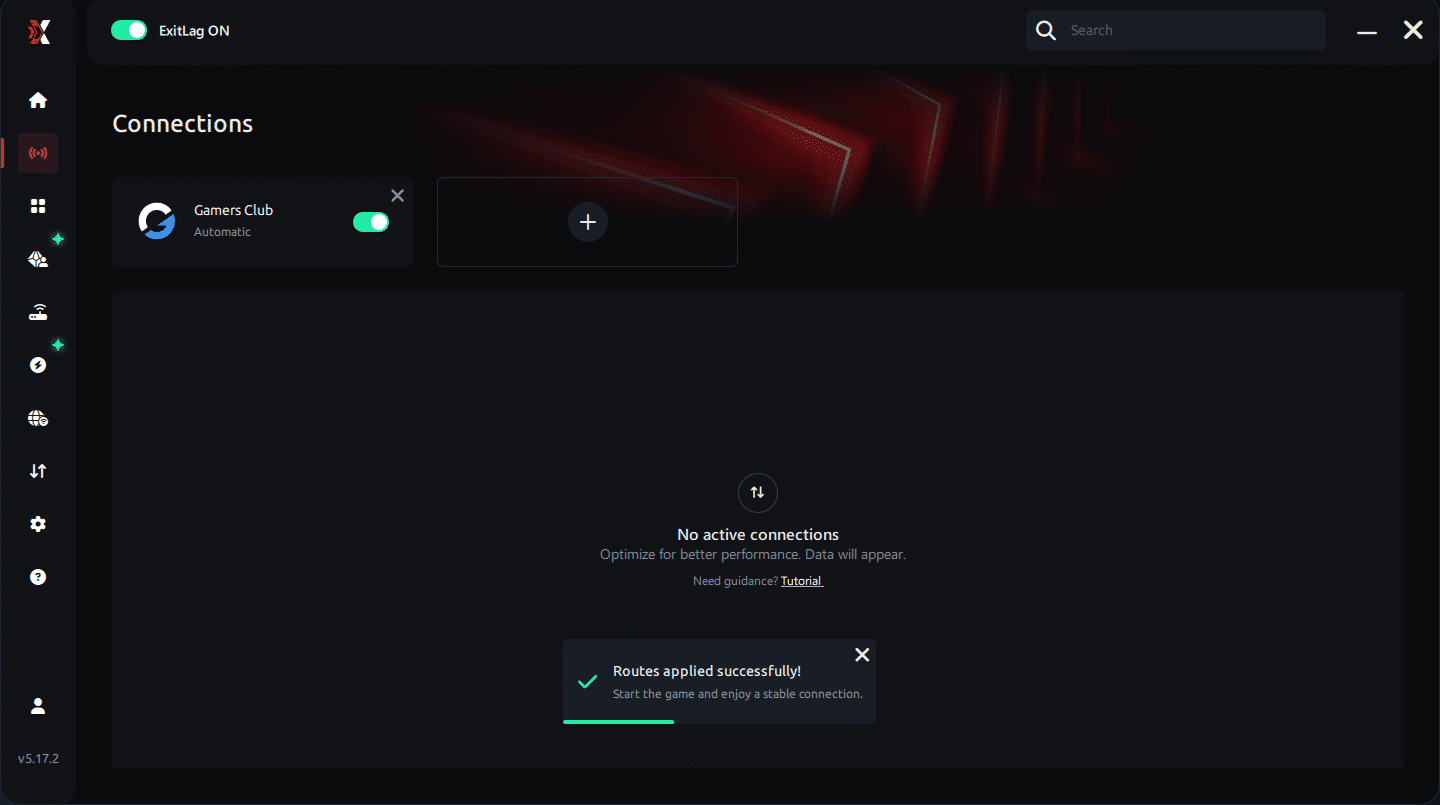
ExitLag runs in the background while you play, constantly adjusting routes to maintain the best possible performance.
Emulator setup
If you use an emulator for training or testing, apply the same route configuration. ExitLag will detect the emulator’s executable and optimize traffic accordingly. This prevents additional stutter cycles that mimic Gamers Club low FPS.
Optimization tips
Users often combine ExitLag with in-game tweaks: low shadows, reduced anti-aliasing, and capped FPS. These changes minimize GPU spikes while ExitLag handles network stability. Together, both sides reduce FPS Drop Gamers Club more effectively.
Console players
Although ExitLag is only available on PC, console players connected through a PC hotspot may benefit from routing improvements. This setup can reduce Gamers Club lag for those who prefer hybrid arrangements.
Before and after results with ExitLag in Gamers Club
Competitive players consistently report significant improvements after stabilizing their network paths. Even moderate systems maintain smoother gameplay, reducing the feeling of FPS Drop Gamers Club.
Real player cases
- Case #1: Player gained +38% frame pacing stability and reduced jitter peaks.
- Case #2: Ranked competitor lowered latency from 87 ms to 41 ms, eliminating Gamers Club stuttering.
- Case #3: User decreased packet loss from 12% to 0%, removing freeze-like micro drops.
Performance comparison table
| Metric | Without ExitLag | With ExitLag | Improvement |
| Latency | 80–90 ms | 35–45 ms | Significant |
| Packet Loss | 5–12% | 0% | Major |
| Frame Pacing Stability | Low | High | Noticeable |
| Stutter Events | Frequent | Rare | Strong |
Additional optimizations to maximize FPS with ExitLag
Players dealing with FPS Drop Gamers Club often benefit from combining ExitLag with system, network, and in-game tweaks. Each layer contributes to smoother gameplay and reduces the intensity of Gamers Club performance issues. With the right adjustments, frame pacing becomes more stable, reducing visual stutters mistaken for additional Gamers Club lag.
Network
Improving network conditions helps maintain consistent game pacing. Ethernet connections reduce wireless fluctuations and keep gameplay steady. QoS prioritizes game packets, reducing interruptions that amplify FPS Drop Gamers Club. Adjusting DNS can also improve routing quality. Additionally, closing heavy apps prevents unnecessary spikes that resemble Gamers Club stuttering.
System
System-level optimizations reduce rendering delays. Updating drivers ensures full compatibility with Gamers Club’s engine. High-performance power mode avoids downclocking. Closing background apps frees CPU resources and minimizes the chance of Gamers Club low FPS during intense duels. A clean system also prevents unexpected bottlenecks.
In-game
Gamers Club players often disable V-Sync to avoid input delay. FPS limiters help maintain consistent pacing and reduce micro-stutters linked to FPS Drop Gamers Club. Recommended presets like low shadows and minimal anti-aliasing ensure higher stability, especially in heavy action scenarios.
Frequently asked questions about FPS drop in Gamers Club
Does ExitLag actually improve FPS?
ExitLag directly stabilizes network pacing, which reduces micro-stutter and helps avoid moments that feel like FPS Drop Gamers Club. While it does not boost hardware FPS, it corrects stuttering caused by inconsistent packet delivery.
Is ExitLag safe?
Yes. ExitLag is secure, does not access personal files, and focuses exclusively on game routing. It offers stable performance without intrusive processes that might cause Gamers Club frame drops.
Does ExitLag work on console?
ExitLag is PC-based, but console players who connect through a PC hotspot can still experience better routing and fewer network interruptions that resemble FPS Drop Gamers Club.
How much does ExitLag cost?
ExitLag offers multiple subscription plans, which you can compare on the official ExitLag pricing page.
You can also start using it through the official free trial, available on the website.
My PC is weak, does ExitLag help?
Yes. Even weaker PCs suffer additional stutter when network jitter occurs. ExitLag stabilizes network pacing, reducing perceived FPS Drop Gamers Club.
Does ExitLag work with Gamers Club?
Yes. Gamers Club is fully compatible, and the service is listed among supported games. You can check the full catalog through the supported games list on ExitLag’s official website.
What’s the difference between ExitLag and a VPN?
ExitLag is NOT a VPN. It avoids encryption overhead and uses game-optimized routing for maximum speed. Traditional VPNs may increase Gamers Club lag.
Why do I get stutter only when peeking?
This happens when packet delivery spikes right as the engine loads enemy models. The game temporarily slows, mimicking FPS Drop Gamers Club.
Why does smoke cause my FPS to tank?
Smoke effects generate more particle rendering, and when combined with jitter, the drop appears even worse.
Does high ping cause lower FPS?
Indirectly, yes. High ping disrupts rendering updates, increasing the perception of FPS Drop Gamers Club.
Fix FPS drop in Gamers Club with ExitLag
Reducing instability in competitive matches becomes much easier when your network routes, system settings, and in-game configurations work together. Players who struggle with FPS Drop Gamers Club often experience issues that come from both rendering and network pacing.

Final benefits
- Stable FPS
- Zero micro-stuttering
- Smooth gameplay
- Competitive advantage
- Frustration-free gameplay
Next steps
- Test ExitLag for free
- Configure in 5 minutes
- Compare before and after
- Dominate Gamers Club
In conclusion, solving FPS drop Gamers Club issues requires balancing hardware, settings, and network stability. ExitLag’s multi-path technology eliminates routing delays and ensures fluid gameplay across all regions of Gamers Club. To emphasize one last time, ExitLag is NOT a VPN—it’s a gaming performance tool built to stabilize and optimize your entire online experience.
Now that you know everything about FPS drop Gamers Club, if you want the most stable, smooth, and competitive gameplay possible, is time to upgrade your performance toolkit. Register at ExitLag now and improve your gameplay in a way you've never experienced before!



