
Experiencing FPS Drop Tibia mid-hunt can completely ruin an otherwise perfect session. At first sight, everything seems fine—your spells are flowing, monsters are respawning, and suddenly the frame rate collapses. The screen freezes for a second, enemies stack up, and you lose control right when precision matters most. This situation is frustrating, especially during high-density hunts, bosses, or War scenarios where even small stutters break your rhythm.
Soon after this, new problems appear. You move to another floor, and the FPS Drop Tibia becomes even worse, turning into microfreezes and slow camera response. These interruptions often combine with Tibialag, Tibialow FPS, Tibiastuttering, Tibiaframe drops, and other Tibiaperformance issues that keep escalating. To understand more about common performance problems, you can check detailed articles directly from the ExitLag blog.
However, there is a reliable way to regain full control at FPS Drop Tibia. With ExitLag, players consistently stabilize their routes, reduce ping variation, and maintain smoother frames even in crowded Tibia environments. Through intelligent optimization and advanced routing, ExitLag helps eliminate interruptions caused by unstable connections. For more information, you can learn directly from ExitLag’s official platform.
What is FPS drop and why does it happen in Tibia?
FPS Drop Tibia occurs when your frame rate suddenly decreases, making gameplay feel choppy or visually unstable. Even more, this drop affects combat fluidity, spell timing, and overall responsiveness across all hunting grounds.
Understanding FPS
Typical FPS ranges experienced by Tibia players:
- 144+ FPS
- 60–120 FPS
- 30–60 FPS
- Below 30 FPS
Difference between FPS drop and network lag
Both problems seem related, but they originate from different sources.
| Aspect | FPS Drop | Network Lag |
| Cause | Hardware, graphics settings, overloaded maps | Routing instability, packet loss, unstable connection |
| Symptoms | Stuttering visuals, screen freezes | Delay, rubber-banding, slow spell response |
| Solution | Adjust system/game settings | ExitLag |
Why Tibia suffers from FPS drop
Although Tibia is lightweight, its engine relies heavily on rendering large clusters of sprites, spell effects, creature density, and map transitions. When too many animations or particles appear—such as in Soul War, Roshamuul, or massive War battles—the game demands more processing power. Consequently, any weak hardware point triggers Tibialow FPS, Tibiastuttering, and sudden Tibiaframe drops.
5 main causes of FPS drop in Tibia
Below are the most common reasons that contribute to FPS Drop Tibia.
1. Overheating
When your CPU or GPU temperature rises, performance automatically throttles. Therefore, Tibia may begin showing Tibiaperformance issues, especially during long hunts or multi-client sessions.
2. Outdated drivers
Old GPU drivers cause miscommunication between your system and the game. As a result, FPS becomes unstable, and FPS Drop Tibia happens more frequently.
3. Graphics settings
Even though Tibia is simple, playing with maximum lights, high particle density, or multiple clients increases load. This often leads to Tibiastuttering during crowded fights.
4. Background processes
Programs consuming RAM, CPU, or disk usage can directly drop frame rates. Browsers, recorders, and overlays create conditions where Tibialag becomes more noticeable.
5. Insufficient hardware
Older systems or integrated GPUs struggle with new Tibia content. This limitation produces Tibiaframe drops during high-intensity areas like Secret Library, Oramond, and War zones.
How ExitLag fixes FPS drop in Tibia
When players look for solutions to FPS Drop Tibia, they usually focus only on graphics settings or hardware. However, instability also comes from the network layer. Sudden spikes, jitter, and unstable routing generate pacing inconsistencies that feel like visual stutters. Because Tibia depends heavily on real-time communication, any interruption increases Tibialag, Tibiastuttering, and other Tibiaperformance issues even when your PC is fine.
What is ExitLag? (NOT a VPN)
ExitLag is a performance-focused connection optimizer created specifically for online games. Even more, ExitLag is NOT a VPN. Instead of masking your IP like traditional VPNs, it uses multi-route technology to improve stability, reduce jitter, and avoid congested networks. For a full explanation of how its engine works, you can check the “How it Works” Exitlag’s page.
Its purpose is not privacy. Instead, ExitLag is built to ensure stable routes, reduce packet loss, and keep Tibia responsive during crowded hunts and War scenarios. This directly helps situations where FPS Drop Tibia appears side-by-side with unstable routing.
How ExitLag optimizes performance in Tibia
- Network route optimization
- Latency reduction
- Packet loss elimination
- Game traffic prioritization
- Connection stabilization
These optimizations reduce Tibialow FPS, micro-breaks, and Tibiaframe drops caused by jitter.
Why ExitLag helps with FPS drop
Although FPS is mostly tied to rendering, Tibia’s frame pacing depends heavily on incoming packets. If your connection stutters, the camera visibly shakes, spells feel delayed, and micro-pauses occur. As a result, players interpret these symptoms as FPS Drop Tibia. ExitLag stabilizes data flow, reducing irregular frame pacing, eliminating jitter, and preventing micro-stutters that mimic low-FPS behavior.
ExitLag technologies that impact FPS
ExitLag improves gaming responsiveness through:
- Multi-path routing
- Redundant connections
- Gaming-optimized protocol
These systems ensure your gameplay feels smoother, particularly in areas with high monster density where Tibiastuttering is common.
ExitLag vs other solutions
| Solution | Improves FPS? | Reduces lag? | Ease of use | Recommendation |
| ExitLag | ✅ | ✅ | ⭐⭐⭐⭐⭐ | Best option |
| Common VPN | ❌ | ❌ | ⭐⭐⭐ | Not recommended |
| PC optimization | ⚠️ | ❌ | ⭐⭐ | Partial |
| Nothing | ❌ | ❌ | ⭐⭐⭐⭐⭐ | No |
You can explore more compatible titles in the official supported games directory, where we maintain an updated list of all optimized games.
How to use ExitLag in Tibia
The process is extremely simple:
Step 1 – Access the official ExitLag website and download the application. There’s a free trial period for new users.
Step 2 – Install and open the program. Log in with your account.
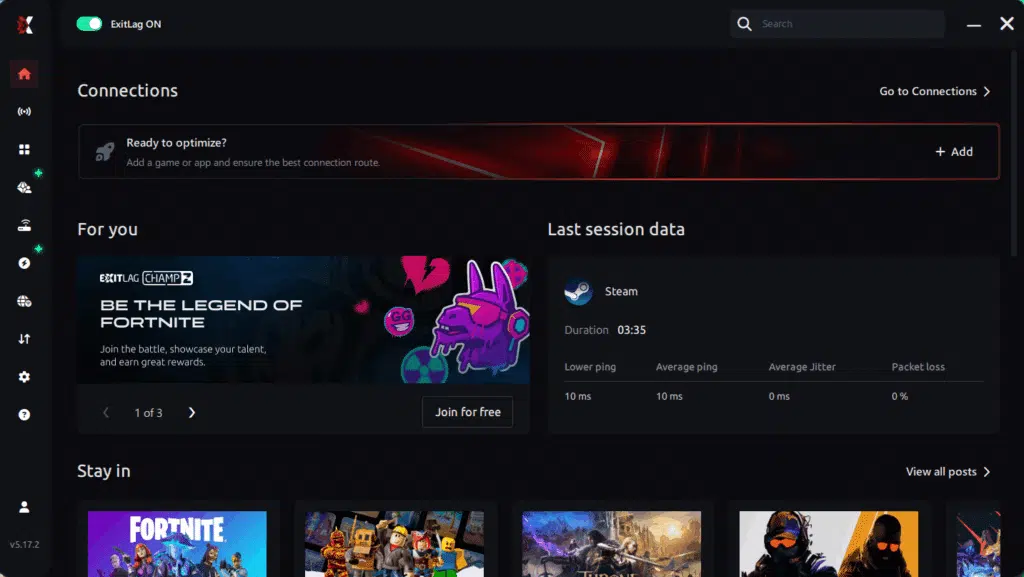
Step 3 – In the search bar, type “Tibia” and select the game from the list.
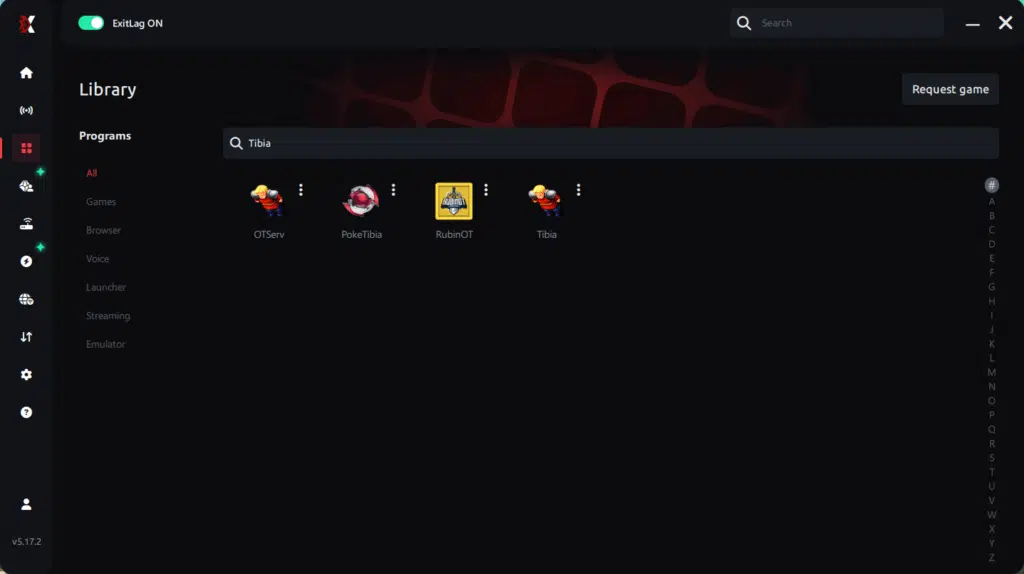
Step 4 – Choose between automated or manual route
Based on the results, you can let ExitLag automatically select the best route or manually choose the server that showed the lowest latency for your connection.
AI-optimized automated route
Based on the results, you can let ExitLag automatically select the best route through AI optimization. The system analyzes multiple connection paths in real time and automatically identifies the most efficient route for your connection, ensuring the lowest possible latency without requiring manual choices.
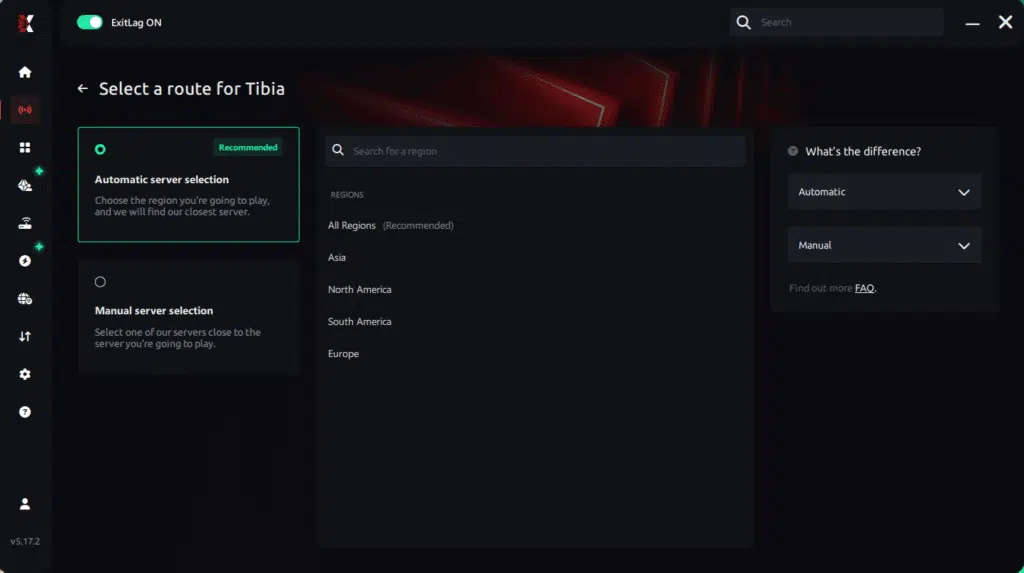
Manual route
If you prefer to have full control over your connection, you can manually choose the server based on the ping test results. Simply select the server that showed the lowest latency or the one that best meets your specific gaming needs, allowing complete customization of your experience.
Step 5 – Click “Apply routes” or the play button. ExitLag will begin optimizing your connection automatically.
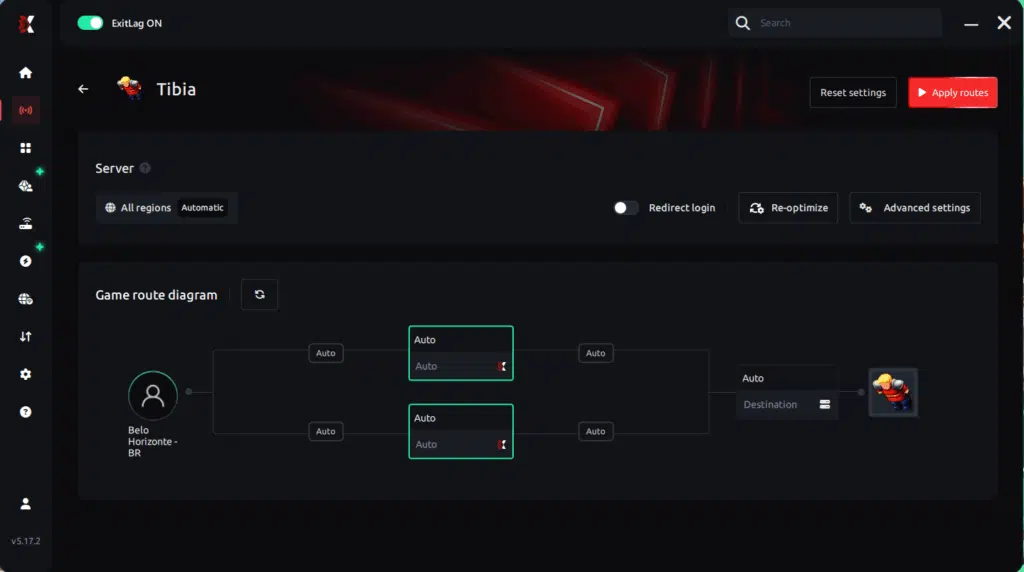
Step 6 – Wait a few seconds until optimization is complete. You’ll see ping indicators in the interface.
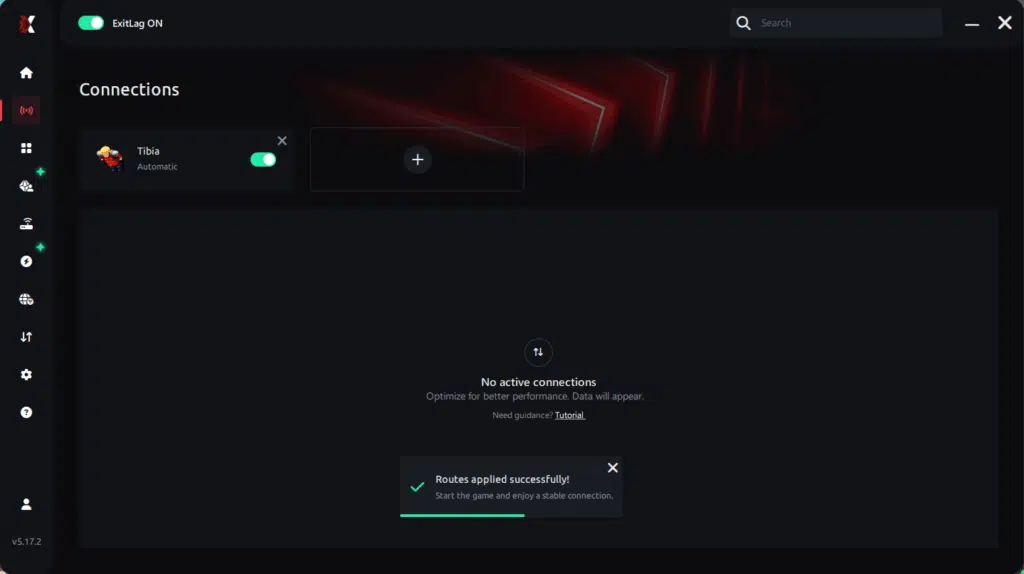
Step 7 – Launch Tibia normally. The optimization will already be active.
ExitLag runs in the background while you play, constantly adjusting routes to maintain the best possible performance.
Console players
Console editions do not support ExitLag directly, but you can use router-based setups or PC-bridge configurations. These setups may improve routing quality, helping reduce micro-stutters and minimizing Tibiaframe drops caused by jitter.
Before and after results with ExitLag in Tibia
When analyzing real scenarios, players consistently report improvements in responsiveness, route stability, and frame pacing. These gains reduce symptoms commonly mistaken for FPS Drop Tibia, such as Tibialag or occasional Tibiaperformance issues.
Real player cases
- A player from Brazil reduced ping spikes from 160 ms → 80 ms, eliminating microfreezes during War.
- A European player stabilized jitter from +45 ms variation → under 5 ms, solving Tibiastuttering in crowded hunts.
- A North American player removed 100% of packet loss incidents, reducing visual pauses that looked like Tibiaframe drops.
Performance comparison table
| Metric | Without ExitLag | With ExitLag | Improvement |
| Jitter | High | Low | Significant |
| Packet Loss | Moderate | 0% | Eliminated |
| Route Stability | Unstable | Consistent | Major |
| Hunt Smoothness | Frequent pauses | Fluid | Noticeable |
| Visual Micro-stutters | Common | Rare | Strong |
Additional optimizations to maximize FPS with ExitLag
Improving stability goes beyond connection routing, and addressing complementary factors helps reduce symptoms similar to FPS Drop Tibia. Even with a perfectly optimized network, system bottlenecks or incorrect configurations can cause Tibialag, Tibiastuttering, or Tibiaperformance issues. The following tips strengthen the effects of ExitLag and create a more stable gameplay experience.
Network
To begin with, use a wired Ethernet connection whenever possible. This prevents packet fluctuation and reduces jitter that may be confused with FPS Drop Tibia during intense hunts. Additionally, configure QoS on your router to prioritize gaming traffic and reduce congestion. If needed, try switching DNS providers to improve lookup responsiveness. Finally, close bandwidth-heavy apps, such as streaming or cloud sync tools, to avoid Tibiaframe drops caused by inconsistent routing.
System
Keeping your system healthy is essential. Update GPU and chipset drivers regularly to avoid hidden issues that mimic FPS Drop Tibia. Activate high-performance mode in Windows or your GPU control panel to maintain stable clock speeds during combat. Avoid running unnecessary background apps that drain resources and produce Tibialow FPS in crowded maps. Regular system cleanup also ensures smooth responsiveness.
In-game
Inside Tibia, small adjustments create big differences. Disable V-Sync to avoid input delay and reduce pacing inconsistencies often mistaken for FPS Drop Tibia. Set a reasonable FPS limit for your hardware to ensure steady rendering. Most importantly, use recommended presets, especially in large-scale hunts, where spell particles and sprite density strain both connection and hardware.
Frequently asked questions about FPS drop in Tibia
Does ExitLag actually improve FPS?
ExitLag directly improves pacing stability and reduces network-related stutters that feel like FPS Drop Tibia. While it does not boost GPU rendering, it eliminates microfreezes caused by routing instability, packet loss, and jitter—major contributors to perceived low FPS.
Is ExitLag safe?
Yes. ExitLag is trusted globally and uses proprietary routing technology designed exclusively for gaming performance. It never stores harmful data and maintains stable connectivity without modifying your system beyond network routing.
Does ExitLag work on console?
ExitLag is primarily designed for PC. However, some players use indirect setups through PC-to-router routing, which may improve stability. Still, the best results occur on Windows systems.
How much does ExitLag cost?
ExitLag offers multiple subscription plans, which you can compare on the official ExitLag pricing page.
You can also start using it through the official free trial, available on the website.
My PC is weak, does ExitLag help?
If your FPS problems stem from outdated hardware, ExitLag cannot increase raw GPU performance. Nevertheless, it removes stutters caused by network issues, often misinterpreted as FPS Drop Tibia, resulting in smoother overall gameplay even on modest systems.
Does ExitLag work with Tibia?
Yes, ExitLag fully supports the game and improves connection stability during high-density hunts. You can browse the complete supported titles list through the platform’s official directories.
What’s the difference between ExitLag and a VPN?
ExitLag is NOT a VPN. Traditional VPNs reroute traffic for privacy, which can harm latency. ExitLag uses multi-route technology, packet stabilization, and gaming-focused protocols—built solely for performance. This is why it effectively reduces issues often perceived as FPS Drop Tibia.
Why does Tibia stutter in crowded hunts?
Two main reasons: sprite overload and packet congestion. ExitLag stabilizes routing, while lowering in-game effects reduces sprite load.
Does multicasting affect performance?
Yes. Multiclienting increases CPU and network usage, making Tibialag and Tibiaframe drops more common.
Is Wi-Fi bad for Tibia?
Wi-Fi introduces jitter and micro-interruptions that look like FPS Drop Tibia. Ethernet is always recommended.
Fix FPS drop in Tibia with ExitLag
Final benefits
- Stable FPS
- Zero micro-stuttering
- Smooth gameplay
- Competitive advantage
- Frustration-free gameplay
ExitLag delivers consistent performance during intense hunts, large battles, and fast-paced scenarios where FPS Drop Tibia would otherwise ruin your experience.
Next steps
- Test ExitLag for free
- Configure in 5 minutes
- Compare before and after
- Dominate Tibia
In conclusion, solving FPS drop Tibiaissues requires balancing hardware, settings, and network stability. ExitLag’s multi-path technology eliminates routing delays and ensures fluid gameplay across all regions of Tibia. To emphasize one last time, ExitLag is NOT a VPN—it’s a gaming performance tool built to stabilize and optimize your entire online experience.
Now that you know everything about FPS drop Tibia, if you want the most stable, smooth, and competitive gameplay possible, is the time to upgrade your performance toolkit. Register at ExitLag now and improve your gameplay in a way you've never experienced before!



