

Few things are more annoying than a login screen that simply refuses to open. That is exactly what the Geo Block Aion 2 error feels like, and it has a clear explanation. Fortunately, the situation is changing fast.
In this guide, you will learn how the Geo Block Aion 2 restrictions work, which services they affect, and what is confirmed for the worldwide release. Furthermore, you will see which shortcuts put your account at risk.
The short answer: Geo Block Aion 2 restrictions apply to the Korea and Taiwan service and to a short list of countries on the global Steam release. If your country is supported, the Aion 2 Global Release Date on October 5 ends the problem. If it is not, no official bypass exists.

Tip: Several ExitLag users located outside of Korea and Taiwan have reported excellent stability and surprisingly low ping when selecting optimized routes to Aion 2’s early servers. This has allowed them to enjoy smooth gameplay!
Understanding The Geo Block Aion 2 Restrictions
Why The Korea And Taiwan Service Is Region Locked
- Separate service: Right now, Aion 2 runs as two services, and the live version has its own accounts and servers, apart from the Aion 2 Global launch.
- Login rejection: Players outside those territories are generally stopped at the login stage, which explains the connection errors overseas fans report.
- No transfers: NCsoft has announced no character or account transfer between the two services.
- Language barrier: The live version centers on Korean and Traditional Chinese, and translation patches are unofficial.
This restriction is a deliberate regional setup. Therefore, treat it as a rule rather than a glitch you can fix from your side.
Why Some Countries Cannot Get The Global Version
The global release has limits of its own. Community trackers reading Steam’s package data report that a short list of countries cannot obtain the game there. However, these lists differ between sources, so double-check yours.
| Restriction Type | Reported Examples | What It Means |
|---|---|---|
| Separate local service | South Korea, Taiwan, plus Hong Kong and Macau | Local versions already exist, so the global Steam package is not offered |
| Sanctions or trade rules | Cuba, Syria, Russian Federation | Publishers generally comply with international restrictions |
| No reason announced | Belarus, Belgium, Netherlands, Vietnam, mainland China | NCsoft has not explained these cases publicly |
Notably, NCsoft has not published its own country list. Therefore, confirm availability on your own store page before planning around launch day.
How To Tell Which Restriction You Hit
Not every Geo Block Aion 2 message means the same thing. In practice, the stage where things fail points to the cause.
- Store page unavailable: This typically signals a distribution restriction for your country.
- Page loads but activation fails: The package or your account region is usually the problem.
- Client opens but login fails: This looks like a service-level regional restriction, similar to what overseas players face on the Korea and Taiwan service.
Aion 2 Global Release Date: When The Block Stops Mattering
For most players, the Aion 2 Global Release Date is the real fix for any Geo Block Aion 2 problem. NCsoft revealed October 5 at gamescom Opening Night Live, with the game launching free-to-play on Steam and the PURPLE launcher.
Confirmed Dates At A Glance
- September 17 to 18: The free Launch Scale Test, which has already wrapped up.
- September 30 to October 4: Five days of Founder’s Pack Early Access.
- October 5: The free-to-play launch for everyone on PC in supported regions.
For every milestone in detail, read our complete Aion 2 launch schedule.
What Changes On Launch Day
- Global players get their own accounts and servers, separate from Korea and Taiwan.
- Regional servers cover North America, South America, Europe, and Asia.
- Restricted countries stay restricted, so the launch does not erase every Geo Block Aion 2 limit.
Therefore, if you live in a supported country, waiting is the safest path.
How To Bypass Aion 2 Geo Block Without Risking A Ban?
Many websites promise a quick trick for the Geo Block Aion 2 problem. However, if you hoped to learn How To Bypass Aion 2 Geo Block in one click, the honest answer is less exciting: no official method exists. Instead, the safest plan is to work within the rules.
What Does Not Work Against The Geo Block Aion 2 Rules
- Free proxy tools: They can expose your login details and add delay to every packet.
- Resold or shared accounts: Steam treats your account as strictly personal, so selling or lending it breaks the rules.
- Unofficial clients: Files from random sites can carry malware, and NCsoft cannot support them.
Legit Steps That Actually Work
- First, check whether the Steam store page and the PURPLE launcher both open for your country.
- Then register only through official channels, either Steam or PURPLE.
- Follow NCsoft’s official notices for any change to supported regions.
- If your country is unsupported, wait for an official update instead of forcing access.
- Finally, prepare your connection before launch week, so queues do not expose weak routing.
Should You Use An Aion 2 VPN?
It is the first idea many players try, so it deserves a straight answer. An Aion 2 VPN cannot solve the Geo Block Aion 2 rules, because both the publisher and the store enforce them. In fact, it can create new problems.
What The Steam Rules Say
The Steam Subscriber Agreement says subscribers agree not to use IP proxying to disguise where they live, including to get around geographic restrictions on game content.
- Account risk: Valve may terminate account access if that rule is broken.
- Bigger stakes: A VPN does not just risk a Geo Block Aion 2 login failure, because your whole Steam account is on the line.
Why A VPN Also Hurts Your Ping
- Extra distance: Traffic must reach the VPN server before it heads to the game.
- Encryption overhead: Every packet is processed, which adds a little delay.
- Unstable routes: Shared servers are built for privacy, not for fast game traffic.
Aion 2 Global Server Access And Client Download
Once the Geo Block Aion 2 hurdle is behind you, connection quality takes over. Aion 2 Global Server Access runs through regional servers, and the client comes from two official channels.
Regions Available At Launch
- North America and South America: Local hosting aims to cut latency across the Americas.
- Europe: A dedicated regional service for European players.
- Asia (Japan): The main Asian hub outside Korea and Taiwan.
- No dedicated Oceania server: Players there connect to the nearest hub.
NCsoft has not yet published final world names or per-region server counts. Therefore, read our guide to choosing the right Aion 2 server region for latency basics.
Aion 2 Global Client Download On Steam And PURPLE
The Aion 2 Global Client Download is free, and sticking to official channels keeps you clear of any Geo Block Aion 2 trouble.
- Pick one official channel, either Steam or the PURPLE launcher. You do not need both.
- On Steam, uninstall the Launch Scale Test Playtest App, since it does not update into the retail game.
- Download Aion 2 from its main page when access opens for you.
- Watch NCsoft’s notices for pre-download timing, because none is confirmed for the retail client at the time of writing.
How To Play Aion 2 From Other Countries The Right Way
Players who want to Play Aion 2 From Other Countries have more official support than before, and fewer Geo Block Aion 2 surprises. Indeed, the global build supports ten languages, including English, Brazilian Portuguese, Spanish, German, French, and Japanese.
Supported Platform And Access Basics
- Platform: Windows PC only, with no console or mobile version confirmed for the global release.
- Price: Free to play, so a Founder’s Pack is optional and mainly buys the five-day head start.
Should You Try The Korea Or Taiwan Version Instead?
Some players do not want to wait. However, that route runs straight into the Geo Block Aion 2 rules, so weigh the trade-offs before you commit.
- Separate progress: Nothing carries over to the global servers.
- Different language: Expect a Korean or Traditional Chinese interface.
- Higher ping: Distance adds latency for players in the Americas and Europe.
- Registration limits: The official launcher decides which countries can sign up.
Our Aion 2 Taiwan release date guide covers this option in more detail.
Meanwhile, players in the Americas can also read our Aion 2 North America release guide for regional specifics.
Pro Tips And Common Mistakes Before You Log In
Pro Tips: Handling Geo Block Aion 2 Issues
- Confirm before you buy: Check that both the store page and the launcher open in your country first, because Early Access follows the platform where you purchase.
- Stay on one platform: Keeping everything on Steam or PURPLE keeps your access and progress in one place and avoids Geo Block Aion 2 confusion.
- Test latency early: Run a ping test before launch week, since a crowded Aion 2 Global Server Access queue exposes weak routes only when it is too late.
- Keep your account personal: Never buy, sell, or share accounts, because Steam’s agreement forbids it and personal control protects your purchases.
- Follow official notices: NCsoft announcements settle Geo Block Aion 2 questions faster and more reliably than rumors.
Common Mistakes Geo Block Aion 2 Players Make
- Trusting a country list blindly: Third-party lists disagree with each other. Fix: confirm availability on your own store page.
- Buying a resold account: Steam accounts are strictly personal. Fix: purchase directly on Steam or PURPLE.
- Expecting progress to transfer: No transfer between Korea, Taiwan, and global is announced. Fix: treat the global launch as a fresh start.
- Keeping the Playtest App installed: It does not update into the retail game. Fix: uninstall it and finish your Aion 2 Global Client Download separately.
- Reaching for an Aion 2 VPN after a failed login: It can violate Steam’s rules. Fix: check your region status and wait for official updates.
Keep Your Connection Stable With ExitLag
What ExitLag Does And What It Does Not Do
ExitLag is a game connection optimizer, not an Aion 2 VPN. It does not encrypt your traffic, does not mask your IP, and cannot get around a Geo Block Aion 2 restriction set by NCsoft or Steam.
Instead, once you are legitimately in the game, it analyzes multiple network paths in real time and picks the fastest, most stable route to the servers.
- Multipath Technology: Sends packets through several routes at once, so one weak path does not break your session.
- Real-time Optimization: Reduces delay and packet loss during long raid sessions.
- Multi-Internet: Supports up to four simultaneous connections, so a dropped line will not kick you out of a queue.
Why It Matters During An MMORPG Launch
Launch week puts heavy pressure on regional servers. As a result, packet loss and rubber-banding can appear during boss fights and crowded zones.
- Coverage: 4,000+ titles for PC and Mobile.
- Network: 1,500+ servers in 190+ countries.
- Community: 30M+ users and 18M+ optimizations per week.
Additionally, ExitLag does not modify game files or interact with anti-cheat systems. Just remember not to run it alongside a VPN, since that reduces its effectiveness.
Ready to prepare your route before the Early Access rush? Grab the ExitLag Download and test your connection to your regional server ahead of launch.
Final Thoughts On Geo Block Aion 2
The Short Version
- Korea and Taiwan run a separate, region-locked service.
- The Aion 2 Global Release Date is October 5 on Steam and PURPLE for supported countries.
- No official bypass exists for the Geo Block Aion 2 restrictions.
Your Next Move
Ultimately, the Geo Block Aion 2 story comes down to patience and official channels. Confirm your region, complete the Aion 2 Global Client Download through Steam or PURPLE, and prepare your connection before the crowds arrive.
How to use ExitLag in Aion 2
The process is extremely simple:
Step 1 – Access the official ExitLag website and download the application. There’s a free trial period for new users.
Step 2 – Install and open the program. Log in with your account.
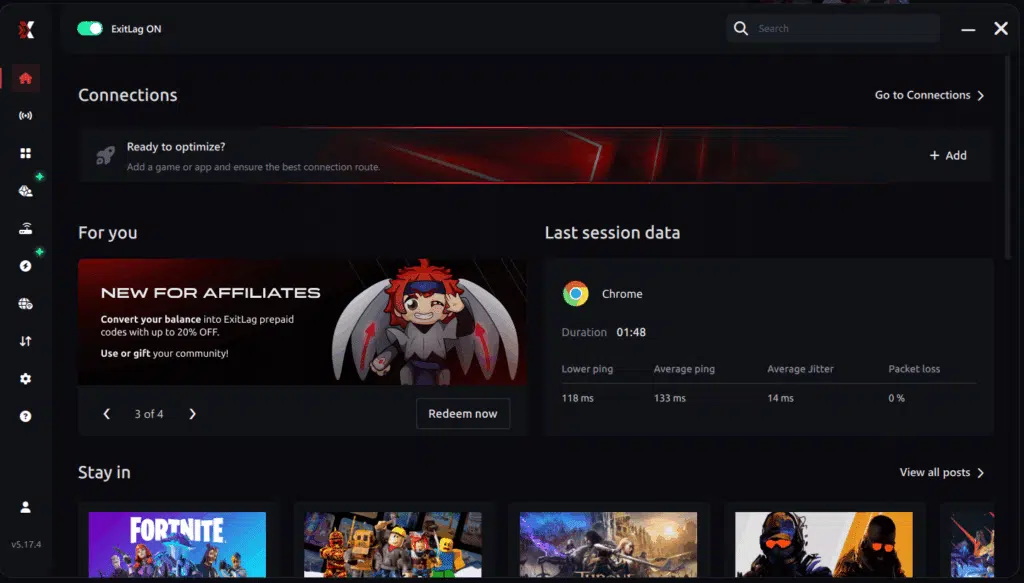
Step 3 – In the search bar, type “Aion 2” and select the game from the list.
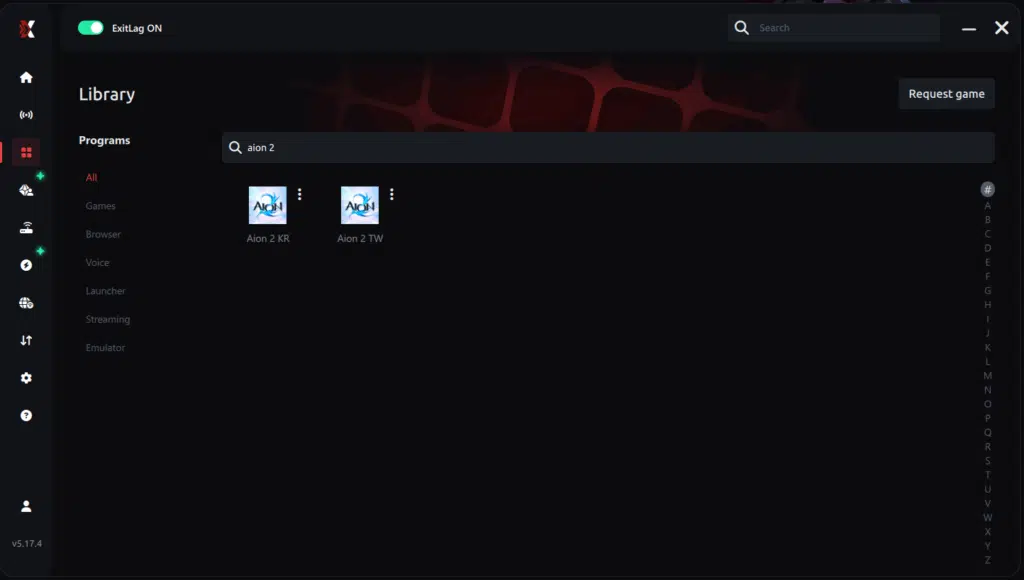
Step 4 – Choose between automated or manual route
Based on the results, you can let ExitLag automatically select the best route or manually choose the server that showed the lowest latency for your connection.
AI-optimized automated route
Based on the results, you can let ExitLag automatically select the best route through AI-optimized . The system analyzes multiple connection paths in real-time and automatically identifies the most efficient route for your connection, ensuring the lowest possible latency without requiring manual choices.
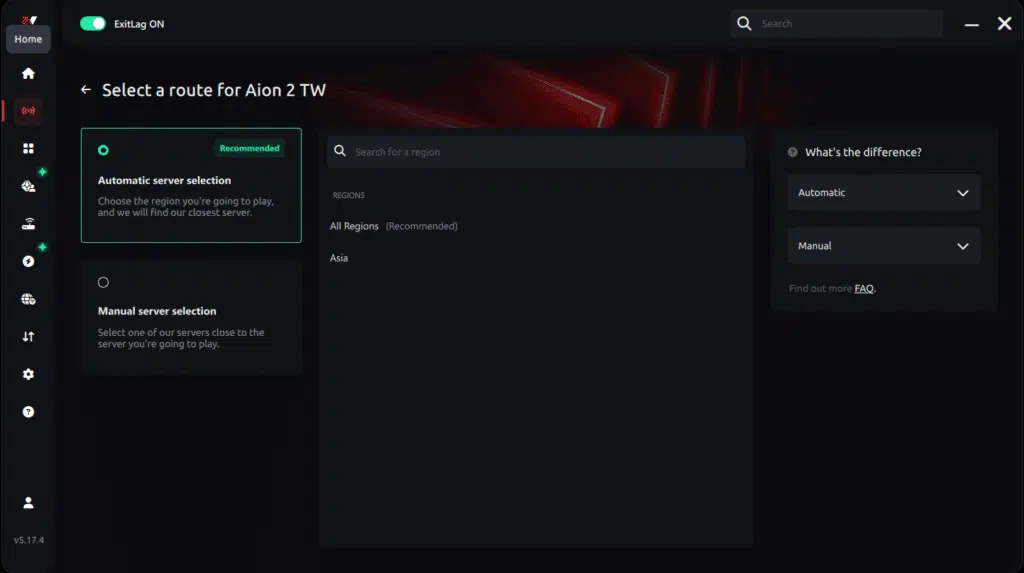
Manual route
If you prefer to have full control over your connection, you can manually choose the server based on the ping test results. Simply select the server that showed the lowest latency or the one that best meets your specific gaming needs, allowing complete customization of your experience.

Step 5 – Click “Apply routes” or the play button. ExitLag will begin optimizing your connection automatically.
AI-optimized automated route:

Manual route:

Step 6 – Wait a few seconds until optimization is complete. You’ll see ping indicators in the interface.
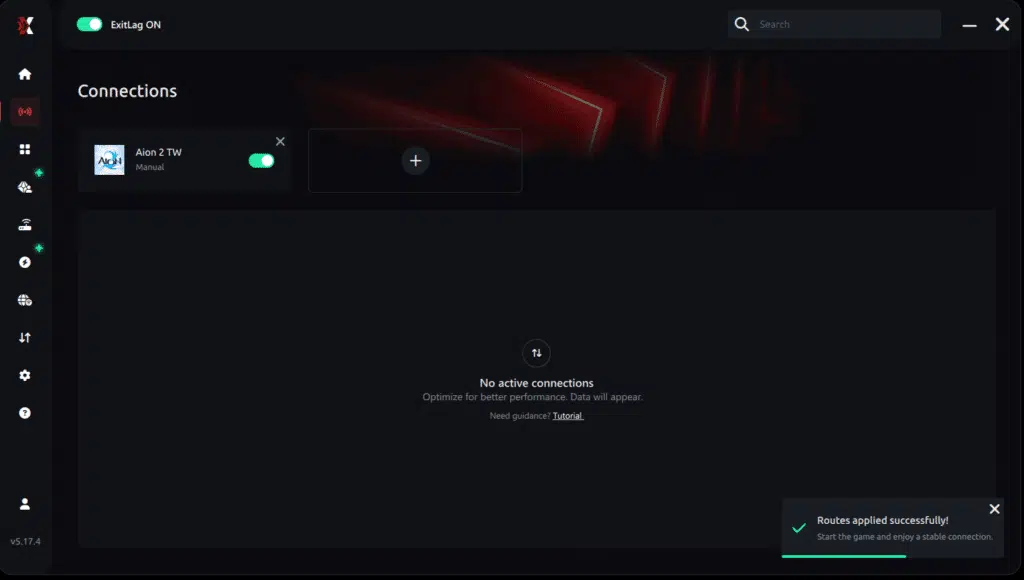
Step 7 – Launch Aion 2 normally. The optimization will already be active.
ExitLag runs in the background while you play, constantly adjusting routes to maintain the best possible performance.
How to use Ping for Games: step-by-step guide
Checking your connection quality before entering a match has never been easier. Here’s how to use Ping for Games in just a few steps:
1. Open the ExitLag software on your PC
Ensure the application is installed and open. The feature is integrated into the platform and available for free to all users.
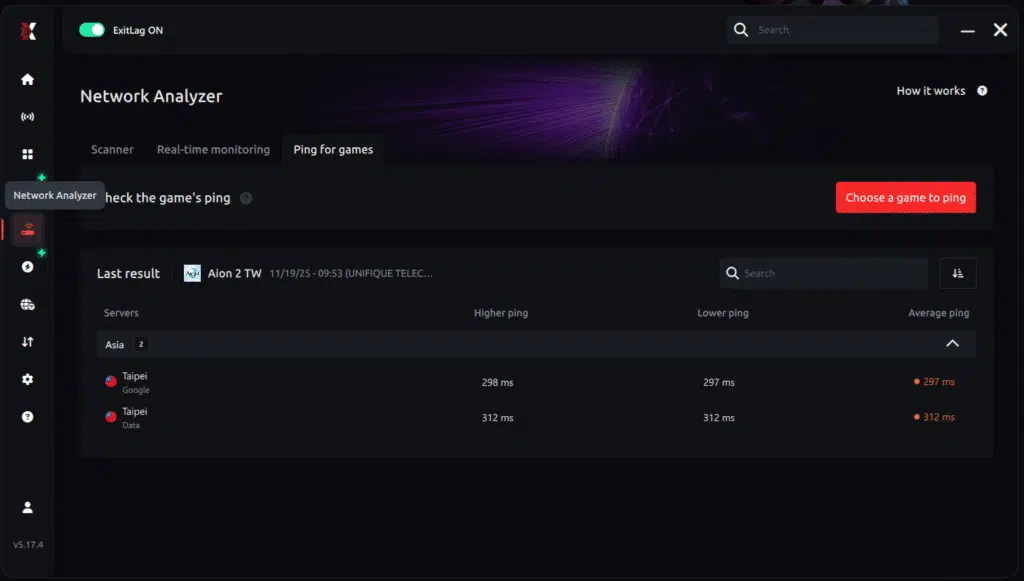
2. Access the Network Analyzer tool
Locate the Network Analyzer in the software menu. This is where you’ll find Ping for Games along with other connection analysis features.
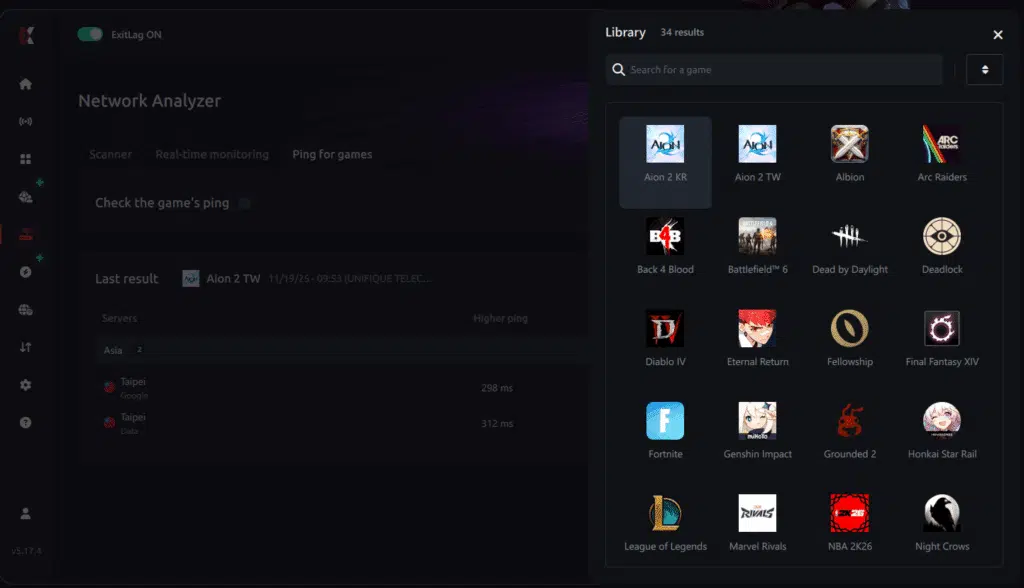
3. Select the game you want to test
Choose from the list the title you plan to play. The tool supports major online multiplayer games, including MOBAs, FPS, Battle Royales, MMORPGs, and more.
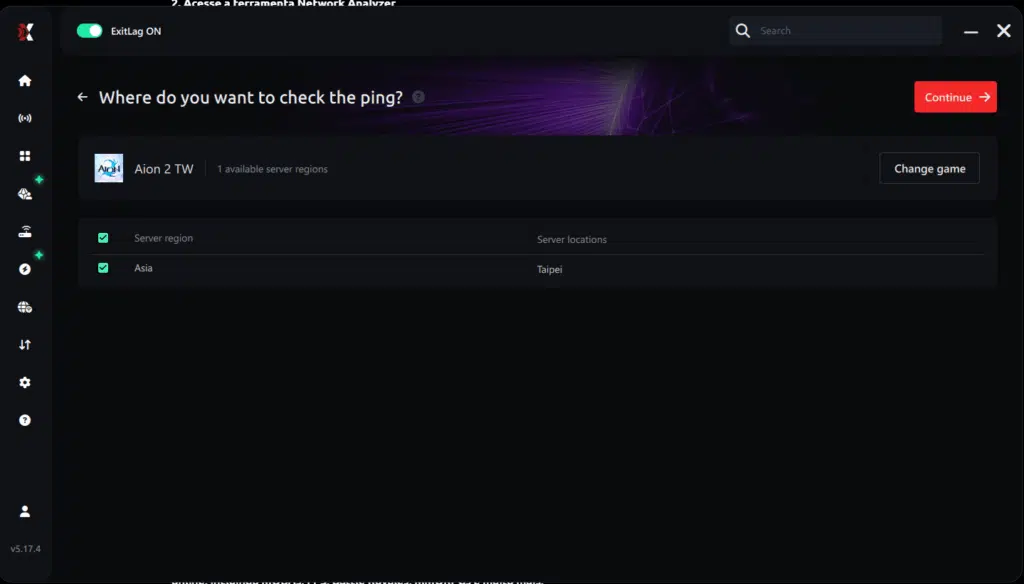
4. Choose the specific server
Now you select directly the server you want to test, instead of just a generic region. This ensures much more accurate results for your choice.
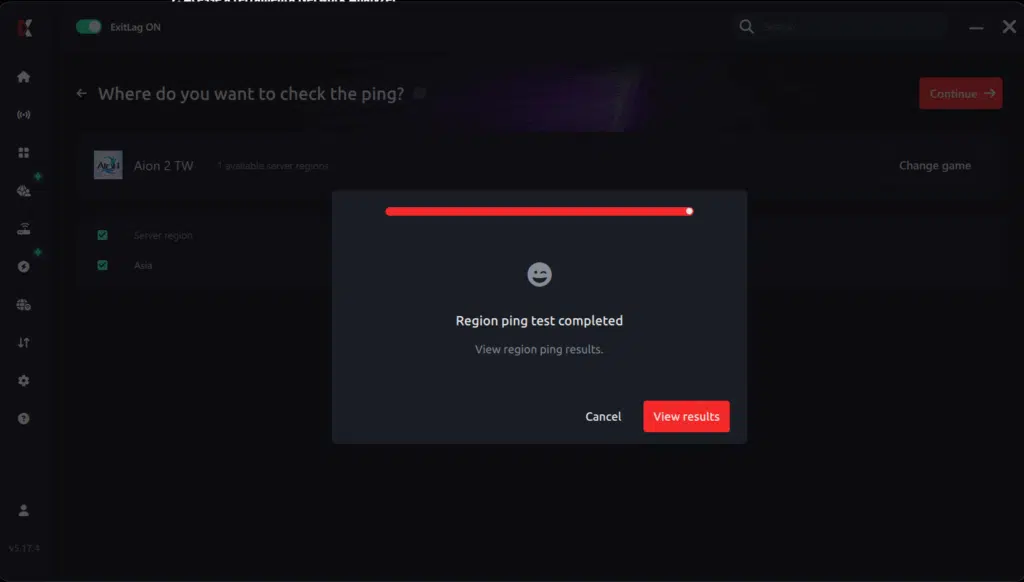
5. Start the ping test
With one click, the measurement is performed in real-time between your device and the chosen server, considering your current connection (cable or Wi-Fi).
6. Analyze the results
Results appear in milliseconds (ms), automatically sorted from best to worst ping. You can also reorganize the view alphabetically, if you prefer.
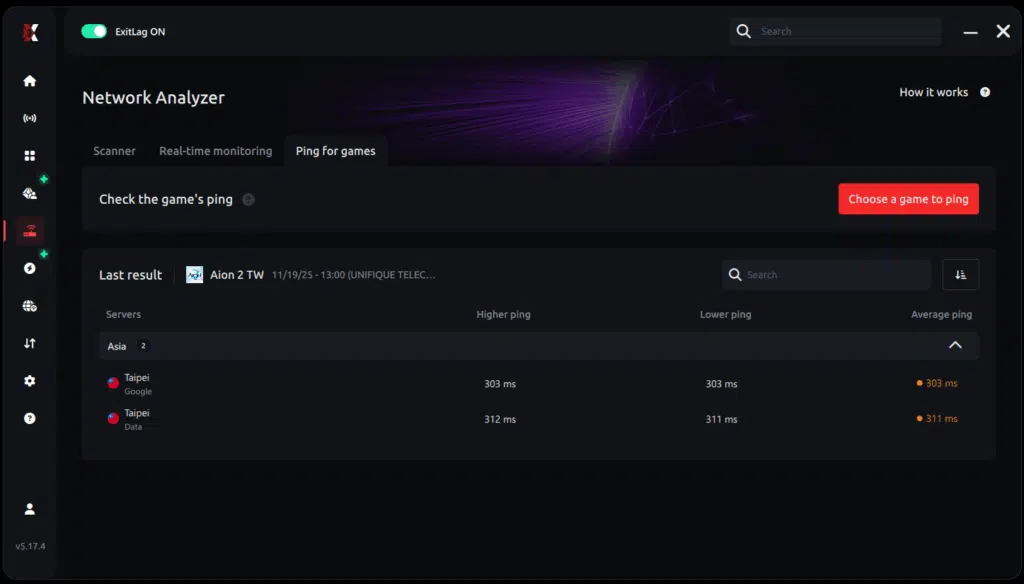
7. Choose the best server and play worry-free
With the information in hand, just select the server with the lowest latency and enter the match knowing your connection is optimized.
By following these network optimization techniques, early access strategies, and preparation guidelines, players outside Korea and Taiwan can maximize their Aion 2 experience while staying compliant with official rules and waiting for the global release.
All game images used in this blog post belong to NCsoft. They are used for informational and educational purposes only and do not imply endorsement or affiliation with the rights holders.
Got questions or want to connect with other players? Join the conversation at the ExitLag Forum!




