Online gaming platforms have become a central part of entertainment for millions of players worldwide. Because accounts store personal progress, purchased items, friends lists, and virtual achievements, protecting access credentials is one of the most important steps for every player. A reliable Roblox password reset process can help users recover their accounts quickly while preventing unauthorized access.
Understanding how a Roblox password reset works makes it easier to solve these problems without losing progress or account information. This complete guide explains how to recover your account, troubleshoot common errors, improve security, and keep your Roblox experience protected.
What Is Roblox Password Reset and How Does It Work?
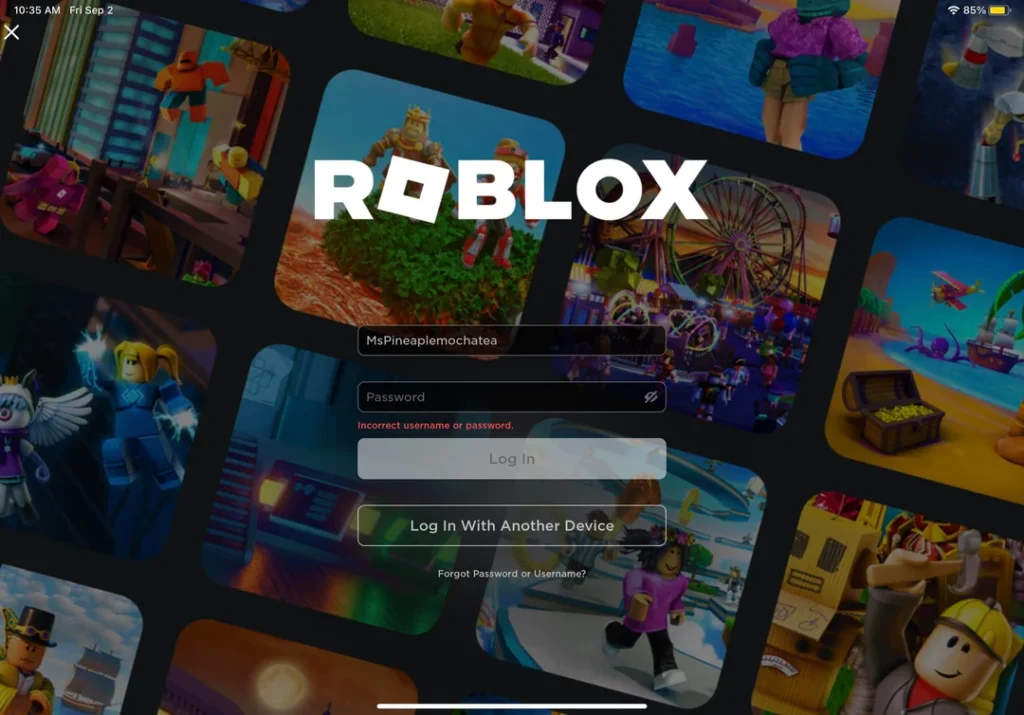
A Roblox password reset is the official account recovery process that allows players to create a new password when they can no longer access their account. The system verifies ownership through connected recovery methods, such as an email address or phone number, before allowing a password change.
When players search for how to recover access after forgetting credentials, they are usually looking for solutions related to Roblox login, Roblox sign in, or problems accessing their existing account. The reset system exists to make account recovery simple while adding security checks that prevent unauthorized users from changing account information.
The process generally follows these steps:
- The player selects the password recovery option on the login page.
- Roblox sends verification instructions through the available recovery method.
- The player opens the recovery link and creates a new password.
- The updated credentials are used to access the account again.
How to Reset Your Roblox Password on Desktop
Recovering an account through a computer is one of the most common methods used by players searching for a Roblox password reset solution. The desktop version provides a straightforward recovery process through the official Roblox website.
Before starting, make sure you know which email address is connected to your account. Using the wrong email is one of the main reasons players experience problems with account recovery.
Step-by-Step Roblox Password Recovery on PC
To recover your account using a desktop browser, follow these steps:
- Open the official Roblox website and select the login option.
- Click the “Forgot Password or Username?” button below the login fields.
- Enter the email address connected to your Roblox account.
- Select the option to submit the request.
- Check your inbox for the recovery message.
- Open the Roblox password reset link included in the email.
- Create a new password and confirm the change.
- Return to the login page and complete your Roblox log in using the updated credentials.
This method is useful for players who forgot their password and need a secure way to restore access without creating a new account.
Understanding the Roblox Password Reset Email
After requesting account recovery, Roblox sends a verification message containing instructions. The email usually includes important information that helps users complete the process safely.
A legitimate recovery email typically contains:
- A notification explaining that a password change was requested.
- A secure recovery button or link.
- Instructions for creating a new password.
Players should always verify the sender before clicking any links. Fake messages that imitate gaming platforms are often used in phishing attempts designed to steal account information.
A real recovery message will not request unnecessary personal information, payment details, or unrelated account data.
Common Desktop Recovery Problems
Although the recovery process is simple, some users encounter errors during the process. These problems are usually related to incorrect information, email delivery delays, or expired links.
Common solutions include:
- Checking Spam, Junk, and Promotions folders.
- Confirming that the correct email address is being used.
- Requesting another recovery email if the first one expires.
- Trying a different browser if the recovery page does not load correctly.
- Clearing browser cache and cookies before attempting again.
Players experiencing repeated Roblox login problems should also check whether their account information has changed or whether another recovery method is available.
How to Reset Your Roblox Password on Mobile Devices
Mobile gaming represents a large portion of the Roblox community, making smartphone account recovery an essential skill. Whether players use Android devices, iPhones, or mobile browsers, the recovery process follows a similar structure.
A mobile Roblox password reset allows users to regain access without needing a computer. However, small differences between applications and browsers can change where specific options appear.
Roblox Password Reset Steps on Android and iOS
To recover your account through mobile, follow these instructions:
- Open the Roblox app or access the Roblox website through your mobile browser.
- Tap the login option.
- Select “Forgot Password or Username?”
- Enter the email connected to your account.
- Submit the recovery request.
- Open your email application and find the Roblox recovery message.
- Tap the recovery link.
- Create and confirm a new password.
- Return to the app and complete your Roblox sign in.
The process is designed to work across different mobile platforms, although the appearance of menus may vary depending on the device and application version.
Differences Between App and Browser Recovery
The Roblox application and mobile browsers provide similar recovery options, but users may notice some differences.
For example:
- The app interface may place account recovery options in different locations.
- Mobile email applications may open recovery links differently.
- Browser versions may look closer to the desktop experience.
If the application creates problems during recovery, switching to a mobile browser can often solve the issue.
Players who manage several gaming accounts may also use different login systems, which can create confusion. Keeping recovery emails organized makes future account access much easier.
Roblox Account Security: Best Practices After Recovery
Recovering an account is only the first step. After completing a Roblox password reset, players should improve their security habits to avoid future problems.
Many account issues happen because users reuse passwords, share login information, or ignore available protection tools.
A secure Roblox account should include:
- A unique password that is not used on other platforms.
- Updated recovery information.
- Two-step verification whenever possible.
- Safe browsing habits.
| Security Feature | Benefit | Recommended Action |
| Strong password | Reduces unauthorized access attempts | Create a unique combination of characters |
| Two-step verification | Adds an extra protection layer | Enable verification in account settings |
| Recovery email | Helps restore access | Keep email information updated |
| Password manager | Stores credentials safely | Avoid writing passwords publicly |
Building strong security habits reduces the chances of losing access and minimizes the need for repeated recovery requests.
How to Create a Stronger Roblox Password
Many players search for how to change Roblox password because they want to improve account protection after recovering access. A strong password should be easy for the owner to manage but difficult for others to guess.
Avoid using:
- Simple words related to your username.
- Birth dates or personal information.
- Repeated passwords from other websites.
- Short combinations with predictable numbers.
Instead, consider creating a longer passphrase that combines different types of characters.
A good password strategy includes:
- Uppercase letters.
- Lowercase letters.
- Numbers.
- Special characters.
- A length of several characters.
After updating your credentials, store them securely. Password managers can help players avoid forgetting information while maintaining better security.
For users who frequently switch between devices, keeping account information organized also makes the iRobux login process safer by reducing the temptation to use unofficial websites or suspicious services.
Protecting Your Roblox Account After a Password Reset
A successful Roblox password reset restores access to your account, but maintaining security afterward is what keeps your progress, items, and personal information protected. Many players recover their accounts only to face the same problem again because they do not update their security settings.
Roblox accounts can contain valuable digital items, saved progress, friends lists, and purchased content. Therefore, protecting your account should become part of your regular gaming routine.
Enable Two-Step Verification on Roblox
Two-step verification is one of the most effective ways to protect your account after completing a recovery process. This feature adds another security layer by requiring an additional verification code when someone attempts to access your account from a new device.
Even if another person discovers your password, they will still need the second verification method to complete the Roblox login process.
To enable this feature:
- Open Roblox and access your account settings.
- Select the Security section.
- Activate two-step verification.
- Confirm your email address if required.
- Follow the instructions to complete the setup.
This additional protection reduces the possibility of unauthorized access and decreases the chances of needing another Roblox password reset in the future.
Keep Your Recovery Information Updated
A recovery email or phone number is essential for account protection. Without updated recovery information, recovering your account can become much more difficult.
Players should regularly check whether their account details are still accurate.
Important information to review includes:
- The email address connected to your Roblox account.
- Available phone number recovery options.
- Security notifications.
- Recent account activity.
Many users lose access because they no longer use the email connected to their account. Updating this information ensures that future recovery requests can be completed faster.
Common Roblox Password Reset Problems and Solutions
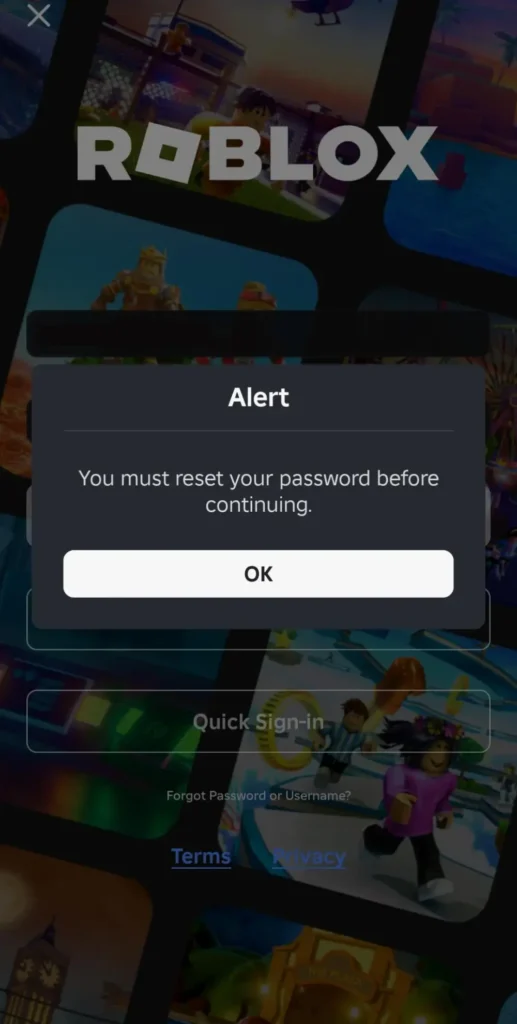
Although the recovery system is designed to be simple, some players encounter errors while trying to regain access. Issues involving the recovery email, login page, or password reset link are among the most common reasons players search for solutions.
Understanding these problems helps users solve them without unnecessary delays.
Roblox Password Reset Email Not Arriving
One of the most common situations is requesting account recovery but not receiving the email. This can happen for several reasons, including incorrect email information or automatic filtering by email providers.
Before trying again, check the following:
- Confirm that the email address belongs to the account you are recovering.
- Check Spam, Junk, and Promotions folders.
- Wait several minutes before submitting another request.
- Make sure your email inbox has available storage space.
If you have multiple email accounts, try each one that may have been connected to your Roblox account.
Players who cannot remember which email was used may need additional account verification support.
Roblox Password Reset Link Expired
Another frequent issue occurs when the recovery link no longer works. Password recovery links are usually temporary security measures, meaning they may expire after a certain amount of time.
If this happens:
- Return to the Roblox recovery page.
- Request a new password reset message.
- Open the newest email as soon as possible.
- Create a new password immediately.
Avoid using old recovery messages because expired links will continue to fail.
Account Recovery Without an Email Address
Some older accounts may not have a verified email connected. In these cases, the normal recovery process may not work because Roblox cannot send the verification message.
Possible solutions include:
- Checking whether a phone number was previously added.
- Using official account support options.
- Providing ownership information when requested.
Information such as purchase history, previous usernames, and account details can help verify ownership.
After recovering access, adding an active email address is highly recommended.
Understanding Roblox Login and Account Access Issues
Many account problems are not caused by passwords alone. Players can also experience problems related to devices, saved credentials, browser settings, or security restrictions.
A successful Roblox log in requires both correct account information and a stable connection between the device and Roblox servers.
Browser and Application Issues
Sometimes the problem is caused by the platform being used rather than the account itself.
Common fixes include:
- Updating the Roblox application.
- Restarting the device.
- Clearing browser cache.
- Trying another browser.
- Reinstalling the application if necessary.
These steps can solve situations where the password is correct but the login process does not continue.
Avoiding Fake Roblox Login Pages
Players should always be careful when entering account information online. Fake websites often imitate popular gaming platforms to steal usernames and passwords.
Avoid:
- Websites promising free Robux.
- Suspicious links shared through messages.
- Unofficial account verification pages.
- Services requesting your password.
The safest approach is always using official Roblox platforms for account access.
This is especially important for users searching for iRobux login solutions, as many unofficial websites use similar terms to appear legitimate.
Roblox Account Safety Tips for Long-Term Protection
Account security is an ongoing process. After completing a Roblox password reset, players should develop habits that reduce future risks.
Simple actions can make a major difference.
Security Habits Every Roblox Player Should Follow
Consider these recommendations:
- Never share your password with friends or strangers.
- Avoid logging into your account on unknown devices.
- Do not reuse passwords from other platforms.
- Review account activity regularly.
- Enable all available security features.
These practices help protect accounts from unauthorized access attempts.
Managing Multiple Gaming Accounts
Many players use several gaming platforms at the same time. Managing different passwords can become difficult, especially when each account requires unique credentials.
A password manager can help organize information securely.
Benefits include:
- Creating stronger passwords.
- Storing credentials safely.
- Reducing password repetition.
- Making account recovery easier.
Good organization prevents many situations where players need to search repeatedly for how to recover access.
How Connection Quality Affects Your Roblox Experience
Account security allows players to access their games safely, but connection quality also influences the overall experience. Roblox includes thousands of multiplayer experiences where stable performance matters.
Players can encounter:
- Delayed actions.
- Connection drops.
- High latency.
- Slow loading times.
These problems are different from account issues but can still interrupt gameplay.
After completing a Roblox password reset, maintaining a reliable connection helps ensure smoother sessions across different Roblox experiences.
ExitLag helps optimize network routes by finding more efficient paths between players and game servers. This can improve stability, reduce unnecessary latency, and provide a more consistent experience during online gameplay.
Roblox Password Reset Compared to Other Account Recovery Methods
Different recovery methods provide different levels of convenience depending on what information is available.
| Recovery Method | Required Information | Best Use Case |
| Email recovery | Connected email address | Most common recovery option |
| Phone recovery | Registered phone number | Useful when email access is unavailable |
| Support assistance | Account verification details | For accounts without recovery information |
Using official recovery methods is always safer than relying on third-party services.
How to Avoid Needing Another Roblox Password Reset
The best recovery strategy is preventing account problems before they happen. While knowing how to perform a reset is useful, prevention saves time and protects your account.
Players should create a routine that includes:
- Checking security settings regularly.
- Updating passwords when necessary.
- Keeping recovery information current.
- Avoiding suspicious websites.
- Using verification features.
A secure account allows players to focus on what matters most: enjoying Roblox games and connecting with the community.
Roblox Password Reset: Complete Guide to Keeping Your Account Safe
Managing account access is an essential part of modern gaming. A reliable Roblox password reset process helps players recover lost access, fix login problems, and continue enjoying their favorite Roblox experiences. For players who regularly experience connection interruptions while gaming, account security is only one part of a smooth experience. ExitLag helps optimize network routes, reducing unstable connections and improving consistency during Roblox sessions.
FAQ
To complete a Roblox password reset, visit the Roblox login page, select “Forgot Password or Username?”, enter your connected email address, and follow the recovery instructions sent by Roblox.
If you forgot your password, use the account recovery option on Roblox, verify your email or phone number, and create a new password through the official recovery process.
The email may not arrive because of incorrect account information, spam filters, or delivery delays. Check all email folders and confirm that the correct address is connected to your account.
Yes. You can complete a Roblox password reset through the Roblox mobile app or a mobile browser by selecting the recovery option and following the verification steps.
Enable two-step verification, use a unique password, update recovery information, and avoid sharing account details with other users.
Got questions or want to connect with other players? Join the conversation at the ExitLag Forum!