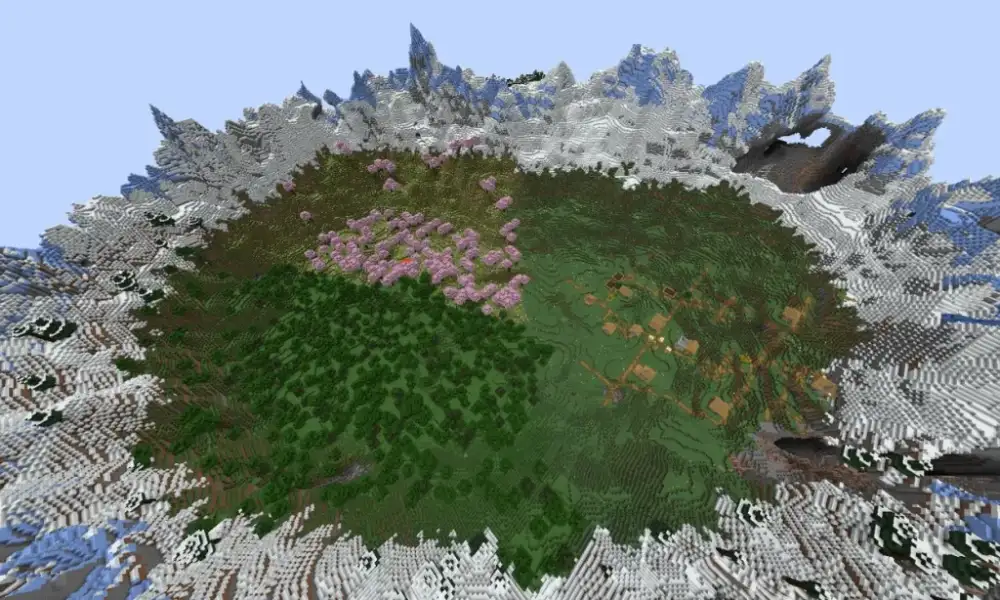
If you've ever wondered how do you make a minecraft name tag, the process is easier than ever. Minecraft's Tiny Takeover update introduced a crafting recipe that allows players to create name tags using simple materials. Instead of spending hours searching for rare loot, you can now personalize your favorite animals, villagers, and other mobs with a name of your choice.
Learning how do you make a minecraft name tag is especially useful for players who enjoy building farms, collecting pets, or creating unique Survival worlds. Name tags help you identify individual creatures and prevent many named mobs from naturally despawning. Moreover, they make your Minecraft adventures feel more personal, whether you're naming a loyal wolf or organizing a busy village.
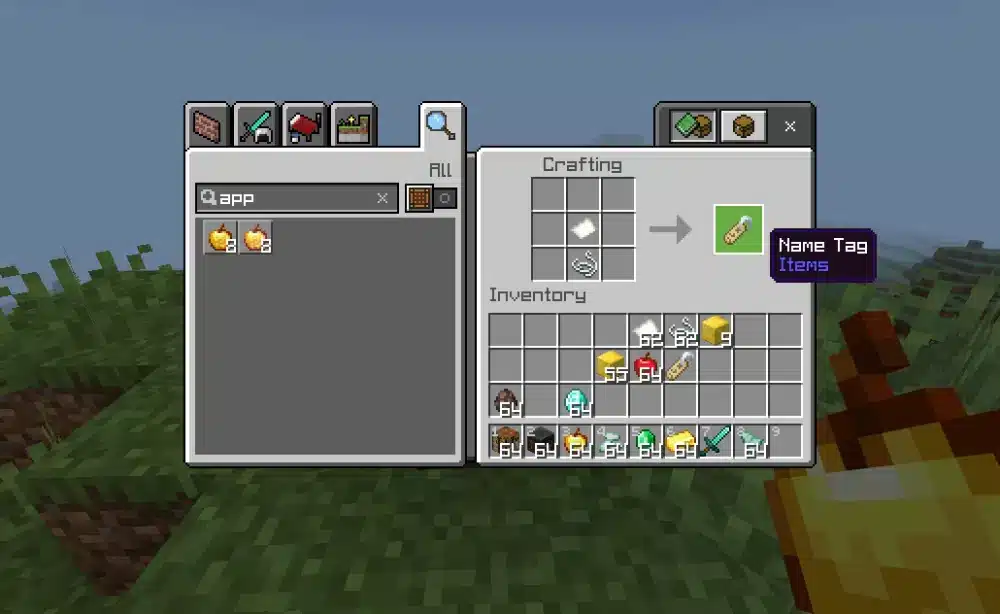
So, how do you make a minecraft name tag in the latest version? You need one paper and one metal nugget, such as an iron nugget, to craft a name tag. This recipe became available with the Tiny Takeover update in 2026. However, players using older versions may still need to obtain name tags through exploration, fishing, or trading.
 The introduction of craftable name tags changed how players customize their Minecraft worlds. Previously, name tags were valuable items that couldn't be crafted through normal Survival gameplay.
Now, the crafting system makes them much more accessible. As a result, players can name entire groups of animals without relying on rare treasure or specific villager trades.
The introduction of craftable name tags changed how players customize their Minecraft worlds. Previously, name tags were valuable items that couldn't be crafted through normal Survival gameplay.
Now, the crafting system makes them much more accessible. As a result, players can name entire groups of animals without relying on rare treasure or specific villager trades.
Because the materials are inexpensive, players can prepare multiple name tags before starting a new farm or breeding project.
These differences matter because changing your username in one system does not automatically rename your profile in the other.
For instance, updating your Xbox gamertag does not necessarily change your Java Edition username.
Similarly, renaming a wolf or horse using a name tag has no effect on your player account.
Understanding these distinctions helps prevent confusion when managing your identity across Minecraft platforms.
These names work particularly well in Survival worlds where players maintain animal farms or customized villages.
Additionally, naming mobs can help distinguish valuable creatures from others of the same species.
For example, if you breed horses with different characteristics, assigning unique names makes it easier to identify your favorites.
 Although name tags are relatively simple items, players occasionally encounter problems when crafting or using them.
These issues often involve outdated game versions, incorrect crafting materials, or misunderstandings about how anvils work.
Fortunately, most name tag problems can be solved with a few basic checks.
Although name tags are relatively simple items, players occasionally encounter problems when crafting or using them.
These issues often involve outdated game versions, incorrect crafting materials, or misunderstandings about how anvils work.
Fortunately, most name tag problems can be solved with a few basic checks.
How Do You Make a Minecraft Name Tag in the Latest Update?
The introduction of craftable name tags changed how players customize their Minecraft worlds. Previously, name tags were valuable items that couldn't be crafted through normal Survival gameplay.
Now, the crafting system makes them much more accessible. As a result, players can name entire groups of animals without relying on rare treasure or specific villager trades.
How to Craft a Name Tag in Minecraft With Paper and Metal Nuggets
Understanding how to craft a name tag in minecraft starts with collecting two basic resources. The recipe requires:- 1 Paper: Crafted from sugar cane.
- 1 Metal Nugget: Such as an iron nugget obtained from an iron ingot.
- Crafting interface: Used to combine the materials into a name tag.
Materials Needed for the Minecraft Name Tag Recipe
Before crafting your first minecraft name tag, you should understand where each ingredient comes from. Paper is one of Minecraft's most accessible crafting materials. You can produce three pieces of paper by placing three sugar cane horizontally in a crafting grid. Sugar cane commonly grows near water, making it relatively easy to collect during exploration. Iron nuggets are also straightforward to obtain. Place one iron ingot in a crafting grid to convert it into nine iron nuggets. This means a single iron ingot can provide enough nuggets for several name tags, provided you also have enough paper.| Material | Quantity | How to obtain it |
| Paper | 1 | Craft using sugar cane |
| Iron nugget | 1 | Convert an iron ingot into nuggets |
| Crafting interface | 1 | Use your inventory crafting grid or a crafting table |
How to Make a Name Tag in Minecraft Step by Step
If you're searching for how to make a name tag in minecraft, follow these instructions:- Collect sugar cane: Find sugar cane growing near rivers, lakes, or other water sources.
- Craft paper: Arrange three sugar cane horizontally to produce three pieces of paper.
- Obtain an iron nugget: Convert an iron ingot into nine nuggets.
- Open your crafting interface: Use the inventory crafting grid or a crafting table.
- Combine the ingredients: Place one paper and one iron nugget in the required crafting arrangement.
- Collect your name tag: Move the finished item into your inventory.
Where Can You Find a Minecraft Name Tag?
Although crafting is now an option, exploring the world remains another way to obtain name tags. Players using older Minecraft versions may find these alternative methods particularly important. Additionally, collecting name tags while exploring can save crafting materials for other projects.Finding Name Tags in Loot Chests and Structures
One traditional way to obtain a name tag minecraft item is by searching naturally generated structures. Depending on your Minecraft edition and version, name tags may appear in loot chests within certain structures. Some locations worth exploring include:- Dungeons: Underground rooms containing monster spawners and loot chests.
- Abandoned mineshafts: Underground tunnel networks with minecart chests.
- Ancient cities: Dangerous Deep Dark structures containing valuable loot.
- Woodland mansions: Large structures inhabited by hostile illagers.
Getting Name Tags Through Fishing and Villager Trading
Fishing has traditionally provided another opportunity to obtain name tags in Minecraft. When fishing, players can occasionally receive treasure items instead of ordinary fish. Name tags belong to this treasure category in versions that support them as fishing rewards. However, treasure catches are uncommon. Consequently, fishing is not always the fastest way to collect several name tags. Using a fishing rod enchanted with Luck of the Sea can improve your chances of receiving treasure rewards. Villager trading offers another alternative. Master-level librarian villagers can sell name tags in exchange for emeralds, depending on the applicable trading mechanics. This method is especially useful for players who already maintain a trading hall or emerald farm. Instead of relying on random loot, you can exchange resources for name tags through an established villager trading system.Crafting Versus Exploring: Which Method Is Better?
The best method depends on your Minecraft version and available resources. For players using the latest update, crafting is generally the most convenient approach. Paper and iron nuggets are relatively inexpensive, especially once you've established reliable sugar cane and iron supplies. Exploration, meanwhile, remains valuable for players who enjoy discovering structures and collecting additional treasure. Fishing can provide name tags alongside other rewards, while villager trading offers a practical option for established Survival worlds. If you're playing an older version without name tag crafting, trading may be one of the more predictable methods. Ultimately, understanding these different approaches helps you obtain name tags efficiently without interrupting your main gameplay objectives.How to Make Name Tag in Minecraft and Use It on Mobs
After obtaining a name tag, the next step is learning how to use it correctly. Many beginners assume they can simply hold the item and interact with an animal. However, Minecraft requires you to assign a name using an anvil before applying the tag. Once prepared, the item can personalize a wide variety of creatures throughout your world.How to Rename a Name Tag Using an Anvil
If you've been researching how to make name tag in minecraft, knowing how to use an anvil is essential. An anvil allows you to rename items, repair equipment, and combine compatible enchantments. To rename your name tag, follow these steps:- Place an anvil somewhere accessible in your Minecraft world.
- Open the anvil interface.
- Insert the name tag into the first input slot.
- Replace the default item name with your preferred name.
- Pay the required experience level cost.
- Collect the renamed name tag.
How to Apply a Name Tag to Animals and Other Mobs
Using a renamed name tag is straightforward. Hold the item in your hand and interact with the creature you want to name. On PC, this generally involves using the right mouse button while targeting the mob. After the interaction, the creature receives its new name, which can appear above it when you look toward it. Name tags work with many Minecraft creatures, including:- Wolves, cats, horses, and other common animals.
- Villagers and certain other passive mobs.
- Zombies, skeletons, and numerous hostile mobs.
- Rare creatures you want to preserve or identify.
Special Name Tag Easter Eggs and Naming Tricks
Minecraft includes several entertaining secrets connected to name tags. These Easter eggs allow players to change certain creatures' appearances or behaviors by assigning specific names. One famous example is Dinnerbone. Naming many supported mobs Dinnerbone causes their models to appear upside down. Another popular name is jeb_, which creates a color-changing visual effect when applied to a sheep. The sheep cycles through different wool colors, producing a rainbow-like appearance. However, this effect is visual. Shearing the sheep does not produce randomly changing rainbow wool. Players can also name a rabbit Toast to give it a special appearance. This Easter egg references a rabbit and has become one of Minecraft's recognizable naming secrets. Another interesting example involves naming a vindicator Johnny, which changes its behavior toward many other mobs. These hidden interactions make name tags more than simple identification tools. They also provide creative opportunities for themed builds, custom adventures, and entertaining multiplayer experiences. Whether you're organizing a peaceful animal sanctuary or designing a mysterious adventure map, name tags add another layer of personality to your Minecraft world.How to Change Your Name on Minecraft: Java and Bedrock
Understanding how to change your name on Minecraft is different from learning how to rename mobs. While name tags customize creatures inside your world, changing your player name requires adjusting your Minecraft account settings. Fortunately, both Java and Bedrock Edition allow players to personalize their identities. However, the process depends on which version you play and whether your profile uses a Java username or a Microsoft Xbox gamertag. Before making changes, remember that your Minecraft username represents your identity across multiplayer servers. Therefore, choosing a recognizable name can help friends find you and make your profile easier to identify.Changing Name in Minecraft Java Edition
If you're interested in changing name in minecraft Java Edition, you can update your username through your Minecraft account profile. Unlike name tags, this process does not require crafting materials, anvils, or experience levels. Follow these steps:- Visit the official Minecraft website at Minecraft.net.
- Sign in using the Microsoft account associated with your Minecraft Java Edition profile.
- Open your profile settings.
- Find the Java Edition profile name section.
- Enter your preferred new username.
- Confirm the change and save your updated profile.
How Can You Change Your Name on Minecraft Bedrock Edition?
Players asking how can you change your name on minecraft Bedrock Edition need to understand the relationship between Minecraft and Xbox accounts. Bedrock Edition uses your Microsoft Xbox gamertag as your player identity. Consequently, changing your Minecraft name involves updating that gamertag rather than editing a separate Java Edition username. Here's how to do it:- Open the official Xbox website.
- Sign in using the Microsoft account linked to Minecraft.
- Navigate to your Xbox profile.
- Select the option to customize or change your gamertag.
- Enter your desired new name.
- Review the available options and confirm your selection.
Minecraft Name Change Rules and Limitations
Before completing a minecraft name change, it's important to understand the differences between Java and Bedrock Edition. Both versions support player customization, but their naming systems operate independently.| Feature | Java Edition | Bedrock Edition |
| Player identity | Java profile username | Xbox gamertag |
| Where to change it | Minecraft profile | Xbox profile |
| Character limits | 3–16 characters | Xbox gamertag rules |
| Change frequency | Generally once every 30 days | Subject to Xbox policies |
| Possible cost | Free | Additional changes may cost money |
| Affects mob name tags? | No | No |
Best Minecraft Names for Pets, Mobs, and Worlds
Choosing creative minecraft names can make your adventures more memorable. Whether you're naming a loyal companion, organizing a village, or creating a new Survival world, the right name adds personality to your gameplay. Minecraft encourages creativity, so there's no need to limit yourself to ordinary names. You can draw inspiration from fantasy stories, mythology, animals, colors, or even your favorite gaming memories. Moreover, choosing consistent naming themes can make large Minecraft worlds easier to organize, especially when playing with friends.Creative Minecraft Names for Animals and Villagers
When selecting a name on minecraft for your pets, consider their appearance, personality, and role in your world. For example, a fast horse might deserve an energetic name, while a peaceful village cat could have something more playful. Here are some ideas:| Creature | Name ideas | Theme |
| Wolf | Shadow, Fang, Ghost | Adventure |
| Cat | Luna, Whiskers, Mochi | Cute |
| Horse | Thunder, Blaze, Storm | Speed |
| Axolotl | Bubbles, Coral, Splash | Aquatic |
| Villager | Professor Oak, Merchant Max | Roleplay |
| Sheep | Cotton, Marshmallow, Cloud | Funny |
| Iron Golem | Guardian, Titan, Sentinel | Protection |
| Bee | Honey, Buzz, Pollen | Nature |
Funny and Unique Names for Worlds on Minecraft
Finding creative names for worlds on minecraft can be just as entertaining as naming individual mobs. A memorable world name helps establish the atmosphere of your adventure before you even start exploring. Some players prefer mysterious fantasy names, while others enjoy humorous references. Here are several ideas organized by theme: Fantasy world names:- Kingdom of Everstone
- The Forgotten Realm
- Dragonfall Valley
- Emerald Kingdom
- Crystalwood Forest
- One More Diamond
- The Endless Expedition
- Creeper Territory
- Beyond Bedrock
- Survival Chronicles
- Definitely No Creepers
- Dirt Mansion Simulator
- Respawn Again
- The Chicken Empire
- Diamonds Not Included
- Block Builders United
- The Crafting Alliance
- Friends of the Overworld
- The Great Survival Project
- Kingdom of Blocks
Tips for Choosing a Memorable Name on Minecraft
A good Minecraft name should be easy to recognize and appropriate for its purpose. If you're naming a pet, you can experiment with humorous or unusual combinations. However, multiplayer usernames often benefit from simplicity. Consider these recommendations:- Keep names readable: Avoid unnecessary symbols or complicated combinations.
- Choose a consistent theme: Matching names can make your world feel more organized.
- Use recognizable references: Fantasy, mythology, and gaming culture provide inspiration.
- Avoid confusing duplicates: Unique names help identify different mobs.
- Think about multiplayer: Choose usernames that friends can easily remember.
Minecraft Name Tag Problems and How to Fix Them
Although name tags are relatively simple items, players occasionally encounter problems when crafting or using them.
These issues often involve outdated game versions, incorrect crafting materials, or misunderstandings about how anvils work.
Fortunately, most name tag problems can be solved with a few basic checks.
Why Your Minecraft Name Tag Is Not Working
If your name tag doesn't work when interacting with a creature, first check whether you've renamed the item. An ordinary, unnamed name tag cannot be applied in the same way as a properly customized one. To fix the problem, place the name tag inside an anvil and assign your preferred name. Next, verify that you're interacting with a compatible mob. Most common animals and many hostile creatures support name tags, but certain entities and special creatures have restrictions. You should also check your interaction controls. On PC, using a renamed name tag generally requires right-clicking the target creature. On Mobile, the interaction depends on the touchscreen controls and available action prompts. If you're playing multiplayer, server permissions or custom plugins may also affect item behavior.Why You Cannot Craft a Name Tag in Older Minecraft Versions
One of the most common questions is why the crafting recipe doesn't appear. The answer usually depends on your Minecraft version. Before the Tiny Takeover update, name tags were not craftable through standard Survival recipes. Therefore, players using older releases must obtain them through alternative methods. If crafting isn't working, try these solutions:- Check your Minecraft version from the game's main menu.
- Confirm whether your edition includes the Tiny Takeover update.
- Verify that you're using the correct ingredients.
- Check the crafting arrangement required by your version.
- Restart the game after updating if necessary.