You’re grinding in PokeTibia, timing your spells and movements perfectly in PvP, and suddenly your character lags behind what you see on the screen. Your ping looks “ok”, but skills trigger late, enemies teleport, and your whole match feels random. That’s jitter: fluctuating ping and connection instability that make it impossible to predict when your commands will execute. Unlike simple high ping, jitter is worse because it is unpredictable, turning every action into a gamble rather than a skill-based decision.
If you play multiple online games or OT servers, you can check which titles are supported in the official list of supported games at ExitLag’s official supported games list.

What is jitter in PokeTibia?
In PokeTibia, jitter is the irregular variation in your network latency—the time it takes for each data packet to travel between your PC and the game servers and back.
- Ping measures how long that round trip takes.
- Jitter measures how consistent that time is between packets.
If your ping is 80 ms every second, your connection is stable.
If your ping jumps between 40 ms, 130 ms, 75 ms, and 200 ms over a short period, that’s high instability.
This inconsistent response time is exactly what causes skills, movements, and interactions in PokeTibia to feel inconsistent. Your screen shows one thing, but the server timeline is slightly different all the time, and the gap between both keeps changing.
Ideally, your ping should only vary by about 5–10 ms. Once variation exceeds that and becomes chaotic, jitter starts to heavily disrupt your gameplay.
How jitter affects your gameplay in PokeTibia
High jitter hits PokeTibia players hard, especially in crowded servers and PvP situations where timing is everything. Some of the most common problems caused by jitter include:
- Inconsistent command execution
One moment your spell or ability is cast instantly, the next it takes a full second to go off, ruining combos and rotations. - Difficulty dodging skills and attacks
When timing keeps changing, dodges and repositioning are unreliable, and you end up getting hit even when you react correctly. - Broken combos and rotations
Sequences of skills that should flow smoothly fail because one cast appears late due to unpredictable delay. - Sudden deaths and teleports
Enemies or bosses “teleport” or move in big jumps, and you suddenly drop dead because the server registered hits earlier than you saw them. - Frustration in PvP
Competitive PvP becomes unfair when you cannot predict how long your commands will take to register, while someone with a stable connection plays smoothly. - Wasted buffs and consumables
You use potions or buffs at the perfect time on your screen, but on the server they register too late to save you. - Inconsistent hit registration
Sometimes your hits and spells register perfectly, and sometimes they don’t, even when you swear your timing and aim were correct. - Unreliable movement and pathing
Rubberbanding or micro-teleports make it hard to kite enemies or move precisely in dangerous areas.
All of this can happen even when your average ping looks “fine”. That’s why so many PokeTibia players feel something is wrong but can’t explain it—because the real villain is jitter.
Main causes of jitter in PokeTibia
Network congestion
When several devices share your internet—PCs, phones, tablets, smart TVs streaming video—your router must juggle all that traffic. Packet priority changes all the time, and PokeTibia packets may get delayed behind streaming or downloads, which creates jitter and instability.
Unstable routing
Your data doesn’t travel in a straight line to PokeTibia servers. It goes through multiple routers and networks. If the route changes frequently or one of those hops is overloaded, your latency will show high variation, resulting in inconsistent response times.
Unstable Wi-Fi
Wi-Fi is convenient but fragile. Interference from other networks, walls, distance from the router, and even other electronic devices can cause micro packet delays. These don’t always cause full disconnects; they often appear as jitter, especially when you play from far away or with a weak signal.
ISP problems
Even with a good local setup, your internet provider may have overloaded nodes, poor peering, or misconfigured equipment. This leads to random spikes and jitter on every service, including PokeTibia, particularly at peak hours when many users are online.
Distance to servers
If the PokeTibia server you are playing on is located in another country or far from your region, packets travel through more hops. Every extra hop is another chance for instability and delay variation, which you feel as jitter during gameplay.
PokeTibia server load and configuration
Overloaded PokeTibia servers, poorly configured OT servers, or regions with high player density can intensify the effect of jitter. While some of this is “server lag”, when combined with routing issues it makes your experience feel even more unstable.
How to identify and measure jitter in PokeTibia
Extended ping test
One of the best ways to detect jitter is to run a long ping test to your PokeTibia server (or a stable target close to it):
On Windows:
ping <server-ip> -t
On Linux/macOS:
ping <server-ip>
Let it run for several minutes. If your ping stays around 70–80 ms with only small deviations, jitter is low. If it jumps constantly from, say, 40 ms to 150 ms or more, you clearly have a jitter problem.
In-game signs
Inside PokeTibia, you’ll notice typical symptoms of jitter:
- The ping shown in-game varies constantly instead of staying near a stable value.
- Some moments are perfectly playable, while others feel inconsistent, with abilities and movements responding late.
- You experience intermittent rubberbanding—your character snaps back a few steps.
- Skills and commands show variable delay, sometimes instant, sometimes very slow.
- The experience feels unstable even when the displayed ping is “low”.
If these signs match what you feel, and your extended ping test shows large variation in latency, jitter is a key issue affecting your PokeTibia gameplay.
Jitter levels in PokeTibia
Because jitter is about variation rather than raw ping, it helps to classify how serious it is for your PokeTibia sessions.
Jitter severity table
| Jitter level | Variation (ms) | Gameplay impact in PokeTibia |
| Excellent | 0–5 ms | Smooth, responsive, no visible issues |
| Good | 5–15 ms | Minor artifacts, almost always playable |
| Moderate | 15–30 ms | Noticeable delay variations, some rubberbanding |
| High | 30–50 ms | Skills and movements feel unreliable, PvP is frustrating |
| Severe | 50 ms+ | Gameplay feels broken, frequent teleports and missed actions |
Your target is not just low ping, but low and stable jitter—ideally in the Excellent or Good range.
Basic solutions to reduce jitter in PokeTibia
Prioritize your connection
Before anything advanced, fix the basics of your setup:
- Use ethernet cable
Switch from Wi-Fi to a wired connection. Ethernet minimizes interference and delivers far more stable response time than wireless. - Close background applications
Stop downloads, streaming services, cloud backups, and other bandwidth-heavy apps. These can create burst traffic that leads to jitter and instability. - Limit devices on the network
The fewer devices actively using the connection, the more consistent your PokeTibia traffic will be. Ask others to pause heavy usage during your key sessions. - Disable automatic updates
System, game launcher, and software updates may start without you noticing, generating sudden spikes and variation in latency. - Update network drivers
Outdated drivers can cause weird network behavior and inconsistent ping. Keeping your NIC drivers updated helps ensure stable operation. - Adjust PokeTibia client settings
Close extra clients or addons that consume too many resources and network calls, especially on older PCs.
Configure QoS on router
Quality of Service (QoS) is a router feature that lets you prioritize specific traffic. By giving your gaming PC or PokeTibia ports higher priority, your router ensures game packets are processed first, even when the network is busy.
This doesn’t magically increase your speed, but it helps reduce jitter by avoiding situations where game traffic waits behind bulk downloads or streaming.
Check with your ISP
If your internal setup is optimized but you still see heavy jitter, the issue may be upstream:
- Contact your ISP and explain you’re facing fluctuating latency and instability in games.
- Ask for a line test, noise checks, or a modem replacement.
- If you use an old plan or outdated hardware, consider upgrading to a more stable connectivity option.
When ISP routing remains unstable, you need a more robust way to control your traffic path—this is where ExitLag becomes your main ally.
ExitLag: the definitive solution to eliminate jitter in PokeTibia
What is ExitLag?
ExitLag is a specialized software focused on connection optimization for online games and real-time applications. Instead of letting your ISP pick whatever route it wants, ExitLag acts like an intelligent stabilizer that carefully chooses and manages the best paths between you and the game servers.
Developed by gamers for gamers, it’s designed to reduce ping, minimize jitter, and improve overall stability so your actions in PokeTibia line up much more closely with what the server sees. It works on PC and compatible mobile setups, not on consoles, and supports hundreds of online titles and private server environments.
If you want to dig into the tech details behind this optimization, you can learn more on the official ExitLag technology page at ExitLag’s official technology page.
How ExitLag eliminates jitter in PokeTibia
ExitLag uses Multi-Internet routing and advanced algorithms to keep your ping stable and your latency consistent. It doesn’t just send your packets along a single path—it constantly analyzes, balances, and refines routes in real time.
You can see a more complete explanation of the process by checking how ExitLag works at how ExitLag works.
In practical terms, ExitLag combats PokeTibia jitter through:
- Multiple routes simultaneously
Your PokeTibia data is sent through several optimized routes at once. If one path encounters congestion or instability, other paths keep your response time consistent. - Intelligent packet selection
The system automatically selects the packets that arrive fastest and discards slower ones, smoothing out variation and reducing visible jitter. - Real-time route optimization
ExitLag continually monitors route performance and dynamically switches to better ones, ensuring low and steady latency even as network conditions change. - Reduction of hops
By avoiding unnecessary or poor-quality nodes, ExitLag reduces the number of routers your packets traverse, minimizing points where jitter and packet delays can occur. - Smart buffering and flow control
ExitLag manages packet flow so that PokeTibia receives a more uniform and stable stream of data, masking short-lived spikes and lowering jitter perception.
Advantages of ExitLag for PokeTibia players
For PokeTibia players, ExitLag offers several key benefits:
- Complete ping stabilization
Your connection becomes more predictable, with fewer spikes and more consistent response time, making gameplay smoother. - Jitter elimination
Thanks to Multi-Internet routing and smart packet handling, jitter is greatly reduced or even neutralized, especially during peak hours. - Better timing in PvP and events
Skill usage, movement, and reaction-based plays become more reliable, which is crucial in PvP, boss fights, and contested hunts. - Competitive advantage
In a game where milliseconds matter, a more stable connection can be the difference between winning or losing key fights or events. - Works with many PokeTibia servers
Whether you’re playing on popular OTs or private servers abroad, ExitLag helps route your traffic more efficiently to those destinations. - Simple and intuitive interface
You don’t need deep technical knowledge. Just select PokeTibia, apply routes, and keep ExitLag ON while you play.
Is it worth using ExitLag in PokeTibia?
ExitLag is especially valuable if you:
- Suffer frequent jitter and connection instability in PokeTibia.
- Play on international or distant servers.
- Participate in competitive PvP, tournaments, or high-stakes events.
- Play mostly in peak hours when the network is more congested.
- Use Wi-Fi or deal with an ISP known for unstable routing.
- Have already lost fights, hunts, or rewards due to unpredictable lag.
- Want consistent timing for spells, dodges, and movement.
If that sounds like you, it’s worth examining which ExitLag plans best match your needs and region at ExitLag pricing plans.
How to use ExitLag in PokeTibia
The process is extremely simple:
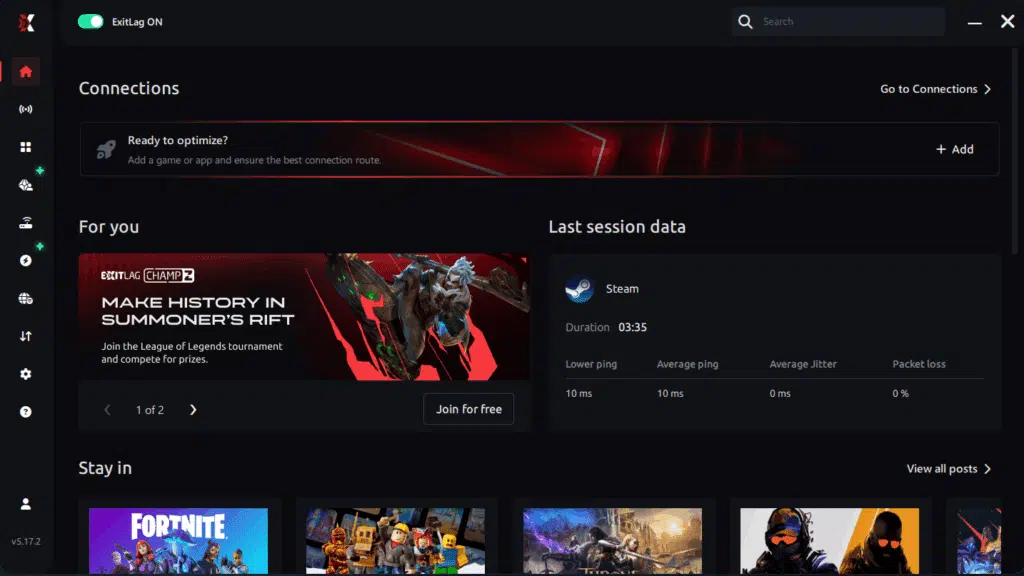
Step 1 – Access the official ExitLag website and download the application. There’s a free trial period for new users.
Step 2 – Install and open the program. Log in with your account..
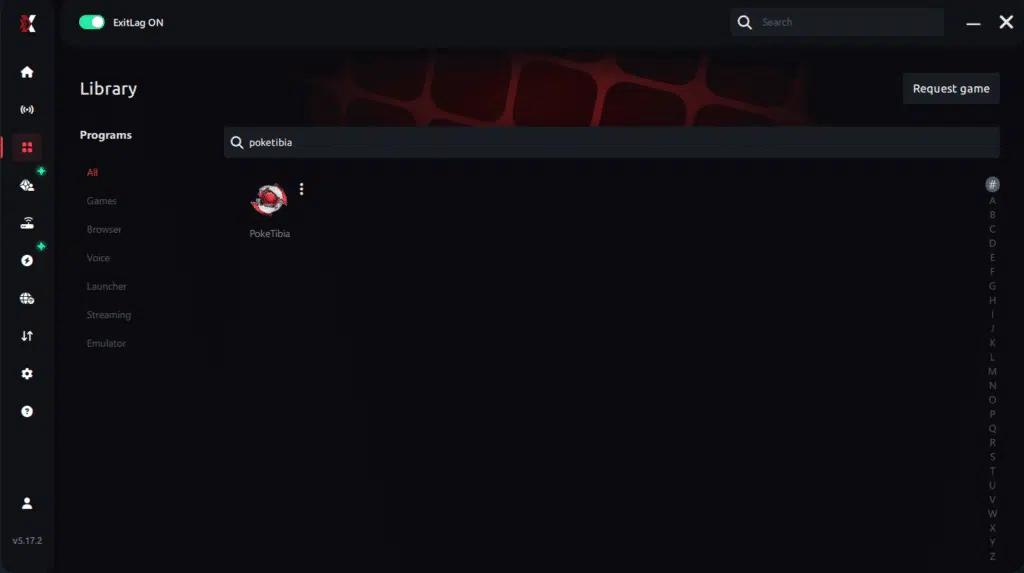
Step 3 – In the search bar, type “PokeTibia” and select the game from the list.
Step 4 – Choose between automated or manual route
Based on the results, you can let ExitLag automatically select the best route or manually choose the server that showed the lowest latency for your connection.
AI-optimized automated route
Based on the results, you can let ExitLag automatically select the best route through AI optimization. The system analyzes multiple connection paths in real time and automatically identifies the most efficient route for your connection, ensuring the lowest possible latency without requiring manual choices.
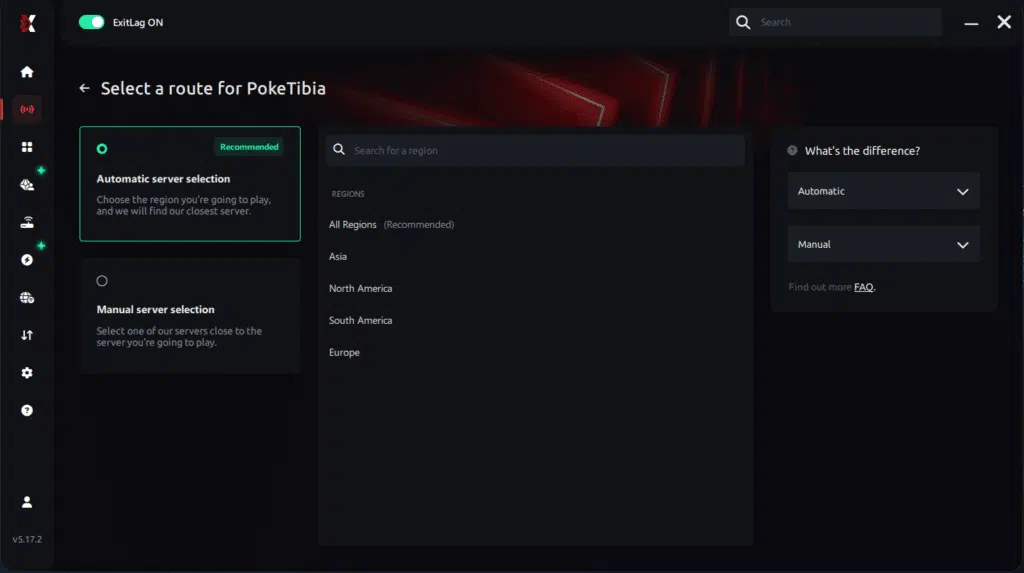
Manual route
If you prefer to have full control over your connection, you can manually choose the server based on the ping test results. Simply select the server that showed the lowest latency or the one that best meets your specific gaming needs, allowing complete customization of your experience.
Step 5 – Click “Apply routes” or the play button. ExitLag will begin optimizing your connection automatically.
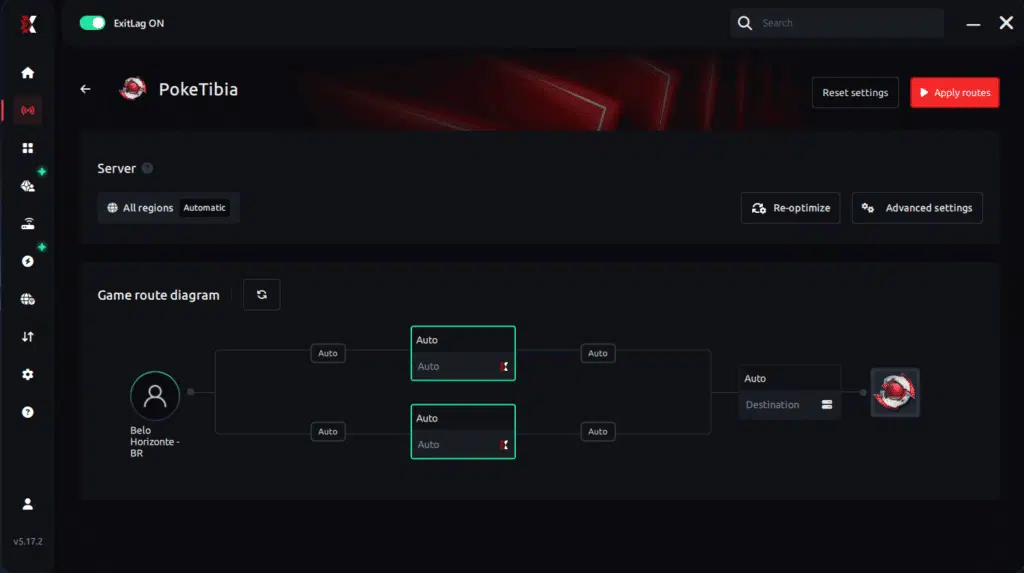
Step 6 – Wait a few seconds until optimization is complete. You’ll see ping indicators in the interface.
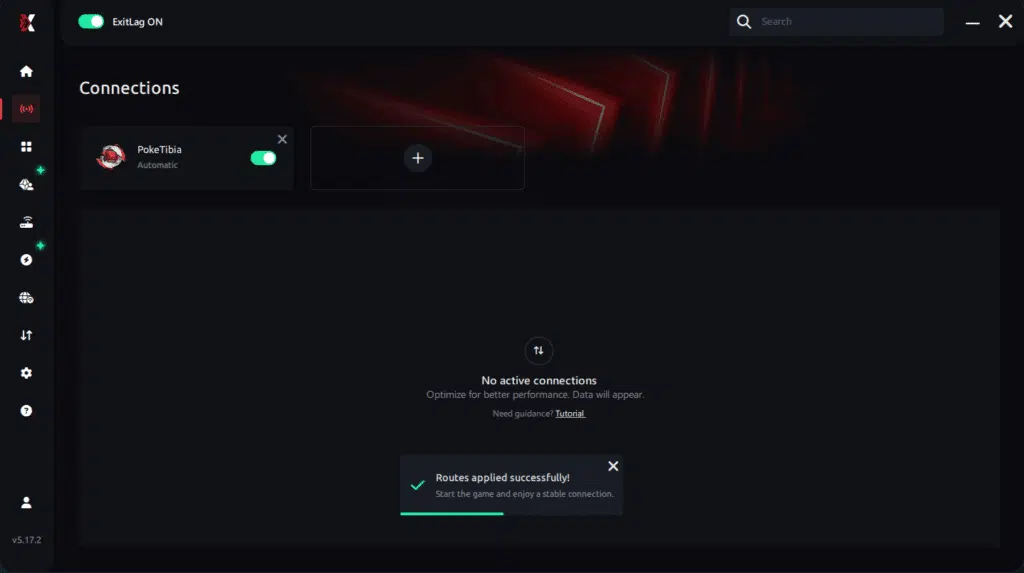
Step 7 – Launch PokeTibia normally. The optimization will already be active.
ExitLag runs in the background while you play, constantly adjusting routes to maintain the best possible performance.
FAQ: frequently asked questions about jitter in PokeTibia
1. What is the difference between jitter, lag, and packet loss in PokeTibia?
Jitter is the variation in your ping—how much your latency bounces instead of staying stable. Lag is the general delay between your actions and what happens in-game, often caused by high ping. Packet loss is when some data packets never reach the server or never return.
You can have low ping but high jitter and still feel your PokeTibia experience is terrible. Likewise, if you have packet loss, skills and movements may not register even when ping seems fine.
2. Why does my ping keep fluctuating in PokeTibia?
Common causes include home network congestion, unstable ISP routing, Wi-Fi interference, too many devices sharing your connection, or playing on distant servers. All of these increase variation in latency.
If you notice ping constantly jumping and your commands becoming inconsistent, jitter is probably a big part of the problem, not just raw ping.
3. Is jitter worse than high ping in PokeTibia?
In many situations, yes. A high but stable ping (for example, always around 120 ms) can be manageable once you adapt your timing.
But jitter changes from moment to moment, so you never know if your spell will trigger instantly or half a second late. This unpredictability makes PvP, hunts, and events much more frustrating than simply playing with a stable but slightly higher ping.
4. How can I know if I have jitter in PokeTibia?
Run an extended ping test and check whether the values cluster tightly or jump all over the place. Large swings indicate jitter.
In-game, if you feel your actions are sometimes instant and sometimes delayed, if your character rubberbands, and if damage or spells feel out of sync, that’s a strong sign that jitter is impacting your PokeTibia sessions.
5. Does Wi-Fi cause jitter in PokeTibia?
Yes. Wi-Fi is much more susceptible to interference, obstacles, and competing networks than a wired connection. These micro disruptions show up as jitter and instability, especially in crowded buildings or apartments.
Whenever possible, switch to an Ethernet cable to significantly reduce variation in latency and get more consistent gameplay.
6. Does ExitLag help with other connectivity problems besides jitter?
Yes. ExitLag not only stabilizes jitter, but also helps:
- Reduce overall ping by finding better routes.
- Lower packet loss by avoiding unstable nodes.
- Smooth out random spikes caused by poor routing.
- Improve general stability across many online games and OT servers.
It’s a broad connection optimization solution designed for gamers, not just a single-issue fix.
7. Do I need to keep ExitLag open while playing PokeTibia?
Yes. ExitLag must remain active during your entire gaming session to maintain the optimized routes and stabilizer functionality.
You can minimize the application to keep it out of the way, but don’t close it until you finish playing PokeTibia, or you’ll lose the benefits of the optimized routing.
8. Can PokeTibia server issues cause problems that look like jitter?
Absolutely. Overloaded servers, poor OT configurations, or temporary maintenance can create server-side lag that feels like jitter.
However, when you optimize your connection with ExitLag and still experience problems only on one specific server, it’s more likely that the issue is on the server side rather than your route.
9. Will switching servers fix jitter in PokeTibia?
Sometimes. Choosing a server closer to your region or one with better peering to your ISP can reduce latency and jitter.
Still, if your ISP routing is unstable in general or your home network has issues, simply switching servers won’t fully solve the problem. In these cases, using a tool like ExitLag to control your routes is much more effective.

Conclusion
Jitter can transform a relaxed PokeTibia session into a stressful, unpredictable experience where your skill is overshadowed by connection instability. Commands fail, spells land late, enemies teleport, and PvP feels like a guessing game instead of a fair fight.
But this doesn’t have to be your reality. By understanding what jitter is, learning how to identify it, applying best practices to your home network, and using dedicated routing optimization like ExitLag, you can finally stabilize your ping variation and enjoy PokeTibia the way it was meant to be played.
For more tips on connection tuning, performance, and game-specific guides, you can explore the official ExitLag blog at the official ExitLag blog.
Ready to stop losing hunts and PvP fights to random jitter instead of skill? Take the next step toward a stable, competitive connection and start your free trial at ExitLag free trial.
Got questions or want to connect with other players? Join the conversation at the ExitLag Forum!