Playing AION 2 Taiwan has become a popular choice among MMORPG fans who want early access, better updates, or simply a fresh start on a high‑population server. In this in‑depth guide, you’ll learn everything you need to know to connect, download, and enjoy the Taiwan version of the game with maximum stability and performance.
In the AION 2 Taiwan VPN discussions, players often assume complex setups are required, but the truth is that accessing the region is surprisingly straightforward once you follow the right steps. AION 2 Taiwan servers are region‑locked, so understanding what they are, where to find them, and how to access them is the first step.
Tip: Many ExitLag users playing Aion 2 on Taiwan servers have reported noticeably smoother gameplay and reduced ping when using optimized routing paths to TW servers. Even players connecting from distant regions have achieved stable combat, faster loading, and far fewer disconnects!

How to Play AION 2 on Taiwan Servers
Playing on the Taiwan servers requires stable access and optimized routing. Below is a clear, step-by-step guide to connecting properly using ExitLag - without relying on VPNs, which can reduce performance and stability.
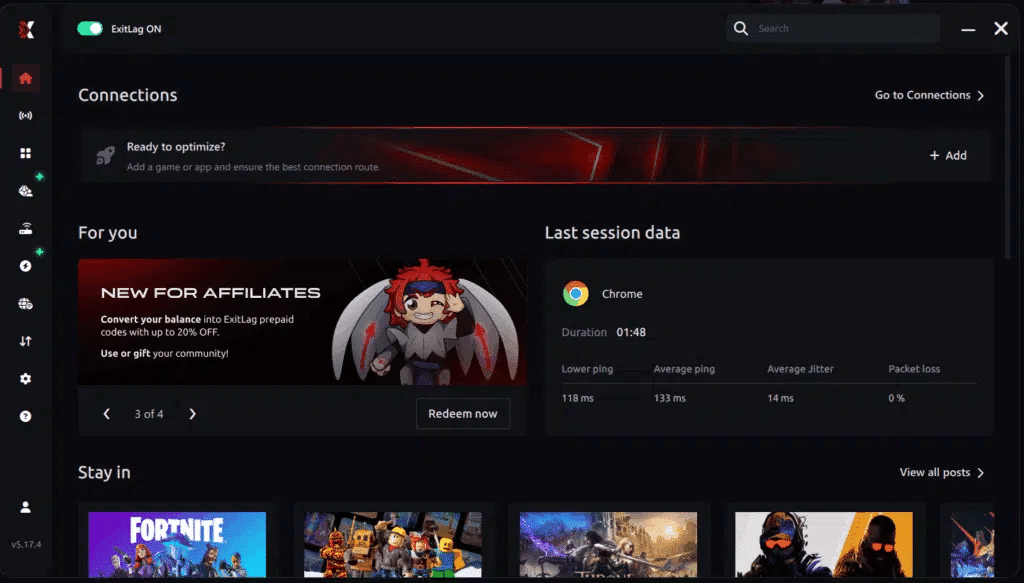
Step 1: Install ExitLag
Download and install ExitLag on your PC. After installation, log into your ExitLag account.
Step 2: Search for AION 2 TW
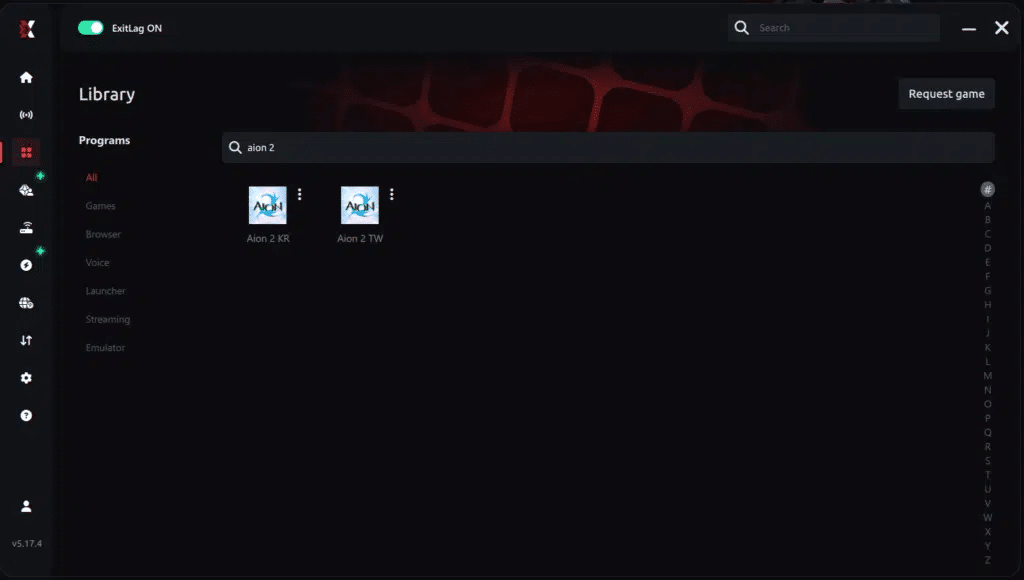
In the ExitLag interface, type “AION 2 TW” in the search bar. Select the correct regional version listed under supported games.
Step 3: Apply or Manually Select Routes
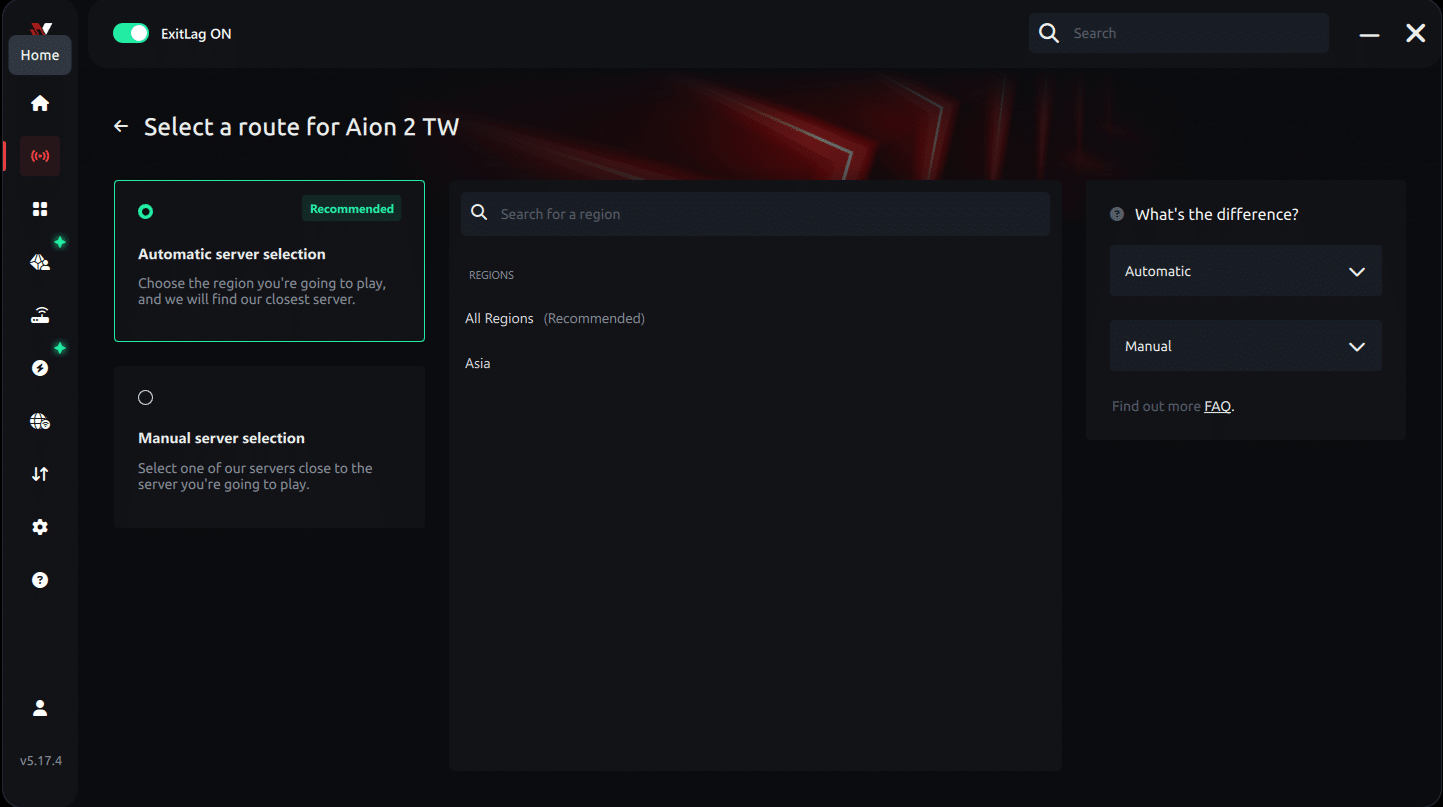
ExitLag uses its AI-powered optimization engine to automatically recommend the most efficient routing paths specifically for AION 2 Taiwan servers, but you may also choose a manual route if you prefer full control.
Automatic Method (Recommended for Most Players):
- ExitLag analyzes your connection and selects the most stable paths to Taiwan.
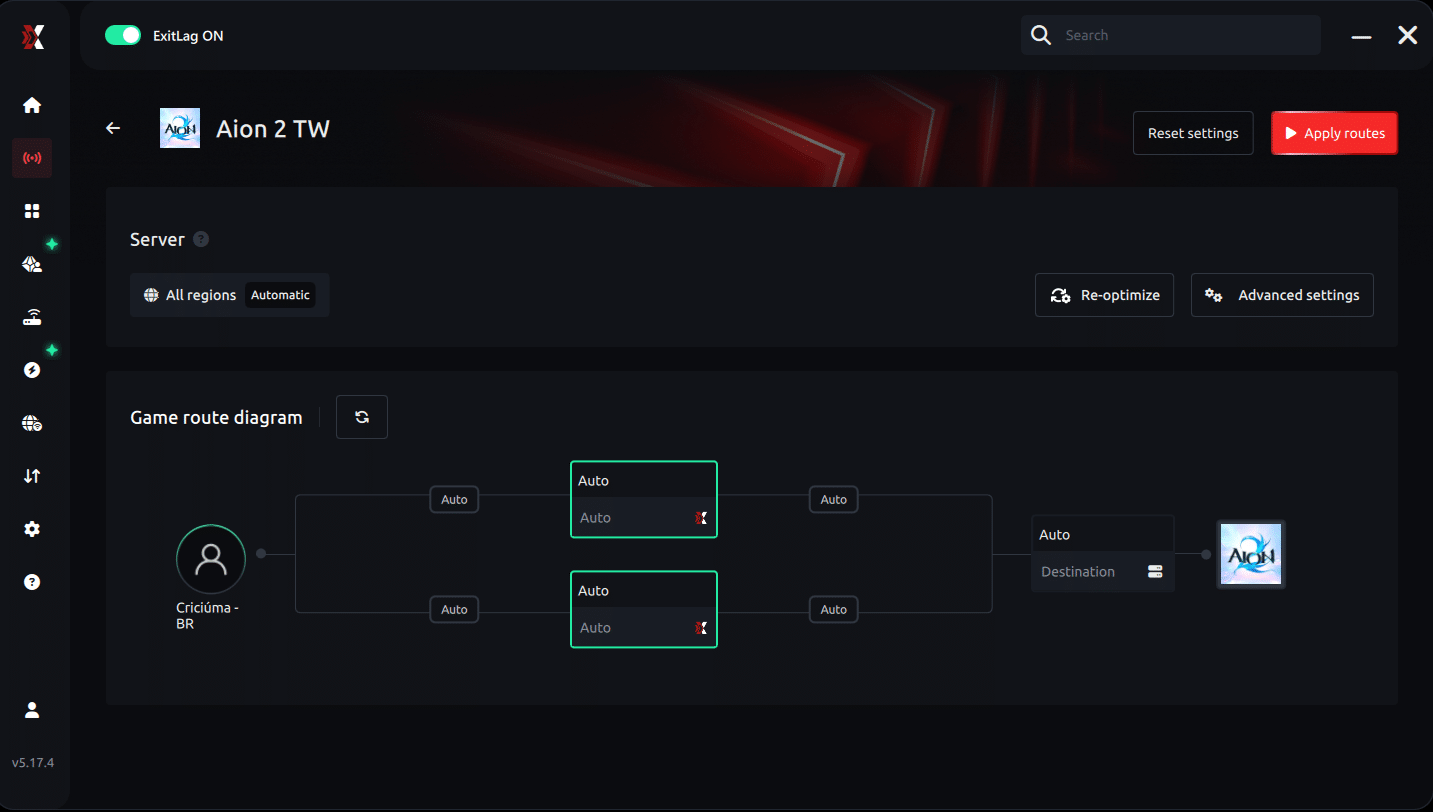
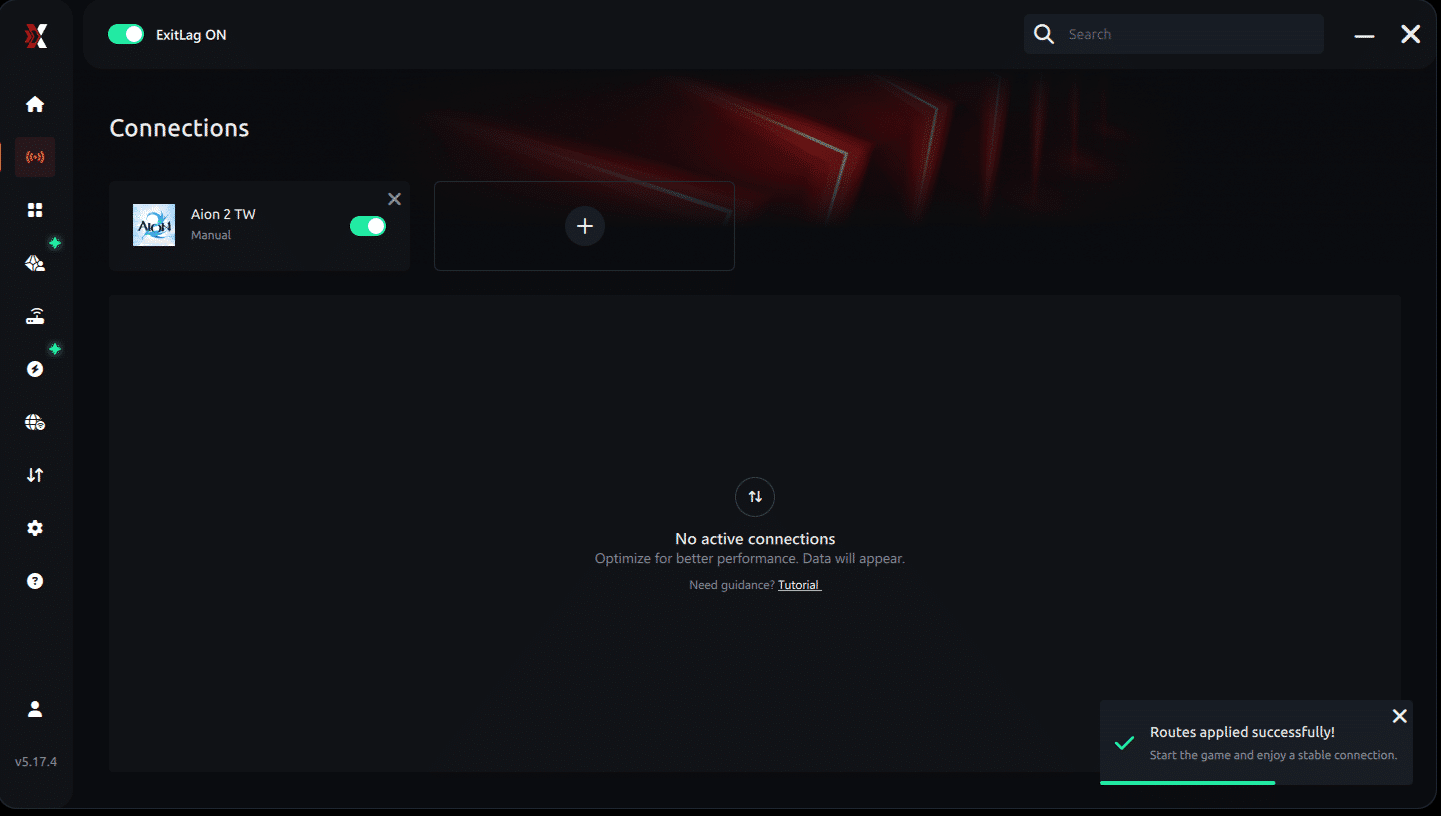
- Click Apply Routes to activate AI-optimized routing.
- ExitLag’s Multipath Connection technology sends your data through multiple Taiwan-oriented paths simultaneously to ensure lower ping, stable latency, and reduced packet loss.
Manual Route Selection (For Advanced Users):
- In the region/server selection panel, choose a specific routing entry tailored for Taiwan connectivity.
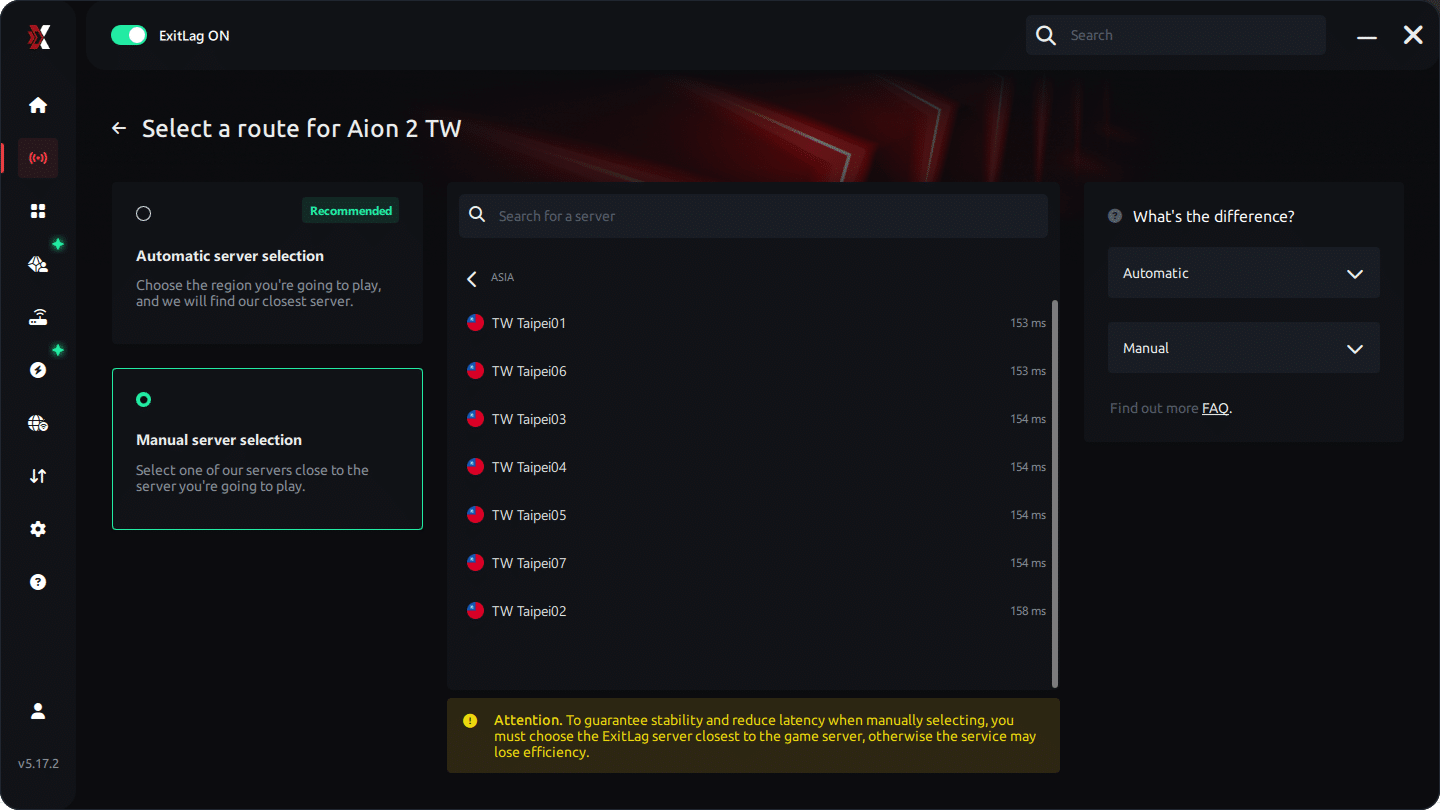
- If the default Recommended or All Regions option is shown and you want tighter control, switch to a manually selected route closest to Taiwan.
- After choosing your preferred route, click Apply Routes to activate your custom Taiwan-focused path.
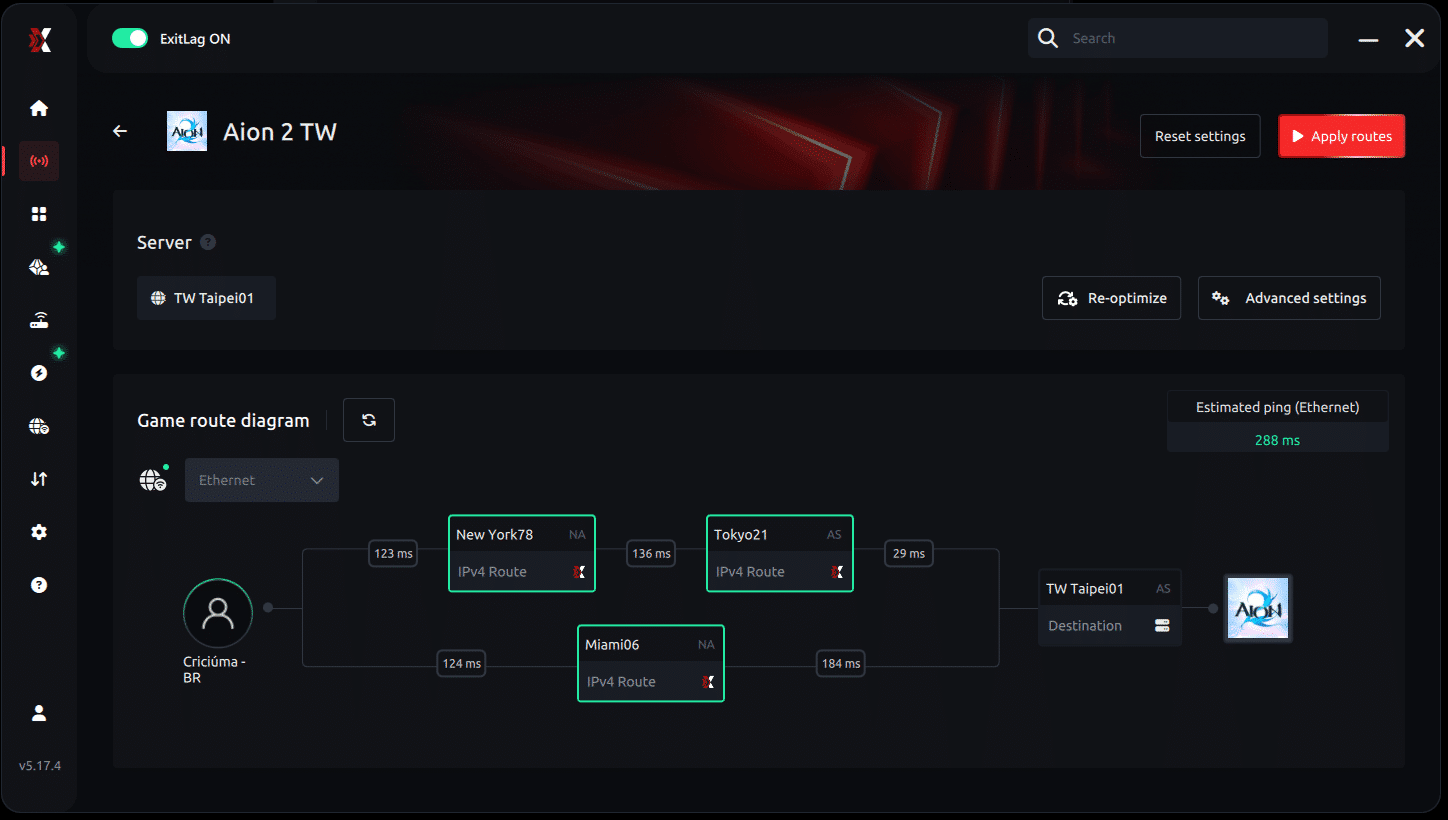
Step 4: Launch AION 2 via PURPLE
Open the PURPLE launcher, log into your Taiwan-region account, and start AION 2. ExitLag will automatically optimize your connection as long as it is active.
Step 5: Test Your Connection Stability
Once in-game:
- Move between busy cities
- Enter PvP arenas
- Join group dungeons
If needed, adjust the route selection in ExitLag and re-apply.
Step 6: Keep ExitLag ON While Playing
Do not close ExitLag while the game is running. This ensures:
- Consistent ping
- Reduced packet loss
- Lower jitter
- Stable gameplay during raids and PvP
How to Download AION 2 Taiwan
Finding the Official TW Download
To start playing, you must download the AION 2 Taiwan client from the official publisher website or approved mobile stores. The process is simple but requires ensuring your device accepts the Taiwan storefront region.
Choosing the Correct Client Version
Because AION 2 receives multiple regional versions, always ensure you’re downloading the Taiwan‑specific client. Mixing versions may result in login errors or region lock screens.
Setting Up Your AION 2 TW Account
How to Create an AION 2 Taiwan Account
Creating an AION 2 TW account requires verifying your email, setting your region to Taiwan, and agreeing to local service terms. Some players use mobile numbers from the region, but email‑based verification is typically enough.
Account Security Recommendations
Keep your login secure by enabling two‑factor authentication and maintaining unique passwords for game services.
AION 2 Region Lock: How Access Works
Understanding the Region Lock System
AION 2 uses region restrictions to prevent access from unsupported countries. Fortunately, the lock applies only to login verification, not gameplay performance.
Bypassing Region Lock Safely (No Illegal Tools)
Players outside Taiwan can access the game by adjusting their region settings in supported app stores or using built‑in device features. This does not involve illegal hacks, and no unauthorized tools should ever be used.
How to Improve Ping on AION 2 Taiwan
ExitLag for AION 2
Whether you play from Europe, LATAM, or North America, latency can impact your combat responsiveness. ExitLag enhances performance by offering:
- Multipath Connection routing
- Worldwide servers
- Real‑time optimization
- Traffic Shaper technology
- Multi‑Internet failover support
- FPS Boost for overall system stability
To get started:
- Create your ExitLag account
- Download ExitLag
- Choose your game and apply the routes
- Enjoy the best experience with ExitLag ON!
ExitLag is the best option for stabilizing your ping on AION 2 Taiwan and eliminating jitter, packet loss, and route instability.
AION 2 Taiwan Server Access: Requirements
Minimum Requirements to Connect
Players must have:
- A Taiwan server‑compatible game client
- A verified TW account
- Access to the regional login interface
Recommended Settings for Stability
Use stable Wi‑Fi or wired connections, close background apps, and apply device‑level optimizations for smooth gameplay.
Preparing Your Character for Taiwan Servers
Class Selection in TW Servers
Early adopters benefit from observing the meta shaped by local competitive players.
Understanding Server Economy and Culture
The TW economy often differs from global servers. Expect:
- Higher demand for crafting materials
- Active trading communities
- Faster dungeon queue times
Interface and Language Barriers
How to Play Despite Language Differences
Many players enjoy Taiwan servers even without speaking Mandarin due to intuitive interfaces and consistent iconography. Community translations are also widely available.
Settings to Simplify Navigation
Enable:
- Auto‑pathfinding
- Highlighted quest icons
- Language‑independent notifications
Server Activities and Community Features
Popular Activities in AION 2 Taiwan
- High‑intensity PvP
- Seasonal progression events
- Cross‑server raids
- Guild warfare
Why Players Prefer Taiwan Servers
Taiwan servers are known for:
- Fast updates
- Dedicated player base
- Strong competitive scene
How ExitLag Enhances AION 2 Taiwan
Even though AION 2 is primarily mobile‑based, players using desktop setups via supported platforms benefit greatly from smoother routing. ExitLag:
- Ends lag
- Ends ping instability
- Ends packet loss
- Ends jitter
ExitLag is not a VPN and should never be compared to one. Its multipath connection technology works to optimize your route to game servers.
Advanced AION 2 Taiwan Optimization and Gameplay Strategies
Playing on AION 2 Taiwan servers gives players access to an active community, competitive events, and early content cycles. In this second part of the guide, we go deeper into the systems, extended features, and high-level strategies that help you thrive on TW servers.
While many players assume using a VPN is necessary, VPNs often harm gameplay performance, introduce instability, or cause packet loss. ExitLag is specifically designed for gaming traffic optimization - never as a VPN replacement - offering stability that VPNs simply cannot provide.
AION 2 Taiwan: Endgame Progression Overview
What Endgame Looks Like on TW Servers
AION 2 Taiwan places strong emphasis on:
- High-level PvP battlegrounds
- Seasonal arena ladders
- Large-scale guild wars
- High-difficulty PvE raids
Progression Systems
Players must manage:
- Gear enhancement
- Skill upgrades
- Season challenges
- Mount and companion development
Late-Game Dungeons and Group Play in Taiwan Servers
Key Dungeon Types
AION 2 Taiwan offers:
- Solo Challenge Arenas
- 4-Player Dungeons
- 8-Player Raids (based on preliminary information, community reports, and early previews; not yet fully confirmed)
- Cross-Server Boss Encounters (reported by the community and seen in early previews; awaiting full confirmation)
Success Tips
- Communicate with your group despite language differences
- Learn attack patterns
- Balance DPS, tank, and support roles
- Optimize device or PC/emulator performance
PvP and Competitive Modes in AION 2 Taiwan
Ranked PvP Structure
Ranked PvP includes:
- 1v1 Duels
- 3v3 Small-Group Arena
- Massive faction-based open-world PvP
Competitive Season Rewards
Rewards typically include:
- Exclusive costumes
- Mount skins
- Seasonal titles
- Enhancement materials
Crafting, Economy, and Trading on Taiwan Servers
Understanding the TW Market
Taiwan servers have:
- what players describe in community discussions as fast-moving auction houses
- community-reported high-value crafting materials
- Player-driven inflation during events
Tips to Profit in TW Economy
- Track market trends
- Sell materials during peak hours
- Farm high-demand items
- Participate in seasonal events
Language Barrier Solutions for AION 2 Taiwan
Official Language Limitations
AION 2 Taiwan does not include an English version. All UI, quests, and tooltips are presented in Traditional Chinese.
Community Solutions
While unofficial, players rely on:
- Community-made translation sheets
- Fan-translated UI maps
- Icon-based navigation
Recommended UI Practices
- Enable auto-routing
- Follow quest icons visually
- Learn key ability symbols
Taiwan Server Time Zone Considerations
Update Timing Differences
According to community reports, Taiwan updates may follow shortly after the Korean patch schedule, though this can vary over time.
Best Times to Play
- In general, players report weekends have the highest population
- According to community activity patterns, evening TW time tends to have the most active raids and PvP
Performance and Connection Optimization
Why You Should Never Use VPNs for AION 2
VPNs:
- Increase latency
- Cause random disconnections
- Reduce routing stability
- May conflict with game security measures
Why ExitLag is the Superior Alternative
ExitLag uses:
- Multipath Connection
- Worldwide servers
- Real-Time Optimization
- Traffic Shaper
- Multi-Internet failover
- FPS Boost
Use ExitLag via the onboarding steps:
- Create your ExitLag account
- Download ExitLag
- Select AION 2 and apply the optimized routes
- Enjoy the best experience with ExitLag ON!
ExitLag ends lag, ping spikes, jitter, and packet loss - and it is not a VPN.
AION 2 Taiwan Server Late-Game Table
| Feature | Taiwan Servers | Notes |
| Endgame PvP | Very active | Highly competitive community |
| Dungeon Frequency | High | Raids and events run daily |
| Economy | Fast-paced | Crafted items in high demand |
| Language | Traditional Chinese | No official English version; English support has not been announced yet and may change in the future |
| PC Support | PC supported via the PURPLE launcher | Console version not yet confirmed; no announcement has been made so far |
| Update Timing | Slightly delayed | Follows KR patch cycle |
Building the Best TW Server Character
Attributes and Stats
Focus on:
- Crit Power
- Attack Speed
- All Resistance stats
Gear Priorities
Endgame players focus on:
- High-rarity armor sets
- PvP-specific gear
- Enchantment bonuses
Companions and Mounts
Mounts provide:
- Movement speed boosts
- Combat stat bonuses (on select mounts)
Social Systems and Guilds in Taiwan Servers
Why Join a Guild?
Guilds offer:
- Raid access
- Daily activity bonuses
- Store discounts
- Exclusive guild skills
How to Choose the Right Guild
Look for:
- English-speaking groups (if needed)
- Active raid schedules
- Fair contribution systems
TW Events, Seasons, and Festivals
Seasonal Structure
Each major season introduces:
- New battlegrounds
- Gear tiers
- Limited-time events
Event Types
- Holiday festivals
- XP buff weekends
- Rare boss rotations
How to Use Ping for Games: Step-by-Step Guide
Checking your connection quality before jumping into a match has never been easier. Here’s how to use Ping for Games in just a few steps:
1. Open the ExitLag software on your PC
Make sure the application is installed and running. The feature is built into the platform and is available for free to all users.
2. Access the Network Analyzer tool
Find the Network Analyzer in the software’s menu. This is where you’ll see Ping for Games, along with other connection analysis features.
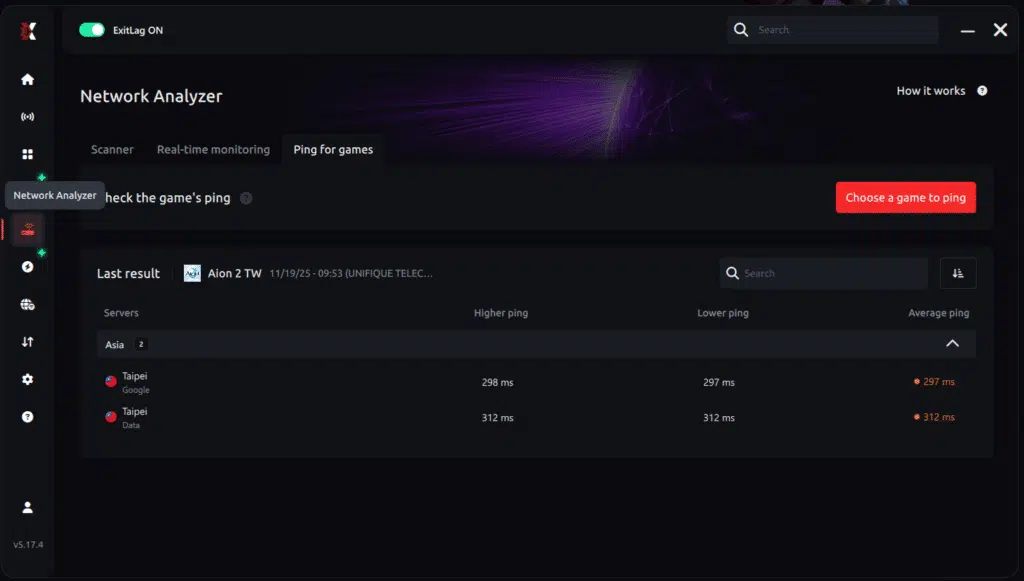
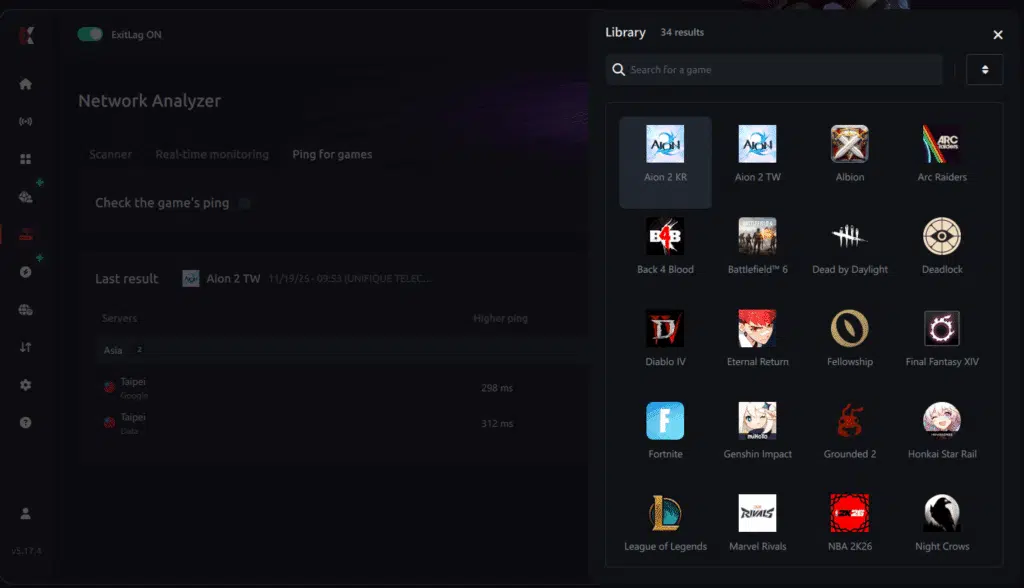
3. Select the game you want to test
Choose the title you plan to play from the list. The tool supports major online multiplayer games, including MOBAs, FPS, Battle Royales, MMORPGs, and more.
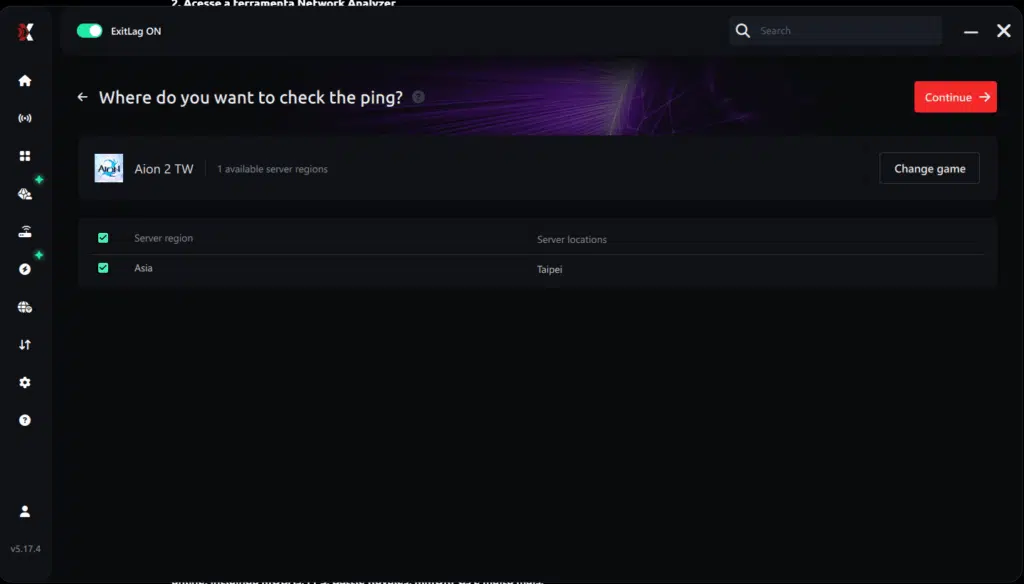
4. Choose the specific server
Select the exact server you want to test-rather than just a general region. This provides much more accurate and relevant results.
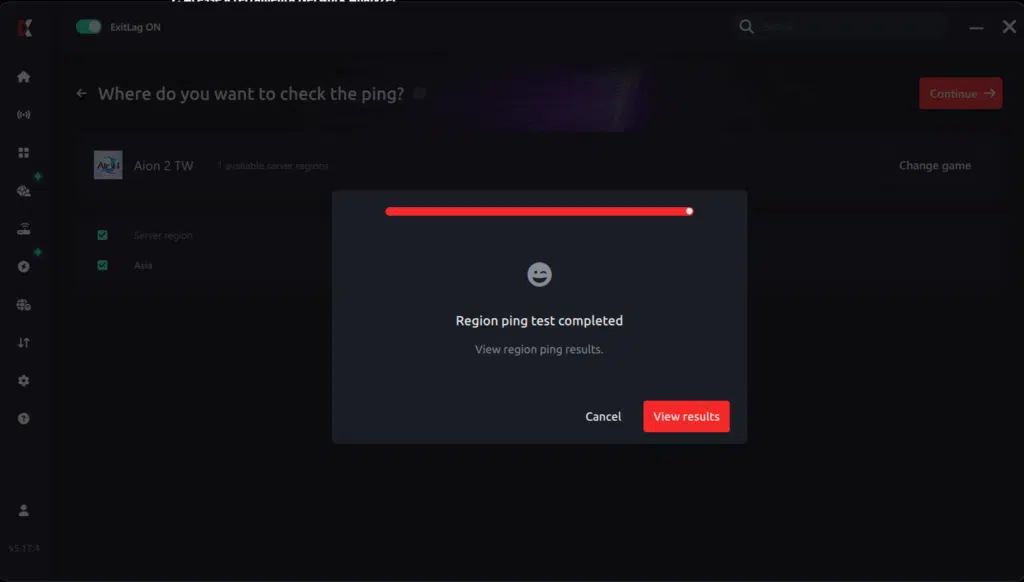
5. Start the ping test
With a single click, ExitLag performs a real-time measurement between your device and the selected server, taking your current connection (wired or Wi-Fi) into account.
6. Analyze the results
The results appear in milliseconds (ms), automatically sorted from lowest to highest ping. You can also sort them alphabetically if you prefer.
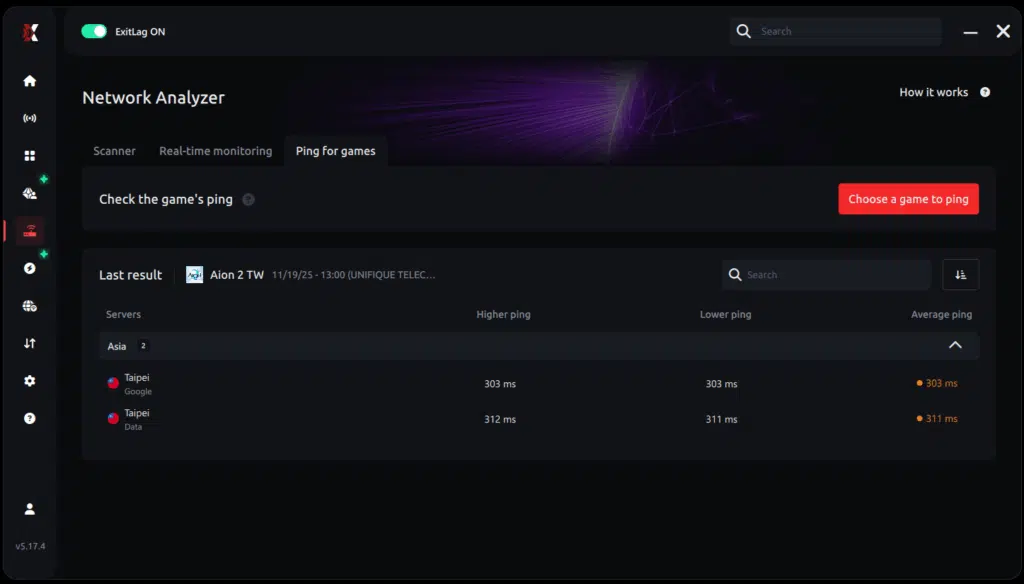
7. Pick the best server and play with confidence
Once you have the information, simply choose the server with the lowest latency and jump into the game knowing your connection is optimized.
Final Considerations for AION 2 Taiwan
Playing on AION 2 Taiwan servers is an exciting path for players seeking competitive environments, community-driven economies, and frequent updates. The language barrier, region restrictions, and download policies require preparation, but the long-term rewards are significant.
For the smoothest possible gameplay on TW servers - especially if you're connecting from outside Asia - always use ExitLag to stabilize your route, eliminate ping spikes, and secure a superior experience.
ExitLag:
- Ends lag
- Ends ping
- Ends packet loss
- Ends jitter
General Disclaimer: "All game images used in this blog belong to NCSoft. They are used for informational/educational purposes only and do not imply endorsement or affiliation with the rights holders."