You bought a game on a sale, launched it, and it runs like a slideshow. Or it's just not fun. Either way, you want your money back.
Steam lets you do that, but the clock starts ticking the moment you pay. Knowing How To Return A Game On Steam is mostly about knowing which limits Valve actually enforces.
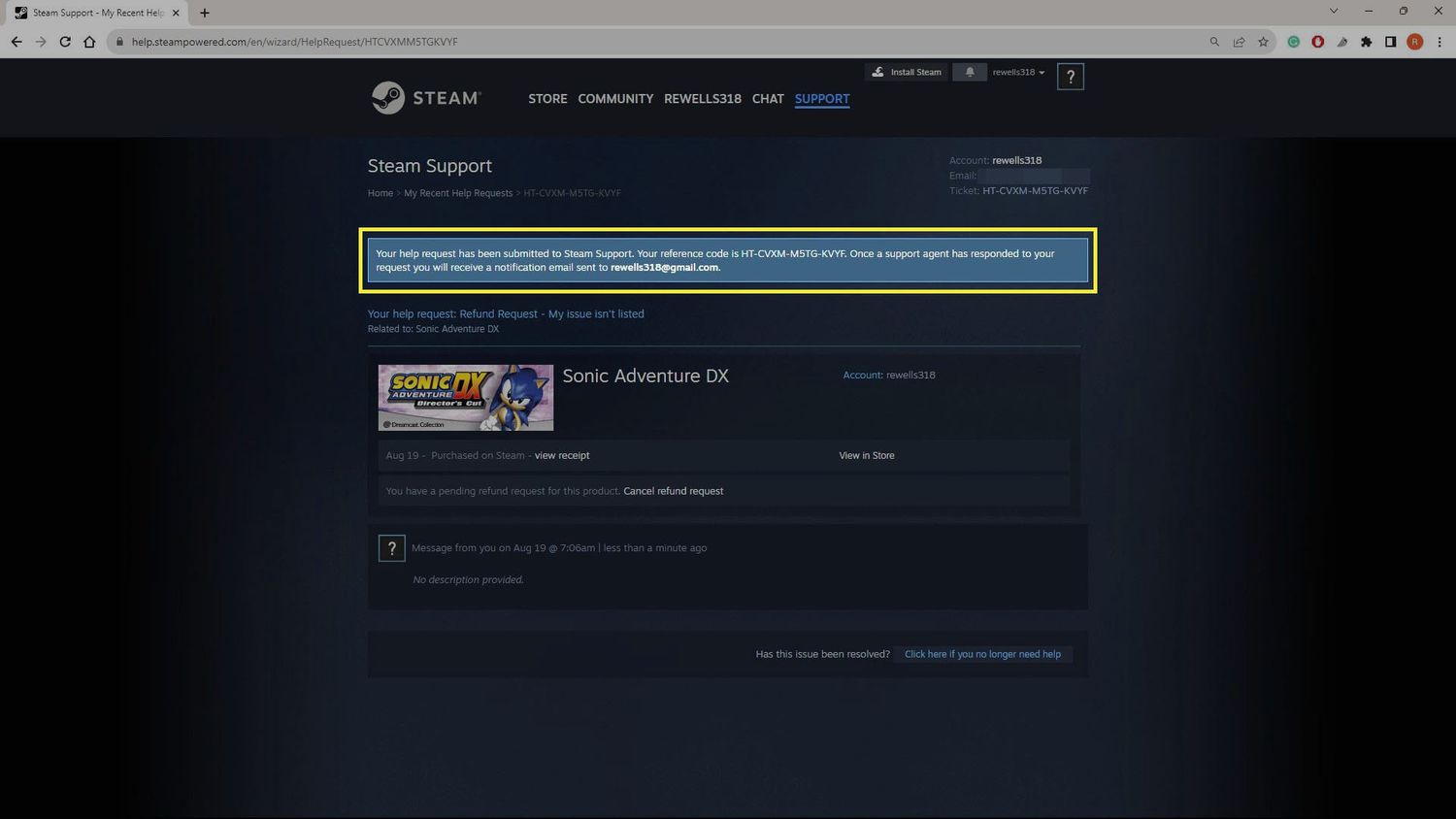
Short version: you can ask for a How To Return A Game On Steam refund within 14 days of buying, as long as you've played under 2 hours. Open Steam Support, pick the purchase, choose "I would like a refund," and Valve usually pays within a week. Most Steam Return requests inside those limits get approved.
How To Return A Game On Steam Step By Step
Filing the request takes two minutes. Remembering to do it before your playtime creeps past the limit is the hard part.What You Need Before You Start
Check three things first. If any of them fails, your request may still be reviewed, but you shouldn't count on it.- The purchase was made on Steam, not through a third-party key site.
- It's been 14 days or less since the purchase date.
- Your playtime is under 2 hours, including Early Access time.
The Steps To Request A Refund
Here is the full flow for How To Return Games On Steam from a desktop browser or the Steam client.- Go to help.steampowered.com and sign in.
- Click Purchases, then pick the game from your recent list.
- Choose "I would like a refund."
- Pick a reason. "Game doesn't work properly" and "Purchased by accident" are both fine.
- Select your refund method: original payment method or Steam Wallet.
- Add a short note if you want, then submit.
How Long Does The Money Take?
Valve says approved refunds are paid within a week. In practice, a refund to Steam Wallet is quick, and a refund to a card or PayPal depends on your bank. If you pick the original payment method and it can't be refunded, the full amount goes to your Wallet instead. Not every method supports refunds to its source.Steam Return Policy Limits You Should Know
The Steam Return Policy is simpler than people think, but the edge cases trip up a lot of players. Valve publishes the full text on its official Steam refunds page, and we checked it against what follows.Quick Reference Table
| Purchase type | Refund window | Condition |
|---|---|---|
| Games and software | 14 days | Under 2 hours played |
| DLC | 14 days | Base game under 2 hours since DLC bought, DLC unused |
| In-game items (Valve games) | 48 hours | Not used, changed or transferred |
| In-game items (other games) | Only if developer opted in | Shown at checkout |
| Pre-purchases | Any time before release | 14 days start on release date |
| Subscriptions | 48 hours | Unused in current billing cycle |
| Steam Wallet funds | 14 days | Bought on Steam and unspent |
What Can't Be Refunded?
Some purchases fall outside the Steam Game Return Policy no matter how fast you ask.- Keys and wallet cards bought outside Steam
- Video content, unless bundled with refundable software
- Games on accounts banned by VAC (Valve Anti-Cheat)
- Third-party DLC that permanently changes a character, marked on the store page
Can You Return Games On Steam After 2 Hours?
Sometimes. Valve says it can review requests outside the standard limits, and some countries add extra rights for faulty games. Don't count on it. If a game is broken and you're at 3 hours, write a clear note about the crash or bug and expect a coin flip. EU customers also have a separate right of withdrawal that Steam explains in its support pages.Can You Return Games On Steam In Special Cases?
Bundles, gifts and Early Access each have a quirk. Most denied requests start here.Bundles, Gifts And Early Access
A bundle is refundable in full if the combined playtime of every item is under 2 hours. Play three games for 45 minutes each and you're out. Gifts follow the same 14-day, 2-hour rule, but a redeemed gift can only be refunded if the recipient starts the request. The money goes back to the person who paid. Early Access playtime counts toward the 2 hours, except for beta testing. Pre-purchases are the kind one: refund them any time before release, and the 14-day window only begins on launch day.Is It Worth Refunding Before A Sale?
Yes. Valve says this isn't abuse. Buying a game before a sale and rebuying it at the sale price is fine. Still, Valve can stop offering refunds to accounts that look like they're gaming the system. A refund every few days on titles you finish in 90 minutes is the pattern that gets noticed.Why Was Your Steam Games Return Denied?
Denials sting when the reason feels random. Almost always, it's one of the four below, and the first one catches nearly everybody who tweaks graphics settings in the main menu for an hour.Common Mistakes Steam Return Requests Run Into
- Playing "just to test": A 15-minute benchmark turns into 2 hours when you tweak settings. Fix: check your Library playtime before each launch and stop at about 90 minutes.
- Waiting for the weekend: The 14 days run from purchase, not from first launch. Fix: set a phone reminder the day you buy.
- Refunding the wrong item: DLC bought after 2 hours of base game play is usually blocked. Fix: decide on the DLC before you pass the limit, not after.
- Vague reason text: "Don't like it" works, but a specific bug report works better when you're over the limit. Fix: name the crash, the error code or the framerate.
What To Do If You Get Declined
You can reply to the ticket. Add details instead of arguing: your hardware, the exact bug and what you already tried. If the problem was the network and not the game, fix that first. Our guide to Steam not working right now covers the usual store and login errors that look like a broken purchase.Should You Return It Or Fix It First?
Not every bad first hour is the game's fault. A game that stutters or won't connect might have a network problem, and a refund won't fix it on the next purchase.Quick Checks Before You Hit Refund
Spend 10 minutes on these while the clock is still on your side. Yes, really.- Verify game files in Steam properties.
- Update graphics drivers.
- Check the game's own server status page.
- Run a speed test during your normal play hours.
Pro Tips: Getting Refunds Approved
- Test early: Launch the game within an hour of buying so you know fast whether it runs. A day-13 discovery leaves no room to troubleshoot.
- Watch the Library clock: Playtime updates after you close the game, so quit at 1 hour 30 minutes to leave a buffer.
- Refund to Wallet: It's the fastest route, and the money goes straight into your next sale purchase.
- Request on mobile if needed: The Steam companion app gives you account access, and our overview of mobile games on Steam explains what it can and can't do.