Battlefield 2042 is an intense, fast-paced FPS where every second matters — but when jitter hits, the entire match becomes unpredictable. You move, shoot, aim, or drive a vehicle, yet the game responds at completely different times because your fluctuating connection produces severe instability. This unpredictable behavior is often worse than high ping itself, especially in PvP, competitive, and large-scale multiplayer modes.
If you’ve been struggling with jitter in Battlefield 2042, the good news is that you can fix it — and this guide will show you exactly how, starting with understanding the issue and exploring all solutions available. See all supported games at ExitLag’s official supported games list.
What is jitter in Battlefield 2042?
In simple terms, jitter is the irregular variation in your network latency. While ping measures how long it takes for data to travel from your PC to the server and back, jitter measures how consistent that travel time is. Even if your ping is low, jitter can make your connection feel inconsistent, causing unexpected lags, delays, and freezes.
When your response time jumps from 50 ms to 120 ms to 80 ms to 150 ms within seconds, the Battlefield 2042 servers receive your inputs out of order or with inconsistent timing. That makes the gameplay feel random. Ideally, your ping should vary no more than 5–10 ms. Anything higher creates noticeable instability, especially in large-scale battles.
Battlefield 2042 relies heavily on synchronized data between client and server, meaning that even small jitter spikes cause serious in-game issues. This is why jitter feels so disruptive — you never know when your command will actually register, even if your average ping appears normal.
How jitter affects your gameplay in Battlefield 2042
Jitter disrupts every moment in Battlefield 2042. Here are the most common real gameplay problems caused by unstable latency:
- Inconsistent input response: Your weapons, gadgets, or actions sometimes respond instantly and other times after a full second.
- Unpredictable dodging/movement: With variable delays, sliding, sprinting, and strafing become unreliable.
- Broken combat flow: Any action sequence — such as switching weapons or throwing grenades — becomes inconsistent due to unstable timing.
- Sudden deaths: Enemies appear to teleport or snap positions, killing you before you see them.
- Severe PvP frustration: Competitive fights become impossible because you can’t predict the game’s reaction time.
- Wasted utilities: Grenades, armor plates, revives, or gadgets trigger late or fail entirely.
- Inconsistent hit registration: Shots sometimes connect precisely, and other times don’t register at all.
- Aim and recoil control issues: Your aim feels “slippery” or delayed due to timing variations.
Main causes of jitter in Battlefield 2042
1. Network congestion
When multiple devices or heavy applications use your internet at the same time, your router distributes bandwidth unevenly. This creates variable packet delivery, resulting in sudden spikes in jitter.
2. Unstable routing
If your data travels through different internet paths at different times, the travel duration fluctuates. Battlefield 2042 is extremely sensitive to these routing inconsistencies.
3. Unstable Wi-Fi
Wireless connections often suffer interference from walls, other devices, or overlapping channels. This unpredictability naturally creates jitter and latency jumps.
4. Problems with your ISP
Overloaded ISP infrastructure, poor maintenance, or outdated cabling can cause severe and persistent instability. Even with high bandwidth, your ISP may deliver an unstable line.
5. Distance from Battlefield 2042 servers
The farther you are from the game servers, the more routers and hops your data must cross. More hops = more opportunities for jitter and timing variations.
6. Server load during massive lobbies
During peak hours or 128-player games, Battlefield 2042 servers can experience increased load, indirectly contributing to jitter symptoms.
How to identify and measure jitter in Battlefield 2042
Test extended ping
Open Command Prompt and run:
ping -t google.com
If each response displays wildly different values — for example, 32 ms, then 140 ms, then 58 ms — you are experiencing jitter.
In-game indicators
Battlefield 2042 provides signs of unstable connection even when the game doesn’t show jitter directly.
Common symptoms:
- Ping wildly changing during matches
- Gameplay that feels inconsistent
- Moments of smooth performance followed by sudden stutters
- Random rubberbanding even with low ping
- Actions (shooting, throwing, reloading) with variable delay
- Overall gameplay feeling unstable even when shown ping is “good”
If these symptoms match your experience, jitter is very likely the cause.
| Jitter Level | Variation (ms) | Gameplay Impact |
| Excellent | 0–5 ms | Smooth, highly consistent |
| Good | 5–15 ms | Mostly stable gameplay |
| Moderate | 15–30 ms | Occasional delays, minor issues |
| High | 30–50 ms | Noticeable instability, irregular input |
| Severe | 50+ ms | Frequent desync, rubberbanding, unplayable |
Basic solutions to reduce jitter in Battlefield 2042
Prioritize your connection
- Use an Ethernet cable — eliminates Wi-Fi instability.
- Close background applications — downloads, cloud sync, and streams cause jitter.
- Limit devices on your network — fewer active devices = more stability.
- Disable automatic updates — they consume bandwidth unexpectedly.
- Update network drivers — outdated drivers can create issues.
- Battlefield 2042-specific tip: Disable crossplay temporarily when server regions mismatch your location.
Configure QoS on your router
Quality of Service (QoS) helps prioritize Battlefield 2042 traffic over other internet activities. By giving the game maximum priority, your packets are handled more consistently, reducing jitter even during heavy network load.
Check with your ISP
If jitter persists, contact your ISP to request a line test, routing check, or modem replacement. ISPs sometimes fix jitter-causing instability by adjusting network provisioning.
ExitLag: the definitive solution to eliminate jitter in Battlefield 2042
What is ExitLag?
ExitLag is a specialized software designed specifically for connection optimization in online games. Built by gamers for gamers, ExitLag acts as a smart stabilizer that ensures your data reaches Battlefield 2042 servers through the most stable and consistent routes available. It doesn’t behave like a VPN — ExitLag focuses purely on gaming performance and routing precision, using technologies created exclusively for real-time online gameplay.
Learn more about the technology powering ExitLag at ExitLag’s official technology page.
How ExitLag eliminates jitter in Battlefield 2042
ExitLag uses its proprietary Multi-Internet technology to guarantee consistent latency by optimizing all routing paths in real time. See how it works at how ExitLag works.
ExitLag eliminates jitter through:
- Multiple simultaneous routes
Sends data through several optimized paths at once — if one fluctuates, others remain stable. - Intelligent packet selection
Automatically prioritizes the fastest-arriving packets, eliminating late or delayed ones. - Real-time route optimization
Continuously analyzes your route and adjusts instantly to maintain stable latency. - Reduced hops
Minimizes the number of routers between you and Battlefield 2042 servers, reducing variation points. - Smart buffer management
Smooths out packet delivery to ensure the game receives data consistently, even under unstable internet conditions.
Advantages of ExitLag for Battlefield 2042 players
Complete ping stabilization
ExitLag turns an unstable connection into a predictable, consistent one, allowing you to play without sudden latency spikes.
Total jitter elimination
Since packets use multiple stable routes simultaneously, jitter becomes nearly nonexistent — no more timing inconsistencies.
Improved combat timing
Stable ping allows precise control over recoil, movement, aiming, and ability timing.
Competitive advantage
In fast-paced Battlefield 2042 modes, stable connection is a major advantage in firefights and vehicle combat.
Works on any server
Whether you’re playing on official or private servers, ExitLag ensures optimal routing.
Simple interface
Anyone can use it — select the game, apply routes, and play.
Is ExitLag worth using in Battlefield 2042?
Absolutely, especially if you:
- Experience jitter frequently
- Play on international or distant servers
- Join competitive modes or ranked events
- Want stable and consistent gameplay
- Play during peak hours
- Use Wi-Fi or have inconsistent routing
- Lose gunfights due to timing inconsistencies
- Need reliable timing for abilities, revives, gadgets
Check ExitLag plans at ExitLag subscription plans.
How to use ExitLag in Battlefield 6
The process is extremely simple:
Step 1 – Access the official ExitLag website and download the application. There’s a free trial period for new users.
Step 2 – Install and open the program. Log in with your account.
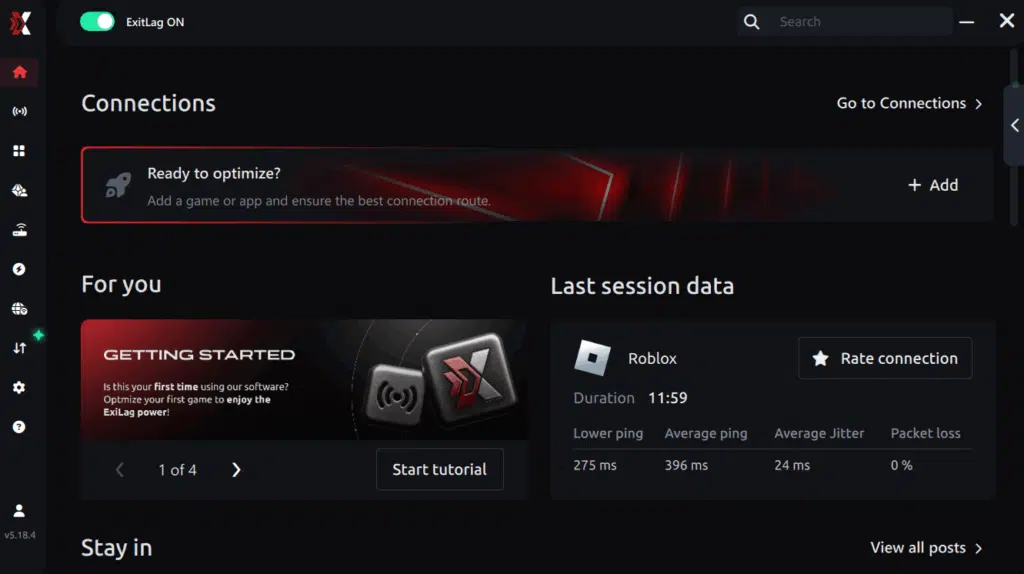
Step 3 – In the search bar, type “Battlefield 6” and select the game from the list.
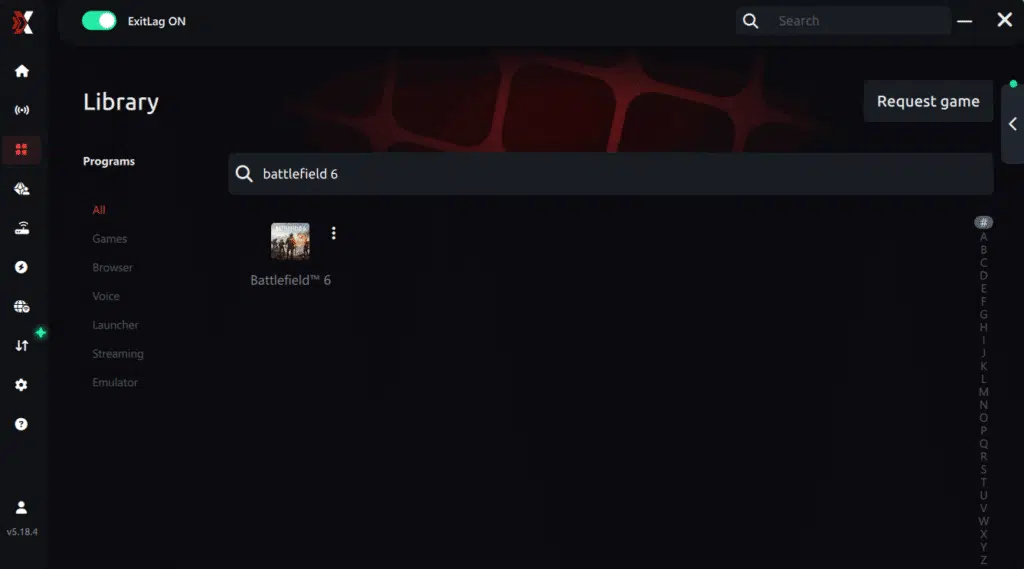
Step 4 – Choose between automated or manual route
Based on the results, you can let ExitLag automatically select the best route or manually choose the server that showed the lowest latency for your connection.
AI-optimized automated route
Based on the results, you can let ExitLag automatically select the best route through AI optimization. The system analyzes multiple connection paths in real time and automatically identifies the most efficient route for your connection, ensuring the lowest possible latency without requiring manual choices.
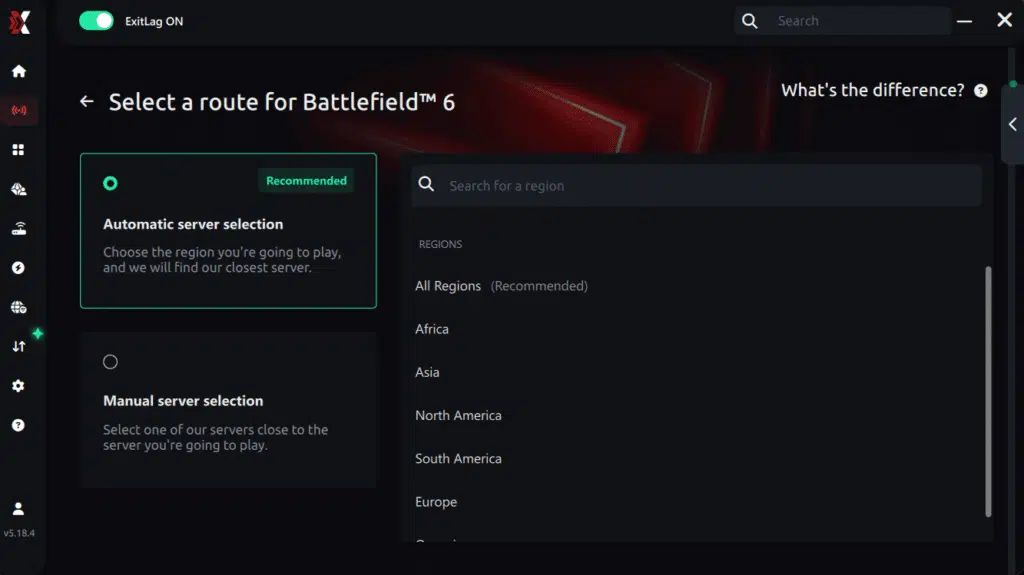
Manual route
If you prefer to have full control over your connection, you can manually choose the server based on the ping test results. Simply select the server that showed the lowest latency or the one that best meets your specific gaming needs, allowing complete customization of your experience.
Step 5 – Click “Apply routes” or the play button. ExitLag will begin optimizing your connection automatically.
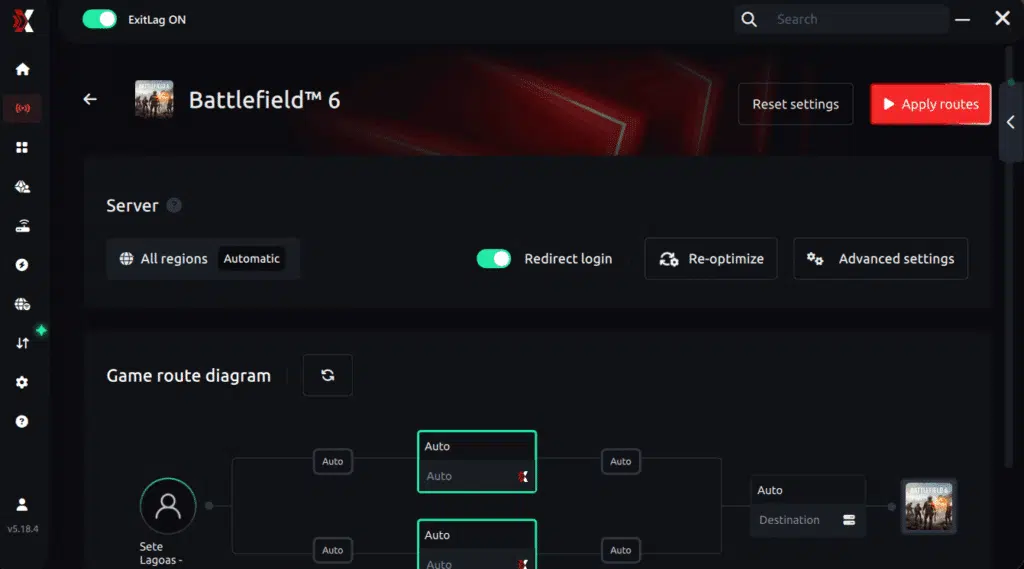
Step 6 – Wait a few seconds until optimization is complete. You’ll see ping indicators in the interface.
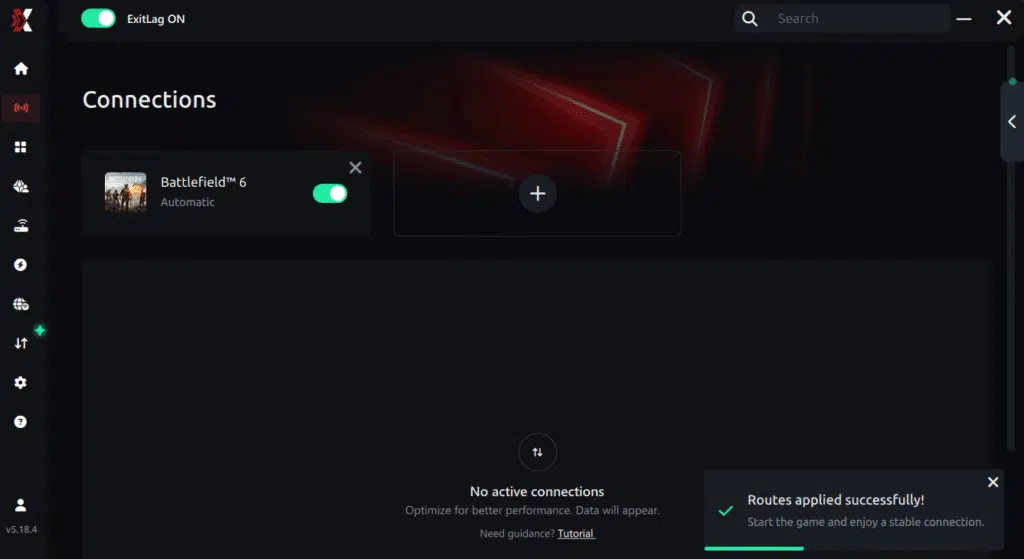
Step 7 – Launch Battlefield 6 normally. The optimization will already be active.
ExitLag runs in the background while you play, constantly adjusting routes to maintain the best possible performance.
FAQ: common questions about jitter in Battlefield 2042
What’s the difference between jitter, lag, and packet loss?
Jitter is variation in response time, lag is delayed reaction due to high ping, and packet loss happens when data fails to reach the server. You can have low ping but high jitter, making the game feel extremely inconsistent.
Why does my ping keep fluctuating in Battlefield 2042?
Common reasons include network congestion, unstable routing, Wi-Fi interference, ISP issues, and server distance. Battlefield 2042’s large-scale matches also intensify symptoms during peak hours.
Is jitter worse than high ping?
Often, yes. A stable 120 ms ping is far more predictable than ping jumping between 20 ms and 150 ms. Consistency matters more than raw ping.
How do I know if I have jitter?
Run an extended ping test or observe in-game behavior. Random delays, inconsistent input response, and sudden movement jumps are strong indicators.
Does Wi-Fi cause jitter?
Yes. Wireless networks are much more susceptible to interference, causing significant jitter. Ethernet is always recommended.
Does ExitLag fix problems other than jitter?
Yes. ExitLag also reduces ping, improves routing, decreases packet loss, and stabilizes your online gaming experience across hundreds of supported games.
Do I need to keep ExitLag open while playing Battlefield 2042?
Yes. ExitLag must remain active to continuously optimize your routes throughout your gameplay session.
Does Battlefield 2042 server load affect jitter?
Yes. Large 128-player battles or peak-hour queues can increase perceived jitter because of server-side load.
Conclusion
Jitter can turn thrilling Battlefield 2042 sessions into frustrating, unpredictable chaos. But you don’t need to accept inconsistent gameplay as normal. With the right optimizations, you can eliminate ping variations, stabilize your connection, and enjoy Battlefield 2042 as it was meant to be played — smooth, responsive, and competitive. For more insights and guides, visit the official ExitLag blog.
A stable connection isn’t optional in a game as fast and dynamic as Battlefield 2042. It’s the key to fair gunfights, precise aiming, consistent movement, and perfect timing. ExitLag provides the definitive solution to remove jitter, stabilize your latency, and give you the gameplay quality you deserve.
Start your free trial now and eliminate jitter for good: Start your ExitLag free trial
Got questions or want to connect with other players? Join the conversation at the ExitLag Forum!