

In Chaos Zero Nightmare, every second inside the arena counts — but when jitter hits, the experience quickly turns into chaos for all the wrong reasons. Your ping keeps fluctuating, abilities trigger at random times, enemies seem out of sync, and the overall instability makes PvE waves and PvP fights feel unfair. Unlike simple high ping, jitter makes it impossible to predict when the game will actually respond to your inputs, ruining your reaction time and consistency.
If that sounds familiar, this guide will show you exactly how to identify, understand, and fix jitter in Chaos Zero Nightmare, and how to unlock a truly stable experience using the tools available on the ExitLag games list.

What is jitter in Chaos Zero Nightmare?
In networking terms, jitter is the irregular variation in your network latency. While ping tells you how long it takes for data to travel between your PC and the game servers, jitter measures how much that time changes from one packet to the next. Even if your average ping looks fine, big swings in response time create instability that you feel directly in combat.
For example, imagine your ping jumping like this: 50 ms, 120 ms, 80 ms, 150 ms. That is classic high jitter. The game is constantly receiving your commands at different times, which makes animations, shots, and movement feel inconsistent. Ideally, your ping should stay within a narrow band of about 5–10 ms variation. When it goes beyond that, micro-delays start stacking into visible problems.
In Chaos Zero Nightmare, where timing, dodging, and damage windows are crucial, jitter can completely break your flow. You try to dodge a boss attack, but the delay changes every time. You fire at an enemy, but the hit registers late or not at all. That is why jitter often feels worse than stable high ping — you can adapt to a constant delay, but you cannot adapt to random, shifting latency.
How jitter affects your gameplay in Chaos Zero Nightmare
Here are the most common ways jitter ruins your Chaos Zero Nightmare sessions:
- Inconsistent input response: Sometimes your attacks or abilities fire instantly, other times they appear a full second later.
- Unreliable dodges and movement: Timing rolls, dashes, or strafes becomes extremely hard when your command delay changes constantly.
- Broken combos and skill chains: Any combo that relies on precise timing can fail because of unpredictable delay.
- Sudden deaths and teleporting enemies: Opponents or mobs may “jump” positions, killing you before you even see the hit coming.
- Frustration in PvP lobbies: In competitive duels or team fights, jitter makes it impossible to track opponents reliably.
- Wasted consumables and cooldowns: Potions, buffs, and long-cooldown skills can be triggered too late or at the wrong moment.
- Inconsistent hit registration: Some hits land cleanly, others whiff for no apparent reason because of desync between client and server.
- Unstable aim and targeting: Your aim feels off and your muscle memory breaks when the game timing keeps changing.
Main causes of jitter in Chaos Zero Nightmare
Network congestion
When multiple devices and apps share your connection — streaming, downloads, cloud sync, or another person gaming — your router has to juggle all that traffic. Packet priority can change from moment to moment, causing jitter as your Chaos Zero Nightmare traffic fights for bandwidth.
Unstable routing
Your data travels through multiple hops to reach Chaos Zero Nightmare’s servers. If your ISP uses unstable or changing routes, your packets may take different paths each second, with different travel times. These unpredictable routes are one of the main sources of jitter, even when your speed test looks fine.
Unstable Wi-Fi
Wi-Fi is convenient but naturally unstable. Interference from walls, other networks, or household devices can degrade signal quality. This leads to packet retransmissions and timing variations, which show up as jitter in Chaos Zero Nightmare, especially in intense fights or crowded hubs.
ISP-related problems
Even if your local network is well-configured, your internet service provider might have overloaded infrastructure, congested nodes, or misconfigured equipment. These issues create random spikes in latency and packet timing, turning your connection into a jitter machine during peak hours.
Distance from Chaos Zero Nightmare servers
The farther you are from the game servers, the more routers and backbone segments your packets must cross. Each extra hop adds potential variation in response time, increasing the risk of jitter. Choosing a distant region or being forced to connect to far-away servers makes things even worse.
Game-related server load and events
Chaos Zero Nightmare may experience higher server load during major events, patches, or peak play times. Even if your own connection is solid, overloaded game servers can amplify jitter-like symptoms such as delayed skills, rubberbanding, and delayed hit registration.
How to identify and measure jitter in Chaos Zero Nightmare
Extended ping test
One of the simplest ways to detect jitter outside the game is to run an extended ping test:
On Windows, open Command Prompt and type:
ping -t 8.8.8.8
Watch the results for 1–2 minutes. If the numbers stay close (for example, 40–45 ms), your connection is stable. If they jump all over the place — 40 ms, 130 ms, 80 ms, 200 ms — you are dealing with significant jitter.
You can also ping Chaos Zero Nightmare’s server IP (if available) or your ISP gateway for a more targeted test. The key is not just the average ping, but how much it varies from line to line.
In-game signs
Inside Chaos Zero Nightmare, you can spot jitter through several clear symptoms:
- The ping value shown in-game varies constantly instead of staying near a fixed number.
- The general feeling that gameplay is “inconsistent” — some pulls are smooth, others are a mess.
- Some phases or moments feel playable, while others have terrible lag without obvious reason.
- Intermittent rubberbanding where your character snaps back to a previous position.
- Skills and commands have variable delay — sometimes instant, sometimes painfully late.
- The experience feels unstable even when the game claims your ping is low.
If you recognize several of these signs, you can safely assume jitter is affecting your Chaos Zero Nightmare sessions.
Jitter level reference
Jitter levels in Chaos Zero Nightmare
| Jitter level | Ping variation (ms) | Gameplay impact in Chaos Zero Nightmare |
| Excellent | 0–5 ms | Ultra-smooth, predictable reactions |
| Good | 5–15 ms | Mostly stable with minor timing shifts |
| Moderate | 15–30 ms | Occasional delays, noticeable in PvP |
| High | 30–50 ms | Frequent inconsistencies and desync |
| Severe | 50+ ms | Heavy rubberbanding, near unplayable |
If you are in the high or severe range, reducing jitter should be your top priority before worrying about other performance tweaks.
Basic solutions to reduce jitter in Chaos Zero Nightmare
Prioritize your connection
- Use an Ethernet cable
Switch from Wi-Fi to a wired connection to eliminate wireless interference and create a more stable link. - Close background applications
Shut down downloads, video streams, cloud syncing, or other games that might be consuming bandwidth and causing unstable latency. - Limit devices on your network
Ask others on your network to pause heavy usage (4K streaming, large downloads) while you play Chaos Zero Nightmare. - Disable automatic updates
Turn off auto-updates for your OS, launcher, and other apps during your gaming sessions, as they can trigger sudden bandwidth spikes. - Update network drivers and firmware
Make sure your network adapter drivers and router firmware are up to date to avoid bugs that cause instability. - Chaos Zero Nightmare-specific tip
If the game allows region selection, choose the server closest to your physical location to reduce both ping and jitter.
Configure QoS on your router
Most modern routers include Quality of Service (QoS) features that let you prioritize gaming traffic over everything else. By marking Chaos Zero Nightmare (or your PC’s IP) as high priority, your router ensures that your game packets are processed first, even when your network is busy. This reduces jitter by providing more consistent bandwidth and packet timing.
Check with your ISP
If you still experience jitter after optimizing your home setup, contact your ISP. Ask them to:
- Check your line for noise or instability
- Verify your connection profile and routing
- Replace or test your modem if needed
Sometimes a small adjustment on their side can significantly reduce jitter, especially if the issue is localized to their network.
ExitLag: the definitive solution to eliminate jitter in Chaos Zero Nightmare
What is ExitLag?
ExitLag is a specialized software focused on connection optimization for online games, acting as a smart stabilizer between your PC and game servers. It was created by gamers who understand how frustrating jitter, high ping, and random spikes can be in demanding titles like Chaos Zero Nightmare. Instead of changing your internet provider, ExitLag optimizes the path your game traffic takes to reach the servers.
It works on PC and mobile devices dedicated to supported titles, but not on consoles, ensuring maximum focus on platforms where routing control is most effective. You can dive deeper into the underlying smart routing technology by visiting the official ExitLag technology page at ExitLag’s official technology page.
How ExitLag eliminates jitter in Chaos Zero Nightmare
ExitLag uses a unique Multi-Internet system designed to keep your connection both fast and stable. You can learn more about this Multi-Internet system at how ExitLag works.
Here is how it tackles jitter step by step:
- Multiple simultaneous routes
Your data is sent through several optimized routes at once. If one path becomes unstable, the others keep your connection smooth. - Intelligent packet selection
ExitLag automatically chooses the fastest-arriving packets and discards delayed ones, effectively removing jitter from the game’s perspective. - Real-time route optimization
The software constantly analyzes available routes and dynamically switches to better paths whenever conditions change, keeping your latency stable throughout your session. - Reduced hops between you and the server
By cutting out unnecessary intermediaries, ExitLag reduces the number of “hops” your packets must travel through, decreasing both ping and timing variation. - Smart buffering for consistent delivery
ExitLag shapes packet flow so Chaos Zero Nightmare receives data in a steady, predictable stream instead of chaotic bursts.
Advantages of ExitLag for Chaos Zero Nightmare players
Full ping stabilization
Instead of dealing with wildly shifting latency, you get a predictable, constant ping, making it much easier to adapt your reactions and play style.
Jitter elimination
With multiple routes and intelligent packet handling, ExitLag dramatically reduces or eliminates jitter, making Chaos Zero Nightmare feel responsive and fair again.
Better timing for skills and dodges
Stable latency means you know exactly when your skills will fire and when your dodges will trigger, which is crucial in tight boss fights and intense PvP matches.
Competitive edge in PvP and co-op
A stable connection can be the difference between clutching a wave or wiping, winning a duel or getting deleted before you can react.
Works on any available region
Whether you are connecting to nearby servers or playing with friends in another region, ExitLag optimizes your route to get the best possible stability.
Simple to use, no technical expertise required
The interface is intuitive: select your game, apply the routes, and you are ready to play with optimized connection.
Is it worth using ExitLag in Chaos Zero Nightmare?
ExitLag is especially worth it if you:
- Frequently experience jitter and unstable ping
- Play on distant or international Chaos Zero Nightmare servers
- Join competitive PvP, ranked matches, or timed events
- Often play during crowded peak hours
- Use Wi-Fi or suffer from poor ISP routing
- Have lost runs, raids, or duels due to unpredictable lag
- Want precise timing for combos, defenses, and coordinated team plays
If that sounds like you, check the available plans and options on the official pricing page at ExitLag pricing plans.
How to use ExitLag in Chaos Zero Nightmare
The process is extremely simple:
Step 1 – Access the official ExitLag website and download the application. There’s a free trial period for new users.
Step 2 – Install and open the program. Log in with your account.
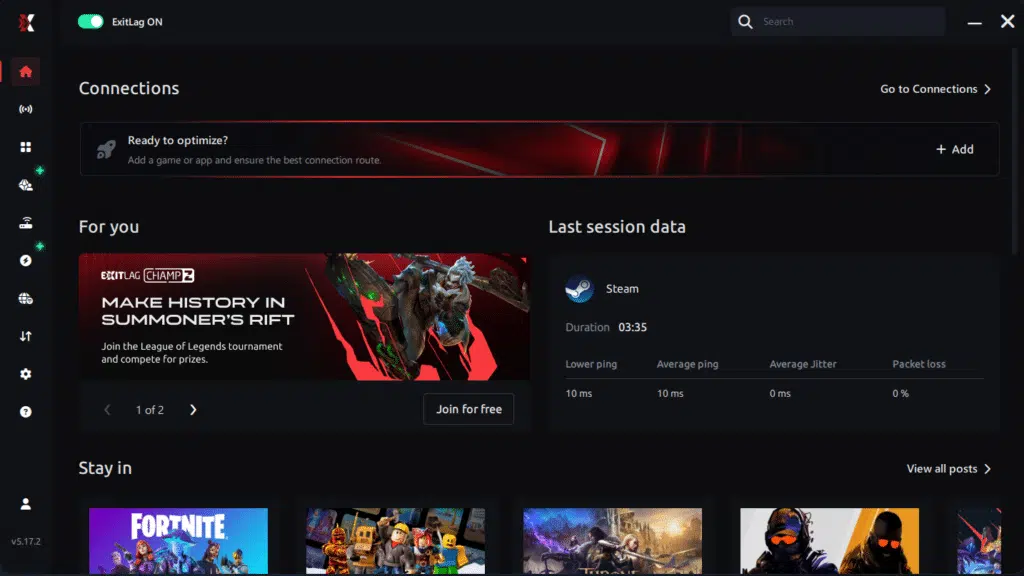
Step 3 – In the search bar, type “Chaos Zero Nightmare” and select the game from the list.
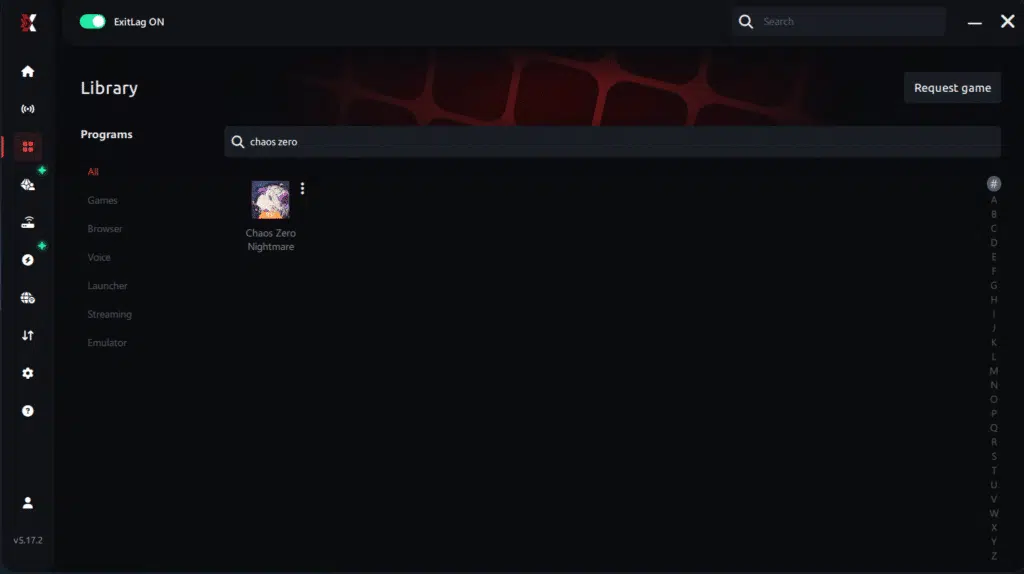
Step 4 – Choose between automated or manual route
Based on the results, you can let ExitLag automatically select the best route or manually choose the server that showed the lowest latency for your connection.
AI-optimized automated route
Based on the results, you can let ExitLag automatically select the best route through AI optimization. The system analyzes multiple connection paths in real time and automatically identifies the most efficient route for your connection, ensuring the lowest possible latency without requiring manual choices.
Manual route
If you prefer to have full control over your connection, you can manually choose the server based on the ping test results. Simply select the server that showed the lowest latency or the one that best meets your specific gaming needs, allowing complete customization of your experience.
Step 5 – Click “Chaos Zero Nightmare” or the play button. ExitLag will begin optimizing your connection automatically.
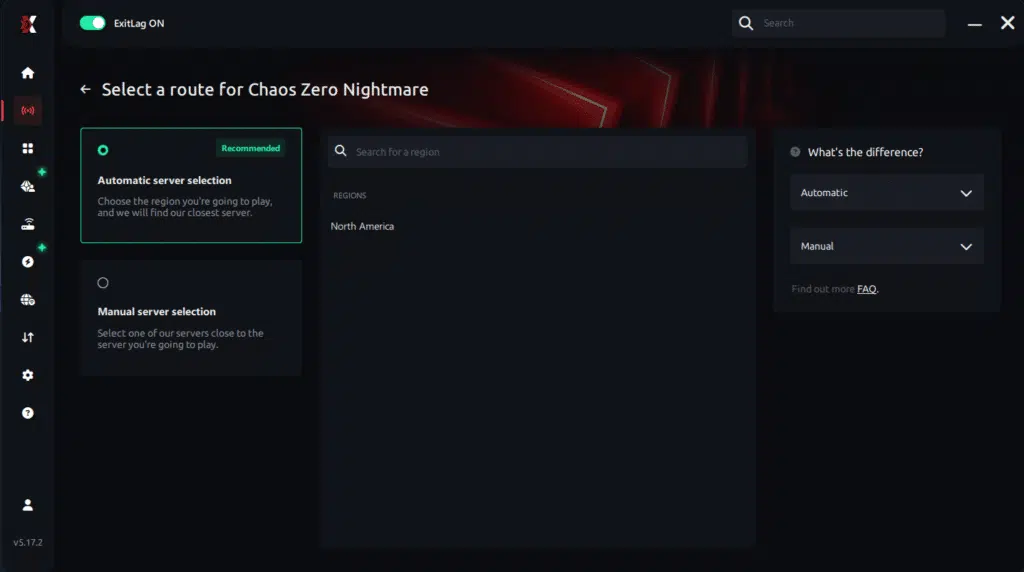
Step 6 – Wait a few seconds until optimization is complete. You’ll see ping indicators in the interface.

Step 7 – Launch Chaos Zero Nightmare normally. The optimization will already be active.
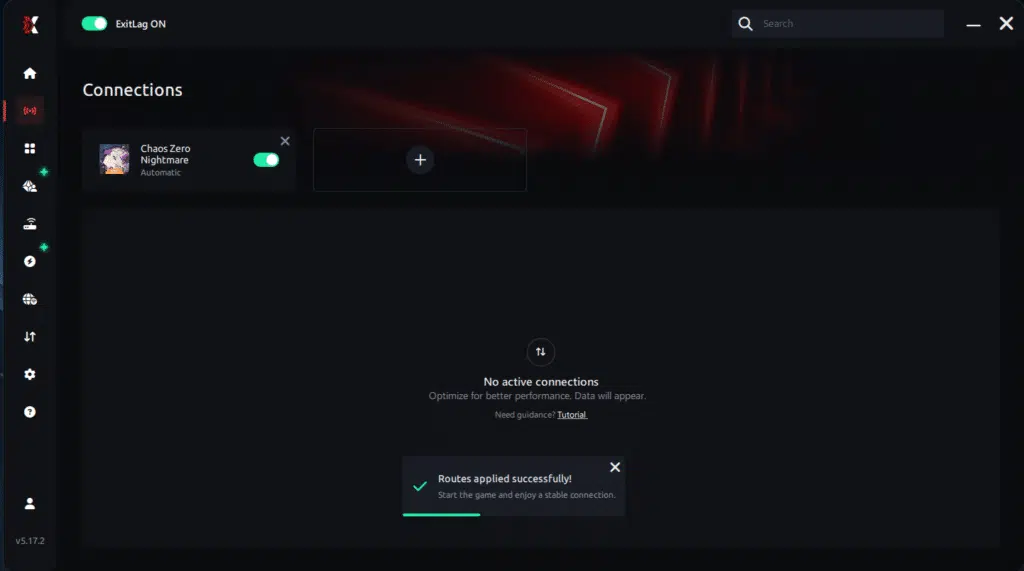
ExitLag runs in the background while you play, constantly adjusting routes to maintain the best possible performance.
FAQ: common questions about jitter in Chaos Zero Nightmare
What is the difference between jitter, lag, and packet loss?
Jitter is the variation of your ping over time — how unstable your latency is. Lag usually refers to noticeable delay between your inputs and the game’s response, often linked to high or unstable ping. Packet loss happens when data packets never reach the server or your PC, causing missing information, rubberbanding, and hard desync. You can have low ping but high jitter and packet loss, resulting in a terrible experience.
Why does my ping keep fluctuating in Chaos Zero Nightmare?
Common causes include home network congestion, unstable routing by your ISP, Wi-Fi interference, multiple devices sharing bandwidth, and long distances to the game’s servers. Chaos Zero Nightmare’s peak play times or large events can amplify these symptoms, making your ping bounce wildly even if your speed test looks normal.
Is jitter worse than high ping in Chaos Zero Nightmare?
Often yes. A stable 100 ms ping can be surprisingly playable once you adjust to it. But latency that jumps from 30 ms to 150 ms and back again is almost impossible to adapt to. In a timing-sensitive game like Chaos Zero Nightmare, this instability is more disruptive than a constant, higher delay.
How can I tell if I have jitter while playing Chaos Zero Nightmare?
Look for inconsistent behavior: sometimes your skills feel snappy, other times they fire late; some encounters run smoothly, others feel like you are fighting underwater. Combine that with an extended ping test outside the game — if the values jump a lot rather than staying close together, you are definitely dealing with jitter.
Does Wi-Fi cause jitter in Chaos Zero Nightmare?
Yes. Wi-Fi is inherently more prone to interference, signal fluctuations, and congestion. Small disturbances that your router corrects through retransmissions show up as jitter in the game. Switching to a wired Ethernet connection is one of the most effective ways to reduce jitter and stabilize your Chaos Zero Nightmare matches.
Does ExitLag help with other network issues besides jitter?
Yes. In addition to reducing jitter, ExitLag helps lower ping, minimizes packet loss, and improves overall routing stability in hundreds of online games. It focuses on making your path to the game server as stable and efficient as possible, which improves nearly every aspect of your online experience.
Do I need to keep ExitLag open while playing Chaos Zero Nightmare?
Yes. ExitLag must stay running for its optimization to remain active. You can minimize it to the tray, but you should not close it during your Chaos Zero Nightmare session. If it’s closed, your connection reverts to your ISP’s default routing, and jitter is likely to return.
Are Chaos Zero Nightmare events and patches related to jitter?
They can be. During big updates, new events, or major content drops, more players log in simultaneously, putting extra pressure on the servers. Even if your local connection is fine, server-side load can increase latency variance and make jitter more noticeable. Using ExitLag helps by ensuring your path to the servers is as clean and efficient as possible during these busy periods.
Conclusion
Jitter can turn an intense Chaos Zero Nightmare run into a frustrating mess, where every dodge, combo, and ability feels like a gamble. But you do not have to accept this as “normal.” By understanding what causes jitter, applying basic network optimizations, and using advanced routing tools, you can reclaim a stable, predictable, and competitive experience. For more tips and connectivity guides, visit the ExitLag official blog.
With a stable connection, Chaos Zero Nightmare becomes what it was meant to be: fast, responsive, and rewarding. No more losing runs to invisible hits, delayed dodges, or random lag spikes. Instead, your skill, strategy, and teamwork decide the outcome — not your internet route.
If you are serious about performance and tired of letting instability ruin your matches, it is time to invest in a properly optimized connection and experience Chaos Zero Nightmare with consistent timing and reliable responsiveness.
Ready to eliminate jitter and stabilize your Chaos Zero Nightmare connection for good? Start your free trial today at Start your ExitLag free trial and feel the difference from your very next session.
Got questions or want to connect with other players? Join the conversation at the ExitLag Forum!


