When you’re trying to survive a chase or secure a clutch hook in Dead by Daylight, nothing is more frustrating than sudden jitter, fluctuating ping, and unpredictable instability ruining your timing. One moment your fast vault responds instantly, and the next your character rubberbands backward as the Killer suddenly teleports in front of you. In a competitive PvP environment where split-second skill checks, mindgames, pallet drops, and killer powers depend on precise timing, jitter makes the entire experience inconsistent.
If you want smooth, stable matches, Dead by Daylight is among the titles fully supported at ExitLag supported games list.

What is jitter in Dead by Daylight?
In online gaming terms, jitter is the irregular variation in the latency between your PC and the Dead by Daylight servers. While ping measures the average response time, jitter measures how inconsistent that response is over time.
For example, a stable ping around 70ms feels predictable. But if your latency jumps between 50ms, 120ms, 80ms, 150ms in rapid succession, you are experiencing instability that breaks the natural flow of the game.
Dead by Daylight relies heavily on animation sync, hit validation, and response time, so a stable connection is far more important than simply having “low ping.” Ideally, variation should remain below 5–10ms. Anything higher creates gameplay inconsistencies that disrupt both Survivor and Killer roles.
How jitter affects your gameplay in Dead by Daylight
Jitter doesn’t just create delays — it creates unpredictable delays, which break core mechanics in Dead by Daylight:
- Inconsistent commands: Skill checks may appear too early or too late, or pallet drops activate seconds after pressing the button.
- Unreliable movement and chases: Killer lunges and survivor jukes become unpredictable due to variable delay.
- Broken combos: Powers like Blink, Chainsaw, Blink Attacks, Birds, or Dash abilities become unreliable with shifting latency.
- Sudden deaths or hits: Enemies seem to teleport, or you get downed before the animation appears.
- PvP frustration: Impossible to compete in high-MMR matches with fluctuating responsiveness.
- Wasted resources: Med-kits, Dead Hard timing, exhaustion perks, and totems get disrupted.
- Inconsistent hit registration: Basic attacks, ranged shots, and power interactions fail randomly.
- Aim/positioning issues: Killer tracking and survivor micro-movements lose accuracy when timing constantly shifts.
Main causes of jitter in Dead by Daylight
1. Network congestion
Multiple devices streaming or downloading cause your connection to fluctuate as bandwidth availability changes, generating irregular ping variations.
2. Unstable routing
If your ISP routes packets through inconsistent paths, your travel time changes constantly, producing noticeable jitter during matches.
3. Unstable Wi-Fi
Wireless signals are easily affected by walls, interference, and distance. This makes Wi-Fi one of the biggest contributors to jitter.
4. ISP infrastructure problems
Overloaded or poorly configured ISP networks cause instability, especially during peak hours.
5. Distance from servers
Dead by Daylight uses region-based servers. If your nearest server is far, more routing hops increase the likelihood of jitter.
6. Game-specific issues
When DBD servers experience maintenance, high traffic, or delayed updates, jitter impacts players across entire regions.
How to identify and measure jitter in Dead by Daylight
Extended ping test
A long ping test shows how stable your latency is. If values vary widely, your connection has jitter regardless of your average ping.
In-game signs of jitter
You likely have jitter if you notice:
- Ping value jumping constantly in the HUD
- Gameplay feeling inconsistent from one moment to the next
- Smooth movement suddenly turning into severe lag
- Random rubberbanding during chases
- Variable delays in inputs such as vaulting or attacking
- An overall unstable experience even with “low ping”
These symptoms clearly differentiate jitter from packet loss or high ping.
Jitter levels table
| Jitter Level | Variation (ms) | Gameplay Impact |
| Excellent | 0–5ms | Smooth chases, reliable hits, consistent skill checks |
| Good | 6–15ms | Minor inconsistencies, playable for most roles |
| Moderate | 16–30ms | Timing issues during vaults, hits, and checks |
| Bad | 31–60ms | Rubberbanding, broken power timings, unreliable hits |
| Severe | 60ms+ | Unplayable competitive experience |
Basic solutions to reduce jitter in Dead by Daylight
Prioritize your connection
- Use an ethernet cable to eliminate Wi-Fi signal interference.
- Close background applications like streaming, syncing, or downloading tools.
- Limit devices connected to your network to reduce congestion.
- Disable automatic updates that consume bandwidth unpredictably.
- Update network drivers to improve stability.
- Choose the most stable DBD region using the in-game data center.
Configure QoS on your router
Quality of Service prioritizes game traffic, ensuring Dead by Daylight receives packet priority even during heavy network usage. This reduces jitter by stabilizing traffic flow during matches.
Check with your ISP
If jitter persists, your provider may have routing, wiring, or congestion issues. Requesting a line test often reveals the root cause.
ExitLag: the definitive solution to eliminate jitter in Dead by Daylight
What is ExitLag?
ExitLag is a specialized software built for professional-grade connection optimization, acting like a real-time stabilizer for your internet routes. It avoids fluctuating paths and ensures your packets reach Dead by Daylight servers through the most stable, consistent connections possible. Learn more about this technology at ExitLag technology page.
How ExitLag eliminates jitter in Dead by Daylight
Dead by Daylight relies heavily on server-side responsiveness for hit validation, chases, and skill checks. ExitLag’s Multi-Internet system ensures maximum consistency. More details at how ExitLag works.
ExitLag eliminates jitter through:
- Multiple simultaneous routes
Sends packets over several optimized paths; if one becomes unstable, others maintain consistent latency. - Intelligent packet selection
Only the fastest packets are used, eliminating high-variance delays. - Real-time route optimization
Constantly analyzes paths and switches instantly to maintain stable latency. - Reduced hops
Cuts unnecessary routers between you and the game servers to minimize potential variation. - Smart buffering
Ensures a smooth and constant packet delivery flow even when your ISP is unstable.
Advantages of ExitLag for Dead by Daylight players
Complete ping stabilization
Provides consistent latency, making timing predictable for survivors and killers.
Total jitter elimination
Multi-route optimization ensures minimal variation at all times.
Better timing and precision
Perks like Dead Hard, vault timing, and killer lunges become more reliable.
Competitive advantage
Smooth chases, accurate hit validations, and consistent skills provide major advantages in PvP.
Works with any server
Supports all Dead by Daylight regions globally.
Simple and intuitive interface
Select the game, apply routes, and enjoy immediate stability.
Is ExitLag worth using for Dead by Daylight?
ExitLag is extremely valuable if you:
- Experience jitter or fluctuating latency
- Play on distant servers
- Participate in ranked, tournaments, or high-MMR lobbies
- Play during peak traffic hours
- Use Wi-Fi or have inconsistent ISP routing
- Lose chases or hits due to unpredictable delays
- Want perfect timing for skills and reactions
See current plans at ExitLag pricing plans.
How to use ExitLag in Dead by Daylight
The process is extremely simple:
Step 1 – Access the official ExitLag website and download the application. There’s a free trial period for new users.
Step 2 – Install and open the program. Log in with your account.
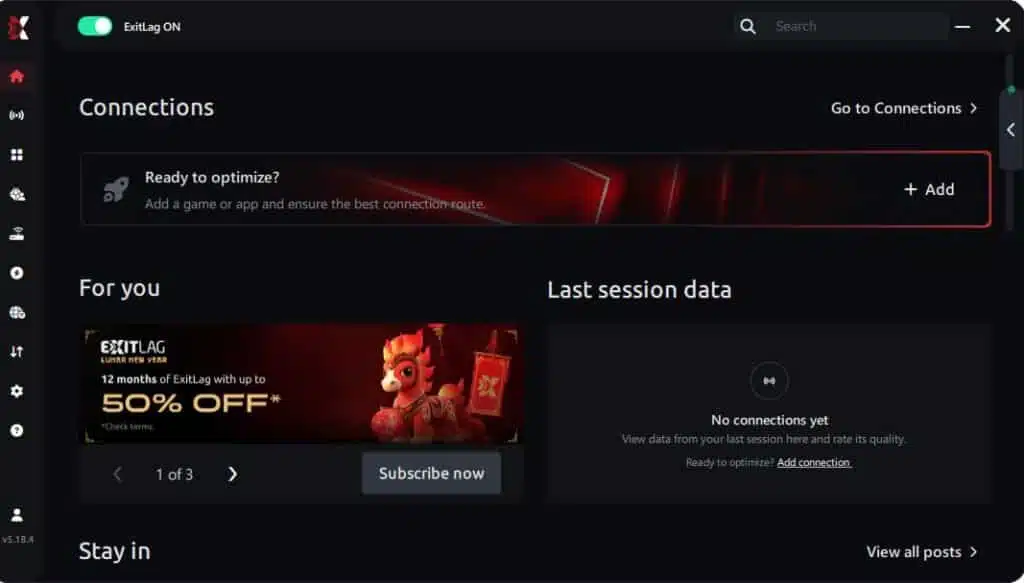
Step 3 – In the search bar, type “Dead by Daylight” and select the game from the list.

Step 4 – Choose between automated or manual route
Based on the results, you can let ExitLag automatically select the best route or manually choose the server that showed the lowest latency for your connection.
AI-optimized automated route
Based on the results, you can let ExitLag automatically select the best route through AI optimization. The system analyzes multiple connection paths in real time and automatically identifies the most efficient route for your connection, ensuring the lowest possible latency without requiring manual choices.
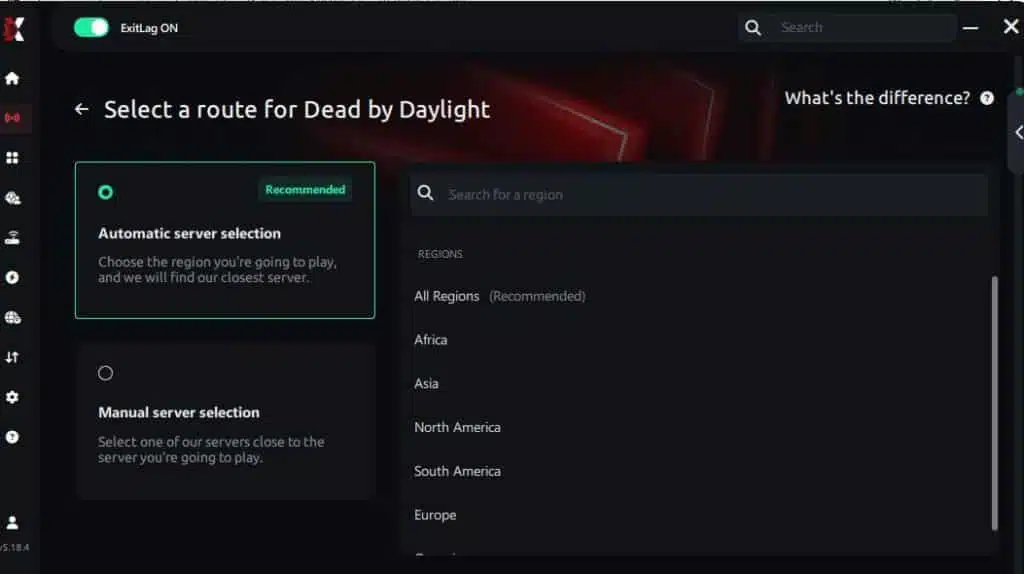
Manual route
If you prefer to have full control over your connection, you can manually choose the server based on the ping test results. Simply select the server that showed the lowest latency or the one that best meets your specific gaming needs, allowing complete customization of your experience.
Step 5 – Click “Dead by Daylight” or the play button. ExitLag will begin optimizing your connection automatically.
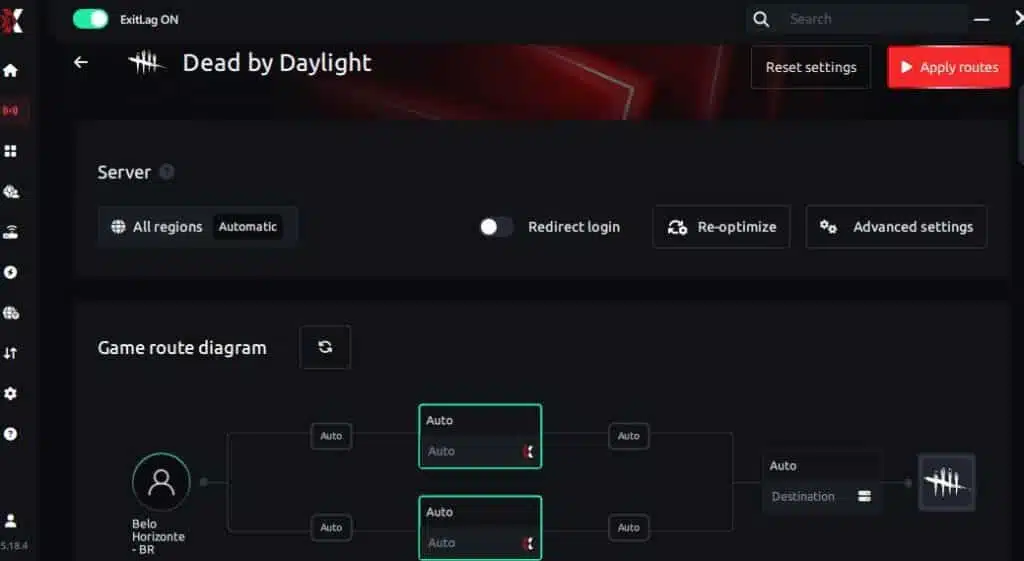
Step 6 – Wait a few seconds until optimization is complete. You’ll see ping indicators in the interface.
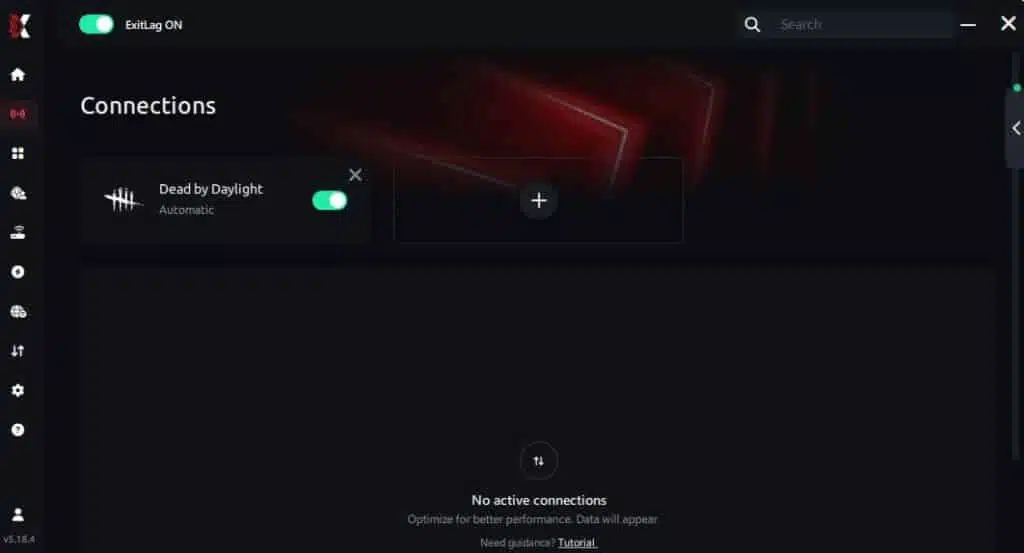
Step 7 – Launch Dead by Daylight normally. The optimization will already be active.
ExitLag runs in the background while you play, constantly adjusting routes to maintain the best possible performance.
FAQ: frequently asked questions about jitter in Dead by Daylight
What’s the difference between jitter, lag, and packet loss?
Jitter is variation in ping, lag is delay due to high latency, and packet loss is when data never reaches the server. You can have low ping but high jitter and still experience severe problems.
Why does my ping fluctuate in Dead by Daylight?
Common causes include routing instability, Wi-Fi interference, multiple devices on the network, ISP congestion, or distance from servers. Jitter is extremely common in overloaded regions.
Is jitter worse than high ping in Dead by Daylight?
Yes in many cases. A stable 120ms ping is more predictable than a 40ms ping that jumps to 150ms randomly during chases or hit validations.
How do I know if I have jitter?
If skill checks feel inconsistent, chases fluctuate in responsiveness, and inputs sometimes delay unpredictably, you likely have jitter. A long ping test can confirm variation.
Does Wi-Fi cause jitter?
Yes. Wireless connections suffer from interference and signal loss, making jitter far more likely. Ethernet offers much more stability.
Does ExitLag fix problems beyond jitter?
Yes. ExitLag reduces ping, removes packet loss, improves route quality, and stabilizes overall gameplay in hundreds of online titles.
Do I need ExitLag open while playing?
Yes, the software must stay active for route optimization to work during your entire session.
Does Dead by Daylight suffer from server-based jitter?
Some regions experience instability during big patches or high traffic, causing jitter even for players with good ISPs.

Conclusion
Jitter can turn a fun Dead by Daylight session into a frustrating experience full of missed skill checks, unpredictable chases, and inconsistent hit validations. But you don’t need to accept this instability as normal. With the right setup and tools, especially ExitLag, you can ensure stable latency, consistent reactions, and a competitive advantage in every match. Don’t let connection issues decide your survival — get the stability you deserve and enjoy DBD with precise timing and smooth gameplay. Learn more at ExitLag blog.
Ready to stabilize your ping and eliminate jitter? Start your free trial now: start your free ExitLag trial.
Got questions or want to connect with other players? Join the conversation at the ExitLag Forum!