You join a FIVE M GTA roleplay server ready for a clean patrol, a high-speed chase, or intense PvP, but instead you get brutal jitter, fluctuating ping, and connection instability that ruins the whole session. Your car teleports, shots register late, players warp around corners, and your character reacts a second after you press a key. This unpredictable delay is often worse than just high ping, because you can’t adapt when you never know when your commands will actually go through. And it’s not just you — a lot of players in many supported titles go through the same thing, as you can see on the ExitLag games list at ExitLag supported games list.

What is jitter in FIVE M GTA?
In simple terms, jitter is the irregular variation in your network latency. While ping measures how long it takes for a packet to travel from your PC to the game servers and back, jitter measures how inconsistent that travel time is from one packet to the next.
You can think of latency as the basic response time. If that response time changes all the time, your game doesn’t know exactly how long it should wait for data, which leads to weird behavior in movement, vehicles, and hit registration. That’s why your gameplay can feel off even when the ping number doesn’t look that bad.
For example, imagine your ping going 50 ms → 120 ms → 80 ms → 150 ms in just a few seconds. That level of instability makes every action in FIVE M GTA feel delayed or out of sync. The ideal scenario is a stable ping that only varies by about 5–10 ms. Anything beyond that starts to cause noticeable jitter and breaks your immersion.
How jitter affects your gameplay in FIVE M GTA
Jitter shows up in very specific, very annoying ways in FIVE M GTA servers, especially in busy RP cities and competitive situations:
- Inconsistent command response: Sometimes your key press is processed instantly, other times your character moves or shoots half a second later.
- Unreliable dodges and evasive maneuvers: Dodges, strafes, and quick turns in shootouts become unpredictable, making gunfights feel random.
- Broken timing for abilities and interactions: Actions like using items, getting into vehicles, or interacting with objects can fail or feel delayed because of jitter.
- Sudden “death” or out-of-nowhere collisions: Opponents or vehicles teleport or rubberband, and you get taken out by hits you never actually saw in real time.
- Frustration in PvP and competitive servers: In serious RP or competitive PvP scenes, fights feel unfair when your reactions are punished by network randomness.
- Wasted resources and cooldowns: Items, shots, and special actions may trigger too late or seem to go off in the wrong moment due to unstable response.
- Inconsistent hit registration: Sometimes bullets land cleanly, other times they don’t register at all, even when your aim and crosshair placement were the same.
- Unreliable aim and control: With constantly changing timing, your muscle memory becomes less effective, and aiming or driving precisely gets much harder.
Main causes of jitter in FIVE M GTA
Network congestion
When several devices in your home are streaming, downloading, or gaming at the same time, your bandwidth gets split. That means the priority of your game packets is constantly changing, and some packets arrive later than others. This local congestion is one of the most common sources of jitter.
Unstable routing
Your ISP controls which path your data takes to reach the FIVE M GTA server. If these routes change on the fly or pass through overloaded nodes, your latency jumps up and down. Those shifts in routing cause irregular delays and are a major reason for variation in your response time.
Unstable Wi-Fi
Wi-Fi is convenient but inherently unstable. Walls, distance, other routers, and electronic devices can interfere with the signal. Every little interference can cause packet delay or temporary drops, which show up in-game as jitter, even when your base speed looks fine on a speed test.
ISP problems
Some ISPs have overloaded networks, poor peering with game servers, or outdated infrastructure. This leads to instability you can’t fix with simple home tweaks. Even with good download/upload Mbps, the route to your favorite FIVE M GTA server can still be inconsistent.
Distance from the servers
The farther you are from the server hosting your favorite RP or PvP city, the more routers (hops) your traffic must cross. Each hop is a potential point of congestion or delay. Long routes with many hops increase both ping and jitter, especially during peak hours.
Server-specific issues
Different FIVE M GTA servers can be hosted in various locations and with different setups. A poorly configured server or one hosted far from your region can amplify jitter, especially when a lot of players are online or the city is packed with vehicles and scripts.
How to identify and measure jitter in FIVE M GTA
Extended ping test
A great starting point is to run a prolonged ping test outside the game. Use your command prompt or terminal to continuously ping a stable host (like your router or a reliable DNS). If you see the values jumping from 30 ms to 140 ms, then down to 70 ms and so on, you clearly have jitter.
In a stable connection, ping values cluster closely around a central value, with only minor fluctuations. In a jittery connection, those numbers spike and drop unpredictably, which is exactly what you later feel as delayed walking, drifting cars, and weird gunfights in FIVE M GTA.
In-game signs
Inside FIVE M GTA, you’ll notice jitter even without running tests:
- The in-game ping value keeps moving, rarely staying near a single stable number.
- The gameplay feels inconsistent — one minute everything is smooth, the next you’re sliding around or freezing mid-chase.
- You experience rubberbanding while driving or running, getting snapped back to earlier positions.
- Skills, interactions, and general commands have variable delay — sometimes instant, sometimes sluggish.
- The overall experience feels unstable even when the game UI claims your ping is “low.”
If these symptoms are regular for you, you’re not dealing only with high latency; jitter is a big part of the problem.
Jitter levels table for FIVE M GTA
Use this table to understand how different jitter levels affect your experience:
| Jitter range | Ping variation pattern | Impact on FIVE M GTA |
| 0–5 ms | Almost flat line | Ideal. Driving, aiming, and animations feel perfectly synced. |
| 5–15 ms | Small bumps | Very playable. Minor inconsistencies, rarely noticeable. |
| 15–30 ms | Noticeable spikes | Delayed reactions, weird trades in gunfights, and off-timing on actions. |
| 30–50 ms | Frequent jumps | Rubberbanding cars, delayed interactions, and unreliable PvP. |
| 50+ ms | Constant heavy swings | RP and PvP become frustrating and often unplayable. |
Basic solutions to reduce jitter in FIVE M GTA
Prioritize your connection
- Use an Ethernet cable
Avoid Wi-Fi whenever possible. A wired connection significantly reduces interference and instability. - Close background applications
Stop downloads, streams, and heavy background tasks on your PC that compete for bandwidth while you play FIVE M GTA. - Limit devices on your network
Disconnect or pause other devices that are gaming, streaming, or downloading to reduce congestion and ping variation. - Disable automatic updates while playing
Operating system and launcher updates often start suddenly, causing unpredictable latency spikes and jitter mid-session. - Update network drivers and router firmware
Make sure your network adapter drivers and router firmware are up to date to fix bugs and improve response time consistency. - Tweak in-game and server choices
Prefer servers closer to your region, avoid over-modded or heavily overloaded servers, and disable unnecessary overlays that might add extra processing.
Configure QoS on router
Quality of Service (QoS) allows you to prioritize game traffic over less time-sensitive data like downloads or video streams. By tagging FIVE M GTA traffic as high priority, your router ensures those packets are handled first. QoS doesn’t magically give you more bandwidth, but it helps prevent local congestion from causing jitter and packet delay.
Check with your ISP
If jitter persists after optimizing your home setup, contact your ISP and explain that you’re experiencing instability and inconsistent latency during online gaming. Ask for:
- A line quality test
- Checks for noise, errors, or intermittent drops
- Possible improvements or alternative routes to the relevant game servers
Sometimes, the root cause of jitter lies in your provider’s network, not inside your house.
ExitLag: the definitive solution to eliminate jitter in FIVE M GTA
What is ExitLag?
ExitLag is a specialized software built exclusively for connection optimization in online games, acting as an intelligent stabilizer between your device and the game server. Instead of relying on your ISP’s default route, it actively searches for and maintains more stable paths, focusing on consistency rather than just raw speed. You can explore the underlying technology in detail at ExitLag underlying connection technology.
ExitLag is designed for PC and mobile gaming, not consoles, where it can directly control network routing and deliver the biggest impact on ping stability, jitter reduction, and overall reliability in FIVE M GTA sessions.
How ExitLag eliminates jitter in FIVE M GTA
ExitLag uses a proprietary Multi-Internet approach to make your route to the server more resilient and stable. Instead of sending your traffic down a single fragile path, it uses multiple, intelligently selected routes to keep your latency constant. If you want a deeper technical breakdown, you can read the step-by-step explanation at ExitLag step-by-step explanation.
Here’s how it works in practice:
- Multiple simultaneous routes
Your game packets are sent through several optimized routes at the same time. If one path hits congestion, other paths keep delivering data quickly, reducing jitter. - Intelligent packet selection
ExitLag automatically selects the packets that arrive first and discards late ones. This stabilizes the response time that FIVE M GTA actually “sees.” - Real-time route optimization
The software constantly analyzes available paths and instantly switches away from those showing instability, preventing spikes before they hit your gameplay. - Reduction of network hops
By shortening the number of routers each packet passes through, ExitLag cuts out potential weak links that cause variation in your ping. - Smart buffering and flow management
ExitLag manages packet flow so that the game servers receive data in a smooth, controlled stream, even when your ISP’s network has minor fluctuations.
The end result is a far more stable connection where jitter is minimized and your actions in FIVE M GTA line up closely with what happens on screen.
Advantages of ExitLag for FIVE M GTA players
Complete ping stabilization
ExitLag focuses on keeping your ping steady, not just low. That means fewer random spikes when you join a crowded city, join a chase, or load into a heavy RP scenario.
Jitter elimination
By combining multiple routes and intelligent path selection, ExitLag drastically reduces instability, smoothing out the micro-delays that make your car jerk around or your shots feel delayed.
Improved timing and responsiveness
With stable latency, your driving, aiming, and interactions become predictable again. When you press a key, your character reacts when you expect, not a random amount of time later.
Competitive advantage in PvP and serious RP
On servers where gunfights, reaction time, and clean driving matter, a more stable connection can be the difference between winning and losing a big engagement.
Works on any FIVE M GTA server region
Whether you play on local or international servers, ExitLag can optimize your route worldwide, helping you choose servers based on gameplay and community instead of just connection issues.
Simple and intuitive interface
You don’t need networking knowledge. You open ExitLag, choose FIVE M GTA, apply the routes, and play, while the optimization runs quietly in the background.
Is ExitLag worth using in FIVE M GTA?
ExitLag is particularly valuable if you:
- Experience frequent jitter and unstable ping when driving or fighting
- Play on servers hosted in other regions or countries
- Join competitive PvP or serious RP servers where reactions matter
- Play during peak hours when your ISP is heavily loaded
- Use Wi-Fi or have a provider known for inconsistent routing
- Have already tried basic fixes and still lose fights to “invisible” lag
For players who treat FIVE M GTA seriously — whether for roleplay, PvP, or streaming — a stable route is part of your essential setup. You can check available plans and offers at ExitLag plans and offers.
How to use ExitLag in FIVE M GTA
The process is extremely simple:
Step 1 – Access the official ExitLag website and download the application. There’s a free trial period for new users.
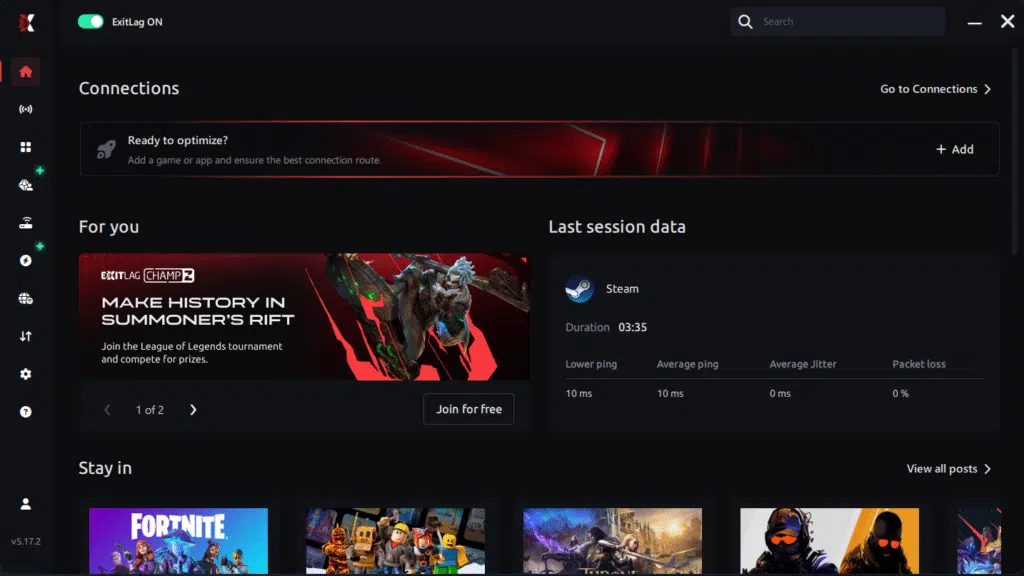
Step 2 – Install and open the program. Log in with your account.
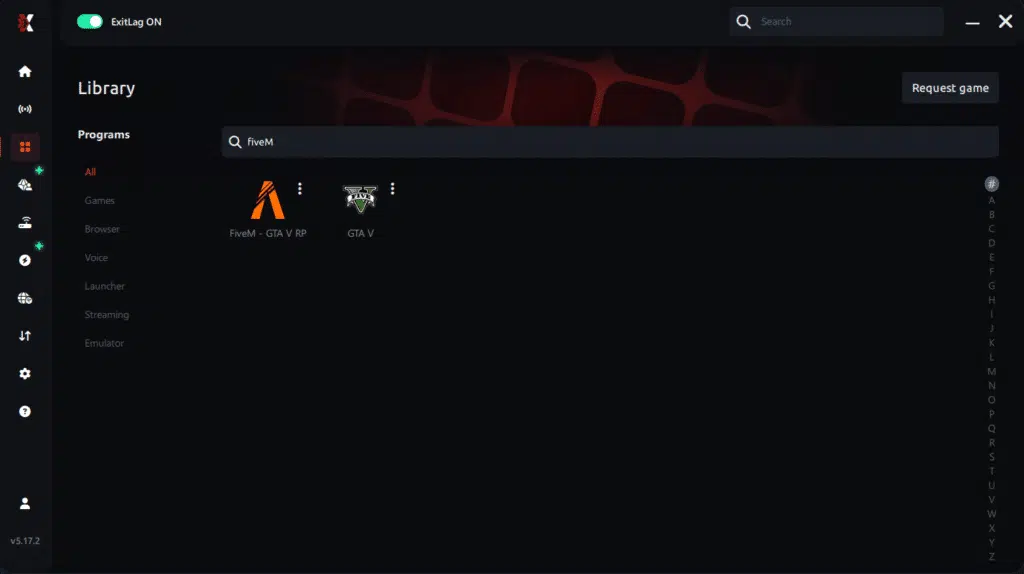
Step 3 – In the search bar, type “FIVE M GTA” and select the game from the list.
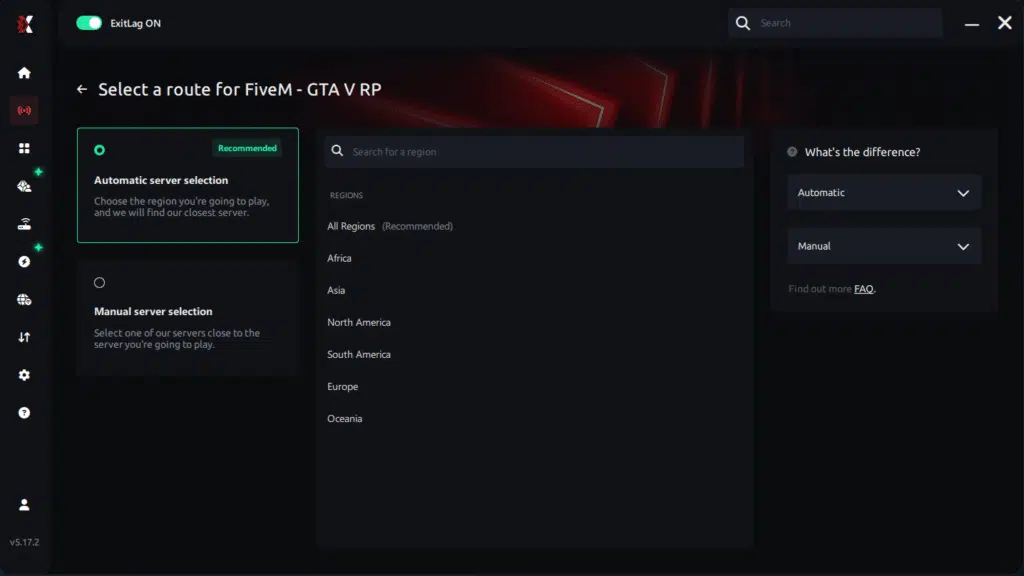
Step 4 – Choose between automated or manual route
Based on the results, you can let ExitLag automatically select the best route or manually choose the server that showed the lowest latency for your connection.
AI-optimized automated route
Based on the results, you can let ExitLag automatically select the best route through AI optimization. The system analyzes multiple connection paths in real time and automatically identifies the most efficient route for your connection, ensuring the lowest possible latency without requiring manual choices.
Manual route
If you prefer to have full control over your connection, you can manually choose the server based on the ping test results. Simply select the server that showed the lowest latency or the one that best meets your specific gaming needs, allowing complete customization of your experience.
Step 5 – Click “FIVE M GTA” or the play button. ExitLag will begin optimizing your connection automatically.
Step 6 – Wait a few seconds until optimization is complete. You’ll see ping indicators in the interface.

Step 7 – Launch FIVE M GTA normally. The optimization will already be active.
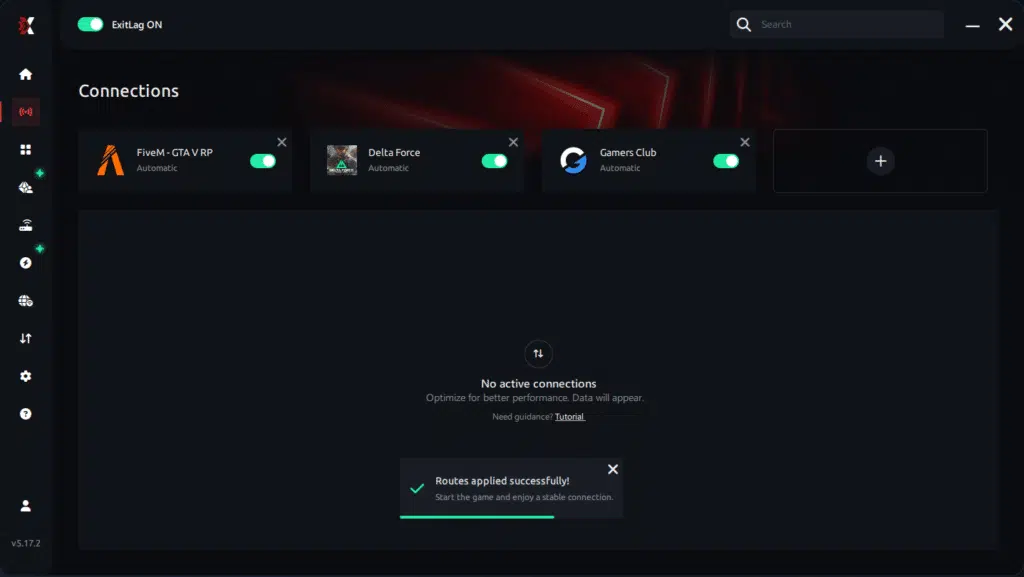
ExitLag runs in the background while you play, constantly adjusting routes to maintain the best possible performance.
FAQ: frequently asked questions about jitter in FIVE M GTA
What is the difference between jitter, lag, and packet loss in FIVE M GTA?
Jitter is the variation of your ping over time — how unstable your latency is from one moment to the next. Lag is the overall delay you feel between your input and the game’s reaction. Packet loss happens when some data never reaches the servers, causing stutters, missing hits, or big desync moments. You can have low ping but high jitter or packet loss and still have a terrible experience.
Why does my ping keep fluctuating in FIVE M GTA?
Fluctuating ping usually comes from network congestion in your home, unstable routing by your ISP, Wi-Fi interference, multiple devices sharing bandwidth, or long distances to the server. All of this creates instability and unpredictable spikes that you feel as delayed reactions and random teleporting.
Is jitter worse than just having high ping in FIVE M GTA?
In many cases, yes. A stable 90 ms ping can be more playable than a wildly inconsistent 30–150 ms ping, because you can adjust to a constant delay but not to random changes in response time. Jitter makes your driving, aiming, and timing unpredictable.
How can I tell if I have jitter while playing FIVE M GTA?
Look for signs like commands sometimes feeling instant and other times delayed, even when the ping number looks similar. Running an extended ping test is a good way to confirm; if your values jump all over the place, you have jitter. In-game, frequent rubberbanding, weird collisions, and delayed shots are strong indicators.
Does Wi-Fi cause more jitter in FIVE M GTA?
Yes. Wi-Fi is more vulnerable to interference, signal drops, and congestion from nearby networks. These issues directly turn into variation in your latency, which appears as jitter. Using a wired Ethernet cable is one of the easiest and most effective ways to stabilize your connection.
Does ExitLag help with more than just jitter in FIVE M GTA?
ExitLag is designed to stabilize routes, reduce ping, and minimize packet loss across hundreds of online games. By controlling and optimizing your path to the server, it improves overall connection quality, which means fewer spikes, fewer desync issues, and smoother gameplay across all types of servers.
Do I need to keep ExitLag open while playing FIVE M GTA?
Yes. ExitLag must remain running so it can continuously monitor and adjust your routes. You can minimize it to your tray, but closing it will send your traffic back through your ISP’s default, potentially unstable routing.
Why does jitter feel especially bad on RP and PvP FIVE M GTA servers?
Because timing and positioning are everything — from driving at high speed through tight city streets to reacting in close-quarters gunfights. Even small amounts of jitter can cause delayed braking, missed shots, or collisions you never saw coming, which is incredibly punishing in serious RP or competitive environments.

Conclusion
Jitter can turn a fun night on FIVE M GTA into a frustrating mess of delayed reactions, strange collisions, and unfair gunfights. The main problem isn’t just the delay itself — it’s the unpredictability. When your ping is constantly changing, you never know whether your next chase or PvP fight will feel smooth or completely out of control.
But this doesn’t have to be your normal. By understanding what jitter is, cleaning up your local network, and using intelligent routing to stabilize your latency, you can transform your experience on any server. ExitLag is built to be the definitive tool for that stabilization, turning unstable routes into consistent, predictable connections. For more tips, optimization guides, and connection-focused content, you can explore the official blog at ExitLag official blog.
With a properly optimized connection, FIVE M GTA plays the way it should: responsive controls, clean driving, reliable shots, and roleplay moments decided by your choices — not by network instability.If you’re ready to eliminate jitter, stabilize your ping, and feel the difference in your very next session, start your ExitLag free trial and optimize your routes for FIVE M GTA at start your ExitLag free trial.
Got questions or want to connect with other players? Join the conversation at the ExitLag Forum!