When you’re deep into a competitive Free Fire match, nothing is more frustrating than dealing with jitter, that constant fluctuating latency that turns every move into a gamble. Even with good internet, this unpredictable instability makes dodging shots, timing abilities, or reacting in ranked nearly impossible.
Unlike high ping — which you can at least adapt to — jitter adds randomness to every action. If you’re tired of your gameplay suffering from unstable responses, this guide will show what causes the issue, how to diagnose it, and how to finally fix it. You can also check all supported games at ExitLag supported games list.

What is jitter in Free Fire?
In online games, jitter refers to the irregular variation in the latency between your device and the game’s servers. Instead of keeping a consistent ping, your connection jumps rapidly — for example, 50ms → 120ms → 80ms → 150ms → 60ms. These unstable changes represent high jitter.
While ping measures how long data takes to travel, jitter measures how inconsistent that travel time is. A player with 120ms stable ping can still play, but with unstable variation (30ms → 200ms → 70ms), even simple actions will fail.
Ideally, a healthy connection should fluctuate no more than 5–10ms. Anything above that risks instability, delayed response time, rubberbanding, and unreliable gameplay feedback.
How jitter affects your gameplay in Free Fire
High jitter is one of the biggest enemies of competitive play, especially in fast-paced shooters like Free Fire. It can cause:
- Inconsistent command execution – Skills or actions sometimes happen instantly, other times after a full second.
- Difficulty dodging or strafing – Timing becomes unpredictable because latency fluctuates.
- Broken movement combos – Ability sequences fail due to random extra delay.
- Sudden death moments – Enemies “teleport” and you get eliminated without understanding what happened.
- PvP frustration – You cannot predict how the server will respond to your commands.
- Wasted resources – Medkits, grenades, and utilities fail due to timing mismatches.
- Inconsistent hit registration – Shots connect on your screen but don’t register server-side.
- Unreliable aiming – Your crosshair timing becomes impossible to sync with server feedback.
If you’re pushing ranked or tournaments, jitter is literally game-breaking.
Main causes of jitter in Free Fire
1. Network congestion
When multiple devices share your connection — streaming, downloads, smart TVs — the available bandwidth fluctuates. These changes cause unpredictable packet timing, which directly creates jitter.
2. Unstable routing
Your data travels through several nodes before reaching Free Fire’s servers. If the route changes frequently or passes through overloaded nodes, the travel time becomes inconsistent, producing jitter spikes.
3. Unstable Wi-Fi
Wireless signals face interference from walls, distance, appliances, and even neighboring networks. These conditions naturally create packet timing variation, making Wi-Fi a major jitter contributor.
4. ISP-related issues
Cheap or overloaded ISPs may lack capacity to deliver consistent routing. Infrastructure problems, noisy lines, or oversold bandwidth can generate severe instability.
5. Distance from servers
The farther you are, the more routers your data crosses — each hop is an opportunity for delay variation. Long-route paths often produce significant jitter.
6. Game-specific server load
Free Fire servers may experience regional overload, especially during peak hours or after content updates, leading to inconsistent server-side processing.
How to identify and measure jitter in Free Fire
Extended ping test
Run a long-duration ping test using your terminal/shell. If results fluctuate heavily between measurements, you have jitter. A stable connection should show almost identical ms values across the test.
Signs in-game
Some symptoms indicate jitter even when your displayed ping seems normal:
- The ping number changes constantly — up/down repeatedly
- Gameplay feels inconsistent or “off”
- Sometimes smooth, other times unplayable
- Random rubberbanding
- Skills and commands fire with variable delay
- The game feels unstable even with “low ping”
If these happen frequently, jitter is almost certainly present.
| Jitter Level | Variation Range | Gameplay Experience |
| 0–5 ms | Excellent | Smooth and predictable |
| 5–15 ms | Good | Mostly stable with rare spikes |
| 15–30 ms | Playable | Noticeable inconsistencies during PvP |
| 30–50 ms | Bad | Severe timing and hit-registration issues |
| 50+ ms | Critical | Competitive gameplay becomes impossible |
Basic solutions to reduce jitter in Free Fire
Prioritize your connection
- Use an Ethernet cable – Completely removes Wi-Fi instability.
- Close background applications – Stop streaming, downloads, cloud sync, etc.
- Limit active devices – Fewer devices = more consistency.
- Disable automatic updates – Prevent sudden bandwidth consumption.
- Update network drivers – Outdated drivers often cause jitter.
- Free Fire-specific tip: Reduce lobby visual effects and HUD animations, which depend on synchronized packet timing.
Configure QoS on your router
QoS (Quality of Service) lets you prioritize game-related traffic. When enabled, your router gives Free Fire packets higher priority, reducing delay variation even when your network is under load.
Check with your ISP
If jitter persists after local optimizations, contact your ISP. Request a line check, equipment replacement, or updated routing. Many jitter problems originate from ISP congestion.
ExitLag: the ultimate solution to eliminate jitter in Free Fire
What is ExitLag?
ExitLag is a software specialized in connection optimization, created specifically for competitive gaming. Think of it as an intelligent connection stabilizer that ensures your data always travels using the most efficient routes. It is designed by gamers for gamers, focusing on solving exactly what causes jitter, ping spikes, and instability. Learn more at ExitLag connection optimization technology.
ExitLag is not a workaround — it’s the definitive solution for unstable routing, jitter, and packet variation.
How ExitLag eliminates jitter in Free Fire
ExitLag uses its exclusive Multi-Internet technology to maintain stable latency at all times. Learn how it works at how ExitLag Multi-Internet works.
It solves jitter through:
- Multiple simultaneous routes
Data is sent through several optimized paths. If one route fluctuates, ExitLag automatically relies on others. - Smart packet selection
The system selects the fastest-arriving packets and discards delayed ones, eliminating jitter at the source. - Real-time route optimization
ExitLag constantly scans and switches to the most stable route with zero interruptions. - Reduced hops
ExitLag minimizes the number of routers your data travels through, avoiding instability from overloaded nodes. - Intelligent buffer system
Maintains a perfectly smooth packet flow, even during temporary ISP instability or peak congestion.
Advantages of ExitLag for Free Fire players
1. Complete ping stabilization
ExitLag evens out all latency inconsistencies, delivering predictable server response — crucial for aiming, dodging, and precise timing.
2. Jitter elimination
Its multi-route system ensures that any unstable path is bypassed instantly, reducing or eliminating jitter even during peak hours.
3. Timing improvements
Stable ping = perfect rhythm for skills, grenades, movement, peeking, and weapon swaps.
4. Competitive advantage
In ranked settings, every millisecond matters. ExitLag gives you the stability necessary to consistently outplay opponents.
5. Works on any server
No matter the Free Fire server region, ExitLag optimizes routing for all.
6. Simple interface
Select the game, apply the optimization, and you’re done — no technical knowledge required.
Is ExitLag worth it for Free Fire?
If you experience any of the following, the answer is absolutely yes:
- Frequent jitter or unstable ping
- Playing on distant or international servers
- Engaging in PvP, ranked, or competitive matches
- Internet instability during peak hours
- Using Wi-Fi or suffering from poor ISP routing
- Losing fights due to unpredictable delays
- Needing consistent timing for aim, recoil, and abilities
Check current plans at ExitLag pricing and plans.
How to use ExitLag in Free Fire
The process is extremely simple:
Step 1 – Access the official ExitLag website and download the application. There’s a free trial period for new users.
Step 2 – Install and open the program. Log in with your account.
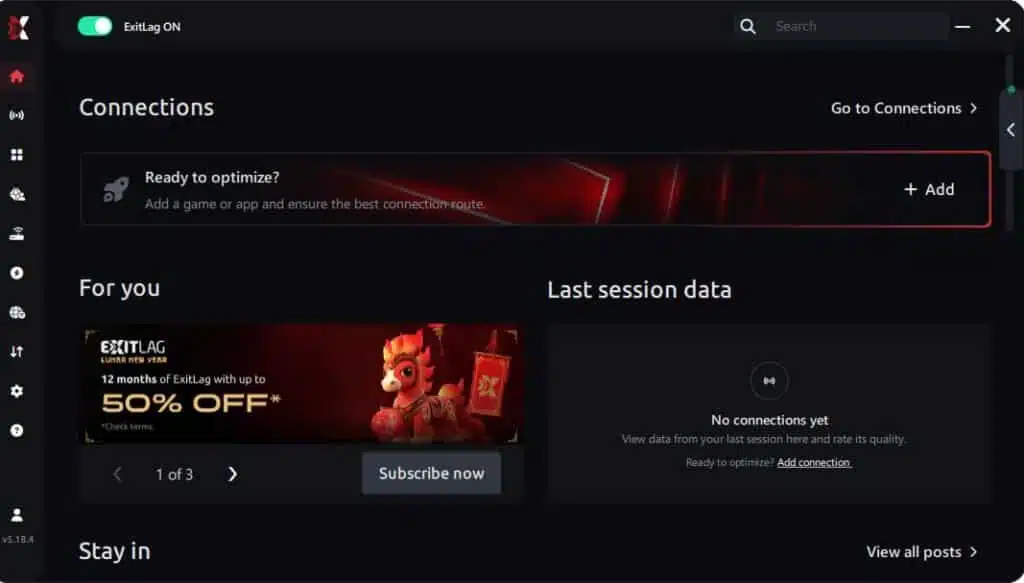
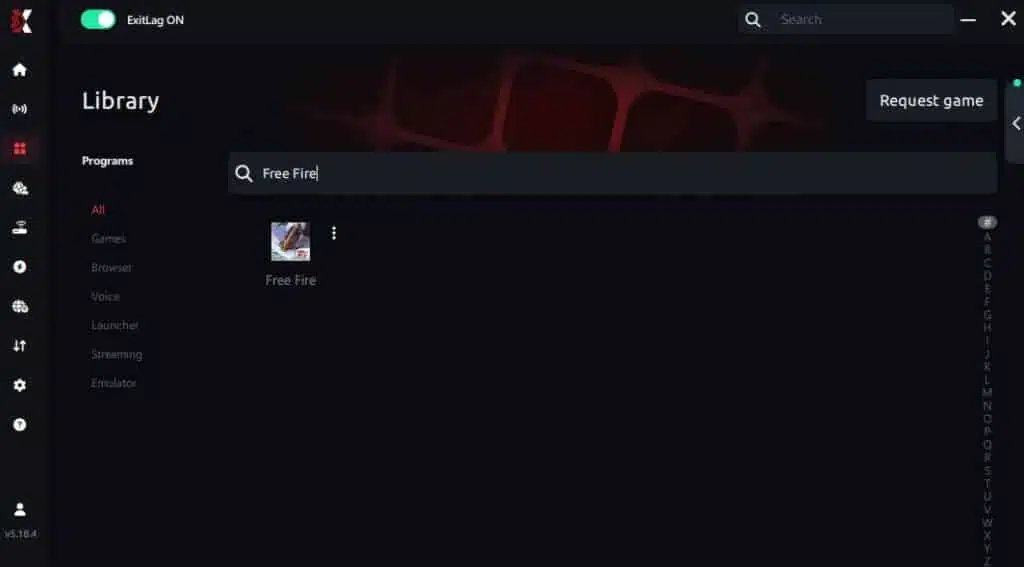
Step 3 – In the search bar, type “Free Fire” and select the game from the list.
Step 4 – Choose between automated or manual route
Based on the results, you can let ExitLag automatically select the best route or manually choose the server that showed the lowest latency for your connection.
AI-optimized automated route
Based on the results, you can let ExitLag automatically select the best route through AI optimization. The system analyzes multiple connection paths in real time and automatically identifies the most efficient route for your connection, ensuring the lowest possible latency without requiring manual choices.
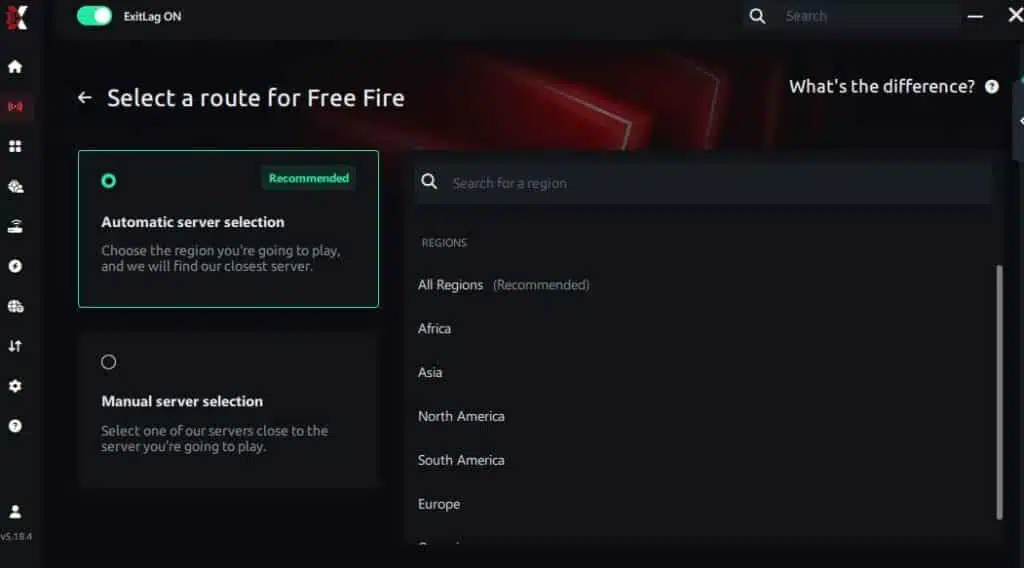
Manual route
If you prefer to have full control over your connection, you can manually choose the server based on the ping test results. Simply select the server that showed the lowest latency or the one that best meets your specific gaming needs, allowing complete customization of your experience.
Step 5 – Click “Free Fire” or the play button. ExitLag will begin optimizing your connection automatically.

Step 6 – Wait a few seconds until optimization is complete. You’ll see ping indicators in the interface.
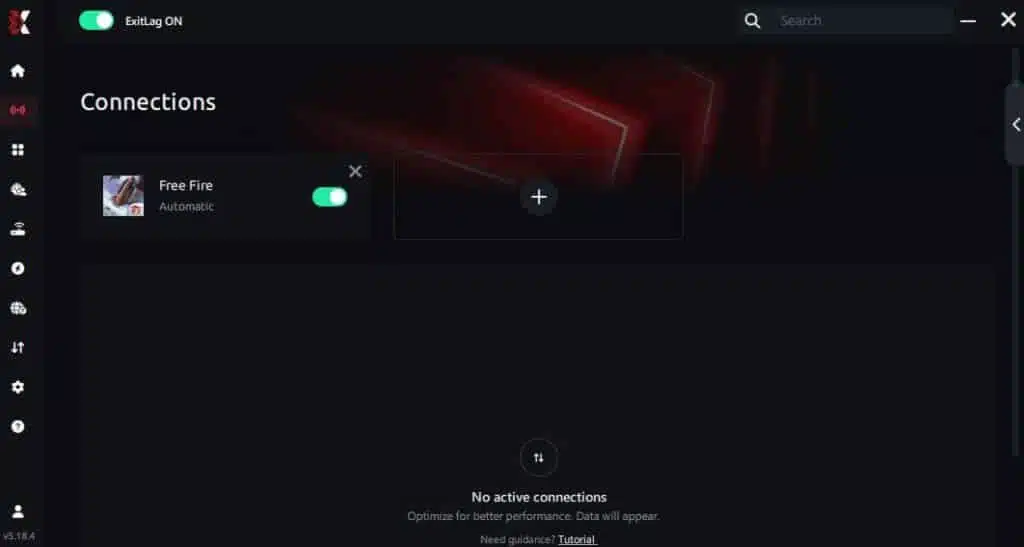
Step 7 – Launch Free Fire normally. The optimization will already be active.
ExitLag runs in the background while you play, constantly adjusting routes to maintain the best possible performance.
FAQ: Common questions about jitter in Free Fire
1. What’s the difference between jitter, lag, and packet loss?
Jitter refers to variation in ping times.
Lag refers to delayed response due to high ping.
Packet loss happens when data never reaches the server.
You can have low ping but high jitter — creating terrible gameplay conditions.
2. Why is my ping fluctuating in Free Fire?
Common causes include network congestion, unstable routing, Wi-Fi interference, overloaded ISP nodes, and distance to servers. Free Fire server load can also contribute.
3. Is jitter worse than high ping?
Often, yes. A stable 120ms is playable, but 20ms jumping to 200ms makes gameplay unpredictable and nearly impossible to adapt to.
4. How do I know if I have jitter?
Run an extended ping test or observe in-game inconsistencies such as delayed shots, rubberbanding, and random response variation.
5. Does Wi-Fi cause jitter?
Yes. Wireless networks are vulnerable to interference and signal variation. For gaming, wired Ethernet is always superior.
6. Does ExitLag fix issues besides jitter?
Yes. ExitLag reduces ping, prevents packet loss, avoids routing instability, and increases overall connection stability.
7. Do I need ExitLag running while playing?
Yes. ExitLag must remain open to maintain real-time route optimization.
8. Is ExitLag effective for Free Fire on mobile emulators?
Yes — as long as you’re running via PC. ExitLag supports PC and mobile gaming through PC, not consoles.

Conclusion
Jitter can transform a fun session of Free Fire into a frustrating battle against your own connection. But you don’t have to accept unstable ping as normal. With the right optimizations and the power of ExitLag, you can completely eliminate ping variation and restore precise timing, predictable responses, and competitive consistency.
Stable gameplay isn’t a luxury — it’s essential for performing at your best. Whether you’re climbing ranked or playing casually, ExitLag ensures your matches unfold exactly as they should: smooth, responsive, and without surprises.
Explore more optimization tips at ExitLag optimization tips blog.
Ready to eliminate jitter for good and experience Free Fire the way it was meant to be played?
Start your free trial today at: Start your free trial
Got questions or want to connect with other players? Join the conversation at the ExitLag Forum!