You lock in your champ, load into League of Legends, and everything looks fine… until your jitter starts kicking in. Your ping is constantly fluctuating, skillshots feel delayed, your champion stutters during trades, and fights in ranked become a coin flip because of pure connection instability.
Unlike simple high ping, jitter is worse because it makes your connection unpredictable — you never know when your inputs will actually reach the server. If that sounds like your reality on the Rift, this guide will show you exactly what causes the problem, how to diagnose it, and how to fix it for good. You can also confirm if your title is supported in official ExitLag game catalog.

What is jitter in League of Legends?
In online games, jitter is the irregular variation in your network latency — the time it takes for data to travel between your PC and the game servers. Instead of having a stable ping, your latency jumps constantly: for example, 35 ms → 80 ms → 50 ms → 110 ms → 40 ms. That unstable pattern is jitter.
While ping measures how long the signal takes to go back and forth, jitter measures how inconsistent that signal is over time. You can think of it like this: ping = speed, jitter = stability. You can get used to a constant 80 ms delay, but instability between 20 ms and 200 ms makes it impossible to time combos, kites, and flashes correctly.
In an ideal scenario, your response time should vary by no more than 5–10 ms. Once those variations get higher — especially during team fights or objective contests — you start to feel delayed skills, weird movement, desynced animations, and sudden deaths that make no sense.
How jitter affects your gameplay in League of Legends
High jitter ruins consistency, and consistency is everything in League of Legends jitter scenarios. Some of the most common problems are:
- Inconsistent commands – Sometimes your abilities are cast instantly, other times your champion “thinks” for half a second before doing anything.
- Unreliable dodging – You try to sidestep a skillshot, but because the timing keeps shifting, you still get hit even though you dodged correctly on your screen.
- Broken combos – Cancels and animation chains (like R-flash engages or precise resets) fail because of unpredictable delay between inputs.
- Sudden death moments – An enemy appears to teleport or jump positions, and you die before you can react.
- PvP frustration – In competitive or ranked games, you can’t read trades or all-ins properly because your champion isn’t reacting in sync with the server.
- Wasted resources – Shields, summoner spells, and actives come out too late, causing you to lose fights you should have won.
- Inconsistent hit registration – Auto-attacks and spells you clearly cast sometimes don’t connect server-side, especially near minions or during hectic fights.
- Imprecise aiming and kiting – Your last-hits and orbwalking become unreliable because your timing never matches what the server is actually processing.
If any of this sounds familiar, you’re not just “playing badly” — your connection is betraying you.
Main causes of jitter in League of Legends
1. Network congestion
Network congestion happens when multiple devices or apps are using the internet at the same time. Streaming, large downloads, cloud backups, or multiple people gaming simultaneously all compete for bandwidth. When your router constantly switches priorities between different devices, packet timing to the League of Legends servers becomes unstable, and jitter goes up.
2. Unstable routing
Your data doesn’t travel in a straight line — it hops through several routers and nodes until it reaches Riot’s infrastructure. If your ISP chooses suboptimal or constantly changing routes, the response time for each packet can vary wildly. This is one of the biggest invisible causes of instability and inconsistent ping.
3. Unstable Wi-Fi
Wi-Fi is convenient, but it’s also extremely vulnerable to interference: walls, distance, other networks, and even household devices can disrupt the signal. When the wireless link fluctuates, your game traffic suffers irregular latency and variation, which you feel as jitter and micro-freezes during trades and team fights.
4. ISP (internet provider) problems
Some ISPs have overloaded infrastructure, outdated equipment, or poorly optimized peering with Riot’s servers. Even if your speed test looks great, your route to the game might be a mess. This leads to random spikes, jitter, and periods of severe instability — especially during peak hours.
5. Distance from game servers
The farther you are from Riot’s region for your account, the more hops your data takes. Each additional router and junction along the path increases the chance of congestion and variation in timing. Long routes can still have okay average ping, but with high jitter that destroys your consistency.
6. Game-specific load and events
During major patches, events, or prime-time windows, Riot’s servers can get heavily loaded. When server-side processing becomes inconsistent, your client may still show a “good” ping, but your champion feels delayed or inconsistent in actions — a classic symptom of jitter.
How to identify and measure jitter in League of Legends
Extended ping test
To properly confirm jitter, don’t just rely on a single-speed test. Run an extended ping test to the game’s gateway or a close network node:
- Open Command Prompt or Terminal.
- Use a continuous ping command (like ping -t on Windows or ping with a high count).
- Observe the results over at least a few minutes, especially during peak gaming hours.
If the values are jumping from, say, 25 ms to 90 ms to 40 ms to 150 ms, instead of staying around a tight window like 25–30 ms, you’re dealing with jitter, not just high ping.
In-game signs
In League of Legends, you can feel jitter even when the number on the HUD looks okay:
- The displayed ping jumps up and down constantly instead of staying stable.
- Some moments feel perfectly smooth, while others feel like slow motion or delayed reactions.
- You experience intermittent rubberbanding when moving or kiting in lane.
- Skills and commands trigger with variable delay: sometimes instant, sometimes noticeably late.
- The match feels unstable even if you technically have a “low” ping.
If these symptoms show up more often during ranked or peak hours, jitter is almost certainly part of the problem.
Jitter levels in League of Legends
Jitter reference table
| Jitter level | Variation range (ms) | Gameplay experience in League of Legends |
| 0–5 ms | Excellent | Super smooth laning, reliable trades and last-hits |
| 5–15 ms | Good | Minor inconsistencies, usually fine for ranked |
| 15–30 ms | Playable | Noticeable issues in skillshots and tight outplays |
| 30–50 ms | Bad | Team fights and mechanics become very unreliable |
| 50+ ms | Critical | Competitive play is practically impossible |
The closer you are to the 0–5 ms range, the more your mechanics will reflect your true skill level.
Basic solutions to reduce jitter in League of Legends
Prioritize your connection
- Use an ethernet cable
Switch from Wi-Fi to a wired connection whenever possible. Ethernet dramatically reduces interference and makes your latency more consistent. - Close background applications
Shut down streams, downloads, cloud syncs, and anything else using your connection while you’re in PvP. Each extra app can introduce new variation in traffic. - Limit devices on the network
Ask others to pause bandwidth-heavy activities during your ranked sessions. Fewer active devices mean less chance of instability. - Disable automatic updates
System and launcher updates can suddenly consume a large chunk of bandwidth mid-game, creating nasty jitter spikes. - Update network drivers
Outdated drivers can cause packet handling issues and weird timing problems. Keep your network adapter and motherboard drivers up to date. - League of Legends–specific tip
Turn off unnecessary client animations and close the client during gameplay (using the in-game option) to reduce CPU load and avoid extra background traffic through the servers.
Configure QoS on your router
QoS (Quality of Service) is a powerful feature in many routers that lets you prioritize your League of Legends traffic over everything else. When configured correctly, it tells your router: “game packets first, everything else later.” That way, even if someone starts watching a video or downloading something, the jitter affecting your ping is minimized.
Most modern routers allow you to either mark your PC as high priority or manually assign high priority to ports or protocols used by League of Legends. Once QoS is active, the response time for game packets becomes much more stable, especially in crowded home networks.
Check with your ISP
If you’ve optimized your local setup and jitter still haunts you, it might be time to talk to your ISP. Explain that you’re experiencing inconsistent latency in online games, especially League of Legends, and ask them to check your line quality, signal levels, and routing. Sometimes a simple modem replacement, profile adjustment, or route tweak can dramatically improve your stability.
ExitLag: the definitive solution to eliminate jitter in League of Legends
What is ExitLag?
ExitLag is a software specialized in connection optimization built specifically for gaming. Instead of accepting whatever route your ISP randomly chooses, ExitLag acts like an intelligent connection stabilizer, automatically choosing the most stable path between you and Riot’s servers. You can think of it as a dedicated teammate whose job is to keep your latency stable every single match. Learn more about the underlying engine on the official technology page at ExitLag technology page.
Unlike generic tools or “maybe it helps” tweaks, ExitLag is laser-focused on reducing jitter, avoiding spikes, and stabilizing your ping in League of Legends and many other competitive titles on PC and mobile (via PC emulation), but not on consoles.
How ExitLag eliminates jitter in League of Legends
ExitLag uses a Multi-Internet approach to control routing at a level your ISP alone simply doesn’t. Instead of sending your packets down one path and hoping for the best, it builds a network of optimized routes and constantly chooses the best one in real time. You can dive deeper into the full process on the how-it-works page at how ExitLag works.
Here’s how it tackles jitter:
- Multiple simultaneous routes
Your League of Legends traffic is sent through several carefully selected paths at the same time. If one route becomes congested or unstable, other routes keep your ping steady. - Smart packet selection
ExitLag automatically selects the packets that arrive fastest and discards slower ones. This keeps your effective response time stable and prevents random delays from reaching the game. - Real-time route optimization
The software constantly analyzes performance across different routes. If a path starts to show instability or variation, ExitLag switches to a better one without you ever noticing. - Reduced hops
By cutting out unnecessary middle routers, ExitLag decreases the number of points where congestion and jitter can occur. Fewer hops usually means more consistent latency. - Intelligent buffering
ExitLag manages your packet flow so that Riot’s servers receive data at a constant rhythm, smoothing out short bursts of noise or micro-instability from your ISP.
Advantages of ExitLag for League of Legends players
1. Full ping stabilization
Instead of small fluctuations turning into lost trades, ExitLag keeps your ping in a narrow, predictable range. That means cleaner last-hits, more reliable kiting, and fewer “how did that hit me?” moments.
2. Jitter elimination
Because it uses multiple routes and smart packet handling, ExitLag dramatically reduces the variation between your lowest and highest latency readings. Your champion responds the same way in lane, in skirmishes, and in 5v5 team fights.
3. Better timing and mechanics
In League of Legends, timing is everything: animation cancels, flash combos, skillshot dodges, and objective steals all depend on precise milliseconds. With ExitLag, your timing is no longer fighting against connection instability, so your real skill can shine.
4. Competitive advantage
In PvP and ranked play, players with stable connections can outplay those suffering from jitter even when skill levels are similar. ExitLag gives you that crucial stability edge, especially if you grind climbing sessions during peak hours.
5. Works in any region
Whether you’re playing on your local Riot region or practicing on another one with friends, ExitLag optimizes routes globally. It doesn’t matter if the servers are near or far; the software finds the most efficient available paths.
6. Simple, gamer-friendly interface
You don’t need to be a network engineer to fix League of Legends jitter. ExitLag’s interface is straightforward: choose your game, select your region, apply the routes, and jump into your match.
Is it worth using ExitLag in League of Legends?
It’s absolutely worth using ExitLag if you:
- Frequently see your ping bouncing up and down.
- Play in distant or international Riot regions.
- Take ranked or competitive play seriously and want rock-solid responsiveness.
- Suffer more jitter during peak hours when your ISP is crowded.
- Use Wi-Fi or have inconsistent ISP routing.
- Have lost fights or entire games due to unpredictable delay or rubberbanding.
You can compare options and choose the best plan for your routine on the official pricing page at ExitLag pricing page.
How to use ExitLag in League of Legends
The process is extremely simple:
Step 1 – Access the official ExitLag website and download the application. There’s a free trial period for new users.
Step 2 – Install and open the program. Log in with your account.
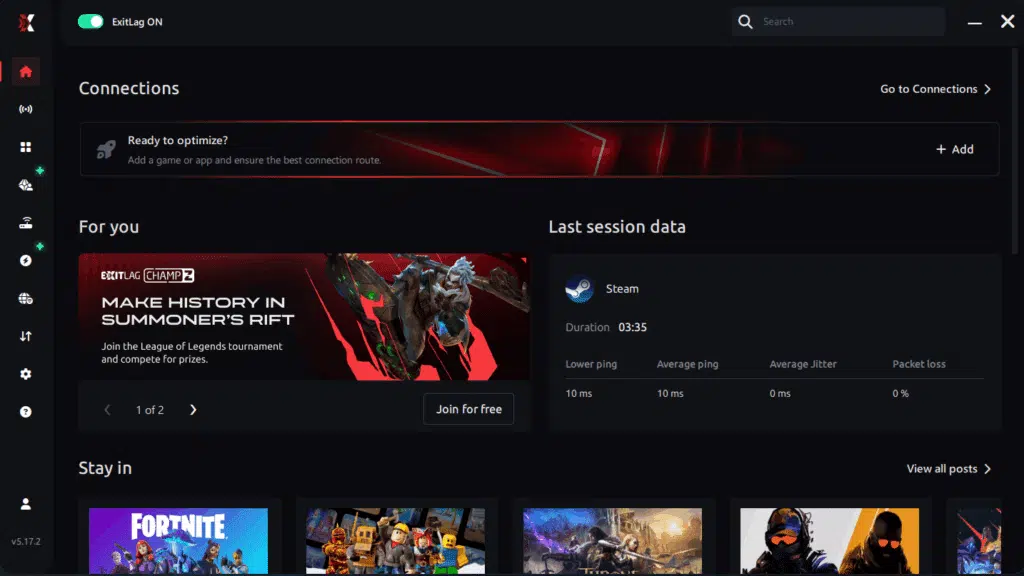
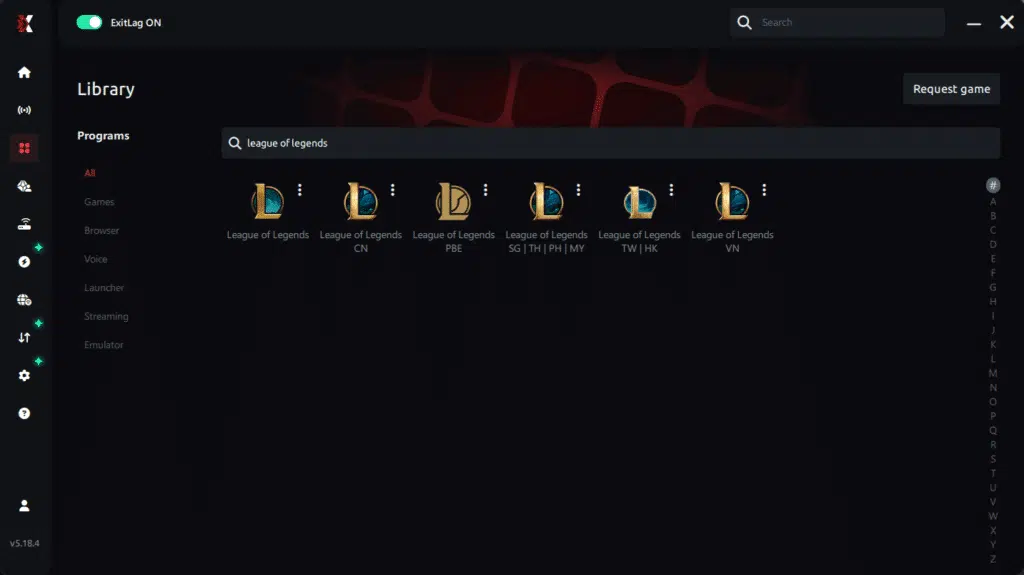
Step 3 – In the search bar, type “League of Legends” and select the game from the list.
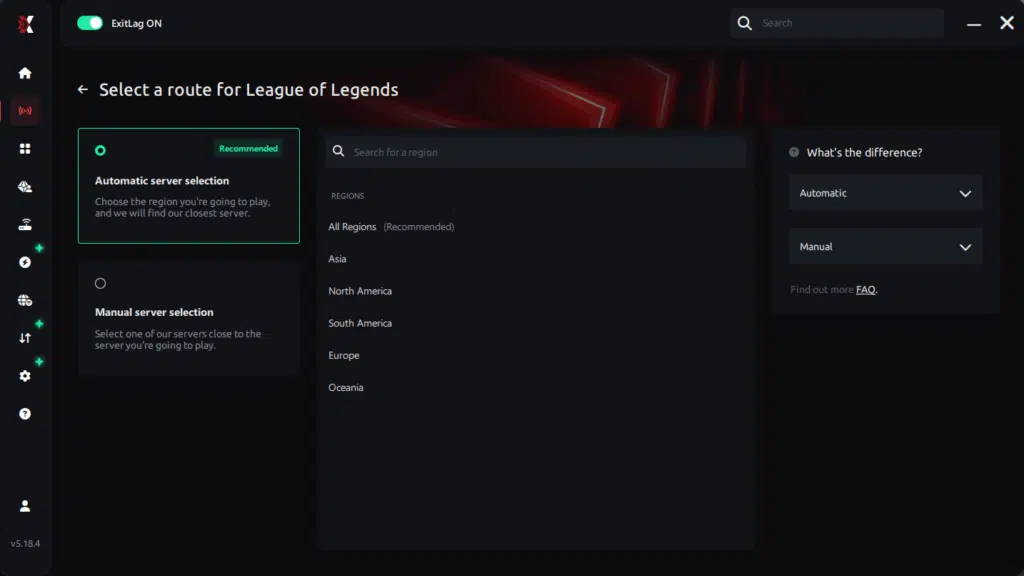
Step 4 – Choose between automated or manual route
Based on the results, you can let ExitLag automatically select the best route or manually choose the server that showed the lowest latency for your connection.
AI-optimized automated route
Based on the results, you can let ExitLag automatically select the best route through AI optimization. The system analyzes multiple connection paths in real time and automatically identifies the most efficient route for your connection, ensuring the lowest possible latency without requiring manual choices.
Manual route
If you prefer to have full control over your connection, you can manually choose the server based on the ping test results. Simply select the server that showed the lowest latency or the one that best meets your specific gaming needs, allowing complete customization of your experience.
Step 5 – Click “League of Legends” or the play button. ExitLag will begin optimizing your connection automatically.
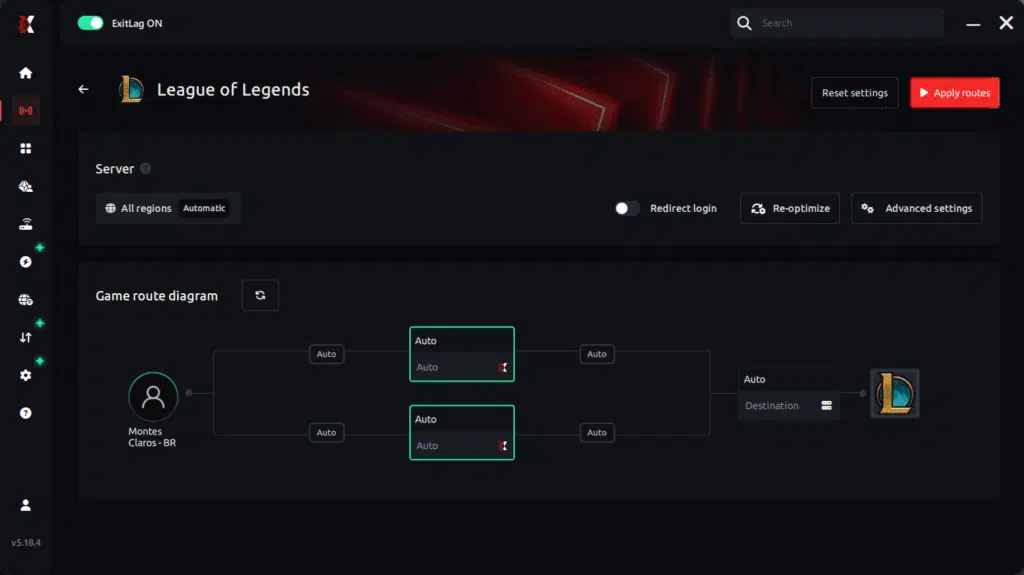
Step 6 – Wait a few seconds until optimization is complete. You’ll see ping indicators in the interface.
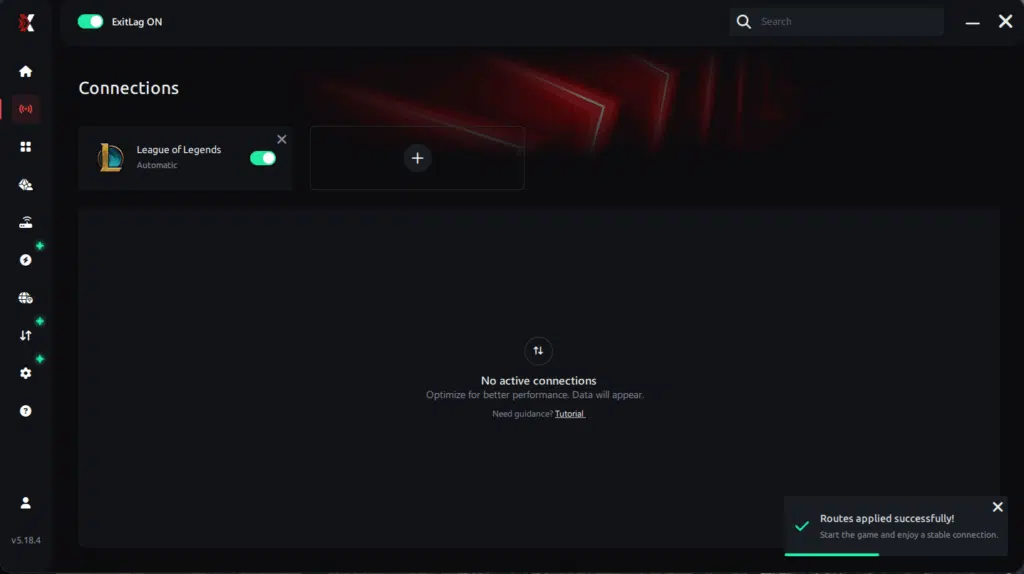
Step 7 – Launch League of Legends normally. The optimization will already be active.
ExitLag runs in the background while you play, constantly adjusting routes to maintain the best possible performance.
FAQ: common questions about jitter in League of Legends
1. What is the difference between jitter, lag, and packet loss?
Jitter is the variation in your ping over time. Even if your average latency seems okay, large swings between low and high values cause inconsistent gameplay. Lag usually refers to high ping or slow response time. Packet loss is when data never reaches the servers at all.
You can have low ping but high jitter, which feels awful in League of Legends: skills come out at random speeds, and fights don’t match what you see on your screen. You can also have packet loss plus jitter, causing extreme rubberbanding and missing actions.
2. Why does my ping keep fluctuating in League of Legends?
League of Legends jitter usually comes from network congestion, unstable routing, Wi-Fi interference, multiple devices sharing the connection, or issues with your ISP. The game’s servers themselves can also contribute during high-traffic times, making your latency spike despite a seemingly good internet connection.
If your ping is constantly jumping, focus first on using Ethernet, closing background apps, and prioritizing your PC on the router. If that’s not enough, tools like ExitLag that optimize routing directly are often necessary.
3. Is jitter worse than high ping?
In many situations, yes. A stable 100 ms ping is often easier to adapt to than a 30–150 ms rollercoaster. With stable latency, you can learn the delay and play around it; with jitter, every trade is a guess, and every combo feels off.
For mechanically intensive roles like ADC, mid assassins, or skillshot-heavy champions, jitter can be far more damaging than a single, constant high value.
4. How can I tell if I have jitter in League of Legends?
You can detect jitter by:
- Running an extended ping test and checking for large variation between minimum and maximum values.
- Watching for inconsistent reactions in-game: sometimes your champion responds instantly, other times with a visible delay.
- Noticing that fights feel very different from one moment to the next, even when your displayed ping looks similar.
If your inputs feel random, especially in ranked matches, jitter is likely part of the problem.
5. Does Wi-Fi cause jitter?
Yes. Wi-Fi is more susceptible to interference, distance, and obstacles. Even if the average latency looks okay, small wireless interruptions can create significant jitter and packet instability. That’s why a wired Ethernet cable is always recommended for League of Legends and any other serious online PvP title.
Switching from Wi-Fi to cable is often one of the biggest single upgrades you can make for consistent response time.
6. Does ExitLag help with problems besides jitter?
Yes. While one of its main strengths is stabilizing ping and reducing jitter, ExitLag is also designed to minimize packet loss, avoid unstable routes, and protect your gaming session from common connectivity issues. It optimizes your connection path to many online games, improving stability and overall performance.
That means smoother skillshots, fewer rubberbanding incidents, and more reliable interactions with servers, not just in League of Legends, but across a large library of titles.
7. Do I need to keep ExitLag open while I play?
Yes. ExitLag needs to stay running in the background for its optimizations to remain active. You can minimize it, but don’t close the program, or your traffic will revert to your ISP’s default routing. Keeping it open ensures Multi-Internet routing and real-time optimization stay active for the entire match.
8. Are there specific champions that suffer more from jitter?
Champions that rely heavily on precise timing and skillshots are hit hardest by League of Legends jitter. Think of champions like Ezreal, Thresh, Blitzcrank, Yasuo, Lee Sin, or any engage support and assassin. When your latency is inconsistent, hitting hooks, dashes, and outplay combos becomes dramatically harder.
On the other hand, more stat-based or point-and-click champions suffer slightly less — but everyone benefits from stable response time.
Conclusion
Jitter can turn what should be a fun climb in League of Legends into a frustrating fight against your own connection. It takes your mechanics, decision-making, and game knowledge and buries them under randomness, making every trade and team fight feel like a gamble instead of a skill check.
But you don’t have to accept instability as “just how it is.” With the right local optimizations, better routing, and tools built specifically for gaming, you can finally enjoy consistent ping, smooth inputs, and reliable reactions in your matches. For more optimization tips, connectivity guides, and advanced explanations, you can explore additional content on official ExitLag blog.
In the end, investing in a stable connection is just as important as learning matchups or practicing last-hits. When your connection is optimized, you get to experience League of Legends the way it was designed: crisp responses, perfect timing, and zero surprises from your network instead of your opponents.
If you’re ready to stop losing LP to League of Legends jitter and start playing with truly stable ping, this is the moment to act. Fix your connection, unlock your full potential, and enjoy every ranked session with confidence — start your free trial now at start your free ExitLag trial now.
Got questions or want to connect with other players? Join the conversation at the ExitLag Forum!