

Few things are as frustrating in PUBG as seeing your shots delay, your character teleport, or your aim fall apart because of jitter. Even if your ping looks reasonable, fluctuating latency creates unpredictable delays that ruin firefights, desync vehicle combat, and sabotage clutch moments in competitive, ranked, or squad-based matches. What makes jitter especially painful is its instability—you never know if your next command will register instantly or half a second later.
PUBG relies on precise aim, timing, peeking, and movement, and jitter destroys that consistency. PUBG is one of the supported titles on connection-optimization solutions such as those listed on ExitLag supported games.
What is jitter in PUBG?
In online games like PUBG, jitter refers to the irregular variation in your network’s latency, causing your ping to bounce unpredictably. Instead of sending and receiving data at steady intervals, your connection sends packets with fluctuating timing. This makes your gameplay feel inconsistent, even when your ping appears low.
For example, imagine your ping moving like this:
40ms → 115ms → 75ms → 160ms → 50ms → 130ms
That is a severe jitter.
Stable connections keep latency changes within 5–10ms. Once your variation exceeds that threshold, your response time becomes unreliable, causing desync, rubberbanding, ghost bullets, and poor hit registration.
PUBG relies heavily on accurate positional data and fast updates from the servers, so any jitter makes combat unpredictable.
How jitter affects your gameplay in PUBG
Jitter affects nearly every part of the PUBG experience. When your connection is unstable, these issues become common:
- Inconsistent input response: Sometimes your shot fires instantly; other times there’s a delay before your gun fires.
- Broken dodges and peeks: Timing your peeks, strafes, or counter-peeks becomes nearly impossible with jitter.
- Flick and tracking aim failure: Aim adjustments feel inconsistent and unpredictable due to timing desync.
- Sudden death moments: Enemies appear to teleport into your screen, killing you before you can react.
- Frustration in PvP: In gunfights, timing instability makes anticipating enemy movement unpredictable.
- Wasted consumables: Medkits, boosts, and throwables activate too late or inconsistently.
- Inconsistent hit registration: Shots that should hit don’t register because your client and server disagree.
- Vehicle instability: Cars jitter across the terrain, causing crashes or missed turns.
PUBG’s competitive environment punishes any instability, making jitter one of the most damaging connection issues.
Main causes of jitter in PUBG
Network congestion
When multiple devices use the same connection—streaming, downloads, smart TVs, phones—the priority of data fluctuates. This is one of the most common sources of jitter.
Unstable routing
ISPs sometimes route your traffic through inefficient paths. Each time the route changes, your packet travel time changes, causing jitter. PUBG’s servers require consistent routing to keep game state updated.
Wi-Fi instability
Wi-Fi is naturally vulnerable to interference, distance, and noise. Fluctuating signal strength leads to fluctuating latency, which produces jitter.
ISP problems
Overloaded networks, regional congestion, or poor infrastructure lead to unstable latency. Even if your speed is high, jitter can remain severe.
Distance to PUBG servers
The farther away you are from your PUBG region, the more routers (hops) your packets cross. Each hop introduces potential variation.
Game-specific behavior
PUBG’s real-time positional data system is sensitive to timing. Large firefights, smoke grenades, heavy particle effects, and crowded zones produce huge volumes of network traffic. Unstable connections struggle to maintain consistent timing across all this data.
How to identify and measure jitter in PUBG
Extended ping test
To measure jitter accurately, ping must be tested over time.
On Windows:
ping google.com -t
If numbers vary widely (40ms, 130ms, 80ms, 150ms), that’s jitter.
In-game indicators
PUBG gives many signs that you’re experiencing jitter:
- Ping value constantly rising and falling
- Movement that feels inconsistent
- Certain moments play smoothly, then suddenly become jittery
- Rubberbanding when walking, driving, or strafing
- Shots or grenades throw with variable delay
- In-game experience feels unstable, despite low displayed ping
If your gameplay feels unpredictable from moment to moment, jitter is likely the cause.
Jitter level table
| Jitter Level | Range (ms) | Gameplay Impact |
| Excellent | 0–5ms | Ultra-stable; competitive-ready. |
| Good | 6–15ms | Minor variation; barely noticeable. |
| Moderate | 16–30ms | Occasional jitter, noticeable during firefights. |
| Poor | 31–50ms | Frequent rubberbanding and shot delay. |
| Severe | 50ms+ | Highly unstable; aiming and movement unreliable. |
Basic solutions to reduce jitter in PUBG
Prioritize your connection
- Use an Ethernet cable
Wi-Fi instability is the most common cause of jitter. Always go wired. - Close background applications
Downloads, streams, and updates create bandwidth spikes that cause latency variation. - Limit active devices
More devices = more competition for bandwidth = more jitter. - Disable automatic updates
Windows Update, Steam, Epic, and launchers perform surprise downloads that harm stability. - Update network drivers
Outdated drivers create unpredictable packet scheduling. - PUBG-specific optimization
Remove packet-heavy overlays or recording tools that interfere with data timing.
Configure QoS on router
Quality of Service helps your router prioritize PUBG traffic over other devices. QoS ensures PUBG packets are processed first, leading to more consistent latency even under load.
Check with your ISP
If jitter is persistent:
- Ask for a line stability test
- Request updated routing
- Ask if your area suffers peak-hour congestion
- Consider modem replacement
However, these are partial fixes. They cannot stabilize routes dynamically for PUBG.
ExitLag: the definitive solution to eliminate jitter in PUBG
What is ExitLag?
ExitLag is a specialized software for professional-level connection optimization built specifically for online games. Designed by gamers, it acts as an intelligent stabilizer that ensures your packets take the most stable, consistent, and optimized path—not the path chosen by your ISP.
ExitLag’s technology overview is available here:
ExitLag technology
It’s not a VPN, doesn’t encrypt anything, and doesn’t slow your traffic. Its goal is simple: eliminate jitter and stabilize online gameplay.
How ExitLag eliminates jitter in PUBG
ExitLag uses a proprietary Multi-Internet routing system explained here:
how ExitLag works
It stabilizes PUBG in the following ways:
- Multiple simultaneous routes
Your data travels across multiple paths. If one path becomes unstable, another provides stable delivery. - Intelligent packet selection
Slow packets are discarded. Only the fastest, most stable packets reach PUBG’s servers—eliminating jitter. - Real-time route optimization
ExitLag continuously analyzes network conditions and adjusts your routing live. - Hop reduction
Fewer router jumps reduce timing variation. - Smart buffering
Packet flow becomes stable and consistent, even under unstable ISP conditions.
With ExitLag, your connection becomes stable, predictable, and competitive-ready.
Advantages of ExitLag for PUBG players
Complete ping stabilization
ExitLag removes fluctuating responses by optimizing your route.
Jitter elimination
Unstable latency becomes smooth, consistent, and competitive.
Better timing
Your shots fire exactly when you click. Your movement responds instantly.
Competitive edge
In PUBG, reaction time determines survival. Stable latency gives you an immediate advantage.
Works on all regions
Whether playing your region or joining international servers, ExitLag stabilizes every path.
Simple and accessible
Just select PUBG and click apply—no networking knowledge required.
Is ExitLag worth using in PUBG?
ExitLag is ideal if you:
- Experience jitter or fluctuating latency
- Play on international or distant servers
- Compete in ranked or tournament environments
- Want smooth performance during peak hours
- Use Wi-Fi or unstable ISP routing
- Lose gunfights due to unpredictable timing
- Want your aim and movement to respond instantly
Pricing page:
ExitLag pricing
How to use ExitLag in PUBG
The process is extremely simple:
Step 1 – Access the official ExitLag website and download the application. There’s a free trial period for new users.
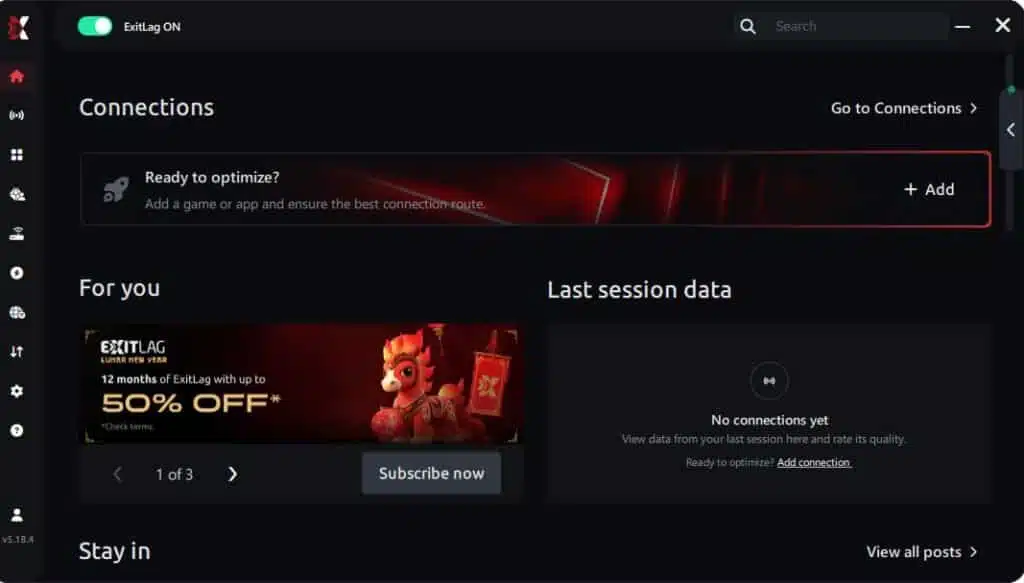
Step 2 – Install and open the program. Log in with your account.
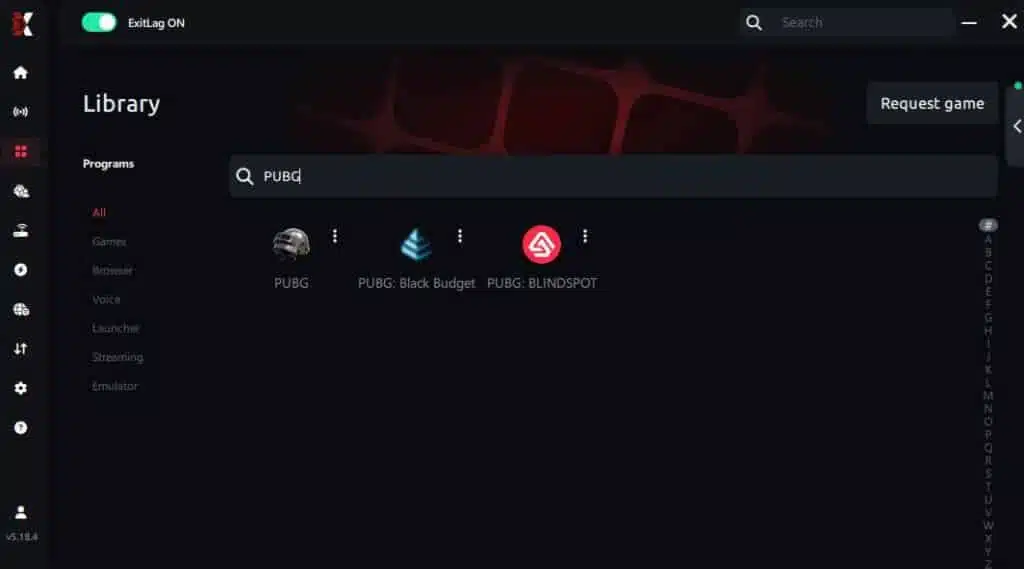
Step 3 – In the search bar, type “PUBG” and select the game from the list.
Step 4 – Choose between automated or manual route

Based on the results, you can let ExitLag automatically select the best route or manually choose the server that showed the lowest latency for your connection.
AI-optimized automated route
Based on the results, you can let ExitLag automatically select the best route through AI optimization. The system analyzes multiple connection paths in real time and automatically identifies the most efficient route for your connection, ensuring the lowest possible latency without requiring manual choices.
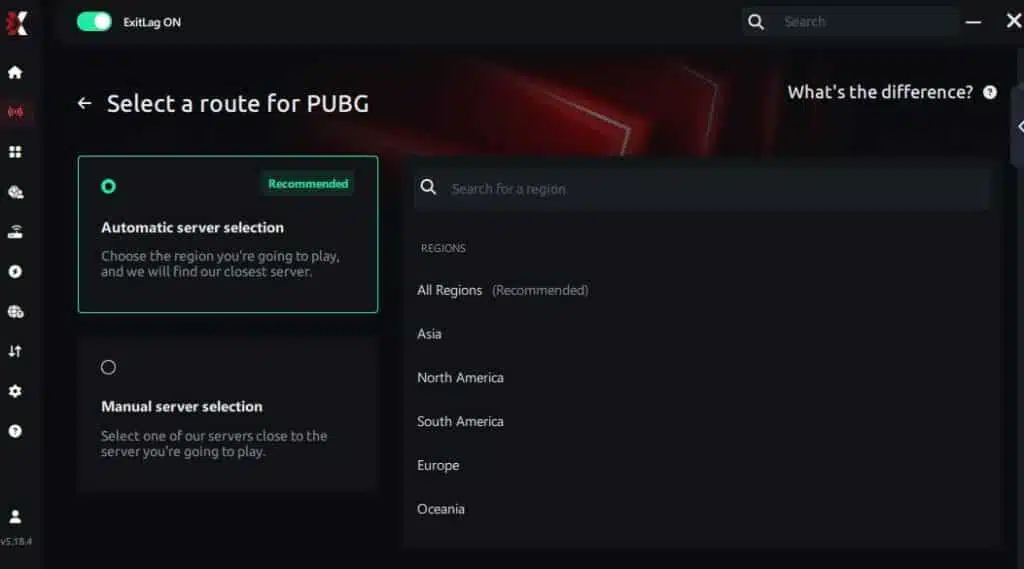
Manual route
If you prefer to have full control over your connection, you can manually choose the server based on the ping test results. Simply select the server that showed the lowest latency or the one that best meets your specific gaming needs, allowing complete customization of your experience.
Step 5 – Click “PUBG” or the play button. ExitLag will begin optimizing your connection automatically.
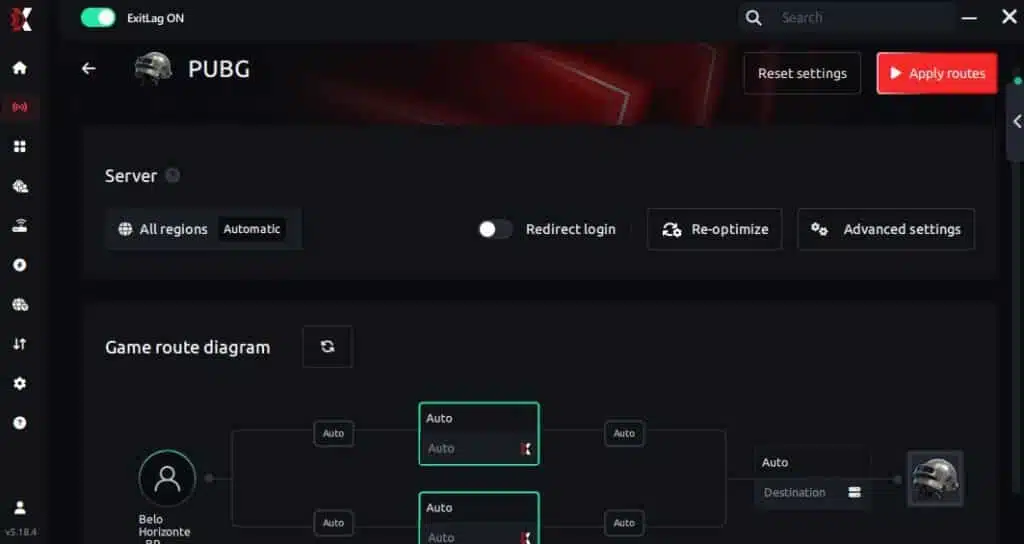
Step 6 – Wait a few seconds until optimization is complete. You’ll see ping indicators in the interface.
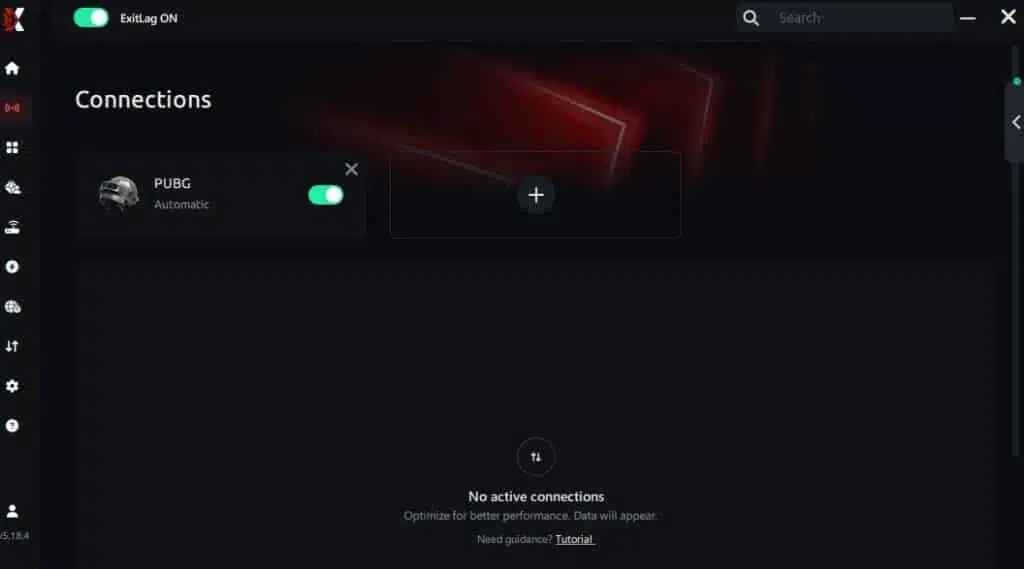
Step 7 – Launch PUBG normally. The optimization will already be active.
ExitLag runs in the background while you play, constantly adjusting routes to maintain the best possible performance.
FAQ: Jitter in PUBG
What is the difference between jitter, lag, and packet loss?
Jitter is the variation in ping—instability.
Lag is slow response caused by high ping.
Packet loss is data failing to reach the server.
You can have low ping but high jitter, creating a terrible experience.
Why does my ping fluctuate in PUBG?
Reasons include:
- Network congestion
- Unstable routing
- Wi-Fi interference
- Excess devices
- ISP congestion
- Server distance
PUBG’s real-time data demands make ping variation especially noticeable.
Is jitter worse than high ping?
Often, yes. A stable 100ms ping is more predictable than fluctuating 40–150ms ping.
How do I know if I have jitter?
If PUBG feels inconsistent—sometimes responsive, sometimes delayed—you likely have jitter. An extended ping test confirms wide fluctuations.
Does Wi-Fi cause jitter?
Yes. Wireless interference is one of the biggest sources of jitter. Ethernet dramatically improves stability.
Does ExitLag fix more than jitter?
Yes. ExitLag also reduces ping, prevents packet loss, and stabilizes routing across hundreds of games.
Do I need ExitLag running while playing PUBG?
Yes. It must stay active to maintain optimized routes.
Why do gunfights feel unfair when I have jitter?
Because your actions reach the server inconsistently, causing hit registration mismatches and delayed positioning.

Conclusion
Jitter is one of the most destructive issues PUBG players face. It ruins accuracy, disrupts timing, affects movement, and turns every gunfight into a gamble. But you don’t need to accept unstable gameplay.
With proper optimization—and especially with ExitLag, the definitive solution for jitter—you can eliminate instability, stabilize ping, and play PUBG the way it’s meant to be played: smooth, responsive, and competitive.
Bad connection shouldn’t decide your fights. Don’t let latency variation ruin your aim, timing, or positioning. You deserve consistent performance every time you drop into the battlefield.
Read more insights and optimization tips here:
ExitLag blog
Stabilize your connection. Eliminate jitter. Dominate every gunfight.
Start your ExitLag free trial now:
ExitLag free trial
Got questions or want to connect with other players? Join the conversation at the ExitLag Forum!




