Anyone who plays Tibia knows how frustrating it is when your connection becomes unstable mid-hunt or during a decisive PvP moment. The constant jitter—that unpredictable fluctuating latency that changes every second—turns smooth gameplay into a stressful experience. Instead of having full control over your character, you suddenly face spell delays, walking desynchronization, rubberbanding, or unexpected hits that break your timing and rhythm.
This instability is even worse than high ping because you can no longer trust when your commands will actually execute, especially during PvP, wars, bosses, or fast-paced hunts. Many players facing these problems search for solutions in tools and lists of supported games such as those available at ExitLag supported games list
What is jitter in Tibia?
In Tibia, jitter refers to the irregular variation in your connection’s latency, meaning your ping doesn’t stay consistent. Instead of remaining stable—like 80–90 ms—it jumps unpredictably: 80, then 160, then 110, then 200. This instability creates delays between your commands and the server’s response.
While ping measures how long a packet takes to travel, jitter measures how inconsistent this delivery is. Even if your average ping appears acceptable, high jitter makes gameplay unpredictable.
For example, if your latency fluctuates wildly—like 50 ms, 120 ms, 80 ms, 150 ms—you experience high jitter. Ideally, you want a maximum variation of only 5–10 ms for stable gameplay, especially in PvP environments where every millisecond matters.
These fluctuations represent instability in your servers communication path, resulting in slow response time and unpredictable character behavior.
How jitter affects your gameplay in Tibia
High jitter disrupts Tibia gameplay in several critical ways:
- Inconsistent command execution: Sometimes your spell fires instantly; other times it delays due to inconsistent ping.
- Difficulty dodging: Movement becomes unreliable, making it extremely hard to avoid waves, beams, or monster paths.
- Broken combos: Timed spells like exori, exeta res, or utito tempo feel out of sync due to unpredictable delay.
- Sudden deaths: Enemies appear to teleport or you suddenly take massive damage due to desync.
- Frustration in PvP: Timing for runes, pushes, waves, and paralyzes becomes unreliable.
- Loss of resources: Potions and runes are wasted because spells land too late.
- Inconsistent hit registration: Attacks sometimes register slowly or not at all.
- Unreliable targeting: Movement variations affect precise positioning in tight spaces or high-level hunts.
For players on war servers, high jitter is especially painful—one delayed UE or missed step can change the outcome of an entire fight.
Main causes of jitter in Tibia
1. Network congestion
When multiple devices or applications compete for bandwidth, your connection becomes unstable. Video calls, streams, downloads, and game updates create traffic spikes, resulting in jitter.
2. Unstable routing
Your ISP may route your data through inconsistent or congested paths. If your route changes frequently, your response time varies constantly, causing jitter—especially when playing on servers far from your region.
3. Unstable Wi-Fi
Wireless connections suffer from interference, signal loss, and environmental obstacles. Even small interruptions generate instability noticeable during gameplay.
4. ISP problems
Poor infrastructure, overloaded nodes, or maintenance can create micro-interruptions that cause jitter. Even high-speed internet plans can deliver unstable connections.
5. Server distance
If the Tibia server is far from your physical location, your packets must travel through many routers. More hops mean more opportunities for variation and spikes.
6. Game-specific situations
Large battles, crowded cities, and heavy PvP zones cause local performance inconsistencies that amplify network jitter effects.
How to identify and measure jitter in Tibia
Extended ping test
You can run a continuous ping test to your router or a stable IP address. If the ping results vary widely (example: 12 → 80 → 40 → 120 ms), you have clear jitter issues.
In-game signs of jitter
You will notice jitter in Tibia through several symptoms:
- The ping indicator fluctuates constantly.
- The game feels inconsistent, even when average ping is low.
- Smooth moments alternate with sudden, severe latency spikes.
- Rubberbanding occurs while walking, especially in tight hunts like Banuta, Roshamuul, or Warzones.
- Spell delays vary wildly, affecting runes, waves, exoris, or pushes.
- Gameplay feels unstable even when your connection speed is good.
These signs indicate packet delivery instability, not necessarily slow internet.
Jitter severity table
| Jitter Level | Ping Variation | Gameplay Impact |
| Low | 0–10 ms | Smooth gameplay; spells respond immediately |
| Medium | 10–30 ms | Noticeable spell delays; small inconsistencies |
| High | 30–60 ms | Unreliable combos; PvP delays; rubberbanding |
| Critical | 60+ ms | Severe instability; teleporting; unplayable hunts |
Use this table to understand your connection’s behavior and decide if you need corrective action.
Basic solutions to reduce jitter in Tibia
Prioritize your connection
- Use an ethernet cable
Wi-Fi introduces interference and signal drop-offs, causing jitter. - Close background applications
Streaming, downloads, updates, and cloud services increase latency variation. - Limit network devices
Fewer devices equal more consistent bandwidth for Tibia. - Disable automatic updates
Background updates cause sudden bandwidth spikes. - Update network drivers
Outdated drivers affect packet handling efficiency. - Tibia-specific solution
Disable heavy scripts or unnecessary bot-like tools that may overload your system or connection.
Configure QoS on your router
Quality of Service (QoS) prioritizes game traffic over other applications. When configured correctly, your router ensures Tibia gets the bandwidth and stability necessary even under heavy network load.
Check with your ISP
If jitter persists, contacting your ISP for a line check is essential. They may adjust routing, replace faulty equipment, or diagnose regional congestion problems.
ExitLag: the definitive solution to eliminate jitter in Tibia
What is ExitLag?
ExitLag is a specialized software created exclusively for connection optimization in online games. Instead of relying on unstable ISP routing, ExitLag builds optimized paths that ensure consistent and stable packet delivery. It acts like a smart stabilizer that prevents jitter spikes and maintains smooth gameplay.
It is developed by gamers, for gamers—designed around real gaming demands such as fast spellcasting, precise movement, and consistent PvP reaction time.
Learn more about its technology at:
ExitLag connection optimization technology
How ExitLag eliminates jitter in Tibia
ExitLag uses Multi-Internet technology to ensure your packets travel through the most stable and fastest routes available.
Learn how it works at:
how ExitLag multi-route works
Here’s how it reduces jitter:
- Multiple simultaneous routes
Packets travel through multiple optimized paths; if one fluctuates, others take over. - Intelligent packet selection
ExitLag picks only the fastest-arriving packets, eliminating those that arrive late. - Real-time route optimization
Routes are continually evaluated and adjusted for maximum stability. - Reduction of hops
Fewer routers between you and the server mean fewer points where variation can occur. - Smart buffer management
Ensures a constant, smooth packet flow even when your ISP is unstable.
Advantages of ExitLag for Tibia players
- Complete ping stabilization
Makes your latency consistent, predictable, and reliable. - Elimination of jitter
Multi-route tech minimizes or removes ping variation entirely. - Better timing and reaction
Spells land exactly when intended—crucial for PvP combos and boss mechanics. - Competitive advantage
Consistent timing in pushes, paralyzes, and waves can be the deciding factor in war servers. - Works on any server
Supports all official Tibia servers and regions. - Simple interface
No technical skills needed—just select Tibia and click apply.
Is ExitLag worth using for Tibia?
ExitLag is ideal if you:
- Frequently experience jitter or unstable latency
- Play on distant or international servers
- Participate in PvP, open battles, wars, or tournaments
- Want stable and reliable spell timing
- Play during peak hours
- Use Wi-Fi or suffer from poor routing
- Have ever died due to unpredictable delays
Find the right plan for you at:
find the right ExitLag plan
How to use ExitLag in Tibia
The process is extremely simple:
Step 1 – Access the official ExitLag website and download the application. There’s a free trial period for new users.
Step 2 – Install and open the program. Log in with your account.
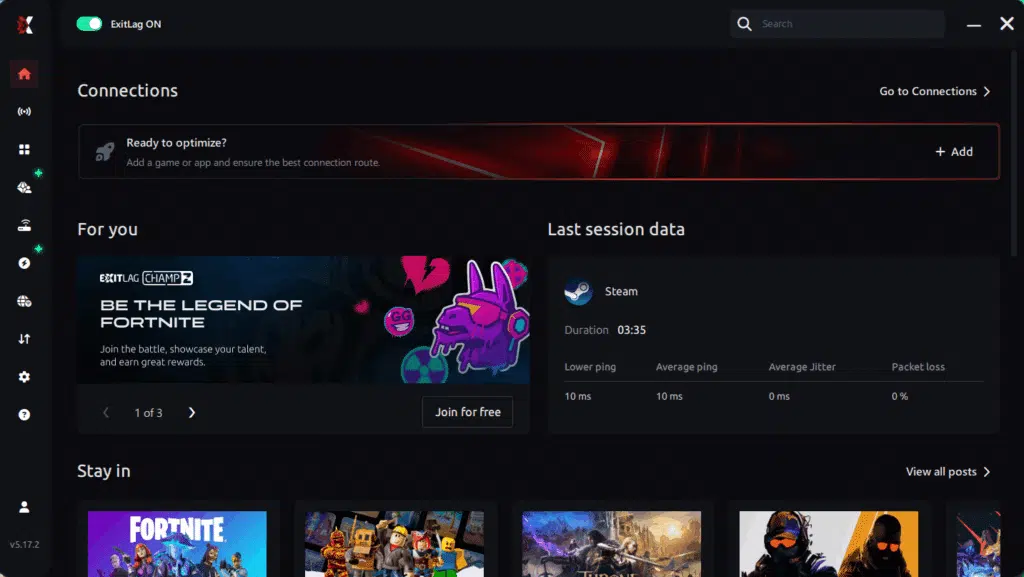
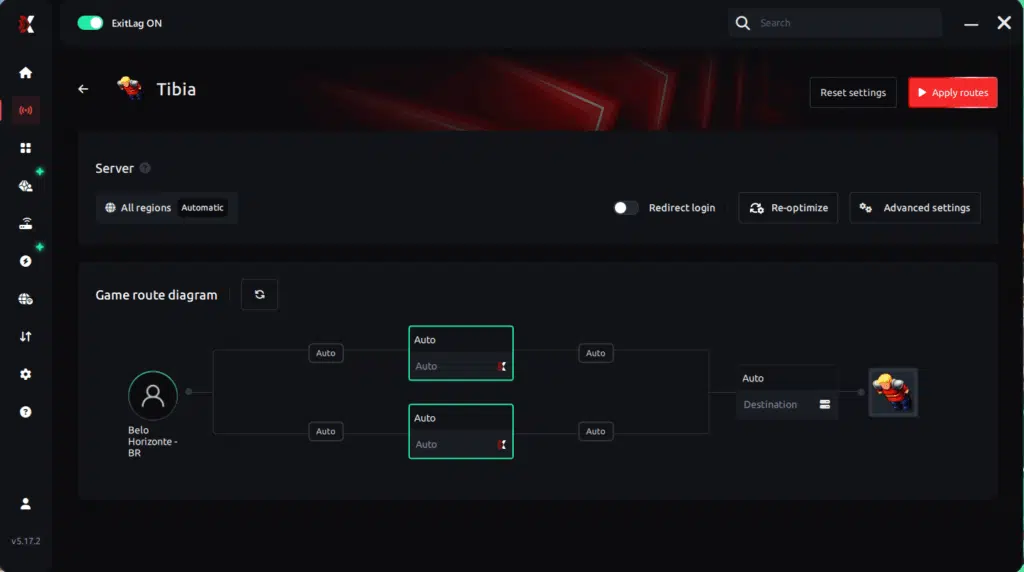
Step 3 – In the search bar, type “Tibia” and select the game from the list.
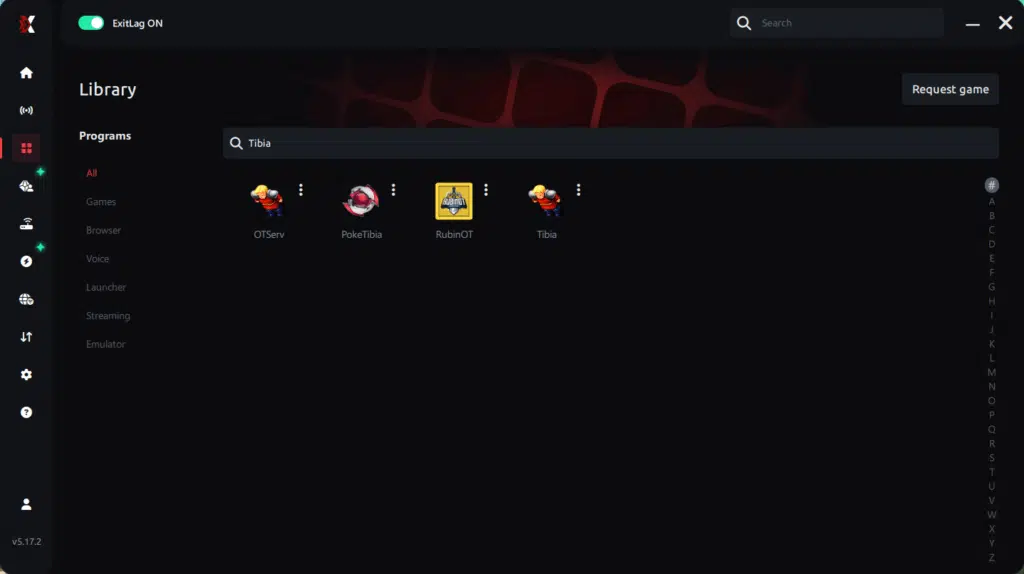
Step 4 – Choose between automated or manual route
Based on the results, you can let ExitLag automatically select the best route or manually choose the server that showed the lowest latency for your connection.
AI-optimized automated route
Based on the results, you can let ExitLag automatically select the best route through AI optimization. The system analyzes multiple connection paths in real time and automatically identifies the most efficient route for your connection, ensuring the lowest possible latency without requiring manual choices.
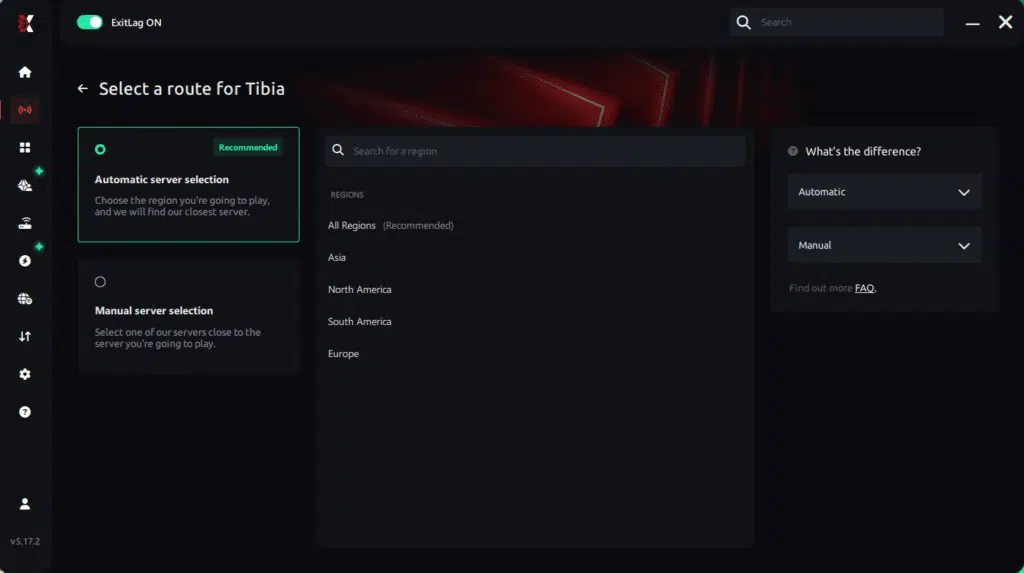
Manual route
If you prefer to have full control over your connection, you can manually choose the server based on the ping test results. Simply select the server that showed the lowest latency or the one that best meets your specific gaming needs, allowing complete customization of your experience.
Step 5 – Click “Apply routes” or the play button. ExitLag will begin optimizing your connection automatically.
Step 6 – Wait a few seconds until optimization is complete. You’ll see ping indicators in the interface.
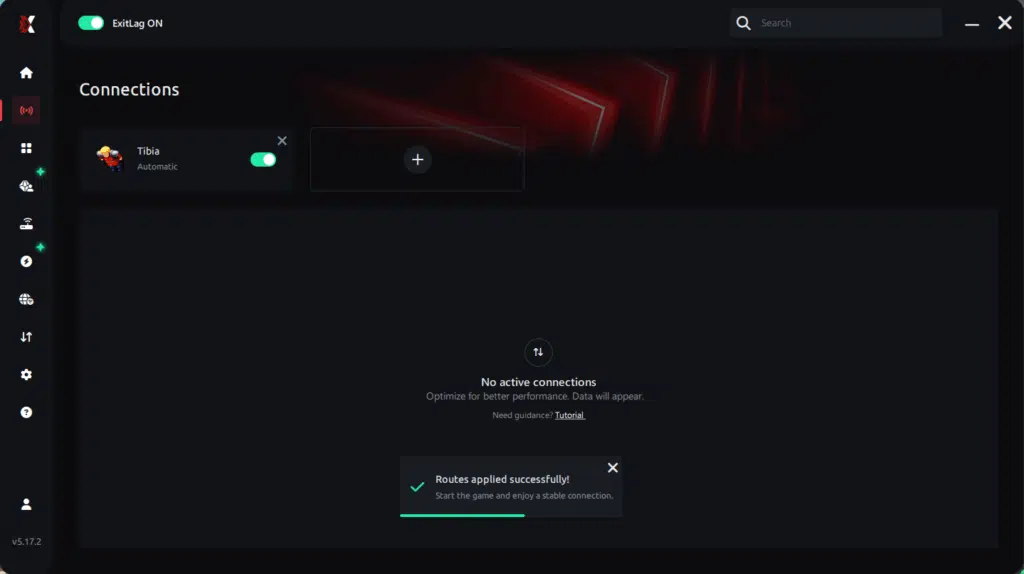
Step 7 – Launch Tibia normally. The optimization will already be active.
ExitLag runs in the background while you play, constantly adjusting routes to maintain the best possible performance.
FAQ: frequently asked questions about jitter in Tibia
1. What is the difference between jitter, lag, and packet loss?
Jitter is the variation in ping; lag is the delay in action execution; packet loss happens when data never reaches the server. You can have low ping and still suffer from jitter.
2. Why does my ping fluctuate in Tibia?
Common causes include network congestion, poor routing, Wi-Fi interference, ISP issues, and server distance.
3. Is jitter worse than high ping?
Yes. A stable 100 ms is better than a jittering 40–150 ms because predictability matters more for gameplay.
4. How do I know if I have jitter?
Run an extended ping test or observe inconsistent spell response, rubberbanding, or fluctuating in-game latency.
5. Does Wi-Fi cause jitter?
Yes, wireless connections are highly vulnerable to interference and variation. Ethernet is always better.
6. Does ExitLag solve issues besides jitter?
Yes, it reduces ping, prevents packet loss, stabilizes routes, and improves reliability in hundreds of games.
7. Do I need ExitLag open while playing Tibia?
Yes, the software must remain active to maintain optimization.
8. Does Tibia’s engine make jitter worse?
Tibia’s fast tick rate and high server interaction make jitter more noticeable than in slower-paced games.
9. Why does jitter get worse during massive wars?
Heavy server load amplifies instability and makes every fluctuation more noticeable during large-scale battles.
Conclusion
Jitter can ruin your Tibia experience by creating unpredictable delays, broken combos, and unstable movement. But you don’t need to accept these issues as normal. With the right tools and configuration, you can eliminate ping variation, stabilize your gameplay, and enjoy Tibia exactly as it was meant to be played: smooth, responsive, and reliable.
For more technical insights and optimization tips, visit the ExitLag blog at:
ExitLag blog optimization tips
Experience Tibia with the stability you deserve. Start your free trial now:
start your ExitLag free trial
Got questions or want to connect with other players? Join the conversation at the ExitLag Forum!