

John Wick’s Dog Fortnite searches have spiked since the John Wick Set landed in Chapter 7 Season 3. Players are dropping into matches specifically to track down this loyal Sidekick before anyone else beats them to it.
If you have already spotted the icon on the map but are not sure how to actually claim it, this guide walks through the exact process.
To answer it directly, John Wick’s Dog in Fortnite is an Uncommon Sidekick officially named Dog (Pen & Ink), and it spawns randomly at one of two named locations, either Sinister Strip or The Battlewoods. You need to fight through NPC guards, interact with the dog to free it, and it then follows you permanently for the rest of that match.
This guide covers Where Is John Wick’s Dog In Fortnite exactly, how to rescue it safely, and the rewards waiting for players who pull it off.
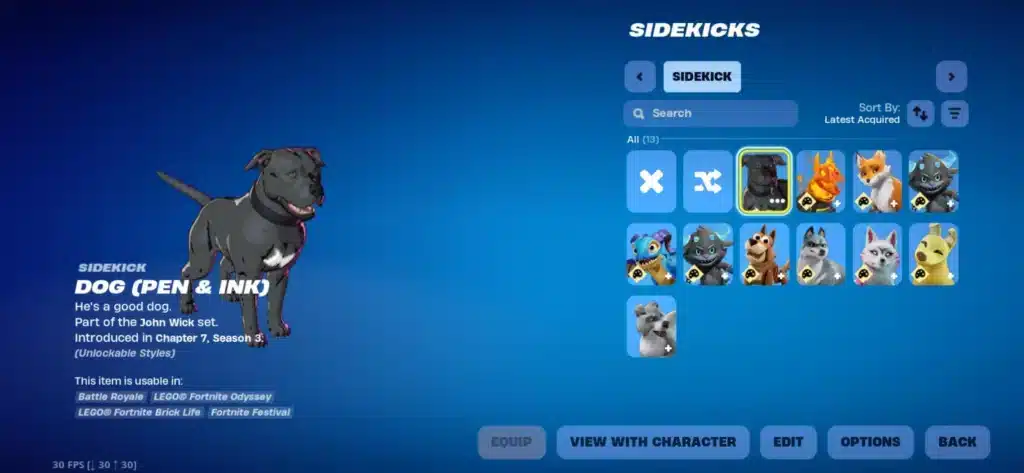
Where Is John Wick’s Dog In Fortnite Exactly?
The dog does not have one fixed spawn point. Instead, Fortnite randomly places it at either Sinister Strip or The Battlewoods each match, so you need to check both if the first one comes up empty.
Consequently, landing early and scouting quickly gives you the best shot at finding it before another squad does.
Sinister Strip Spawn Details
Sinister Strip is one of the two possible locations tied to this Sidekick. When the dog spawns here, it typically sits inside a guarded structure patrolled by NPC enemies loyal to the location’s theme.
- Land directly on Sinister Strip early in the match for the fastest access
- Expect resistance from NPCs guarding the immediate area
- Check building interiors first, since the dog rarely spawns in open ground
The Battlewoods Spawn Details
If Sinister Strip does not have it, The Battlewoods is the second possible location. This wooded area requires a bit more searching since cover makes visual scanning harder.
- Sweep through denser tree clusters where NPCs tend to patrol
- Listen for combat audio cues from AI guards defending the dog
- Treat this as your backup destination if your first landing comes up empty
How Do You Rescue John Wick’s Dog In Fortnite?
Once you find the correct location, rescuing the dog follows a fairly consistent pattern. John Wick’s Dog Fortnite hunters need to clear resistance before the actual interaction becomes available.
Here is the general sequence to follow:
- Land at either Sinister Strip or The Battlewoods depending on where the icon appears
- Eliminate or avoid the NPC guards stationed near the dog’s location
- Approach the marked interaction point once the area is clear
- Interact with the prompt to free the dog from its cage or holding spot
- Confirm the Sidekick is now following your character on the minimap
- Continue looting the immediate area, since rescuing the dog often triggers bonus loot drops
Combat Considerations While Rescuing
The NPCs guarding the dog are not pushovers, so going in with a full health bar and at least one weapon ready matters. Furthermore, other squads chasing the same objective can complicate the fight significantly.
- Prioritize eliminating ranged NPCs first to reduce incoming damage
- Watch your surroundings for rival players also chasing the dog
- Bring shield potions if you plan to contest the location against enemy squads
What Rewards Do You Get From Rescuing The Dog?
John Wick’s Dog Fortnite rescues are not just for the Sidekick itself. The area tends to include valuable loot tied to the John Wick Set, making the detour worth the risk.
Loot Tied To The Rescue Area
Beyond claiming the Sidekick, the guarded location typically drops notable weapons and items once cleared.
| Reward Type | Example Item | Rarity |
|---|---|---|
| Sidekick | Dog (Pen & Ink) | Uncommon |
| Mythic Weapon | Baba Yaga 9mm Pistol | Mythic |
| Rare Weapon Chance | Lancehead Pistol | Legendary |
| Bonus Loot | Standard chest and floor loot | Varies |
Is It Worth Fighting For The Dog Early Game?
For most players, yes, especially if you land near either location naturally. The combination of a permanent Sidekick companion and a shot at Mythic loot makes the detour efficient rather than wasteful.
However, if the fight draws in multiple squads, weigh the risk carefully. Losing your loadout early over a cosmetic Sidekick is rarely worth it if the contest turns into a full firefight.
Customizing Your Sidekick After The Rescue
Once John Wick’s Dog joins your character, Fortnite allows some interaction with it during the match. Sidekicks are a relatively newer mechanic, so understanding what you can and cannot do with it helps.
Sidekick Behavior During Matches
- The dog follows your character automatically once rescued
- It does not fight on your behalf, since Sidekicks are primarily companion cosmetics
- It persists for the remainder of that specific match only
- Rescuing it again next match requires repeating the same process
Does The Dog Carry Over Between Matches?
No, Sidekicks rescued in a match do not carry over automatically to your next game. Each match resets the opportunity, meaning dedicated players can rescue John Wick’s Dog Fortnite style content repeatedly across sessions if they enjoy the mechanic.
Best Strategy For Finding The Dog Consistently
Since the spawn location rotates between two spots, building a quick decision habit saves time. Rather than committing fully to one location every match, scouting efficiently increases your success rate.
Squad Coordination Tips
If you are playing with a full squad, splitting attention across both potential spawn locations is a smart approach.
- Send one player to scout Sinister Strip immediately after landing
- Send another toward The Battlewoods in parallel
- Communicate findings quickly over voice or ping system
- Regroup at whichever location confirms the dog’s presence
Solo Player Approach
Solo players need to commit to one location strategically rather than splitting attention. Checking recent match patterns or landing near your preferred spot first tends to work best.
- Pick whichever location tends to have less landing traffic from other players
- Move quickly and quietly to avoid drawing early fights
- Fall back to the second location only if the first is confirmed empty

Pro Tips: John Wick’s Dog Fortnite
- Land early and decisively: Since only one player or squad can claim the dog first, hesitating on your landing spot often means missing it entirely.
- Bring healing items before engaging NPCs: The guards protecting the dog can deal significant damage, so entering the fight undersupplied is a common way to lose the contest.
- Check both locations across multiple matches: Since the spawn rotates, playing several matches naturally teaches you which location tends to appear more often in your lobbies.
- Prioritize the Mythic pistol loot after rescuing: The Baba Yaga 9mm is a strong early pickup, so clear the immediate area fully before rotating elsewhere.
- Coordinate with squadmates to split scouting duties: Covering both locations simultaneously dramatically increases your odds compared to guessing alone.
Common Mistakes John Wick’s Dog Fortnite Players Make
- Assuming the dog has a single fixed spawn: Many players repeatedly land at only one location and get frustrated when it is empty. Fix: remember the spawn rotates between Sinister Strip and The Battlewoods, and check the second if the first fails.
- Engaging NPCs without adequate supplies: Rushing in with low health or no shields against guarded areas often ends in an early elimination. Fix: loot briefly before committing to the fight if possible.
- Ignoring rival squads chasing the same objective: Some players focus so heavily on NPCs that they get third-partied by another team. Fix: stay aware of your surroundings throughout the rescue process.
- Expecting the Sidekick to persist between matches: Players sometimes assume progress carries over, then are confused when it resets. Fix: treat each match as a fresh opportunity to rescue the dog again.
Staying Connected While Chasing John Wick’s Dog
Racing to a contested location like Sinister Strip or The Battlewoods means every input matters, from building cover to landing shots on guarding NPCs. A poorly timed lag spike during that fight can cost you both the Sidekick and your loadout.
That is exactly where ExitLag becomes useful for John Wick’s Dog Fortnite hunters. ExitLag is not a VPN. It is a game connection optimizer that analyzes multiple network paths in real time and automatically selects the fastest, most stable route between your device and Fortnite’s servers.
It does not encrypt your traffic, does not mask your IP, and does not affect any apps outside the games it supports. Since Fortnite spans PC, Mobile, and Console, connection stability plays out differently depending on your setup, which is exactly the kind of variability ExitLag is designed to smooth over.
Here is what makes it genuinely useful during high-contest moments like a dog rescue fight:
- Real-time Optimization: Reduces delay and packet loss, so building, editing, and aiming inputs register the instant you press them.
- Multipath Technology: Sends your traffic through multiple routes simultaneously, so if one path degrades mid-fight, another keeps your connection stable.
- Multi-Internet: Supports up to four simultaneous internet connections, reducing the odds of a full disconnect during a contested landing.
- AI-powered routing: Automatically finds the fastest, most stable path with one click, while manual adjustments remain available for players who want more control.
ExitLag does not modify Fortnite’s game files, does not inject code, and does not interact with anti-cheat systems in any way, making it safe to run alongside the game. Just avoid pairing it with a VPN, since running both together can reduce overall effectiveness.
Whether you play on desktop or chase Sidekicks on the go, you can start with the ExitLag Download for PC, grab ExitLag for Android if you play Fortnite on your phone, or install ExitLag for iOS to keep mobile sessions stable while hunting down John Wick’s Dog Fortnite style rewards.
All game images used in this blog post belong to Epic Games. They are used for informational and educational purposes only and do not imply endorsement or affiliation with the rights holders.
Got questions or want to connect with other players? Join the conversation at the ExitLag Forum!

