

Maplestory Worlds is one of the most interesting expansions of the MapleStory universe, because it goes beyond the classic MMORPG formula and gives players room to create, explore, and share custom experiences. Instead of only following fixed quests and progression systems, players can enter a platform built around user-generated content, social interaction, and creative freedom.
Players returning to the franchise may also want broader context before jumping into a creator-focused platform. A guide about picking up MapleStory again from Reddit discussions can help explain why older players revisit the universe and what expectations they bring back.
If you want to understand how Maplestory Worlds works, where to download it, what makes it different from traditional MapleStory, and why so many players compare it to sandbox platforms, this guide covers the essentials. Maplestory Worlds blends recognizable MapleStory charm with a more open design philosophy, which makes it attractive for both long-time fans and curious newcomers.
For many players, Maplestory Worlds feels like a natural evolution of the franchise. It keeps the brand identity, visual inspiration, and community-driven appeal of MapleStory, but shifts the focus toward building worlds, experimenting with ideas, and joining experiences made by other players. As a result, it stands out in a gaming landscape where customization and community content are increasingly important.
Whether you are looking for download instructions, wondering about supported platforms, comparing it to sandbox hits, or trying to understand the appeal behind Maplestory Worlds Fortnite discussions, this article will walk you through everything step by step. It will also explain how ExitLag can help improve connection stability when you jump into multiplayer content, explore community creations, or access servers from other regions.
What is MapleStory Worlds?
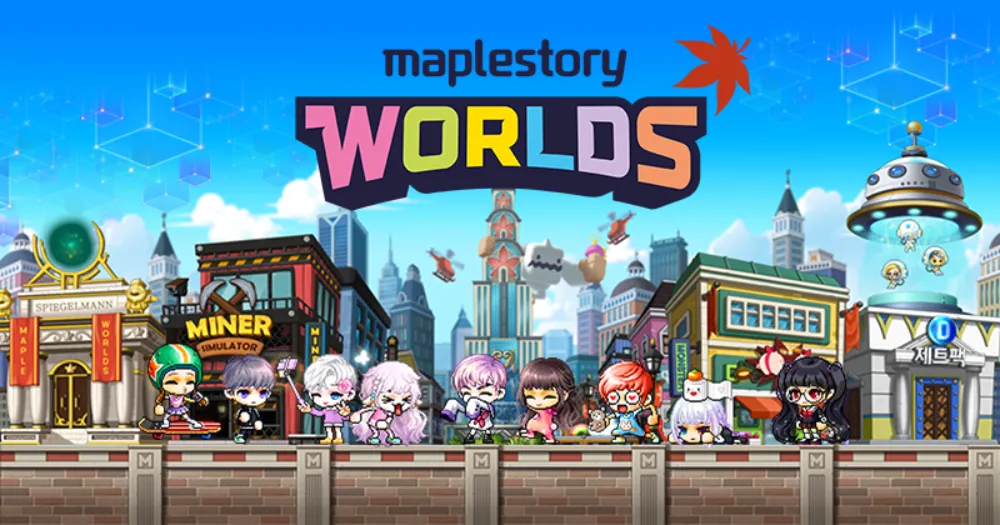
At its core, Maplestory Worlds is a creative multiplayer platform built around the MapleStory IP. Rather than limiting players to a single predefined adventure, it allows them to enter multiple worlds, interact with other users, and even create original experiences using built-in tools.
That means the game is not only about playing. It is also about making. Players can build maps, design interactions, script activities, and shape their own spaces in ways that feel much more flexible than a conventional MMORPG.
This structure is why many people compare it to games and platforms focused on player creativity. However, the MapleStory identity still matters here. The project keeps familiar visual influences, recognizable style choices, and a sense of continuity with the larger franchise.
Why does it feel different from classic MapleStory?
Classic MapleStory is built around structured progression. You choose a class, level up, complete quests, improve your gear, and follow content designed by the developers. That formula remains beloved for a reason, but it is very different from what Maplestory Worlds tries to do.
Maplestory Worlds shifts attention toward:
- player-made experiences
- custom worlds
- social exploration
- flexible gameplay loops
- interactive creation tools
Instead of a single path, players get a platform with many possible paths. Some worlds may focus on exploration. Others may center on social hangouts, mini-games, challenges, or creative experiments.
Why are players comparing it to Fortnite Creative and Roblox?
The comparison exists because these platforms all encourage user-generated content. Players are not limited to official maps or official modes. They can participate in experiences created by the community.
That is why search terms such as Maple Worlds Fortnite creative, Maplestory in Fortnite, and Maplestory Worlds island often appear in related discussions. People are trying to understand whether the game offers a creative ecosystem similar to Fortnite Creative or Roblox. The answer is not that they are identical, but they do share the same broad appeal: community-built content, repeatable social play, and room for experimentation.
Is MapleStory Worlds like Fortnite Creative?
Yes, in broad terms, there are similarities. However, there are also important differences.
Maplestory Worlds and Fortnite Creative both attract players who enjoy:
- building new experiences
- sharing custom content
- revisiting community-made maps
- playing socially with friends
- exploring new game ideas without waiting for official updates
Still, Maplestory Worlds leans more heavily into the MapleStory brand, its aesthetic identity, and its own toolset. That gives it a different tone from Fortnite’s shooter-first ecosystem.
Official franchise context still matters when comparing MapleStory Worlds with the classic MMORPG. The main MapleStory website from Nexon is the safest place to understand the original game’s current structure before separating it from the newer creative platform.
Shared strengths with Fortnite Creative
Before diving into technical details, it helps to understand why Maplestory Worlds Fortnite comparisons are so common. Both platforms thrive because they allow creativity to become part of the core gameplay loop. Instead of consuming content passively, players can help produce it.
This gives both games strong replay value. New worlds, events, and experiments can keep the experience fresh long after launch.
Key differences from Fortnite Creative
Even though Maplestory in Fortnite is a search phrase that reflects player curiosity, the identity of Maplestory Worlds remains distinct. Fortnite Creative is tied to Fortnite’s mechanics, visual direction, and combat legacy. Maplestory Worlds, by contrast, feels more connected to social creation and a MapleStory-inspired universe.
So, while Maple Worlds Fortnite creative is a useful comparison point, players should not expect a one-to-one copy. The better approach is to think of it as a MapleStory-flavored creative platform with its own structure and audience appeal.
What makes Maplestory Worlds stand out?
The game stands out because it combines three elements that many players already love:
- familiar MapleStory identity
- user-generated worlds
- flexible community interaction
That combination gives it a niche that is different from both classic MMORPGs and more general-purpose sandbox platforms.
How do you download MapleStory Worlds?
Downloading Maplestory Worlds is relatively simple, but the process depends on your platform. The game is available on mobile and PC, which makes it easier for different types of players to jump in.
Before the detailed steps, the important thing to know is that official sources matter. You should always use trusted storefronts or Nexon’s official launcher to avoid installation issues or outdated files.
Mobile download steps
If you want to play on a smartphone or tablet, use the official app marketplace for your device.
Android and iOS installation
Follow these steps:
- open Google Play Store or Apple App Store
- search for “Maplestory Worlds”
- confirm the listing is from the official publisher
- tap Download or Get
- wait for installation to finish
- open the app and log into your account
Mobile access is one of the reasons the game has drawn so much attention. It allows casual exploration and makes it easier to try community content without needing a dedicated gaming setup.
Account setup and in-game systems can also affect how smoothly new players move between MapleStory experiences. If you are exploring related tools or confusing interface moments, this guide on how to cancel navigation in MapleStory can help with a specific point that often interrupts flow.
Things to check before installing
Before installing on mobile, make sure you have:
- enough free storage
- a stable internet connection
- updated operating system software
- access to your Nexon account credentials
These simple checks reduce the chance of failed installs or login frustration.
PC download steps
PC players typically use the Nexon Launcher to access the game.
How to install on PC
Use this process:
- Visit Nexon’s official website.
- Download the Nexon Launcher.
- Install the launcher on your computer.
- Log in with your Nexon account.
- Search for Maplestory Worlds in the library.
- Click download and wait for the files to install.
- Launch the game and begin playing.
Why some players prefer PC
PC can offer several advantages:
- easier navigation
- potentially better performance
- more comfortable multitasking
- smoother controls for longer sessions
- a larger screen for creation tools and social interaction
For players who want to spend time exploring multiple worlds or working on their own creations, PC often feels more practical.
What are the main features of MapleStory Worlds?
Maplestory Worlds offers more than simple exploration. Its main value comes from how it blends play, creation, and social discovery into one ecosystem.
The exact content you encounter can vary depending on what worlds are active and what the community is building. Still, several core features define the overall experience.
Core features at a glance
| Feature | What it does | Why it matters |
| World creation | Lets users build maps and spaces | Encourages creativity and replay value |
| Social interaction | Supports shared exploration and multiplayer activity | Makes the platform feel alive |
| Custom experiences | Allows players to try many styles of gameplay | Prevents the experience from becoming repetitive |
| Avatar customization | Lets users personalize their identity | Strengthens engagement and expression |
| Community content | Provides access to player-created worlds | Expands available content beyond official releases |
Creation tools
One of the biggest strengths of the game is its support for user-generated content. Players are not confined to developer-designed experiences. They can also become creators.
That opens the door to:
- custom maps
- mini-games
- social spaces
- challenge modes
- interactive environments
This is a major reason why search interest around Maplestory Worlds game modes continues to grow. Players want to know what kinds of experiences are possible, and the answer is: potentially many.
Social play and discovery
The social aspect matters almost as much as the creative one. Even players who do not plan to build their own worlds can still enjoy the platform by exploring what others have made.
That makes discovery part of the fun. Instead of repeating one official path, you can move through a wider ecosystem of player activity.
Avatar identity and style
Personalization is also important. Like other social and creative platforms, the ability to customize your avatar helps make the experience more personal.
This adds value for players who enjoy:
- self-expression
- social visibility
- cosmetic progression
- community identity
That is where interest in Maplestory Worlds characters often appears. While the phrase can refer to franchise familiarity, it also reflects curiosity about how identity and customization function inside the platform.
Customization is also connected to how players think about value, cosmetics, and trading ecosystems across MapleStory-related experiences. A deeper look at the MapleStory marketplace can help explain how player interest often extends beyond gameplay into items, identity, and account progression.
What game modes can you expect in MapleStory Worlds?

Because the game is built around player creativity, the answer is broader than in a traditional title. You are not limited to a small set of official activities. Instead, Maplestory Worlds game modes can vary depending on what creators build and what becomes popular in the community.
That variety is part of the appeal.
Common experience types
Although the platform evolves, players can generally expect experiences such as:
- exploration worlds
- mini-game challenges
- hangout and social maps
- event-style activities
- custom adventure spaces
- experimental community projects
Some worlds may feel relaxed and casual. Others may be built around competition, puzzles, or progression-style interaction.
Why this matters for replayability
A fixed game can lose freshness when players exhaust the main content. A platform based on user-generated content can keep changing. That is why creative platforms often maintain long-term appeal even when official updates are slower.
Maplestory Worlds benefits from this same principle. As new ideas emerge, the playable ecosystem can keep expanding.
Are all worlds equally polished?
No. That is part of the reality of community-created ecosystems. Some worlds will feel more refined than others. Some may be experimental. Others may be ambitious but unfinished.
Still, that variety can be exciting. It means there is always something new to try, and it also gives creators room to grow.
Can you create your own worlds and mini-games?
Yes. This is one of the defining features of the platform.
Before looking at monetization or performance, it is important to understand that creation is not a side activity here. It is central to the identity of the game. Players can build spaces, shape interactions, and design playable ideas for others to enjoy.
What can creators build?
Depending on the available tools and systems, creators may work on:
- mini-games
- themed worlds
- social environments
- custom interactive spaces
- challenge maps
- roleplay-style experiences
This broad scope is why people compare it to platforms focused on creator ecosystems.
Is it beginner-friendly?
The idea is accessible, but the level of complexity depends on what you want to build. Simple spaces can be easier to put together. More advanced interactive experiences may require more experimentation and familiarity with the toolset.
For that reason, many players start by exploring worlds first. After understanding what is possible, they gradually move into creation.
Why creator tools matter
Creator tools do more than add flexibility. They also support the long-term health of the platform. When the community can make new content, the ecosystem becomes less dependent on a constant stream of official developer-made content.
That helps sustain engagement over time.
Is MapleStory Worlds monetized?
Yes, but the way monetization works is important to understand. In creative multiplayer platforms, monetization often revolves around cosmetics, personalization, and creator-related support rather than raw pay-to-win advantages.
Common monetization focus
Maplestory Worlds is generally associated with monetization elements such as:
- cosmetic items
- appearance customization
- optional purchases
- creator ecosystem support
This approach is often healthier for player trust than systems that lock gameplay strength directly behind spending.
Why players care about monetization design
Monetization can shape the tone of a game. If players feel forced to pay to remain competitive, the experience becomes frustrating. If monetization stays centered on personalization and optional benefits, the game usually feels more welcoming.
That is why this topic matters. Players do not just want more content. They want a fair environment too.
For players comparing Worlds with the original MMO, classes remain one of the clearest differences in structure and expectations. The official MapleStory classes and jobs page is useful for seeing how traditional character progression works before comparing it with creator-driven worlds.
MapleStory Worlds vs MapleStory: what are the biggest differences?
This is one of the most searched questions around the game, and for good reason. Even though both belong to the same franchise family, they serve different player expectations.
MapleStory is a classic MMORPG. Maplestory Worlds is a creative platform with social and user-generated content at its center.
Big-picture comparison
Here is a clearer side-by-side look:
| Category | Maplestory Worlds | MapleStory |
| Core identity | Creative platform with user-generated content | Traditional MMORPG |
| Progression style | Flexible, world-dependent | Structured leveling and questing |
| Content source | Community-made and official content | Mostly developer-created content |
| Social design | Discovery and shared creative spaces | Guilds, parties, dungeons, progression |
| Visual direction | Modernized presentation | Classic 2D side-scrolling look |
Which type of player may prefer MapleStory?
Classic MapleStory may be better for players who want:
- clear class progression
- fixed long-term goals
- grinding and leveling loops
- traditional MMO structure
Which type of player may prefer Maplestory Worlds?
Maplestory Worlds may be better for players who want:
- creative freedom
- changing community content
- casual or experimental social play
- more variety in world design
- access to creator-driven experiences
So, instead of replacing MapleStory entirely, the platform expands the franchise into a different kind of audience need.
Why is ExitLag useful for MapleStory Worlds?
ExitLag for MapleStory Worlds
When you play a multiplayer platform built around community interaction, world exploration, and potentially cross-region access, connection quality matters. Even the most creative experience can feel frustrating if you deal with unstable ping, lag spikes, packet loss, or inconsistent routing.
That is where ExitLag becomes relevant for Maplestory Worlds.
Why connection quality matters here
Maplestory Worlds is not just a single-player experience. It depends on smooth online interaction, responsive movement, reliable loading, and stable communication with game servers. If your route to the server is inefficient, the result can be:
- delayed actions
- stuttering movement
- slow world loading
- unstable multiplayer sessions
- interrupted exploration
For players testing many community experiences or accessing content tied to different regions, these connection issues can become even more noticeable.
How ExitLag helps
ExitLag is designed to optimize your game traffic through better routing. Instead of depending only on default internet paths, it improves data flow to help reduce latency and stabilize the online experience.
This can help Maplestory Worlds players by:
- reducing ping spikes
- improving routing stability
- lowering packet loss risk
- making online sessions more responsive
- supporting smoother multiplayer interaction
When ExitLag becomes especially valuable
ExitLag can be especially useful if you:
- connect to distant servers
- experience unstable ping during play
- notice lag in crowded or active worlds
- want more consistent performance in multiplayer content
- frequently switch between worlds and sessions
Because Maplestory Worlds depends so much on social and online activity, a stable connection is not a minor detail. It directly affects how smooth the game feels from one session to the next.
If you want a better experience while exploring Maplestory Worlds, testing community content, or jumping between multiplayer activities, ExitLag is one of the most practical tools to consider.
Is MapleStory Worlds worth trying?
For players who enjoy creativity, social discovery, and community-made content, the answer is yes. The platform offers a different kind of value than a traditional MMORPG, and that difference is exactly why it stands out.
Reasons to try it
Maplestory Worlds is worth a look if you enjoy:
- sandbox-style experimentation
- sharing experiences with other players
- discovering new community creations
- trying multiple styles of gameplay in one ecosystem
- seeing how the MapleStory universe evolves
Who may enjoy it most
The game may especially appeal to:
- MapleStory fans curious about a new format
- players who like Roblox or Fortnite Creative-style systems
- casual social gamers
- creators who enjoy building playable spaces
- users interested in variety instead of one fixed progression path
Final perspective
It may not replace classic MapleStory for players who want pure MMORPG progression. However, it does not need to. Its value lies in opening a different lane for the franchise.
That makes it an interesting addition rather than a direct substitute.
Conclusion
Maplestory Worlds expands the MapleStory brand in a smart and flexible direction. Instead of repeating the exact structure of the classic MMORPG, it gives players access to world creation, community exploration, social interaction, and a broader variety of possible experiences. That is why interest in topics such as Maplestory Worlds characters, Maplestory Worlds game modes, Maplestory Worlds island, and Maplestory Worlds Fortnite continues to grow.
If you want a platform that mixes recognizable MapleStory style with creativity and player-made content, Maplestory Worlds is absolutely worth exploring. And if you want smoother performance while connecting to online content, exploring multiplayer spaces, and avoiding frustrating lag, Maplestory Worlds becomes even better when paired with ExitLag.
Ready to explore new worlds with more stability and less lag? Try ExitLag and improve your Maplestory Worlds experience with a faster, smoother, and more reliable connection.
Frequently asked questions
MapleStory Worlds is a creative multiplayer platform based on the MapleStory universe. It allows players to explore community-made worlds, interact socially, and create their own content instead of following only a traditional MMORPG structure.
Classic MapleStory is focused on quests, leveling, classes, and structured progression. Maplestory Worlds focuses more on custom worlds, creator tools, social play, and flexible experiences.
It has strong sandbox-style elements because players can build and share their own experiences, even though it remains tied to the MapleStory brand and visual identity.
You can download the game on Android and iOS through official app stores, or on PC through the Nexon Launcher.
Yes. PC players can install the Nexon Launcher, search for the game in the library, download it, and launch it from there.
Yes. Mobile players can use the Google Play Store or Apple App Store to install the game and log in through their Nexon account.
There are similarities, which is why terms such as Maple Worlds Fortnite creative and Maplestory in Fortnite appear in player searches. Both platforms encourage user-generated content and community-made experiences.
No. Fortnite Creative is tied to Fortnite’s gameplay identity, while Maplestory Worlds keeps a MapleStory-inspired style and its own creative ecosystem.
Players compare them because both let users create, share, and replay custom experiences made by the community.
The available Maplestory Worlds game modes can vary depending on what players and creators build. This may include mini-games, social spaces, exploration worlds, and experimental interactive maps.
Yes. One of the biggest attractions of the platform is the ability to create original experiences and share them with others.
Yes. Because the content can keep changing, the game has more long-term variety than titles built around only one official path.
Yes. ExitLag can help improve routing and connection stability, which is useful for online multiplayer experiences like Maplestory Worlds.
It can help reduce ping spikes, unstable routing, packet loss, and other connection issues that affect responsiveness.
Players connecting to distant servers, experiencing unstable internet routes, or exploring many multiplayer worlds may benefit the most from using ExitLag.



