If you’ve been trying to log into Marvel Rivals and suddenly face the dreaded Marvel Rivals Error Code 270, you’re not alone. This issue affects thousands of players during updates, peak hours, and unexpected server instabilities. Understanding why it happens and how to fix it quickly can save you from long waits and repeated login failures.
In the second paragraph, the situation becomes even more frustrating because many players report the same Marvel Rivals Error Code 270 appearing randomly and blocking access to matches, even when their internet seems fine. Combined with similar variants like Error Code 270 Marvel Rivals, the problem creates confusion across the community and disrupts gameplay sessions, especially on competitive days.
What exactly is the Marvel Rivals Error Code 270, and why does it appear? This error occurs when the game fails to establish a stable connection between your device and the Marvel Rivals servers. In most cases, the issue is related to high traffic, patch deployments, corrupted cache, or unstable network routing. That means the problem is not tied to bans, account violations, or gameplay restrictions it is purely a connection failure.
How the Marvel Rivals Error Code 270 Happens
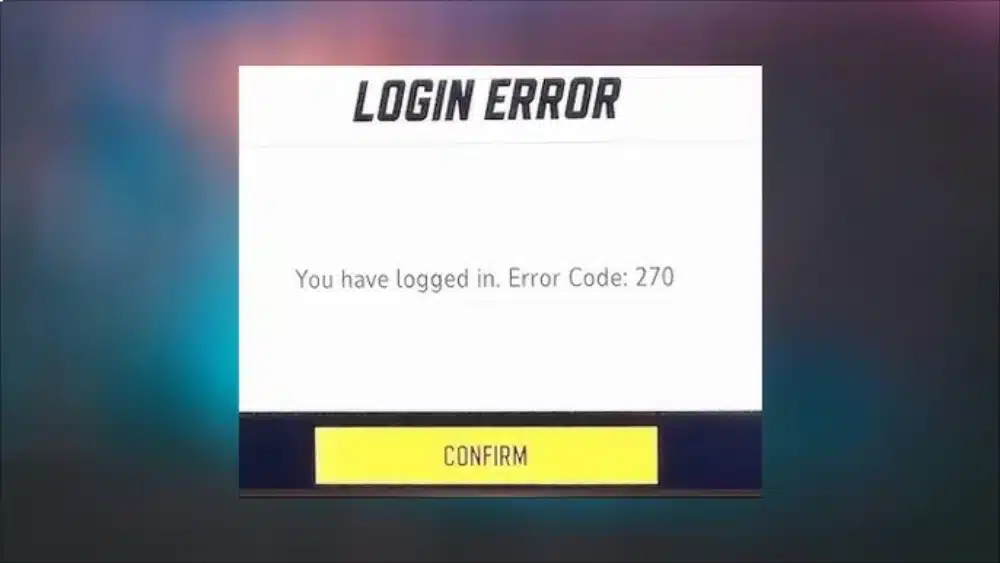
When players encounter Marvel Rivals Error Code 270, it often appears during login attempts, match launches, or after the game disconnects abruptly. The error is especially common during seasonal patches, early-access surges, or launch-day server congestion. To make things worse, variants like Error Code 270 Marvel Rivals and Marvel Rivals Error Code 270 appear under slightly different conditions, but they all stem from the same root cause: failure to handshake with the game servers.
Causes Behind the Error
Some of the most frequent triggers include:
- Server overload during peak hours
- Network instability or packet loss
- Corrupted cache or temporary files
- DNS conflicts
- Cross-platform syncing issues
- Temporary outages affecting logins
Why It Impacts All Platforms
Although the error is common on PC, it’s also widely reported on consoles like PS5. That’s why terms such as Marvel Rivals Error Code 270 ps5 and login Error Code 270 Marvel Rivals appear often in community discussions. Regardless of the device, the connection path remains the same, meaning the failure occurs before the game loads your profile data.
Understanding the Variants of Error Code 270
Different players see slightly different messages tied to Marvel Rivals Error Code 270, but all of them share the same origin. This is why identifying the variant you receive helps diagnose the exact step where the failure occurs.
Most Common Variants
- Error Code 270 Marvel Rivals
- Marvel Rivals Error Code 270
- you have logged in Error Code 270 Marvel Rivals
- Marvel Rival Error Code 270
Each variant appears under different conditions:
- During login
- When server authentication times out
- When the game detects duplicated sessions
- During maintenance windows
When the Error Appears Most Frequently
The issue tends to spike during:
- Major patches
- First-week seasonal launches
- Hotfix deployments
- Midnight local resets
- Free weekends or special events
This means some causes are beyond your control yet there are several proven solutions players use to fix the error on both PC and PS5.
Fixing Marvel Rivals Error Code 270: All Working Solutions
The fastest way to fix Marvel Rivals Error Code 270 is to stabilize your network connection and reset your game cache. However, because this error has multiple triggers, you may need to try more than one method until the game reconnects successfully.
Restarting and Resetting Basics
Before trying advanced fixes, start with the simplest actions:
- Restart your router
- Restart your PC or PS5
- Try logging in again after 1–2 minutes
- Check if servers are under maintenance
Advanced Solutions Players Report Working
Here are the most successful methods shared by the community:
1. Change DNS
Switch to Cloudflare (1.1.1.1) or Google DNS (8.8.8.8).
2. Reset Game Cache
Clearing temporary game files often solves handshake failures.
3. Use Wired Internet (Ethernet)
Wi-Fi drops cause packet loss that triggers Error Code 270.
4. Try a Different Network
Switch to a mobile hotspot briefly to bypass ISP routing conflicts.
5. Reinstall or Repair Game Files
A corrupted update can break server authentication.
Marvel Rivals Error Code 270 on PC
On PC, the error behaves slightly differently.
PC players often experience:
- Login error after switching accounts
- Error after VPN or network change
- Error after waking PC from sleep mode
In many cases, the issue is related to network routing or cached session data.
Quick Comparison: Error Code 270 by Platform
| Platform | Most Common Cause | Fix Difficulty |
| PC | Network instability or cached sessions | Easy |
| PS5 | Platform sync and suspended sessions | Easy |
| Cross-platform | Server overload | Wait required |
This table shows that Marvel Rivals Error Code 270 is rarely a serious problem.
Marvel Rivals Error Code 270 on PS5
The PS5 version is particularly prone to Marvel Rivals Error Code 270 ps5 due to console caching and network policies. Many console players report being stuck on login screens for several minutes before receiving variants like you have logged in Error Code 270 Marvel Rivals.
Why It Happens on PS5
- User profile sync conflicts
- Cached login tokens
- NAT type restrictions
- Automatic QoS settings on routers
Fixes Specifically for PS5
Try These Steps:
- Close the game fully (not just return to home)
- Rebuild PS5 database
- Change console DNS
- Disable IPv6 if enabled
- Restart your internet modem
When PS5 Players Must Wait
If the servers are overloaded after a patch, the error persists no matter what you do in that case, the only solution is patience until stability returns.
Preventing Error Code 270 From Returning
Once you manage to fix Marvel Rivals Error Code 270, it’s important to reduce the chances of it coming back, especially during competitive or ranked matches.
Tips to Keep the Error Away
- Avoid peak hours after major updates
- Restart the game after long sessions
- Keep your network ping stable
- Use modern DNS servers
- Update your OS and drivers
When It’s an ISP Problem
In some regions, routing from local ISPs to the Marvel Rivals servers becomes unstable. This leads to multiple recurring variants of error 270 such as Marvel Rivals Error Code 270 or Marvel Rival Error Code 270, even when everything seems fine at home.
How ExitLag Helps Reduce Marvel Rivals Connection Errors
When dealing with connection-heavy games like Marvel Rivals, tools like ExitLag can greatly improve gameplay stability. ExitLag optimizes the route between your PC and the game servers, reducing packet loss, improving ping, and stabilizing your connection to minimize occurrences of Marvel Rivals Error Code 270.
Why ExitLag Helps
ExitLag improves gameplay performance by:
- Reducing latency
- Stabilizing network paths
- Avoiding overloaded ISP routes
- Minimizing connection drops
- Enhancing responsiveness in team fights
When ExitLag Makes a Difference
ExitLag is especially useful when:
- Servers are overloaded
- ISP routes are unstable
- You play from a region far from the main servers
- You frequently see errors like Error Code 270 Marvel Rivals or login Error Code 270 Marvel Rivals
With a more reliable network path, your chances of hitting connection-related login failures decrease significantly, letting you enjoy smoother matches and consistent performance.
Continuing the Guide to Fixing Marvel Rivals Error Code 270
When players continue to experience issues related to Marvel Rivals Error Code 270, the frustration grows with every login attempt. Even after trying several solutions, variants like Error Code 270 Marvel Rivals, Marvel Rivals Error Code 270 ps5, and Marvel Rivals login Error Code 270 may appear unpredictably. To help you prevent new failures and ensure long-term stability, this second part of the guide expands with deeper strategies, advanced network adjustments, and player-tested solutions that go beyond basic troubleshooting.
One important detail is understanding how the game’s server structure behaves across regions. Marvel Rivals relies on dynamic routing, capacity scaling, and multi-server authentication layers. Because of that, even players with strong connections can face errors like login Error Code 270 Marvel Rivals or you have logged in Error Code 270 Marvel Rivals if the handshake between their ISP and the official servers fails at any point. Knowing how to work around those routing conflicts can make your gameplay far more reliable.
Advanced Fixes for Marvel Rivals Error Code 270
After addressing the basic solutions, many players look for deeper adjustments that can eliminate problem sources permanently. Since the root of Marvel Rivals Error Code 270 lies in connection instability or failed authentication, the fixes below focus on strengthening the entire network path between your device and the game server.
Strengthening Your Local Network
When your local setup is unstable, errors like Marvel Rivals Error Code 270 tend to show up randomly. While your internet might appear functional for browsing or streaming, game servers require a far more stable flow of packets.
Steps to reinforce your home setup:
- Check if your router firmware is outdated
- Move your console or PC closer to the router
- Disable QoS for gaming hours
- Disconnect unused devices occupying bandwidth
- Switch your connection to 5GHz Wi-Fi or Ethernet
Router and Modem Reboot Strategy
Players who struggle with recurring Error Code 270 Marvel Rivals report that simply resetting the router does not always solve the issue. Instead, using a proper reboot strategy often eliminates residual routing conflicts.
Advanced reboot method (recommended):
- Turn off your router and modem
- Wait exactly 90 seconds
- Turn on the modem first
- Wait for full synchronization
- Turn the router back on
- Reconnect your PC or PS5
This method forces your ISP to assign a fresh routing path, which often clears login-specific issues.
Optimizing Your Connection for Marvel Rivals
Even after fixing Marvel Rivals Error Code 270, long-term stability depends heavily on network optimization. Because the game operates with strict real-time communication requirements, every millisecond matters.
Using Custom DNS
Many players who repeatedly saw Marvel Rivals Error Code 270 found relief by switching to high-performance DNS servers.
Best DNS options for Marvel Rivals:
- Google: 8.8.8.8 / 8.8.4.4
- Cloudflare: 1.1.1.1 / 1.0.0.1
- Quad9: 9.9.9.9
Fast DNS servers reduce authentication failures and improve the speed at which the game establishes connection.
Eliminating Packet Loss
Packet loss is one of the primary reasons behind variants like you have logged in Error Code 270 Marvel Rivals. When the server fails to receive complete login data, it rejects the session.
Ways to reduce packet loss:
- Use a CAT6 Ethernet cable
- Avoid connecting multiple devices during gameplay
- Reset router MTU settings to automatic
Marvel Rivals Error Code 270 on PS5: In-Depth Solutions
Console players suffer differently from PC users. With Marvel Rivals Error Code 270 ps5, the root cause often lies in cached data, NAT restrictions, or background system processes competing for bandwidth.
Clear PS5 Cache Through Safe Mode
This method eliminates corrupted tokens and temporary files causing the error.
How to clear PS5 cache:
- Turn off your PS5 completely
- Hold the power button until you hear two beeps
- Enter Safe Mode
- Select “Clear Cache and Rebuild Database”
This refreshes login credentials and often removes network errors instantly.
Adjust NAT Type to Avoid Login Failures
A strict NAT Type 3 can easily cause login Error Code 270 Marvel Rivals due to blocked server ports.
How to fix it:
- Enable UPnP on your router
- Place PS5 in DMZ (advanced users only)
- Use wired connection
- Reset router NAT configuration
Avoiding Future Marvel Rivals Connection Failures
Fixing the current error is important, but preventing future issues ensures smooth sessions, especially during ranked gameplay.
Daily Habits to Keep Your Connection Stable
Players who maintain a stable setup rarely encounter Marvel Rivals Error Code 270.
Recommended habits:
- Restart your game after long sessions
- Avoid Wi-Fi on crowded networks
- Check server status before playing
- Keep your system updated
Monitor High-Traffic Periods
Marvel Rivals servers tend to overload during:
- New season launches
- Event announcements
- Major patch notes
- Free weekends
Planning your gameplay around these times reduces the risk of facing Marvel Rivals Error Code 270 again.
How ExitLag Improves Marvel Rivals Stability
ExitLag plays an essential role in preventing errors such as Error Code 270 Marvel Rivals by optimizing the exact route your connection takes to the game servers. Instead of relying on your ISP’s default path which may be unstable or overloaded ExitLag recalculates the most efficient route using multi-routing technology.
Benefits of Using ExitLag in Marvel Rivals
ExitLag significantly improves gameplay by:
- Reducing ping spikes
- Stabilizing the connection
- Eliminating packet loss
- Avoiding congested server routes
- Improving login speed
For players dealing with Marvel Rivals login Error Code 270, this stability makes a measurable difference. With smoother, more consistent routing, your device can authenticate faster and maintain uninterrupted gameplay even during busy server hours.
When ExitLag Is Most Effective
ExitLag becomes essential when:
- Your ISP has poor international routing
- You live far from official Marvel Rivals servers
- Your connection randomly drops
- You experience frequent authentication failures
If you want the most reliable online experience especially during competitive matches ExitLag is one of the strongest tools available.
Final Considerations
Marvel Rivals is a fast-paced game that relies heavily on stable communication between your system and the game servers. When failures occur, they often manifest through Marvel Rivals Error Code 270 or its variants such as Marvel Rival Error Code 270 and you have logged in Error Code 270 Marvel Rivals. By following the methods in this extended guide, you can reduce the frequency of these issues and maintain a smooth and enjoyable gaming experience.
Whether you play on PC or PS5, keeping your network optimized, your cache clean, and your routing stable ensures the game runs at its full potential. And with tools like ExitLag supporting your connection, the likelihood of facing login errors, timeouts, or authentication failures drops significantly.
Got questions or want to connect with other players? Join the conversation at the ExitLag Forum!