If your ultimate keeps freezing mid animation or your shots register a full second late, you already know how frustrating Marvel Rivals Ping Spiking can be. It does not matter how sharp your aim is when the server refuses to cooperate. Random spikes turn clean plays into desyncs, and ranked matches into a coin flip.
The good news is that most spikes have a clear, fixable cause. Marvel Rivals Ping Spiking rarely comes from a single problem. It usually stacks up from your router, your ISP route, and sometimes the game’s own server load.
So why is my ping so high in Marvel Rivals even when my internet speed test looks perfectly fine? The short answer is that speed and stability are not the same thing. A fast connection can still suffer from bufferbloat, congested routing paths, or overloaded regional servers, all of which cause the sudden ping jumps players report constantly.

What Causes Marvel Rivals Ping Spiking
Before fixing anything, it helps to understand where the problem actually starts. Ping spikes are almost never random, even though they feel that way in the middle of a team fight.
Several factors combine to create the spikes players see every match:
- Bufferbloat: Your router queues too much data during uploads or downloads, delaying small time-sensitive game packets.
- Background traffic: Launchers, cloud backups, and streaming apps quietly eat bandwidth while you queue.
- Server-side congestion: Some regional hubs get overloaded during peak hours, especially in Europe and Asia-Pacific.
- ISP routing: Your provider may send traffic through a longer, less direct path to the game’s data centers.
- Wi-Fi interference: Wireless signals fluctuate constantly, unlike a stable wired connection.
Notably, many players report steady ping around 27 to 33 ms that suddenly jumps to 170 ms or higher for a few seconds, then settles again. This pattern points directly at bufferbloat or momentary route congestion rather than a hardware failure.
How Server Regions Affect Ping
Marvel Rivals runs dedicated hubs across North America, Europe, the Middle East, South America, and Asia-Pacific. North America alone spreads across Oregon, Dallas, and Northern Virginia.
As a result, your matchmaking region has a massive impact on baseline latency. Players in Europe currently rely on Frankfurt and Warsaw hubs, which have faced reported instability during high traffic windows.
How To Check If It Is Your Network Or The Game
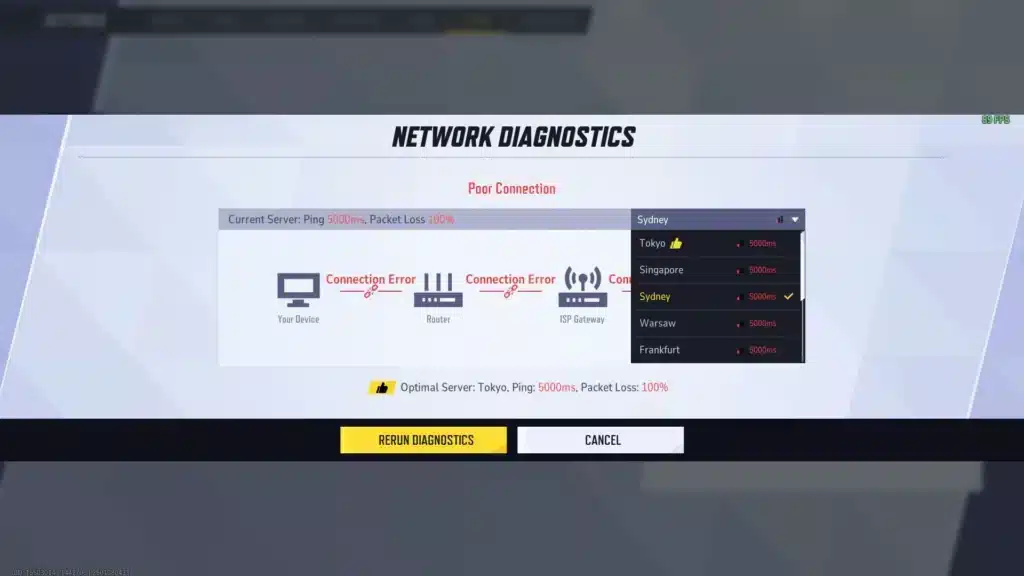
Marvel Rivals includes a built in Network Diagnostics Tool under the “Other” settings tab. Running this quick check tells you whether the issue sits with your own connection or with the game’s servers.
Here is the fastest way to confirm the source of the problem:
- Open Settings, then navigate to the “Other” tab and select Network Diagnostics.
- Run the quick check and note whether it flags your connection or the server route.
- Enable Network Stats in the display settings to watch ping and packet loss live during a match.
- If problems persist, locate client_diagnose.exe inside the game’s local files and run it as administrator for a deeper scan.
Why Is My Ping So High In Marvel Rivals During Ranked Matches
Ranked queues often feel worse than casual ones, and there is a practical reason for that. Competitive matchmaking sometimes searches farther for balanced opponents, which can quietly push you toward a less optimal server.
How Peak Hour Congestion Adds Up
Furthermore, peak hour congestion hits ranked lobbies harder simply because more players are online competing for the same server capacity. This is a major reason why is my ping so high in Marvel Rivals specifically during evenings and weekends.
In addition, some players noticed the game shifted from displaying one way travel time to two way ping. That single change made in-game numbers look roughly double what older comparisons suggested, which confused a lot of the community.
Is It A Display Bug Or A Real Spike
Not every scary number is a real problem. Distinguishing between a display quirk and an actual spike saves you from chasing the wrong fix.
| Symptom | Likely Cause | Quick Check |
|---|---|---|
| Ping reads high but gameplay feels smooth | Two way ping display change | Compare with a third party server ping test |
| Ping suddenly jumps every few minutes | Bufferbloat or background upload | Run a bufferbloat test during gameplay |
| Consistently high ping from match start | Wrong region selected | Manually pick the closest server hub |
| Ping spikes only during downloads | Router buffer overload | Pause downloads or enable QoS |
Fixing Marvel Rivals Ping Spiking Step By Step
Once you know the source, fixing it becomes far more straightforward. Most of these steps take only a few minutes and do not require new hardware.
Quick Fixes You Can Try Right Now
Start with the basics before moving into router level changes:
- Switch to a wired Ethernet connection instead of Wi-Fi whenever possible.
- Restart your router and modem by powering them off for 30 to 60 seconds.
- Close background apps like launchers, cloud sync tools, and streaming software before queuing.
- Manually select the server region closest to your physical location.
- Update your router firmware to the latest available version.
Advanced Router Settings That Actually Help
Basic restarts fix temporary issues, but persistent Marvel Rivals Ping Spiking usually needs a deeper router adjustment. This is where most guides stop, yet it is where the real improvement happens.
Enabling Smart Queue Management, often labeled SQM, QoS, or algorithms like Cake and FQ CoDel, is currently the single most effective router side fix. It forces small time sensitive packets, like the ones Marvel Rivals sends, to skip ahead of bulk downloads in the queue.
To set it up properly, follow these steps:
- Log into your router’s admin panel and locate the QoS or SQM section.
- Run a speed test and enter roughly 85 to 90 percent of your real upload and download numbers.
- Enable Cake or FQ CoDel if your router supports it, since these handle gaming traffic better than basic QoS.
- Save the settings and run a bufferbloat test to confirm the grade improved.
Why Is My Ping So High In Marvel Rivals: Common Mistakes To Avoid
Mistakes That Make Marvel Rivals Ping Spiking Worse
- Blaming their PC first: Many players upgrade hardware when the actual issue is routing or bufferbloat. Fix: run the in-game Network Diagnostics Tool before touching your rig.
- Ignoring background bandwidth: Cloud backups and other devices on the network quietly saturate the connection during matches. Fix: pause syncs and downloads before queuing for ranked.
- Staying on the default region: The client does not always pick the closest or least congested hub automatically. Fix: manually select your region every session, especially after a patch.
- Skipping router firmware updates: Outdated firmware often lacks proper bufferbloat handling. Fix: check for updates monthly, since manufacturers frequently patch queue management.
How To Avoid Repeating These Errors
Ultimately, most of these mistakes come from treating symptoms instead of causes. Running diagnostics first, then applying the right fix, saves hours of frustration.
Therefore, keep a simple habit: check Network Diagnostics before every troubleshooting session. It tells you exactly where to focus your effort.
How ExitLag Helps With Marvel Rivals Ping Spiking
After trying router tweaks and region changes, some routing problems simply sit outside your home network, on your ISP’s path to the game’s data centers. That is exactly the layer ExitLag was built to optimize.
ExitLag is not a VPN. It is a connection optimizer that scans multiple real time paths and automatically routes your traffic through the fastest, most stable one available for Marvel Rivals.
Consequently, this directly targets Marvel Rivals Ping Spiking caused by inefficient ISP routing rather than local hardware. The Multipath Technology sends your packets through several routes at once, so if one path degrades mid match, another keeps your connection steady instead of freezing your character.
ExitLag currently supports over 4,000 titles on PC and Mobile, backed by 1,500+ servers across 190+ countries. It is trusted by more than 30 million users and processes over 18 million optimizations every week.
What Makes ExitLag Different
Here is what makes it genuinely useful for a competitive shooter like this one:
- Real time Optimization: Cuts delay and packet loss so your abilities land when you actually press the button.
- Multi Internet: Supports up to four simultaneous connections, so a dropped line does not end your match.
- Traffic Shaper: Prioritizes game data over other apps competing for your bandwidth.
- AI powered routing: Selects the fastest stable path automatically, with manual customization if you prefer control.
ExitLag does not modify game files, inject code, or interact with anti cheat systems, so it stays completely safe to run alongside Marvel Rivals. Just avoid running it together with a VPN, since that combination reduces its effectiveness.
If routing issues keep interrupting your matches, grab the ExitLag Download and test your route before your next ranked queue.
Pro Tips: Reducing Marvel Rivals Ping Spiking
- Test at different times of day: Peak hour congestion varies by region, so running a quick check before queuing helps you spot bad windows early.
- Prioritize your gaming PC in router settings: Most modern routers let you assign device priority, which keeps your session ahead of other traffic on the network.
- Use a 5GHz or 6GHz band if wired is not possible: These bands suffer less interference than the older 2.4GHz frequency, reducing wireless related spikes.
- Recheck your region after every major patch: Server hub performance shifts as player populations move between updates, so what worked last month may not be optimal today.
Frequently Asked Questions About Marvel Rivals Ping Spiking
Does Server Region Really Change My Marvel Rivals Ping That Much
Yes, and the difference can be significant. Selecting a hub hundreds of miles closer to you can cut baseline latency dramatically, especially if you were previously matched onto a distant default server.
Can A Good Internet Plan Still Have Ping Spikes
Absolutely, and this surprises a lot of players. Bandwidth and latency are separate metrics, so a high speed plan with poor queue management can still produce sharp, recurring spikes during gameplay.
Is ExitLag Safe To Use With Marvel Rivals
Yes, it is safe. ExitLag does not alter game files or interact with anti cheat systems, and it works the same way across supported competitive titles without triggering bans.
All game images used in this blog post belong to NetEase Games and Marvel. They are used for informational and educational purposes only and do not imply endorsement or affiliation with the rights holders.
Got questions or want to connect with other players? Join the conversation at the ExitLag Forum!