Marvel Rivals has established itself as one of the most popular hero shooters available, but like every online game, its servers occasionally go offline for maintenance or experience unexpected outages. Knowing how to check server status quickly prevents you from spending time troubleshooting your own connection when the issue is on the game’s end.
Marvel Rivals Servers are operated by NetEase Games and support players across multiple global regions. When servers are fully operational, most players experience ping between 20 and 80ms depending on their proximity to the nearest data center. When servers go down, no amount of local troubleshooting will restore your connection until the maintenance window closes.
The fastest way to check Marvel Rivals Servers status is through the official Marvel Rivals server status page or community tracking sites like DownDetector. Planned maintenance is announced through the official Marvel Rivals X (Twitter) account at least several hours before it begins, and unscheduled outages appear on these monitoring sites as player reports accumulate in real time.

Are Marvel Rivals Servers Down Right Now?
When you cannot connect to Marvel Rivals, the first priority is determining whether the issue is server-side or local. These two categories require completely different solutions, and skipping this check wastes time on troubleshooting steps that cannot help.
How to Check Marvel Rivals Server Status
Use these methods in order:
- Official Marvel Rivals Server Status Page: Visit marvelrivals.gg/server-status for real-time server condition reports updated by the community and team.
- DownDetector: The DownDetector page for Marvel Rivals aggregates player-submitted outage reports in real time. A spike in reports strongly indicates a server-side issue.
- Official Marvel Rivals X (Twitter) Account: Planned maintenance windows and emergency outages are announced here. Check for pinned posts or recent updates.
- In-Game Error Code: If you receive a specific error code at the login screen, search for that code on the Marvel Rivals support page to determine whether it indicates a server outage or a local connection issue.
Is Marvel Rivals Down: What Planned Maintenance Looks Like
Planned maintenance periods are announced in advance and follow a predictable pattern. Season and patch updates are the most common triggers for scheduled downtime.
Season 8.5 maintenance, for example, began on June 12, 2026 at 9 AM UTC and was expected to last approximately 2 hours. During this period, all game servers were entirely offline and no connections were possible regardless of your local network setup.
Typical maintenance windows last 1 to 3 hours, though complex updates with new heroes or map changes can extend beyond the initial estimate.
Marvel Rivals Servers Down: What to Do While Waiting
If Marvel Rivals Servers Down is confirmed, there is genuinely nothing you can do on your end to restore access. However, you can:
- Follow the official X account for update posts about server restoration
- Check DownDetector for live user reports indicating whether the outage is improving
- Prepare for the return by reviewing patch notes for whatever update triggered the maintenance
- Watch for the maintenance countdown timer if the official status page provides one
How to Check If Marvel Rivals Is Down vs. Your Connection
When you cannot connect and server monitoring sites show no widespread reports, the problem may be on your side. The distinction between server-side and local issues is straightforward to test.
Testing Local vs. Server Issues
- Test another online game: If a second game connects without issues, Marvel Rivals servers are likely the problem. If the second game also fails, your router or ISP connection is the issue.
- Restart your router: Power-cycle by unplugging for 30 seconds, then plug back in and wait for full restart. This resolves temporary ISP routing issues that affect specific game servers.
- Ping check through the game: Enable Network Stats in Marvel Rivals display settings to show your real-time ping and packet loss overlay in the top corner of your screen during matches.
- Use the Network Diagnostics Tool: Found in the game’s Other settings, this tool identifies whether latency problems originate from your network or from the game’s servers specifically.
Marvel Rivals Servers Lagging: How to Fix High Ping
If the servers are online but Marvel Rivals Servers Lagging is still affecting your matches, the issue is connection quality rather than a full outage. Several optimizations can dramatically improve your performance.
Fix 1: Switch to a Wired Connection
Wi-Fi introduces packet loss and variable latency that wired Ethernet eliminates. If you are playing on Wi-Fi, switching to a direct Ethernet cable connection to your router is the single highest-impact change you can make immediately.
Wi-Fi interference from neighboring networks, wall materials, and other wireless devices causes ping spikes that appear without warning mid-match. A wired connection removes all of these variables.
Fix 2: Select the Optimal Server Region
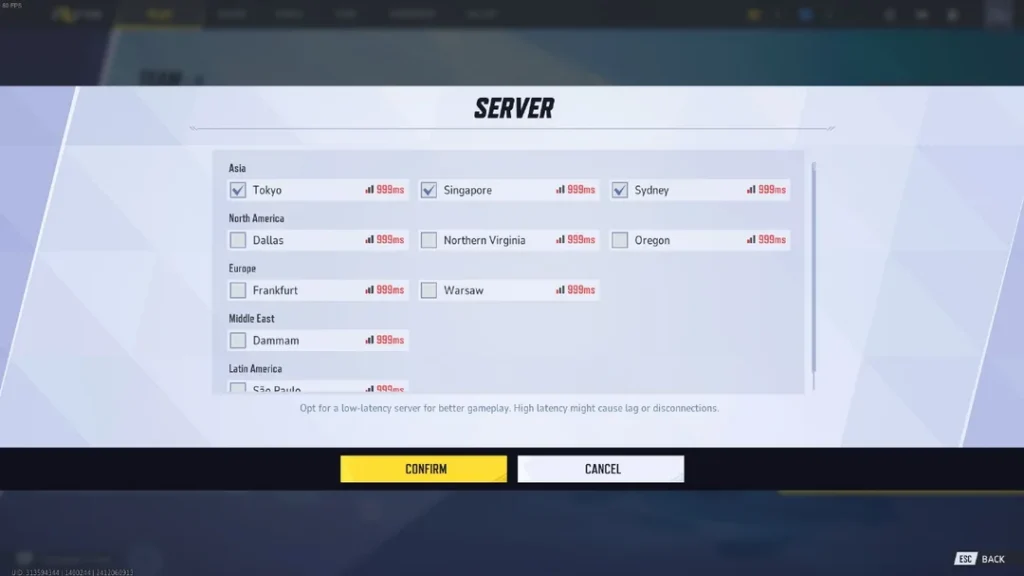
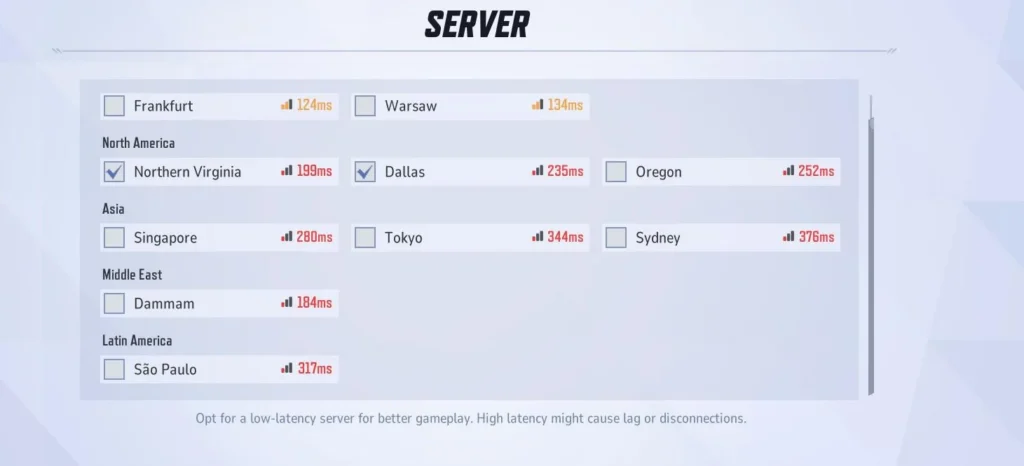
Marvel Rivals allows you to manually select which server region to connect to before queuing:
- Open the server selection menu from the main menu or pre-match lobby
- Check the displayed ping values for each available region
- Select the region with the lowest displayed ping
- Queue as normal
Connecting to a geographically closer server reduces the physical distance your packets travel, which directly lowers baseline latency. Do not assume the automatically selected server is always the closest one.
Fix 3: Close Background Applications
Background applications compete with Marvel Rivals for bandwidth and CPU resources. Before every session:
- Close download managers, streaming services, and cloud backup applications
- Disable Windows Update automatic downloads during your play session
- Stop any large file transfers on your network from other devices in your home
Even a single active background download can cause packet loss severe enough to cause noticeable lag during intense combat sequences.
Fix 4: Restart Your Router Before Sessions
Routers accumulate stale routing table entries over time that can create suboptimal network paths to game servers. A simple restart clears these entries and often resolves persistent low-level ping issues without requiring any other changes.
How Long Will Marvel Rivals Be Down During Maintenance?
Maintenance duration varies depending on the scale of the update. Here is a general reference for expected downtime:
| Update Type | Expected Duration |
|---|---|
| Minor balance patch | 1 to 1.5 hours |
| Mid-season update (e.g., Season 8.5) | 2 to 3 hours |
| Full season update with new hero | 3 to 4 hours |
| Emergency hotfix | 30 minutes to 2 hours |
| Unexpected server outage | Variable, no guaranteed window |
When maintenance runs longer than the announced estimate, NetEase typically posts updates on the official X account explaining the delay and providing a revised timeline.
Marvel Rivals Down Detector: Best Community Resources
Community-driven monitoring tools fill the gap when official communications are delayed.
Best Tools for Monitoring Marvel Rivals Server Status
- DownDetector Marvel Rivals page: Real-time outage reports from players worldwide with a graph showing report volume over time
- marvelrivals.gg/server-status: A fan-maintained community status page updated by active players
- checkserverping.com Marvel Rivals: Provides real-time latency data to specific Marvel Rivals server regions, showing both current ping and historical performance trends
- Official Marvel Rivals Discord server: Moderators often post server status updates faster than other channels
- r/MarvelRivals subreddit: Active players report outages in real time, and the front page during a major outage typically surfaces these reports quickly
Marvel Rivals Lag: Fix It Permanently With ExitLag
Even when Marvel Rivals Servers are fully operational, connection quality between your device and the server determines your in-game performance. High ping, packet loss, and routing instability are all fixable without waiting for a server maintenance window.
Why Your Marvel Rivals Ping Fluctuates
Your ISP routes traffic to game servers through multiple relay points, each of which adds latency. These routes are not optimized for gaming, and they change based on network load throughout the day. During peak hours, the route from your home to the NetEase servers can degrade significantly even if your overall internet speed is perfectly fine.
The result is inconsistent ping, sudden spikes during intense fights, and packet loss that causes abilities to fail to register or character movements to rubber-band.
How ExitLag Fixes Marvel Rivals Connection Issues
ExitLag is a game connection optimizer that analyzes multiple available network paths to the Marvel Rivals servers in real time and routes your game traffic through the fastest, most stable option. It is not a VPN and does not affect any applications outside of your supported gaming sessions.
ExitLag’s Multipath Technology simultaneously routes your Marvel Rivals packets through several network paths. If one path encounters congestion during a match, the others maintain your connection stability without any interruption on your end. The result is consistently lower ping, reduced packet loss, and fewer mid-match lag spikes.
Key benefits for Marvel Rivals players:
- Real-time routing optimization to minimize delay between your inputs and server registration
- Multipath Technology for connection redundancy during team fights and critical ability exchanges
- AI-powered path selection that adapts as network conditions change throughout your session
- Traffic Shaper to prioritize Marvel Rivals traffic over background applications automatically
For competitive Marvel Rivals, aim for under 60ms for a comfortable experience and under 30ms for peak performance. ExitLag helps players consistently achieve and maintain lower ping than their standard ISP routing provides.
Download ExitLag for PC and stop letting your ISP’s routing choices decide whether your matches are smooth or laggy.
Marvel Rivals Servers: Complete Status and Lag Guide
Marvel Rivals Servers go down periodically for planned maintenance and occasionally for emergency fixes. The key to minimizing frustration is knowing exactly where to check status and how to distinguish a server issue from a local connection problem.
Quick Reference: Checking Marvel Rivals Server Status
- DownDetector: Real-time player outage reports
- Official Marvel Rivals X account: Planned maintenance announcements
- marvelrivals.gg/server-status: Community status tracking
- In-game Network Stats: Real-time ping and packet loss during matches
Quick Reference: Fixing Marvel Rivals Lag
- Switch to wired Ethernet connection
- Select optimal server region manually
- Close background applications and downloads
- Restart router before sessions
- Use ExitLag for optimized routing to Marvel Rivals servers
When Are The Marvel Rivals Servers Down is the question, check DownDetector first and the official X account second. When the servers are confirmed online but lag persists, the solutions above address every major local connection issue affecting your Marvel Rivals Servers experience.
All game images used in this blog post belong to NetEase Games and Marvel. They are used for informational and educational purposes only and do not imply endorsement or affiliation with the rights holders.
Got questions or want to connect with other players? Join the conversation at the ExitLag Forum!