Creating minecraft banner designs is one of the easiest ways to give a base, castle, village, or multiplayer headquarters its own identity. With a banner, dyes, and the right patterns, a simple block can become a flag, emblem, warning sign, faction symbol, or decorative centerpiece.
The best minecraft banner designs do not require dozens of complicated steps. By combining a strong base color with carefully selected layers, you can create everything from medieval flags and fantasy emblems to Creeper-inspired banners, Nether themes, and minimalist symbols.
So, what are minecraft banner designs and how do you make them? Start with a colored banner, place it in a Loom with dye, choose a pattern, and repeat the process to add more layers. Certain designs require special Banner Pattern items, while many common shapes are available directly through the Loom.
The order of those layers matters. Each new pattern is placed over the patterns already on the banner, so changing the sequence can completely alter the final appearance.
That makes planning just as important as choosing colors. Before using harder-to-obtain materials, decide what you want the finished banner to represent and build the design from the background forward.
Minecraft Banner Designs: How Banners Work
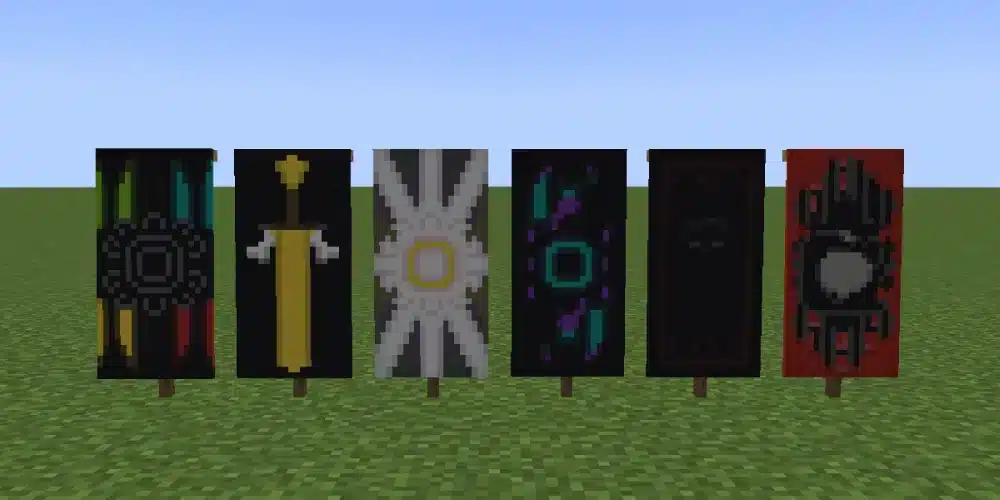
Before attempting elaborate banner designs on minecraft, it helps to understand the basic system.
Banners are tall decorative blocks that can display colored patterns. Instead of being restricted to a single texture, players can combine a base banner color with multiple pattern layers to produce customized results.
How to make a basic banner
A standard banner starts with wool and a stick.
The wool determines the banner’s initial base color, so choose carefully if you already have a finished design in mind.
For example, a medieval banner could begin with red or black, while an ocean-themed design might start with blue or cyan.
Once the banner exists, you can begin adding patterns with a Loom.
Your basic preparation should include:
- A banner in your chosen base color.
- One or more dyes.
- A Loom.
- Any special Banner Pattern items required by the design.
- Extra materials if you plan to experiment with several versions.
Creating multiple blank banners at once can be useful when testing designs for minecraft banners.
If one combination does not look right, you can experiment without rebuilding your entire material setup.
How to use a Loom for banner designs
The Loom simplifies banner customization.
Place your banner into the Loom and add the dye you want to use. The interface then displays the available pattern choices.
Choose a pattern and preview the result.
Once you are satisfied, take the customized banner. You can place it back into the Loom with another dye to add the next layer.
This process is what makes complex banner design minecraft combinations possible.
Instead of trying to produce the entire image at once, you build it gradually.
Think of each pattern as another layer in a simple graphics editor.
Cool Banner Designs Minecraft Players Can Make
You do not need a huge collection of rare items to create cool banner designs minecraft players will recognize.
A strong theme and good color contrast can be enough.
Creeper-inspired banner
The Creeper is one of Minecraft’s most recognizable creatures, making it an obvious inspiration for a banner.
Start with green as your dominant color.
Then use darker details to create a threatening face-like design. A dedicated Creeper Banner Pattern can also be used for the official Creeper Charge pattern.
A Creeper-inspired palette could use:
- Green.
- Lime.
- Black.
- Dark green-style contrasts where available through your chosen dyes and patterns.
This type of banner works especially well around mob farms, dangerous entrances, trap-themed builds, or Creeper-focused areas.
It is also a good example of why cool designs for banners in minecraft do not necessarily need many colors.
Two or three contrasting tones can be more recognizable than an overly complicated combination.
Enderman-inspired banner
For an Enderman theme, start dark.
Black provides an obvious background, while purple or magenta details can evoke the Enderman’s eyes and the visual identity of the End dimension.
Keep the composition simple.
A dark central field with small bright details usually communicates the theme more effectively than filling the entire banner with purple patterns.
Other mob and dimension-inspired concepts include:
- Wither-themed black and gray banners.
- Skeleton-inspired monochrome banners.
- Nether banners using red and black.
- Blaze-inspired yellow and orange designs.
- End-themed black and purple banners.
- Warden-inspired dark cyan combinations.
These are creative themes rather than official preset banner recipes, so you can adjust them to fit your build.
Best Banner Designs Minecraft for Survival Bases
The best banner designs minecraft players use are often the ones that match their architecture.
A beautiful banner can look completely out of place if its colors and theme clash with the surrounding build.
Medieval kingdom banner
Castles are perfect places for banners.
Red, white, black, yellow, and blue can all work well for medieval-inspired combinations. Borders, crosses, diagonals, and central symbols help create the appearance of a heraldic emblem.
For a royal castle, try a strong base color with a contrasting central pattern.
Purple and yellow can create a regal appearance, while red and white work well for a traditional kingdom aesthetic.
Placement also matters.
Use matching banners:
- Beside the castle entrance.
- Above gateways.
- Inside a throne room.
- Along exterior walls.
- Around towers.
- Inside a great hall.
Repeating the same banner designs minecraft combination throughout the structure creates a stronger visual identity.
Viking and warrior banners
Viking-inspired builds often benefit from simpler patterns.
Dark red, brown-like visual palettes, black, white, and gray can complement wood, stone, and darker construction materials.
Try symmetrical shapes or strong vertical divisions.
You can also create several related banners instead of using one identical flag everywhere.
For example, the main hall could display the primary emblem while smaller buildings use simplified versions of the same colors.
That makes an entire settlement feel connected without becoming repetitive.
Awesome Banner Designs Minecraft for Different Builds
Different builds call for different awesome banner designs minecraft combinations.
Instead of choosing a banner first, consider the architecture and environment where it will appear.
Japanese-inspired and fantasy banners
A Japanese-inspired build can benefit from restrained designs.
White and red are an obvious high-contrast combination, while black can provide additional definition. Minimalist circles, borders, and central shapes work particularly well with temple-inspired structures.
Fantasy builds allow much more experimentation.
Purple, cyan, blue, black, and white can create magical-looking banners for wizard towers, enchanted libraries, or fantasy castles.
Here are several starting palettes:
| Banner Theme | Suggested Colors | Good Placement |
| Medieval | Red, black, white | Castles and villages |
| Nether | Black, red, orange | Nether bases |
| End | Black, purple, magenta | End portals and bases |
| Ocean | Blue, cyan, white | Ships and docks |
| Forest | Green, lime, white | Nature builds |
| Royal | Purple, yellow, white | Palaces and throne rooms |
| Ice | White, light blue, cyan | Frozen castles |
| Dark fantasy | Black, purple, red | Fortresses and towers |
Treat these as starting points rather than fixed recipes.
The strongest minecraft good banner designs usually match the player’s own build palette.
Pirate and ocean banners
Ships are another perfect use for banners.
Black and white can create a classic pirate aesthetic, while blue, cyan, and white fit naval or ocean-themed builds.
A skull-like design works for pirate ships, but you can also create an original fleet symbol.
Try using one emblem across:
- Ship sails and decks.
- Harbor entrances.
- Docks.
- Coastal forts.
- Storage buildings.
- Island bases.
Using consistent colors makes separate structures look like part of the same faction.
Designs for Banners in Minecraft Using Special Patterns
Some designs for banners in minecraft use patterns that are not part of the basic unrestricted Loom selection.
Instead, you need the corresponding Banner Pattern item.
Banner Pattern items explained
Banner Pattern items unlock particular designs in the Loom.
When one is required, place the pattern item into the appropriate Loom slot alongside the banner and dye.
The Banner Pattern itself is not consumed when you apply its design, so you can reuse it for additional banners.
This is useful when decorating a large castle or multiplayer settlement with matching flags.
Depending on your Minecraft version, special patterns can include distinctive designs such as Creeper Charge, Skull Charge, Flower Charge, Thing, Snout, Flow, Guster, Field Masoned, and Bordure Indented.
Because Minecraft continues to receive updates, always check the requirements for the version and edition you are playing before collecting materials for a specific pattern.
Field Masoned and Bordure Indented
Two patterns deserve special attention because their acquisition changed in newer Java releases.
Field Masoned and Bordure Indented use dedicated Banner Pattern items rather than simply appearing as unrestricted choices.
Field Masoned creates a brick-like pattern.
Bordure Indented creates an angular decorative border around the banner.
These are particularly useful for advanced cool minecraft banner designs because they can add texture around or behind a more recognizable central symbol.
Use them as supporting layers rather than assuming every special pattern needs to become the main feature.
Banner Design Minecraft: Step-by-Step Loom Guide
Once you understand the interface, creating a banner design minecraft becomes a repeatable process.
The biggest challenge is deciding the order of the layers.
Add your first pattern
Follow this workflow:
- Craft or obtain a banner in your preferred base color.
- Place the banner into a Loom.
- Add your chosen dye.
- Select the first pattern.
- Preview the result.
- Take the customized banner.
- Put it back into the Loom.
- Add another dye and select the next pattern.
- Use a Banner Pattern item when a special design requires one.
- Continue until the banner matches your intended appearance.
Start with large background elements.
Then add smaller details.
For example, if you want a central symbol surrounded by a border, create the background first and apply the border and symbol in the correct visual sequence.
Why pattern order matters
Imagine placing a large solid shape over a tiny detail.
The new layer may hide the detail underneath.
That is why advanced designs for minecraft banners should be planned from the background toward the foreground.
A practical sequence is:
Base color → large background pattern → division or gradient → central symbol → border → finishing detail
Not every banner needs all these steps.
In fact, some of the strongest designs use only a few layers.
Cool Minecraft Banner Designs With Simple Patterns
Complexity does not automatically create better cool minecraft banner designs.
Simple banners can be easier to recognize, cheaper to reproduce, and more suitable for Survival Mode.
Easy two-color banners
Start with two colors that contrast clearly.
Good combinations include:
- Black and white.
- Red and white.
- Blue and white.
- Purple and black.
- Yellow and black.
- Green and white.
- Cyan and dark blue-style combinations.
Then choose one prominent pattern.
A diagonal division can produce a military or faction-style flag, while a central shape creates a more emblematic appearance.
Borders can also transform an otherwise plain banner.
This makes two-color designs ideal for beginners experimenting with cool banner designs minecraft for the first time.
Layered banners with three or more colors
Once you understand two-color banners, add a third color.
The third color should usually have a purpose.
For example, it might provide a highlight around the central symbol or create a border separating two darker colors.
Avoid adding colors simply because they are available.
A useful rule is to assign each color a role:
- Background.
- Main symbol.
- Accent.
This keeps the final banner readable.
How to Create Your Own Banner Designer Minecraft Style
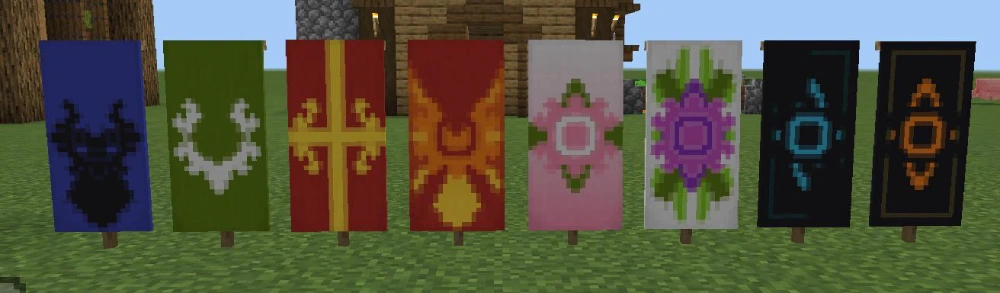
A banner designer minecraft approach is useful when you want an original emblem rather than copying a finished recipe.
Start with the idea, not the Loom.
Start with a theme and color palette
Ask what the banner represents.
Is it for a kingdom? A pirate ship? An underground city? A multiplayer faction? A Nether fortress?
Once you know the theme, select two or three main colors.
Then decide what players should notice first.
Your workflow can be:
Theme → palette → base → main shape → secondary detail → border
This approach prevents random patterns from taking over the design.
For example, a Nether fortress could use black as the base, red as the main pattern, and yellow or orange as an accent.
An ocean kingdom might use blue, white, and cyan instead.
Preview layers before using special materials
Planning becomes more important when your design uses Banner Pattern items that took time to obtain.
Test simpler combinations first.
You can also create a temporary banner to experiment with the visual order before reproducing the final version across an entire base.
Most importantly, remember that layers interact.
A great individual pattern can disappear beneath the next one if you choose the wrong order.
Minecraft Good Banner Designs for Multiplayer Bases
Multiplayer is where minecraft good banner designs can become more than decoration.
They can provide a consistent visual identity for a group, settlement, shop, or community project.
Team and faction banners
Suppose four friends build a shared medieval kingdom.
Instead of decorating every building differently, the group can choose one banner as its main emblem.
That banner could appear at:
- The main gate.
- Individual houses.
- Farms.
- Defensive towers.
- Nether portals.
- Meeting rooms.
- Community storage areas.
Players immediately recognize which structures belong to the group.
You can even create variations for different roles while preserving the same base colors.
Marking bases and important locations
Banners can also act as visual markers.
Use different colors to identify specific areas of a large settlement.
For example:
| Color Theme | Possible Meaning |
| Red | PvP or combat area |
| Blue | Harbor or water district |
| Green | Farms |
| Yellow | Trading area |
| Purple | Enchanting or magic district |
| White | Main community buildings |
These meanings are entirely player-created.
That flexibility is what makes banner designs on minecraft so useful in multiplayer worlds.
Minecraft Banners and Multiplayer With ExitLag
Showing off awesome banner designs minecraft is even more enjoyable when those banners become part of a shared base or server.
Minecraft multiplayer lets communities create towns, factions, castles, shops, minigames, and survival worlds where recognizable designs can become part of the server’s visual identity.
Using banners in multiplayer worlds
Banners do not provide combat or network advantages.
Their purpose is visual.
However, consistent banners can make a large multiplayer project easier to understand by giving different factions or locations their own recognizable identity.
They are particularly useful for SMP worlds where several groups build in the same region.
Your faction might use one banner design minecraft at every major outpost, while another group develops an entirely different emblem.
How ExitLag supports Minecraft multiplayer
While banners handle the visual side of your world, ExitLag focuses on connection performance for supported Minecraft multiplayer experiences on PC.
ExitLag’s Real-Time Optimization evaluates network routes during gameplay, while Multipath Connection can use multiple simultaneous routes to improve connection stability. Traffic Shaper can also help prioritize gaming traffic when other applications are competing for your connection.
For players joining distant Minecraft servers or spending long sessions on SMP worlds, optimized routing can help reduce problems related to unstable routes, latency variation, and packet loss.
ExitLag does not change banner graphics or crafting mechanics. Instead, it focuses on helping provide a more stable network experience while you build, explore, and play online.
FAQ
The easiest way to understand minecraft banner designs is to think in layers. Start with a base color, apply patterns through the Loom, and build the final image one element at a time.
Once you understand that system, creating original banners becomes much easier.
Craft or obtain a banner and use a Loom.
Place the banner and a dye into the Loom, choose an available pattern, and apply it. Then place the customized banner back into the Loom to continue adding layers.
Certain designs require a corresponding Banner Pattern item.
The best banner designs minecraft players can make depend on the build where the banner will appear.
Medieval banners work well for castles, black-and-purple designs complement End builds, red-and-black patterns fit Nether bases, and blue or cyan banners are excellent for ocean builds.
The best option is usually one that matches the surrounding architecture.
Use strong color contrast and avoid adding unnecessary details.
Start with two or three colors, choose a recognizable main shape, and add supporting patterns only when they improve the design.
Many cool designs for banners in minecraft are effective precisely because they remain simple.
A Loom is used to apply patterns to banners.
Add a banner and dye, then choose the pattern you want. Special patterns can require an additional Banner Pattern item.
The Loom makes customization much easier than trying to manage complicated banner combinations through other methods.
No.
A Banner Pattern item is not consumed simply because you use it to apply its associated design in the Loom.
That means one pattern item can help you reproduce the same emblem across multiple banners.
A Creeper Charge can be applied using the appropriate Creeper Banner Pattern in the Loom with a banner and dye.
You can then combine that recognizable face with backgrounds, borders, gradients, or other layers to create more elaborate cool minecraft banner designs.
Banner and shield interaction depends on Minecraft edition and version.
Java Edition allows a banner design to be applied to a shield, making matching banners and shields a popular choice for medieval or faction builds.
Players on other editions should check the mechanics available in their current version rather than assuming Java functionality is identical everywhere.
Every additional pattern changes the visible design.
Later patterns appear over earlier ones, so a large foreground layer can cover details underneath it.
Plan complex banners from the background forward.
Contrast is usually more important than any specific combination.
Popular pairings include black and white, red and white, purple and black, blue and white, and yellow and black.
Three-color designs can add an accent without becoming overly complicated.
Minecraft provides a way to remove the topmost banner layer using a cauldron containing water in editions where that mechanic is supported.
This is useful if the most recently added pattern does not look right.
It also reinforces why building banners layer by layer is helpful: mistakes can be corrected without necessarily starting from zero.
Field Masoned creates a brick-like banner pattern, while Bordure Indented produces an indented decorative border.
In newer Java versions, these designs use their own Banner Pattern items rather than simply appearing as unrestricted Loom patterns.
They can be excellent supporting layers for castle and medieval-themed banners.
Minecraft banners are customized by combining the patterns available through the game’s banner system.
You cannot simply upload any arbitrary image through the normal Survival Loom interface and turn it into a banner.
Instead, creativity comes from combining colors, pattern shapes, and layers.
This limitation is exactly why creative banner designer minecraft combinations can be so impressive.
Yes, particularly as visual identifiers.
They can mark faction territory, decorate shops, identify districts, establish team colors, or give community buildings a consistent style.
They remain decorative rather than providing competitive bonuses.
Ultimately, the best minecraft banner designs combine a clear theme, strong colors, and carefully ordered layers instead of using every available pattern at once. Whether you want cool banner designs minecraft for a castle, awesome banner designs minecraft for a multiplayer faction, or simple designs for banners in minecraft for a Survival base, start with the Loom, build from the background forward, and experiment until the emblem fits your world. With enough creativity, minecraft banner designs can turn even a simple wall, tower, ship, or village entrance into something players immediately recognize.
All game images used in this blog belong to Mojang Studios. They are used for informational/educational purposes only and do not imply endorsement or affiliation with the rights holders.
Got questions or want to connect with other players? Join the conversation at the ExitLag Forum!