Finding specific biomes is one of Minecraft’s biggest challenges, and the term Minecraft biome finder has become increasingly popular among players seeking efficiency and precision.
Using a Minecraft biome finder allows players to skip endless wandering and instead explore their worlds with purpose, focusing on the exact locations they need for resources, builds, or progression.
What is a Minecraft biome finder?
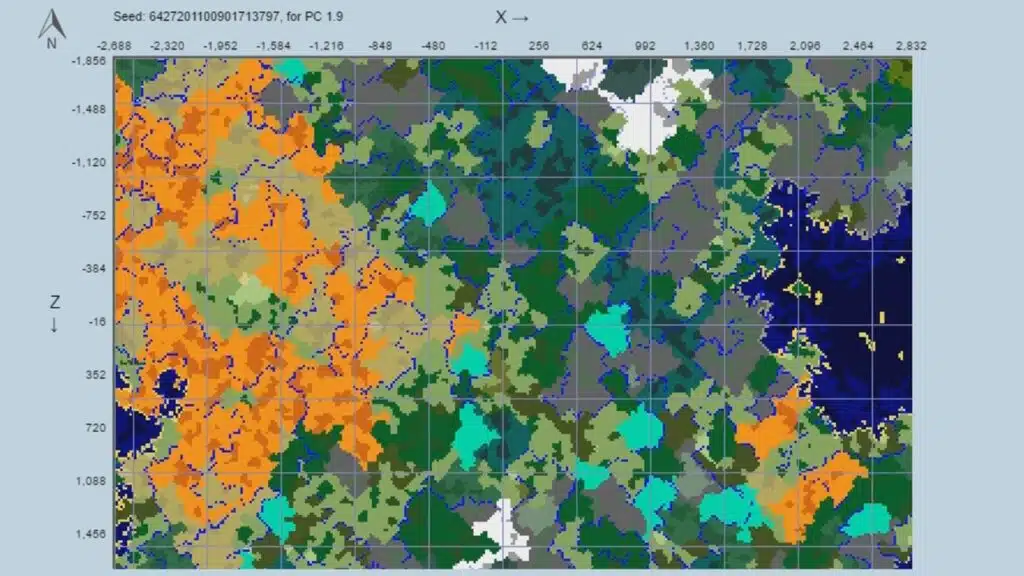
A Minecraft biome finder is any tool, command, or method that helps identify where specific biomes generate within a world seed. These tools can be external platforms, in-game commands, or mods that reveal biome distribution based on Minecraft’s generation system.
Understanding how to find biomes in Minecraft is essential because world generation has evolved significantly. Players now rely on tools, commands, and planning to locate rare environments efficiently.
Why the Minecraft Biome Finder Is Essential
Faster Access to Resources
Using a Minecraft biome finder dramatically reduces the time needed to gather biome-specific materials.
Players can quickly locate:
- Rare blocks like mycelium
- Unique vegetation such as bamboo or cherry trees
- Exclusive mobs tied to specific regions
Improved Exploration Strategy
Instead of random exploration, players can follow a structured plan.
This helps to:
- Optimize travel routes
- Reduce wasted time
- Focus on progression goals
Better Building Opportunities
Choosing the right biome is crucial for aesthetic builds.
For example:
- Cherry Grove for scenic builds
- Desert for temples and open layouts
- Snowy biomes for themed structures
Types of Biome Finder Minecraft Tools
External Seed Analyzers
External tools are the most popular way to find biomes Minecraft efficiently.
These platforms allow players to input a seed and preview biome locations instantly.
Common features include:
- Full biome maps
- Coordinate markers
- Structure indicators
However, players must ensure compatibility with their edition.
In-Game Commands
The Minecraft find biome command is one of the simplest built-in tools.
Using /locate biome, players can instantly get coordinates for nearby biomes.
Benefits include:
- No external tools required
- Works directly in-game
- Reliable for supported versions
Limitations:
- Requires cheats or permissions
- Not always available on servers
Debug Tools (Java Edition)
Java players can use the F3 menu to identify their current biome.
This is useful for:
- Verifying location
- Tracking biome transitions
Mods and Mapping Tools
Mods expand the functionality of biome finder for Minecraft significantly.
Popular features:
- Real-time maps
- Biome overlays
- Waypoint systems
These are ideal for long-term survival worlds.
How to Use a Minecraft Biome Finder Step by Step
Basic Workflow
- Find your world seed
- Open a biome finder Minecraft tool
- Enter the seed
- Select your edition
- Analyze biome locations
- Travel to coordinates
Travel Optimization Tips
Once you know the location, efficient travel becomes key.
Best methods include:
- Nether travel (8x faster)
- Elytra flying
- Ice highways
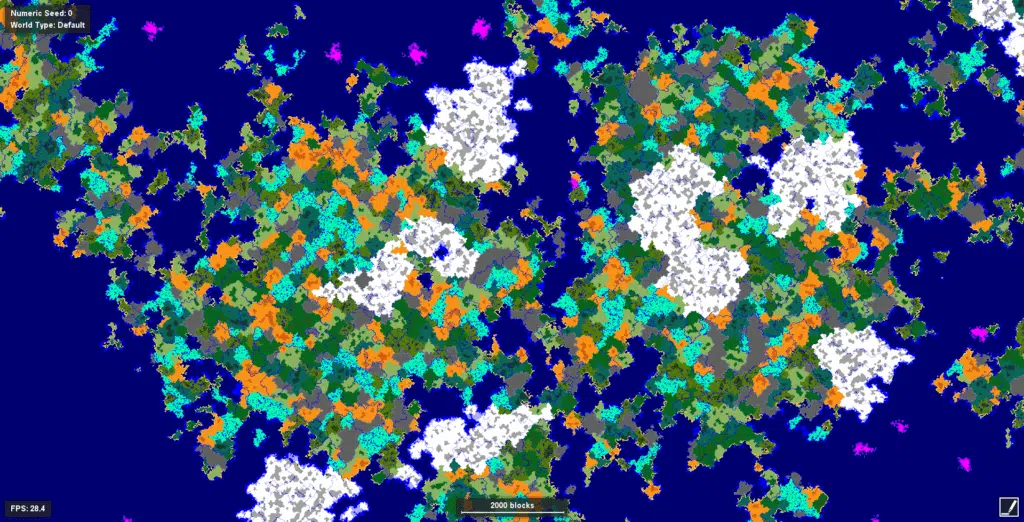
Understanding Minecraft Biome Generation
Multi-Noise System
Modern Minecraft uses a complex system to generate biomes.
Key factors include:
- Temperature
- Humidity
- Continentalness
- Erosion
- Weirdness
These values interact to create natural transitions between biomes.
Biome Families
Biomes are often grouped into categories:
- Warm: Desert, Jungle, Savanna
- Temperate: Plains, Forest, Meadow
- Cold: Taiga, Snowy Taiga
- Frozen: Ice Spikes, Snowy Plains
This helps predict where certain biomes may appear.
Biome Finder Minecraft Bedrock vs Java
Java Edition
Java provides more accurate results with external tools.
Advantages:
- Stable generation
- Better tool support
Bedrock Edition
Bedrock differs in generation logic.
Challenges include:
- Tool incompatibility
- Version inconsistencies
Players must verify tool support before use.
Common Biomes and Difficulty
| Biome | Difficulty | Notes |
| Mushroom Fields | High | Rare and isolated |
| Cherry Grove | Medium | Newer biome |
| Ice Spikes | Medium | Sparse generation |
| Badlands | Medium | Large but uncommon |
| Plains | Low | Very common |
Advanced Biome Finder Strategies
Planning Resource Routes
Using a Minecraft seed biome finder allows players to plan efficient farming routes.
Examples:
- Swamps for slime
- Badlands for gold
- Jungles for bamboo
Finding Rare Biomes
Some biomes require deeper analysis.
Strategies include:
- Checking multiple seeds
- Using detailed maps
- Exploring biome clusters
Essential Early Game Biomes
Best Starting Locations
- Plains: Easy survival
- Taiga: Wood and wolves
- Desert: Structures and loot
Why They Matter
These biomes provide essential resources early in the game.
How Updates Impact Biome Finding
Terrain Changes
Recent updates introduced:
- Higher mountains
- Deeper caves
- Complex terrain
Tool Accuracy
Biome finder tools must match the game version.
Otherwise, results may be incorrect.
Efficient Travel Methods
Nether Travel
Traveling through the Nether reduces distance significantly.
Elytra Flight
Elytra allows fast aerial exploration.
Recommended enchantments:
- Unbreaking
- Mending
Multiplayer Considerations
Server Limitations
Many servers restrict commands.
This affects:
- /locate biome usage
- Exploration freedom
Network Stability
ExitLag improves connection quality.
Benefits include:
- Reduced lag
- Stable gameplay
- Better chunk loading experience
Minecraft Biome Finder Best Practices
Key Tips
- Always verify version compatibility
- Use correct seed input
- Match world type settings
Common Mistakes
- Using outdated tools
- Selecting wrong edition
- Ignoring world generation changes
Minecraft Biome Finder Advanced Guide
Understanding Structure Generation
Biomes influence structures but do not guarantee them.
Examples:
- Desert temples require deserts
- Mansions need large forests
Cross-Version Differences
Older worlds may behave differently.
Important notes:
- New chunks follow new rules
- Old terrain remains unchanged
Minecraft Biome Finder Complete Exploration Strategy
Mastering biome discovery requires combining tools, knowledge, and planning.
Players should:
- Use biome finder tools effectively
- Understand generation systems
- Optimize travel routes
When used correctly, a Minecraft biome finder becomes one of the most powerful tools for exploration and progression in Minecraft.
Final Thoughts on Minecraft Biome
In addition, ExitLag enhances your multiplayer experience by stabilizing your connection while exploring vast worlds. When traveling long distances across servers, maintaining low latency ensures smoother gameplay and prevents interruptions during Minecraft biome discovery.
FAQ
A tool or method used to locate biomes based on a world seed.
Yes, but compatibility depends on the tool and version.
Use a biome finder or explore mountainous regions.
Yes, through exploration, but it is slower.
No, it only improves connection stability.
Got questions or want to connect with other players? Join the conversation at the ExitLag Forum!