First of all, Minecraft education mods are transforming the way students and teachers approach learning. Instead of relying on traditional methods, these mods introduce interactive systems that make lessons more engaging and memorable.
In other words, Minecraft education mods turn the game into a powerful educational platform. They allow players to explore subjects like science, math, history, and coding through hands-on experiences. Because of this, they are becoming increasingly popular in classrooms around the world. And before we continue, know that to know more about all the relevant content about gaming, you just have to check our blog.
What are Minecraft education mods?

They are custom modifications, tools, or add-ons that enhance Minecraft: Education Edition with new mechanics, challenges, and learning-focused features. fileciteturn6file0
Before diving deeper, it’s important to understand that these mods are not just about gameplay—they are designed to improve critical thinking, collaboration, and problem-solving skills.
Difference between mods, add-ons, and official features
There are three main categories to consider:
- Mods: third-party tools that add new mechanics or systems
- Add-ons: lighter modifications that adjust behavior or visuals
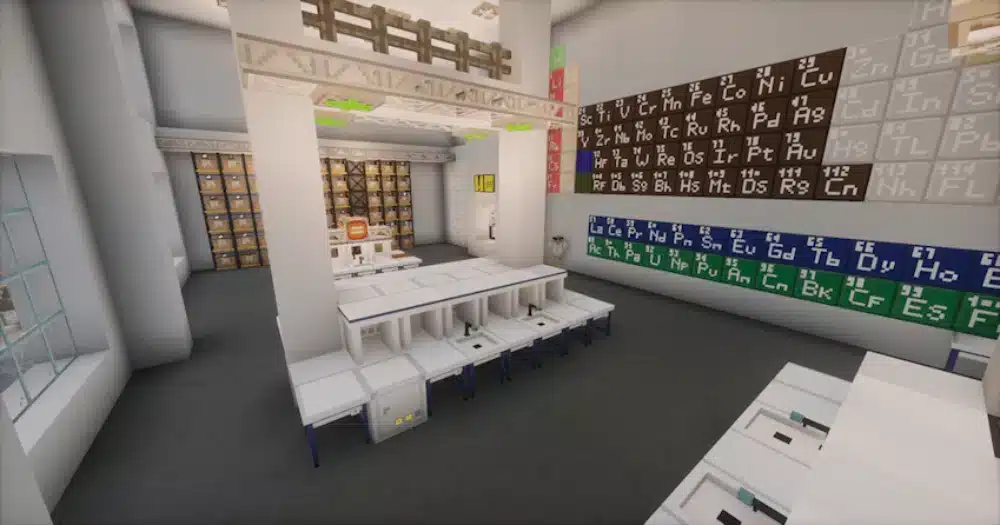
- Official features: built-in tools like Code Builder and Chemistry Lab fileciteturn6file0
Because of this, choosing the right type depends on your learning goals.
Why use mods for Minecraft education edition
Using mods for Minecraft education edition allows teachers to customize lessons.
Benefits include:
- Interactive learning environments
- Custom challenges and simulations
- Increased student engagement
As a result, lessons become more dynamic and effective.
You may also like: Minecraft House Tutorial: Step-by-Step Guide for Beginners
How to install Minecraft education mods safely
Installing mods correctly is crucial for a smooth experience.
Minecraft education mods download methods
There are several ways to handle Minecraft education mods download:
- Tynker platform for coding-based mods
- Manual file import for custom setups
- Minecraft Marketplace for official add-ons fileciteturn6file0
Each method offers different levels of flexibility.
Step-by-step installation process
To install mods safely:
- Backup your existing worlds
- Download mods from trusted sources
- Import files or connect via platform (like Tynker)
- Activate mods in world settings
- Test before using in lessons
Following these steps helps avoid errors or data loss.
Best Minecraft education mods for interactive learning
Choosing the right mods can completely change the learning experience.
Educational Minecraft mods for science and coding
Some of the best educational Minecraft mods include:
- Chemistry Lab systems for experiments
- Coding mods like Tynker
- Physics-based simulations
These tools help students learn through experimentation.
Creative and historical learning mods
Other useful education Minecraft mods focus on creativity and exploration:
- History world recreations
- Eco-city sustainability builds
- Art and design tools
Because of this, students can explore real-world concepts in a virtual environment.
Check also: Minecraft Horse Stable: How to Build one, Designs and Tips
Benefits of using Minecraft education edition mods
The advantages go beyond simple gameplay improvements.
Learning benefits
Using Minecraft education edition mods improves:
- Problem-solving skills
- Team collaboration
- Logical thinking
Students actively participate instead of passively learning.
Classroom engagement
Additionally, these mods:
- Increase motivation
- Encourage creativity
- Make lessons more interactive
This leads to better retention and understanding.
Why ExitLag improves your Minecraft experience
Even in educational environments, performance matters—especially in multiplayer or online classrooms.
ExitLag improves your experience by:
- Reducing latency spikes
- Stabilizing connections
- Ensuring smoother interaction in shared worlds
This allows students and teachers to focus on learning without interruptions.
In conclusion, mastering Minecraft education mods is essential if you want to create engaging, interactive, and effective learning experiences inside Minecraft.
You should check more games compatible with ExitLag at our official games page.
Advanced uses of Minecraft education mods in the classroom
As lessons evolve, Minecraft education mods become powerful tools for building complex, interactive, and highly engaging learning environments. Instead of simple activities, they allow educators to design entire systems where students actively participate, experiment, and solve real-world problems.
Project-based learning with mods for Minecraft education
Using mods for Minecraft education, teachers can create long-term projects that go beyond traditional lessons.
Examples include:
- Rebuilding historical civilizations with interactive storytelling
- Simulating scientific experiments with real-world logic
- Designing sustainable cities with resource management systems
Because of this, students shift from passive learning to active exploration, which improves retention and engagement.
Collaborative learning environments
Another major advantage is collaboration. Mods encourage teamwork in ways that traditional classrooms often cannot.
Students can:
- Work together in shared worlds
- Divide roles such as builder, coder, or planner
- Solve challenges collectively
This improves communication, leadership, and problem-solving skills.
Minecraft education edition mods vs add-ons
Understanding the difference between mods and add-ons is essential for choosing the right approach.
Mods vs add-ons comparison
| Feature | Mods | Add-Ons |
| Complexity | High | Low |
| Customization | Extensive | Limited |
| Installation | Manual or platform-based | Simple import |
| Use case | Advanced systems and lessons | Quick enhancements |
As shown above, Minecraft education edition mods provide deeper customization, while add-ons are faster and easier to apply.
Check also: Minecraft error code 1: complete guide to fix exit code issues
When to use each option
- Use mods for coding lessons, simulations, and complex systems
- Use add-ons for quick visual or functional improvements
Choosing the right option saves time and ensures better results.
Minecraft education mods download: safety and best practices
When dealing with Minecraft education mods download, safety should always be a priority.
Common risks when installing mods
Some potential issues include:
- Downloading corrupted or unsafe files
- Version incompatibility with the game
- Conflicts between multiple mods
Because of this, careful selection and testing are essential.
Best practices for safe installation
To avoid problems:
- Only download from trusted platforms like Tynker or Marketplace
- Always back up your worlds before installing
- Test mods in a separate environment first
Following these practices ensures stability and security.
Minecraft education edition mod performance and optimization
Performance becomes critical when using multiple Minecraft education edition mod setups, especially in classrooms.
Optimizing worlds with multiple mods
To maintain smooth gameplay:
- Limit the number of active mods
- Avoid heavy scripts in large worlds
- Use smaller test environments before scaling
These steps help prevent lag and crashes.
Check this: Minecraft Dock: Build the Perfect Waterfront Structure in Your World
Managing multiplayer classrooms efficiently
In multiplayer environments, performance issues can increase quickly.
To optimize:
- Spread players across different areas
- Assign structured roles to reduce chaos
- Monitor entity count and world complexity
Because of this, you maintain a stable and enjoyable experience.
Educational Minecraft mods: advanced use cases
Beyond basics, educational Minecraft mods can support advanced teaching strategies.
Real-world simulations
Mods can simulate real-world systems such as:
- Ecosystems and environmental balance
- Economic systems and trade
- Engineering and physics mechanics
This helps students understand complex concepts through interaction.
Coding and automation learning
Using Minecraft mods education edition, students can:
- Learn programming logic
- Automate systems using code
- Solve challenges through structured thinking
This builds valuable technical skills.
Step-by-step: how to choose the best Minecraft education mod
To select the ideal Minecraft education mod, follow this process:
- Define your learning objective
- Choose between mod or add-on
- Verify compatibility and source
- Test in a safe environment
- Apply in your lesson plan
This ensures both effectiveness and safety.
Why ExitLag improves your Minecraft Education experience
Even in educational environments, performance matters—especially in multiplayer classrooms or online sessions.
ExitLag helps by:
- Reducing latency spikes
- Stabilizing connections
- Improving responsiveness in shared worlds
This allows students and teachers to focus fully on learning without technical interruptions. To know more, check our pricing page.
Frequently Asked Questions (FAQ)
Yes, you can use mods and add-ons in Minecraft Education Edition. However, you must ensure they are compatible with the version you are using and come from trusted sources. Mods allow deeper customization, while add-ons are easier to implement.
The best mods depend on your goals. Coding mods like Tynker are excellent for programming, while chemistry and physics mods are great for science lessons. Creative and historical mods are ideal for storytelling and world-building activities.
You can install mods using three main methods: Tynker integration, manual file import, or official Marketplace add-ons. Always back up your worlds and test mods before applying them in a classroom setting.
Yes, they are safe if downloaded from trusted platforms. Avoid unknown sources, test mods beforehand, and keep your game updated to reduce risks.
Mods usually introduce new mechanics, systems, or gameplay changes, while add-ons modify visuals or behaviors with less complexity. Mods are better for advanced lessons, while add-ons are ideal for quick improvements.
In conclusion
In conclusion, Minecraft education mods are powerful tools that transform Minecraft into a complete learning platform.
By combining interactivity, collaboration, and customization, they allow educators to create immersive lessons that go far beyond traditional teaching methods.
Above all, mastering Minecraft education mods helps unlock deeper engagement, better learning outcomes, and a more dynamic classroom experience. Download ExitLag now!
Got questions or want to connect with other players? Join the conversation at the ExitLag Forum!