Finding every single plant variant across different biomes can completely transform your base building experience. Whether you want vibrant gardens or massive dye production setups, understanding plant mechanics saves countless hours of searching. Every single biome holds unique botanical treasures waiting to be harvested.
Mastering plant distribution allows you to gather rare colors effortlessly for banners, wool, and crafting needs. Experienced builders know that managing these resources efficiently separates amateur bases from master projects. Exploring the wild with a clear plan ensures you never miss a rare bloom.
Minecraft Flowers represent a diverse family of decorative blocks that serve vital utility purposes in survival worlds. From basic dye extraction to brewing suspicious stews with unique status effects, these colorful assets are essential for progression. Knowing where to look and how to cultivate them changes everything.
Comprehensive List Of All Minecraft Flowers
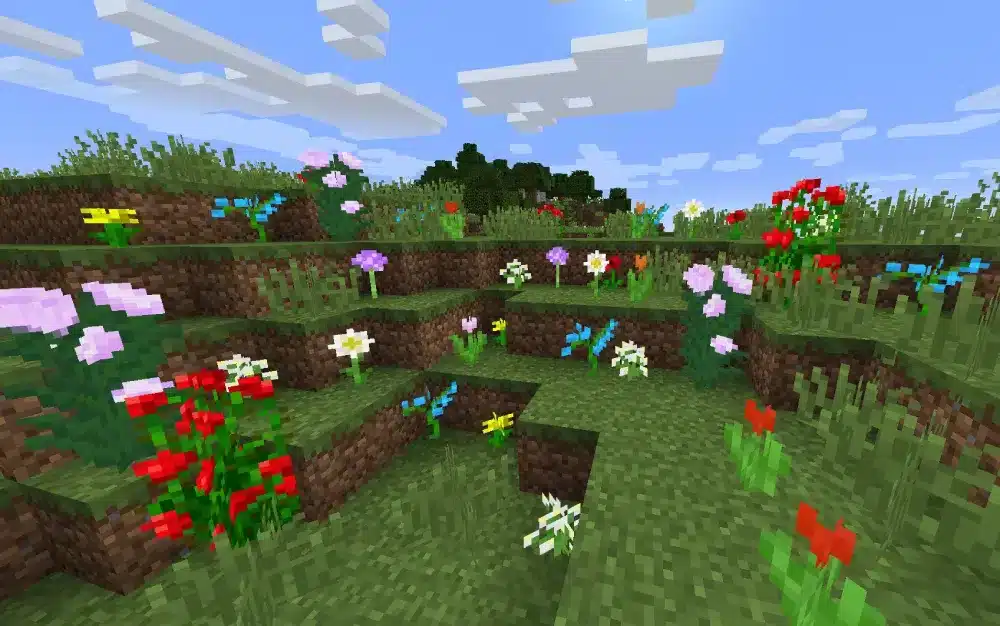
Different biomes feature distinct botanical groups that reflect their local climate and terrain. Small variants generally stay one block high and generate naturally on grass blocks. Meanwhile, tall variants stretch across two blocks and offer higher resource yields when harvested correctly.
Popular small options include the classic Dandelion, Poppy, and Allium, each providing distinct color profiles for crafting. Furthermore, rarer specimens like the Blue Orchid require specific humid environments to thrive naturally. Exploring diverse terrain types is the only way to catalog every single variety.
- Dandelion: A bright yellow flower found across plains, forests, and village meadows.
- Poppy: A common red bloom frequently discovered in plains, savannas, and taiga biomes.
- Blue Orchid: A cool-toned light blue variant exclusive to swamp and mangrove swamp biomes.
- Allium: A distinct purple flower that generates reliably inside flower forest regions.
- Cornflower: A brilliant blue source plant found across standard plains and meadow biomes.
Tall variants provide an exceptional advantage because they double your harvest when broken. Additionally, applying bone meal directly to tall variants causes them to drop an extra item instantly. Leveraging these physical traits accelerates your stockpiles significantly.
- Sunflower: A tall yellow plant that always faces east, serving as a reliable natural compass.
- Lilac: A tall light purple bush that provides double the magenta dye yield.
- Peony: A large pink bloom found primarily in dense forest biomes.
- Rose Bush: A multi-flowered red bush used for crafting dark red dyes.
How To Farm Minecraft Flowers Efficiently
Building an automated resource station requires careful setup and the right environmental conditions. Selecting the correct biome foundation maximizes your bone meal efficiency and resource output. Flower forests represent the ultimate location because they support almost all small variations under a single footprint.
Setting up a dispenser mechanism connected to a redstone clock allows automated growth cycles. Placing grass blocks around your operational platform ensures organic spread up to seven blocks away in every direction. Consequently, items flow smoothly into collection chests via hopper systems.
- Clear a flat 9×9 area consisting entirely of dirt and grass blocks.
- Position a dispenser facing the central grass block and fill it with bone meal.
- Wire a simple redstone clock to trigger the dispenser automatically at regular intervals.
- Install hopper floor grids underneath the grass layer to collect harvested items instantly.
- Activate the system to generate endless piles of colorful petals for your storage rooms.
Advanced Farming Mechanics And Optimization Strategies
Maximizing output requires understanding hidden engine mechanics that govern block generation. Approximately 95 percent of all growth occurs within a tight four-block radius around the source grass block. Therefore, keeping your dispenser cluster compact ensures zero resource waste during long farming sessions.
Utilizing specific enchantment books on your harvesting tools dramatically increases your overall yields. For instance, applying Fortune upgrades on tools utilized in specific versions multiplies harvested drops efficiently. Combining automated collection with manual looting creates an unstoppable resource pipeline.
| Plant Category | Primary Biome Source | Optimal Farming Method | Main Utility |
| Small Flowers | Flower Forest / Plains | Dispenser Bone Meal Clock | Dye Crafting & Bee Breeding |
| Tall Flowers | Forest / Sunflower Plains | Direct Bone Meal Application | High-Yield Dye Production |
| Exotic Flora | Swamps / Lush Caves | Manual Collection & Spreading | Special Suspicious Stew Effects |
Common Mistakes Minecraft Flowers Players Make
- Farming in the wrong biome: Trying to collect swamp-exclusive variations in dry plains results in zero rare drops. Fix: always verify your local coordinates before building permanent agricultural installations.
- Wasting bone meal supplies: Spraying bone meal on barren stone or dirt instead of valid grass blocks drains resources instantly. Fix: ensure your growth platform consists entirely of active grass blocks.
- Ignoring inventory management: Mass automated harvesting quickly overflows hoppers and clogs storage chests. Fix: build sorting filters connected directly to automated crafting tables for immediate dye conversion.
Pro Tips: Minecraft Flowers Mastery
- Beacon placement: Place a Haste-infused beacon near your large agricultural projects to break blocks instantly during manual clearing phases.
- Beehive synergy: Plant flowering gardens directly adjacent to bee enclosures to maximize honey production rates safely.
- Lighting control: Maintain light levels above seven on all grass surfaces to ensure continuous organic night growth.
- Navigation markers: Use facing-east sunflowers around your base perimeter to never lose your directional orientation during exploration.
Smooth Out Your Gameplay With ExitLag
Exploring massive multi-biome worlds and managing complex redstone automation servers requires a rock-solid connection. Network latency, packet loss, and high ping can cause severe rubber-banding when you are traveling across distant dimensions or managing heavy server loads. ExitLag is a specialized game connection optimizer that analyzes multiple network paths in real time. It selects the fastest, most stable route between your device and the game servers without masking IP addresses or modifying game files.
Featuring advanced Multipath Technology, ExitLag sends your data packets through several routes simultaneously so that connection drops never interrupt your session. It also includes Traffic Shaper tools to prioritize game data while limiting background bandwidth consumption. Whether you are building massive automated agricultural structures on multiplayer servers or exploring uncharted biomes, maintaining peak network performance is essential. Boost your gameplay stability today by checking out ExitLag Download.
Image Disclaimer
All game images used in this blog post belong to Mojang Studios and Microsoft. They are used for informational and educational purposes only and do not imply endorsement or affiliation with the rights holders.
Got questions or want to connect with other players? Join the conversation at the ExitLag Forum!