
The Minecraft community is always excited whenever Mojang introduces new biomes, mobs, and exploration mechanics. With the arrival of the Minecraft Pale Garden, players now have another mysterious area to discover in Minecraft 1.21.
The Minecraft Pale Garden biome quickly became one of the most talked-about additions because of its eerie atmosphere, unique vegetation, and hidden dangers. Furthermore, players are searching for better ways to explore this region without suffering from lag spikes or unstable gameplay during multiplayer sessions.
So, what is the Minecraft Pale Garden? The Minecraft Pale Garden is a new biome introduced in Minecraft 1.21 featuring pale vegetation, unique environmental details, and new hostile encounters that expand exploration possibilities for survival and adventure players.
In this complete guide, you will learn how the biome works, where to find it, which mobs appear there, and how to improve your exploration experience. In addition, we will explain why stable connections are essential when exploring demanding Minecraft multiplayer servers.
Minecraft Pale Garden biome overview
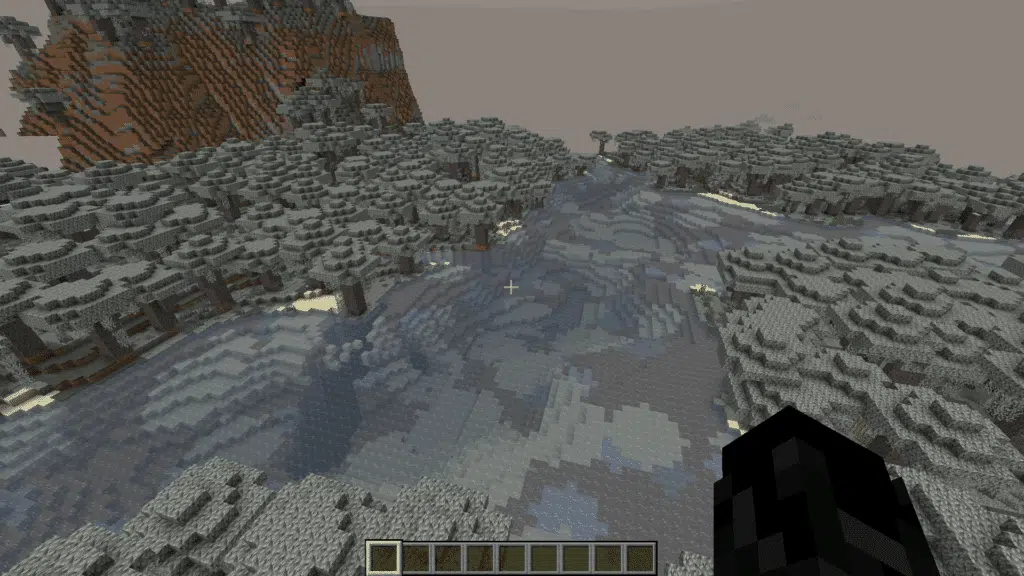
The Minecraft pale garden biome introduces a completely different visual atmosphere compared to traditional forest biomes.
Instead of vibrant colors and lively vegetation, players encounter pale trees, muted tones, and mysterious environmental sounds.
This biome was designed to increase immersion and tension during exploration. Consequently, players often compare it to some of Minecraft’s darker survival-focused regions.
Visual style and environmental design
One of the main attractions of the Minecraft pale garden biome is its distinctive appearance. The environment feels cold, abandoned, and atmospheric, creating a unique exploration experience.
Key visual characteristics include:
- Pale trees and faded vegetation;
- Dense fog-like ambiance;
- Reduced color saturation;
- Darker nighttime visibility;
- Eerie environmental audio.
Because of these elements, the biome creates stronger survival tension, especially during nighttime gameplay.
Why players are excited about the biome
The release of pale garden Minecraft 1.21 generated massive attention across the community because players constantly seek fresh exploration content.
Several factors increased player interest:
- New exploration mechanics;
- Unique atmosphere;
- Hidden mob encounters;
- Rare generation patterns;
- Potential lore theories.
Additionally, content creators and multiplayer servers immediately started building custom experiences around the biome.
How to find Pale Garden Minecraft locations
Finding the biome can sometimes be challenging because biome generation depends heavily on world seeds and exploration distance.
Many players searching for how to find pale garden Minecraft areas spend hours exploring without success. Fortunately, there are several strategies that can help speed up the process.
Best exploration methods
Exploration efficiency matters significantly when searching for rare biome generation zones.
Some useful exploration strategies include:
- Traveling long distances from spawn;
- Using Elytra for aerial exploration;
- Exploring unexplored chunks;
- Using biome locator commands in creative worlds;
- Testing multiple world seeds.
Players using survival mode should also bring enough food, armor, and torches before entering unfamiliar territory.
Best seeds for Pale Garden generation
Some worlds naturally generate easier access to pale garden Minecraft seed locations.
The table below shows examples of useful world generation characteristics players often look for.
| Seed Type | Main Advantage | Exploration Difficulty |
| Near-spawn biome seeds | Faster access | Easy |
| Mountain-adjacent seeds | Better visibility | Medium |
| Large forest seeds | More biome variation | Medium |
| Survival challenge seeds | Harder progression | High |
Choosing a good pale garden Minecraft seed can save significant exploration time.
After selecting your world, players should mark biome coordinates for future navigation.
Pale garden Minecraft mobs and dangers
The pale garden Minecraft mobs contribute heavily to the biome’s unsettling atmosphere. Hostile encounters become much more intense because of reduced visibility and environmental tension.
Unlike traditional Minecraft forests, the Pale Garden focuses more on suspense and dangerous encounters.
Hostile creatures inside the biome
Although Minecraft players are familiar with standard hostile mobs, the biome introduces more unpredictable encounters.
Players may experience:
- Sudden nighttime attacks;
- Reduced visibility combat;
- Narrow escape routes;
- Dangerous terrain combinations;
- Higher tension during exploration.
As a result, preparation becomes extremely important before entering deeper sections of the biome.
Survival tips for combat encounters
Surviving the biome requires more than just strong armor. Positioning and awareness are equally important.
Useful survival tips include:
- Carrying extra torches;
- Using ranged weapons;
- Avoiding nighttime exploration alone;
- Bringing healing items;
- Keeping escape routes visible.
Additionally, multiplayer players should maintain stable connections during combat situations to avoid delays or packet loss.
A lag spike during a dangerous encounter can easily lead to losing valuable items and progression.
Pale Garden Minecraft 1.21 gameplay changes
The pale garden Minecraft 1.21 update also affects how players approach exploration and survival progression overall.
Biome diversity continues expanding in Minecraft, and Mojang is clearly focusing on immersion-based gameplay design.
Exploration became more immersive
The Minecraft Pale Garden biome encourages slower and more careful gameplay.
Instead of rushing through terrain, players often stop to:
- Observe surroundings;
- Listen for environmental cues;
- Search for hidden paths;
- Avoid dangerous nighttime combat.
This pacing creates a much more immersive survival experience.
Multiplayer exploration challenges
Large multiplayer servers make biome exploration even more exciting. However, multiplayer gameplay introduces additional technical challenges.
Players frequently experience issues such as:
- High ping;
- Chunk loading delays;
- Rubberbanding;
- Combat desynchronization;
- Connection instability.
These issues become especially frustrating when exploring dangerous regions like the Pale Garden.
This is where tools like ExitLag become useful for Minecraft players seeking smoother gameplay sessions.
Why connection stability matters in Minecraft
Minecraft may not look like a fast-paced shooter, but stable connections are still extremely important.
Exploration-heavy biomes such as the Minecraft Pale Garden often require quick reactions during combat and movement.
Common connection issues in Minecraft
Many players underestimate how much unstable routing affects Minecraft gameplay.
Common problems include:
- Delayed block placement;
- Slow chunk rendering;
- Mob teleportation;
- Combat registration delays;
- Sudden disconnects.
These issues become even more noticeable in heavily modded or multiplayer environments.
How ExitLag helps Minecraft players
Unlike traditional VPN services, ExitLag focuses specifically on optimizing game routing connections.
The software works by:
- Monitoring route quality in real time;
- Sending traffic through multiple optimized paths;
- Selecting the fastest and most stable route automatically;
- Reducing packet loss and connection instability.
As a result, Minecraft players can experience smoother exploration sessions and more stable multiplayer gameplay.
Additionally, ExitLag supports hundreds of online games for PC and supported mobile titles.
Minecraft Pale Garden exploration strategies
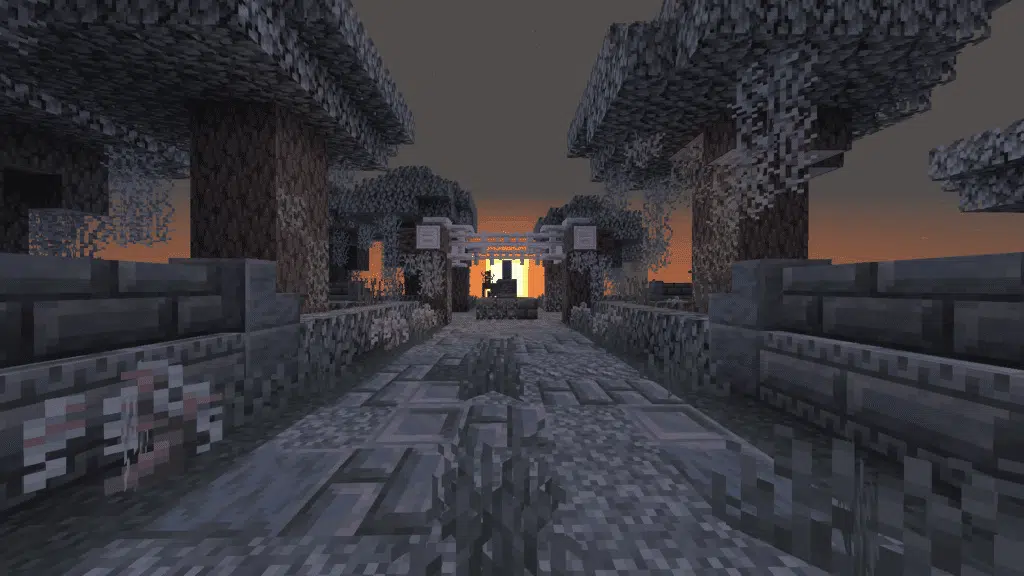
Exploring the Minecraft Pale Garden successfully requires preparation and strategy.
Players who rush into the biome unprepared often struggle with survival.
Best equipment for exploration
Before entering the biome, players should prepare carefully.
Recommended equipment includes:
- Diamond or Netherite armor;
- Strong ranged weapons;
- Plenty of food;
- Torches and lanterns;
- Healing potions;
- Building blocks for escape paths.
Preparation significantly improves survival odds.
Multiplayer teamwork strategies
Exploring with friends can make the biome both safer and more enjoyable.
Good team strategies include:
- Assigning scouting roles;
- Sharing resources;
- Marking paths with torches;
- Staying close during nighttime;
- Coordinating combat attacks.
However, stable multiplayer synchronization remains essential for cooperative gameplay.
This is another reason why many players use gaming connection optimization tools during multiplayer sessions.
Best ways to improve Minecraft performance
Although Minecraft may appear visually simple at first glance, performance optimization still plays a major role in gameplay quality.
Modern updates introduced larger worlds, more complex terrain generation, advanced lighting systems, and highly detailed biomes such as the Minecraft pale garden biome.
As a result, many players experience frame drops, stuttering, chunk loading delays, and unstable gameplay during exploration sessions. This becomes even more noticeable when using shaders, mods, or multiplayer servers in pale garden Minecraft 1.21 worlds.
Fortunately, there are several ways to improve both graphical performance and connection stability for smoother gameplay.
Graphics optimization tips
Improving graphical settings can significantly enhance responsiveness, especially when exploring demanding areas like the Minecraft pale garden location zones filled with dense vegetation and atmospheric effects.
Players can improve performance by adjusting the following settings:
- Render distance: Lower render distance reduces the number of chunks loaded simultaneously, improving FPS stability;
- Shadow quality: Disabling or lowering advanced shadows helps reduce GPU usage considerably;
- Particle effects: Reducing particles minimizes unnecessary visual processing during combat and environmental interactions;
- Chunk loading settings: Slower or optimized chunk loading reduces stuttering while exploring new terrain;
- Shader intensity: High-end shaders can heavily impact performance, especially in large multiplayer worlds;
- Entity distance: Lowering mob rendering distance helps improve performance in crowded servers;
- Cloud and weather effects: Disabling unnecessary environmental effects may increase frame consistency.
Additionally, players searching for how to find pale garden Minecraft regions often travel long distances quickly, which increases chunk generation load. Optimized settings help maintain smoother exploration during these moments.
Reducing unnecessary graphical load often improves responsiveness considerably, particularly in survival gameplay where reaction speed matters during encounters with pale garden Minecraft mobs.
Network optimization tips
Connection quality also affects gameplay consistency far more than many players realize. Even with strong FPS performance, unstable internet routes can still create lag, delayed interactions, and synchronization problems.
This becomes especially frustrating when exploring rare pale garden Minecraft seed worlds on multiplayer servers.
Useful optimization practices include:
- Using wired internet when possible: Ethernet connections are usually more stable than Wi-Fi;
- Closing background downloads: Streaming services, cloud backups, and updates may consume valuable bandwidth;
- Avoiding network congestion: Peak internet usage hours can increase latency and packet instability;
- Using optimized gaming routes: Specialized tools like ExitLag help improve route stability between players and game servers;
- Monitoring packet loss: Packet loss may cause teleporting mobs, delayed combat, and chunk loading failures;
- Restarting networking equipment regularly: Routers and modems can accumulate performance issues over time;
- Selecting nearby servers: Choosing servers closer to your region often improves ping consistency.
These adjustments can make exploration smoother, especially inside visually demanding biomes like the Minecraft pale garden biome, where stable gameplay is important for survival, exploration, and multiplayer coordination.
For players spending hours exploring Minecraft pale garden location areas with friends, maintaining both graphical optimization and network stability creates a far more immersive gameplay experience.
FAQ
What is Minecraft Pale Garden?
Minecraft Pale Garden is a biome introduced in Minecraft 1.21 featuring pale vegetation, darker environmental visuals, and dangerous exploration elements.
How to find Pale Garden Minecraft biomes?
Players can find the biome by exploring large world areas, testing different seeds, or using biome locator tools in creative mode.
Which mobs appear in the Pale Garden biome?
The biome includes hostile encounters and dangerous nighttime combat situations designed to increase survival tension.
Is the Pale Garden available in Minecraft 1.21?
Yes, pale garden Minecraft 1.21 content became available as part of the latest biome expansion updates.
Does ExitLag work with Minecraft?
Yes. ExitLag supports Minecraft on PC and helps optimize routing connections for smoother multiplayer gameplay.
Can ExitLag reduce Minecraft lag?
ExitLag helps reduce connection instability, packet loss, and routing inefficiencies by optimizing traffic paths between players and game servers.
Discover the Minecraft Pale Garden with ExitLag
The Minecraft Pale Garden delivers one of the most atmospheric exploration experiences introduced in Minecraft 1.21. From eerie visuals to dangerous encounters, the biome adds new depth to survival gameplay.
However, exploration becomes much more enjoyable when gameplay remains smooth and responsive. Stable connections help reduce interruptions, improve multiplayer synchronization, and create more immersive adventures.
Whether you are searching for the perfect pale garden Minecraft seed, fighting hostile creatures, or exploring multiplayer servers with friends, connection quality plays a major role in your overall experience.
Try ExitLag today and enjoy smoother Minecraft exploration with optimized routing, lower instability, and more reliable gameplay performance.


