If you’re looking to upgrade your builds and create something both functional and visually impressive, the Minecraft Windmill is one of the best projects you can start with. It combines creativity, utility, and aesthetics in a way few structures do.
A Minecraft Windmill can serve as a decorative landmark, a redstone-powered system, or even part of a fully immersive survival base. Minecraft Windmill builds are incredibly versatile and can adapt to different styles, from medieval villages to modern farms.
So, what is a Minecraft Windmill? It’s a structure inspired by real-life windmills, usually built with rotating blades (decorative or functional), and often used to enhance farms, generate visual motion, or integrate redstone mechanics.
In this guide, you’ll learn everything from how to build a Windmill in Minecraft, explore Minecraft Windmill design strategies, and discover Minecraft Windmill build ideas that can elevate your gameplay.
Minecraft Windmill: how to build step by step
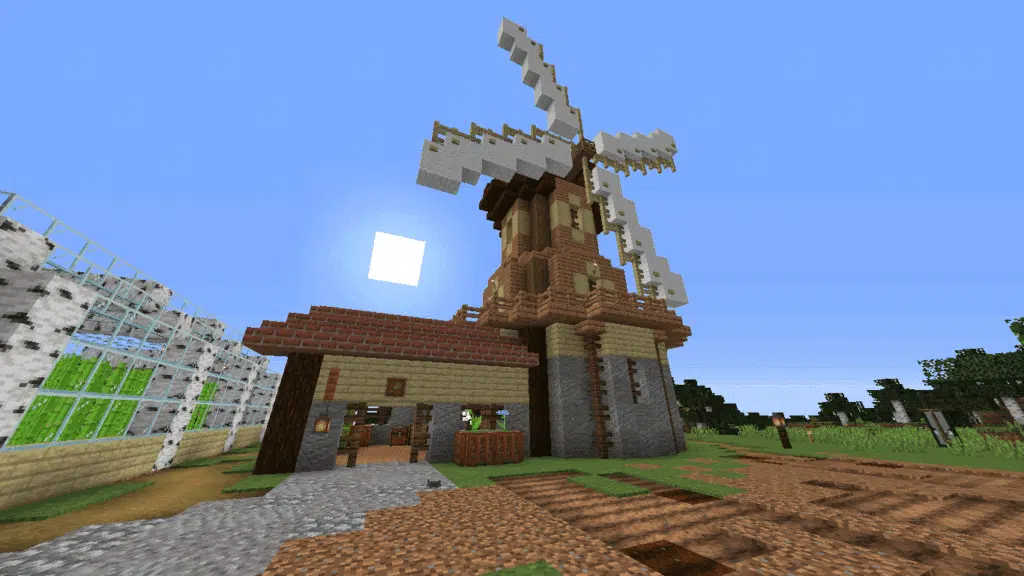
Building a windmill might look complex at first, but once you break it down, it becomes a fun and manageable project. The key is planning your structure before placing blocks.
Choosing the right location
Before starting your build, location matters a lot. A windmill works best in open areas.
Consider these options:
- Plains biome for a classic farm look;
- Hilltops for a dramatic visual effect;
- Near crops to create a realistic farming environment;
- Coastal areas for aesthetic builds.
A good location enhances both immersion and visibility.
Materials you should use
The materials define the style of your windmill. For a traditional look, stick with:
- Wood logs and planks;
- Stone bricks or cobblestone;
- Wool or concrete for blades;
- Glass panes for windows.
If you want a more modern Minecraft Windmill design, you can experiment with quartz, smooth stone, or even blackstone.
Step-by-step building process
Follow this simple structure:
- Build a tall vertical tower (5–10 blocks high minimum);
- Create a circular or square base for stability;
- Add floors inside for interior use;
- Extend a central axis from the top;
- Build four symmetrical blades;
- Decorate the exterior with details.
This is the foundation for any Minecraft Windmill tutorial you’ll find.
Minecraft Windmill design ideas and variations
Once you understand the basics, you can explore creative directions. This is where your build truly stands out.
Classic European windmill
This style is inspired by medieval villages.
Key features:
- Wooden structure;
- Stone base;
- White blades;
- Small windows.
Perfect for survival worlds.
Modern windmill concepts
If you prefer a futuristic look, go for:
- Clean lines;
- Minimalist shapes;
- White and gray palettes;
- Taller and thinner structures.
These designs work great in modern cities.
Large windmill Minecraft builds
If you want something impressive, scale it up.
A large Windmill Minecraft build usually includes:
- Multi-floor interiors;
- Storage rooms;
- Redstone systems;
- Viewing platforms.
These builds become central landmarks in your world.
Adding functionality: Minecraft working Windmill
Most windmills in Minecraft are decorative, but you can make them functional with redstone.
How to simulate movement
To create a Minecraft working Windmill, use:
- Redstone clocks;
- Pistons;
- Slime blocks;
- Observers.
These components can simulate rotating blades.
Limitations you should know
Even with redstone, there are constraints:
| Feature | Possible in Minecraft | Notes |
| Full rotation | Partial | Limited by mechanics |
| Continuous movement | Yes | Requires redstone setup |
| Energy generation | No | Only decorative |
| Automation | Yes | With creative setups |
This table helps you understand what’s realistic when building your windmill.
Performance tips: why connection matters in Minecraft
When building complex structures like a Minecraft Windmill, performance can impact your experience, especially in multiplayer servers.
Common issues players face
- Lag spikes while building;
- Delayed block placement;
- Server desync;
- High ping affecting redstone timing.
These problems can ruin the building experience.
How to improve your gameplay connection
This is where tools like ExitLag come in.
ExitLag works by:
- Optimizing your connection route;
- Reducing ping fluctuations;
- Stabilizing packet delivery;
- Improving responsiveness.
It’s not a VPN, it doesn’t change your location or IP. Instead, it ensures your data travels through the best possible path.
This makes a huge difference when you’re working on detailed builds or testing redstone systems.
Minecraft Windmill build ideas to inspire you
If you’re unsure where to start, here are some creative directions:
- Farm windmill with wheat fields;
- Fantasy windmill with glowing blocks;
- Industrial windmill with machinery;
- Windmill house (fully livable);
- Floating windmill (creative mode).
These Minecraft Windmill build ideas can help you create something unique.
Advanced building tips for better results
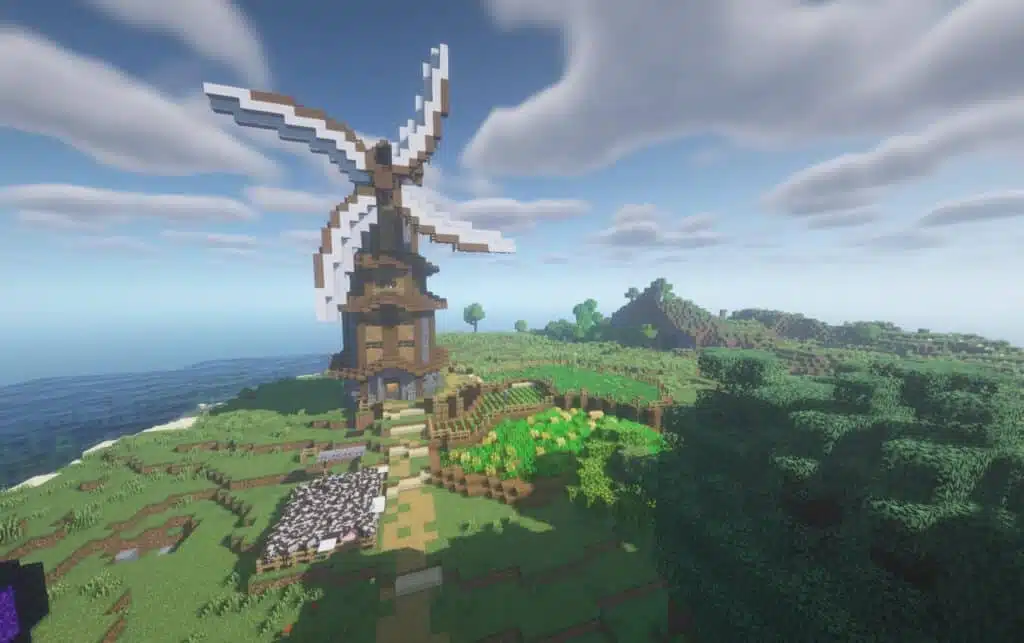
If you really want your windmill to stand out, it’s not just about following a Minecraft Windmill tutorial, it’s about refining the details that most players overlook.
Focus on depth and detail
One of the biggest mistakes beginners make when working on a Minecraft Windmill design is creating flat surfaces. At first glance, it may look fine, but once you step back, the build feels lifeless and artificial.
To fix this, you need to think in layers.
Instead of placing blocks in a straight line, start adding variation. Use stairs and slabs to break the flatness and create subtle shadows. This simple adjustment already gives your build a much more realistic look.
You can also experiment with layered textures. For example, mixing wood planks with stripped logs or combining stone bricks with cracked variants adds visual complexity.
This is especially important if you’re aiming for more advanced Minecraft Windmill build ideas.
Another powerful trick is using color variations. Even small changes in tone can make a huge difference. Don’t rely on a single block type, mix similar shades to create depth and richness.
In short, if your goal is to move beyond a basic how to build a Windmill in Minecraft approach, focusing on detail is what separates a simple build from a memorable one.
Use symmetry wisely
Now let’s talk about something critical: symmetry.
A windmill is one of those structures where symmetry isn’t optional, it’s essential. But here’s the catch: it needs to feel natural, not forced.
When building your blades, make sure they are perfectly aligned from the center. Even a one-block difference can make your entire Minecraft working Windmill look off.
Take your time to position each blade carefully. A good tip is to build one blade first, then replicate it using reference points instead of guessing measurements.
Another important detail is proportion. If your tower is too small and your blades are too large (or the opposite), the structure loses balance.
This becomes even more noticeable in a large Windmill Minecraft build, where scale amplifies every mistake.
Before finishing, always step back and analyze your build from different angles. Walk around it, look from above, and even switch perspectives. Testing your design before finalizing is what ensures your windmill looks polished and intentional.
Minecraft Windmill: optimize your experience with ExitLag
Building a windmill is one thing, enjoying the process without interruptions is another.
When you’re working on a detailed Minecraft Windmill, especially in multiplayer servers, your connection quality plays a bigger role than most players realize.
Why stability matters
Let’s be honest: nothing breaks immersion faster than lag.
Even small delays can affect your experience in ways you might not notice immediately — but they add up quickly.
For example, redstone timing becomes inconsistent when your connection fluctuates. If you’re trying to build a Minecraft working Windmill, this can completely ruin your mechanisms.
Block placement is another issue. You click once, and the block takes a second to appear — or worse, it doesn’t place at all. This affects your precision, especially when working on detailed Minecraft Windmill design elements.
And if you’re playing multiplayer, interactions with other players can feel delayed or desynced. That’s frustrating, especially when you’re collaborating on creative Minecraft Windmill build ideas.
How ExitLag enhances your gameplay
This is where ExitLag makes a real difference.
Instead of relying on a single connection path, ExitLag analyzes multiple routes in real time and automatically selects the most stable one. That means your data always takes the best possible path to the game server.
Here’s what that translates to in practice:
- Lower ping for faster responses;
- Reduced packet loss for smoother gameplay;
- More stable sessions, even during peak hours;
- Better consistency when building and testing.
And just to be clear: ExitLag is not a VPN. It doesn’t change your location or IP, it simply optimizes your connection route.
So when you’re building your next Minecraft Windmill, especially something complex or large-scale, you can focus entirely on creativity instead of fighting connection issues.
In the end, a smooth connection ensures your project flows naturally from start to finish, exactly the way it should.
FAQ
A Minecraft Windmill is mainly decorative, but it can also house farms, storage, or redstone systems.
Start with a simple tower, add blades, and expand with details. Following a Minecraft Windmill tutorial helps simplify the process.
Yes, partially. A Minecraft working Windmill can simulate movement using redstone, but it won’t generate energy.
It depends on your style. Classic wooden designs work well in survival, while modern builds suit creative worlds.
A standard windmill is around 7–10 blocks tall, but a large Windmill Minecraft build can be much bigger depending on your project.
Build your Minecraft Windmill with better performance using ExitLag
Creating a detailed Minecraft Windmill is not just about blocks, it’s about the experience. Minecraft Windmill projects become much more enjoyable when your gameplay is smooth and responsive.
Whether you’re building solo or on a multiplayer server, having a stable connection makes all the difference. That’s why many players rely on tools like ExitLag to reduce lag, improve routing, and keep their sessions consistent.
Try ExitLag now and take your Minecraft builds to the next level with smoother, more stable gameplay.
Got questions or want to connect with other players? Join the conversation at the ExitLag Forum!