

Mir4 packet loss destroys your MMORPG experience in catastrophic ways. You’re battling for territory control in clan wars, but suddenly your character freezes while enemies eliminate you and claim valuable resources.
Furthermore, your skills refuse to activate during critical boss raids. Meanwhile, other players teleport unpredictably across the battlefield. These connection problems waste your grinding time, destroy PvP encounters, and cause unfair deaths in supported games like Mir4 consistently.
Moreover, packet loss transforms profitable farming sessions into frustrating wipes. Subsequently, combo commands vanish without executing properly. Additionally, critical healing items never activate in time.
Understanding how to eliminate these network issues separates successful clans from struggling players. Whether farming Darksteel or dominating Valley of Destiny, stable connections determine survival.

What is packet loss in Mir4?
Packet loss occurs when information traveling between your device and game servers disappears during transmission. Think of packets as digital messages carrying vital gaming instructions.
Each message contains crucial details about your character’s actions. Perhaps a skill activation, movement command, or item usage.
When messages fail reaching their destination, the server lacks information about your intentions. Consequently, this creates visible mismatches between your display and actual server state.
How data transmission works in Mir4
Your system continuously exchanges data packets with Mir4 servers through multiple connection points. These intermediate stops include numerous routers and network infrastructure.
Congestion or malfunctions at any point cause packet deletion. Therefore, overwhelmed routers simply discard information when capacity limits are exceeded.
The result? Moreover, enemies appear in wrong positions. Subsequently, commands execute with noticeable delays. Additionally, that smooth MMORPG experience deteriorates into technical frustration.
Why packet loss is devastating in Mir4 gameplay
Mir4 demands precise real-time coordination especially during clan wars and boss raids. Furthermore, combat requires split-second reactions to protect valuable loot and resources.
Lost packets during critical moments mean missed combos and character deaths. Consequently, high-stakes content becomes impossible when abilities don’t register reliably.
Even 1% packet loss creates game-breaking problems in competitive scenarios. Therefore, eliminating connection instability isn’t optional for serious progression.
How packet loss affects your gameplay in Mir4
Connection problems create far worse issues than simple stuttering. Indeed, packet loss manifests in devastating ways across hunting grounds and dungeons.
Common symptoms include:
- Skill execution failures: Your ultimate ability doesn’t activate, leaving you defenseless against bosses
- Character rubberbanding: Your avatar snaps backward into monster swarms unexpectedly
- Potion delay: Critical health potions simply refuse activation during intense fights
- Loot disappearance: Valuable Darksteel vanishes before you can collect it
- Enemy desynchronization: Boss attacks teleport unpredictably, making dodging impossible
- Clan war failures: Server boots you from territory battles, causing strategic losses
Main causes of packet loss in Mir4
Identifying connection problem sources enables targeted solutions. Understanding network architecture helps troubleshoot effectively.
Inefficient ISP routing to game servers
Your internet provider doesn’t always choose optimal paths to Mir4 infrastructure. Instead, data might traverse dozens of unnecessary intermediate points.
Each additional router hop exponentially increases packet loss probability. Moreover, geographic routing inefficiencies waste bandwidth introducing instability.
Some providers deliberately deprioritize gaming traffic during congestion. Consequently, your clan war competes equally with streaming video traffic.
Unstable local internet connection
Home networking equipment frequently causes mysterious problems. Aging modems and routers struggle with constant online gaming demands.
Wireless connections introduce inherent instability through signal interference. Therefore, walls, appliances, and competing devices degrade Wi-Fi quality significantly.
Furthermore, damaged network cables present another overlooked culprit. Additionally, physical cable degradation causes intermittent packet drops.
Physical distance from game servers
Physics imposes unavoidable constraints on long-distance connections. Players far from server locations face inherent disadvantages.
Greater distances mean more intermediate routing equipment. Consequently, each hop introduces potential failure points and cumulative delay.
International connections might traverse 30+ routers regularly. Meanwhile, local players experience maybe 8-10 hops comparatively.
Network congestion during peak hours
Heavy internet usage periods create widespread congestion. When entire neighborhoods stream simultaneously, available bandwidth suffers dramatically.
Standard routers fail to prioritize time-sensitive gaming packets properly. Therefore, they treat combat commands identically to web browsing traffic.
Similarly, special events and updates overwhelm servers temporarily. Consequently, this creates server-side packet loss affecting all players simultaneously.
Hardware problems causing packet loss
Defective network cards surprisingly commonly cause connection issues. Old drivers or damaged components discard packets randomly.
Damaged ethernet cables frequently create mysterious problems. Furthermore, cables bent, crushed, or exposed to electromagnetic interference cause transmission errors.
How to identify packet loss in Mir4
Recognizing connection problems helps implement appropriate fixes. Mir4 provides visual indicators for monitoring network performance.
In-game detection methods
Watch for connection indicators in the game interface. Red or yellow symbols show active problems requiring immediate attention.
Monitor your displayed ping values for suspicious patterns. Additionally, sudden spikes from stable 50ms to 300ms suggest packet loss occurring.
Moreover, observe character movement responsiveness. Delayed actions despite acceptable ping indicate packet loss.
Behavioral signs during gameplay
Observe these warning indicators:
- Ping fluctuations varying wildly without apparent pattern
- Noticeable delays despite acceptable displayed latency
- Other players exhibiting jerky unpredictable movements
- Your character sliding backward to previous positions
- Skills requiring multiple activation attempts
Packet loss levels and gameplay impact
| Packet Loss % | Connection Quality | Gameplay Impact | PvP Viability |
| 0% | Perfect | Zero noticeable problems | Ideal for clan wars |
| 0-1% | Excellent | Rare minor hitches | Acceptable casual |
| 1-3% | Good | Regular responsiveness issues | Boss raids risky |
| 3-5% | Poor | Frequent severe problems | PvP impossible |
| 5-10% | Very Poor | Constant disconnects | Content unplayable |
| 10%+ | Unplayable | Unable maintaining connection | Mir4 impossible |
Basic solutions to reduce packet loss in Mir4
Before exploring advanced solutions, attempt these fundamental optimizations. Simple fixes often resolve minor connection issues.
Optimize your local connection
Implement these home network improvements:
- Use wired connection: Ethernet cables eliminate wireless interference completely
- Close background applications: Terminate downloads, streaming platforms, bandwidth consumers
- Update network drivers: Download latest drivers from manufacturer websites
- Configure QoS on router: Prioritize gaming traffic over other activities
- Restart network equipment: Power cycle modem and router clearing issues
- Test with different cables: Replace potentially damaged ethernet cables
Contact your ISP
After exhausting local fixes, contact your internet provider directly. Document exact packet loss percentages from testing.
Request thorough line diagnostics checking signal degradation and interference. Furthermore, persistence matters—initial support often deflects responsibility.
ExitLag: the definitive solution to fix Mir4 packet loss
Professional connection optimization requires purpose-built specialized software for MMORPGs. ExitLag transforms problematic connections into stable gaming experiences.
What is ExitLag?
ExitLag represents the most sophisticated packet loss elimination system available. Leveraging proprietary advanced technology, it establishes protective routing between your system and servers.
Generic network tools merely mask symptoms temporarily. In contrast, ExitLag fundamentally repairs inefficient internet routing architecture permanently.
This specialized software isn’t just another utility option. Instead, it’s the mandatory solution serious Mir4 players rely on.
How ExitLag works to reduce packet loss
The revolutionary Multi-Internet approach fundamentally transforms data transmission. Reviewing how it works reveals sophisticated optimization algorithms.
Five core mechanisms enable this:
- Real-time analysis: Continuous quality monitoring across multiple potential routes
- Simultaneous multiple connections: Data transmits through several paths concurrently
- Automatic selection: Instant redirection when routes experience packet loss
- Hop optimization: Proprietary worldwide servers minimize intermediate connection points
- Continuous stabilization: Jitter elimination and throughput consistency maintained
Advantages of ExitLag for Mir4 players
Packet loss elimination stands as ExitLag’s primary transformative benefit. Multi-Internet technology drastically reduces or completely removes packet loss.
No more unfair deaths from frozen characters. Moreover, clan war rubberbanding disappears entirely.
Ping reduction provides another massive advantage. Discovering efficient routing often cuts latency 30-60% immediately.
Connection stability proves essential for competitive gameplay. Consequently, unpredictable variations vanish, replaced by rock-solid consistency.
DDoS protection provides additional security during territory wars. Therefore, mitigating attack impacts ensures stable connections.
Easy-to-use interface makes ExitLag accessible for everyone. Furthermore, simple setup requires no technical expertise.
Multiple platform support works across PC and mobile devices. Additionally, optimization applies universally regardless of platform.
Is ExitLag worth it for Mir4?
ExitLag becomes essential when playing from distant regions or unstable connections. It transforms unplayable scenarios into smooth gaming experiences.
Clan leaders and competitive players consider ExitLag mandatory. Victory margins frequently depend on millisecond response times.
For dedicated Mir4 players, ExitLag investment returns value immediately. Check current pricing options for accessible plans.
How to use ExitLag in MIR4
The process is extremely simple:
Step 1 – Access the official ExitLag website and download the application. There’s a free trial period for new users.
Step 2 – Install and open the program. Log in with your account.
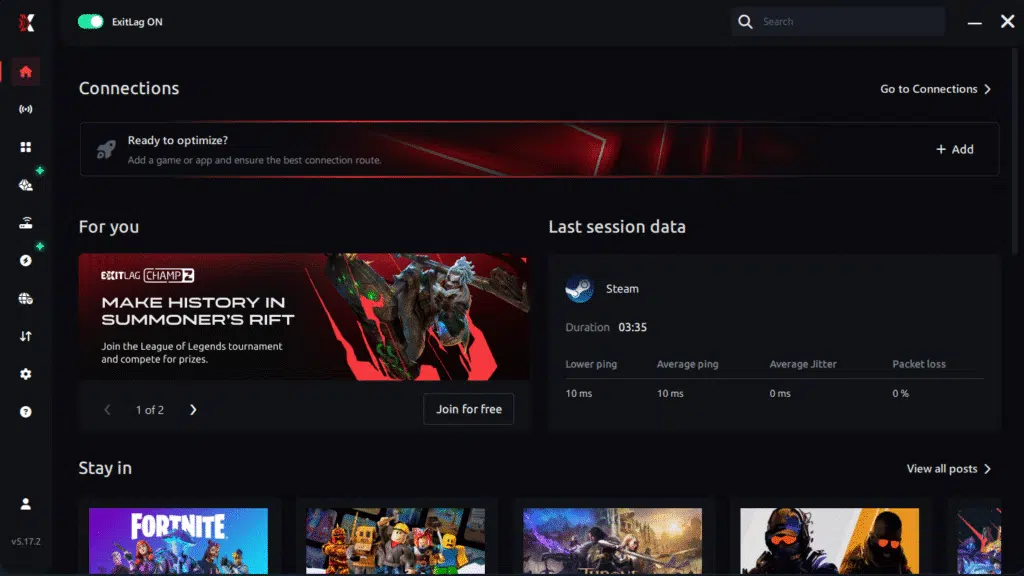
Step 3 – In the search bar, type “MIR4” and select the game from the list.
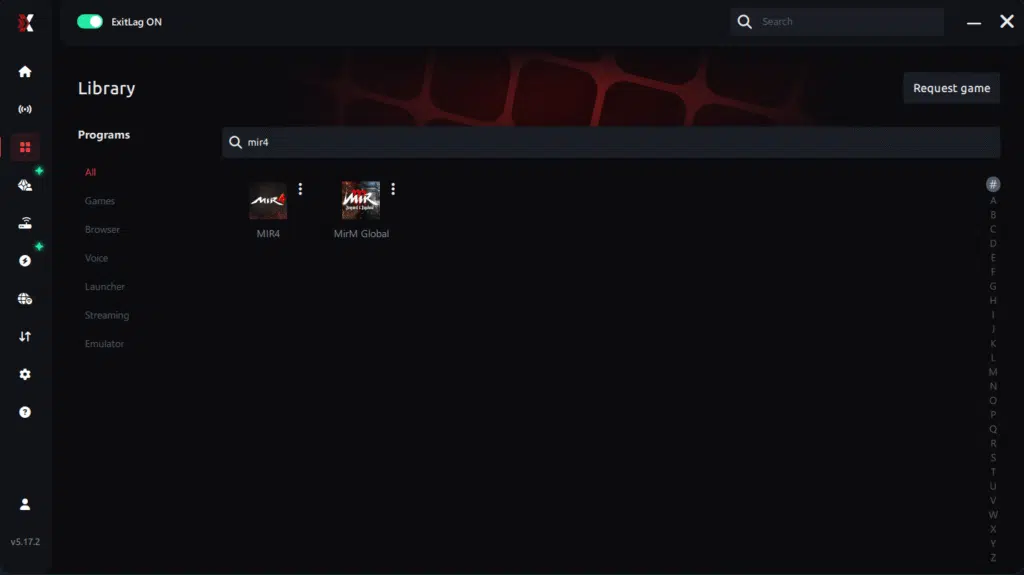
Step 4 – Choose between automated or manual route
Based on the results, you can let ExitLag automatically select the best route or manually choose the server that showed the lowest latency for your connection.
AI-optimized automated route
Based on the results, you can let ExitLag automatically select the best route through AI optimization. The system analyzes multiple connection paths in real time and automatically identifies the most efficient route for your connection, ensuring the lowest possible latency without requiring manual choices.
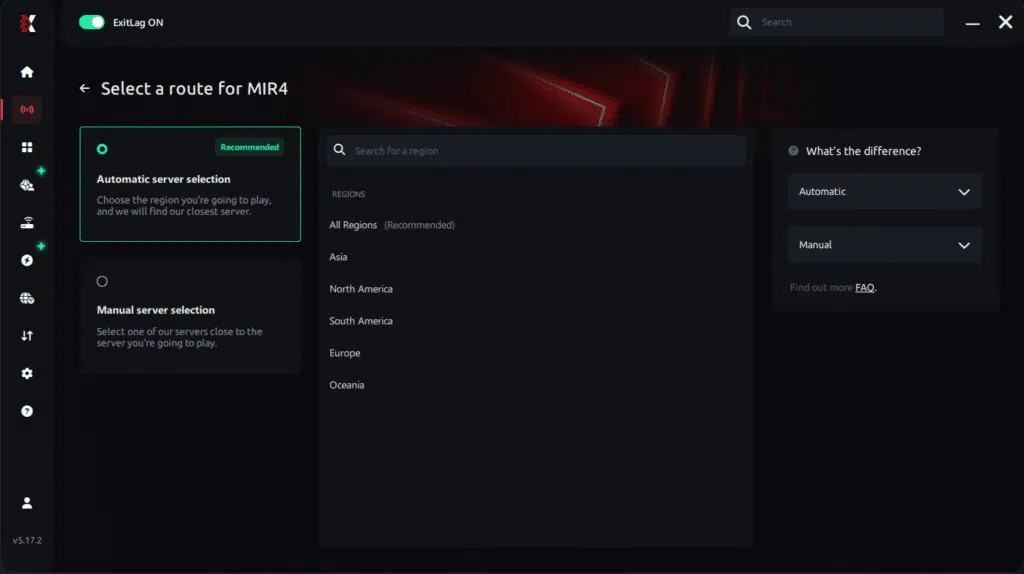
Manual route
If you prefer to have full control over your connection, you can manually choose the server based on the ping test results. Simply select the server that showed the lowest latency or the one that best meets your specific gaming needs, allowing complete customization of your experience.
Step 5 – Click “Apply routes” or the play button. ExitLag will begin optimizing your connection automatically.
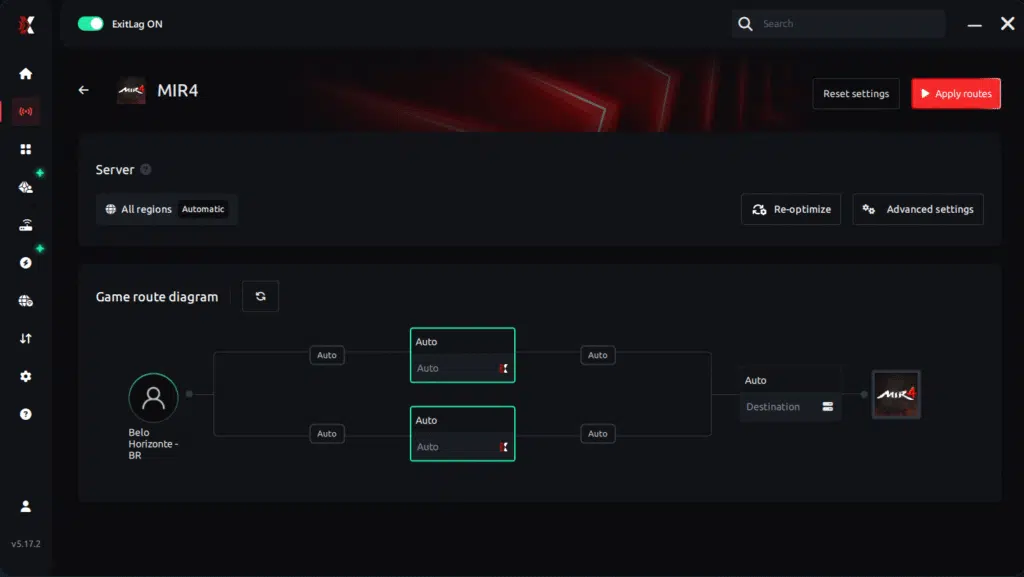
Step 6 – Wait a few seconds until optimization is complete. You’ll see ping indicators in the interface.
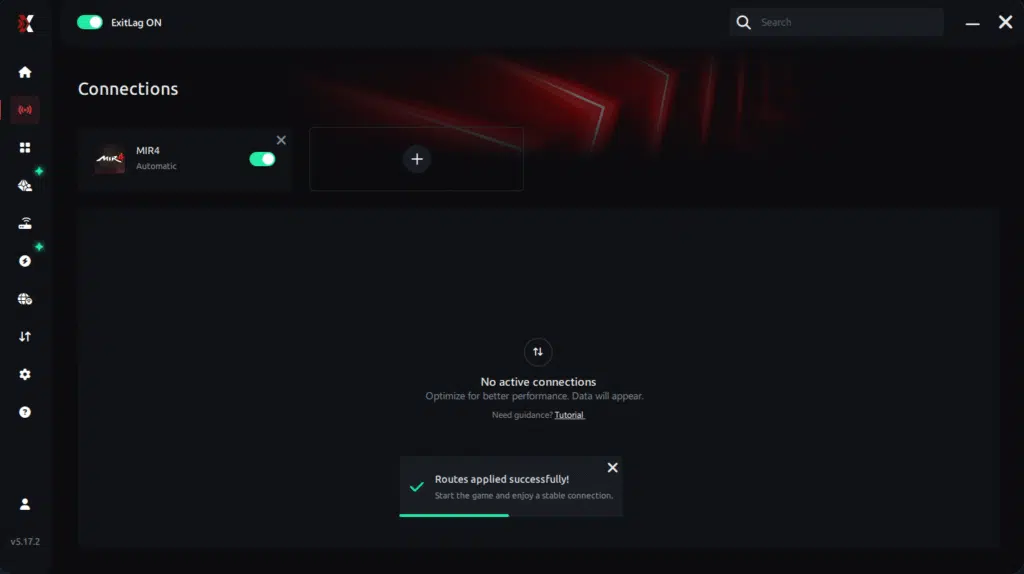
Step 7 – Launch MIR4 normally. The optimization will already be active.
ExitLag runs in the background while you play, constantly adjusting routes to maintain the best possible performance.
Final thoughts: Play MIR4 without lag forever
At the end of the day, MIR4 lag should never ruin your progress. Whether you’re farming, mining Darksteel, doing PvP, or participating in large-scale clan wars, your internet connection should never be the reason you lose rewards or time.
With ExitLag, you finally take control of your network performance. The software finds the fastest routes, eliminates lag, and stabilizes your ping so that every skill, every movement, and every battle happens exactly when you want it to.
Try ExitLag for free right now and experience how smooth MIR4 can be when your connection is fully optimized. Play with confidence, progress faster, and make lag a thing of the past.t.
FAQ: frequently asked questions about Mir4 packet loss
Is packet loss the same as lag?
No, these represent entirely separate problems. Lag means elevated latency (high ping), whereas packet loss indicates data never reaching destinations.
Low ping with severe packet loss remains possible. Similarly, high latency doesn’t automatically include packet loss.
Why do I have packet loss only in Mir4?
Different games utilize servers in varying datacenters with unique routing. Your path to Mir4 infrastructure might traverse problematic routers avoided by other games.
Server positioning and ISP routing decisions determine which games suffer. Visit the Mir4 official website for server status information.
Can packet loss cause kicks for suspected botting?
Generally no, anti-cheat systems distinguish between packet loss and botting. Packet loss causes erratic movement within game mechanics.
However, extremely unstable connections might trigger automatic disconnections protecting server integrity.
How much packet loss is acceptable for PvP?
Ideally 0% for any competitive content. Casual grinding might tolerate 1% occasionally.
However, clan wars and boss raids become impossible with any packet loss. Single rubberbanding incidents cause character deaths.
Can my hardware cause packet loss?
Yes—defective network cards, deteriorated cables, outdated routers, overheating modems commonly cause problems. Hardware testing helps isolate culprits.
ExitLag’s multi-route technology compensates effectively when replacement isn’t immediately possible. Software optimization overcomes hardware limitations remarkably.
Does ExitLag work on mobile Mir4?
Yes, ExitLag works on both PC and mobile platforms. Routes optimize for Android and iOS devices.
Configuration adapts automatically for different platforms. Optimization applies universally to all Mir4 versions.
Do I need ExitLag running constantly?
Only while actively playing Mir4. Launch ExitLag before starting ensuring optimized routes establish properly.
Close ExitLag after finishing gaming sessions freeing system resources. Reactivate before subsequent sessions for continued optimization.
Conclusion: eliminate Mir4 packet loss permanently
Mir4 packet loss shouldn’t prevent progression or destroy clan performance. Losing territory battles to connection problems rather than actual combat is preventable.
Every unfair death because skills didn’t register can be avoided. Furthermore, every failed boss raid from disconnections can be eliminated completely.
ExitLag represents the definitive solution for serious players refusing substandard connections. Attacking packet loss fundamentally transforms problematic connections into professional-grade performance.
Whether grinding casually or dominating territories, eliminating packet loss proves fundamental. Discover additional strategies through the ExitLag blog for comprehensive improvements.
Ready to eliminate packet loss permanently and dominate Mir4? Try ExitLag risk-free and experience professional-grade connection optimization today.
Got questions or want to connect with other players? Join the conversation at the ExitLag Forum!

