

Who plays MU Online knows how frustrating performance issues can be. Nothing ruins a hunt, a duel, or a Castle Siege moment faster than MU Online Lag. Even when you have a seemingly stable connection, it is common to see the ping spike, skills freeze, monsters teleport, or movement feel delayed. Therefore, understanding why this happens is the first step toward finally regaining control of your gameplay.
However, most players don’t realize that lag often has nothing to do with your PC power or your internet speed. Instead, it is usually caused by deeper connection-route issues between your device and the MU Online Lag servers.
Like this, once you understand what causes instability, it becomes easier to see why tools like ExitLag are becoming the preferred solution for players who want real stability, reduced ping, and smoother performance in MU Online Lag scenarios.

What is lag in MU Online
Lag in MU Online happens when there is a delay between your command and the game server’s response. Therefore, actions such as attacking, buffing, moving, or executing combos take longer to appear on screen. This delay can be caused by:
- slow or congested routes between your PC and the server
- packet loss (data not reaching the server)
- unstable routing choices from your internet provider
- long physical distance from the game server
Lag, ping and fps differences
Understanding these terms helps you identify the real issue:
| Term | Meaning | Impact |
| Lag | Command delay between you and the server | Skills feel slow or unresponsive |
| Ping | Time for data to travel to the server and back | High ping = delayed actions |
| FPS | Frames per second | Visual smoothness, not related to internet |
Therefore, if your game “feels slow,” it doesn’t always mean your computer is the problem most of the time, it’s the network path.
Why lag happens even with good internet
It is completely possible to experience MU Online Lag even when your internet plan is fast. Your provider automatically chooses routes for your data, and these paths are not always the fastest or most stable.
However, imagine your data packets traveling through a “digital traffic jam.” Even if the highway (your internet) is fast, if the route chosen is bad, you will still experience delays.
Finally, moments of server congestion, peak hours, or routing conflicts can intensify the issue, making MU Online nearly unplayable during critical PvP moments.
Exitlag as the solution
What if you could manually force your connection to take the best possible route instead of relying on your provider’s automatic choices? That is exactly what ExitLag does.
ExitLag is a multi-route optimization software that uses intelligent tunneling technology to stabilize and shorten the connection path between you and the MU Online servers. Like this, the game becomes more responsive, stable, and fluid.

Benefits of Exitlag for mu online
- lower and more stable ping
- fewer freezes and teleporting monsters
- reduced packet loss, making skills and hits register correctly
- better reaction time in PvP and bosses
- consistent gameplay even during peak hours
- extremely simple setup
Why Exitlag setup is so quick
ExitLag was designed so that any player regardless of technical knowledge can optimize their connection with minimal effort. Instead of requiring complicated adjustments or manual configurations, the software automatically analyzes and selects the best routes available. This means you don’t have to understand networking or deal with complex menus to see immediate improvements.
Moreover, the interface is lightweight and intuitive, allowing you to install, choose your game, and apply routes in a matter of seconds. Therefore, even players who are setting up a connection optimizer for the first time can feel confident navigating the platform. This simplicity ensures you spend less time configuring and more time enjoying smoother gameplay in MU Online.
What to expect after applying routes
Once the optimized routes are active, the first thing you will notice is how much faster your commands respond. Movement feels smoother, skills activate more quickly, and you experience fewer sudden freezes or strange teleporting from monsters or other players. Like this, your gameplay becomes far more predictable and consistent, especially in high-intensity scenarios such as PvP or boss fights.
Additionally, ExitLag significantly reduces packet loss and instability throughout your session, even during peak hours when servers and networks tend to be congested. This results in a more reliable connection that helps you maintain performance, accuracy, and reaction time. As a result, you can expect a noticeable improvement in your overall experience right after applying the optimized routes.
How to use ExitLag in MU Online
The process is extremely simple:
Step 1 – Access the official ExitLag website and download the application. There’s a free trial period for new users.
Step 2 – Install and open the program. Log in with your account.
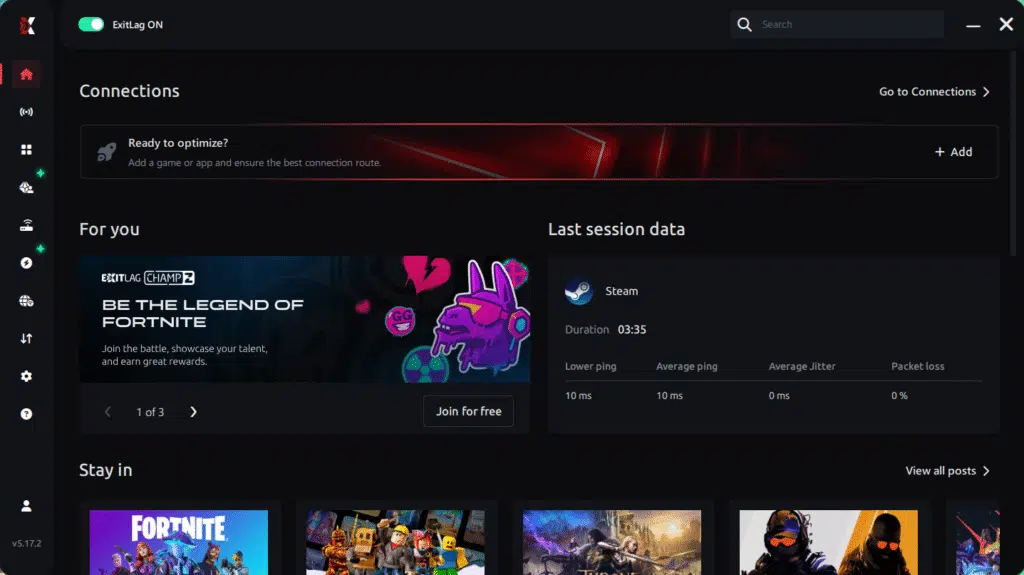
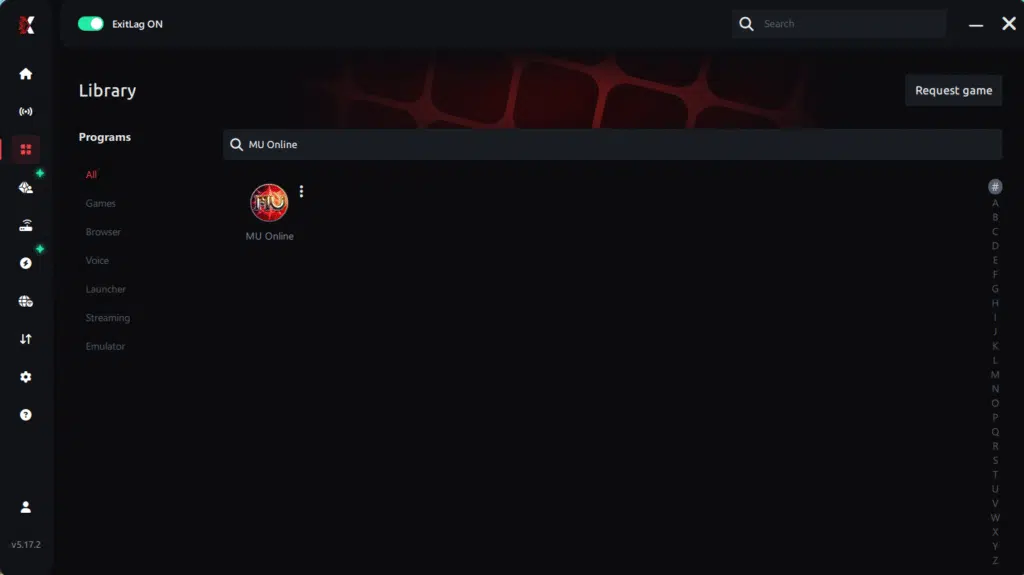
Step 3 – In the search bar, type “MU Online” and select the game from the list.
Step 4 – Choose between automated or manual route
Based on the results, you can let ExitLag automatically select the best route or manually choose the server that showed the lowest latency for your connection.
AI-optimized automated route
Based on the results, you can let ExitLag automatically select the best route through AI optimization. The system analyzes multiple connection paths in real time and automatically identifies the most efficient route for your connection, ensuring the lowest possible latency without requiring manual choices.
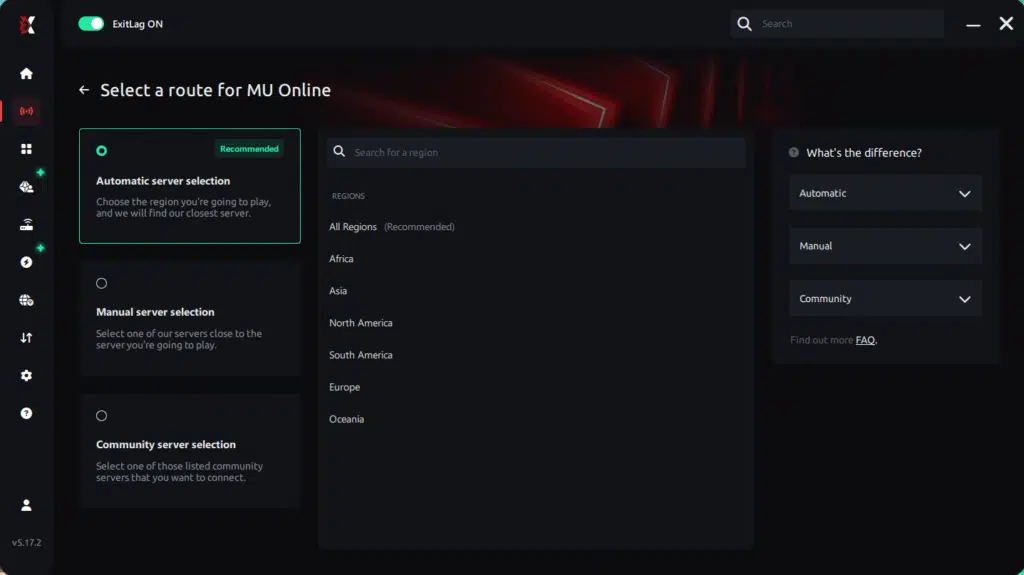
Manual route
If you prefer to have full control over your connection, you can manually choose the server based on the ping test results. Simply select the server that showed the lowest latency or the one that best meets your specific gaming needs, allowing complete customization of your experience.
Step 5 – Click “Apply routes” or the play button. ExitLag will begin optimizing your connection automatically.
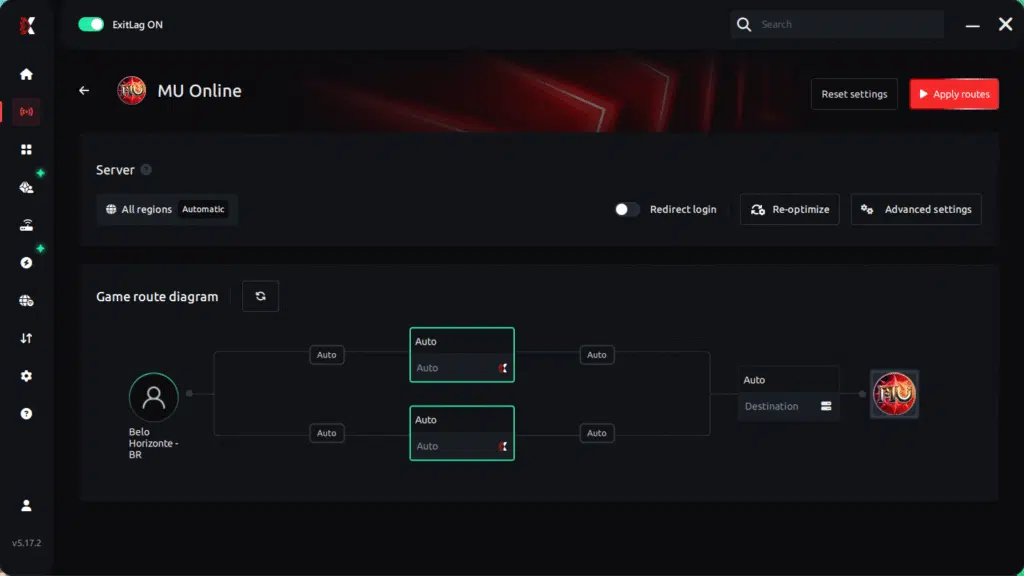
Step 6 – Wait a few seconds until optimization is complete. You’ll see ping indicators in the interface.
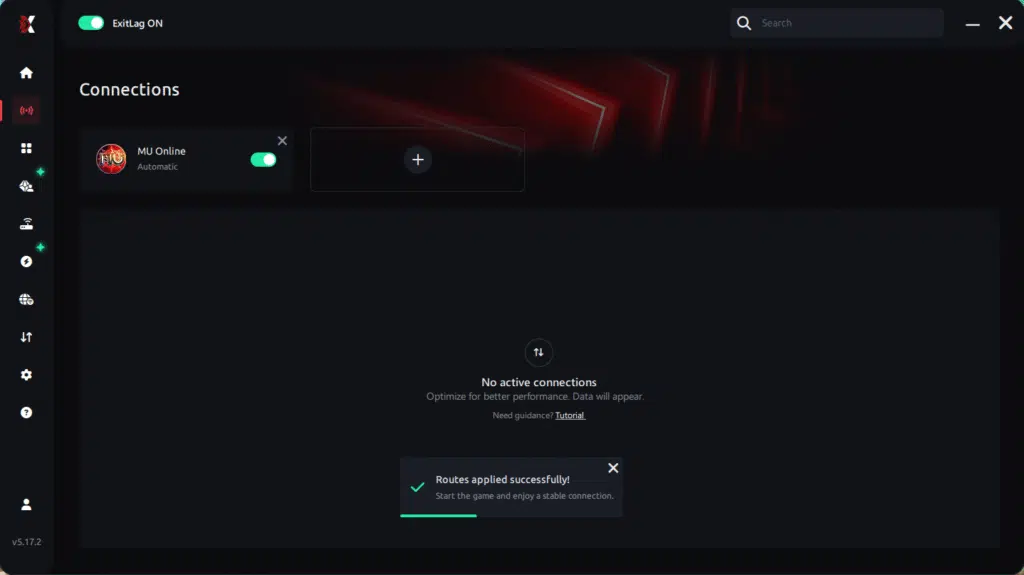
Step 7 – Launch MU Online normally. The optimization will already be active.
ExitLag runs in the background while you play, constantly adjusting routes to maintain the best possible performance.
Final thoughts: Play MU Online without lag forever
At the end of the day, MU Online lag should never ruin your experience. Whether you’re farming, upando level, fazendo PvP ou participando de eventos, your internet connection should never be the reason you disconnect or lose progress.
With ExitLag, you finally take control of your network performance. The software finds the fastest routes, eliminates lag, and stabilizes your ping so that every skill, every movement, and every action happens exactly when you want it to.
Try ExitLag for free right now and experience how smooth MU Online can be when your connection is fully optimized. Play with confidence, evolve faster, and make lag a thing of the past.onsiveness.
Why Exitlag is ideal for mu online players
MU Online is a game where milliseconds matter. Combo timing, skill delay, potion usage, and reaction speed determine victory in PvP, Duel Arena, Castle Siege, and even PVM bosses. Therefore, reducing lag is not just about comfort; it directly influences performance and results.
With its smart routing, ExitLag ensures your actions reach the server faster and more accurately. Thus, you gain smoother control, better hit registration, and more consistency in every session.
How to use Ping for Games: step-by-step guide
Checking your connection quality before entering a match has never been easier. Here’s how to use Ping for Games in just a few steps:
1. Open the ExitLag software on your PC
Ensure the application is installed and open. The feature is integrated into the platform and available for free to all users.
2. Access the Network Analyzer tool
Locate the Network Analyzer in the software menu. This is where you’ll find Ping for Games along with other connection analysis features.
3. Select the game you want to test
Choose from the list the title you plan to play. The tool supports major online multiplayer games, including MOBAs, FPS, Battle Royales, MMORPGs, and more.
4. Choose the specific server
Now you select directly the server you want to test, instead of just a generic region. This ensures much more accurate results for your choice.
5. Start the ping test
With one click, the measurement is performed in real-time between your device and the chosen server, considering your current connection (cable or Wi-Fi).
6. Analyze the results
Results appear in milliseconds (ms), automatically sorted from best to worst ping. You can also reorganize the view alphabetically, if you prefer.
7. Choose the best server and play worry-free
With the information in hand, just select the server with the lowest latency and enter the match knowing your connection is optimized.
Final notes
After understanding the real causes of instability, it becomes clear that you don’t need to accept MU Online Lag as part of your gameplay. With ExitLag, you can fix the connection route, reduce ping, eliminate packet loss, and finally experience MU Online with the performance it deserves.
Therefore, if you are tired of dying, missing combos, or losing events because of lag, it’s time to act. Finally, test ExitLag for free and feel the difference instantly unlock the full potential of your gameplay and enjoy MU Online the way it was meant to be played.
Got questions or want to connect with other players? Join the conversation at the ExitLag Forum!

