Few things ruin an expedition faster than a sudden drop mid boss fight. If you have been searching for answers about Nightreign Server Issues, you are not alone.
Thousands of players deal with the same frustration every week, from failed matchmaking to random disconnects during Duo Expeditions. Nightreign Server Issues can strike at the worst possible moment, wiping out Remembrance progress and forcing you back to the Roundtable Hold empty handed.
So what actually causes these problems? Most Nightreign Server Issues come from a mix of peer to peer networking limitations, NAT restrictions, and regional routing that was not built to handle every ISP equally. Understanding this is the first step toward a real fix, not just a restart.
This guide breaks down exactly why connections fail, how to diagnose the real cause, and which fixes actually work. We will also cover Elden Ring Nightreign Connection Problems tied to specific error codes, plus a permanent solution for anyone tired of guessing.
Why Do Nightreign Server Issues Happen?
Elden Ring Nightreign relies on a peer to peer connection model for its multiplayer expeditions. Instead of a dedicated game server hosting every match, one player effectively becomes the host, and everyone else connects through that link.
This design choice explains a lot about why Nightreign Server Issues feel so unpredictable compared to other online games. If the host has a weak connection, everyone in the party suffers, even players with excellent internet.
How Does The P2P System Affect Stability?
Because Nightreign uses P2P matchmaking with routing assistance, your NAT type matters enormously. A Strict or Moderate NAT type can silently block the direct connections needed for smooth co-op play.
Consequently, players with open NAT types tend to report far fewer drops than those behind restrictive routers or double NAT setups. Firewalls and IPv6 configurations add another layer of complexity on top of that.
- Peer to peer hosting means match quality depends on the weakest connection in the party
- Strict or Moderate NAT types frequently block direct P2P traffic
- IPv6 has repeatedly caused connectivity problems for Nightreign players on PC
- Regional routing can send your traffic through congested paths even when a closer server exists
- Anti-cheat processes tied to Nightreign occasionally interfere with network handshakes
Is Nightreign Down Right Now Or Is It My Connection?
This is the question everyone asks the moment a session drops. In most cases, the game itself is online and functioning, and the issue traces back to local network configuration or ISP routing.
Genuine outages do happen, usually during scheduled maintenance windows or right after a major patch rollout. Checking official status channels before assuming a personal fix is needed can save you a lot of troubleshooting time.
Common Elden Ring Nightreign Connection Problems
Not every disconnect looks the same, and recognizing the pattern helps you apply the right fix instead of restarting blindly. Some issues are tied to specific error codes, while others show up as generic timeouts.
Furthermore, certain problems only appear during specific in game actions, such as repeated skill usage or continuous spellcasting during a fight. That detail alone hints at how sensitive the networking layer still is under heavy load.
| Issue Type | Typical Symptom | Likely Cause |
|---|---|---|
| Matchmaking Failure | Endless searching, no lobby found | Regional congestion or NAT blocking |
| Mid Match Disconnect | Sudden drop during boss fight | Host connection instability or packet loss |
| Network Error Loop | Reconnect attempt fails repeatedly | Session handshake failure, requires full restart |
| Rubber Banding | Enemies teleport, hits do not register | High latency or jitter to the host |
| File Permission Error | Crash with error code on launch | Anti-cheat or corrupted local files |
What Triggers Mid Match Disconnects?
Mid match drops are often the most painful because they can forfeit your Remembrance progress entirely. Several factors tend to combine to cause this specific failure.
- The host player experiences packet loss or a temporary ISP hiccup
- Continuous use of certain Sorceries or Incantations places extra strain on the network layer
- A background download or streaming app saturates your bandwidth mid session
- Router firmware drops the connection during a DHCP lease renewal
- Windows updates or driver installs silently interrupt network priority
How Do You Fix The Network Error Loop?
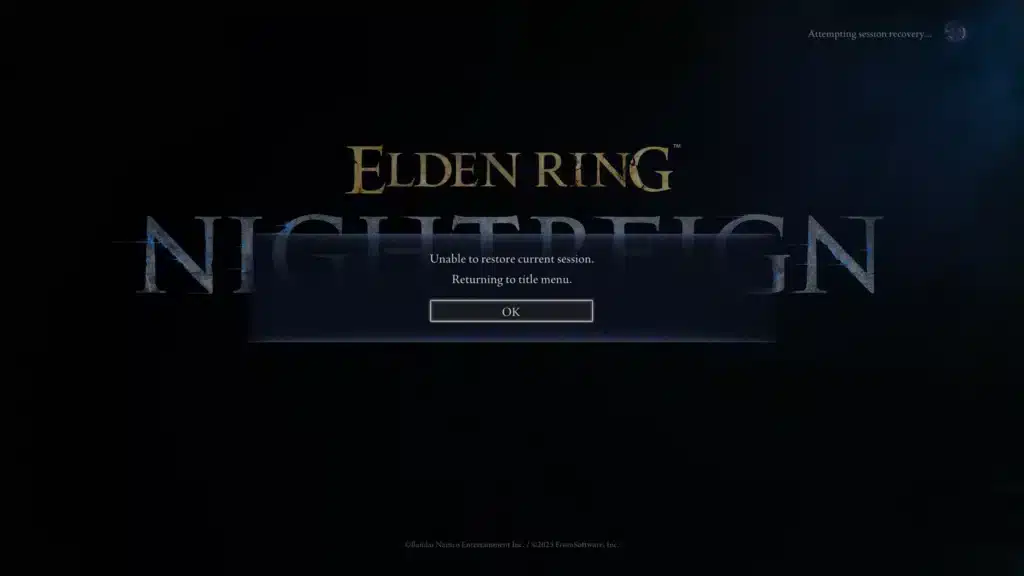
This specific loop traps you in a cycle where the game tries to reconnect but never succeeds. It is one of the more frustrating Nightreign Disconnect Fix scenarios because a normal retry does nothing.
The community workaround is straightforward but not obvious. Force close the game entirely while the error screen is still up, then relaunch and accept the rejoin prompt.
- Press Alt+F4 or use Task Manager to fully end the process
- Do not click retry inside the stuck menu, it rarely resolves the loop
- Relaunch the client and wait for the automatic rejoin option
- If rejoin fails twice, check your NAT type before trying a third time
How Can You Reduce Nightreign Lag And Ping Spikes?
Lag is different from a hard disconnect, but it is arguably more common and just as damaging. A single spike during a boss attack window can mean the difference between dodging and eating a full combo.
Most Nightreign Lag Fix advice online repeats the same generic tips like restarting your router. Those steps help, but they rarely address the actual routing problem happening between your ISP and the game’s network.
Why Does Regional Matchmaking Increase Latency?
Nightreign supports cross region matchmaking by default, meaning you can be grouped with players on other continents unless you disable it manually. That flexibility comes at a real cost to your ping.
Therefore, if you consistently notice sluggish inputs or delayed hit registration, check whether cross region matchmaking is toggled on. Turning it off narrows your matches to closer, lower latency lobbies.
What Local Steps Actually Help With Lag?
Before reaching for any third party tool, a few basic checks are worth ruling out first. These will not fix everything, but they eliminate the easy culprits.
- Connect via ethernet instead of Wi-Fi whenever possible
- Close background apps that consume upload bandwidth, including cloud sync tools
- Update your router firmware and restart it monthly
- Set the game to high priority in Task Manager on PC
- Confirm your NAT type is Open or Moderate, not Strict
Checking Nightreign Server Status Before You Troubleshoot
Before spending an hour changing router settings, it is worth confirming whether the problem is even on your end. Nightreign Server Status pages and in game notices can quickly rule out a wider outage.
Scheduled maintenance is usually announced in advance and tends to follow major patch releases. Unexpected outages are rarer but do happen when player volume spikes after new content drops.
How Do You Know If It Is A Widespread Outage?
If multiple players across different regions report the same error at the same time, that is a strong signal of a server side problem rather than a personal connection issue. Social channels and community forums usually confirm this within minutes.
On the other hand, if you are the only one in your party experiencing drops, the issue is almost certainly local. This distinction saves you from wasting time on fixes that were never going to help.

Pro Tips: Nightreign Server Issues
- Restart your router before every long session: A fresh connection clears temporary routing tables and reduces the chance of a mid session NAT conflict.
- Disable IPv6 on your adapter: Many players report fewer P2P handshake failures after switching to IPv4 only, since Nightreign’s netcode still struggles with IPv6 in certain configurations.
- Allowlist the game in your firewall manually: Automatic detection sometimes misses Nightreign’s specific ports, so adding it manually prevents silent connection blocks.
- Avoid downloads and streaming during expeditions: Bandwidth competition is one of the most overlooked causes of lag spikes during boss fights.
- Turn off cross region matchmaking if ping matters more than queue speed: You will wait slightly longer for a lobby, but the connection quality improves noticeably.
Common Mistakes Nightreign Players Make
- Blaming the game for every drop: Many players assume every disconnect is a server outage. Fix: check your NAT type and firewall settings first, since local configuration causes most issues.
- Spamming the retry button during a network error loop: This rarely works and wastes valuable time. Fix: force close the client completely and relaunch before attempting to rejoin.
- Ignoring background bandwidth usage: Cloud backups and downloads silently eat upload speed during expeditions. Fix: pause all non essential network activity before starting a session.
- Never checking NAT type: A Strict NAT quietly blocks P2P traffic without any clear error message. Fix: enable UPnP or set up port forwarding on your router for a more open connection type.
Solving Nightreign Server Issues With ExitLag
At this point you understand the local fixes, but there is a limit to what router restarts and firewall changes can accomplish. The truth is that a lot of instability happens outside your home network, somewhere along the route to the game’s infrastructure.
This is exactly where ExitLag becomes useful. ExitLag is not a VPN, it is a connection optimizer that analyzes multiple network paths in real time and automatically selects the fastest, most stable route to reduce Elden Ring Nightreign Connection Problems.
Its Multipath Technology sends your data through several routes at once. If one path degrades or drops, the others keep the connection alive, which directly addresses the mid match disconnects that plague P2P based games like Nightreign.
For players on unstable home internet, Multi-Internet support allows up to four simultaneous connections. If your primary line hiccups during a boss fight, a secondary connection takes over instantly instead of forcing a full reconnect.
ExitLag also includes Traffic Shaper, which prioritizes your game traffic over background apps competing for bandwidth. Combined with AI powered routing that picks the best path automatically, it targets the exact packet loss and latency spikes behind most Nightreign Lag Fix searches.
The platform supports over 4,000 games across 1,500+ servers in more than 190 countries, trusted by over 30 million users running upwards of 18 million optimizations every week. It does not encrypt traffic or mask your IP, and it is fully safe to use alongside Nightreign’s anti-cheat systems.
If you are ready to stop guessing and actually fix your routing, grab the ExitLag Download and run the optimizer before your next expedition. Just remember never to run it alongside a VPN, since that reduces its effectiveness.
Final Thoughts On Nightreign Server Issues
Server instability in online games is rarely one single problem, and Nightreign is no exception. Between P2P hosting, NAT restrictions, and regional routing, there are several points where things can go wrong.
However, the good news is that most Nightreign Server Issues are fixable once you know where to look. Start with your NAT type and firewall, rule out a genuine outage, and lean on smarter routing tools when local fixes are not enough.
With the right combination of settings and optimization, you can spend far less time troubleshooting and far more time actually enjoying your expeditions.
All game images used in this blog post belong to FromSoftware / Bandai Namco. They are used for informational and educational purposes only and do not imply endorsement or affiliation with the rights holders.
Got questions or want to connect with other players? Join the conversation at the ExitLag Forum!