When you launch Ark: Survival Evolved ready to tame creatures or dive into PvP, nothing is more frustrating than sudden freezes, rubberbanding, or commands that simply don’t register. Many of these issues come from one single problem: packet loss ark. And if you’ve been searching for ways to fix packet loss ark, you’re definitely not alone. Players across official, unofficial and modded servers constantly report ark connection issues that make the game nearly unplayable, especially in competitive environments.
Like this, countless players end up looking for solutions that actually work, and among the known options, one has consistently proven to reduce instability and ark lag while helping users reduce packet loss Ark.
However, before we reach the definitive solution, we must understand what packet loss really means inside Ark and why it hits this game harder than many others.

What is packet loss in Ark?
Packet loss refers to the moment when data packets, the small pieces of information your PC sends to the game servers, never reach their destination. In Ark, every movement, action, hit and structure placement depends on accurate transmission of these data. Therefore, when even a few packets disappear, the game stops receiving crucial information in real time.
This packet loss works almost like sending several letters through different couriers: some arrive fast, others late, and some never show up at all. In Ark’s case, those “letters” are your data packets, and when they vanish, the server cannot update your character’s state, causing stutters, delays and even disconnections.
However, because Ark’s engine processes large amounts of positional and entity data, it is more sensitive to packet loss than simpler online games. A small loss in another title might cause a delay, but in Ark, it can get you killed instantly.
How packet loss affects Ark gameplay
When packet loss occurs in Ark, several in-game symptoms appear:
- Rubberbanding: Your character snaps back to a previous position.
- Delayed commands: Actions like jumping, attacking, or using items stop responding.
- Sudden disconnections: The server may kick you out without warning.
- Teleporting creatures: Dinos and enemies appear in unpredictable spots.
- Failed hit registration: Damage doesn’t apply even when you clearly hit.
- Structure placement failure: Building becomes nearly impossible as the server fails to register inputs.
These issues severely impact PvP, raids and even casual exploration, making a stable connection essential.
Main causes of packet loss in Ark
Inefficient routing
Your connection may traverse multiple routers and international nodes before reaching an Ark server. If any hop becomes unstable, pacotes de dados are dropped. Therefore, poor routing is one of the biggest contributors to instability.
Unstable connection
Wi-Fi drops, ISP fluctuations, outdated modems or misconfigured routers can interrupt data transmission. However, even strong signals can suffer interference.
Distance from servers
The farther you are from an Ark server, the more hops your data must take. More hops mean more chances for packet loss.
Network congestion
Peak hours or multiple devices streaming in your home create bottlenecks. Therefore, your game packets become deprioritized.
Damaged hardware
Faulty network cards, broken cables or failing routers can generate intermittent loss.
Game-specific load
Ark servers are often heavy, especially unofficial modded ones. High load can make the server drop packets during peak usage.
How to identify packet loss in Ark
Identifying packet loss requires observing irregular behaviors. First, players typically notice inconsistent latency, where ping fluctuates even when their internet is stable. However, you might experience Ark lag despite having a “good” ping because packet loss disrupts communication independently of latency.
You can also detect packet loss through in-game symptoms such as rubberbanding, unpredictable dino movement and delayed inventory actions.
Finally, a manual ping test can confirm the issue. Using command prompt (Windows) or terminal (Mac/Linux), you can send test packets to a server. If any results show drops or large deviations, you’re likely dealing with packet loss.
Packet loss levels in Ark
| Packet Loss Level | Gameplay Impact |
| 0% | Perfect, smooth gameplay |
| 1–3% | Minor lag, occasional rubberband |
| 4–8% | Noticeable lag, input delay |
| 9–15% | Severe instability, frequent teleporting |
| 16%+ | Unplayable, disconnects likely |
Basic solutions to reduce packet loss in Ark
Optimize your local connection
- Switch to a wired Ethernet connection.
- Close background programs using bandwidth.
- Update all network drivers.
- Enable QoS prioritization for gaming on your router.
- Test different LAN cables to rule out damage.
- Restart modem and router to refresh routing.
Contact your ISP
If the issue persists, your ISP may need to check line noise, signal quality or routing problems. Sometimes a simple line recalibration fixes loss.
ExitLag: the definitive solution to eliminate packet loss in Ark
What is ExitLag?
ExitLag is a software specialized in connection optimization designed specifically for online games. It uses advanced technology to stabilize your route, improve performance and completely eliminate inconsistent data travel between you and Ark servers.
ExitLag is not “just another tool”, it is the ultimate solution for players who want stable gameplay, especially in demanding titles like Ark that rely on heavy real-time communication.
How ExitLag works to reduce packet loss
ExitLag uses its proprietary Multi-Internet technology to eliminate packet loss.
Here’s how it works:
- Real-time route analysis
- Multiple simultaneous connections
- Automatic route switching when instability occurs
- Hop optimization
- Continuous connection stabilization
Advantages of ExitLag for Ark players
- Eliminates packet loss Ark by intelligently rerouting traffic
- Reduces ping through optimized, direct paths
- Provides a more stable connection in PvP and raids
- Minimizes unpredictable behavior during combat
- Works with official, unofficial and modded servers
- Easy setup and intuitive interface
Therefore, players experience fewer deaths, fewer disconnects and much more predictable gameplay.

Is ExitLag worth using for Ark?
With Ark’s heavy network load, ExitLag quickly becomes indispensable.
ExitLag is ideal if you:
- Play on distant servers
- Participate in competitive PvP
- Experience constant instability
- Want consistent performance
- Play during peak hours
- Have an ISP with poor routing
Finally, most players find that ExitLag pays for itself just by preventing unfair deaths and lost progress.
How to use ExitLag in Ark
The process is extremely simple:
Step 1 – Access the official ExitLag website and download the application. There’s a free trial period for new users.
Step 2 – Install and open the program. Log in with your account.

Step 3 – In the search bar, type “Ark” and select the game from the list.

Step 4 – Choose between automated or manual route
Based on the results, you can let ExitLag automatically select the best route or manually choose the server that showed the lowest latency for your connection.
AI-optimized automated route
Based on the results, you can let ExitLag automatically select the best route through AI optimization. The system analyzes multiple connection paths in real time and automatically identifies the most efficient route for your connection, ensuring the lowest possible latency without requiring manual choices.
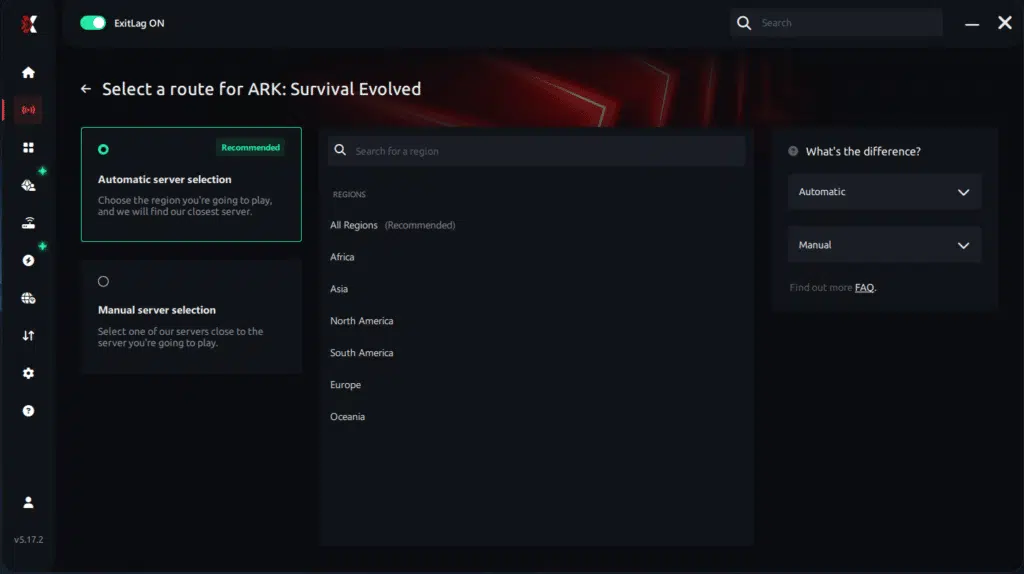
Manual route
If you prefer to have full control over your connection, you can manually choose the server based on the ping test results. Simply select the server that showed the lowest latency or the one that best meets your specific gaming needs, allowing complete customization of your experience.
Step 5 – Click “Ark” or the play button. ExitLag will begin optimizing your connection automatically.

Step 6 – Wait a few seconds until optimization is complete. You’ll see ping indicators in the interface.
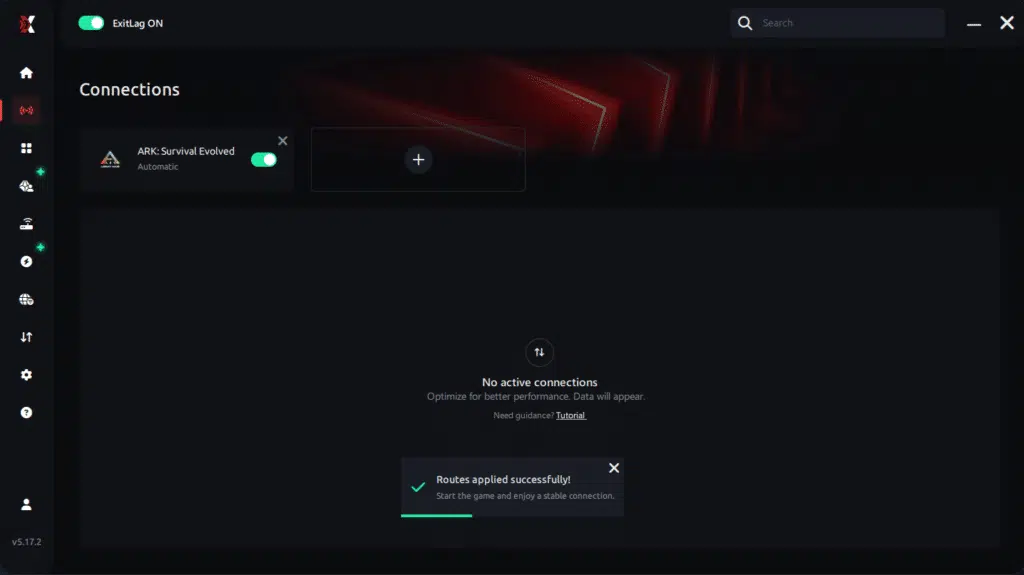
Step 7 – Launch Ark normally. The optimization will already be active.
ExitLag runs in the background while you play, constantly adjusting routes to maintain the best possible performance.
FAQ: packet loss in Ark
Is packet loss the same as lag?
No. Lag refers to high ping (delay). Packet loss refers to data not reaching the server. You can have low ping but high packet loss.
Why do I have packet loss only in Ark?
Servers for different games are located in different regions. A route might be stable for one game but problematic for Ark.
Can packet loss cause bans?
Generally no. Packet loss creates erratic behavior, not cheating patterns. However, severe instability might trigger automatic disconnects.
What level of packet loss is acceptable?
Competitive Ark requires 0%. Up to 1% is tolerable casually, but anything above that becomes dangerous in PvP.
Can my hardware cause packet loss?
Yes, faulty LAN cables, old routers, damaged network cards and overheating modems all contribute to instability.
Does ExitLag work on unofficial Ark servers?
Yes, ExitLag works on both official and private servers as long as they are properly selected.
Do I need ExitLag on all the time?
No, only while gaming. But activating it before launching Ark ensures stable routing.
Eliminate packet loss and play Ark without interruptions
Packet loss doesn’t have to ruin your Ark sessions. With the right tools and knowledge, you can stabilize your gameplay, protect your tames and avoid losing progress due to network instability. Ark’s complex server structure makes it more sensitive to routing issues, but a reliable solution ensures consistency.
Therefore, investing in optimized connection performance gives you a tangible gameplay advantage, especially in high-stakes PvP, raids and survival situations.Finally, using ExitLag ensures the smooth, interruption-free Ark experience you’ve been searching for.
Got questions or want to connect with other players? Join the conversation at the ExitLag Forum!