Playing Counter-Strike 2 becomes incredibly frustrating when your commands fail to register, enemies teleport across the screen, or bullets don’t hit even when your aim is perfect. These issues often happen due to packet loss Counter-Strike 2, which disrupts the communication between your game and the server. Therefore, many players search for ways to fix packet loss Counter-Strike 2, especially when dealing with unstable matches and unpredictable firefights.
However, packet loss isn’t always caused by slow internet or hardware problems; it often happens because your computer’s data can’t reach the server properly. Like this, even players with strong setups experience Counter-Strike 2 connection issues, random lag spikes, or rubberbanding during critical rounds. This creates a competitive disadvantage, especially in clutch situations where every millisecond matters.
Finally, understanding what causes packet loss Counter-Strike 2 is crucial. Once you know where the problem comes from, you can apply the right fixes and use professional optimization tools to stabilize your route and avoid sudden losses in ranked matches. With the right solution, you can eliminate interruptions and regain full control over your gameplay performance.

What is packet loss in Counter-Strike 2?
Packet loss happens when data packets sent from your device fail to reach the servers, or when the transmission takes too long and the server rejects them. Think of it as trying to send messages, but some never arrive at the destination. In Counter-Strike 2, this leads to actions not responding, bullets not registering, and unpredictable player movement.
When packet loss occurs, you might see enemies teleport, teammates stuttering across the map, or your character getting pulled back after moving. This is different from normal lag because packet loss affects data integrity, not just speed. In high-level gameplay, even 1–2% packet loss can drastically impact a match.
Therefore, understanding packet loss Counter-Strike 2 early helps avoid confusion and allows you to address the correct part of your connection.
How packet loss affects gameplay
In Counter-Strike 2, packet loss creates several serious disruptions:
- Hit registration failure: bullets don’t count
- Rubberbanding: your character snaps back
- Random freezes during firefights
- Teleporting enemies
- Delayed peeks and trades
- Counter-Strike 2 lag even with low ping
- Unexpected disconnections during competitive matches
Main causes of packet loss in the game
Inefficient routing
Your data travels through multiple network points. If any node drops information on the way, reduce packet loss Counter-Strike 2 becomes difficult. Routing also affects ping stability.
Unstable connection
Your modem or ISP may introduce jitter, interruptions, or momentary disconnections. These micro-cuts create packet loss even with fast download speeds.
Distance from servers
The farther you are from the server region, the more likely packet loss Counter-Strike 2 becomes due to longer packet travel.
Network congestion
Shared Wi-Fi, multiple users, or peak gaming hours can overload your network, causing delays in packet delivery.
Hardware or cable issues
Damaged ethernet cables, outdated routers, or faulty network cards can make data transmission inconsistent.
How to identify packet loss
Inside Counter-Strike 2, symptoms like rubberbanding, low-ping lag, or inconsistent player movement reveal packet loss. The game may also display icons or warnings indicating network instability.
You can perform a manual test by running a ping command in your terminal to a known server. If responses show variability or timeouts, your packets aren’t traveling consistently. This explains why packet loss Counter-Strike 2 can happen even when your ping appears normal.
Interpreting results is simple: stable ping means stable data flow, while fluctuating numbers or missing responses reveal packet loss or jitter problems.
Packet loss reference table
| Packet Loss % | Gameplay Impact | Severity |
| 0% | Perfect | Low |
| 1–2% | Minor issues | Medium |
| 3–5% | Noticeable lag | High |
| 6%+ | Unplayable | Critical |
Basic solutions to reduce packet loss
Optimize your local connection
- Switch to wired ethernet
- Close background programs and updates
- Update network drivers
- Configure router QoS
- Replace old ethernet cables
- Restart modem and router
Contact your isp
If you notice consistent packet loss at certain times of the day, your ISP might be using congested routes. They can evaluate your line quality or adjust your routing, but this rarely ensures long-term stability.
ExitLag: the definitive fix for packet loss
What is ExitLag?
ExitLag is a specialized software built specifically for connection optimization, ensuring your data travels through the most stable routes available. Its advanced technology monitors your connection in real time and corrects unstable paths before they impact your gameplay.
How ExitLag reduces packet loss
ExitLag’s advanced multi-route system sends your information across multiple paths at once.
ExitLag works through:
- Real-time analysis
- Multiple simultaneous routes
- Automatic route switching
- Hop optimization
- Connection stabilization
Benefits for Counter-Strike 2 players
- Drastic reduction or removal of packet loss Counter-Strike 2
- Lower ping from optimized routing
- Stable and predictable latency
- Enhanced hit registration reliability
- Intuitive user interface
- Compatibility with official and private servers
These benefits eliminate unpredictable gameplay and offer competitive consistency.
Is ExitLag worth it?
ExitLag is extremely valuable for players who face frequent instability, weak routing, or distant servers. Its improvements in consistency and responsiveness help avoid unfair losses and unreliable rounds.
How to use ExitLag in Counter-Strike 2
The process is extremely simple:
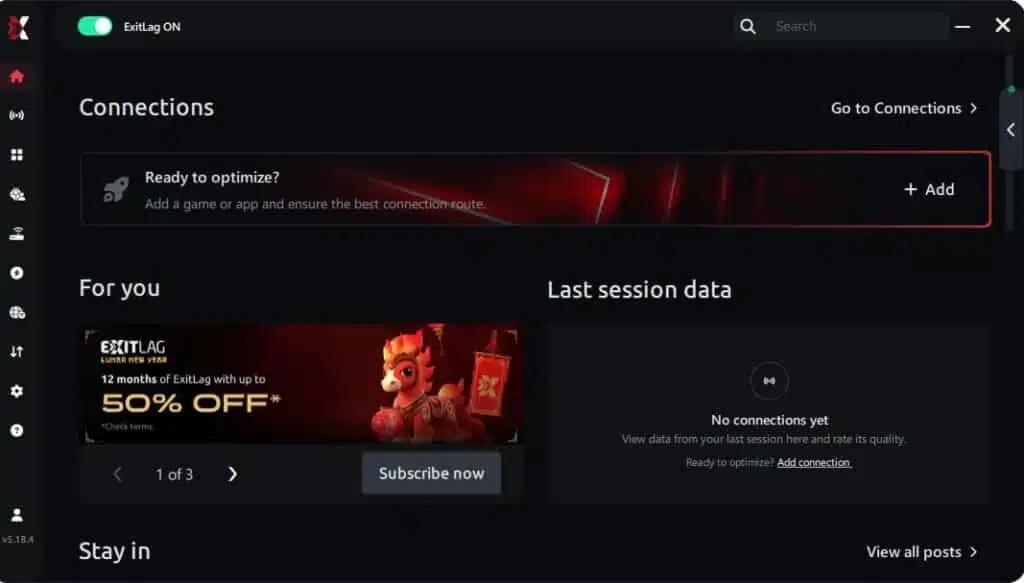
Step 1 – Access the official ExitLag website and download the application. There’s a free trial period for new users.
Step 2 – Install and open the program. Log in with your account.
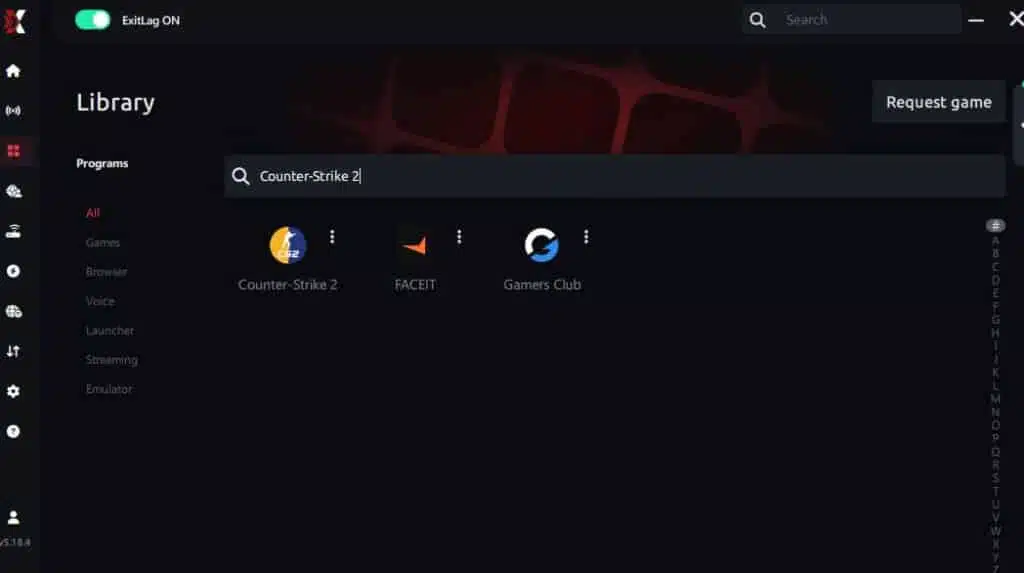
Step 3 – In the search bar, type “Counter-Strike 2” and select the game from the list.
Step 4 – Choose between automated or manual route

Based on the results, you can let ExitLag automatically select the best route or manually choose the server that showed the lowest latency for your connection.
AI-optimized automated route
Based on the results, you can let ExitLag automatically select the best route through AI optimization. The system analyzes multiple connection paths in real time and automatically identifies the most efficient route for your connection, ensuring the lowest possible latency without requiring manual choices.
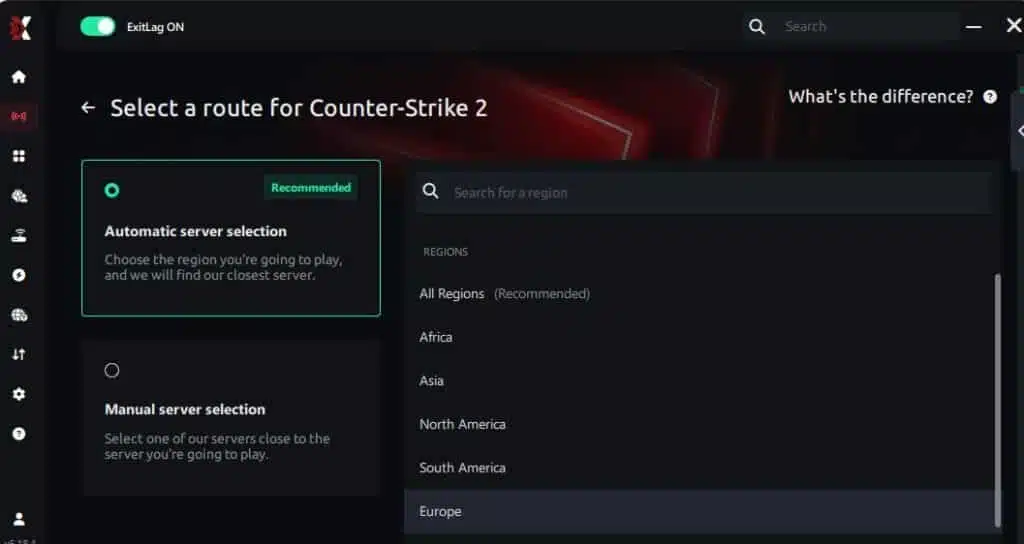
Manual route
If you prefer to have full control over your connection, you can manually choose the server based on the ping test results. Simply select the server that showed the lowest latency or the one that best meets your specific gaming needs, allowing complete customization of your experience.
Step 5 – Click “Counter-Strike 2” or the play button. ExitLag will begin optimizing your connection automatically.

Step 6 – Wait a few seconds until optimization is complete. You’ll see ping indicators in the interface.
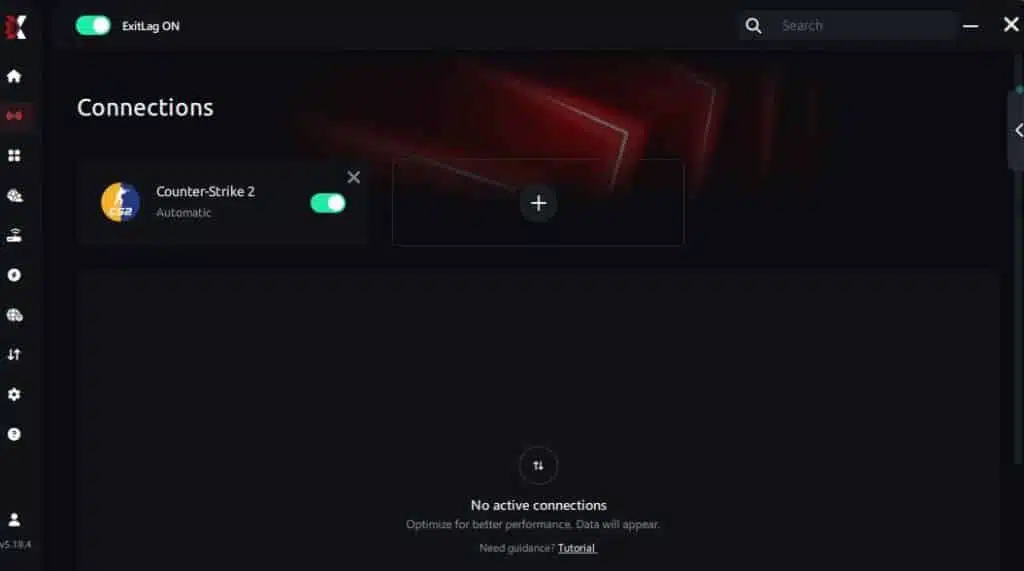
Step 7 – Launch Counter-Strike 2 normally. The optimization will already be active.
ExitLag runs in the background while you play, constantly adjusting routes to maintain the best possible performance.
Faq about packet loss
Is packet loss the same as lag?
No. Lag refers to high ping, while packet loss refers to missing data. You can have low ping with severe packet loss.
Why do I have packet loss only in Counter-Strike 2?
Each game uses different servers and routes. Your path to CS2 servers may have unstable network nodes.
Can packet loss cause bans?
Packet loss does not cause bans, though extreme instability may cause automatic disconnections that look suspicious.
How much packet loss is acceptable?
For competitive CS2, 0% is ideal. Up to 1% is tolerable casually, but anything higher impacts gameplay.
Can hardware cause packet loss?
Yes. Damaged cables, failing routers or outdated network cards often cause inconsistent transmissions.
Does ExitLag work on private servers?
Yes, ExitLag supports official and private servers when configured correctly.
Why does packet loss happen even with good ping?
Because the problem is not speed but failed delivery of data packets.
Eliminate packet loss and play cs2 without interruptions
Packet loss doesn’t need to ruin your Counter-Strike 2 experience. With the right understanding and tools, you can stabilize your connection and prevent unpredictable network issues. ExitLag offers the definitive solution, eliminating packet loss Counter-Strike 2 spikes and ensuring full control of your matches.
Got questions or want to connect with other players? Join the conversation at the ExitLag Forum!