Playing Free Fire can become extremely frustrating when every movement, shot or dodge takes too long to register because of packet loss Free Fire. Even players with fast internet face issues such as rubberbanding, teleporting enemies and inconsistent gameplay, often searching for ways to fix packet loss Free Fire without understanding what causes it.
However, packet loss is not always caused by your phone or PC. Most of the time, it happens during the transmission of data between your device and the Free Fire servers. Like this, even players with good devices and strong Wi-Fi often experience Free Fire connection issues, especially during peak hours or in competitive matches. This type of instability affects matches significantly, making it difficult to climb ranks or react quickly.
Finally, solving packet loss Free Fire is possible once you understand the real source of the problem. Whether you are struggling with unstable routing, congested networks or server distance, this complete guide will help you identify the issue and discover why ExitLag is the definitive solution for stable, smooth gameplay.

What is packet loss in Free Fire
Packet loss occurs when data packets sent between your device and Free Fire’s servers do not arrive correctly or are lost during transmission. When these packets fail to reach the server, your actions are not processed in time, leading to noticeable delays. In simple terms, packet loss is like sending several messages to a friend and only half of them arrive; the rest disappear along the way.
This phenomenon causes serious gameplay interruptions, as Free Fire relies on constant two-way data exchange. If even a small percentage of this data disappears, your game may freeze, shots may not register and enemies may appear in unexpected positions. Understanding this issue is crucial to diagnose whether your lag is caused by performance or networking.
How packet loss affects gameplay
Packet loss in Free Fire can cause a variety of issues, including:
- Delayed commands where actions take too long to register
- Rubberbanding that pulls your character backward
- Sudden disconnections during matches
- Free Fire lag even with stable ping
- Teleporting enemies that appear out of nowhere
- Skills not registering during combat
- Hit registration failure leading to unfair deaths
These problems are even more noticeable in ranked modes, clash squad matches and late-game circles.
Main causes of packet loss in Free Fire
Inefficient routing
Your packets may travel through long or unstable paths until they reach the server. If these “hops” fail, packets are dropped, resulting in packet loss Free Fire during intense fights.
Unstable connection
If your router, modem or ISP is experiencing instability, packet loss becomes inevitable. Shared Wi-Fi, old equipment and fluctuating speeds increase the risk.
Server distance
The farther you are from Free Fire’s servers, the higher the chance of packet loss. Longer routes increase transmission time and packet drop percentage.
Network congestion
Peak hours, crowded networks and multiple devices connected simultaneously can overload your bandwidth. Therefore, your device competes for data, resulting in frequent loss.
Hardware issues
Damaged cables, outdated routers and defective network cards can also lead to packet loss, especially in extended gaming sessions.
How to identify packet loss in Free Fire
Packet loss often appears as lag even when your ping is low. If you notice inconsistent latency, erratic player movement, rubberbanding or failed hit registration, you’re likely dealing with packet loss. The in-game indicators may not always show all details, but any instability in movement or combat is a strong sign.
You can also run a ping test using your device’s terminal or command prompt. High variance in results, such as missing responses or timeouts, usually indicates packet loss. Interpreting these results helps determine whether the issue is related to routing, distance or local equipment.
Packet loss severity table
| Loss Level | Gameplay Impact | Severity |
| 0% | Smooth gameplay | Low |
| 1–5% | Minor freezes | Medium |
| 5–10% | Frequent delays | High |
| 10%+ | Unplayable | Critical |
Basic solutions to reduce packet loss
Optimize your local connection
- Use wired connections instead of Wi-Fi
- Close background applications
- Update network drivers
- Prioritize gaming traffic in router QoS
- Replace damaged network cables
- Adjust in-game settings for stability
Contact your isp
If you frequently experience packet loss, your ISP may be routing your connection inefficiently. They can analyze your line, reset your route or check for hidden issues. However, ISP support alone rarely eliminates packet loss entirely.
ExitLag: the definitive solution for packet loss in free fire
What is ExitLag?
ExitLag is a specialized software designed for connection optimization, built specifically to eliminate packet loss Free Fire and stabilize online gameplay. With advanced technology, it analyzes data routes and ensures your connection takes the fastest and most reliable path.
How ExitLag reduces packet loss
ExitLag uses Multi-Internet routing to eliminate unstable paths. Through its intelligent design, it manages multiple routes at once, ensuring your data reaches the server even if one path fails.
Its process includes:
- Real-time route analysis
- Multiple simultaneous routes
- Automatic route switching
- Hop optimization
- Stability reinforcement
Advantages for Free Fire players
- Eliminates packet loss by distributing routes
- Reduces ping through optimized paths
- Ensures stable gameplay with fewer interruptions
- Protects against unstable routing and congestion
- Simple interface and fast configuration
- Works across regional and international servers
These benefits drastically improve responsiveness, movement accuracy and overall stability during matches.
Is ExitLag worth it for free fire?
ExitLag is essential for players who face unstable routing, distant servers or inconsistent networks. It offers competitive advantage and eliminates frustrating interruptions.

How to use ExitLag in Free Fire
The process is extremely simple:
Step 1 – Access the official ExitLag website and download the application. There’s a free trial period for new users.
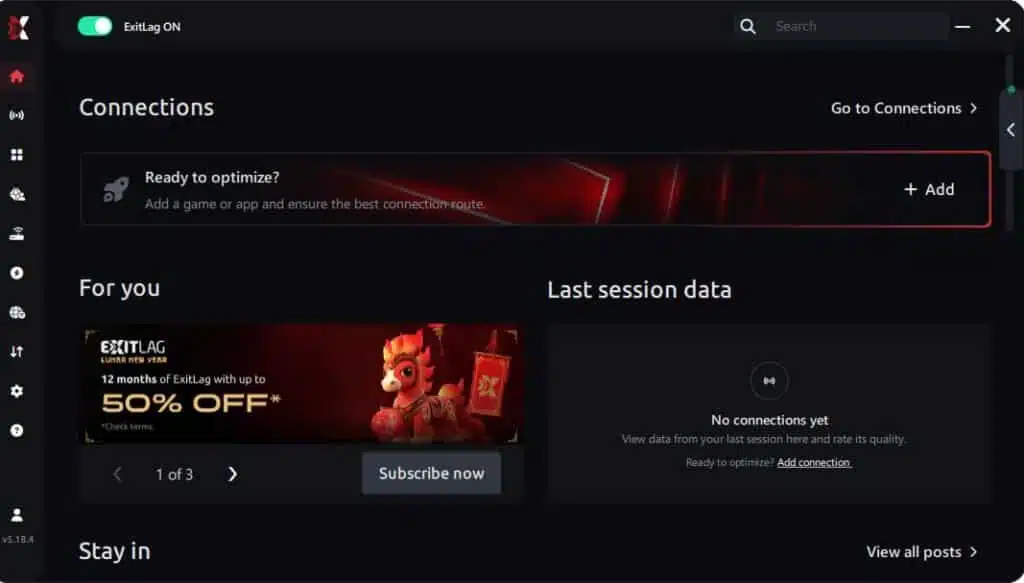
Step 2 – Install and open the program. Log in with your account.
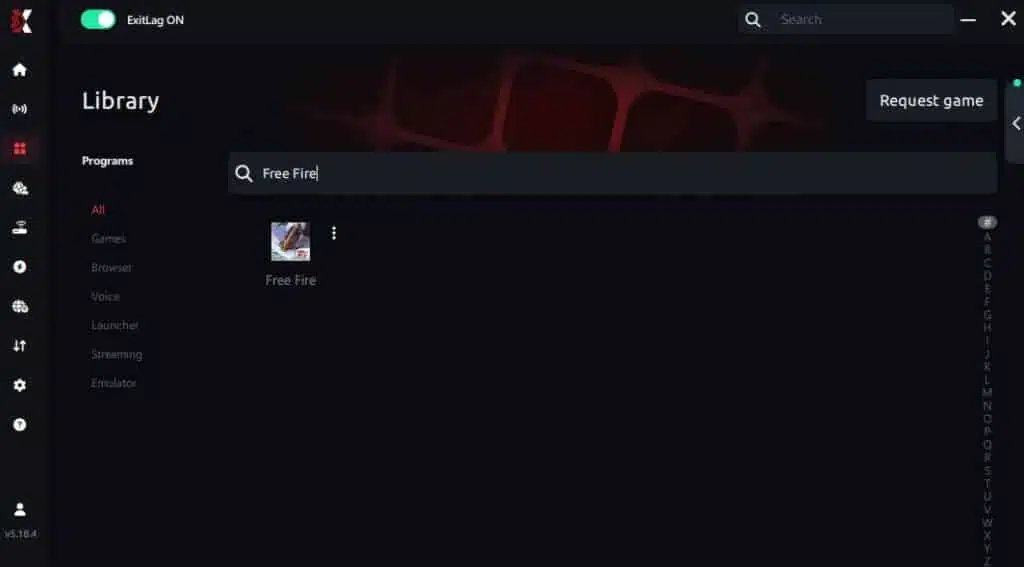
Step 3 – In the search bar, type “Free Fire” and select the game from the list.
Step 4 – Choose between automated or manual route
Based on the results, you can let ExitLag automatically select the best route or manually choose the server that showed the lowest latency for your connection.
AI-optimized automated route
Based on the results, you can let ExitLag automatically select the best route through AI optimization. The system analyzes multiple connection paths in real time and automatically identifies the most efficient route for your connection, ensuring the lowest possible latency without requiring manual choices.
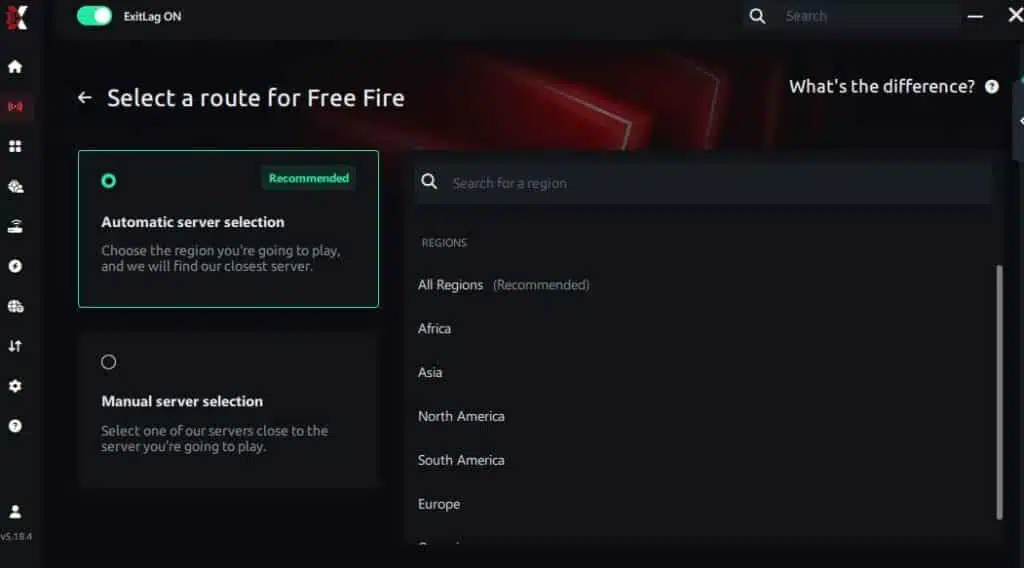
Manual route
If you prefer to have full control over your connection, you can manually choose the server based on the ping test results. Simply select the server that showed the lowest latency or the one that best meets your specific gaming needs, allowing complete customization of your experience.
Step 5 – Click “Free Fire” or the play button. ExitLag will begin optimizing your connection automatically.

Step 6 – Wait a few seconds until optimization is complete. You’ll see ping indicators in the interface.
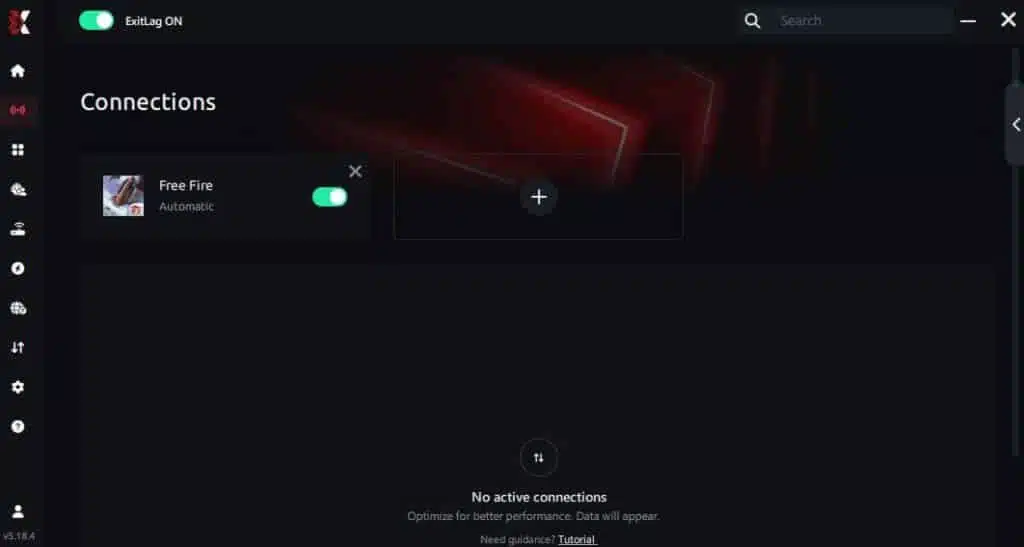
Step 7 – Launch Free Fire normally. The optimization will already be active.
ExitLag runs in the background while you play, constantly adjusting routes to maintain the best possible performance.
Faq about packet loss in Free Fire
Is packet loss the same as lag?
No. Lag usually refers to high ping, while packet loss involves missing data packets. You can have low ping and still experience packet loss.
Why do I get packet loss only in Free Fire?
Different games use different servers. Free Fire’s servers may be farther or routed inefficiently compared to others.
Can packet loss cause bans?
No, but unstable behavior may cause temporary disconnections. It does not mimic hacking behavior.
How much packet loss is acceptable?
Competitive play requires 0%. Even 1% can impact duels, movement and hit registration.
Can hardware cause packet loss?
Yes. Faulty cables, outdated routers and damaged components can contribute to instability.
Does ExitLag work on private Free Fire servers?
Yes, as long as routes are configured correctly.
Do I need ExitLag on all the time?
Only while playing. It is recommended to launch it before starting the game.
Eliminate packet loss and play Free Fire without interruptions
In Free Fire, packet loss can ruin your performance, prevent actions from registering and make competitive matches nearly impossible. However, you don’t need to accept instability as part of your experience. With optimized routing and the right tools, you can finally eliminate packet loss Free Fire and enjoy smooth gameplay.
Got questions or want to connect with other players? Join the conversation at the ExitLag Forum!